

How Prompt Clarity Shapes Architecture, Data Models, Maintainability
See how clear prompts drive better architecture, cleaner data models, and easier maintenance—plus practical techniques, examples, and checklists.
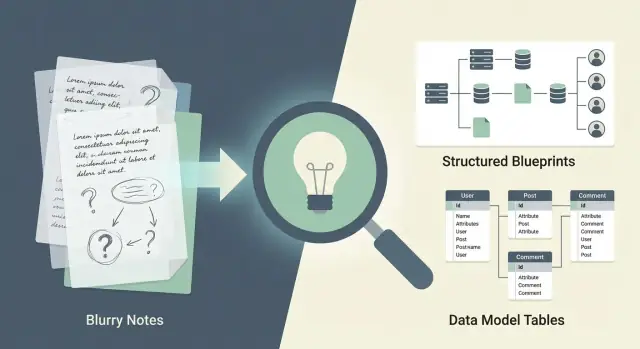
What Prompt Clarity Means (and Why It Matters)
“Prompt clarity” means stating what you want in a way that leaves little room for competing interpretations. In product terms, it looks like clear outcomes, users, constraints, and success measures. In engineering terms, it becomes explicit requirements: inputs, outputs, data rules, error behavior, and non-functional expectations (performance, security, compliance).
The chain reaction: prompt → code
A prompt isn’t just text you hand to an AI or a teammate. It’s the seed of the entire build:
- Prompt expresses intent (what problem we’re solving and why).
- Requirements translate intent into testable statements.
- Design decisions turn requirements into architecture choices (services, boundaries, APIs, data stores).
- Code implements those choices—including the assumptions made along the way.
When the prompt is crisp, downstream artifacts tend to align: fewer debates about “what did we mean,” fewer last-minute changes, and fewer surprises in edge cases.
Why ambiguity is expensive
Ambiguous prompts force people (and AI) to fill gaps with assumptions—and those assumptions are rarely aligned across roles. One person imagines “fast” means sub-second responses; another imagines “fast enough” for a weekly report. One person thinks “customer” includes trial users; another excludes them.
That mismatch creates rework: designs get revised after implementation starts, data models need migrations, APIs gain breaking changes, and tests fail to capture real acceptance criteria.
Clarity helps, but it’s not magic
Clear prompts dramatically improve the odds of a clean architecture, correct data models, and maintainable code—but they don’t guarantee them. You still need reviews, trade-offs, and iteration. The difference is that clarity makes those conversations concrete (and cheaper) before assumptions harden into technical debt.
How Clarity Propagates Into Architecture Quality
When a prompt is vague, the team (human or AI) fills gaps with assumptions. Those assumptions harden into components, service boundaries, and data flows—often before anyone realizes a decision was even made.
Unclear prompts create mismatched boundaries
If the prompt doesn’t say who owns what, architecture tends to drift toward “whatever works right now.” You’ll see ad-hoc services created to satisfy a single screen or urgent integration, without a stable responsibility model.
For example, a prompt like “add subscriptions” can silently mix billing, entitlements, and customer status into one catch-all module. Later, every new feature touches it, and boundaries stop reflecting the real domain.
Early choices are expensive to unwind
Architecture is path-dependent. Once you’ve picked boundaries, you’ve also picked:
- where validation lives
- where business rules run
- how data is duplicated or shared
If the original prompt didn’t clarify constraints (e.g., “must support refunds,” “multiple plans per account,” “proration rules”), you may build a simplified model that can’t stretch. Fixing it later often means migrations, contract changes, and re-testing integrations.
Clarity reduces branching options
Every clarification collapses a tree of possible designs. That’s good: fewer “maybe” paths means fewer accidental architectures.
A precise prompt doesn’t just make implementation easier—it makes trade-offs visible. When requirements are explicit, the team can choose boundaries intentionally (and document why), rather than inheriting them from the first interpretation that compiled.
Common symptoms of ambiguity
Prompt ambiguity tends to show up quickly:
- scope creep (“while we’re here, can it also…?”)
- brittle integrations (partners rely on undocumented behavior)
- duplicated logic (the same rules re-implemented across services)
- confusing ownership (no one knows where a rule belongs)
Clear prompts don’t guarantee perfect architecture, but they significantly increase the odds that system structure mirrors the real problem—and stays maintainable as it grows.
From Prompt to System Boundaries and Responsibilities
Clear prompts don’t just help you “get an answer”—they force you to declare what the system is responsible for. That’s the difference between a clean architecture and a pile of features that can’t decide where they belong.
Goals and non-goals define service boundaries
If your prompt states a goal like “users can export invoices as PDF within 30 seconds,” that immediately suggests dedicated responsibilities (PDF generation, job tracking, storage, notifications). A non-goal like “no real-time collaboration in v1” prevents you from prematurely introducing websockets, shared locks, and conflict resolution.
When goals are measurable and non-goals are explicit, you can draw sharper lines:
- What must be synchronous (UI waits) vs. asynchronous (background workers)
- What data must be strongly consistent vs. “eventually ok”
- What belongs in a separate service vs. a module inside the API
Map actors and workflows to components
A good prompt identifies actors (customer, admin, support, automated scheduler) and the core workflows they trigger. Those workflows map cleanly to components:
- UI: forms, dashboards, upload/download, status views
- API: validation, orchestration, policy enforcement, aggregation
- Workers: long-running tasks, retries, batch processing
- Storage: source-of-truth tables, file/object storage, audit logs
Cross-cutting concerns you should name upfront
Prompts often miss the “everywhere” requirements that dominate architecture: authentication/authorization, auditing, rate limits, idempotency, retries/timeouts, PII handling, and observability (logs/metrics/traces). If they’re not specified, they get implemented inconsistently.
Quick checklist: is your prompt architecturally complete?
- Clear goals + explicit non-goals
- Actors and top workflows listed
- Expected scale/latency and failure expectations
- Data ownership (source of truth) and retention rules
- Cross-cutting concerns: auth, auditing, rate limits, retries
- “Done” criteria (acceptance criteria) for each workflow
Prompt Clarity and Data Model Correctness
A data model often goes wrong long before anyone writes SQL—when the prompt uses vague nouns that sound “obvious.” Words like customer, account, and user can mean several different real-world things, and each interpretation creates a different schema.
How vague nouns create messy schemas
If a prompt says “store customers and their accounts,” you’ll quickly face questions the prompt didn’t answer:
- Is a customer a person, a company, or both?
- Is an account a billing profile, a login, a bank account, or a subscription?
- Is a user the same as a customer, or an employee who manages customers?
Without definitions, teams compensate by adding nullable columns, catch-all tables, and overloaded fields like type, notes, or metadata that slowly become “where we put everything.”
Precise definitions improve keys, relationships, and constraints
Clear prompts turn nouns into explicit entities with rules. For example: “A Customer is an organization. A User is a login that can belong to one organization. An Account is a billing account per organization.” Now you can design confidently:
- Keys:
customer_idvs.user_idare not interchangeable - Relationships: one-to-many vs. many-to-many is defined, not guessed
- Constraints: uniqueness (email per org), required fields, valid states
Data lifecycle prevents “immortal” records
Prompt clarity should also cover lifecycle: how records are created, updated, deactivated, deleted, and retained. “Delete customer” might mean hard delete, soft delete, or legal retention with restricted access. Stating this upfront avoids broken foreign keys, orphaned data, and inconsistent reporting.
Naming consistency and avoiding overloaded fields
Use consistent names for the same concept across tables and APIs (e.g., always customer_id, never sometimes org_id). Prefer modeling distinct concepts over overloaded columns—separate billing_status from account_status, instead of one ambiguous status that means five different things.
What to Specify for Strong Data Models
A data model is only as good as the details you provide up front. If a prompt says “store customers and orders,” you’ll likely get a schema that works for a demo but fails under real-world conditions like duplicates, imports, and partial records.
Core entities and identifiers
Name the entities explicitly (e.g., Customer, Order, Payment) and define how each is identified.
- Primary identifiers: Is it a UUID, email, account number, or composite key?
- External identifiers: Will records be synced from other systems (e.g., CRM ID)? Can multiple external IDs exist?
- Uniqueness rules: Is email unique globally, per tenant, or not unique at all?
States, transitions, and lifecycle rules
Many models break because state wasn’t specified. Clarify:
- Allowed states (Draft → Submitted → Paid → Refunded)
- Transitions that are permitted and what triggers them
- Whether states are mutable (can “Paid” revert?) and how you audit changes
Validation, required fields, and formatting
Spell out what must be present and what can be missing.
Examples:
- Required vs. optional fields (e.g., phone optional, billing address required for invoicing)
- Field constraints (min/max lengths, allowed characters)
- Validation timing (on create, on update, or at workflow milestones)
Time, currency, locale, and timezone
Specify these early to avoid hidden inconsistencies.
- Store timestamps in UTC? Also store original timezone?
- Currency as ISO 4217 (USD/EUR) with minor units? Rounding rules?
- Locale-specific formatting vs. normalized storage
Edge cases: duplicates, merges, imports, partial data
Real systems must handle messy reality. Clarify how to handle:
- Duplicate detection and merge rules (which fields “win,” what’s preserved)
- Imported records with missing fields (allowed as “incomplete”? )
- Conflicting updates from multiple sources and audit requirements
API Contracts: Where Prompt Clarity Pays Off Fast
API contracts are one of the fastest places to see the payoff from prompt clarity: when requirements are explicit, the API becomes harder to misuse, easier to version, and less likely to trigger breaking changes.
Preventing breaking changes by being specific
Vague prompts like “add an endpoint to update orders” leave room for incompatible interpretations (partial vs. full updates, field names, default values, async vs. sync). Clear contract requirements force decisions early:
- Which fields are writable, required, or immutable
- Whether updates are
PUT(replace) orPATCH(partial) - Backward-compatibility rules (e.g., “new fields must be optional; never change meaning of existing fields”)
Error handling: make failure modes part of the design
Define what “good errors” look like. At minimum, specify:
- Status codes per scenario (400 validation, 401/403 auth, 404 missing, 409 conflicts, 429 rate limit)
- A consistent error body (machine code, human message, field-level details, correlation/request ID)
- Retry expectations: which errors are safe to retry, and recommended backoff behavior
Pagination, filtering, sorting, and idempotency
Ambiguity here creates client bugs and uneven performance. State the rules:
- Pagination style (cursor vs. offset), limits, and stable ordering guarantees
- Supported filters and their types (exact match, ranges, enums)
- Sorting fields and default sort
- Idempotency for writes (idempotency keys, dedupe window, behavior on duplicate requests)
Document with examples and constraints
Include concrete request/response samples and constraints (min/max lengths, allowed values, date formats). A few examples often prevent more misunderstandings than a page of prose.
Maintainability: The Long-Term Cost of Ambiguity
Ambiguous prompts don’t just create “wrong answers.” They create hidden assumptions—tiny, undocumented decisions that spread across code paths, database fields, and API responses. The result is software that works only under the assumptions the builder guessed, and breaks the moment real usage differs.
Hidden assumptions become brittle code
When a prompt leaves room for interpretation (for example, “support refunds” without rules), teams fill gaps differently in different places: one service treats a refund as a reversal, another as a separate transaction, and a third allows partial refunds without constraints.
Clear prompts reduce guesswork by stating invariants (“refunds are allowed within 30 days,” “partial refunds are permitted,” “inventory is not restocked for digital goods”). Those statements drive predictable behavior across the system.
Clarity makes code and tests simpler
Maintainable systems are easier to reason about. Prompt clarity supports:
- Readable code: fewer defensive branches because inputs and states are defined.
- Simpler tests: test cases map directly to stated acceptance criteria instead of chasing “what if” scenarios.
- Safer refactors: if behavior is specified, you can change internals confidently while verifying outcomes.
If you’re using AI-assisted development, crisp requirements also help the model generate consistent implementations rather than plausible-but-mismatched fragments.
Operability: logging and metrics aren’t optional details
Maintainability includes running the system. Prompts should specify observability expectations: what must be logged (and what must not), which metrics matter (error rates, latency, retries), and how failures should be surfaced. Without that, teams discover problems only after customers do.
Maintainability signals to look for
Ambiguity often shows up as low cohesion and high coupling: unrelated responsibilities jammed together, “helper” modules that touch everything, and behavior that varies by caller. Clear prompts encourage cohesive components, narrow interfaces, and predictable outcomes—making future changes cheaper. For a practical way to enforce this, see /blog/review-workflow-catch-gaps-before-building.
Before-and-After Examples of Better Prompts
Vague prompts don’t just produce vague text—they push a design toward “generic CRUD” defaults. A clearer prompt forces decisions early: boundaries, data ownership, and what must be true in the database.
Before: ambiguous prompt
“Design a simple system to manage items. Users can create, update, and share items. It should be fast and scalable, with a clean API. Keep history of changes.”
What a builder (human or AI) can’t reliably infer:
- What is an “item” (fields, lifecycle, uniqueness)?
- What does “share” mean (public link vs. specific users vs. teams)?
- What counts as “history” (full snapshots vs. diffs, who changed what, retention)?
After: clearer prompt with constraints
“Design a REST API for managing generic items with these rules: items have
title(required, max 120),description(optional),status(draft|active|archived),tags(0–10). Each item belongs to exactly one owner (user). Sharing is per-item access for specific users with rolesviewer|editor; no public links. Every change must be auditable: store who changed what and when, and allow retrieving the last 50 changes per item. Non-functional: 95th percentile API latency < 200ms for reads; write throughput is low. Provide data model entities and endpoints; include error cases and permissions.”
Now architecture and schema choices change immediately:
- Architecture: a dedicated Authorization component (role checks) and an Audit Log write path; no need for complex caching if writes are low.
- Schema:
items,item_shares(many-to-many with role), anditem_audit_events(append-only).statusbecomes an enum, and tags likely move to a join table to enforce the 10-tag limit.
Quick translation table
| Ambiguous phrase | Clarified version |
|---|---|
| “Share items” | “Share with specific users; roles viewer/editor; no public links” |
| “Keep history” | “Store audit events with actor, timestamp, changed fields; last 50 retrievable” |
| “Fast and scalable” | “p95 read latency < 200ms; low write throughput; define main workload” |
| “Clean API” | “List endpoints + request/response shapes + permission errors” |
A Practical Prompt Template for Better Designs
A clear prompt doesn’t need to be long—it needs to be structured. The goal is to provide enough context that architecture and data modeling decisions become obvious, not guessed.
Copy/paste template
1) Goal
- What are we building, and why now?
- Success looks like: <measurable outcome>

2) Users & roles
- Primary users:
- Admin/support roles:
- Permissions/entitlements assumptions:

3) Key flows (happy path + edge cases)
- Flow A:
- Flow B:
- What can go wrong (timeouts, missing data, retries, cancellations)?

4) Data (source of truth)
- Core entities (with examples):
- Relationships (1:N, N:N):
- Data lifecycle (create/update/delete/audit):
- Integrations/data imports (if any):

5) Constraints & preferences
- Must use / cannot use:
- Budget/time constraints:
- Deployment environment:

6) Non-functional requirements (NFRs)
- Performance: target latency/throughput, peak load assumptions
- Uptime: SLA/SLO, maintenance windows
- Privacy/security: PII fields, retention, encryption, access logs
- Compliance: (if relevant)

7) Risks & open questions
- Known unknowns:
- Decisions needed from stakeholders:

8) Acceptance criteria + Definition of Done
- AC: Given/When/Then statements
- DoD: tests, monitoring, docs, migrations, rollout plan

9) References
- Link existing internal pages: /docs/<...>, /pricing, /blog/<...>
How to use it effectively
Fill sections 1–4 first. If you can’t name the core entities and the source of truth, the design will usually drift into “whatever the API returns,” which later causes messy migrations and unclear ownership.
For NFRs, avoid vague words (“fast,” “secure”). Replace them with numbers, thresholds, and explicit data handling rules. Even a rough estimate (e.g., “p95 < 300ms for reads at 200 RPS”) is more actionable than silence.
For acceptance criteria, include at least one negative case (e.g., invalid input, permission denied) and one operational case (e.g., how failures are surfaced). That keeps the design grounded in real behavior, not diagrams.
Using Koder.ai to Turn Clear Prompts Into Consistent Builds
Prompt clarity matters even more when you’re building with AI end-to-end—not just generating snippets. In a vibe-coding workflow (where prompts drive requirements, design, and implementation), small ambiguities can propagate into schema choices, API contracts, and UI behavior.
Koder.ai is designed for this style of development: you can iterate on a structured prompt in chat, use Planning Mode to make assumptions and open questions explicit before code is generated, and then ship a working web/backend/mobile app stack (React on the web, Go + PostgreSQL on the backend, Flutter for mobile). Practical features like snapshots and rollback help you experiment safely when requirements change, and source code export lets teams keep ownership and avoid “black box” systems.
If you’re sharing prompts with teammates, treating the prompt template above as a living spec (and versioning it alongside the app) tends to produce cleaner boundaries and fewer accidental breaking changes.
Review Workflow: Catch Gaps Before Building
A clear prompt isn’t “done” when it feels readable. It’s done when two different people would design roughly the same system from it. A lightweight review workflow helps you find ambiguity early—before it turns into architecture churn, schema rewrites, and API breaking changes.
Step 1: Do a read-back (2 minutes)
Ask one person (PM, engineer, or the AI) to restate the prompt as: goals, non-goals, inputs/outputs, and constraints. Compare that read-back to your intent. Any mismatch is a requirement that wasn’t explicit.
Step 2: Force missing questions to surface
Before building, list “unknowns that change the design.” Examples:
- Who is the source of truth for a field (user vs. system vs. external API)?
- What happens when data is missing, late, duplicated, or wrong?
- What are the performance or scale expectations (rough numbers)?
Write the questions directly into the prompt as a short “Open questions” section.
Step 3: Maintain an assumptions list—and convert it
Assumptions are fine, but only if they’re visible. For each assumption, choose one:
- Decision: make it explicit (e.g., “Email is unique per user; changes require verification”).
- TODO: mark it as a tracked follow-up with an owner and timing (e.g., “TODO: confirm retention policy with Legal before launch”).
Step 4: Iterate in small cycles
Instead of one giant prompt, do 2–3 short iterations: clarify boundaries, then data model, then API contract. Each pass should remove ambiguity, not add scope.
Quick sign-off checklist (PM + engineer)
- Success metrics and acceptance criteria are written
- Non-goals are explicit
- System boundaries and responsibilities are named
- Key entities/fields and ownership are defined
- Error cases and edge cases are described
- Assumptions are converted into decisions or TODOs
Common Mistakes and How to Fix Them
Even strong teams lose clarity in small, repeatable ways. The good news: most issues are easy to spot and correct before any code is written.
Clarity killers to watch for
Vague verbs hide design decisions. Words like “support,” “handle,” “optimize,” or “make it easy” don’t tell you what success looks like.
Undefined actors create ownership gaps. “The system notifies the user” begs questions: which system component, which user type, and through what channel?
Missing constraints leads to accidental architecture. If you don’t state scale, latency, privacy rules, audit needs, or deployment boundaries, the implementation will guess—and you’ll pay later.
Don’t over-specify implementation
A frequent trap is prescribing tools and internals (“Use microservices,” “Store in MongoDB,” “Use event sourcing”) when you really mean an outcome (“independent deployments,” “flexible schema,” “audit trail”). State why you want something, then add measurable requirements.
Example: instead of “Use Kafka,” write “Events must be durable for 7 days and replayable to rebuild projections.”
Avoid contradictions early
Contradictions often appear as “must be real-time” plus “batch is fine,” or “no PII stored” plus “email users and show profiles.” Resolve by ranking priorities (must/should/could), and by adding acceptance criteria that can’t both be true.
Anti-patterns and fixes
-
Anti-pattern: “Make onboarding simple.” Fix: “New users can complete onboarding in <3 minutes; max 6 fields; save-and-resume supported.”
-
Anti-pattern: “Admins can manage accounts.” Fix: Define actions (suspend, reset MFA, change plan), permissions, and audit logging.
-
Anti-pattern: “Ensure high performance.” Fix: “P95 API latency <300ms at 200 RPS; degrade gracefully when rate-limited.”
-
Anti-pattern: Mixed terms (“customer,” “user,” “account”). Fix: Add a small glossary and stick to it throughout.
Checklist and Next Steps
Clear prompts don’t just help an assistant “understand you.” They reduce guesswork, which shows up immediately in cleaner system boundaries, fewer data-model surprises, and APIs that are easier to evolve. Ambiguity, on the other hand, becomes rework: migrations you didn’t plan, endpoints that don’t match real workflows, and maintenance tasks that keep resurfacing.
A one-page checklist you can reuse
Use this before you ask for an architecture, schema, or API design:
- Goal: What user outcome should happen? What does “done” look like?
- Scope: What’s in, what’s out, and what can wait for later?
- Actors & entry points: Who triggers the flow (user, admin, system job)?
- Key workflows: 2–5 happy-path steps, plus the top failure cases.
- Data definitions: Important entities, required fields, IDs, and relationships.
- Constraints: Performance targets, privacy rules, retention, audit needs.
- Integrations: External systems, events, queues, and ownership boundaries.
- API expectations: Inputs/outputs, error behavior, idempotency, pagination.
- Acceptance criteria: Testable statements (including edge cases).
- Non-goals: Explicitly state what the system should not do.
- Assumptions: What you believe to be true but haven’t verified.
- Open questions: Anything you need answered before building.
Next steps
- Pick a real feature you’re planning this week.
- Write a prompt using the checklist above.
- Generate two designs: one from your “old” prompt, one from the clarified prompt.
- Compare results using three lenses: system boundaries, data model, and API contract.
- Keep the clarified prompt as part of your spec (it becomes living documentation).
If you want more practical patterns, browse /blog or check supporting guides in /docs.
FAQ
What does “prompt clarity” mean in practical terms?
Prompt clarity is stating what you want in a way that minimizes competing interpretations. Practically, that means writing down:
- the outcome you want
- who the users/actors are
- constraints (data, security, performance)
- how you’ll measure success (acceptance criteria)
It turns “intent” into requirements that can be designed, implemented, and tested.
Why is ambiguity in a prompt so expensive during development?
Ambiguity forces builders (people or AI) to fill gaps with assumptions, and those assumptions rarely match across roles. The cost shows up later as:
- rework (redesigns, migrations, breaking API changes)
- inconsistent behavior across services
- missed edge cases and brittle logic
Clarity makes disagreements visible earlier, when they’re cheaper to fix.
How does a vague prompt lead to poor system boundaries?
Architecture decisions are path-dependent: early interpretations harden into service boundaries, data flows, and “where rules live.” If the prompt doesn’t specify responsibilities (e.g., billing vs entitlements vs customer status), teams often build catch-all modules that become hard to change.
A clear prompt helps you assign ownership explicitly and avoid accidental boundaries.
What’s the fastest way to turn a vague prompt into one that drives good architecture?
Add explicit goals, non-goals, and constraints so the design space collapses. For example:
- “Export invoices as PDF within 30 seconds” implies async jobs, status tracking, and storage.
- “No real-time collaboration in v1” prevents unnecessary websockets/locking.
Each concrete statement removes multiple “maybe” architectures and makes trade-offs intentional.
Which “cross-cutting concerns” should I always include in a prompt?
Name the cross-cutting requirements explicitly, because they affect almost every component:
- authentication/authorization rules
- auditing requirements (what, who, retention)
- rate limits and abuse controls
- idempotency and retries/timeouts
- PII handling (encryption, access logs, retention)
- observability (logs/metrics/traces, correlation IDs)
If you don’t specify these, they’re implemented inconsistently (or not at all).
How does prompt clarity prevent messy data models?
Define terms like customer, account, and user with precise meanings and relationships. When you don’t, schemas drift toward nullable fields and overloaded columns like status, type, or metadata.
A good prompt specifies:
- entity definitions and identifiers
- relationships (1:N, N:N)
- constraints (uniqueness, required fields)
- lifecycle (delete vs deactivate vs retain)
What details should I specify up front to get a strong data model?
Include the parts that most often cause real-world failures:
- identifiers: primary keys and external IDs (sync/import)
- states and transitions (e.g., Draft → Paid → Refunded)
- validation rules and when they apply (create vs update)
- time/currency rules (UTC, ISO 4217, rounding)
- edge cases: duplicates, merges, partial imports
These details drive keys, constraints, and auditability instead of leaving them to guesswork.
How does prompt clarity reduce breaking changes in API design?
Be specific about contract behavior so clients can’t accidentally rely on undefined defaults:
- update semantics (
PUTvsPATCH, writable/immutable fields) - error handling (status codes + consistent error body)
- pagination/filtering/sorting rules
- idempotency for writes (keys, dedupe window)
- backward-compatibility expectations (e.g., new fields are optional)
Add small request/response examples to remove ambiguity quickly.
Can prompt clarity improve operability (logging/metrics), not just features?
Yes—if your Definition of Done includes it. Add explicit requirements for:
- what must be logged (and what must not)
- key metrics (latency, error rates, retries)
- correlation/request IDs for tracing
- how failures are surfaced (alerts, dashboards)
Without these being stated, observability is often uneven, which makes production issues harder (and more expensive) to diagnose.
What’s a simple workflow to catch gaps in a prompt before building?
Use a short review loop that forces ambiguity to surface:
- Read-back: have someone restate goals, non-goals, inputs/outputs, constraints.
- Open questions: list unknowns that would change the design (source of truth, failure behavior, scale).
- Assumptions list: convert each assumption into a decision or a tracked TODO.
If you want a structured process, see /blog/review-workflow-catch-gaps-before-building.