

Prompt, Iterate, Refactor: Replacing Design Docs in Vibe Coding
Learn how prompting, fast iteration, and refactoring can replace heavy design docs in a vibe coding workflow—without losing clarity, alignment, or quality.
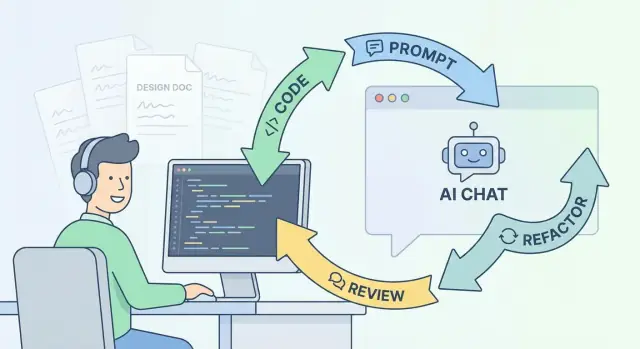
What a Vibe Coding Workflow Actually Is
“Vibe coding” is a way of building software where you start with intent and examples, then let the implementation evolve through quick cycles of prompting, running, and adjusting. Instead of writing a big plan up front, you get something working early, learn from what you see, and steer the code toward the outcome you want.
The plain-English definition
A vibe coding workflow looks like this:
- Describe the goal in natural language (often with a few concrete examples).
- Ask an AI assistant to draft code, tests, or a small feature slice.
- Run it, inspect what happened, and refine the prompt.
- Keep tightening the implementation through small edits and refactors.
The “vibe” part isn’t guesswork—it’s rapid feedback. You’re using execution and iteration to replace long periods of speculation.
What changes when AI is part of the build loop
AI shifts effort from writing exhaustive documentation to giving clear, runnable direction:
- You write prompts that behave like mini-specs (“do X, avoid Y, here are edge cases”).
- You evaluate output immediately (tests, logs, UI behavior), then correct course.
- You generate alternatives quickly (different approaches, naming, APIs) without weeks of debate.
When replacing design docs makes sense (and when it doesn’t)
This approach fits best for product iteration, internal tools, early-stage features, and refactors where the fastest path is to build and learn.
It’s a poor fit when you need formal approvals, strict compliance, long-term cross-team commitments, or irreversible architecture decisions. In those cases, you still want a written decision record—just smaller, tighter, and more explicit.
What this post will help you do
You’ll learn how to treat prompts as lightweight specs, use iteration as your planning tool, and rely on refactoring and tests to keep clarity—without defaulting to heavyweight design documents.
Why Traditional Design Docs Often Fail in Fast Builds
Traditional design docs are meant to create clarity before code changes. In fast builds, they often produce the opposite: a slow, fragile artifact that can’t keep up with learning.
The usual failure pattern
Design docs tend to go stale quickly. The moment implementation starts, the team discovers edge cases, library quirks, performance constraints, and integration realities that weren’t obvious on day one. Unless someone continuously edits the doc (rare), it becomes a historical record rather than a guide.
They’re also slow to write and slow to read. When speed matters, teams optimize for shipping: the doc becomes “nice to have,” gets skimmed, and then quietly ignored. The effort still happened—just without payoff.
Doc-writing can delay the learning you actually need
A big upfront doc can create a false sense of progress: you feel like you’re “done with design” before you’ve confronted the hard parts.
But the real constraints are usually discovered by trying:
- hitting an API and seeing what it really returns
- wiring up auth and encountering permission edge cases
- measuring latency instead of assuming it
- discovering that a “simple” UI state has six variants
If the doc delays those experiments, it delays the moment the team learns what’s feasible.
Upfront certainty vs. evolving requirements
Fast builds are shaped by moving targets: feedback arrives daily, priorities shift, and the best solution changes once you see a prototype. Traditional docs assume you can predict the future with enough detail to commit early. That mismatch creates waste—either rewriting documents or forcing work to follow an outdated plan.
Keep the real goal
The goal isn’t paperwork; it’s shared understanding: what we’re building, why it matters, what “done” means, and which risks we’re watching. The rest is just a tool—and in fast builds, heavy docs are often the wrong one.
Prompting as a Runnable Design Spec
A traditional design doc tries to predict the future: what you’ll build, how it will work, and what you’ll do if something changes. A runnable prompt flips that. It’s a living spec you can execute, observe, and revise.
In other words: the “document” isn’t a static PDF—it’s the set of instructions that reliably produces the next correct increment of the system.
Write prompts like executable product requirements
The goal is to make your intent unambiguous and testable. A good runnable prompt includes:
- User story: who needs this and why
- Inputs/outputs: what goes in, what comes out (API payloads, UI states, events)
- Constraints: performance targets, security rules, libraries to use/avoid, compatibility
- Acceptance criteria: concrete checks that must pass
Instead of paragraphs of prose, you’re describing the work in a way that can directly generate code, tests, or a checklist.
Ask for assumptions and edge cases up front
Most surprise rework happens because assumptions stay implicit. Make them explicit in the prompt:
- “List your assumptions before coding.”
- “Call out edge cases and failure modes.”
- “If requirements conflict, ask a clarification question.”
This forces alignment early and creates a visible record of decisions—without the overhead of a heavy doc.
Put the definition of done inside the prompt
The most useful part of a design doc is often the end: what counts as finished. Put that directly in the runnable prompt so it travels with the work.
For example, your prompt can require: passing unit tests, updated error handling, accessibility checks, and a short summary of changes. When the prompt is the spec, “done” stops being a debate and becomes a set of verifiable outcomes you can re-run on every iteration.
A note on tooling: keep prompts close to execution
This workflow works best when prompting, running, reviewing, and rolling back are tightly connected. Vibe-coding platforms like Koder.ai are designed around that loop: you can iterate via chat to generate web/server/mobile slices, use a planning mode to get a micro-plan before code changes, and rely on snapshots and rollback when an iteration goes sideways. The practical impact is less “prompt theater” and more real, testable increments.
Iteration Replaces Speculation
Traditional design docs try to “solve” uncertainty on paper. But the riskiest parts of a build are usually the ones you can’t reason through cleanly: edge cases, performance bottlenecks, confusing UX flows, third‑party quirks, and the way real users interpret wording.
A vibe coding workflow treats uncertainty as something you burn down through tight cycles. Instead of debating what might happen, you build the smallest version that can produce evidence, then you adjust.
Start with a thin vertical slice
Pick the smallest useful slice that still runs end‑to‑end: UI → API → data → back. This avoids “perfect” modules that don’t integrate.
For example, if you’re building “saved searches,” don’t start by designing every filter option. Start with one filter, one saved item, one retrieval path. If that slice feels right, expand.
Timebox the loop
Keep cycles short and explicit:
- Prompt → implement → test → adjust
A 30–90 minute timebox forces clarity. The goal isn’t to finish the feature—it’s to eliminate the next biggest unknown. If you can’t describe the next step in one or two sentences, the step is too large.
Prototype early when the unknowns are real
When you’re unsure about feasibility or UX, do a quick prototype. Prototypes aren’t throwaway “toy code” if you label them honestly and set expectations: they answer a question.
Examples of good prototype questions:
- “Can we paginate this endpoint without changing the database schema?”
- “Does this copy make users understand what’s being shared?”
Prefer feedback over hypothetical debates
Real feedback beats internal arguments. Ship behind a flag, demo to one stakeholder, or run the flow yourself with test data. Every loop should produce a concrete output: a passing test, a working screen, a measured query time, or a clear “this is confusing.”
Decomposing Work Through Prompts and Micro-Plans
Big design docs try to front-load decisions. A vibe coding workflow flips that: you decompose the work as you prompt, producing micro-plans the codebase can absorb and reviewers can validate.
Start with a “bounded” prompt
Instead of “build a billing system,” write a prompt that names a single outcome and the constraints around it. The goal is to turn broad prompts into tasks the codebase can absorb—small enough that the answer can be implemented without inventing architecture on the fly.
A useful structure:
- Goal: one user-visible change
- Scope: what’s explicitly in and out
- Constraints: frameworks, patterns, naming, performance/security notes
- Definition of done: what proves it works
Ask for a plan before code
Make planning a required step: ask the AI for a step-by-step plan before generating code. You’re not looking for perfect prediction—just a reviewable route.
Then convert that plan into a concrete checklist:
- Files to touch: specific paths, not “update backend”
- APIs to add/change: request/response shapes, error cases
- Tests to write: unit/integration, plus key edge cases
If the plan can’t name these, it’s still too vague.
Keep changes review-sized
Micro-plans work best when each change is small enough to review quickly. Treat each prompt as one PR-sized slice: a schema tweak or an endpoint or a UI state transition—then iterate.
A practical rule: if the reviewer needs a meeting to understand the change, split it again.
For team consistency, store repeatable prompt templates in a short internal page (e.g., /playbook/prompts) so decomposition becomes a habit, not a personal style.
Refactoring as the Real Design Document
Refactoring is the point where “what we learned” becomes “what we meant.” In a vibe coding workflow, early prompts and iterations are intentionally exploratory: you ship a thin slice, see where it breaks, and discover the real constraints. The refactor is when design turns explicit—captured in structure, names, boundaries, and tests that future teammates can read and trust.
Make intent obvious with names and boundaries
A clean codebase explains itself. When you rename a vague function like handleThing() to calculateTrialEndDate() and move it into a BillingRules module, you’re writing a design doc in executable form.
Good refactors often look like:
- Introducing modules that match the product domain (Billing, Permissions, Notifications)
- Pulling side effects to the edges (API calls, database writes) and keeping core logic pure
- Creating clear interfaces between parts of the system so changes stay local
Replace diagrams with interfaces and tests
Architecture diagrams age quickly. Clean interfaces age better—especially when backed by tests that define behavior.
Instead of a box-and-arrow diagram of “Services,” prefer:
- A small public API surface (what other modules can call)
- Acceptance tests that describe outcomes in plain language
- Contract tests for integrations (what inputs/outputs are guaranteed)
When someone asks “how does this work?”, the answer is no longer a slide deck; it’s the boundaries in code and the tests that enforce them.
Refactor after learning, not before
Schedule refactors when you’ve collected enough evidence: repeated changes in the same area, confusing ownership, or bugs that trace back to unclear boundaries. Prompting and iteration help you learn fast; refactoring is how you lock in those lessons so the next build starts from clarity, not guesswork.
Lightweight Artifacts That Still Preserve Context
Replacing long design docs doesn’t mean operating without memory. The goal is to keep just enough written context so future you (and your teammates) can understand why the code looks the way it does—without freezing progress.
Maintain a prompt log (decisions, constraints, outcomes)
Keep a simple running log of the prompts that mattered and what changed as a result. This can be a markdown file in the repo (for example, /docs/prompt-log.md) or a thread in your issue tracker.
Capture:
- The decision made (what you chose)
- Constraints (performance, APIs, security, deadlines)
- The outcome (what shipped, what was rolled back, what still hurts)
This turns “we asked the AI a bunch of things” into an auditable trail that supports reviews and later refactors.
A short README or /docs/notes.md for the “why”
Aim for a half-page “why” document per project or feature area. Not a spec—more like:
- What problem this solves
- Non-goals (what we intentionally didn’t build)
- Key tradeoffs (and what would make us revisit them)
If someone asks “why didn’t we…?”, the answer should be findable in two minutes.
Use issue templates to preserve scope and acceptance criteria
A lightweight issue template can replace many doc sections. Include fields for scope, risks, and clear acceptance criteria (“done means…”). This also helps AI-assisted work: you can paste the issue into prompts and get outputs that match the intended boundaries.
Link, don’t rewrite
When relevant, link to existing internal pages rather than duplicating content. Keep links relative (e.g., /pricing) and only add them when they genuinely help someone make a decision.
Keeping Teams Aligned Without Big Docs
Fast iteration only works if people stay oriented around the same goals. The trick is to replace “one giant doc everyone forgets” with a few small rituals and artifacts that keep humans in charge—especially when AI is helping generate code.
Keep humans in control (and explicit about it)
A vibe coding workflow doesn’t remove roles; it clarifies them.
- Product owns the why: what problem we’re solving, what success looks like, and what tradeoffs are acceptable.
- Design owns the experience: UX constraints, accessibility expectations, interaction patterns, and “this should feel like…” guidance.
- Engineering owns the how: technical constraints, architecture direction, safety, and the iteration loop that turns prompts into shippable code.
When prompting for software, make these owners visible. For example: “Product approves scope changes,” “Design approves interaction changes,” “Engineering approves architectural changes.” This prevents AI-generated momentum from quietly rewriting decisions.
Replace long doc reviews with short alignment sessions
Instead of asking everyone to read a 10-page doc, run a 15–25 minute alignment at key points:
- Start of a new feature: confirm outcomes and constraints.
- After the first working slice: review what the code actually does.
- Before release: confirm acceptance criteria and rollback plan.
The output should be a small, runnable set of decisions: what we’re shipping now, what we’re not shipping, and what we’ll revisit. If you need continuity, capture it in a short note in the repo (e.g., /docs/decisions.md) rather than a sprawling narrative.
Create a shared constraints list (that prompts must respect)
Maintain a living “constraints list” that is easy to copy into prompts and PR descriptions:
- Security: auth rules, data handling, logging/redaction requirements.
- Performance: latency budgets, query limits, caching rules.
- UX: accessibility targets, empty states, error messaging style.
This becomes your lightweight documentation anchor: whenever iteration pressure rises, the constraints list keeps the loop from drifting.
Agree on approval boundaries (before changes happen)
Define who can approve what—and when it must be escalated. A simple policy like “scope/UX/security changes require explicit approval” prevents “small” AI-assisted edits from becoming unreviewed redesigns.
If you want one guiding rule: the smaller the doc, the stricter the approvals. That’s how you stay fast without losing alignment.
Quality Gates: Tests, Reviews, and Acceptance Criteria
Speed only helps if you can trust what you ship. In a vibe coding workflow, quality gates replace long “approval” documents with checks that run every time you change the code.
Start with acceptance criteria you can test
Before writing prompts, define a small set of acceptance criteria in plain language: what the user can do, what “done” looks like, and what must never happen. Keep it tight enough that a reviewer can verify it in minutes.
Then make the criteria runnable. A helpful pattern is to turn each criterion into at least one automated check.
Add automated tests early (and keep them boring)
Don’t wait until the feature “works.” Add tests as soon as you can execute the path end-to-end:
- Unit tests for core logic and edge cases.
- Integration tests for key boundaries (DB, API, auth).
- Smoke tests that confirm the app boots and the main flow doesn’t 500.
If you have written acceptance criteria, ask AI to generate test cases directly from them, then edit for realism. The goal is coverage of intent, not a huge test suite.
Code review is the main gate
Treat code review as the design and safety checkpoint:
- Does the implementation match the acceptance criteria?
- Are error states handled and observable (logs/metrics)?
- Is the change readable enough that future refactors won’t be risky?
Reviewers can also ask the AI to propose “what could go wrong” scenarios, but the team owns the final judgment.
Track non-functional needs explicitly
Non-functional requirements often get lost without design docs, so make them part of the gate:
- Latency/performance targets (e.g., p95 under X ms)
- Accessibility checks (keyboard flow, contrast)
- Privacy/security constraints (data retention, PII handling)
Capture these in the PR description or a short checklist so they’re verified, not assumed.
Common Failure Modes and How to Avoid Them
Vibe coding workflows can move extremely fast—but speed also makes it easy to introduce failure patterns that don’t show up until the codebase starts to strain. The good news: most of these are preventable with a few simple habits.
1) Over-prompting (you talk more than you build)
If you’re spending more time perfecting prompts than shipping increments, you’ve recreated design-doc paralysis in a new format.
A practical fix is to timebox prompts: write a “good enough” prompt, build the smallest slice, and only then refine. Keep prompts runnable: include inputs, outputs, and a quick acceptance check so you can validate immediately.
2) Hidden decisions (the “why” disappears)
Fast iterations often bury key choices—why you picked an approach, what you rejected, and what constraints mattered. Later, teams re-litigate the same decisions or break assumptions unknowingly.
Avoid this by capturing decisions as you go:
- Add a short “Decision” note in the PR description (2–4 lines).
- Leave a single comment near the relevant code for non-obvious tradeoffs.
- Maintain a lightweight
/docs/decisions.mdwith one bullet per meaningful choice.
3) Refactor avoidance (messy code labeled as “fast”)
Shipping quickly isn’t the same as shipping sustainably. If each iteration adds shortcuts, the workflow slows down as soon as changes become risky.
Make refactoring part of the definition of done: after a feature works, spend one more pass to simplify names, extract functions, and delete dead paths. If it’s not safe to refactor, that’s a signal you need tests or clearer boundaries.
4) AI drift (style and architecture wander)
Without guardrails, each iteration may pull the code in a different direction—new patterns, inconsistent naming, mixed folder conventions.
Prevent drift by anchoring the system:
- Add a small “project rules” block to prompts (naming, layering, error handling).
- Use a single reference folder structure and point the assistant to it.
- Enforce consistency in review: “Does this match our existing patterns?”
These habits keep the workflow fast while preserving clarity, consistency, and maintainability.
A Practical Rollout Plan for Your Team
Rolling this out works best as a controlled experiment, not a company-wide flip of a switch. Pick a small slice of work where you can measure impact and adjust quickly.
1) Start small and measurable
Choose one feature area (or one service) and define a single success metric you can track for the next sprint or two—examples: lead time from ticket to merge, number of review cycles, escaped bugs, or on-call interruptions.
Write down what “done” means in one sentence before you start. This keeps the experiment honest.
2) Standardize how you prompt
Introduce a shared prompt template so prompts are comparable and reusable. Keep it simple:
- Goal (what the user should be able to do)
- Constraints (tech stack, performance, security, dependencies)
- Acceptance criteria (observable checks)
- Non-goals (what you’re explicitly not building)
- Plan (a short step-by-step micro-plan)
Store prompts in the repo (e.g., /docs/prompt-log.md) or in your ticketing system, but make them easy to find.
3) Set “documentation minimums”
Instead of long design docs, require three lightweight artifacts for every change:
- Prompt log: the latest prompt(s) that generated or shaped the solution
- Tests: new/updated tests that prove the acceptance criteria
- README notes: a short update explaining any new behavior, flags, or operational concerns
This creates a trail of intent without slowing delivery.
4) Review after 2–4 weeks
Run a short retro focused on outcomes: Did the metric move? Where did reviews get stuck? Which prompts produced confusion? Update the template, adjust minimums, and decide whether to expand to another feature area.
Optional: use a platform that supports the loop end-to-end
If your team is serious about replacing heavyweight docs, it helps to use tooling that makes iteration safe: quick deploys, easy environment resets, and the ability to roll back when an experiment doesn’t pan out.
For example, Koder.ai is built for this vibe-coding workflow: you can chat your way through a micro-plan and implementation, generate React-based web apps, Go + PostgreSQL backends, and Flutter mobile apps, and then export source code when you want to transition from exploration to a more traditional repo workflow. Snapshots and rollback are especially useful when you’re iterating aggressively and want “try it” to be low-risk.
Summary: The New Loop for Clarity and Speed
Design docs don’t disappear in a vibe coding workflow—they shrink, get more specific, and move closer to the work. Instead of a single “big document” written upfront, the documentation you rely on is produced continuously: prompts that state intent, iterations that expose reality, and refactoring that makes the result understandable and durable.
The loop that replaces the doc
Prompting defines intent. A good prompt acts like a runnable design spec: constraints, acceptance criteria, and “don’t break” rules stated in plain language.
Iteration finds truth. Small cycles (generate → run → inspect → adjust) replace speculation with feedback. When something is unclear, you don’t argue about it—you try it, measure it, and update the prompt or the code.
Refactoring locks it in. Once the solution works, refactor to make the design legible: naming, boundaries, tests, and comments that explain the “why.” This becomes the long-term reference more reliably than a stale PDF.
Don’t lose context: keep lightweight artifacts
To prevent memory loss, keep a few compact, high-signal artifacts:
- A short prompt template (goal, constraints, edge cases, done means)
- Micro-plans in PR descriptions (what changed, what’s next)
- Tests as executable acceptance criteria
Next steps for teams
Adopt a consistent prompt/PR template, tighten tests before you speed up, and keep changes small enough to review in minutes—not days. If you want a concrete rollout sequence, see /blog/a-practical-rollout-plan-for-your-team.
FAQ
What is a vibe coding workflow in plain English?
A vibe coding workflow is an iterative build loop where you state intent in natural language, generate a small increment (often with AI), run it, observe results, and refine.
It replaces long upfront planning with rapid feedback: prompt → implement → test → adjust.
Why do traditional design docs often fail in fast builds?
They tend to become stale as soon as real implementation reveals constraints (API quirks, edge cases, performance limits, integration details).
In fast-moving work, teams often skim or ignore long docs, so the cost is paid without consistent benefit.
What should a “runnable design spec” prompt contain?
Include four things:
- User story (who/why)
- Inputs/outputs (payloads, UI states, events)
- Constraints (libraries to use/avoid, security, performance)
- Acceptance criteria (checks that must pass)
Write it so someone can generate code and verify it quickly.
How do you surface assumptions and edge cases early when prompting?
Ask explicitly before coding:
- “List your assumptions before you start.”
- “Call out edge cases and failure modes.”
- “If requirements conflict, ask a clarification question.”
Then decide which assumptions become constraints, which become tests, and which need product/design input.
What is a “thin vertical slice,” and why start there?
Choose the smallest end-to-end path that still runs through the real boundaries (UI → API → data → back).
Example: for “saved searches,” start with one filter + one save + one retrieval, then expand once the slice behaves correctly.
How do you timebox vibe coding so it doesn’t turn into endless prompting?
Timebox each cycle to 30–90 minutes and require a concrete output (a passing test, a working screen, a measured query time, or a clear UX finding).
If you can’t describe the next step in 1–2 sentences, split the work again.
How do you decompose work into prompt-driven micro-plans?
Require a plan first, then convert it into a micro-checklist:
- Files to touch (specific paths)
- APIs to add/change (request/response + error cases)
- Tests to write (unit/integration + key edges)
Treat each prompt as one PR-sized slice that a reviewer can understand without a meeting.
When should you refactor in a vibe coding workflow?
After you’ve learned enough from iteration to see the real constraints: repeated changes in the same area, confusing boundaries, or bugs caused by unclear structure.
Use refactoring to make intent explicit with names, modules aligned to the domain, and tests that lock in behavior.
What lightweight documentation should you keep if you drop big design docs?
Keep small, high-signal artifacts:
- A repo prompt log (decisions, constraints, outcomes)
- A short /docs/notes.md explaining the “why,” non-goals, and key tradeoffs
- Lightweight issue/PR templates that capture scope and acceptance criteria
Prefer linking internally (e.g., /docs/decisions.md) rather than rewriting the same context repeatedly.
How do you maintain quality and alignment without big upfront docs?
Use quality gates that run every iteration:
- Acceptance criteria written in plain language, then turned into tests
- Automated tests (unit, integration, smoke) early
- Code review as the main checkpoint (correctness, readability, error handling, observability)
Also track non-functional needs explicitly (performance, accessibility, privacy/security) in the PR checklist.