

Prompting Patterns for Cleaner Software Architecture, Fewer Rewrites
Learn proven prompting patterns that guide AI toward clearer requirements, modular designs, and testable code—reducing refactors and rewrite cycles.
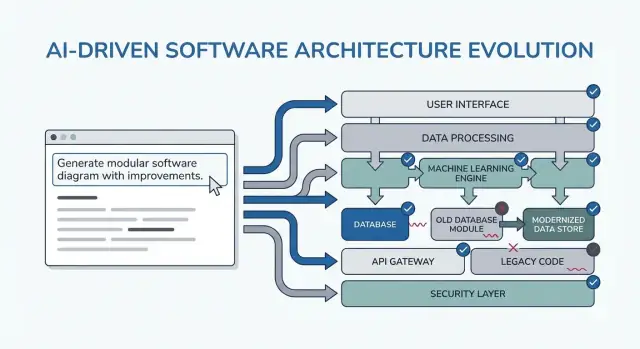
What “Cleaner Architecture” Looks Like in AI-Assisted Work
“Cleaner architecture” in this post doesn’t mean a particular framework or a perfect diagram. It means you can explain the system simply, change it without breaking unrelated parts, and verify behavior without heroic testing.
A practical definition: clarity, modularity, testability
Clarity means the purpose and shape of the system are obvious from a short description: what it does, who uses it, what data it handles, and what it must never do. In AI-assisted work, clarity also means the model can restate requirements back to you in a way you’d sign off on.
Modularity means responsibilities have clean boundaries. Each module has a job, inputs/outputs, and minimal knowledge of the internals of other modules. When AI generates code, modularity is what stops it from smearing business rules across controllers, UI, and data access.
Testability means the architecture makes “prove it works” cheap. Business rules can be tested without a full running system, and integration tests focus on a few contracts rather than every code path.
Why rewrites happen (and why AI can amplify them)
Rewrites usually aren’t caused by “bad code”—they’re caused by missing constraints, vague scope, and hidden assumptions. Examples:
- A feature is built for one user type, then you discover there are three roles and different permissions.
- Performance, audit logging, or data retention rules appear late.
- An external API behaves differently than expected, forcing changes everywhere.
AI can accelerate this failure mode by producing convincing output quickly, which makes it easy to build on top of shaky foundations.
What to expect from the patterns in this guide
The patterns ahead are templates to adapt, not magic prompts. Their real goal is to force the right conversations early: clarify constraints, compare options, document assumptions, and define contracts. If you skip that thinking, the model will happily fill in the blanks—and you’ll pay for it later.
Where these patterns fit in your workflow
You’ll use them across the whole delivery cycle:
- Planning: tighten requirements and success criteria
- Design: pick boundaries, data flows, and contracts
- Coding: keep responsibilities separated as implementation grows
- Review: catch risks and mismatches before they become rewrites
If you’re using a vibe-coding workflow (where the system is generated and iterated via chat), these checkpoints matter even more. For example, in Koder.ai you can run a “planning mode” loop to lock down requirements and contracts before generating React/Go/PostgreSQL code, then use snapshots/rollback to iterate safely when assumptions change—without turning every change into a rewrite.
How to Use Prompting Patterns Without Creating More Work
Prompting patterns are most valuable when they reduce decision churn. The trick is to use them as short, repeatable checkpoints—before you code, while you design, and during review—so the AI produces artifacts you can reuse, not extra text you have to sift through.
When to use patterns
Before coding: run one “alignment” loop to confirm goals, users, constraints, and success metrics.
During design: use patterns that force explicit trade-offs (e.g., alternatives, risks, data boundaries) before you start implementing.
During review: use a checklist-style prompt to spot gaps (edge cases, monitoring, security, performance) while changes are still cheap.
Gather inputs first (keep it lightweight)
You’ll get better output with a small, consistent input bundle:
- Goals: what “done” means (latency targets, UX outcomes, cost limits)
- Users: roles, key workflows, and top pain points
- Constraints: tech stack, deadlines, compliance/security requirements
- Data & integrations: sources, ownership, APIs, third-party dependencies
If you don’t know something, say so explicitly and ask the AI to list assumptions.
Ask for reusable output formats
Instead of “explain the design,” request artifacts you can paste into docs or tickets:
- A decision log (options → pros/cons → chosen → why)
- A table of components with responsibilities and boundaries
- A checklist for reliability and testing
- A simple diagram description (e.g., Mermaid text) you can render later
Iterate in small loops with acceptance criteria
Do 10–15 minute loops: prompt → skim → tighten. Always include acceptance criteria (what must be true for the design to be acceptable), then ask the AI to self-check against them. That keeps the process from turning into endless redesign and makes the next sections’ patterns fast to apply.
Pattern 1: Clarify the Requirements Before Any Design
Most “architecture rewrites” aren’t caused by bad diagrams—they’re caused by building the right thing for the wrong (or incomplete) problem. When you use an LLM early, don’t ask for an architecture first. Ask it to expose ambiguity.
The prompting move: turn uncertainty into a checklist
Use the model as a requirements interviewer. Your goal is a short, prioritized spec that you can confirm before anyone designs components, picks databases, or commits to APIs.
Here’s a copy-paste template you can reuse:
You are my requirements analyst. Before proposing any architecture, do this:

1) Ask 10–15 clarifying questions about missing requirements and assumptions.
   - Group questions by: users, workflows, data, integrations, security/compliance, scale, operations.

2) Produce a prioritized scope list:
   - Must-have
   - Nice-to-have
   - Explicitly out-of-scope

3) List constraints I must confirm:
   - Performance (latency/throughput targets)
   - Cost limits
   - Security/privacy
   - Compliance (e.g., SOC2, HIPAA, GDPR)
   - Timeline and team size

4) End with: “Restate the final spec in exactly 10 bullets for confirmation.”

Context:
- Product idea:
- Target users:
- Success metrics:
- Existing systems (if any):
What to look for in the output
You want questions that force decisions (not generic “tell me more”), plus a must-have list that can actually be finished within your timeline.
Treat the “10 bullets” restatement as a contract: paste it into your ticket/PRD, get a quick yes/no from stakeholders, and only then move on to architecture. This one step prevents the most common cause of late refactors: building features that were never truly required.
Pattern 2: User Journeys First, Then Technical Choices
When you start with tools (“Should we use event sourcing?”) you often end up designing for the architecture instead of the user. A faster path to clean structure is to make the AI describe user journeys first, in plain language, and only then translate those journeys into components, data, and APIs.
A simple journey-first prompt template
Use this as a copy-paste starting point:
- Roles: user / admin / system
- Key actions: what each role tries to accomplish
- Edge cases: what can go wrong (invalid input, missing permissions, partial completion)
Then ask:
-
“Describe the step-by-step flow for each action in plain language.”
-
“Provide a simple state diagram or state list (e.g., Draft → Submitted → Approved → Archived).”
-
“List non-happy-path scenarios: timeouts, retries, duplicate requests, cancellations, and invalid inputs.”
Turning journeys into decisions (without jumping ahead)
Once the flows are clear, you can ask the AI to map them to technical choices:
- Where do we need validation vs business rules?
- Which steps require idempotency (safe retries)?
- What data must be stored, what can be derived, and what needs an audit trail?
Only after that should you request an architecture sketch (services/modules, boundaries, and responsibilities) tied directly to the flow steps.
Convert flows into testable acceptance criteria
Finish by having the AI convert each journey into acceptance criteria you can actually test:
- “Given/When/Then for each step and failure case.”
- “What should the system return or display?”
- “What should be logged, and what should trigger a retry vs a user-facing error?”
This pattern reduces rewrites because the architecture grows from user behavior—not from assumptions about tech.
Pattern 3: Assumption Log to Prevent Surprise Rewrites
Most architecture rework isn’t caused by “bad design”—it’s caused by hidden assumptions that turn out to be wrong. When you ask an LLM for an architecture, it will often fill gaps with plausible guesses. An assumption log makes those guesses visible early, when changes are cheap.
What to ask the model to do
Your goal is to force a clean separation between facts you provided and assumptions it invented.
Use this prompt pattern:
Template prompt “Before proposing any solution: list your assumptions. Mark each as validated (explicitly stated by me) or unknown (you inferred it). For each unknown assumption, propose a fast way to validate it (question to ask, metric to check, or quick experiment). Then design based only on validated assumptions, and call out where unknowns could change the design.”
A reusable “assumption log” format
Keep it short so people actually use it:
- Assumption: …
- Status: validated / unknown
- Why it matters: what decision it affects
- How to validate: question, check, or spike
- If wrong, likely change: what you’d redesign
“What would change your answer?” triggers
Add one line that makes the model tell you its tipping points:
- “List 5 triggers: what would change your answer? (e.g., user volume, latency targets, compliance needs, data retention rules).”
This pattern turns architecture into a set of conditional decisions. You don’t just get a diagram—you get a map of what needs confirmation before you commit.
Pattern 4: Compare Multiple Architectures Before Picking One
AI tools are great at producing a single “best” design—but that’s often just the first plausible option. A cleaner architecture usually appears when you force a comparison early, while changes are cheap.
The core prompt template
Use a prompt that requires multiple architectures and a structured tradeoff table:
Propose 2–3 viable architectures for this project.
Compare them in a table with criteria: complexity, reliability, time-to-ship, scalability, cost.
Then recommend one option for our constraints and explain why it wins.
Finally, list “what we are NOT building” in this iteration to keep scope stable.

Context:
- Users and key journeys:
- Constraints (team size, deadlines, budget, compliance):
- Expected load and growth:
- Current systems we must integrate with:
Why this reduces rewrites
A comparison forces the model (and you) to surface hidden assumptions: where state lives, how services communicate, what must be synchronous, and what can be delayed.
The criteria table matters because it stops debates like “microservices vs monolith” from becoming opinion-driven. It anchors the decision to what you actually care about—shipping fast, reducing operational overhead, or improving reliability.
Require a recommendation and a boundary
Don’t accept “it depends.” Ask for a clear recommendation and the specific constraints it optimizes.
Also insist on “what we are not building.” Examples: “No multi-region failover,” “No plugin system,” “No real-time notifications.” This keeps the architecture from silently expanding to support features you haven’t committed to yet—and prevents surprise rewrites when scope changes later.
Pattern 5: Modular Boundaries and Responsibility Prompts
Most rewrites happen because boundaries were vague: everything “touches everything,” and a small change ripples across the codebase. This pattern uses prompts that force clear module ownership before anyone debates frameworks or class diagrams.
The core idea
Ask the AI to define modules and responsibilities, plus what explicitly does not belong in each module. Then request interfaces (inputs/outputs) and dependency rules, not a build plan or implementation details.
Copy-paste prompt template
Use this when you’re sketching a new feature or refactoring a messy area:
- Context: <one paragraph about the product/feature>
- Goal: Propose a modular architecture with 4–8 modules.
-
List modules with:
- Purpose (1 sentence)
- Responsibilities (3–5 bullets)
- Non-responsibilities (“does NOT handle…”) (2–3 bullets)
-
For each module, define interfaces only:
- Inputs (events/requests/data)
- Outputs (responses/events/side effects)
- Public API surface (function names or endpoints ok; no internal classes)
-
Dependency rules:
- Allowed dependencies (A → B)
- Forbidden dependencies (A ↛ C) with reasoning
- Where shared types live (and what must never be shared)
-
Future change test: Given these likely changes: <list 3>, show which single module should absorb each change and why.
What “good” output looks like
You’re aiming for modules you can describe to a teammate in under a minute. If the AI proposes a “Utils” module or puts business rules in controllers, push back: “Move decision-making into a domain module and keep adapters thin.”
When done, you have boundaries that survive new requirements—because changes have a clear home, and dependency rules prevent accidental coupling.
Pattern 6: Data & API Contract First (Avoid Integration Rework)
Integration rework often isn’t caused by “bad code”—it’s caused by unclear contracts. If the data model and API shapes are decided late, every team (or every module) fills in blanks differently, and you spend the next sprint reconciling mismatched assumptions.
Start by prompting for contracts before you talk about frameworks, databases, or microservices. A clear contract becomes the shared reference that keeps UI, backend, and data pipelines aligned.
The contract-first prompt
Use this early prompt with your AI assistant:
- Template: “Describe the data model, ownership, and lifecycle for each entity”
Then immediately follow with:
- Ask for API contracts with examples (requests, responses, error shapes)
- Add versioning and backward-compatibility expectations
- Request validation rules and edge cases per field
What “good” output looks like
You want concrete artifacts, not prose. For example:
- Entity:
Subscription- Owner: Billing service
- Lifecycle: created on checkout → active → past_due → canceled (soft-delete after 90 days)
- Source of truth: billing DB; other services cache read-only copies
And an API sketch:
POST /v1/subscriptions
{
  "customer_id": "cus_123",
  "plan_id": "pro_monthly",
  "start_date": "2026-01-01"
}
201 Created
{
  "id": "sub_456",
  "status": "active",
  "current_period_end": "2026-02-01"
}
422 Unprocessable Entity
{
  "error": {
    "code": "VALIDATION_ERROR",
    "message": "start_date must be today or later",
    "fields": {"start_date": "in_past"}
  }
}
Versioning and compatibility rules
Have the AI state rules like: “Additive fields are allowed without a version bump; renames require /v2; clients must ignore unknown fields.” This single step prevents quiet breaking changes—and the rewrites that follow.
Pattern 7: Failure Modes and Reliability Checklist
Architectures get rewritten when “happy path” designs meet real traffic, flaky dependencies, and unexpected user behavior. This pattern makes reliability an explicit design output, not a post-launch scramble.
Copy/paste prompt template
Use this with your chosen architecture description:
List failure modes; propose mitigations; define observability signals.
For each failure mode:
- What triggers it?
- User impact (what the user experiences)
- Mitigation (design + operational)
- Retries, idempotency, rate limits, timeouts considerations
- Observability: logs/metrics/traces + alert thresholds
What to ask the model to cover (non-negotiables)
Focus the response by naming the interfaces that can fail: external APIs, database, queues, auth provider, and background jobs. Then require concrete decisions:
- Retries: when to retry, how many, backoff strategy, and which errors are retryable.
- Idempotency: idempotency keys, dedupe windows, and what state is safe to replay.
- Rate limits: per user/IP/service limits, client messaging, and server-side protection.
- Timeouts: per dependency, overall request budget, and cancellation propagation.
Reliability checklist output
End the prompt with: “Return a simple checklist we can review in 2 minutes.” A good checklist includes items like: dependency timeouts set, retries bounded, idempotency implemented for create/charge actions, backpressure/rate limiting present, graceful degradation path defined.
Observability tied to user actions
Request events around user moments (not just system internals): “user_signed_up”, “checkout_submitted”, “payment_confirmed”, “report_generated”. For each, ask for:
- Log fields (user_id, request_id, idempotency_key)
- Metrics (success rate, latency p95/p99, retry count)
- Traces (spans per dependency call)
This turns reliability into a design artifact you can validate before code exists.
Pattern 8: MVP Slice Planning to Reduce Overbuilding
A common way AI-assisted design creates rewrites is by encouraging “complete” architectures too early. The fix is simple: force the plan to start with the smallest usable slice—one that delivers value, proves the design, and keeps future options open.
The prompt template
Use this when you feel the solution is expanding faster than the requirements:
Template: “Propose the smallest usable slice; define success metrics; list follow-ups.”
Ask the model to respond with:
- MVP slice: what’s included to ship something real
- Success metrics: how you’ll know it worked (user-facing + technical)
- Follow-ups: what can wait without blocking learning
Demand a phased roadmap (MVP → v1 → v2)
Add a second instruction: “Give a phased roadmap: MVP → v1 → v2, and explain what risk each phase reduces.” This keeps later ideas visible without forcing them into the first release.
Example outcomes you want:
- MVP validates the core workflow and a thin end-to-end path.
- v1 hardens reliability, adds missing “must-have” usability.
- v2 expands breadth (more integrations, advanced roles, optimizations).
Require explicit exclusions to prevent scope creep
The most powerful line in this pattern is: “List what is explicitly out of scope for MVP.” Exclusions protect architecture decisions from premature complexity.
Good exclusions look like:
- “No multi-region failover in MVP (log incidents; plan for v2).”
- “No plugin system yet (keep boundaries clean, but ship fixed modules).”
- “Only one payment provider; abstract later if needed.”
Turn the plan into tickets with dependencies
Finally: “Convert the MVP into tickets, each with acceptance criteria and dependencies.” This forces clarity and reveals hidden coupling.
A solid ticket breakdown typically includes:
- A thin end-to-end “happy path”
- Minimal data model + API contract
- Basic error handling and logging
- One integration point (if needed) with a stubbed fallback
If you want, link this directly to your workflow by having the model output in your team’s format (e.g., Jira-style fields) and keep later phases as a separate backlog.
Pattern 9: Test-First Prompts That Shape Better Designs
A simple way to stop architecture from drifting is to force clarity through tests before you ask for a design. When you prompt an LLM to start with acceptance tests, it has to name the behaviors, inputs, outputs, and edge cases. That naturally exposes missing requirements and pushes the implementation toward clean module boundaries.
Copy-paste prompt template
Use this as a “gate” prompt whenever you’re about to design a component:
- Template: “Write acceptance tests first; then propose implementation. You must: (1) list assumptions, (2) name unit vs integration tests, (3) define test data and mocks vs real dependencies, (4) include a definition of done.”
Ask for test boundaries that match modules
Follow up with: “Group the tests by module responsibility (API layer, domain logic, persistence, external integrations). For each group, specify what is mocked and what is real.”
This nudges the LLM away from tangled designs where everything touches everything. If it can’t explain where integration tests start, your architecture probably isn’t clear yet.
Test data strategy: avoid brittle suites
Request: “Propose a test data plan: fixtures vs factories, how to generate edge cases, and how to keep tests deterministic. List which dependencies can use in-memory fakes and which require a real service in CI.”
You’ll often discover that a “simple” feature actually needs a contract, a seed dataset, or stable IDs—better to find that now than during a rewrite.
Definition of done (so the design ships)
End with a lightweight checklist:
- Tests passing (unit + integration) and meaningful coverage of failure cases
- Minimal docs: usage, config, and a short troubleshooting note
- Monitoring/alerts for key failure modes
- Rollout plan (feature flag, migration steps, rollback)
Pattern 10: Design Review Prompts to Catch Problems Early
Design reviews shouldn’t happen only after code exists. With AI, you can run a “pre-mortem review” on your architecture draft (even if it’s just a few paragraphs and a diagram-in-words) and get a concrete list of weaknesses before they become rewrites.
The core review template
Start with a blunt reviewer stance and force specificity:
Prompt: “Act as a reviewer; list risks, inconsistencies, and missing details in this design. Be concrete. If you can’t evaluate something, say what information is missing.”
Paste your design summary, constraints (budget, timeline, team skills), and any non-functional requirements (latency, availability, compliance).
Turn feedback into an actionable punch list
Reviews fail when feedback is vague. Ask for a ranked set of fixes:
Prompt: “Give me a prioritized punch list. For each item: severity (Blocker/High/Medium/Low), why it matters, suggested fix, and the smallest validation step.”
This produces a decision-ready set of tasks rather than a debate.
Quantify rewrite risk
A useful forcing function is a simple score:
Prompt: “Assign a rewrite risk score from 1–10. Explain the top 3 drivers. What would reduce the score by 2 points with minimal effort?”
You’re not chasing precision; you’re surfacing the most rewrite-prone assumptions.
End with a “diff plan”
Finally, prevent the review from expanding scope:
Prompt: “Provide a diff plan: minimal changes needed to reach the target design. List what stays the same, what changes, and any breaking impacts.”
When you repeat this pattern on each iteration, your architecture evolves through small, reversible steps—while the big problems get caught early.
A Copy-Paste Prompt Pack and a Simple Workflow
Use this pack as a lightweight workflow you can repeat on every feature. The idea is to chain prompts so each step produces an artifact the next step can reuse—reducing “lost context” and surprise rewrites.
The 6-step workflow (chain these patterns)
- Requirements (clarify + constraints)
- Architecture options (compare 2–3 approaches)
- Boundaries (modules + responsibilities)
- Contracts (data + APIs)
- Tests (test-first acceptance + key unit tests)
- Review (failure modes + design review checklist)
In practice, teams often implement this chain as a repeatable “feature recipe.” If you’re building with Koder.ai, the same structure maps cleanly to a chat-driven build process: capture the artifacts in one place, generate the first working slice, then iterate with snapshots so experiments stay reversible. When the MVP is ready, you can export source code or deploy/host with a custom domain—useful when you want the speed of AI-assisted delivery without locking yourself into a single environment.
Copy/paste prompt pack (with guardrails)
SYSTEM (optional)
You are a software architecture assistant. Be practical and concise.
Guardrail: When you make a recommendation, cite the specific lines from *my input* you relied on by quoting them verbatim under “Input citations”. Do not cite external sources or general industry claims.
If something is unknown, ask targeted questions.
1) REQUIREMENTS CLARIFIER
Context: <product/system overview>
Feature: <feature name>
My notes: <paste bullets, tickets, constraints>

Task:
- Produce: (a) clarified requirements, (b) non-goals, (c) constraints, (d) open questions.
- Include “Input citations” quoting the exact parts of my notes you used.
2) ARCHITECTURE OPTIONS
Using the clarified requirements above, propose 3 architecture options.
For each: tradeoffs, complexity, risks, and when to choose it.
End with a recommendation + “Input citations”.
3) MODULAR BOUNDARIES
Chosen option: <option name>
Define modules/components and their responsibilities.
- What each module owns (and does NOT own)
- Key interfaces between modules
- “Input citations”
4) DATA & API CONTRACTS
For each interface, define a contract:
- Request/response schema (or events)
- Validation rules
- Versioning strategy
- Error shapes
- “Input citations”
5) TEST-FIRST ACCEPTANCE
Write:
- Acceptance criteria (Given/When/Then)
- 5–10 critical tests (unit/integration)
- What to mock vs not mock
- “Input citations”
6) RELIABILITY + DESIGN REVIEW
Create:
- Failure modes list (timeouts, partial failure, bad data, retries)
- Observability plan (logs/metrics/traces)
- Review checklist tailored to this feature
- “Input citations”
If you want a deeper companion, see /blog/prompting-for-code-reviews. If you’re evaluating tooling or team rollout, /pricing is a practical next stop.
FAQ
What does “cleaner architecture” mean in this guide?
“Cleaner architecture” here means you can:
- Explain the system simply (purpose, users, data, must-not-dos).
- Change one part without breaking unrelated parts (clear boundaries).
- Verify behavior cheaply (business rules testable without full-system setup).
In AI-assisted work, it also means the model can restate requirements back to you in a way you’d sign off on.
Why can AI-assisted development lead to more rewrites?
AI can produce convincing code and designs quickly, which makes it easy to build on top of missing constraints and hidden assumptions. That speed can amplify rewrite triggers like:
- discovering additional roles/permissions late
- adding performance/audit/retention requirements after implementation
- learning an external API behaves differently than expected
The fix isn’t “less AI”—it’s using prompts that force constraints, contracts, and assumptions into the open early.
When should I use these prompting patterns in my workflow?
Use patterns as short checkpoints that produce reusable artifacts (not extra prose):
- Before coding: one alignment loop (goals, users, constraints, success metrics).
- During design: force explicit trade-offs (alternatives, risks, boundaries).
- During review: run a checklist prompt (edge cases, reliability, security, performance).
Keep iterations to 10–15 minutes: prompt → skim → tighten → self-check against acceptance criteria.
What inputs should I gather before prompting an LLM about architecture?
Bring a small, consistent bundle:
- Goals: what “done” means (latency, UX outcome, cost limits)
- Users: roles + key workflows
- Constraints: stack, deadlines, compliance/security
- Data & integrations: sources, owners, APIs, third parties
If something is unknown, say so and ask the model to list assumptions explicitly instead of guessing silently.
What reusable outputs should I request instead of “explain the design”?
Ask for artifacts you can paste into docs, tickets, and PRs:
- a decision log (options → pros/cons → choice → why)
- a component/module table (responsibilities, boundaries)
- a reliability/testing checklist
- a diagram description (e.g., Mermaid text)
This keeps AI output actionable and reduces rework caused by “lost context.”
How do I clarify requirements with AI before doing any architecture?
Use the model as a requirements interviewer. Have it:
- ask 10–15 clarifying questions grouped by users, workflows, data, integrations, security/compliance, scale, operations
- produce a prioritized scope list (must-have / nice-to-have / out-of-scope)
- list constraints to confirm (performance, cost, security, compliance, timeline)
- restate the final spec in exactly 10 bullets for confirmation
Treat that 10-bullet restatement as the contract you validate with stakeholders before design starts.
Why does “user journeys first” lead to better architecture decisions?
Start with roles and actions, then ask for:
- step-by-step flows in plain language
- a simple state list (e.g., Draft → Submitted → Approved)
- non-happy-path scenarios (timeouts, retries, duplicates, cancellations, invalid input)
Only after flows are clear, map them to decisions like where validation ends and business rules begin, where idempotency is required, and what needs storage vs derivation. Then convert flows into testable Given/When/Then acceptance criteria.
What is an assumption log, and how does it prevent surprise rewrites?
Because LLMs will fill gaps with plausible guesses unless you force separation between:
- facts you provided
- assumptions it inferred
Ask for an assumption log that marks each item as validated or unknown, plus:
- why it matters (what decision it affects)
- how to validate quickly (question/metric/spike)
- what would change if it’s wrong
Also ask “what would change your answer?” triggers (e.g., volume, latency, compliance, retention) to make the design conditional and less rewrite-prone.
How do I compare multiple architectures without turning it into endless debate?
Force the model to propose 2–3 viable architectures and compare them in a table (complexity, reliability, time-to-ship, scalability, cost). Then require:
- a clear recommendation tied to your constraints
- an explicit “what we are NOT building” list for this iteration
This prevents the first plausible option from becoming the default and reduces hidden scope expansion (a common rewrite cause).
How do “data & API contracts first” prevent integration rewrites?
A contract-first approach reduces integration rework by making data shapes and compatibility rules explicit.
Ask for:
- entity ownership + lifecycle + source of truth
- API request/response examples and standard error shapes
- field-level validation rules + edge cases
- versioning rules (e.g., additive fields ok; renames require
/v2; clients ignore unknown fields)
When UI, backend, and integrations share the same contract artifact, you spend less time reconciling mismatched assumptions later.