

Protobuf vs JSON for APIs: Speed, Size, and Compatibility
Compare Protobuf and JSON for APIs: payload size, speed, readability, tooling, versioning, and when each format fits best in real products.
What Protobuf and JSON Are (and Why They Matter)
When your API sends or receives data, it needs a data format—a standardized way to represent information in the request and response bodies. That format is then serialized (turned into bytes) for transport over the network, and deserialized back into usable objects on the client and server.
Two of the most common choices are JSON and Protocol Buffers (Protobuf). They can represent the same business data (users, orders, timestamps, lists of items), but they make different trade-offs around performance, payload size, and developer workflow.
JSON: human-readable text
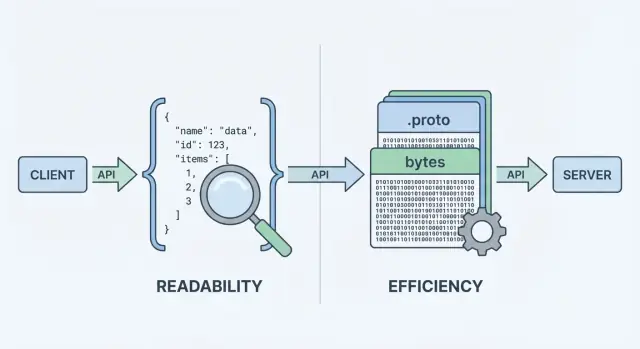
JSON (JavaScript Object Notation) is a text-based format built from simple structures like objects and arrays. It’s popular for REST APIs because it’s easy to read, easy to log, and easy to inspect with tools like curl and browser DevTools.
A big reason JSON is everywhere: most languages have excellent support, and you can visually inspect a response and understand it immediately.
Protobuf: compact binary with a schema
Protobuf is a binary serialization format created by Google. Instead of sending text, it sends a compact binary representation defined by a schema (a .proto file). The schema describes the fields, their types, and their numeric tags.
Because it’s binary and schema-driven, Protobuf usually produces smaller payloads and can be faster to parse—which matters when you have high request volumes, mobile networks, or latency-sensitive services (commonly in gRPC setups, but not limited to gRPC).
Same data, different trade-offs
It’s important to separate what you’re sending from how it’s encoded. A “user” with an id, name, and email can be modeled in both JSON and Protobuf. The difference is the cost you pay in:
- Payload size (text vs compact binary)
- CPU time to serialize/deserialize
- Debugging and observability (readable logs vs binary tooling)
- Compatibility and evolution (informal JSON conventions vs enforced schemas)
There’s no one-size-fits-all answer. For many public-facing APIs, JSON remains the default because it’s accessible and flexible. For internal service-to-service communication, performance-sensitive systems, or strict contracts, Protobuf can be a better fit. The goal of this guide is to help you choose based on constraints—not ideology.
How API Data Gets Serialized and Sent
When an API returns data, it can’t send “objects” directly over the network. It has to turn them into a stream of bytes first. That conversion is serialization—think of it as packing data into a shippable form. On the other side, the client does the reverse (deserialization), unpacking the bytes back into usable data structures.
A quick trip from server to client
A typical request/response flow looks like this:
- Server builds a response in its own in-memory types (objects/structs/classes).
- Serializer encodes that response into a payload (JSON text or Protobuf binary).
- The payload is sent over HTTP/1.1, HTTP/2, or HTTP/3 as bytes.
- Client receives bytes, then decodes them into its own in-memory types.
That “encoding step” is where the format choice matters. JSON encoding produces readable text like {\"id\":123,\"name\":\"Ava\"}. Protobuf encoding produces compact binary bytes that aren’t meaningful to humans without tooling.
Why the format changes performance and workflow
Because every response must be packed and unpacked, the format influences:
- Bandwidth (payload size): Smaller payloads reduce transfer costs, which helps on mobile networks and high-traffic APIs.
- Latency: Less data to transmit can mean faster responses, and faster encoding/decoding can reduce CPU time.
- Developer workflow: JSON is easy to inspect in DevTools and logs; Protobuf often requires generated types and specific decoding tools.
API style can push you in one direction
Your API style often nudges the decision:
- REST-style JSON APIs typically use JSON because it’s widely supported, easy to test with
curl, and simple to log and inspect. - gRPC is designed around Protobuf by default. It uses HTTP/2 and code generation, which pairs naturally with strongly typed Protobuf messages.
You can use JSON with gRPC (via transcoding) or use Protobuf over plain HTTP, but the default ergonomics of your stack—frameworks, gateways, client libraries, and debugging habits—will often decide what feels easiest to run day-to-day.
Payload Size and Speed: What You Usually Gain or Lose
When people compare protobuf vs json, they usually start with two metrics: how big the payload is and how long it takes to encode/decode. The headline is simple: JSON is text and tends to be verbose; Protobuf is binary and tends to be compact.
Payload size: compact binary vs readable text
JSON repeats field names and uses text representations for numbers, booleans, and structure, so it often sends more bytes over the wire. Protobuf replaces field names with numeric tags and packs values efficiently, which commonly leads to noticeably smaller payloads—especially for large objects, repeated fields, and deeply nested data.
That said, compression can narrow the gap. With gzip or brotli, JSON’s repeated keys compress very well, so “JSON vs Protobuf size” differences may shrink in real deployments. Protobuf can also be compressed, but the relative win is often smaller.
CPU cost: parsing text vs decoding binary
JSON parsers must tokenize and validate text, convert strings into numbers, and deal with edge cases (escaping, whitespace, unicode). Protobuf decoding is more direct: read tag → read typed value. In many services, Protobuf reduces CPU time and garbage creation, which can improve tail latency under load.
Network impact: mobile and high-latency connections
On mobile networks or high-latency links, fewer bytes typically means faster transfers and less radio time (which can also help battery). But if your responses are already small, handshake overhead, TLS, and server processing may dominate—making the format choice less visible.
How to benchmark in your own system
Measure with your real payloads:
- Pick representative requests/responses (small, typical, worst-case).
- Compare: raw size, compressed size (gzip/brotli), encode/decode time, and end-to-end latency.
- Run tests at realistic concurrency and record p50/p95/p99.
This turns “API serialization” debates into data you can trust for your API.
Developer Experience: Readability, Debugging, and Logging
Developer experience is where JSON often wins by default. You can inspect a JSON request or response almost anywhere: in browser DevTools, curl output, Postman, reverse proxies, and plain-text logs. When something breaks, “what did we actually send?” is usually one copy/paste away.
Protobuf is different: it’s compact and strict, but not human-readable. If you log raw Protobuf bytes, you’ll see base64 blobs or unreadable binary. To understand the payload, you need the right .proto schema and a decoder (for example, protoc, language-specific tooling, or your service’s generated types).
Debugging workflows in practice
With JSON, reproducing issues is straightforward: grab a logged payload, redact secrets, replay it with curl, and you’re close to a minimal test case.
With Protobuf, you’ll typically debug by:
- capturing the binary payload (often base64-encoded),
- decoding it with the correct schema version,
- re-encoding it to replay the request.
That extra step is manageable—but only if the team has a repeatable workflow.
Tips to make Protobuf (and JSON) easier to debug
Structured logging helps both formats. Log request IDs, method names, user/account identifiers, and key fields rather than whole bodies.
For Protobuf specifically:
- Log a decoded, redacted “debug view” (e.g., JSON representation) alongside the binary payload when safe.
- Store schema version or message type in logs to avoid “which
.protodid we use?” confusion. - Add a small internal script (or make target) that can “decode this base64 payload with the right schema” for on-call use.
For JSON, consider logging canonicalized JSON (stable key ordering) to make diffs and incident timelines easier to read.
Schema and Type Safety: Flexibility vs Guardrails
APIs don’t just move data—they move meaning. The biggest difference between JSON and Protobuf is how clearly that meaning is defined and enforced.
JSON: flexible shape, flexible interpretations
JSON is “schema-less” by default: you can send any object with any fields, and many clients will accept it as long as it looks reasonable.
That flexibility is convenient early on, but it can also hide mistakes. Common pitfalls include:
- Inconsistent fields:
userIdin one response,user_idin another, or missing fields depending on the code path. - Stringly-typed data: numbers, booleans, or dates sent as strings like
\"42\",\"true\", or\"2025-12-23\"—easy to produce, easy to misread. - Ambiguous nulls:
nullmight mean “unknown,” “not set,” or “intentionally empty,” and different clients may treat it differently.
You can add a JSON Schema or OpenAPI spec, but JSON itself doesn’t require consumers to follow it.
Protobuf: an explicit contract via .proto
Protobuf requires a schema defined in a .proto file. A schema is a shared contract that states:
- which fields exist,
- what types they are (string, integer, enum, message, etc.),
- and which field number identifies each field on the wire.
That contract helps prevent accidental changes—like turning an integer into a string—because the generated code expects specific types.
Type safety details that matter
With Protobuf, numbers stay numbers, enums are bounded to known values, and timestamps are typically modeled using well-known types (instead of ad hoc string formats). “Not set” is also clearer: in proto3, absence is distinct from default values when you use optional fields or wrapper types.
If your API depends on precise types and predictable parsing across teams and languages, Protobuf provides guardrails that JSON usually relies on conventions to achieve.
Versioning and Schema Evolution Without Breaking Clients
APIs evolve: you add fields, tweak behavior, and retire old parts. The goal is to change the contract without surprising consumers.
Backward vs forward compatibility (plain-English)
- Backward compatible: new servers can talk to old clients. Old clients ignore what they don’t understand and still work.
- Forward compatible: new clients can talk to old servers. New clients can handle missing fields and fall back to defaults.
A good evolution strategy aims for both, but backward compatibility is usually the minimum bar.
Protobuf: field numbers are the real identity
In Protobuf, each field has a number (e.g., email = 3). That number—not the field name—is what goes on the wire. Names are mainly for humans and generated code.
Because of that:
-
Safe changes (usually)
- Add new optional fields with new, never-used numbers.
- Add new enum values (ideally without reordering existing ones).
- Deprecate a field (stop using it) while keeping the number reserved.
-
Risky changes (often breaking)
- Reusing a field number for a different meaning or type.
- Changing a field’s type in an incompatible way (e.g., string → int).
- Removing a field without reserving its number (a future reuse can corrupt meaning).
- Renaming is “safe on the wire,” but can break generated code and downstream assumptions.
Best practice: use reserved for old numbers/names and keep a changelog.
JSON: versioning by conventions and discipline
JSON doesn’t have a built-in schema, so compatibility depends on your patterns:
- Prefer additive changes: add new fields rather than changing existing ones.
- Treat unknown fields as ignorable, and treat missing fields as “use a sensible default.”
- Avoid changing types (e.g., number → string). If needed, introduce a new field name.
Deprecations and a clear policy
Document deprecations early: when a field is deprecated, how long it will be supported, and what replaces it. Publish a simple versioning policy (e.g., “additive changes are non-breaking; removals require a new major version”) and stick to it.
Tooling and Ecosystem Support Across Platforms
Choosing between JSON and Protobuf often comes down to where your API needs to run—and what your team wants to maintain.
Browsers vs servers: the “default” advantage of JSON
JSON is effectively universal: every browser and backend runtime can parse it without extra dependencies. In a web app, fetch() + JSON.parse() is the happy path, and proxies, API gateways, and observability tools tend to “understand” JSON out of the box.
Protobuf can run in the browser too, but it’s not a zero-cost default. You’ll typically add a Protobuf library (or generated JS/TS code), manage bundling size, and decide whether you’re sending Protobuf over HTTP endpoints that your browser tooling can easily inspect.
Mobile and backend SDKs: where Protobuf shines
On iOS/Android and in backend languages (Go, Java, Kotlin, C#, Python, etc.), Protobuf support is mature. The big difference is that Protobuf assumes you’ll use libraries per platform and usually generate code from .proto files.
Code generation brings real benefits:
- Typed models and enums, with earlier errors when clients drift from the contract
- Faster serialization libraries and consistent data shapes across services
It also adds costs:
- Build steps (generating code in CI, keeping generated artifacts in sync)
- Repo/process complexity (publishing shared
.protopackages, version pinning)
gRPC: a strong ecosystem, a shaping constraint
Protobuf is closely associated with gRPC, which gives you a complete tooling story: service definitions, client stubs, streaming, and interceptors. If you’re considering gRPC, Protobuf is the natural fit.
If you’re building a traditional JSON REST API, JSON’s tooling ecosystem (browser DevTools, curl-friendly debugging, generic gateways) remains simpler—especially for public APIs and quick integrations.
Prototyping both options without committing too early
If you’re still exploring the API surface, it can help to prototype quickly in both styles before you standardize. For example, teams using Koder.ai (a vibe-coding platform) often spin up a JSON REST API for broad compatibility and an internal gRPC/Protobuf service for efficiency, then benchmark real payloads before choosing what becomes “default.” Because Koder.ai can generate full-stack apps (React on the web, Go + PostgreSQL on the backend, Flutter for mobile) and supports planning mode plus snapshots/rollback, it’s practical to iterate on contracts without turning format decisions into a long-lived refactor.
Operational Fit: Caching, Gateways, and Observability
Choosing between JSON and Protobuf isn’t only about payload size or speed. It also affects how well your API fits with caching layers, gateways, and the tools your team relies on during incidents.
Caching and CDNs
Most HTTP caching infrastructure (browser caches, reverse proxies, CDNs) is optimized around HTTP semantics, not a particular body format. A CDN can cache any bytes as long as the response is cacheable.
That said, many teams expect HTTP/JSON at the edge because it’s easy to inspect and troubleshoot. With Protobuf, caching still works, but you’ll want to be deliberate about:
- Cache keys (URL, query params, and especially
Vary) - Clear cacheability headers (
Cache-Control,ETag,Last-Modified) - Avoiding accidental cache fragmentation when supporting multiple formats
Content negotiation (Content-Type and Accept)
If you support both JSON and Protobuf, use content negotiation:
- Clients send
Accept: application/jsonorAccept: application/x-protobuf - Server responds with the matching
Content-Type
Make sure caches understand this by setting Vary: Accept. Otherwise, a cache might store a JSON response and serve it to a Protobuf client (or the other way around).
Gateways, proxies, and observability
API gateways, WAFs, request/response transformers, and observability tools often assume JSON bodies for:
- Request validation and schema checks
- Field-level logging and redaction
- Metrics derived from payload fields
- Debugging in dashboards and trace viewers
Binary Protobuf can limit those features unless your tooling is Protobuf-aware (or you add decoding steps).
Practical guidance for mixed environments
A common pattern is JSON at the edges, Protobuf inside:
- Public REST endpoints: JSON for compatibility and easier operations
- Internal service-to-service calls: Protobuf (often via gRPC) for efficiency
This keeps external integrations simple while still capturing Protobuf’s performance benefits where you control both client and server.
Security and Reliability Considerations
Choosing JSON or Protobuf changes how data is encoded and parsed—but it doesn’t replace core security requirements like authentication, encryption, authorization, and server-side validation. A fast serializer won’t save an API that accepts untrusted input without limits.
Format choice isn’t a security layer
It can be tempting to treat Protobuf as “safer” because it’s binary and less readable. That’s not a security strategy. Attackers don’t need your payloads to be human-readable—they just need your endpoint. If the API leaks sensitive fields, accepts invalid states, or has weak auth, switching formats won’t fix it.
Encrypt transport (TLS), enforce authz checks, validate inputs, and log securely regardless of whether you use a JSON REST API or grpc protobuf.
Attack surface: payloads, parsers, and validation
Both formats share common risks:
- Oversized payloads: Large JSON documents or huge Protobuf messages can trigger memory pressure, slow parsing, or denial-of-service.
- Parser bugs: Every parser is code, and code can have vulnerabilities. The risk isn’t “JSON vs Protobuf” so much as which libraries you use and whether they’re kept up to date.
- Schema validation gaps: JSON is flexible, which can lead to accepting unexpected fields or types unless you validate (for example with JSON Schema). Protobuf adds type constraints, but you can still accept semantically invalid data (e.g., negative quantities, invalid states) unless you enforce rules.
Reliability: limits, timeouts, and strictness
To keep APIs dependable under load and abuse, apply the same guardrails to both formats:
- Set maximum request size and maximum message size (including decompressed size if you support compression).
- Use timeouts and cancellation to avoid slow-client and slow-parser resource drains.
- Prefer strict validation: reject missing required business fields, invalid ranges, and unknown enum values where appropriate.
- Be careful with logging: JSON is easy to inspect, but both JSON and Protobuf can accidentally expose secrets if you log raw payloads.
The bottom line: “binary vs text format” mainly affects performance and ergonomics. Security and reliability come from consistent limits, up-to-date dependencies, and explicit validation—no matter which serializer you choose.
When to Choose JSON vs When to Choose Protobuf
Picking between JSON and Protobuf is less about which one is “better” and more about what your API needs to optimize for: human friendliness and reach, or efficiency and strict contracts.
When JSON is the default choice
JSON is usually the safest default when you need broad compatibility and easy troubleshooting.
Typical scenarios:
- Public APIs where you don’t control clients (partners, third parties, unknown tooling)
- Browser and web clients (native JSON support, easy inspection in DevTools)
- Quick iteration in early product stages (less ceremony, simpler payloads)
- Debugging-first workflows (copy/paste requests, readable logs, quick cURL testing)
- REST-style endpoints that will be cached or proxied widely (common gateway support)
When Protobuf shines
Protobuf tends to win when performance and consistency matter more than human readability.
Typical scenarios:
- High throughput APIs where you pay for bandwidth or operate at scale
- Many small calls (chatty services) where serialization overhead adds up
- Internal microservices where you control both ends and can enforce schemas
- gRPC-based systems (Protobuf is the natural fit and enables strong tooling)
- Mobile or edge environments where smaller payloads help latency and battery
Decision questions to ask
Use these questions to quickly narrow the choice:
- Who consumes the API? External/public clients usually push you toward JSON.
- Do you control all clients and deployments? If yes, Protobuf becomes easier to adopt.
- Is performance a real bottleneck? Measure: p95 latency, CPU, and egress costs.
- How important is strict typing and a schema contract? Protobuf enforces guardrails.
- Is your tooling mature enough? Consider code generation, CI checks, and dev onboarding.
A simple decision matrix (expandable)
You can turn the following into a table in your doc:
- Client diversity: High → JSON | Low/controlled → Protobuf
- Payload size sensitivity: Low → JSON | High → Protobuf
- Latency/CPU constraints: Relaxed → JSON | Tight → Protobuf
- Debugging/logging needs: Heavy manual inspection → JSON | Mostly automated → Protobuf
- Schema discipline: Optional/loose → JSON | Strong contracts required → Protobuf
- Protocol preference: REST → JSON (often) | gRPC → Protobuf (almost always)
If you’re still torn, the “JSON at the edge, Protobuf inside” approach is often a pragmatic compromise.
Migration Strategies: Moving Between JSON and Protobuf
Migrating formats is less about rewriting everything and more about reducing risk for consumers. The safest moves keep the API usable throughout the transition and make it easy to roll back.
1) Start small: one endpoint or one internal service
Pick a low-risk surface area—often an internal service-to-service call or a single read-only endpoint. This lets you validate the Protobuf schema, generated clients, and observability changes without turning the entire API into a “big bang” project.
A practical first step is adding a Protobuf representation for an existing resource while keeping the JSON shape unchanged. You’ll learn quickly where your data model is ambiguous (null vs missing, numbers vs strings, date formats) and can resolve it in the schema.
2) Run JSON and Protobuf in parallel (temporarily)
For external APIs, dual support is usually the smoothest path:
- Negotiate the format via
Content-TypeandAcceptheaders. - Expose a separate endpoint (e.g.,
/v2/...) only if negotiation is hard with your tooling.
During this period, ensure both formats are produced from the same source-of-truth model to avoid subtle drift.
3) Test like a format change is a product change
Plan for:
- Compatibility tests: old clients against new servers, and new clients against old servers.
- Contract tests: validate required fields, default behavior, and error responses.
- Benchmarks: measure payload size, CPU, and latency (including compression and TLS), not just “wire speed.”
4) Document the schema and ship examples
Publish .proto files, field comments, and concrete request/response examples (JSON and Protobuf) so consumers can verify they’re interpreting the data correctly. A short “migration guide” and changelog reduces support load and shortens adoption time.
Practical Best Practices and a Quick Checklist
Choosing between JSON and Protobuf is often less about ideology and more about the reality of your traffic, clients, and operational constraints. The most reliable path is to measure, document decisions, and keep your API changes boring.
Measure before you optimize
Run a small experiment on representative endpoints.
Track:
- Payload size (median and p95)
- End-to-end latency (client → server → client)
- CPU and memory on services doing (de)serialization
- Error rates and timeouts
Do this in staging with production-like data, then validate in production on a small slice of traffic.
Keep schemas and contracts predictable
Whether you use JSON Schema/OpenAPI or .proto files:
- Use consistent naming conventions across endpoints and fields.
- Define clear defaults and document them. “Missing” vs “empty” should not surprise clients.
- Prefer additive changes: add new optional fields rather than changing meaning.
- Deprecate fields with explicit notes and timelines, and keep deprecated fields working until clients migrate.
Make developer experience a first-class feature
Even if you choose Protobuf for performance, keep your docs friendly:
- Include example requests/responses (both “happy path” and common errors).
- Provide copy-pastable client snippets for the most common languages.
- Document how to inspect payloads in logs or using tooling.
If you maintain docs or SDK guides, link them clearly (for example: /docs and /blog). If pricing or usage limits affect format choices, make that visible too (/pricing).
Quick checklist
- Measured payload size + p95 latency + error rate for key endpoints
- Consistent field naming and clear default behaviors documented
- Additive changes only; deprecations have dates and migration notes
- Examples included in docs; client snippets available
- Observability plan: logging/traceability works for the chosen format
FAQ
What’s the practical difference between JSON and Protobuf in an API?
JSON is a text-based format that’s easy to read, log, and test with common tools. Protobuf is a compact binary format defined by a .proto schema, often yielding smaller payloads and faster parsing.
Pick based on constraints: reach and debuggability (JSON) vs efficiency and strict contracts (Protobuf).
What do “serialization” and “deserialization” mean in the request/response flow?
APIs send bytes, not in-memory objects. Serialization encodes your server objects into a payload (JSON text or Protobuf binary) for transport; deserialization decodes those bytes back into client/server objects.
Your format choice affects bandwidth, latency, and CPU spent encoding/decoding.
Is Protobuf always smaller than JSON on the wire?
Often yes, especially with large or nested objects and repeated fields, because Protobuf uses numeric tags and efficient binary encoding.
However, if you enable gzip/brotli, JSON’s repeated keys compress well, so the real-world size gap can shrink. Measure both raw and compressed sizes.
Is Protobuf faster than JSON for encode/decode and latency?
It can. JSON parsing requires tokenizing text, handling escaping/unicode, and converting strings to numbers. Protobuf decoding is more direct (tag → typed value), which often reduces CPU time and allocations.
That said, if payloads are tiny, overall latency may be dominated by TLS, network RTT, and application work rather than serialization.
Why is Protobuf harder to debug and log than JSON?
It’s harder by default. JSON is human-readable and easy to inspect in DevTools, logs, curl, and Postman. Protobuf payloads are binary, so you typically need the matching .proto schema and decoding tooling.
A common workflow improvement is logging a decoded, redacted debug view (often JSON) alongside request IDs and key fields.
How do schemas and type safety differ between JSON and Protobuf?
JSON is flexible and often “schema-less” unless you enforce JSON Schema/OpenAPI. That flexibility can lead to inconsistent fields, “stringly-typed” values, and ambiguous null semantics.
Protobuf enforces types via a .proto contract, generates strongly typed code, and makes evolvable contracts clearer—especially when multiple teams and languages are involved.
How do you evolve an API without breaking clients in JSON vs Protobuf?
Protobuf compatibility is driven by field numbers (tags). Safe changes are usually additive (new optional fields with new numbers). Breaking changes include reusing field numbers or changing types incompatibly.
For Protobuf, reserve removed field numbers/names (reserved) and keep a changelog. For JSON, prefer additive fields, keep types stable, and treat unknown fields as ignorable.
Can an API support both JSON and Protobuf at the same time?
Yes. Use HTTP content negotiation:
- Client sends
Accept: application/jsonorAccept: application/x-protobuf - Server replies with the matching
Content-Type - Add
Vary: Acceptso caches don’t mix formats
If tooling makes negotiation difficult, a separate endpoint/version can be a temporary migration tactic.
What tooling and platform constraints should influence the choice?
It depends on your environment:
- Browsers/public APIs: JSON has near-zero friction and better default tooling.
- Mobile/backend/internal services: Protobuf has strong libraries and benefits from code generation.
- gRPC systems: Protobuf is the default and integrates tightly with generated stubs and streaming.
Consider the maintenance cost of codegen and shared schema versioning when choosing Protobuf.
Does choosing Protobuf over JSON improve security or reliability?
Treat both as untrusted input. Format choice isn’t a security layer.
Practical guardrails for both:
- Set maximum request/message sizes (including decompressed size)
- Use timeouts and cancellation
- Validate business rules (types aren’t enough)
- Avoid logging sensitive fields; prefer structured logs with redaction
Keep parsers/libraries updated to reduce exposure to parser vulnerabilities.