

PWA vs Flutter vs Native: SwiftUI/Compose Differences Explained
Compare PWA, Flutter, and native SwiftUI/Jetpack Compose: performance, UX, offline, device APIs, distribution, and team fit—plus how to choose.
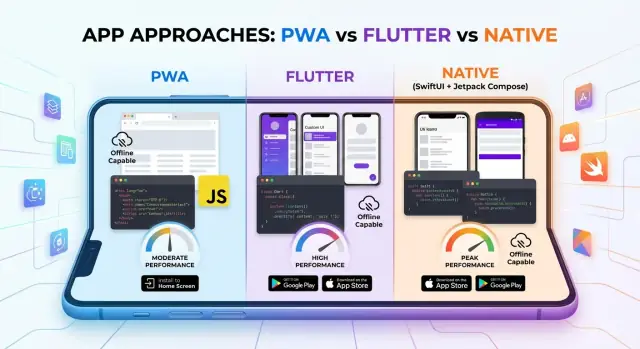
What You’re Really Choosing
Choosing between a PWA, Flutter, and “native” isn’t just picking a programming language—it’s choosing a product delivery model.
A PWA is a website with app-like capabilities (installable, offline caching, push in some environments). Your primary runtime is the browser, and distribution is mostly via links.
Flutter is a cross-platform UI toolkit that ships as an app. You bring your own rendering engine and UI layer, aiming for consistent behavior across iOS and Android while still calling platform APIs when needed.
“Native” today usually means platform SDKs (Apple iOS SDK, Android SDK) plus modern declarative UI frameworks: SwiftUI on iOS and Jetpack Compose on Android. You’re typically not writing “old-school native UI”—you’re writing native declarative UI that integrates tightly with each platform’s conventions, accessibility stack, and system components.
The decision we’re making
This article compares PWA vs Flutter vs native (SwiftUI/Compose) as end-to-end choices: performance characteristics, UX fidelity, capabilities, and operational overhead—not just “which feels nicer to code.”
The criteria used throughout
We’ll evaluate each option using a consistent set of questions:
- Performance & responsiveness (startup time, animations, scrolling)
- UI fidelity (platform look-and-feel, accessibility, input behaviors)
- Offline, push, and background work
- Device APIs (camera, Bluetooth, biometrics, payments, etc.)
- Distribution & updates (stores vs web, review cycles, monetization)
- Developer productivity & maintainability
- Web presence (SEO, deep linking, shareability)
- Security, privacy, and compliance
- Cost, time-to-market, and risk
One more expectation to set
There is no universal “best” choice. The right answer depends on your users, your feature set, your team skills, and how you plan to ship and iterate.
Architecture Basics: How Each Technology Works
Choosing between PWA, Flutter, and native (SwiftUI/Jetpack Compose) is largely a choice of runtime and rendering pipeline: where your code runs, who draws pixels, and how you reach device capabilities.
PWA: Browser engine + Web APIs + Service Worker
A PWA runs inside the browser engine (WebKit on iOS, Chromium-based engines on most Android browsers). Your app code is HTML/CSS/JavaScript executed by the JavaScript engine, with UI produced by the browser’s layout and rendering system.
Key architectural pieces:
- Web APIs (storage, networking, sensors where available) provide capabilities with browser-controlled permission and sandboxing.
- Service Worker is a separate background script that can intercept network requests, cache responses, and enable offline behavior. It’s event-driven and may be paused between events, which affects long-running background work.
In practice, you’re building on a standardized web runtime with constraints and variations across browsers—especially on iOS.
Flutter: Dart runtime + Skia rendering + Platform Channels
Flutter ships its own UI framework and rendering pipeline. Your Dart code runs in a Flutter engine (JIT in debug, AOT-compiled in release). Instead of relying on native UI widgets, Flutter draws everything itself using Skia, producing a consistent look across platforms.
When Flutter needs device-specific features (camera, payments, sensors), it uses platform channels (or plugins) to call into native iOS/Android code. Architecturally, that boundary is explicit: fast UI iteration in Dart, plus targeted native bridges for platform integration.
Native: Swift/SwiftUI and Kotlin/Compose + System UI toolkits
Native apps run directly on the platform runtime (iOS: Swift/Objective‑C on Apple frameworks; Android: Kotlin/Java on ART). With SwiftUI and Jetpack Compose, you still write declarative UI, but rendering is performed by the system UI toolkits.
That means native apps inherit platform behavior “for free”: accessibility, text rendering, input, navigation patterns, and the deepest device APIs—without a bridging layer.
Performance and Responsiveness
Performance isn’t just benchmarks—it’s what users feel: how fast the app opens, whether scrolling stays smooth, and if animations look “attached” to their finger. The same feature can feel premium or laggy depending on the stack.
Perceived performance: startup, scroll, and animation
Native (SwiftUI/Jetpack Compose) typically wins on cold start and input-to-render latency because it runs on the platform runtime, uses system scheduling well, and avoids extra abstraction layers. High-frequency interactions—fast flings in long lists, complex gesture-driven transitions, and heavy text rendering—tend to stay predictable.
Flutter can be very smooth once it’s running because it draws UI via its own rendering engine. That consistency is a strength: you can get uniform 60/120fps animations across devices when the UI is well-optimized. Cold start can be slightly heavier than native, and shader-heavy animations may need tuning (caching, avoiding overdraw).
PWAs are improving, but they’re still bounded by the browser: JavaScript execution, DOM/layout recalculation, and the cost of rendering complex pages. Smooth scrolling is feasible, yet large nested layouts, frequent reflows, and heavyweight third-party scripts can quickly add jank.
Background work and constraints
Background capabilities affect responsiveness indirectly: can you prefetch data, sync quietly, or keep state fresh?
- iOS PWAs have stricter limits: background sync and long-running tasks are constrained, so the app may feel “stale” until it’s opened.
- Flutter and Native can use platform background APIs (still constrained by OS policies), enabling smarter preloading and faster “ready” states.
Rendering trade-offs: DOM vs Flutter canvas vs native widgets
- PWA: web layout engine + DOM/CSS. Great for text/content, but complex UI can trigger layout thrash.
- Flutter: Skia-based canvas rendering. Consistent visuals, but you pay for drawing everything yourself.
- Native: system components and compositor. Often the most efficient path for platform-standard UI.
When differences matter
You’ll notice gaps most in infinite feeds, maps with overlays, chat/realtime updates, image-heavy grids, and gesture-rich UIs. For simpler forms, content, and CRUD flows, a well-built PWA or Flutter app can feel plenty fast—your bottleneck is more often network and data handling than pixels.
User Experience and UI Fidelity
“UI fidelity” is less about pretty screens and more about whether your app behaves like users expect on their platform: navigation patterns, gestures, text rendering, haptics, and accessibility. This is where PWA, Flutter, and native differ most visibly.
Platform conventions: navigation, gestures, and text
Native (SwiftUI/Jetpack Compose) typically wins on “it just feels right.” Back gestures, system navigation bars, text selection, scroll physics, and input behaviors align with OS updates almost automatically.
Flutter can match many conventions, but you’re often choosing: a single cross-platform experience or per-platform tuning. In practice, you may need separate navigation behavior, keyboard avoidance, and typography tweaks to satisfy both iOS and Android expectations.
PWAs are improving, but browser constraints can show up as non-native transitions, limited gesture integration, and occasional differences in font rendering or input behavior.
Design systems: Material, Cupertino, and custom branding
Compose naturally fits Material 3; SwiftUI aligns with iOS patterns. Flutter offers both Material and Cupertino widgets, plus full control for custom branding. The trade-off is maintenance: heavy customization can make upgrades and platform parity more work.
PWAs can implement any design system, but you’ll be re-creating components that native platforms provide (and users recognize).
Complex UI: animations, transitions, and input handling
Flutter excels at custom UI and smooth, consistent animations across devices. Native can be equally powerful, but advanced transitions sometimes require deeper platform knowledge.
PWAs can do impressive motion, yet complex interactions can hit browser performance limits on lower-end devices.
Accessibility: screen readers, dynamic type, focus order
Native stacks provide the most reliable accessibility primitives: semantic roles, focus handling, Dynamic Type/Font Scaling, and platform screen readers.
Flutter supports accessibility well, but you must be disciplined with semantics, focus order, and text scaling.
PWAs depend on web accessibility support, which can be excellent—yet some mobile screen reader behaviors and system-level settings don’t map perfectly through the browser.
Offline, Push, and Background Features
Offline behavior is often the first place where “cross-platform” stops meaning “same capabilities.” PWAs, Flutter apps, and native SwiftUI/Jetpack Compose can all feel offline-first—but they get there with different constraints.
Offline-first: caching, sync, and conflicts
PWA: Offline usually starts with a Service Worker and a deliberate caching strategy (app shell + runtime caching). It’s excellent for read-heavy flows (content browsing, forms, checklists). Write flows need a queue: store pending mutations locally, retry on connectivity, and design for conflict resolution (timestamps, version vectors, or server-side merge rules). The big win is that caching rules are explicit and inspectable; the trade-off is that browser storage and background execution limits can interrupt “eventual sync.”
Flutter: You control the full client stack. Typical patterns are a local database + a sync layer (e.g., repository pattern with an “outbox” table). Conflict handling is similar to native, and you can implement the same merge logic across iOS and Android. Compared to web, you generally see fewer surprises around cache eviction and lifecycle.
Native (SwiftUI/Compose): Best fit when offline requirements are strict (large datasets, guaranteed durability, complex conflict rules, background syncing). You also get tighter control over networking conditions and OS-level scheduling.
Storage options and limits
PWA: IndexedDB is the workhorse (structured data, decent capacity but not guaranteed). Storage can be cleared by the OS under pressure, and quota varies by browser/device.
Flutter: SQLite/Realm-like options via plugins are common; file storage is straightforward. You still follow platform rules, but persistence is more predictable than a browser sandbox.
Native: First-class databases (Core Data/SQLite on iOS, Room/SQLite on Android) with the most reliable persistence and tooling.
Push and background work
PWA push: Supported on Android/Chromium browsers; iOS support exists but with more constraints and user friction. Delivery timing isn’t guaranteed, and advanced notification features can vary.
Flutter/native push: Uses APNs (iOS) and FCM (Android). More consistent delivery, richer controls, and better integration with notification channels, critical alerts (where permitted), and deep links.
Background sync/periodic tasks: PWAs have limited, browser-dependent options. Flutter can use platform schedulers via plugins, but you must respect iOS background limits. Native gives the widest set of tools (BackgroundTasks on iOS, WorkManager on Android) and the highest odds your periodic work actually runs.
Device APIs and Hardware Integration
What you can do with the device (and how reliably you can do it) often decides the technology more than UI or developer preference.
Bread-and-butter APIs: camera, location, sensors
Native (SwiftUI/Jetpack Compose) has first-class access to everything the OS exposes: camera pipelines, fine-grained location modes, motion sensors, biometrics, background processing hooks, and newer platform features as soon as they ship.
Flutter can reach most of these too, but typically through plugins. Popular APIs (camera, geolocation, biometrics, in-app purchases) are well supported, while newer or niche APIs may require you to write native code.
PWAs cover a narrower and more uneven set. Geolocation and basic camera access can work, but there are gaps (or differences by browser/OS), and some capabilities are restricted or absent—especially on iOS.
Bluetooth, NFC, and “edge” hardware
Hardware integration is where the gap becomes obvious:
- Bluetooth: native is best; Flutter depends on plugin maturity; PWA support varies (Web Bluetooth exists in some browsers, but not consistently across mobile platforms).
- NFC: native is the practical choice for payments, badges, secure tags; Flutter can do it via plugins/native modules; PWA NFC support is limited and not broadly dependable.
- Secure elements / OS-level integrations (Health data, Wallet passes, system sharing targets, call/SMS intents): generally native-first.
Permissions, prompts, and user trust
Permission UX differs by platform and affects conversion. Native apps tend to feel expected and consistent: users see familiar OS dialogs and can manage permissions in Settings.
Flutter inherits the native permission system, but you must design good in-app context screens so the OS prompt doesn’t feel abrupt.
PWAs rely on browser permission prompts. These can be easier to dismiss, sometimes harder to re-trigger, and may not map cleanly to the capability you’re trying to explain—impacting trust when you ask for sensitive access.
Bridging and fallbacks
- Flutter: use platform channels when a plugin doesn’t exist or when you need custom behavior (e.g., a specific BLE protocol or a vendor SDK).
- PWA: plan graceful degradation—feature detect, offer alternative flows (manual entry, QR codes, server-side processing), or hand off to a native companion app.
- Native: direct SDK integration with minimal abstraction layers.
Rule of thumb: evaluating API availability
Before committing, list your “must-have” hardware features and check:
-
Is the API supported on both iOS and Android (and your minimum OS versions)?
-
For PWA, is it supported in the specific browsers your users actually run?
-
If using Flutter, does the plugin support your edge cases—or will you budget time for native code?
If the feature is core to the product (not a nice-to-have), prefer native or Flutter with a clear native-bridging plan; treat PWA support as “best effort” unless the use case is clearly web-friendly.
Distribution, Updates, and Monetization
Where your app “lives” determines how users discover it, how fast you can ship fixes, and what kinds of payments you’re allowed to take.
App Store / Play Store (Native + Flutter)
Native (SwiftUI/Jetpack Compose) and Flutter typically ship through the same storefronts: App Store and Google Play. That brings built-in discovery, trust signals, and a familiar install flow—but also gatekeeping.
Review cycles can slow urgent releases, especially on iOS. You can mitigate this with phased rollouts, feature flags, and server-driven configuration, but binaries still need approval. On Android, staged rollouts and multiple tracks (internal/testing/production) help you iterate faster; iOS is generally more “all-or-nothing” once approved.
Updates are straightforward for users and admins: store-managed updates, release notes, and optional forced updates via minimum versioning. For regulated environments, stores provide a clear audit trail of what was shipped and when.
PWA distribution (no store required)
PWAs can be installed from the browser (add-to-home-screen, install prompts) and updated instantly when you deploy—no review queue for most changes. The trade-off is variability: installability and capabilities differ by browser and OS version, and “store-like” discoverability is weaker unless you already have strong web traffic.
For enterprises, PWAs can be deployed via managed browsers, MDM policies, or simply pinned URLs—often faster than coordinating store accounts and reviews.
Monetization: IAP vs web payments
If you rely on in-app purchases (subscriptions, digital goods), app stores are the most predictable path—at the cost of revenue share and policy compliance. On iOS in particular, digital goods typically must use Apple’s IAP.
PWAs can use web payments (e.g., Stripe) where supported and allowed, which can improve margin and flexibility—but may be constrained by platform policies and user trust.
When store presence is non-negotiable
A store listing is a hard requirement when you need maximum consumer reach, store-driven acquisition, or platform-integrated monetization. It’s optional when your product is driven by existing web distribution, enterprise rollout, or you prioritize instant update cadence over storefront exposure.
Developer Productivity and Maintainability
Productivity isn’t just “how fast can we ship v1?”—it’s how easily the team can keep shipping after OS updates, new devices, and evolving product scope.
Code sharing vs platform-specific duplication
- PWA maximizes sharing by default: one codebase, one UI. Duplication appears when you build platform workarounds (Safari vs Chrome behavior, iOS push constraints, different install/UX patterns) or when you add native wrappers later.
- Flutter shares most UI and logic, but duplication shows up around platform channels, permission flows, and edge-case platform UX (e.g., share sheets, background tasks). You may also maintain multiple plugin forks if upstream stalls.
- Native (SwiftUI / Jetpack Compose) has the least sharing, but duplication can be minimized with shared backend SDKs, API clients, and consistent architecture patterns. The trade-off is two UIs and two platform release trains.
Team skill sets and hiring reality
- Web teams ramp fastest on PWA, especially if you already have strong frontend practices.
- Flutter concentrates work in one Dart team, but you still benefit from iOS/Android experience for integrations, release processes, and platform debugging.
- Native aligns with deep platform knowledge—best when your app is hardware-heavy or must follow platform conventions tightly.
Tooling, debugging, and delivery pipeline
PWA debugging is excellent in browser devtools, but device-specific issues can be harder to reproduce. Flutter offers strong hot reload and decent profiling; the quality of crash signals can depend on how you wire native symbolication and plugin crashes. Native tooling (Xcode/Android Studio) remains the most precise for performance traces, energy impact, and OS-level diagnostics.
Long-term maintenance risk
Plan for dependency and plugin health. PWAs depend on browser capability and policy changes; Flutter depends on framework upgrades and plugin ecosystems; native depends on OS APIs changing but usually has the most direct migration path. Whatever you choose, budget for quarterly platform update work and keep a “kill switch” strategy for brittle integrations.
Where Koder.ai can help early (without locking you in)
If your main uncertainty is which delivery model will feel right for users, you can reduce the cost of experimenting. With Koder.ai, teams often prototype a React-based web/PWA experience quickly (and pair it with a Go + PostgreSQL backend) to validate flows, then decide whether to stay web-first or graduate to a full mobile build. Because Koder.ai supports source code export, it can also fit teams that want a fast start without committing permanently to a single toolchain.
Web Presence, SEO, and Deep Linking
If your product needs to be discoverable, web presence isn’t a side concern—it’s part of the core architecture decision.
Deep links, routing, and indexing
PWA is the most straightforward option for deep linking because every screen can map to a URL. Routing is native to the web, and search engines can index public pages (assuming you render meaningful HTML and don’t hide everything behind client-only rendering).
Flutter depends on where it runs:
- Flutter Web can support URL-based navigation, but SEO is often weaker for highly dynamic, canvas-rendered experiences unless you invest in pre-rendered marketing pages or SEO-specific architecture.
- Flutter mobile (iOS/Android) supports deep links via platform configuration (Universal Links/App Links), but there’s no web indexing for in-app screens.
Native (SwiftUI / Jetpack Compose) deep linking is mature and reliable (Universal Links, App Links, intent filters), but it’s strictly about navigation inside installed apps. Search engines won’t index your app UI—only whatever you publish on the web.
When SEO matters (and when it doesn’t)
SEO matters most when you have public, shareable content: landing pages, articles, listings, locations, profiles, pricing, help docs. If your app is mostly logged-in workflows (dashboards, internal tools, private messaging), SEO is usually irrelevant, and deep links mainly serve sharing and re-engagement.
Hybrid setup: marketing site + app shell
A common pattern is a fast, SEO-friendly marketing site (web) paired with an app shell (Flutter or native) for authenticated experiences. You can share design tokens, analytics events, and even some business logic, while keeping URLs like /pricing and /blog consistent.
Tracking and attribution: web vs stores
On the web, attribution leans on UTM parameters, referrers, and cookies (increasingly constrained). In app stores, attribution often runs through SKAdNetwork (iOS), Play Install Referrer (Android), and MMPs—less granular, more privacy-gated, but tied to install and subscription flows.
Security, Privacy, and Compliance Factors
Security isn’t just “how hard is it to hack?”—it’s also what your chosen platform allows you to do, what data you can store safely, and which compliance controls you can realistically implement.
Authentication patterns and secure storage
Native (SwiftUI / Jetpack Compose) gives you first-class primitives for secure sessions: Keychain on iOS and Keystore/EncryptedSharedPreferences on Android, plus mature support for passkeys, biometrics, and device-bound credentials.
Flutter can reach the same primitives through plugins (for example, storing refresh tokens in Keychain/Keystore). The security level can be comparable to native, but you’re more dependent on correct plugin choice, maintenance cadence, and platform-specific configuration.
PWAs rely mostly on web authentication flows and browser storage. You can do strong auth (OAuth/OIDC, WebAuthn/passkeys), but secure storage is constrained: localStorage is a hard “no” for sensitive tokens, and even IndexedDB can be exposed if the origin is compromised. Many teams end up using short-lived tokens plus server-side sessions to reduce client risk.
Transport security and certificate pinning
All three can (and should) enforce HTTPS/TLS.
- Native supports certificate pinning (with caveats for rotation and operational risk) and advanced network controls.
- Flutter can pin certificates using platform hooks or HTTP client configuration, but you still need to implement and test per-platform behavior.
- PWA pinning is generally not feasible in a reliable way because network stacks are controlled by the browser; you’re limited to standard TLS, HSTS, and careful backend hardening.
Data protection and device-level isolation
Native apps benefit from OS sandboxing plus hardware-backed keys. Flutter apps inherit that sandboxing because they ship as native packages.
PWAs run inside the browser sandbox: good isolation from other apps, but less control over device-level encryption policies and fewer guarantees about how storage is handled across browsers and managed devices.
Privacy prompts and compliance surfaces
Permission prompts and compliance touchpoints differ:
- Native: explicit OS prompts (tracking, location, photos, Bluetooth), plus platform requirements (e.g., iOS tracking disclosures).
- Flutter: same prompts, but you must configure them correctly in both iOS and Android projects.
- PWA: fewer permission types and more browser variability; some features (background access, certain sensors) may be unavailable or inconsistent, affecting consent flows and auditability.
If you anticipate regulated requirements (HIPAA/PCI, enterprise MDM, strong device attestation), native—or Flutter with careful platform work—usually offers more enforceable controls than a PWA.
Cost, Time-to-Market, and Risk
Cost isn’t just “how many devs” or “how fast can we ship.” It’s the full lifecycle: building, testing, releasing, and supporting the product across devices and OS updates.
Total cost: beyond initial build
- Build & staffing: PWAs often start cheapest if you already have web talent. Flutter can reduce duplicated UI work across iOS/Android. Native (SwiftUI/Jetpack Compose) may require separate specialists and parallel feature work.
- Test matrix: PWAs inherit the browser matrix (Safari/WebKit nuances can dominate effort). Flutter narrows UI variance but still needs device testing. Native adds two full stacks, but each behaves most predictably within its platform.
- Releases & support: App-store apps require build pipelines, signing, review cycles, and hotfix planning. PWAs deploy like websites, lowering operational friction and enabling faster iteration.
Quality assurance: where time goes
QA effort scales with device coverage, OS versions, browsers, and build flavors. A PWA might pass on Chrome but fail on iOS Safari for storage, push, or media behavior. Flutter reduces UI fragmentation, yet you still validate plugins, platform channels, and performance on real devices. Native needs dual QA streams, but fewer “mystery” browser inconsistencies.
Risk management: constraints and roadmaps
- Platform constraints: PWAs can hit hard limits (background execution, push parity, hardware access). If these are core requirements, risk increases.
- Vendor dependencies: Flutter relies on engine updates and plugin ecosystems; native relies on Apple/Google API changes and policy shifts.
When speed is worth the trade-offs
If you’re validating demand, iterating weekly, or prioritizing content/flows over deep device integration, faster time-to-market (often PWA or Flutter) can beat ideal fidelity—provided you explicitly accept the feature ceiling and test it early.
How to Choose: A Practical Decision Matrix
Choosing between PWA, Flutter, and native isn’t about “best tech”—it’s about which constraints you can’t compromise on: distribution, performance, device access, iteration speed, and long-term ownership.
Decision checklist by product type
Content app (news, blog, docs, marketing + light interactivity): default to PWA for fast iteration, shareable URLs, and low-friction installs. Go Flutter/native only if you need heavy personalization, rich animations, or strict offline behavior.
Internal tool (field ops, dashboards, checklists): Flutter is often the sweet spot: one codebase, consistent UI, strong offline patterns. Use PWA if it’s primarily forms + web workflows and devices are tightly managed.
Consumer app (social, marketplace, streaming companion): Flutter works well for most. Choose native (SwiftUI/Compose) when UI fidelity, scrolling/gesture feel, and platform polish are core to retention.
Fintech/health (regulated, security-sensitive): lean native when you need best-in-class platform security features, compliance posture, and OS-integrated auth flows. Flutter can work, but factor extra audit effort.
IoT / hardware-heavy: prefer native when you need low-level Bluetooth/NFC/UWB, background modes, or vendor SDKs. Flutter is viable if required plugins are proven and maintained.
Pragmatic recommendations
- Pick PWA if distribution through links and SEO matter most, and hardware/background needs are modest.
- Pick Flutter if you want high-quality UI across iOS/Android with one team and you can live within plugin boundaries.
- Pick native if you’re pushing device capabilities, need peak responsiveness, or can’t risk plugin gaps.
Suggested MVP approach
Validate the riskiest assumption first: audience and workflow.
- If discovery and iteration are the risk: start PWA.
- If app-like UX and cross-platform speed are the risk: start Flutter.
- If hardware/performance is the risk: start native for the critical path, then expand.
If you want to move quickly without committing too early, one practical approach is to prototype your web/PWA (and backend) in Koder.ai, validate flows with real users, then use that learning to justify the extra investment in Flutter or native where it truly matters (hardware integrations, store distribution, or high-fidelity UX).
Copyable decision matrix
| Requirement | Best fit |
|---|---|
| SEO + shareable URLs, minimal install friction | PWA |
| One codebase for iOS/Android with strong UI control | Flutter |
| Best platform polish, gestures, and peak performance | Native |
| Complex background tasks / tight OS integration | Native |
| Moderate device APIs (camera, geolocation) | Flutter or PWA |
| Low-level BLE/NFC/vendor SDK dependency | Native |
| Fastest time-to-market with smallest team | PWA or Flutter |
FAQ
What’s the simplest rule of thumb for choosing PWA vs Flutter vs native?
Choose a PWA if links, SEO, and instant deploys matter most and you can live with browser constraints (especially on iOS).
Choose Flutter if you want one iOS/Android codebase with strong UI control and are okay bridging some platform features.
Choose native (SwiftUI/Compose) if you need maximum platform polish, predictable performance, and the deepest device/background capabilities.
What are you really choosing under the hood (runtime and rendering)?
It’s mainly a runtime + rendering decision:
- PWA: runs in the browser; UI is DOM/CSS; capabilities come from Web APIs + Service Worker.
- Flutter: runs in a Flutter engine; UI is drawn by Skia; device features via plugins/platform channels.
- Native: runs on iOS/Android runtimes; UI uses SwiftUI/Compose and system widgets/components.
Which option usually feels fastest to users (startup, scrolling, animations)?
Typically native wins for cold start and input-to-render latency because it uses the platform runtime and system UI pipeline.
Flutter can be extremely smooth once running, but cold start can be heavier and some graphics need tuning.
PWA performance depends heavily on JavaScript + DOM/layout cost; complex layouts and third-party scripts often cause jank sooner than in app runtimes.
Which approach gives the most “native” UX and platform conventions?
Native is usually best for “it just feels right” behaviors: back gestures, text selection, scrolling physics, keyboard handling, and system navigation updates.
Flutter can match many conventions, but you may need per-platform tweaks.
PWA can look great, but some gestures/transitions and input behaviors are constrained by the browser and vary across iOS/Android browsers.
How do offline-first patterns differ between PWA, Flutter, and native?
All three can do offline, but the reliability differs:
- PWA: Service Worker caching is great for read-heavy offline, but background execution/storage eviction can interrupt sync.
- Flutter: common pattern is local DB + “outbox” queue; lifecycle/storage is more predictable than a browser.
- Native: best when offline requirements are strict (durability, large datasets, complex conflict rules, background syncing).
How reliable are push notifications and background tasks across the three?
In practice:
- PWA push: strong on Android/Chromium; on iOS it exists but is more constrained and can add user friction.
- Flutter/native push: uses FCM (Android) and APNs (iOS) with richer controls and more consistent integration.
For periodic/background work, native (and Flutter via platform APIs) generally has better scheduling options than PWAs.
Which choice is best when hardware integration (BLE/NFC/biometrics) is core?
If you need Bluetooth, NFC, Wallet/Health integrations, vendor SDKs, or advanced background modes, native is the safest bet.
Flutter can handle many device APIs via plugins, but you should budget time for platform channels when you hit edge cases.
PWA support is narrower and inconsistent across browsers—especially for “edge” hardware features.
How do distribution and update speed compare (stores vs web)?
PWA updates when you deploy—no store review for most changes—so hotfixes are fast.
Flutter/native ship through the App Store/Play Store, which adds signing, review cycles (especially iOS), and release management. You can mitigate with staged rollouts and feature flags, but binaries still matter.
How does monetization differ between PWA and app-store apps?
If you depend on store discovery or in-app purchases for digital goods, app-store apps (native/Flutter) are usually the most straightforward path—along with store policies and revenue share.
PWAs can use web payments (e.g., Stripe) where allowed, which can improve flexibility and margins, but may be limited by platform rules and user trust in browser flows.
What are the most common hidden costs and risks when choosing one approach?
Biggest “hidden” costs often come from the test matrix:
- PWA: browser differences (notably iOS Safari/WebKit) can dominate QA time.
- Flutter: less UI variance, but plugins/platform channels still require real-device testing.
- Native: two stacks to build and QA, but behavior is typically most predictable within each platform.
A practical step: list your must-have features (push, background sync, BLE, payments) and validate them on your target devices before committing.