

RabbitMQ for Your Applications: Patterns, Setup, and Ops
Learn how to use RabbitMQ in your applications: core concepts, common patterns, reliability tips, scaling, security, and monitoring for production.
Why RabbitMQ Matters for Application Teams
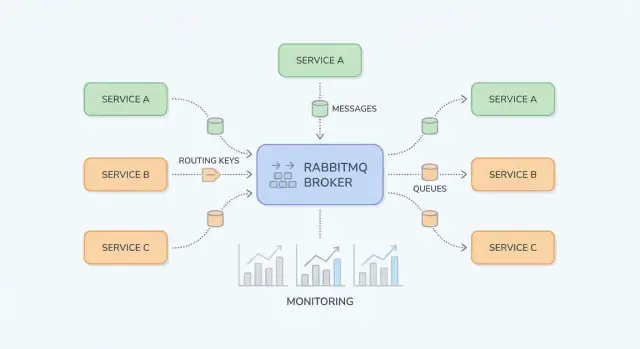
RabbitMQ is a message broker: it sits between parts of your system and reliably moves “work” (messages) from producers to consumers. Application teams usually reach for it when direct, synchronous calls (service-to-service HTTP, shared databases, cron jobs) start creating fragile dependencies, uneven load, and hard-to-debug failure chains.
What problems RabbitMQ solves
Traffic spikes and uneven workloads. If your app gets 10× more signups or orders in a short window, processing everything immediately can overwhelm downstream services. With RabbitMQ, producers enqueue tasks quickly and consumers work through them at a controlled pace.
Tight coupling between services. When Service A must call Service B and wait, failures and latency propagate. Messaging decouples them: A publishes a message and continues; B processes it when available.
Safer failure handling. Not every failure should become an error shown to the user. RabbitMQ helps you retry processing in the background, isolate “poison” messages, and avoid losing work during temporary outages.
Typical outcomes teams see
Teams usually get smoother workloads (buffering peaks), decoupled services (fewer runtime dependencies), and controlled retries (less manual reprocessing). Just as important, it becomes easier to reason about where work is stuck—at the producer, in a queue, or in a consumer.
What this guide covers (and what it doesn’t)
This guide focuses on practical RabbitMQ for application teams: core concepts, common patterns (pub/sub, work queues, retries and dead-letter queues), and operational concerns (security, scaling, observability, troubleshooting).
It does not aim to be a complete AMQP specification walkthrough or a deep dive into every RabbitMQ plugin. The goal is to help you design message flows that stay maintainable in real systems.
Quick glossary
- Producer: an app component that sends messages.
- Consumer: an app component that receives and processes messages.
- Queue: a buffer that holds messages until a consumer handles them.
- Exchange: the entry point that routes messages to one or more queues.
- Routing key: a label used by exchanges to decide where a message should go.
RabbitMQ Basics: What It Is and When to Use It
RabbitMQ is a message broker that routes messages between parts of your system, so producers can hand off work and consumers can process it when they’re ready.
AMQP messaging vs direct HTTP calls
With a direct HTTP call, Service A sends a request to Service B and typically waits for a response. If Service B is slow or down, Service A either fails or stalls, and you have to handle timeouts, retries, and backpressure in every caller.
With RabbitMQ (commonly via AMQP), Service A publishes a message to the broker. RabbitMQ stores and routes it to the right queue(s), and Service B consumes it asynchronously. The key shift is that you’re communicating through a durable middle layer that buffers spikes and smooths out uneven workloads.
When messaging is a good fit (and when it isn’t)
Messaging is a good fit when you:
- Want to decouple teams/services so they can deploy and scale independently.
- Need asynchronous work (send email, generate PDFs, run fraud checks) without blocking a user request.
- Expect bursty traffic and want to absorb peaks with queues.
- Need reliable delivery with acknowledgements, retries, and dead-letter queues.
Messaging is a poor fit when you:
- Truly need an immediate answer to serve the request (e.g., “is this password valid?”).
- Are doing simple synchronous reads where a direct call is clearer and easier to debug.
- Don’t have a plan for message versioning, retries, and monitoring (you’ll move complexity around rather than reducing it).
Request/response vs async workflow (simple example)
Synchronous (HTTP):
A checkout service calls an invoicing service over HTTP: “Create invoice.” The user waits while invoicing runs. If invoicing is slow, checkout latency increases; if it’s down, checkout fails.
Asynchronous (RabbitMQ):
Checkout publishes invoice.requested with the order id. The user gets an immediate confirmation that the order was received. Invoicing consumes the message, generates the invoice, then publishes invoice.created for email/notifications to pick up. Each step can retry independently, and temporary outages don’t automatically break the entire flow.
Core Building Blocks: Exchanges, Queues, and Routing
RabbitMQ is easiest to understand if you separate “where messages are published” from “where messages are stored.” Producers publish to exchanges; exchanges route to queues; consumers read from queues.
Exchanges: how RabbitMQ decides where to send a message
An exchange doesn’t store messages. It evaluates rules and forwards messages to one or more queues.
- Direct exchange: routes by an exact match on a routing key. Use it when you want clear, explicit destinations (e.g.,
billingoremail). - Topic exchange: routes using patterns in routing keys. Use it for flexible pub/sub and “subscribe to a category” behavior.
- Fanout exchange: broadcasts to every bound queue, ignoring routing keys. Use it when every consumer should get every event (e.g., cache invalidation).
- Headers exchange: routes based on message headers instead of routing keys. Use it when routing depends on multiple attributes (e.g.,
region=euANDtier=premium), but keep it for special cases because it’s harder to reason about.
Queues and bindings: how messages end up in the right place
A queue is where messages sit until a consumer processes them. A queue can have one consumer or many (competing consumers), and messages are typically delivered to one consumer at a time.
A binding connects an exchange to a queue and defines the routing rule. Think of it as: “When a message hits exchange X with routing key Y, deliver it to queue Q.” You can bind multiple queues to the same exchange (pub/sub) or bind a single queue multiple times for different routing keys.
Routing keys and patterns (topic exchanges)
For direct exchanges, routing is exact. For topic exchanges, routing keys look like dot-separated words, such as:
orders.createdorders.eu.refunded
Bindings can include wildcards:
*matches exactly one word (e.g.,orders.*matchesorders.created)#matches zero or more words (e.g.,orders.#matchesorders.createdandorders.eu.refunded)
This gives you a clean way to add new consumers without changing producers—create a new queue and bind it with the pattern you need.
Message acknowledgements: ack, nack, requeue
After RabbitMQ delivers a message, the consumer reports what happened:
- ack: “Processed successfully.” RabbitMQ removes the message from the queue.
- nack (or reject): “Failed.” You can choose to drop it or requeue it.
- requeue: puts the message back so it can be tried again (often immediately).
Be careful with requeue: a message that always fails can loop forever and block the queue. Many teams pair nacks with a retry strategy and a dead-letter queue (covered later) so failures are handled predictably.
Common Use Cases in Real Applications
RabbitMQ shines when you need to move work or notifications between parts of your system without making everything wait on a single slow step. Below are practical patterns that show up in everyday products.
Publish/subscribe notifications (fanout/topic)
When multiple consumers should react to the same event—without the publisher knowing who they are—publish/subscribe is a clean fit.
Example: when a user updates their profile, you might notify search indexing, analytics, and a CRM sync in parallel. With a fanout exchange you broadcast to all bound queues; with a topic exchange you route selectively (e.g., user.updated, user.deleted). This avoids tightly coupling services and lets teams add new subscribers later without changing the producer.
Work queues for background jobs
If a task takes time, push it to a queue and let workers process it asynchronously:
- image/video processing
- sending transactional emails
- generating PDFs or reports
- importing/exporting data
This keeps web requests fast while allowing you to scale workers independently. It’s also a natural way to control concurrency: the queue becomes your “to-do list,” and worker count becomes your “throughput knob.”
Event-driven integration between services
Many workflows cross service boundaries: order → billing → shipping is the classic example. Instead of one service calling the next and blocking, each service can publish an event when it finishes its step. Downstream services consume events and continue the workflow.
This improves resilience (a temporary outage in shipping doesn’t break checkout) and makes ownership clearer: each service reacts to events it cares about.
Bridging slow or unreliable dependencies
RabbitMQ is also a buffer between your app and dependencies that can be slow or flaky (third-party APIs, legacy systems, batch databases). You enqueue requests quickly, then process them with controlled retries. If the dependency is down, work accumulates safely and drains later—rather than causing timeouts across your whole application.
If you’re planning to introduce queues gradually, a small “async outbox” or single background-job queue is often a good first step (see /blog/next-steps-rollout-plan).
Designing Message Flows That Stay Maintainable
A RabbitMQ setup stays pleasant to work with when routes are easy to predict, names are consistent, and payloads evolve without breaking older consumers. Before adding another queue, make sure the “story” of a message is obvious: where it originates, how it’s routed, and how a teammate can debug it end-to-end.
Choose the exchange type that matches your routing needs
Picking the right exchange upfront reduces one-off bindings and surprise fan-outs:
- Direct exchange: best when a routing key maps to a specific queue (e.g.,
billing.invoice.created). - Topic exchange: best for flexible pub/sub with patterns (e.g.,
billing.*.created,*.invoice.*). This is the most common choice for maintainable event-style routing. - Fanout exchange: best when every consumer should receive every message (rare for business events; more common for broadcast-like signals).
A good rule: if you’re “inventing” complex routing logic in code, it may belong in a topic exchange pattern instead.
Message schema basics: versioning and backward compatibility
Treat message bodies like public APIs. Use explicit versioning (for example, a top-level field like schema_version: 2) and aim for backward compatibility:
- Add fields; don’t rename/remove them.
- Prefer optional fields with safe defaults.
- If a breaking change is unavoidable, publish a new message type/routing key rather than silently changing the old one.
This keeps older consumers working while new ones adopt the new schema on their own schedule.
Correlation IDs and trace IDs for cross-service debugging
Make troubleshooting cheap by standardizing metadata:
correlation_id: ties together commands/events that belong to the same business action.trace_id(or W3Ctraceparent): links messages to distributed tracing across HTTP and async flows.
When every publisher sets these consistently, you can follow a single transaction across multiple services without guesswork.
Naming conventions that scale with your system
Use predictable, searchable names. One common pattern:
- Exchanges:
<domain>.<type>(e.g.,billing.events) - Routing keys:
<domain>.<entity>.<verb>(e.g.,billing.invoice.created) - Queues:
<service>.<purpose>(e.g.,reporting.invoice_created.worker)
Consistency beats cleverness: future you (and your on-call rotation) will thank you.
Reliability Patterns: Retries, DLQs, and Idempotency
Reliable messaging is mostly about planning for failure: consumers crash, downstream APIs time out, and some events are simply malformed. RabbitMQ gives you the tools, but your application code has to cooperate.
At-least-once delivery (and what it means for your code)
A common setup is at-least-once delivery: a message may be delivered more than once, but it shouldn’t be silently lost. This typically happens when a consumer receives a message, starts work, and then fails before acknowledging it—RabbitMQ will requeue and redeliver.
The practical takeaway: duplicates are normal, so your handler must be safe to run multiple times.
Idempotency strategies for consumers
Idempotency means “processing the same message twice has the same effect as processing it once.” Useful approaches include:
- Dedupe keys: include a stable
message_id(or business key likeorder_id + event_type + version) and store it in a “processed” table/cache with a TTL. - Safe updates: use conditional writes (e.g., update only if the status is still
PENDING) or database uniqueness constraints to prevent double-creates. - Outbox/inbox patterns: persist the event receipt first, then process, so retries don’t repeat side effects.
Retries with TTL + DLX/DLQ
Retries are best treated as a separate flow, not a tight loop in your consumer.
A common pattern is:
- On transient failure, reject and route to a retry queue with a per-queue (or per-message) TTL.
- When the TTL expires, the message is dead-lettered back to the original queue via a dead-letter exchange (DLX).
- Track attempt count via a header (or encode it in the routing key) and stop after N tries.
This creates backoff without keeping messages “stuck” as unacked.
Poison messages: quarantine and replay
Some messages will never succeed (bad schema, missing referenced data, code bug). Detect them by:
- max retry attempts reached
- repeated failures with the same error signature
Route these to a DLQ for quarantine. Treat the DLQ as an operational inbox: inspect payloads, fix the underlying issue, then manually replay selected messages (ideally through a controlled tool/script) rather than dumping everything back into the main queue.
Performance and Scaling: Practical Tuning Tips
RabbitMQ performance is usually limited by a few practical factors: how you manage connections, how fast consumers can safely process work, and whether queues are being used as “storage.” The goal is steady throughput without building a growing backlog.
Connections vs. channels (reuse and limits)
A common mistake is opening a new TCP connection for every publisher or consumer. Connections are heavier than you think (handshakes, heartbeats, TLS), so keep them long-lived and reuse them.
Use channels to multiplex work over a smaller number of connections. As a rule of thumb: few connections, many channels. Still, don’t create thousands of channels blindly—each channel has overhead, and your client library may have its own limits. Prefer a small channel pool per service and reuse channels for publishing.
Prefetch and concurrency (throughput without overload)
If consumers pull too many messages at once, you’ll see memory spikes, long processing times, and uneven latency. Set a prefetch (QoS) so each consumer only holds a controlled number of unacked messages.
Practical guidance:
- For slower jobs (API calls, file processing), start with prefetch 1–10 per consumer.
- For fast CPU-light handlers, increase prefetch gradually while watching ack rates and host resources.
- Scale by adding more consumer instances (or threads) before dramatically raising prefetch.
Message size: keep payloads lean
Large messages reduce throughput and increase memory pressure (on publishers, brokers, and consumers). If your payload is big (e.g., documents, images, large JSON), consider storing it elsewhere (object storage or a database) and sending only an ID + metadata through RabbitMQ.
A good heuristic: keep messages in the KB range, not MB.
Backpressure: prevent “infinite queue growth”
Queue growth is a symptom, not a strategy. Add backpressure so producers slow down when consumers can’t keep up:
- Bound consumer work: cap concurrency and tune prefetch so in-flight work stays predictable.
- Detect and react to growth: alert on queue depth and publish rate vs. ack rate.
- Shedding load: for non-critical events, drop or sample messages before publishing during spikes.
When in doubt, change one knob at a time and measure: publish rate, ack rate, queue length, and end-to-end latency.
Security Checklist for RabbitMQ Deployments
Security for RabbitMQ is mostly about tightening the “edges”: how clients connect, who can do what, and how you keep credentials out of the wrong places. Use this checklist as a baseline, then adapt it to your compliance needs.
Encrypt connections with TLS
- Enable TLS for all client connections (AMQP over TLS on 5671, or your chosen port) and prefer modern TLS versions and ciphers.
- Use certificates that match the broker hostname clients connect to.
- Plan certificate rotation: track expiry dates, automate renewals where possible, and rehearse reload procedures so rotation doesn’t become an outage.
- If you can, validate clients with mTLS for internal services that handle sensitive data.
Authentication and authorization
RabbitMQ permissions are powerful when you use them consistently.
- Create separate users for each application (avoid shared “app” accounts).
- Use vhosts to partition tenants or systems (e.g., one vhost per product/team).
- Apply least privilege permissions per vhost:
- Configure (create/modify resources)
- Write (publish)
- Read (consume)
Separate dev/staging/prod safely
- Run separate clusters per environment whenever possible. If you must share infrastructure, isolate with strict vhost boundaries and separate credentials.
- Never point a dev app at a prod broker “just for testing.” Make this impossible via network policy and DNS naming.
Handle secrets correctly in applications
- Don’t hard-code credentials in code, config committed to git, or container images.
- Inject secrets at runtime via your platform (Kubernetes secrets, a secrets manager, or encrypted CI variables).
- Rotate credentials regularly and remove unused users.
For operational hardening (ports, firewalls, and auditing), keep a short internal runbook and link it from /docs/security so teams follow one standard.
Monitoring and Observability: What to Measure
When RabbitMQ misbehaves, symptoms show up in your application first: slow endpoints, timeouts, missing updates, or jobs that “never finish.” Good observability lets you confirm whether the broker is the cause, spot the bottleneck (publisher, broker, or consumer), and act before users notice.
Key broker metrics to track
Start with a small set of signals that tell you whether messages are flowing.
- Queue depth (messages ready + unacked): rising depth indicates consumers can’t keep up or are stuck.
- Publish rate and ack rate: publish growing while acks flat = backlog. Acks dropping suddenly = consumer failures or timeouts.
- Consumer utilization: are consumers idle, saturated, or frequently restarting? Pair this with prefetch settings and concurrency.
- Redeliveries / requeues: a strong indicator of processing errors, bad retry policy, or poison messages.
Alerting signals that catch incidents early
Alert on trends, not just absolute thresholds.
- Growing backlog over N minutes: depth consistently increasing is more actionable than “depth > X.”
- Repeated requeues/redeliveries: points to a failure loop that burns CPU and blocks the queue.
- Connection and channel churn: frequent disconnects can indicate app crashes, network issues, or misconfigured heartbeats.
- Unacked stuck high for long periods: suggests consumers are hanging or taking too long per message.
Logs and message tracing during incidents
Broker logs help you separate “RabbitMQ is down” from “clients are misusing it.” Look for authentication failures, blocked connections (resource alarms), and frequent channel errors. On the application side, make sure each processing attempt logs a correlation ID, queue name, and outcome (acked, rejected, retried).
If you use distributed tracing, propagate trace headers through message properties so you can connect “API request → published message → consumer work.”
Dashboards and internal runbooks
Build one dashboard per critical flow: publish rate, ack rate, depth, unacked, requeues, and consumer count. Add links directly in the dashboard to your internal runbook, e.g. /docs/monitoring, and a “what to check first” checklist for on-call responders.
Troubleshooting Common RabbitMQ Issues
When something “just stops moving” in RabbitMQ, resist the urge to restart first. Most issues become obvious once you look at (1) bindings and routing, (2) consumer health, and (3) resource alarms.
Messages not consumed
If publishers report “sent successfully” but queues stay empty (or the wrong queue fills), check routing before code.
Start in the Management UI:
- Verify the exchange type and that the queue has the expected binding.
- Confirm the routing key your producer publishes matches the binding pattern (especially with
topicexchanges). - Ensure you’re publishing to the correct vhost.
If the queue has messages but nothing is consuming, confirm:
- A consumer is connected and subscribed to the right queue.
- The consumer isn’t stuck due to prefetch being too low/high, or blocked on slow downstream work.
- Acks are happening (unacked count growing usually means the consumer is not acknowledging or is overloaded).
Duplicates and out-of-order messages
Duplicates typically come from retries (consumer crash after processing but before ack), network interruptions, or manual requeueing. Mitigate by making handlers idempotent (e.g., de-dupe by message ID in a database).
Out-of-order delivery is expected when you have multiple consumers or requeues. If order matters, use a single consumer for that queue, or partition by key into multiple queues.
Memory/disk alarms
Alarms mean RabbitMQ is protecting itself.
- Disk alarm: free disk space, move logs, or expand the volume; then confirm the alarm clears.
- Memory alarm: reduce in-flight messages (lower prefetch, slow publishers, drain queues), and check for oversized messages.
Safe replay from a DLQ
Before replaying, fix the root cause and prevent “poison message” loops. Requeue in small batches, add a retry cap, and stamp failures with metadata (attempt count, last error). Consider sending replayed messages to a separate queue first, so you can stop quickly if the same error repeats.
RabbitMQ vs Alternatives: Choosing the Right Tool
Picking a messaging tool is less about “best” and more about matching your traffic pattern, failure tolerance, and operational comfort.
When RabbitMQ is the right fit
RabbitMQ shines when you need reliable message delivery and flexible routing between application components. It’s a strong choice for classic async workflows—commands, background jobs, fan-out notifications, and request/response patterns—especially when you want:
- Per-message acknowledgements and backpressure (slow consumers don’t silently drop work)
- Rich routing (topics, headers, direct routing) without building it yourself
- Operationally simple scale for many teams (add consumers, tune prefetch, manage queues)
If your applications are event-driven but the primary goal is moving work rather than retaining a long event history, RabbitMQ is often a comfortable default.
RabbitMQ vs Kafka-like streaming systems
Kafka and similar platforms are built for high-throughput streaming and long-lived event logs. Choose a Kafka-like system when you need:
- Replayability (consumers can re-process history)
- Very high throughput with partitioned scaling
- A single “source of truth” event stream for analytics + services
Trade-off: Kafka-style systems can have higher operational overhead and may push you toward throughput-oriented design (batching, partition strategy). RabbitMQ tends to be easier for low-to-moderate throughput with lower end-to-end latency and complex routing.
When a simple task queue may be enough
If you have one app producing jobs and one worker pool consuming them—and you’re fine with simpler semantics—a Redis-based queue (or managed task service) can be sufficient. Teams typically outgrow it when they need stronger delivery guarantees, dead-lettering, multiple routing patterns, or clearer separation between producers and consumers.
Migration considerations if your needs change
Design your message contracts as if you might move later:
- Keep message schemas versioned and backward compatible.
- Avoid broker-specific features in payloads (put routing in headers/metadata, not in the body).
- Build producers/consumers so they can run in parallel during a migration.
If you later need replayable streams, you can often bridge RabbitMQ events into a log-based system while keeping RabbitMQ for operational workflows. For a practical rollout plan, see /blog/rabbitmq-rollout-plan-and-checklist.
Next Steps: Rollout Plan and Team Checklist
Rolling out RabbitMQ works best when you treat it as a product: start small, define ownership, and prove reliability before expanding to more services.
Starter checklist (one-service adoption)
Pick a single workflow that benefits from async processing (e.g., sending emails, generating reports, syncing to a third-party API).
- Define the message contract: required fields, version, and what “success” means.
- Create one exchange + one queue with a clear naming convention.
- Set consumer concurrency limits and prefetch to avoid overloading downstream systems.
- Add retry behavior (with backoff) and a dead-letter queue (DLQ) from day one.
- Make handlers idempotent (safe to process the same message twice).
- Document operational “stop the bleeding” steps (pause consumer, drain queue, replay DLQ).
If you need a reference template for naming, retry tiers, and basic policies, keep it centralized in /docs.
As you implement these patterns, consider standardizing the scaffolding across teams. For example, teams using Koder.ai often generate a small producer/consumer service skeleton from a chat prompt (including naming conventions, retry/DLQ wiring, and trace/correlation headers), then export the source code for review and iterate in “planning mode” before rollout.
Operational ownership (make it explicit)
RabbitMQ succeeds when “someone owns the queue.” Decide this before production:
- Who monitors: usually the platform/SRE team owns broker health; service teams own their queues and consumer behavior.
- Who handles DLQ: service team on-call (with a clear escalation path).
- Runbooks: one broker-level runbook and one service-level runbook per critical queue.
If you’re formalizing support or managed hosting, align expectations early (see /pricing) and set a contact route for incidents or onboarding help at /contact.
Next experiments (prove it before scaling)
Run small, time-boxed exercises to build confidence:
- Load test: validate throughput, consumer concurrency, and latency under peak-like conditions.
- Failure drills: kill consumers, simulate broker restarts, force network latency, verify retries and DLQ behavior.
- Schema versioning: introduce a v2 message while v1 consumers still run; confirm compatibility and rollout steps.
Once one service is stable for a few weeks, replicate the same patterns—don’t reinvent them per team.
FAQ
When should an application team use RabbitMQ instead of direct HTTP calls?
Use RabbitMQ when you want to decouple services, absorb traffic spikes, or move slow work off the request path.
Good fits include background jobs (emails, PDFs), event notifications to multiple consumers, and workflows that should keep running during temporary downstream outages.
Avoid it when you truly need an immediate response (simple reads/validation) or when you can’t commit to versioning, retries, and monitoring—those aren’t optional in production.
How do I choose between direct, topic, fanout, and headers exchanges?
Publish to an exchange and route into queues:
- Use a direct exchange when a routing key should map to a specific destination.
- Use a topic exchange when you want flexible patterns like
orders.*ororders.#. - Use a fanout exchange when every consumer should receive every message.
- Use a headers exchange only for special cases where routing depends on multiple attributes.
Most teams default to topic exchanges for maintainable event-style routing.
What’s the difference between a queue and a binding, and how does routing go wrong?
A queue stores messages until a consumer processes them; a binding is the rule that connects an exchange to a queue.
To debug routing issues:
- Confirm the exchange type and the queue’s binding pattern.
- Verify the producer’s routing key matches the binding (especially with topic wildcards).
- Double-check you’re publishing/consuming in the correct vhost.
These three checks explain most “published but not consumed” incidents.
What’s the simplest “work queue” pattern for background jobs?
Use a work queue when you want one of many workers to process each task.
Practical setup tips:
- Make each message represent one unit of work (small, retryable).
- Set consumer prefetch so workers don’t grab too many unacked messages.
- Scale by adding consumer instances before cranking prefetch high.
- Keep payloads small (send IDs + metadata; store large blobs elsewhere).
What does at-least-once delivery mean, and how do I handle duplicates?
At-least-once delivery means a message can be delivered more than once (for example, if a consumer crashes after doing work but before ack).
Make consumers safe by:
- Using a stable
message_id(or business key) and recording processed IDs with a TTL. - Designing “safe updates” (e.g., conditional updates, uniqueness constraints).
- Separating side effects so retries don’t double-charge, double-email, or double-create records.
Assume duplicates are normal, and design for them.
How should I implement retries and dead-letter queues (DLQ) in RabbitMQ?
Avoid tight requeue loops. A common approach is “retry queues” plus DLQ:
- On transient failure, reject to a retry queue with a TTL (backoff).
- When TTL expires, dead-letter back to the main queue via a DLX.
- Track attempt count (header or metadata) and stop after N tries.
- Send permanent failures to a DLQ for quarantine.
Replay from DLQ only after fixing the root cause, and do it in small batches.
How do I keep message contracts maintainable as services evolve?
Start with predictable names and treat messages like public APIs:
- Add
schema_versionto payloads. - Prefer additive changes (add fields; don’t rename/remove).
- For breaking changes, publish a new message type/routing key.
Also standardize metadata:
correlation_idto tie events/commands to one business action.trace_id(or W3C trace headers) to connect async work to distributed traces.
This makes onboarding and incident response much easier.
What metrics and alerts matter most for RabbitMQ in production?
Focus on a few signals that show whether work is flowing:
- Queue depth (ready + unacked)
- Publish rate vs ack rate
- Redeliveries/requeues (often indicates failure loops)
- Consumer count/utilization and restart churn
Alert on trends (e.g., “backlog growing for 10 minutes”), then use logs that include queue name, correlation_id, and the processing outcome (acked/retried/rejected).
What’s the minimum security checklist for deploying RabbitMQ?
Do the basics consistently:
- Use TLS for client connections; consider mTLS for sensitive internal traffic.
- Create one user per application (no shared credentials).
- Use vhosts to isolate environments/tenants and apply least-privilege permissions (configure/write/read).
- Don’t hard-code secrets; inject them at runtime and rotate regularly.
Keep a short internal runbook so teams follow one standard (for example, link from /docs/security).
How do I troubleshoot “messages aren’t being consumed” or “everything is stuck”?
Start by locating where the flow stops:
- If queues are empty, check exchange/bindings/routing key and vhost.
- If messages are in the queue but not moving, check consumer connections, prefetch, and whether unacked is climbing.
- If you see duplicates or out-of-order processing, assume retries and competing consumers; mitigate with idempotency and partitioning if ordering matters.
- If disk/memory alarms trigger, reduce in-flight messages (prefetch/concurrency), slow publishers, and address resource limits before restarting.
Restarting is rarely the first or best move.