

Recipe box with family ratings for meals everyone wants again
Build a recipe box with family ratings so you can save photos, track what everyone loved, and confidently pick dinners worth repeating.
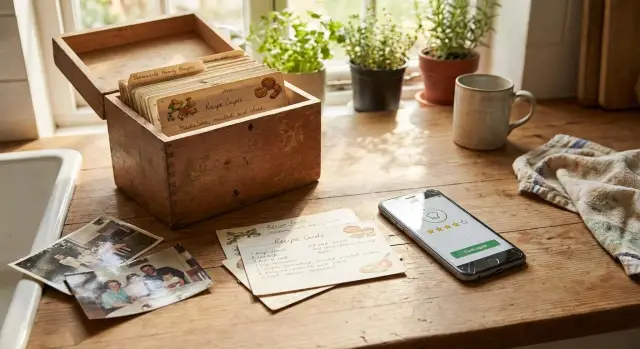
Why families forget the recipes they actually loved
Most families know the moment: someone says, “We should make that again,” everyone agrees, and then it vanishes. A month later it’s 5:30 pm, people are hungry, and nobody can remember what “that” was.
The issue isn’t your memory. It’s that the recipe isn’t saved in a way you can reuse when you need it. It ends up scattered across places you don’t check at dinnertime.
Recipes usually disappear in predictable ways. The link is buried in a group chat or a tab you closed. The screenshot has no name, no notes, and no clear steps. Someone tweaked the recipe, but the changes never got written down. Or it was “good,” but nobody captured who liked it and why.
For a family, “good enough to repeat” rarely means “best thing we ever ate.” It means it worked on a real weeknight: dinner landed on time, the kids ate enough, and cleanup didn’t feel like punishment. Bonus points if it was flexible, like swapping chicken for tofu or skipping the spicy step without ruining the dish.
That’s why a recipe box with simple family ratings helps. A quick score turns fuzzy memories into a clear signal. When you can see “4 stars, everyone ate it, 30 minutes,” dinner stops being a daily debate.
Ratings also cut decision stress. Instead of scanning 40 half-saved recipes, you pull up your proven winners and pick the one that matches tonight’s energy level. Less time choosing, more time cooking something that’s already worked.
What a recipe box with ratings looks like in real life
A recipe box with ratings isn’t a fancy archive. It’s a small, lived-in home base for meals you’ve actually cooked and would happily repeat.
You don’t need to force every recipe into a perfect format. Most families pull from a mix of cookbooks, friends’ texts, screenshots, and websites. The goal is one place that points to the recipe and tells you, quickly, whether it’s worth making again.
A useful entry usually includes four things: a photo of the finished dish, the recipe itself (link, scan, screenshot, or typed steps), a few notes that only your household needs, and a rating with a short reason.
“Family ratings” aren’t restaurant reviews. You’re not scoring plating or authenticity. You’re answering one question: did people actually eat it, and would they be glad to see it again?
Example: you try a new taco recipe on Friday. One person says “too spicy,” one says “make it again,” and one asks for seconds. You record it as 4/5 with the note “halve chili, add extra lime.” Next week, you can choose it without guessing because the feedback is already there.
Keep it realistic at the start. Aim for 10 solid, repeatable recipes before you worry about categories, tags, or perfect organization.
What to save with each recipe (so it’s usable later)
A recipe only earns a spot if you can repeat it without re-reading a long story or guessing what you did last time. Save it for your future self: quick to scan, hard to misunderstand.
Start with the basics:
- A clear recipe name
- Where it came from (grandma, a cookbook page, a friend’s text)
- The version you trust (especially if you changed anything)
If you adjusted the recipe, write the changes where you’ll see them. “Less sugar,” “extra garlic,” “swap soy sauce brand,” or “skip step 6” is the stuff that matters next time.
Then capture the timing you actually lived. Online estimates are often optimistic, especially on busy weeknights. Note your real prep time, cook time, and any hidden time like “marinade 2 hours” or “rest 10 minutes.” This is what tells you if it fits a Tuesday.
A simple difficulty note also helps, as long as it matches your household:
- Easy: can do while helping with homework
- Medium: needs focus, but not stressful
- Weekend project: worth it, but not on a rushed day
Diet and “family fit” notes beat perfect labels. Mark what you’ll care about later: spicy, kid-friendly, dairy-free, freezer-friendly, or “messy to eat.” One line is enough, like: “Mild if you skip chili flakes. Freezes well in single portions.”
Finally, save one photo that shows what “success” looked like. It doesn’t need to be pretty. A quick shot of the finished plate (or the pan before serving) helps you remember color, thickness, and portion size. That single image often makes the whole system feel usable.
Set up a simple system in 20 minutes
A recipe box only works if it’s easy on a normal weeknight. The goal isn’t a perfect archive. It’s a fast way to answer, “What should we cook again?”
First, pick one home for everything. A notes app is quick. A spreadsheet is great if you like sorting. A binder works if you love paper. A shared app can be best if multiple people cook. The choice matters less than this rule: don’t split your recipes across five places.
A basic setup that won’t feel like homework:
- Choose one storage place and make a single folder or tab called “Family Recipes.”
- Create a copy-and-paste template: name, source, servings, time, ingredients, steps, photo, notes.
- Agree on one rating scale (1-5) and a small tag set everyone understands.
- Decide how edits work so you don’t create duplicates.
- Add a weekly 10-minute reset to rate new recipes and fix messy entries.
Keep the rules small. If saving a recipe takes more than a minute, people stop saving it.
Concrete example: after taco night, someone snaps one photo, rates it 4/5, and adds “double the lime” in notes. Next month, you won’t wonder why it tasted better last time.
A repeatable flow: from “new recipe” to “cook again”
A recipe becomes part of your rotation when you can find it quickly and remember what made it work. Treat each new dish like a tiny experiment and record results while they’re fresh.
-
Save it right away. Bookmark it, screenshot it, or take a photo of the cookbook page. Waiting until “later” is how it disappears.
-
Cook once and record what actually happened. Capture substitutions, timing changes, and anything you skipped. The little adjustments are usually the reason the dish worked.
-
Rate it right after dinner. This is when people still have an opinion.
-
Add a few practical tags. Keep it to 2-4, based on how you’ll use it (weeknight, freezer-friendly, leftovers, budget).
-
File it where you’ll browse. Use categories you naturally think in: Chicken, Pasta, Soups, Breakfast. If your family’s style is “Mexican-ish,” that’s fine too.
Example: you try sheet-pan fajitas on Tuesday. You note “add extra peppers, cut chicken smaller, bake 5 minutes less.” After dinner, everyone rates it. You tag it “weeknight” and “lunch leftovers,” then store it under Chicken. Next week, when you need something easy, the recipe is there with the tweaks already written down.
A rating method that works for picky eaters
Fast feedback beats perfect feedback. Aim for one overall score and one short note. If it takes more than 20 seconds, people will skip it or argue about it.
A 5-star score plus a plain-language note is enough: “too spicy,” “great sauce,” “needed more salt,” “kids ate seconds.” Those notes matter more than a long review when you’re deciding what to cook on a busy night.
When tastes differ, capture separate opinions without turning dinner into a debate. A quick split like “Adults: 4/5, Kids: 2/5” (or initials) tells you what happened.
A simple rating template
After each meal, record:
- Overall: 1-5 stars
- Outcome: Repeat / Try again with changes / Not for us
- Picky-eater check: “Ate it” or “Picked at it”
- Effort: Low / Medium / High
- Leftovers: “Great next day” or “Didn’t hold up”
Add one line for your next change. Example: “Try again with changes: use mild salsa and serve toppings on the side.” That one tweak often turns a 3-star meal into a repeat.
What makes your reliable rotation
Write down a rule so decisions stay easy. One example: “Reliable rotation = 4 stars overall, at least one kid at 3+ stars, and effort not High.”
If a recipe meets the rule twice, it earns a spot on your short list of safe dinners.
Photos that help you recreate the win
A good photo doesn’t need perfect styling. It just needs to answer one question later: “What did this look like when everyone liked it?”
Take 10 seconds when the meal hits the table and snap one clear shot in decent light. Get the whole plate or bowl in frame so you can see portion size, sauce level, and how browned (or not) everything was.
Photos also save you from repeat mistakes. If a specific jar of sauce mattered, take a quick package photo before it goes back in the pantry. If the recipe behaved oddly, add a tiny note like “baked 5 minutes less, it dried out” or “shrunk a lot.”
If you want a simple approach, keep:
- One plated photo (the only one you keep long-term)
- One brand shot for any key ingredient
- One quick photo of your own notes or tweaks
Archive or delete the extras right away. One strong photo per recipe keeps browsing easy and prevents your camera roll from becoming the recipe box.
Turn ratings into weekly meal plans
Ratings only matter if they change what you cook on Tuesday night. The easiest move is to turn them into a short, repeatable plan.
Start by building a seasonal “Top 10” that fits your life right now: your highest-rated dinners that are actually realistic with your current schedule.
Then plan by tags, not memory. A few tags do a lot of work: 30-minute, slow cooker, freezer-friendly, budget, kid-approved.
When you plan the week, pick 4-5 meals from the Top 10 and add one new experiment. That keeps variety without turning every night into a gamble.
Ratings also end the “I don’t want that” loop. If two meals are competing, choose the one with the better average rating or fewer low scores from picky eaters. You’re not arguing in the moment. You’re using what your family already told you.
Example: one month of dinners with a simple rating habit
A family of four tries this system. Two people like heat, two don’t. Their rule is simple: right after dinner, everyone gives a 1-5 score and one short note.
Week 1 is taco night. They make one base filling, then split it into three versions: mild (no chili), medium (a little chili), and spicy (extra chili plus hot sauce). Each version gets its own line, because they’re rating what they actually ate.
They save what matters:
- One photo of the finished plate
- A substitution note: “Used ground turkey, added extra lime”
- A next-time tweak: “Double the corn, toast tortillas 30 sec per side”
Scores come in: Mild 4, Medium 5, Spicy 3 (tastes great, but too hot for one kid). Next week’s plan changes immediately: Medium becomes the default, with spicy add-ons at the table.
Over the month they cook 12 dinners using the same habit. By week 3, meal planning is easier because the ratings start making choices for them. Four- and five-star meals return. Three-star meals only return with a clear change. One- and two-star meals get retired.
Common mistakes that make recipe boxes fail
Most recipe boxes fail because they ask too much from you on a normal weeknight. A good system should feel like a tiny habit, not a second job.
The usual traps:
- Making it too detailed (too many fields, strict rules you can’t keep)
- Rating days later, when everyone’s forgotten
- Saving only a link, with no notes about what you changed
- Letting tags multiply until nothing is searchable
- Mixing “tasted great” with “not worth it on a Tuesday”
A common scenario: you try a new chicken bowl, everyone likes it, you save the link, and you plan to rate it later. Two weeks pass. You open it again and can’t remember if you used extra sauce, skipped the onions, or doubled the rice. The recipe becomes “maybe good?” and never makes it into rotation.
Keep it light, fast, and honest:
- Rate the same night (even “3/5” counts).
- Add one sentence: “Kids ate it; next time less chili.”
- Stick to a small tag set.
If you can, separate two scores: one for taste and one for “weeknight doable.” That split is what turns saved recipes into meals you actually repeat.
Quick checklist and next steps
A recipe box works when it stays simple. You’re not trying to save everything. You’re saving meals your family wants again, with enough detail to repeat the win.
Three checks that keep things from turning into a messy folder:
- One home: everything lives in one place.
- One template: you save the same basics each time.
- One rating scale: 1-5, used consistently.
Then keep a light routine. Right after dinner, this takes two minutes:
- Capture: save the recipe and one photo.
- Note: write what you changed and what you’d do next time.
- Rate: a quick score and one short reason.
- Tag: 1-2 tags you’ll actually use.
Build a short “Reliable Rotation” list of 10-20 meals that regularly score well, and review it monthly.
If your family wants something more tailored than notes or spreadsheets, you can build a private shared cookbook app on Koder.ai using a chat-based workflow, then export the code later if you want to fully own it.
FAQ
What’s the simplest way to start a family recipe box without overthinking it?
Start by saving the recipe the same day you cook it, then add a simple rating and one line about what you’d change next time. If you wait a week, you’ll forget the details that made it work.
How should we rate recipes so the ratings actually help on busy weeknights?
Use a single 1–5 score based on one question: would we be happy to eat this again? Add a short reason like “too spicy” or “everyone ate it,” because the note is what makes the score useful later.
What details matter most to save after we tweak a recipe?
Write down what you changed in plain language right next to the recipe, not in a separate note. Things like “half the chili,” “double the lime,” or “skip step 6” are exactly what you’ll need when you’re trying to repeat the win.
Should we track the “real” cook time or trust the website/cookbook estimate?
Record the time you actually experienced, including hidden time like marinating or resting. A recipe that tastes great but takes 70 minutes when you only have 30 isn’t a weeknight option, and your future self needs that truth.
How do we handle picky eaters when everyone rates the same meal differently?
Store both opinions without arguing by splitting the rating, like “Adults: 4/5, Kids: 2/5,” or using initials. That way you can still make it again with a small adjustment, like serving spicy toppings on the side.
What kind of photos are actually worth saving with a recipe?
Keep one photo that shows what success looked like on your table, even if it isn’t pretty. If one ingredient brand or sauce matters, take a quick package photo too, so you can buy the same thing next time.
Why do recipe boxes fail even when people are motivated at first?
Most systems fail when saving a recipe feels like homework. Keep the template short, rate the same night, and limit tags to a small set you’ll really browse, so it stays faster than scrolling random links.
Is it worth keeping separate scores for taste and effort?
Use two quick signals: a taste rating and a “weeknight doable” note (low/medium/high effort). A meal can taste amazing but still be a weekend project, and separating those keeps your rotation realistic.
How do we turn these ratings into an easier weekly meal plan?
Build a short list of your highest-rated realistic dinners (like a seasonal Top 10), then pick 4–5 from that list plus one new experiment each week. This keeps variety without turning every night into a gamble.
Can we build our own shared recipe box app instead of using notes or a spreadsheet?
Yes, if you want a private shared cookbook app that your household can use from one place and shape to your own template. On Koder.ai you can describe what you want in chat, build it for web or mobile, and export the source code later if you want full ownership.