

Redis for Your Applications: Patterns, Pitfalls, and Tips
Learn practical ways to use Redis in your apps: caching, sessions, queues, pub/sub, and rate limiting—plus scaling, persistence, monitoring, and pitfalls.
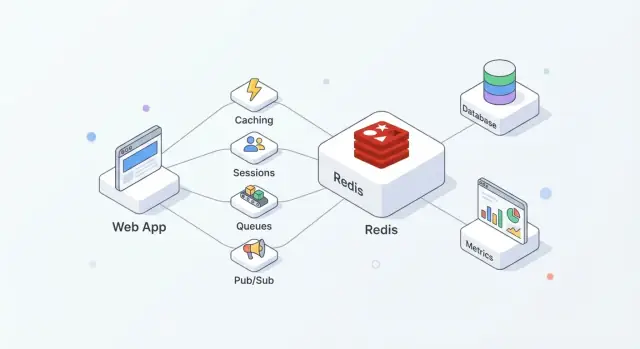
What Redis Does for Modern Applications
Redis is an in-memory data store often used as a shared “fast layer” for applications. Teams like it because it’s straightforward to adopt, extremely quick for common operations, and flexible enough to handle more than one job (cache, sessions, counters, queues, pub/sub) without introducing a brand-new system for each.
In practice, Redis works best when you treat it as speed + coordination, while your primary database remains the source of truth.
Where Redis fits in a typical architecture
A common setup looks like this:
- Database: durable, authoritative data (orders, users, invoices)
- Redis: fast access and shared ephemeral state (cached pages, session tokens, rate-limit counters)
- App: decides what goes where and when to refresh, invalidate, or rebuild
This split keeps your database focused on correctness and durability, while Redis absorbs high-frequency reads/writes that would otherwise drive up latency or load.
What you usually get out of Redis
Used well, Redis tends to deliver a few practical outcomes:
- Faster reads: serve frequently requested data from memory instead of hitting the database every time.
- Smoother traffic spikes: caching and lightweight counters help you survive bursts without your database becoming the bottleneck.
- Simpler coordination: multiple app servers can share ephemeral state (sessions, locks, deduplication keys) rather than rebuilding that logic per instance.
When Redis is not the right tool
Redis is not a replacement for a primary database. If you need complex queries, long-term storage guarantees, or analytics-style reporting, your database is still the right home.
Also, don’t assume Redis is “durable by default.” If losing even a few seconds of data is unacceptable, you’ll need careful persistence settings—or a different system—based on your real recovery requirements.
Redis Basics You Should Know Before Implementing
Redis is often described as a “key-value store,” but it’s more useful to think of it as a very fast server that can hold and manipulate small pieces of data by name (the key). That model encourages predictable access patterns: you typically know exactly what you want (a session, a cached page, a counter), and Redis can fetch or update it in a single round trip.
Why it’s fast: memory first
Redis keeps data in RAM, which is why it can respond in microseconds to low milliseconds. The trade-off is that RAM is limited and more expensive than disk.
Decide early whether Redis is:
- Only a performance layer (pure cache), or
- Part of the state path (sessions, queues), where restart behavior and persistence settings matter
Redis can persist data to disk (RDB snapshots and/or AOF append-only logs), but persistence adds write overhead and forces durability choices (for example, “fast but may lose a second” vs “slower but safer”). Treat persistence as a dial you set based on business impact, not a box you automatically tick.
Single-threaded doesn’t mean slow
Redis executes commands mostly in a single thread, which sounds limiting until you remember two things: operations are typically small, and there’s no locking overhead between multiple worker threads. As long as you avoid expensive commands and oversized payloads, this model can be extremely efficient under high concurrency.
Clients, connections, and request patterns
Your app talks to Redis over TCP using client libraries. Use connection pooling, keep requests small, and prefer batching/pipelining when you need multiple operations.
Plan for timeouts and retries: Redis is fast, but networks aren’t, and your application should degrade gracefully when Redis is busy or temporarily unavailable.
If you’re building a new service and want to standardize these basics quickly, a platform like Koder.ai can help you scaffold a React + Go + PostgreSQL application and then add Redis-backed features (caching, sessions, rate limiting) through a chat-driven workflow—while still letting you export the source code and run it wherever you need.
Caching Patterns That Work in Real Apps
Caching only helps when it has clear ownership: who fills it, who invalidates it, and what “good enough” freshness means.
The cache-aside pattern (the default for most apps)
Cache-aside means your application—not Redis—controls reads and writes.
Typical flow:
- Read: Look up the item in Redis.
- Hit: Return it immediately.
- Miss: Fetch from the primary data source (database, API, service).
- Populate: Store the result in Redis with a TTL.
- Return: Respond to the caller.
Redis is a fast key-value store; your app decides how to serialize, version, and expire entries.
TTLs: choosing expiration without surprising users
A TTL is a product decision as much as a technical one. Short TTLs reduce staleness but increase database load; long TTLs save work but risk outdated results.
Practical tips:
- Match the data’s natural refresh rate (e.g., pricing vs. profile photo).
- Use versioned keys for “schema changes” (e.g.,
user:v3:123) so old cached shapes don’t break new code. - Handle stale data intentionally: for some views, slightly stale content is fine; for others (inventory, auth), it isn’t.
Avoiding cache stampede
When a hot key expires, many requests can miss at once.
Common defenses:
- Request coalescing: let only one request rebuild the value while others wait or serve the previous value.
- TTL jitter: add small randomness so many keys don’t expire simultaneously.
- Soft TTL: treat a value as “stale but usable” briefly while a background refresh updates Redis.
What to cache (and what to skip)
Good candidates include API responses, expensive query results, and computed objects (recommendations, aggregations). Caching full HTML pages can work, but be careful with personalization and permissions—cache fragments when user-specific logic is involved.
Session Storage and Authentication Workflows
Redis is a practical place to keep short-lived login state: session IDs, refresh-token metadata, and “remember this device” flags. The goal is to make authentication fast while keeping session lifetime and revocation under tight control.
Using Redis for user sessions
A common pattern is: your app issues a random session ID, stores a compact record in Redis, and returns the ID to the browser as an HTTP-only cookie. On each request, you look up the session key and attach the user identity and permissions to the request context.
Redis works well here because session reads are frequent, and session expiration is built-in.
Key design and TTL management
Design keys so they’re easy to scan and revoke:
sess:{sessionId}→ session payload (userId, issuedAt, deviceId)user:sessions:{userId}→ a Set of active session IDs (optional, for “log out everywhere”)
Use a TTL on sess:{sessionId} that matches your session lifetime. If you rotate sessions (recommended), create a new session ID and delete the old one immediately.
Be careful with “sliding expiration” (extending TTL on every request): it can keep sessions alive indefinitely for heavy users. A safer compromise is extending TTL only when it’s close to expiring.
Revocation and logout across devices
To log out a single device, delete sess:{sessionId}.
To log out across devices, either:
- delete all session IDs found in
user:sessions:{userId}, or - keep a
user:revoked_after:{userId}timestamp and treat any session issued before it as invalid
The timestamp method avoids large fan-out deletes.
Privacy and security considerations
Store the minimum needed in Redis—prefer IDs over personal data. Never store raw passwords or long-lived secrets. If you must store token-related data, store hashes and use tight TTLs.
Limit who can connect to Redis, require authentication, and keep session IDs high-entropy to prevent guessing attacks.
Rate Limiting and Abuse Prevention
Rate limiting is where Redis shines: it’s fast, shared across your app instances, and offers atomic operations that keep counters consistent under heavy traffic. It’s useful for protecting login endpoints, expensive searches, password reset flows, and any API that can be scraped or brute-forced.
Common rate-limiting models
Fixed window is the simplest: “100 requests per minute.” You count requests in the current minute bucket. It’s easy, but can allow bursts at the boundary (e.g., 100 at 12:00:59 and 100 at 12:01:00).
Sliding window smooths boundaries by looking at the last N seconds/minutes rather than the current bucket. It’s fairer, but typically costs more (you may need sorted sets or more bookkeeping).
Token bucket is great for burst handling. Users “earn” tokens over time up to a cap; each request spends one token. This allows short bursts while still enforcing an average rate.
Safe building blocks: INCR/EXPIRE and atomicity
A common fixed-window pattern is:
INCR keyto increment a counterEXPIRE key window_secondsto set/reset the TTL
The trick is doing it safely. If you run INCR and EXPIRE as separate calls, a crash between them can create keys that never expire.
Safer approaches include:
- Use a Lua script to perform
INCRand setEXPIREonly when the counter is first created. - Or use
SET key 1 EX <ttl> NXfor initialization, thenINCRafter (often still wrapped in a script to avoid races).
Atomic operations matter most when traffic spikes: without them, two requests can “see” the same remaining quota and both pass.
Scoping: per-user, per-IP, per-route (and bursts)
Most apps need multiple layers:
- Per-user limits for authenticated calls (e.g.,
rl:user:{userId}:{route}) - Per-IP limits for anonymous or pre-auth endpoints (e.g., sign-in attempts)
- Per-route limits to protect hot spots (search, exports, reporting)
For bursty endpoints, token bucket (or a generous fixed window plus a short “burst” window) helps avoid punishing legitimate spikes like page loads or mobile reconnects.
When Redis is unavailable: fail-open vs fail-closed
Decide upfront what “safe” means:
- Fail-open: allow requests if Redis can’t be reached. Better uptime and user experience, but weaker abuse protection.
- Fail-closed: deny requests when Redis is down. Stronger protection, but risks taking your app partially offline.
A common compromise is fail-open for low-risk routes and fail-closed for sensitive ones (login, password reset, OTP), with monitoring so you notice the moment rate limiting stops working.
Queues and Background Jobs with Redis
Redis can power background jobs when you need a lightweight queue for sending emails, resizing images, syncing data, or running periodic tasks. The key is choosing the right data structure and setting clear rules for retries and failure handling.
Lists, sorted sets, and streams: which to use and why
Lists are the simplest queue: producers LPUSH, workers BRPOP. They’re easy, but you’ll need extra logic for “in-flight” jobs, retries, and visibility timeouts.
Sorted sets shine when scheduling matters. Use the score as a timestamp (or priority), and workers fetch the next due job. This fits delayed jobs and priority queues.
Streams are often the best default for durable work distribution. They support consumer groups, keep a history, and let multiple workers coordinate without inventing your own “processing list.”
Acknowledgements, retries, and dead-letter handling
With Streams consumer groups, a worker reads a message and later ACKs it. If a worker crashes, the message stays pending and can be claimed by another worker.
For retries, track attempt counts (in the message payload or a side key) and apply exponential backoff (often via a sorted set “retry schedule”). After a max attempt limit, move the job to a dead-letter queue (another stream or list) for manual review.
Idempotency strategies for workers
Assume jobs can run twice. Make handlers idempotent by:
- Using an idempotency key (e.g.,
job:{id}:done) withSET ... NXbefore side effects - Designing operations as upserts, not “create blindly”
- Recording external request IDs when calling third-party APIs
Keeping jobs small and using backpressure
Keep payloads small (store big data elsewhere and pass references). Add backpressure by limiting queue length, slowing producers when lag grows, and scaling workers based on pending depth and processing time.
Pub/Sub Messaging and Event Distribution
Redis Pub/Sub is the simplest way to broadcast events: publishers send a message to a channel, and every connected subscriber gets it immediately. There’s no polling—just a lightweight “push” that works well for real-time updates.
Common uses that fit Pub/Sub well
Pub/Sub shines when you care about speed and fan-out more than guaranteed delivery:
- User-facing notifications ("your report is ready")
- Live UI updates (presence, typing indicators, dashboards)
- Internal event fan-out (one event triggers multiple services)
A useful mental model: Pub/Sub is like a radio station. Anyone tuned in hears the broadcast, but nobody gets a recording automatically.
The key limits to plan for
Pub/Sub has important trade-offs:
- No persistence: if nobody is subscribed at publish time, the message is gone.
- Subscriber reliability: if a subscriber disconnects or is overloaded, it can miss messages.
- No replay or acknowledgements: you can’t ask Redis to “deliver until confirmed.”
Because of this, Pub/Sub is a poor fit for workflows where every event must be processed (exactly once—or even at least once).
When to prefer Redis Streams
If you need durability, retries, consumer groups, or backpressure handling, Redis Streams are usually a better choice. Streams let you store events, process them with acknowledgements, and recover after restarts—much closer to a lightweight message queue.
Patterns for multi-instance apps
In real deployments you’ll have multiple app instances subscribing. A few practical tips:
- Namespace channels to avoid collisions:
app:{env}:{domain}:{event}(e.g.,shop:prod:orders:created). - Separate broadcast vs. targeted channels: broadcast to
notifications:global, and target users withnotifications:user:{id}. - Keep payloads small and self-contained: include an ID and minimal metadata; fetch details elsewhere only if needed.
Used this way, Pub/Sub is a fast event “signal,” while Streams (or another queue) handles events you can’t afford to lose.
Picking the Right Redis Data Structures
Choosing a Redis data structure isn’t just about “what works”—it affects memory use, query speed, and how simple your code stays over time. A good rule is to pick the structure that matches the questions you’ll ask later (read patterns), not just how you store the data today.
Quick selection guide (strings, hashes, sets, sorted sets)
- Strings: best for single values (JSON blob, feature flag, cached HTML). Also great for atomic counters with
INCR/DECR. - Hashes: best for “one object with fields” (user profile fields, cart totals). Ideal when you frequently update individual properties.
- Sets: best for uniqueness and membership checks (has user already claimed coupon X?). Fast
SISMEMBERand easy set operations. - Sorted sets (ZSETs): best for ranked data and “top N” queries (leaderboards, priority lists, time-based scoring).
Atomic updates, counters, and leaderboards
Redis operations are atomic at the command level, so you can safely increment counters without race conditions. Page views and rate-limit counters typically use strings with INCR plus an expiry.
Leaderboards are where sorted sets shine: you can update scores (ZINCRBY) and fetch the top players (ZREVRANGE) efficiently, without scanning all entries.
Using hashes to reduce key count and improve organization
If you create many keys like user:123:name, user:123:email, user:123:plan, you multiply metadata overhead and make key management harder.
A hash like user:123 with fields (name, email, plan) keeps related data together and typically reduces key count. It also makes partial updates straightforward (update one field rather than rewriting an entire JSON string).
Memory considerations that affect your bill
- Many small keys can cost more memory than expected due to per-key overhead.
- Hashes are often more memory-efficient for small-to-medium objects stored under a single key.
- Sorted sets are powerful but can be heavier than sets/strings—use them when ranking or score-based queries are truly needed.
When in doubt, model a small sample and measure memory usage before committing to a structure for high-volume data.
Persistence, Replication, and Data Safety
Redis is often described as “in-memory,” but you still get choices for what happens when a node restarts, a disk fills up, or a server disappears. The right setup depends on how much data you can afford to lose and how quickly you need to recover.
RDB vs AOF: what each provides
RDB snapshots save a point-in-time dump of your dataset. They’re compact and fast to load on startup, which can make restarts quicker. The trade-off is that you can lose the most recent writes since the last snapshot.
AOF (append-only file) logs write operations as they happen. This typically reduces potential data loss because changes are recorded more continuously. AOF files can grow larger, and replays during startup can take longer—though Redis can rewrite/compact the AOF to keep it manageable.
Many teams run both: snapshots for faster restarts, plus AOF for better write durability.
How persistence affects latency and restarts
Persistence isn’t free. Disk writes, AOF fsync policies, and background rewrite operations can add latency spikes if your storage is slow or saturated. On the other hand, persistence makes restarts less scary: with no persistence, an unplanned restart means an empty Redis.
Replication and failover goals
Replication keeps a copy (or copies) of data on replicas so you can fail over when the primary goes down. The goal is usually availability first, not perfect consistency. Under failure, replicas may be slightly behind, and a failover can lose the last acknowledged writes in some scenarios.
Define your acceptable data loss and recovery time
Before tuning anything, write down two numbers:
- Acceptable data loss (RPO): “We can lose up to X seconds/minutes of data.”
- Recovery time (RTO): “We must be back in Y seconds/minutes.”
Use those targets to pick RDB frequency, AOF settings, and whether you need replicas (and automated failover) for your Redis role—cache, session store, queue, or primary data store.
Scaling Redis: From Single Instance to Cluster
A single Redis node can take you surprisingly far: it’s simple to operate, easy to reason about, and often fast enough for many caching, session, or queue workloads.
Scaling becomes necessary when you hit hard limits—usually memory ceiling, CPU saturation, or a single node becoming a single point of failure you can’t accept.
When to move from one node to multiple nodes
Consider adding more nodes when one (or more) of these is true:
- Your dataset no longer fits in RAM with safe headroom.
- Latency spikes during peak traffic because the node is CPU-bound.
- You need higher availability than “restart and recover.”
- You have multiple workloads competing (e.g., cache + queues) and want isolation.
A practical first step is often separating workloads (two independent Redis instances) before jumping into a cluster.
Sharding and Redis Cluster in plain terms
Sharding means splitting your keys across multiple Redis nodes so each node stores only a portion of the data. Redis Cluster is Redis’s built-in way to do this automatically: the keyspace is divided into slots, and each node owns some of those slots.
The win is more total memory and more aggregate throughput. The tradeoff is added complexity: multi-key operations become constrained (keys must be on the same shard), and troubleshooting involves more moving parts.
Hot keys and uneven traffic distribution
Even with “even” sharding, real traffic can be lopsided. A single popular key (a “hot key”) can overload one node while others sit idle.
Mitigations include adding short TTLs with jitter, splitting the value across multiple keys (key hashing), or redesigning access patterns so reads spread out.
Client considerations: cluster-aware drivers and routing
A Redis Cluster requires a cluster-aware client that can discover the topology, route requests to the right node, and follow redirections when slots move.
Before migrating, confirm:
- Your language driver fully supports Redis Cluster.
- Your connection pooling strategy works with multiple nodes.
- Your code avoids multi-key commands across different shards (or uses hash tags to keep related keys together).
Scaling works best when it’s a planned evolution: validate with load tests, instrument key latency, and migrate traffic gradually rather than flipping everything at once.
Security Essentials for Redis Deployments
Redis is often treated as “internal plumbing,” which is exactly why it’s a frequent target: a single exposed port can turn into a full data leak or an attacker-controlled cache. Assume Redis is sensitive infrastructure, even if you only store “temporary” data.
Authentication and access control
Start by enabling authentication and using ACLs (Redis 6+). ACLs let you:
- create separate users for apps, workers, and admins
- restrict commands (e.g., allow GET/SET but deny CONFIG)
- limit keys by prefix (useful for multi-tenant setups)
Avoid sharing one password across every component. Instead, issue per-service credentials and keep permissions narrow.
Network isolation and TLS
The most effective control is not being reachable. Bind Redis to a private interface, place it on a private subnet, and restrict inbound traffic with security groups/firewalls to only the services that need it.
Use TLS when Redis traffic crosses host boundaries you don’t fully control (multi-AZ, shared networks, Kubernetes nodes, or hybrid environments). TLS prevents sniffing and credential theft, and it’s worth the small overhead for sessions, tokens, or any user-related data.
Dangerous commands and misconfiguration
Lock down commands that can cause major damage if abused. Common examples to disable or restrict via ACLs: FLUSHALL, FLUSHDB, CONFIG, SAVE, DEBUG, and EVAL (or at least control scripting carefully). Also protect the rename-command approach with care—ACLs are usually clearer and easier to audit.
Secrets handling and rotation
Store Redis credentials in your secrets manager (not in code or container images), and plan for rotation. Rotation is easiest when clients can reload credentials without a redeploy, or when you support two valid credentials during a transition window.
If you want a practical checklist, keep one in your runbooks alongside your /blog/monitoring-troubleshooting-redis notes.
Monitoring, Troubleshooting, and Operational Hygiene
Redis often “feels fine”… until traffic shifts, memory creeps up, or a slow command stalls everything. A lightweight monitoring routine and a clear incident checklist prevent most surprises.
The metrics that actually matter
Start with a small set you can explain to anyone on the team:
- Memory used vs maxmemory: watch trend lines, not just current usage.
- Cache hit rate (if you’re caching): low hits usually mean poor key design, short TTLs, or bypassed reads.
- Latency: track p95/p99 command latency; spikes are more important than averages.
- Evictions: sustained evictions usually mean you’re under-provisioned or TTLs are wrong.
- Replication lag (if using replicas): rising lag can break read scaling and failover confidence.
Fast troubleshooting: slowlog and command stats
When something is “slow,” confirm it with Redis’s own tools:
- SLOWLOG helps identify expensive commands (often big range queries, large value fetches, or accidental full scans).
- Command stats (via INFO) show which commands dominate. A sudden jump in
KEYS,SMEMBERS, or largeLRANGEcalls is a common red flag.
If latency jumps while CPU looks fine, also consider network saturation, oversized payloads, or blocked clients.
Capacity planning and headroom
Plan for growth by keeping headroom (commonly 20–30% free memory) and revisiting assumptions after launches or feature flags. Treat “steady evictions” as an outage, not a warning.
A simple incident runbook
During an incident, check (in order): memory/evictions, latency, client connections, slowlog, replication lag, and recent deploys. Write down the top recurring causes and fix them permanently—alerts alone won’t.
If your team is iterating quickly, it can help to bake these operational expectations into your development workflow. For example, with Koder.ai’s planning mode and snapshots/rollback, you can prototype Redis-backed features (like caching or rate limiting), test them under load, and revert changes safely—while keeping the implementation in your codebase via source export.
FAQ
What is Redis actually used for in a modern app architecture?
Redis is best as a shared, in-memory “fast layer” for:
- caching expensive reads (API responses, query results)
- shared ephemeral state (sessions, locks, dedupe keys)
- high-frequency counters (rate limits, view counts)
- lightweight work distribution (queues/streams)
Use your primary database for durable, authoritative data and complex queries. Treat Redis as an accelerator and coordinator, not your system of record.
Is Redis a replacement for a primary database?
No. Redis can persist, but it’s not “durable by default.” If you need complex querying, strong durability guarantees, or analytics/reporting, keep that data in your primary database.
If losing even a few seconds of data is unacceptable, don’t assume Redis persistence settings will meet that need without careful configuration (or consider a different system for that workload).
How do I choose between RDB, AOF, or both for persistence?
Decide based on your acceptable data loss and restart behavior:
- RDB snapshots: faster restarts, but you can lose recent writes since the last snapshot.
- AOF: logs writes more continuously, usually less data loss, but can add overhead and longer replays on startup.
- Both: common compromise—snapshots for quicker recovery, AOF for better write durability.
Write down RPO/RTO targets first, then tune persistence to match them.
What is the cache-aside pattern and when should I use it?
In cache-aside, your app owns the logic:
- Read from Redis.
- On hit, return immediately.
- On miss, fetch from the database/API.
- Store the result in Redis with a TTL.
- Return the response.
This works well when your application can tolerate occasional misses and you have a clear plan for expiration/invalidation.
How should I choose TTLs without serving surprisingly stale data?
Pick TTLs based on user impact and backend load:
- Match the data’s natural refresh rate (prices often shorter than profile photos).
- Prefer versioned keys (e.g.,
user:v3:123) when the cached shape may change. - Be explicit about where staleness is acceptable (feeds) vs unacceptable (auth, inventory).
If you’re unsure, start shorter, measure database load, then adjust.
How do I prevent a cache stampede when a hot key expires?
Use one (or more) of these:
- Request coalescing: only one request rebuilds the value; others wait or serve stale.
- TTL jitter: randomize expirations so many keys don’t expire at the same time.
- Soft TTL: keep a “stale-but-usable” window while a background job refreshes.
These patterns prevent synchronized cache misses from overloading your database.
What’s a safe way to store sessions in Redis?
A common approach is:
- Store session data under
sess:{sessionId}with a TTL matching session lifetime. - Optionally keep
user:sessions:{userId}as a set of active session IDs for “log out everywhere.” - Store minimal data (IDs and timestamps), not personal details.
Avoid extending TTL on every request (“sliding expiration”) unless you control it (e.g., only extend when close to expiring).
How do I implement rate limiting correctly with Redis?
Use atomic updates so counters can’t get stuck or race:
- For fixed windows, don’t do
INCRandEXPIREas separate, unprotected calls. - Prefer a Lua script that increments and sets expiry only when the key is created.
Scope keys thoughtfully (per-user, per-IP, per-route), and decide upfront whether to fail-open or fail-closed when Redis is unavailable—especially for sensitive endpoints like login.
Should I use Lists, Sorted Sets, or Streams for background jobs?
Choose based on durability and operational needs:
- Lists (
LPUSH/BRPOP): simple, but you must build retries, in-flight tracking, and timeouts yourself. - Sorted sets: great for delayed jobs and priority scheduling (score as timestamp/priority).
- Streams: often best for work distribution—consumer groups, acknowledgements, pending messages, and recovery after crashes.
Keep job payloads small; store large blobs elsewhere and pass references.
When should I use Redis Pub/Sub vs Redis Streams?
Use Pub/Sub for fast, real-time broadcasts where missing messages is acceptable (presence, live dashboards). It has:
- no persistence
- no acknowledgements
- no replay
If every event must be processed, prefer Redis Streams for durability, consumer groups, retries, and backpressure. For operational hygiene, also lock Redis down with ACLs/network isolation and track latency/evictions; keep a runbook like /blog/monitoring-troubleshooting-redis.