

Salon & Barber Booking Websites: Layouts and Flows That Convert
Learn the best salon and barber website layouts and booking flows—what to place above the fold, how to reduce steps, and how to boost completed bookings.
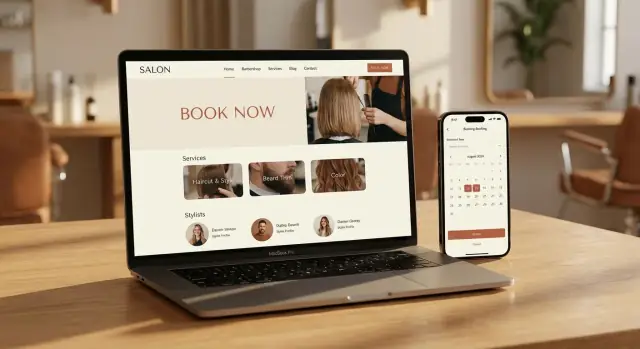
What Success Looks Like for a Booking Website
A booking website succeeds when a new visitor can understand what you offer, what it costs, and how to lock in a time—almost immediately. You don’t get a long attention window. In under 10 seconds, a good booking site should answer four questions:
- Where am I? (salon/barbershop name + location)
- What can I book? (top services)
- How much is it? (starting prices or clear ranges)
- What do I do next? (a prominent “Book now” button)
Primary goal: completed bookings (not page views)
Clicks and time-on-site don’t pay the rent—appointments do. A high-performing salon booking website or barber booking website reduces decision fatigue and keeps momentum: pick a service, pick a provider (or “first available”), pick a time, confirm. Anything that slows that sequence (hidden pricing, too many choices at once, unclear durations) lowers completion rates.
Secondary goals that still matter
Not everyone is ready to book right away. Your site should also make it effortless to:
- Call with one tap (especially on mobile)
- Get directions quickly (address, parking notes, map link)
- Rebook and repeat (remembered preferences, easy return to last service)
These support actions protect revenue you’d otherwise lose to hesitation.
Why visitors abandon booking
Most drop-offs come from avoidable friction:
- Pricing surprises or add-ons revealed late
- Confusing service names (“Full service” vs. what’s included)
- No obvious next step after choosing a service
- Limited availability shown too late (after entering details)
- Policy anxiety (cancellation fees, deposits) presented harshly or buried
Success is a booking flow that feels fair, clear, and fast.
Best-Practice Page Layout (At a Glance)
A high-converting salon or barbershop site keeps decisions simple. Visitors should instantly see what you offer, who they’ll book with, and how to lock in a time—without hunting.
Top navigation that matches how people shop
Keep the main nav short and predictable:
- Services (or “Menu”)
- Team
- Pricing (if separate from Services)
- Locations (if you have more than one)
- Gift Cards
- Contact
If you can’t fit everything, prioritize Services, Team, Locations, Contact and place Gift Cards in the header as a secondary link.
Above the fold: one job, one primary CTA
Your first screen should do three things:
- Say what you do in a clear headline (e.g., “Haircuts & Color in Downtown Austin”).
- Add trust cues near the headline: star rating, review count, “Same-day appointments,” “Free consultation,” or “Parking available.”
- Feature one primary CTA: Book.
Avoid competing buttons like “Learn More” and “Call” at equal weight. Make booking the default path.
Consistent button labels = fewer drop-offs
Pick one label and use it everywhere: “Book now” (recommended) or “Book appointment.” Don’t switch between variations across pages; small inconsistencies create hesitation.
Mobile: sticky booking without blocking content
On mobile, add a sticky “Book now” button that stays visible as users scroll. Make sure it doesn’t cover key content (like prices, service descriptions, or the map) and leaves enough space for cookie banners or chat widgets.
Homepage Above the Fold: What to Include
Above the fold is your decision zone. In a few seconds, people should understand (1) you’re the right place, and (2) booking is easy.
1) A clear hero message (who you serve + specialties)
Keep it to one sentence that names your audience and the outcome. Then add 1–2 specialties so people self-select quickly.
Examples:
- “Modern cuts and color for busy professionals in Downtown Austin.”
- “Skin fades, beard shaping, and kids’ cuts—walk-ins welcome, appointments preferred.”
Avoid vague lines like “Welcome to our salon.” Say what you do and for whom.
2) Two calls to action: Book + Call
Your primary button should be unmistakable: Book Now.
On mobile, add a secondary Call option (as a smaller button or link). Some clients will always prefer to confirm by phone—especially for corrections, weddings, or first-time visits.
3) Availability hints (only if accurate)
If your system can confidently show it, a small line under the CTA can reduce hesitation:
- “Next available today at 4:10 PM”
- “Openings this week”
Don’t guess. Wrong availability erodes trust and leads to abandoned bookings.
4) Trust cues that don’t clutter
Use one compact row of proof points—only what’s true and current:
- Star rating and review count
- “10+ years in business”
- A brief sanitation note (if it’s a real policy you follow)
Keep these lightweight so the page still feels like a fast path to booking, not a brochure.
Service Menu Pages That Reduce Confusion
A service menu page is where most booking friction starts: unclear names, missing prices, and “How long will this take?” uncertainty. The goal is simple—help someone recognize their service in seconds, understand the commitment, and start booking without hunting.
Use categories people already think in
Organize your menu into plain-language buckets like Haircut, Beard, Color, and Kids. Avoid clever internal names (“Signature Refresh”) unless you pair them with a clear label (“Signature Refresh (Haircut + Wash)”). If you offer both salon and barbershop services, keep categories consistent so returning clients can scan fast.
Put price and time where eyes go first
Every service card should show a starting price and a typical duration (e.g., “from $35 • ~30 min”). “From” protects you when the final total varies, while duration sets expectations and reduces back-and-forth.
If you need nuance, add one short line beneath (e.g., “Price varies by length/thickness”). Keep it brief; long descriptions slow decisions.
Add-ons without clutter
Add-ons work best when they’re optional and scannable—think checkboxes during booking or a tidy “Popular add-ons” row on the service card. Examples: shampoo, hot towel, hair design, deep conditioning. Avoid stacking too many options on the menu page; clients should choose the core service first.
Make booking a one-click next step
Each service card should have a clear action like Book this that jumps straight into the booking flow with that service pre-selected. If you also offer help choosing, add a secondary link like “Not sure? See FAQs” pointing to /faq, but keep the primary path focused on booking.
Stylist/Barber Profiles That Help People Choose
A great profile answers one question quickly: “Is this the right person for what I want?” If visitors have to guess, they bounce—or book at random and feel less confident.
What to show (and what to skip)
Start with clear, current photos. One friendly headshot builds trust; 2–4 examples of real work build confidence (cuts, fades, color, textured hair, beard shaping—whatever you actually offer). Keep images consistent in lighting and framing so comparisons feel fair.
Add specialties and the types of clients each stylist/barber serves. This helps people self-select without feeling judged. Examples: “short fades + line-ups,” “curly hair shaping,” “blonde color maintenance,” “kids’ cuts,” “low-maintenance bobs,” “beard design.”
Keep bios short—think 2–4 sentences. Include tone and approach (“detail-focused,” “quick and efficient,” “consultation-first”), not a full career history. Highlight certifications only if they’re verifiable and meaningful to clients (for example, licensed barber, certified color specialist). If you can’t confirm it, don’t feature it.
Availability that builds confidence
Showing a schedule or “next available” can reduce hesitation, but only if it stays accurate. Out-of-date availability hurts trust faster than having none.
A simple pattern:
- “Next available: Tue 3:30pm” (only if reliably synced)
- Otherwise, show typical working days (“In salon Tue–Sat”)
Make booking choices obvious
Give two clear options on every profile:
- First available (fastest path)
- Choose a stylist (for people who care who they see)
This supports both decision styles without adding extra steps—and helps more visitors commit to an appointment.
The Highest-Converting Booking Flow (Step-by-Step)
A booking flow should feel like a short, predictable checklist—not a form marathon. The highest-converting flows keep choices clear, reduce unnecessary decisions, and let people fix mistakes without starting over.
The 4–6 step flow to copy
-
Service: Start with what the client wants (e.g., “Men’s Cut,” “Root Touch-Up”). Keep names plain, show duration, and display the starting price.
-
Staff (optional): Let clients pick a stylist/barber or choose “No preference.”
- Make “No preference” the default.
- Use smart defaults: repeat their last booked staff member when available, or recommend “Next available.”
-
Time: Show the next few available slots immediately. If someone changes service or staff, refresh times without kicking them back to step one.
-
Details: Ask only what you need to complete the appointment: name + mobile/email. Save extra questions (“How did you hear about us?”) for after confirmation.
-
Confirm: Summarize everything in one place (service, staff, date/time, price range, location, policy highlights). Then confirm with one primary button.
Conversion-friendly mechanics
- Progress indicator (e.g., “Step 2 of 5”) so users know it’s short.
- Back button that preserves selections—changing one choice shouldn’t erase the rest.
- No account creation before confirmation. If you want accounts, offer it after booking: “Save your details for next time.”
This matches how people decide: service → (optional) person → time → finish.
Calendar and Time Selection That Feels Effortless
The calendar step is where many “almost bookings” die. Your goal is to make choosing a time feel quick: clear options, minimal scrolling, no surprises.
Make the picker fast (especially on mobile)
Use a date/time picker designed for thumbs: big tap targets, clear contrast, and no precision tapping. If someone needs to pinch-zoom to hit a time slot, they’ll abandon.
Keep the interface focused: show the next available days first, and let people expand to later weeks only if needed. If you offer durations (e.g., 30/45/60 minutes), show them before the time grid so the available slots update instantly.
Default to the nearest available slots
Avoid empty calendars that look broken or fully booked. Instead:
- Preselect the earliest available day and highlight the next 3–6 available times.
- If a day is unavailable, say why (“No openings for 90-min color today”) and suggest alternatives (“Try 60-min express” or “Next opening: Wed 11:30”).
- If you have waitlist functionality, offer it as a secondary option—not the main path.
Handle multiple locations and time zones clearly
If you have multiple branches, the time selector must repeat the chosen location (and staff member, if selected) in a sticky summary. Include the address preview so clients don’t book the right time at the wrong shop.
For time zones, be explicit: “All times shown in Pacific Time (Los Angeles).” This matters for tourists and remote gift-booking.
End with a confident confirmation
After a slot is chosen, the confirmation page should reduce second-guessing:
- Add to calendar (Google/Apple/ICS)
- Directions link
- Simple reschedule/cancel link (ideally from the confirmation screen and email)
Easy rescheduling prevents no-shows while keeping the booking completed today.
Client Details, Policies, and Payments (Without Friction)
This is where many bookings stall: the form suddenly feels like paperwork, and policies appear too late. The fix is simple—ask for less, explain more, and surface money rules before the final click.
Ask only what you need (and make it feel fair)
Keep the required fields to the minimum:
- Name
- Mobile phone or email
- Notes (optional)
If you need both phone and email, make one optional or explain the tradeoff clearly. Every extra required field increases abandonment—especially on mobile.
Say why you’re asking for a phone number
A short line under the field reduces hesitation and bad data:
Phone number (for appointment updates and last‑minute changes—no marketing texts)
That one sentence prevents fake numbers and reassures clients who don’t want spam.
Put policies and deposits before confirmation
Don’t hide deposits, cancellation windows, or late policies in a footer link. Show them right above the “Confirm booking” button so the client sees the rules before committing.
Keep it scannable:
- Deposit: $20 today (applies to your service)
- Cancellation: free up to 24 hours before
- No‑show: deposit is forfeited
If you support tipping or add-ons later, say so—surprises create support tickets.
Payments: reduce decisions, not options
If deposits are required, make the default path obvious (Apple Pay/Google Pay where possible). If payment is optional, keep it gentle: “Pay now to secure your slot (recommended)” instead of forcing a confusing choice.
Support guest checkout; offer accounts after
Let people book as a guest. After confirmation, invite them to create an account to “rebook in two taps, manage appointments, and save preferences.” Optional accounts convert better than mandatory accounts.
Mobile Booking UX: The Real Make-or-Break
Most clients book on their phone—often between errands, on a commute, or right after seeing your work on social. If the booking experience feels slow, cramped, or fiddly, they’ll quit and “do it later” (which usually means never).
Design for thumbs, not cursors
Mobile-first doesn’t mean smaller desktop. It means a layout that’s instantly readable and easy to tap.
Use comfortable font sizes, clear contrast, and generous spacing so service names and prices don’t blur together. Make primary actions (like Book now, Next, Confirm) large, consistent, and easy to reach with one thumb.
A simple rule: if someone can’t complete the flow while holding a coffee, it’s too hard.
Reduce typing to almost nothing
Typing is the biggest momentum-killer on mobile. Keep forms short and use the right input types so the phone helps the client:
- Enable autofill for name, email, and phone
- Use numeric keyboards for phone numbers and card fields
- Use date/time pickers where relevant (instead of free-text)
If you need extra details, consider asking after booking (in a confirmation page or follow-up message), not mid-flow.
Add “instant action” utilities
Mobile users expect quick access to the basics:
- Click-to-call for last-minute questions
- Maps/directions for first-time visitors
- A sticky bottom bar for Book, Call, and Directions (kept minimal)
These help clients commit without hunting through menus.
Speed is part of UX
A beautiful site that loads slowly still loses bookings. Compress images (especially large hero photos), avoid heavy sliders, and keep pages lean so the booking steps open quickly on cellular connections.
If you want a practical checklist that pairs well with this section, see /blog/accessibility-performance-tracking.
Trust Builders That Increase Completed Bookings
People don’t abandon bookings only because of price—they leave when they’re unsure what they’ll get, where to go, or what happens if plans change. The fastest way to raise completed appointments is to remove unknowns and replace them with proof and clarity.
Make the place feel real (and current)
Use real photos of the shop, team, and finished work whenever possible. A few authentic images beat a stock gallery because they answer the unspoken questions: “Is this my vibe?” and “Will I feel comfortable there?”
Keep branding consistent across the site—colors, tone of voice, and photography style. When the homepage, service pages, and booking steps all feel like the same business, visitors trust they won’t be bounced to a sketchy third-party experience.
Reduce arrival anxiety with practical details
Before someone commits, they want to know the logistics. Display your address and hours clearly, plus parking info (meters, lot, validation, bike parking) and any accessibility notes (step-free entry, elevator, quiet times if relevant).
If you have multiple locations or similar business names nearby, add quick “how to find us” guidance. It’s a small detail that prevents no-shows and last-minute cancellations.
Answer the “what if?” questions up front
A short, well-written FAQ near the booking entry point can stop hesitation. Include the policies and prep details clients actually worry about:
- Late and cancellation policy (in plain language)
- Walk-ins vs. appointments
- Kids policies (if applicable)
- Beard trims and what’s included
- Color prep (clean/dry hair, patch tests, timing expectations)
If you take deposits or card holds, explain why and what happens if they reschedule. Clarity feels fair—and fair feels safe.
Social proof that feels trustworthy
Feature a handful of recent reviews with first names/initials, and link out to the source when you can. Add “as seen on” or press only if it’s genuine. The goal is reassurance, not hype.
SEO for Salon & Barber Sites (Without Overdoing It)
SEO for a salon booking website or barber booking website should do one job: help nearby people find you and confidently book. That means clarity over cleverness—plain service names, accurate details, and pages that match what clients actually search.
Build location pages people (and Google) can understand
If you have more than one shop, create a separate page for each location with unique content (don’t copy/paste and swap the address). Include:
- Full address, phone, and hours (keep these consistent everywhere—site, Google Business Profile, social)
- A short “who we’re for” paragraph (e.g., fades, curly cuts, kids cuts, color)
- Parking/transit notes, accessibility info, and neighborhood cues
- A map embed and a clear link to reviews (for example, “Read reviews” pointing to your Google reviews URL)
This supports local intent searches and reduces wrong-location bookings.
Keep on-page SEO simple (but deliberate)
Use one primary phrase per page (e.g., “haircut in Austin” or “barber in Shoreditch”) naturally in the page title, main heading, and a couple of lines of body text. Avoid stuffing variations. Your service menu pricing page should focus on readable categories and clear durations—SEO works best when users can instantly confirm they found the right service.
Add internal links that help clients move forward, such as /pricing for transparent costs and /contact for directions and questions.
Add only the schema you can keep accurate
Structured data can help search engines interpret your business, but it must match reality:
- LocalBusiness for each location page (address, hours)
- Service for key offerings (haircut, beard trim, color)
- FAQ for real policy questions (cancellations, late arrivals)
If you change prices or policies often, update the page first—then the schema.
Accessibility, Performance, and Booking Funnel Tracking
A booking site only converts when everyone can use it—quickly, confidently, and without getting stuck. Accessibility and performance improvements often feel small, but they remove silent blockers that stop clients from finishing the appointment.
Accessibility basics (that directly affect bookings)
Start with the essentials that impact forms and calendars the most:
- Text contrast: Make sure service prices, policy notes, and disabled time slots are clearly readable. Low-contrast gray-on-white is a common reason people miss key info.
- Keyboard navigation: A client should be able to tab through the service list, stylist selection, date picker, and form fields without getting trapped.
- Clear labels (not just placeholders): “Phone” and “Email” should remain visible after typing. Labels also help screen readers and reduce form mistakes.
- Helpful error messages: If a field is wrong, say what to fix (“Phone number needs 10 digits”), not just “Invalid.”
- Alt text for meaningful images: If stylist photos are clickable choices, their alt text should identify the stylist (e.g., “Jordan — Fade specialist”). Decorative images can be empty alt.
Speed checks: keep the booking flow light
Performance is conversion. If the calendar loads slowly or the page jumps around, people abandon:
- Optimize images: Compress hero images and stylist photos; avoid uploading full-resolution camera files.
- Reduce heavy sliders and animations: They look nice but often delay the first interaction—especially on mobile.
- Limit pop-ups: If you use one (for promos or email capture), never show it during the booking steps.
Track funnel events (so you know what to fix)
Instead of only tracking “bookings completed,” track where people drop off:
- Booking start (clicked “Book now”)
- Step drop-off (service selection → stylist → time → details/payment)
- Confirmation (success page or confirmed event)
This makes issues obvious—like a specific service category causing exits, or the time-selection step failing on mobile.
If you’re iterating quickly (new service names, add-ons, deposit rules), a vibe-coding platform like Koder.ai can help you prototype and ship changes faster without a long dev cycle. Teams often use it to generate a React front end with a Go + PostgreSQL backend, test variants with snapshots/rollback, and export the source code when they’re ready to own the stack.
Simple pre-launch QA checklist
Before you promote the site, run an end-to-end test:
- Book an appointment on mobile and desktop (including with a slow connection).
- Verify confirmation: email/SMS, calendar invite (if used), and correct service/stylist/time.
- Test keyboard-only navigation through the booking flow.
- Trigger errors on purpose (blank required fields, invalid phone/email) to confirm messages are clear.
- Confirm tracking fires for start, each step, and confirmation.
These checks prevent the painful scenario where marketing works—but the booking funnel leaks.
FAQ
What’s the #1 metric of success for a salon or barbershop booking website?
Measure what matters:
- Completed bookings (overall conversion rate from visit → confirmation)
- Booking-start rate (clicks on “Book now”)
- Step-by-step drop-off (service → staff → time → details → confirm)
- Support actions that save bookings: tap-to-call, directions clicks, reschedule usage
Page views and time-on-site are secondary unless they correlate with more confirmed appointments.
What should a booking website communicate immediately to first-time visitors?
In the first 10 seconds, a new visitor should be able to answer:
- Where am I? (business name + location)
- What can I book? (top services)
- How much is it? (starting prices or clear ranges)
- What do I do next? (one obvious Book now button)
If any of these are unclear, you’re relying on visitors to “work for it,” and many won’t.
What top navigation items are best for booking-focused salon and barber sites?
Keep the main navigation short and aligned with how people shop:
- Services (or Menu)
- Team
- Pricing (if separate)
- Locations (if more than one)
- Gift Cards
- Contact
If you must cut items, keep Services, Team, Locations, Contact, and treat Gift Cards as a secondary header link.
What belongs above the fold on the homepage to maximize bookings?
Use one primary job: drive booking.
Include:
- A clear headline (what you do + neighborhood/city)
- 1 row of trust cues (rating, review count, “same-day,” parking)
- One primary CTA: Book now
- Optional secondary action on mobile: Call
Avoid giving “Learn more” equal visual weight to booking.
How should a service menu page be structured to reduce booking confusion?
Make each service instantly scannable:
- Plain-language categories (Haircut, Beard, Color, Kids)
- Clear service names (avoid vague “Full service”)
- Starting price + typical duration (e.g., “from $35 • ~30 min”)
- A direct action like Book this that pre-selects the service
If you need nuance, add one short line (e.g., “varies by length/thickness”)—not a long paragraph.
What should stylist/barber profiles include to help clients pick the right person?
Give visitors enough to choose confidently without turning profiles into essays:
- One friendly headshot + 2–4 real-work examples
- Specialties (e.g., fades, curly shaping, blonde maintenance)
- A short bio (2–4 sentences) focused on approach and who they’re best for
- Clear booking choices: First available and Choose a stylist
Only show certifications if they’re verifiable and meaningful to clients.
What’s the ideal step-by-step booking flow for salons and barbershops?
A high-converting flow feels like a short checklist:
- Service (name, duration, starting price)
- Staff (optional; include No preference and make it the default)
- Time (show next available slots immediately)
- Details (only name + phone/email; notes optional)
- Confirm (full summary + one final button)
Key mechanics:
- Progress indicator (e.g., Step 2 of 5)
- Back button that preserves choices
- No account creation before confirmation
How can the calendar/time picker reduce “almost bookings” that abandon?
Make time selection feel fast and predictable:
- Large tap targets and high contrast (thumb-friendly)
- Default to the earliest available day and highlight the next 3–6 times
- If nothing fits, explain why and suggest alternatives (shorter service, next opening)
- If multiple locations/time zones exist, repeat the chosen location/time zone clearly
After selection, reduce second-guessing with:
- Add-to-calendar (Google/Apple/ICS)
- Directions link
- Simple reschedule/cancel link
How should forms, deposits, and cancellation policies be presented without killing conversion?
Lower friction by asking for less and showing policies earlier:
- Require only what’s needed (name + phone/email)
- Add a one-line reassurance under phone/email (e.g., “for appointment updates—no marketing texts”)
- Show deposits/cancellation rules right above the final confirm button
Keep policy copy scannable:
- Deposit amount and how it applies
- Cancellation window
- No-show outcome
If you want accounts, offer them after booking (“Save details for next time”).
What are the most important mobile UX improvements for higher booking completion?
Focus on speed, tap-ability, and low typing:
- Sticky Book now button that doesn’t cover prices/maps
- Autofill-friendly fields and correct keyboards (numeric for phone/card)
- Minimal pop-ups (never during booking steps)
- Compressed images and lightweight pages so the calendar loads quickly
Also include quick utilities:
- Click-to-call
- Directions
- A minimal sticky bar for Book/Call/Directions (if it doesn’t block content)