

SAP Concur and Embedded Workflows: The Retention Engine
See how SAP Concur embeds travel and expense into daily processes, boosting adoption and renewals—and what SaaS teams can copy to raise retention.
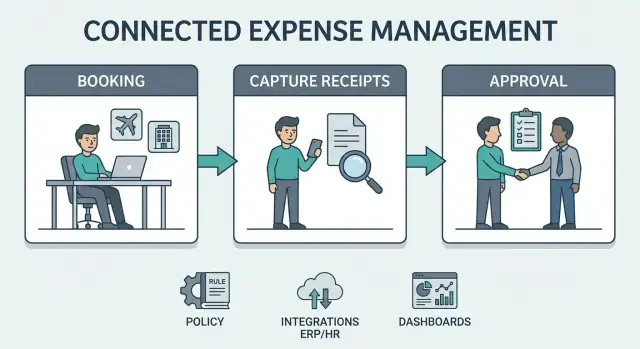
What “Process Embedding” Means for SaaS Retention
“Process embedding” is when a SaaS product isn’t just a tool people log into occasionally—it becomes the place where a recurring business process actually happens, end to end. The software starts to feel less like “an app” and more like “how we do this here.”
A plain-language definition
In practical terms, process embedding means the product:
- Captures the trigger (a trip is booked, a receipt is created, a charge appears on a card)
- Guides the steps (categorize, attach evidence, allocate, submit)
- Routes decisions (manager approval, finance review, audit checks)
- Produces outputs (reimbursement, accounting entries, reporting)
When those steps repeat every week across many employees, the software becomes part of the company’s operating rhythm.
Why Travel & Expense (T&E) is “sticky” by nature
T&E is a high-frequency, repeatable workflow: employees travel, spend money, submit expenses, and get reimbursed—over and over. Managers approve. Finance audits and closes the books. Leaders want visibility into spend and policy adherence.
That repetition matters for retention. When a system is used continuously across departments, renewal decisions are tied to whether the business can keep running without disruption—not just whether someone likes the UI.
What this article will (and won’t) do
This isn’t a set of hidden secrets about SAP Concur. It’s a set of transferable lessons: why embedded workflows retain better, what creates real switching costs, and how enterprise adoption compounds over time.
Scope: what “embedded” includes
We’ll focus on four pieces that drive retention in embedded workflows:
- Workflows (submission, approval, audit, reimbursement)
- Stakeholders (employees, managers, finance, procurement, leadership)
- Integrations (ERP, HR, corporate cards, travel booking)
- Retention drivers (habit, configuration, history, operational dependency)
The Travel & Expense Workflow: Many Steps, Many Touchpoints
Travel and expense isn’t a single task—it’s a chain of small decisions and handoffs that spans a full trip. When a product is present at each point, it stops being “an expense tool” and starts feeling like the way the company travels.
A typical end-to-end flow
Most organizations follow a path that looks like this:
- Plan trip → book
- Travel
- Capture spend (often daily)
- Submit an expense report
- Approve
- Reimburse
- Reconcile to finance systems
Each step is a touchpoint that pulls people back into the same system. Booking brings you in before the trip. Mobile capture keeps you there during the trip. Submission and approvals create a cadence after the trip. Reimbursement and reconciliation keep finance involved long after the traveler has moved on.
Why repeated touchpoints drive return visits
This workflow creates multiple “reasons to return” that aren’t dependent on interface preference. Employees return because they need to finish a report and get paid back. Managers return because approvals pile up and delays create noise. Finance returns because accurate coding, audit trails, and clean exports determine how painful month-end will be.
Over time, history accumulates: prior trips, frequent routes, preferred hotels, cost centers, project codes, and past exceptions. That context makes the product faster and more familiar—which quietly raises switching costs.
Where friction usually appears
The same moments tend to cause trouble across companies:
- Receipts: lost paper, unreadable photos, missing vendors
- Policy checks: out-of-policy hotels, alcohol limits, per diems, receipt thresholds
- Late approvals: managers traveling, unclear justification, back-and-forth edits
A workflow tool earns trust when it reduces these delays rather than adding steps.
Who’s involved (and why it matters)
T&E touches multiple stakeholders with different incentives:
- Employees want speed and reimbursement.
- Managers want quick approvals without risk.
- Finance/AP wants compliance, correct coding, and fewer exceptions.
- Travel admins want control over policy and suppliers.
When a single workflow connects all of them, renewals are influenced by the whole organization—not just individual users.
Policy Built Into the Flow: Compliance Without Extra Work
One reason SAP Concur tends to “stick” is that it doesn’t treat compliance as a separate task. Instead, travel and expense policy is encoded into the steps employees already take—booking, submitting, approving, and reimbursing.
Fewer exceptions means less back-and-forth
When policy rules are built into the workflow, the system can prevent or flag problems early: spend limits, receipt requirements, mileage rules, per-diem caps, approval chains, and project or cost-center rules. That reduces the need for manual judgment (“Is this allowed?”) and cuts down on email threads between employees, managers, and finance.
The impact isn’t only fewer policy violations; it’s fewer delays. When rules are clear and consistently enforced, people stop “trying their luck” and start submitting reports that move straight through.
Guided choices create consistent behavior
Guided decisions—like preferred airlines/hotels, negotiated rates, allowed booking classes, or meal limits—push users toward compliant options without requiring them to interpret a policy document. Employees don’t have to become experts in travel policy; they follow the choices presented.
Over time, this guidance standardizes spending behavior across teams and geographies. Finance sees fewer outliers, approvers see fewer awkward decisions, and employees learn the quickest path to reimbursement.
Compliance builds trust—and trust drives retention
When finance can rely on the system to apply policy consistently, the tool becomes a control point they don’t want to lose. That matters for renewals: even if end users complain about parts of the workflow, finance values predictable audits, cleaner data, and fewer exceptions.
The “default path” effect
Most employees follow the default. If the default path is compliant—and it’s also the easiest path—compliance becomes habitual. That habit becomes a subtle switching cost: changing tools means re-teaching the organization what “normal” looks like and risking a temporary spike in exceptions, disputes, and audit work.
Stakeholders and Incentives: Why More Than Users Drive Renewals
Retention in travel and expense management isn’t decided only by the people filing expenses. It’s driven by everyone whose work gets easier (or harder) depending on whether the workflow is embedded into daily operations.
Map the “job to be done” for each stakeholder
A useful way to understand renewal pressure is to map what each group is trying to accomplish—and what “success” looks like for them:
- Employees (submitters): get reimbursed quickly, avoid rework, know what’s allowed before they spend.
- Managers (approvers): approve fast, keep teams moving, prevent policy violations, maintain budget oversight.
- Finance/AP: close books with fewer surprises, maintain a clean audit trail, standardize coding, reduce exceptions.
- IT/Security: keep access controlled, enforce SSO, reduce manual provisioning, minimize support tickets.
When a system serves these jobs at once, renewals become less about “Do people like the UI?” and more about “Can we run the business without this?”
Approvals create recurring manager engagement
Employees might submit expenses only after trips. Managers, however, engage continuously because approvals arrive whenever their team spends. That repeated touchpoint matters: the approval queue becomes a routine, not a rare event.
Over time, managers internalize the workflow (delegate rules, reminders, escalations, mobile approvals), and the organization builds expectations around response times and accountability.
Finance wins: auditability, coding, fewer exceptions
Finance teams tend to be the strongest renewal advocates because they feel the downstream impact:
- Audit trail by default: who approved what, when, and why.
- Standard coding: consistent cost centers, projects, and GL mappings.
- Fewer exceptions: issues surface early, reducing back-and-forth and manual fixes.
Once these controls become routine, switching away can feel like reintroducing uncertainty and extra month-end work.
IT’s role: security, access, and support load
IT often doesn’t “use” the product daily, but they own the risk. If SAP Concur fits existing identity and access patterns (SSO, role-based permissions, automated user provisioning), IT sees fewer ad-hoc requests and fewer credentials to manage.
That reduction in support load and security exposure is a quiet but powerful force behind renewals—because IT is often a gatekeeper for replacing enterprise systems.
Integrations as the Glue: ERP, HR, Cards, and Data Consistency
A travel and expense tool becomes far more “sticky” when it’s not a standalone app, but a connected part of finance operations. Integrations turn T&E activity into accounting-ready transactions, sync employee data, and reduce manual reconciliation—benefits users feel quickly, and finance teams depend on over time.
Common integration points
Most embedded T&E workflows connect to a few core systems:
- ERP/accounting systems to post expense reports, allocate costs, and map transactions to general ledger accounts.
- HRIS and payroll to keep employee profiles current (manager changes, cost centers, locations) and handle reimbursements accurately.
- Corporate card programs to pull in card transactions, match receipts, and speed up expense creation.
Each integration reduces double entry and makes the process feel like one continuous flow rather than a chain of handoffs.
Why integrations increase value—and make replacement harder
The value is straightforward: fewer errors, faster closes, less time spent chasing information. The retention effect is less obvious but powerful.
Once T&E is connected to financial posting rules, approval hierarchies, card feeds, and reimbursement processes, replacing the system isn’t just changing a UI—it’s reworking a web of dependencies.
That creates switching costs that are operational, not contractual: testing GL mappings, re-training approvers, validating reimbursement timing, and ensuring audit trails remain intact.
Data consistency is the hidden multiplier
Embedded workflows depend on “shared truth” across systems. Integrations help maintain consistent master data such as:
- Vendors and merchants (for reporting and policy checks)
- Cost centers, departments, and projects (for allocation and budgeting)
- Employee profiles and approver relationships (to route approvals correctly)
When these are synced, approvals become smoother, policy enforcement becomes more predictable, and finance reporting becomes more trusted.
A practical caution
No single integration is universally “required” to succeed. Some organizations start with card feeds only; others begin by syncing HR data and expand into ERP posting later. The retention engine typically strengthens as integrations grow—but it can start delivering value with a modest setup.
Where Stickiness Comes From: Configuration, History, and Habits
“Stickiness” in travel and expense isn’t about people loving an app. It’s about the system becoming part of how a company runs—so changing it means redoing real work across teams.
Configuration that becomes company-specific
Over time, SAP Concur is tuned to match how your organization operates. That tuning isn’t one setting—it’s a web of choices that reflect policy and structure:
- Expense categories that mirror your chart of accounts and reporting needs
- Roles and permissions tied to job functions, locations, and cost centers
- Approval chains that reflect who controls budget (and who must sign off)
- Rules for per diems, mileage, receipts, VAT reclaim, and travel exceptions
Once those decisions are in place, the system stops being “a tool” and starts behaving like “our process.” Moving away means re-mapping rules, re-building approvals, and re-testing edge cases until finance trusts the outputs again.
The hidden weight of “switching costs” (without the jargon)
Even if a new product looks similar, the work to change is concrete:
- Re-training employees, approvers, and delegates on new screens and new steps
- Rewriting internal documentation and help articles
- Reconnecting corporate cards, HR data, and finance systems
- Recreating controls that prevent errors (or fraud) before they happen
That effort is why many companies renew: not because change is impossible, but because change consumes time that could go to other priorities.
History you don’t want to lose
Expense data is a record of decisions. Years of submissions, approvals, corrections, and policy exceptions matter for:
- Audits and compliance reviews
- Reporting continuity (so trends don’t break mid-year)
- Dispute resolution (what was claimed, what was approved, and why)
Keeping that history accessible and consistent reduces risk—and risk is expensive.
Habits that reduce friction
When employees know what will be approved, approvers know what “good” looks like, and finance knows what to expect, the workflow becomes habitual. That habit is a retention engine.
Smart stickiness is earned: faster reimbursement, clearer policy, fewer surprises. It shouldn’t be a trap.
User Experience That Builds Trust: Speed, Clarity, and Fewer Surprises
Retention in travel and expense isn’t just about having the right features—it’s about whether employees and finance teams believe the system will “do the right thing” every time. Trust is built when the workflow produces fewer errors, reimbursements arrive quickly, and approvals feel predictable rather than arbitrary.
Trust grows when outcomes are consistent
A smooth experience reduces the frictions that push people toward side channels (emailing receipts, keeping shadow spreadsheets, asking for exceptions). When expenses are categorized correctly, policy checks happen early, and approvals follow a recognizable path, employees stop bracing for rework.
Finance benefits too: fewer back-and-forth questions, fewer escalations, and cleaner audit trails. That reliability connects directly to renewals.
Clarity through status and notifications
Clear status updates turn a stressful “black box” into a predictable process. The most confidence-building UX moments are simple:
- A visible timeline: submitted → manager review → approved → sent to payroll/AP → paid
- Actionable notifications (not noise): “Your report needs one fix” beats “Report updated”
- Explanations that match policy language: why something is out of policy and what to do next
When users can see where things are stuck—and who owns the next step—they don’t need to chase approvals or open support tickets.
Practical UX patterns that reduce friction
A few patterns consistently improve completion rates and satisfaction:
- Mobile capture that’s fast and forgiving (snap receipt now, fill details later)
- Smart reminders based on behavior (unsubmitted items, missing receipts, trip end)
- Policy hints at entry time, like meal caps, required fields, and mileage rules shown while the user is typing—not after submission
The common thread: make the “right” action the easiest one, so the workflow feels dependable instead of demanding.
Adoption Flywheel: From First Rollout to Enterprise Standard
Most companies don’t “buy” travel and expense management once—they graduate into it. The first rollout is typically narrow (one country, one entity, one set of users) because finance wants quick proof that the workflow works.
The flywheel effect
Embedded workflows create a loop that gets stronger with every cycle:
- Higher adoption means more trips and expenses captured the same way.
- Better data improves reporting, forecasting, and exception detection.
- Stronger controls (policy checks, approval routing, audit rules) reduce leakage and rework.
- More confidence grows across finance, HR, and procurement because results become predictable.
- Broader rollout follows—more groups are onboarded because the process is already trusted.
When managers see fewer “mystery charges,” and employees see faster reimbursements, participation stops feeling optional.
How expansion usually happens
Retention is the customer deciding to renew the subscription. Expansion is the customer deciding to grow usage (and often spend) because the workflow is now considered standard.
Expansion commonly shows up as:
- Adding more countries as travel programs unify
- Onboarding new departments (e.g., sales first, then field service)
- Bringing additional entities or subsidiaries onto the same configuration
- Extending coverage to new spend categories (mileage, per diems, corporate card, invoice-like expenses)
Governance: standards with room for local reality
Enterprises that scale well typically establish standard templates (policy rules, approval tiers, coding structure) and then allow controlled local variations for tax rules, union agreements, or per-country allowances. That balance prevents chaos while still respecting compliance needs—making “one more rollout” feel like a repeatable project, not a reinvention.
Retention Metrics to Watch in Embedded Workflows
Embedded workflow products don’t retain customers because people “like the UI.” They retain because the process keeps moving—and teams can prove it. The best metrics make that movement visible early.
Lagging vs. leading indicators
Lagging indicators tell you what already happened:
- Renewal rate, churn, contraction/expansion
- Net Revenue Retention (NRR)
- Support escalations tied to renewal decisions
Leading indicators predict whether the workflow is becoming “the way work gets done”:
- Active submitters: number (and %) of employees submitting expenses or booking travel each month
- Approval cycle time: median hours/days from submit → manager approval → finance approval
- Exceptions rate: % of reports that violate policy or require manual intervention
- Receipt completion: % of line items with compliant receipts attached (and on time)
- Reimbursement time: days from final approval to employee being paid
If these leading indicators trend the wrong way, renewals become harder later—because users feel friction and finance sees risk.
Cohorts that reveal risk early
Overall averages can hide problems. Use cohort views to isolate where embedding is failing:
- New departments onboarded in the last 30/60/90 days: are they reaching the same active-submitter rate as established teams?
- New geos (new countries, entities, or currencies): do approval cycle times spike due to local rules or missing integrations?
- Policy changes (e.g., stricter hotel caps): does the exceptions rate jump—and stay high?
These cohorts help you find pockets of non-adoption before they turn into executive-level dissatisfaction.
A simple dashboard a non-technical team can use
A clear layout beats a complex one:
- Adoption tile: active submitters (count and % of eligible employees)
- Flow tile: approval cycle time (median + 90th percentile)
- Quality tile: exceptions rate + receipt completion
- Employee outcome tile: reimbursement time
- Renewal context: renewal date, expansion opportunities, and top 3 blockers
When SAP Concur is truly embedded, you see stable adoption, shrinking cycle time, fewer exceptions, and predictable reimbursement—long before the renewal email arrives.
Implementation and Change Management: Making the Process Stick
Embedding a travel and expense workflow only drives retention if it’s adopted—and adoption is mostly an implementation and change-management job. The goal is simple: make the compliant path the easiest path.
A practical implementation sequence
Most successful rollouts follow a predictable order:
- Discovery: map the current travel booking, card use, receipt capture, and approvals. Identify bottlenecks (missing receipts, late approvals, policy exceptions) and the stakeholders who feel them.
- Policy design: translate your travel and expense policy into clear, enforceable rules. Define categories, per-diem limits, receipt requirements, approval thresholds, and exception handling.
- Integrations: connect the systems people already rely on—ERP for posting and reimbursement, HR for employee data and cost centers, corporate cards for transaction feeds, and identity/SSO for access. This step prevents double entry and “Which system is correct?” debates.
- Pilot: start with one region or department. Measure cycle time, exception rates, and confusion points. Adjust policy rules and approval routing before scaling.
- Rollout: expand in waves with a repeatable playbook and consistent support.
For a step-by-step view of roles, timelines, and common pitfalls, see /blog/implementation-playbook.
Change management that actually works
Training isn’t a one-time webinar. The basics that stick:
- Short, role-based training: separate sessions for travelers, approvers, and finance admins.
- Office hours for the first 4–6 weeks: live help reduces early frustration that can turn into permanent workarounds.
- Internal champions: a few respected “go-to” people per team who can answer quick questions and model the new habits.
Reducing resistance: make “right” feel effortless
People resist extra steps, not policy. Reduce friction by:
- Pre-filling fields from HR/card feeds so users aren’t retyping basics.
- Making policy rules visible at the moment of choice (e.g., why something is out of policy, and how to fix it).
- Keeping exceptions structured: a reason code and a clear approver path, rather than email side quests.
When teams see faster reimbursement, fewer rejected reports, and less back-and-forth, the workflow becomes the default—and renewals and expansion become much easier to justify. Pricing questions often come next; it helps to align packaging and rollout phases early (/pricing).
What Other SaaS Teams Can Learn From SAP Concur’s Embedding
SAP Concur isn’t “sticky” just because it tracks expenses. It’s sticky because it sits inside a repeatable company process and keeps multiple teams aligned—employees, managers, finance, HR, and auditors.
Patterns worth copying
1) Embed a workflow people must repeat. Retention grows when your product is tied to a cycle that keeps returning (monthly close, onboarding, approvals, reconciliations)—not a one-off project.
2) Create value for more than the end user. Concur works because it serves employees (less hassle), managers (quick approvals), finance (cleaner books), and compliance (policy enforcement). When several roles depend on the same system, renewals become a shared incentive.
3) Make data integration part of the product, not a side quest. Syncing identities, cost centers, cards, and ERP posting reduces exceptions. The fewer “retype it in Finance” moments, the harder it is to replace you.
4) Bake compliance into the flow. Policies are most effective when they’re automatic: eligibility rules, receipt requirements, thresholds, audit trails. Users don’t feel like they’re doing “extra compliance work”—they’re just completing the task.
Prompts for SaaS builders
Ask these when designing your own embedded workflow:
- What should be embedded? The approval chain, policy rules, and the “single source of truth” record that downstream teams rely on.
- What should be automated? Routing, reminders, validations, matching, and exception handling—especially the steps that cause back-and-forth.
- What should be reported? Cycle time, exception rates, compliance gaps, and efficiency metrics leadership actually cares about.
If you’re building (or rebuilding) an embedded workflow product, speed matters: the faster you can prototype the end-to-end flow—including roles, approvals, and audit history—the faster you can test whether the process truly “sticks.” Platforms like Koder.ai are useful here because you can vibe-code a working web app from chat, iterate in planning mode, and use snapshots/rollback to safely refine complex workflow logic without slowing down to rebuild the scaffolding each time.
Quick checklist to apply to your product
- Does a key workflow happen at least weekly/monthly?
- Do 2+ roles get tangible value (not just visibility)?
- Can users complete the process without exporting to spreadsheets?
- Are policy and permissions enforced automatically?
- Are integrations reliable enough that people trust the numbers?
- Can an admin configure the workflow without engineering help?
- Do you provide audit-ready history (who did what, when, and why)?
Next steps
Pick your highest-frequency workflow and map every manual handoff (email, spreadsheet, “ask Finance”). Then remove one handoff by embedding the decision (policy) and automating the routing (workflow). Repeat until the process runs end-to-end in your product.
FAQ
What is “process embedding” in SaaS, in plain language?
Process embedding is when your SaaS becomes the default place a recurring business process runs end to end (trigger → steps → decisions → outputs). Users stop thinking of it as “an app” and start treating it as “how we do this here,” because work keeps flowing through it every week.
Why are Travel & Expense workflows naturally “sticky” for retention?
T&E repeats constantly (travel → spend → submit → approve → reimburse → reconcile) and touches multiple teams. When a tool sits at every step, renewal is tied to operational continuity (paying employees, closing the books, auditability), not just user preference.
What creates real switching costs in embedded workflow products?
Switching costs are mostly operational work, not just contract terms. Expect to redo and retest:
- Policy rules (limits, receipt thresholds, per diems)
- Approval routing (manager chains, escalations, delegates)
- Accounting mappings (GL, cost centers, projects)
- Card feeds and reimbursement workflows
- Training, documentation, and support processes
The risk is a temporary spike in exceptions and month-end pain while the new system stabilizes.
Which integrations matter most for making T&E workflows feel embedded?
Common high-impact integrations are:
- ERP/accounting for posting and reconciliation
- HRIS/payroll for employee profiles, managers, and reimbursement accuracy
- Corporate cards for transaction feeds and faster expense creation
- SSO/identity for access control and lower IT support burden
Prioritize the integrations that remove double entry and eliminate “which system is correct?” arguments.
What retention metrics best predict whether a workflow is becoming embedded?
Start with leading indicators that show the workflow is actually running:
- Active submitters (% of eligible employees)
- Approval cycle time (median and 90th percentile)
- Exception rate (% requiring manual intervention)
- Receipt completion rate (on time, compliant)
- Reimbursement time (final approval → paid)
If these degrade, renewal risk usually follows later.
How do you spot early renewal risk using cohorts (not just averages)?
Use cohorts to find pockets where embedding is failing:
- New departments (30/60/90 days): do they reach steady active-submitter levels?
- New geos/entities: do cycle times spike due to local rules or missing integrations?
- After policy changes: does the exception rate jump and stay elevated?
Cohorts reveal adoption problems that averages hide.
What’s a proven implementation sequence to make the process “stick”?
A practical sequence is:
- Map the current flow and bottlenecks (receipts, late approvals, exceptions).
- Convert policy into enforceable rules (categories, thresholds, routing).
- Add core integrations (ERP/HR/cards/SSO) to reduce double entry.
- Pilot one region/team, measure cycle time and exceptions, adjust.
- Roll out in waves with a repeatable playbook.
If you want a structured rollout view, reference /blog/implementation-playbook.
What change-management tactics reduce resistance and improve adoption?
Make the compliant path the easiest path:
- Provide short, role-based training (submitters vs approvers vs finance admins).
- Run office hours for 4–6 weeks to prevent workarounds from forming.
- Use internal champions in each team to answer quick questions.
- Show policy guidance at entry time (not only after submission).
The goal is fewer rejected reports and faster reimbursement, so habits form naturally.
How can teams reduce friction in receipts, policy exceptions, and approvals?
Design around the predictable failure points:
- Receipts: fast mobile capture, allow “capture now, finish later,” clear missing-receipt prompts.
- Policy checks: surface rules while users enter items, with a clear fix path.
- Late approvals: reminders, escalation rules, and mobile approvals for managers.
Also make status visible so users know who owns the next step and don’t open tickets just to ask “where is it?”
What can other SaaS teams copy from SAP Concur’s embedded-workflow retention model?
Build for repeatable workflows and multi-stakeholder value:
- Anchor your product to a recurring cycle (weekly/monthly) with clear inputs and outputs.
- Serve at least 2–3 roles with tangible benefits (not just reporting).
- Bake compliance and permissions into the flow so “right” is the default.
- Treat integrations as product features that create shared truth across systems.
A useful exercise is to map every manual handoff (email/spreadsheet/“ask Finance”) and eliminate one handoff at a time with routing + policy.