

SAP ERP as System of Record: Why Migrations Become Moats
SAP made ERP the trusted system of record for global firms. See why migrations—data, process, and people—create a durable competitive moat.
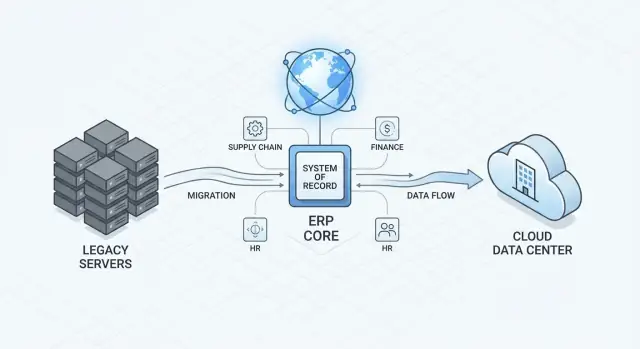
What “System of Record” Means—and Why SAP Fits the Role
A system of record is the place your company treats as the official truth for critical business facts—customers, products, prices, orders, invoices, inventory, employees, and the rules that govern them. If two systems disagree, the system of record is the one that “wins.”
That matters because leadership decisions, audits, and day-to-day operations all depend on consistent answers to basic questions: What did we sell? To whom? At what margin? What do we owe? What do we have on hand? When those answers vary by region or tool, the organization spends its energy reconciling data instead of running the business.
Why SAP often becomes the system of record
SAP earned this role in many global enterprises because it sits at the intersection of finance, supply chain, and operations—the parts of the business where accuracy and controls are non-negotiable. Over time, companies built policies, approvals, and compliance routines around SAP data and transactions. Once that happens, SAP isn’t “just software”; it becomes the backbone that other systems reference.
The core thesis of this post
The competitive advantage isn’t the license. The advantage is the organizational capability to migrate—to move data, redesign processes, integrate systems, and bring people along without breaking the business. If you can modernize your ERP faster and safer than peers, you can adopt new operating models, acquisitions, and regulatory requirements with less friction.
What to expect (and what not to)
This is not a vendor history lesson. It’s a practical set of lessons for leaders: where migrations really fail, where the work really sits, and how to prepare.
The examples are SAP-centric, but the patterns apply to other major ERPs: once an ERP becomes your system of record, change becomes a capability you either build—or pay for later.
How ERP Became the Enterprise Operating System
ERP didn’t start as the “brain” of the company. Early ERP programs were often justified as finance and accounting upgrades: better ledgers, faster closes, cleaner reporting. But once finance data became structured and reliable, it was natural to connect the activities that create those numbers—purchasing, production, shipping, service, and payroll.
From back office to end-to-end flow
Over time, ERP expanded from recording transactions to coordinating work. A purchase order is no longer just paperwork; it triggers approvals, updates budgets, reserves inventory, schedules receipts, and ultimately flows into accounts payable. The same pattern repeats across order-to-cash, hire-to-retire, and plan-to-produce.
Standardization is what made that expansion scalable. Large enterprises standardized on:
- A common chart of accounts, so business units report the same way
- Shared procurement rules, vendor records, and approval thresholds
- Unified inventory definitions (what an item is, where it’s stored, how it’s valued)
- Harmonized HR structures (jobs, cost centers, org units) that map to finance
Why people trust ERP numbers
As ERP became the system of record, trust became the real product. Leaders rely on ERP because it supports auditability and controls: who approved what, when changes were made, which policy was applied, and how each operational event affects financial results. When the ERP is well-run, there’s a single version of key numbers—revenue, margin, inventory value, headcount—that can withstand scrutiny.
The trade-off: control vs flexibility
That consistency isn’t free. Central templates, shared master data, and standardized processes reduce local autonomy. A plant or country team may feel constrained when a global model doesn’t match local habits or regulations.
The best ERP programs treat this as an explicit design choice: standardize what must be comparable and controlled, and allow flexibility where it drives real customer value or compliance. That balance is what turns ERP from “software” into an operating system.
Why Global Enterprises Standardized on SAP
Global companies didn’t standardize on SAP because it was “one size fits all.” They did it because SAP could be made consistent enough to run the business globally, while still allowing local variation where regulations, tax, or operating models demand it.
Configurable processes that travel well
Enterprises with dozens of business units face a repeatable problem: every country and product line needs the same core disciplines (order-to-cash, procure-to-pay, record-to-report), but none of them run exactly the same way.
SAP’s appeal has been its ability to support common process templates—shared definitions for customers, products, pricing, invoices, approvals—while configuring country- and industry-specific requirements (tax, currency, reporting, documentation). That balance enables standardization without forcing every site into identical day-to-day steps.
Integration that reduces handoffs (and cleanup)
When ERP, finance, procurement, manufacturing, and logistics run in separate systems, teams spend a surprising amount of time on handoffs: re-keying data, reconciling totals, chasing mismatched status updates, and explaining “why system A says shipped but system B says not billed.”
Standardizing on SAP often reduced the number of these seams. Fewer handoffs typically means fewer reconciliation cycles, clearer ownership of data, and faster root-cause analysis when something goes wrong. It’s not automatic—but it’s a repeatable pattern when integration replaces manual bridges.
Governance embedded in workflows
Large enterprises also need control: segregation of duties, approval chains, audit trails, and compliance checks.
SAP supports governance by design—roles and authorizations, workflow approvals for purchasing and payments, and process controls that can be enforced consistently across regions. The benefit isn’t “perfect compliance”; it’s the ability to operationalize policies inside the systems people actually use.
Why Migrations Become a Real Competitive Moat
An ERP migration isn’t just “moving data” from one system to another. It’s a coordinated change to how the business runs: redesigned processes, rebuilt integrations, updated controls and reporting, revised security roles, and training that makes new behaviors stick. The data cutover weekend is simply the most visible moment of a much longer transformation.
The hard work is specific—and that’s the point
Two companies can buy the same ERP software and still face completely different migration effort. Your product catalog, pricing rules, approval paths, regulatory obligations, acquisition history, and custom interfaces create a unique web of dependencies. Migrating means translating that reality into a new set of configurations, integrations, and governance routines without breaking operations.
That work is difficult to copy because it’s embedded in how your company actually functions. Competitors can see your end result—faster close, cleaner master data, fewer manual workarounds—but they can’t easily replicate the knowledge you built while untangling exceptions, reconciling definitions, and aligning teams.
Experience compounds over time
The first major ERP migration forces you to learn where the organization is unclear: who owns customer master data, which reports are trusted, which controls are real versus “tribal,” and which integrations are undocumented. After you’ve gone through it once, you tend to have better templates, clearer decision rights, and reusable integration patterns.
The second migration is often faster and safer not because the technology is easier, but because your organization is better.
Migration capability is an asset
When migrations become repeatable—supported by strong data ownership, testing discipline, and change management—you gain strategic flexibility. You can integrate acquisitions faster, adopt innovations like S/4HANA more confidently, and modernize without stalling the business. That capability is a competitive moat you build by doing the hard work well.
The Forces That Keep ERP Migrations on the Roadmap
ERP migrations rarely happen because a company wakes up and “feels like modernizing.” They stay on the roadmap because the business keeps changing—and SAP sits at the center of how finance, supply chain, and operations are recorded.
The most common triggers
A migration program is often pulled forward by events that change what the system must support:
- M&A and carve-outs: onboarding a new entity fast, or separating shared processes and data after a divestiture
- New geographies: adding country-specific tax, invoicing, language, and reporting requirements
- Regulatory change: new audit expectations, data retention rules, or industry compliance needs
- Cloud moves and infrastructure shifts: data center exits, security posture changes, and vendor support timelines that force decisions
These triggers aren’t edge cases—they’re normal for global companies. That’s why “we’ll migrate later” often turns into “we’re migrating during a crisis.”
The cost of delay is operational drag
When migration is postponed, organizations compensate with stopgaps: parallel systems, bolt-on tools, extra reconciliations, and spreadsheet-heavy workarounds. The result isn’t just IT complexity—it’s slower closes, slower reporting, and more time spent explaining numbers instead of acting on them.
Delays also compound data problems. The longer master data issues linger, the more downstream processes depend on exceptions and manual fixes.
Timing risks are real—and predictable
Even when the decision is made, the calendar can make or break the outcome. Peak seasons, year-end close, major product launches, and planned facility shutdowns all create “no-fly zones.” On top of that, the same people needed for migration—finance SMEs, supply chain leads, integration owners—are often the people you can least spare.
Why migration readiness becomes strategic
Because change is constant, the advantage shifts to companies that build repeatable migration capability: clear ownership of data, disciplined integration patterns, and governance that can absorb reorganizations without resetting the whole plan. Migration stops being a one-off project and becomes part of how the business stays adaptable.
Data Is the Bottleneck: Master Data, Quality, and Ownership
ERP migrations rarely fail because of the software. They stall because the organization can’t agree on what its data means, who owns it, and how clean it needs to be before it moves.
Master data vs. transactional data (in plain terms)
Think of transactional data as the “events” your business records every day: sales orders, invoices, goods receipts, time entries, payments. These are high-volume and time-stamped.
Master data is the “shared reference” those events rely on: customer records, vendor records, materials/products, bills of material, plants, cost centers, pricing conditions, chart of accounts. In SAP ERP, master data is what makes transactions comparable and reportable across teams and regions.
A simple example: an invoice (transaction) is only as accurate as the customer master record (master data) it points to—address, tax ID, payment terms, credit limits.
The common data quality traps
Most enterprises discover the same issues during an ERP migration:
- Duplicates: “ACME Ltd,” “Acme Limited,” and “ACME (EMEA)” are three customer accounts in different countries, each with different credit and contact details.
- Missing fields: tax numbers, incoterms, units of measure, or bank details absent in older records because they were “optional” years ago.
- Inconsistent hierarchies: product categories, customer groups, or profit center structures that don’t match across divisions—making global reporting feel like comparing different languages.
Ownership: who decides what “correct” means?
Data cleansing isn’t an IT clean-up project; it’s a business decision. Data owners (often in finance, sales ops, supply chain, procurement) must define standards: what fields are mandatory, how naming works, what the golden record is, and which team approves changes.
When ownership is unclear, quality stays subjective—and that has real outcomes: weaker forecasting, slower quote-to-cash, inconsistent customer experiences, and compliance risk when audits rely on incomplete or conflicting records.
Process and Integration: The Hidden Work Behind “Going Live”
A new SAP system can be technically “live” and still feel broken if day-to-day processes and integrations haven’t been rebuilt with care. Most migration pain shows up here: orders that can’t flow end-to-end, approvals that bypass controls, or reports that no longer match operational reality.
From custom everything to a cleaner core
Many legacy ERPs accumulated years of custom code to handle edge cases, local variations, and “that’s how we’ve always done it.” Modern SAP programs increasingly follow a clean core approach: keep SAP closer to standard, push extensions to well-defined layers, and reduce changes that make upgrades harder.
This doesn’t mean “no customization.” It means being deliberate: if a customization doesn’t clearly protect revenue, compliance, or a true competitive advantage, it’s a candidate for redesign or retirement.
Standardization vs differentiation (where to stay unique)
Standardizing finance, procurement basics, and common supply chain steps usually pays back quickly: shared data definitions, fewer exceptions, easier training, and simpler global reporting.
Save differentiation for places where customers notice and value it—pricing logic, fulfillment promises, after-sales service, or product configuration. The practical test is: If we copied a standard process here, would our market position change? If not, standardize.
Integration modernization in plain terms
Legacy integrations often rely on brittle point-to-point connections and batch files. Modern integration is more like building reliable “connectors” between systems:
- APIs: stable interfaces that let systems request or update data in a controlled way.
- Middleware/iPaaS: a central layer that manages routing, transformations, retries, and monitoring.
- Event-driven patterns: instead of polling, systems publish “something happened” events (e.g., order created), and subscribers react.
The goal isn’t novelty—it’s fewer breaks, clearer ownership, and faster change.
In practice, teams often need lightweight “surrounding apps” too—internal portals for cutover tracking, data quality queues, exception triage dashboards, or role-based task checklists. Platforms like Koder.ai can help you spin up those supporting tools quickly via a chat-based workflow (with exportable source code), so the migration program isn’t blocked waiting on a long custom dev cycle for every small but critical capability.
Controls and audit trails: design them in
Controls can’t be bolted on after go-live. Approval steps, segregation of duties, logging, and reconciliations need to be built into workflows and integrations from the start. Otherwise, you get “shadow processes” in email and spreadsheets—exactly where auditability disappears.
Treat every integration like a financial transaction: who changed what, when, and why should be traceable by design.
People and Governance: The Make-or-Break Layer
Most ERP programs don’t fail because the software can’t be configured. They fail because the organization can’t make (and stick to) the decisions required to change how work gets done.
Why migrations stall or fail
Three patterns show up repeatedly:
- Unclear decisions and ownership. Teams debate “the right process” for months because no one has the mandate to decide what becomes the global standard.
- Competing priorities. Day-to-day operations keep winning. Key people get pulled back into quarter-end close, audits, or customer escalations, and the program loses momentum.
- Weak sponsorship. Without a leader who can trade scope, timeline, and risk in real time—and enforce those trades—projects drift into endless redesign.
The roles you can’t skip
Successful migrations name specific owners for outcomes, not just tasks:
- Business process owners (Order-to-Cash, Procure-to-Pay, Record-to-Report) who approve process standards, exceptions, and KPIs.
- Data stewards for customers, materials, vendors, and finance master data—accountable for definitions, quality thresholds, and ongoing governance.
- IT to translate process decisions into configuration, integrations, and environments.
- Security to design roles, segregation of duties, and audit evidence from day one (not just before go-live).
- Finance to protect close, controls, and reporting continuity—especially when charts of accounts or valuation logic change.
Training and adoption are design work
Users don’t resist “SAP”; they resist surprises. A migration changes jobs: new approvals, new handoffs, new exception handling, and new metrics that expose delays or rework. Training should be role-based and scenario-driven (what to do when things go wrong), and it must include managers who interpret the new dashboards and enforce the new rules.
Governance rhythms that keep it moving
Set a cadence that forces progress:
- Weekly issue triage with clear severity rules and decision deadlines.
- Biweekly steering focused on trade-offs (scope/time/risk), not status slides.
- Cutover rehearsals early and often—treat them like flight simulations, with owners for every step and a back-out plan.
When people and governance are handled well, technical complexity becomes manageable—and the migration becomes a capability, not a one-time event.
Migration Strategies: Choosing the Right Path for Your Business
An ERP migration isn’t a beauty contest. A realistic goal is to reduce risk and accelerate time-to-value—getting the business onto a stable, supportable platform with clean data and working processes—rather than chasing a “perfect” redesign everywhere at once.
Common migration paths (and when they fit)
Big-bang (single cutover): You switch all sites, processes, and users to the new system at once.
- Best when you can freeze change, align stakeholders, and accept a short period of intense disruption.
- Risk concentrates at go-live; planning and rehearsals matter more than slide decks.
Phased rollout (by region, business unit, or process): You move in stages.
- Best when operations can’t tolerate a single enterprise-wide outage or when local requirements vary.
- Watch for “temporary” integrations that become permanent complexity.
Selective data migration (selective historical scope): You move only what you need—often open items plus a defined history window.
- Best when legacy data quality is uneven, or when reporting can be satisfied from an archive.
- Requires clear agreement on what is the system of record for historical analysis.
Sandboxing and testing: where confidence is built
Treat testing as a progressive funnel:
- Sandboxing to explore configuration and validate assumptions early.
- Unit testing to confirm each process step works (e.g., order-to-cash).
- Integration testing to prove end-to-end flows across SAP and connected apps.
- User acceptance testing (UAT) to confirm the business can operate the new way.
- Cutover rehearsal to time every step: data loads, approvals, system freeze, and rollback decisions.
A simple decision framework
Choose your path by scoring each major area on:
- Business criticality: How much downtime or disruption is acceptable?
- Readiness: Data quality, process clarity, and availability of key users.
- Dependencies: Interfaces, regulatory needs, and timing constraints (fiscal close, peak season).
The “right” strategy is the one that matches your operational risk tolerance and your organization’s capacity to absorb change—while keeping the scope tight enough to deliver a real milestone, not an endless program.
S/4HANA and Cloud ERP: What Actually Changes
Moving from a classic SAP ERP setup to S/4HANA (and especially to cloud-hosted ERP) isn’t just a technical upgrade. It changes how fast you can adopt new capabilities, how much you can tailor the system, and what “good governance” needs to look like day to day.
What changes in plain terms
S/4HANA is built to work with a simplified data model and an in-memory database. For business teams, that typically means faster reporting and more consistent real-time views (for example, inventory, finance, and order status aligning more cleanly).
Cloud hosting adds another shift: SAP (and your cloud provider) takes on more of the platform work—patching, scaling, and infrastructure operations—so your team can focus more on processes, data, and change.
Faster innovation vs. less freedom to customize
The trade-off is straightforward:
- You can move faster with standard updates, packaged best practices, and modern integration options.
- You may customize less (or at least customize differently). Heavy modifications that used to live “inside” the ERP increasingly get pushed to extensions, configuration, and surrounding apps. That can feel restrictive—but it also reduces upgrade pain later.
Security and compliance basics don’t disappear
Even in cloud ERP, security is still your responsibility in key areas:
- Identity and access: clear role design, least-privilege access, and disciplined provisioning.
- Segregation of duties (SoD): preventing risky combinations (e.g., creating vendors and approving payments).
- Auditability: logging, approvals, and controls that map to your compliance obligations.
Integration and data remain the long-term work
“Go-live” doesn’t end the job. Integrations still need monitoring, change coordination, and version management. And data still needs ownership: master data standards, quality rules, and accountability when definitions drift. The platform may modernize—your operating discipline still has to mature.
A Practical ERP Migration Readiness Checklist
Treat readiness as a gate, not a feeling. Before you commit to an ERP migration plan (especially an S/4HANA migration), align on what “ready” means in concrete, testable terms.
Readiness checklist (minimum viable)
- Scope: A written scope that lists legal entities, plants/warehouses, core processes (O2C, P2P, R2R), and what is explicitly out. Confirm which customizations will be retired, rebuilt, or kept.
- Data readiness: Named owners for each master data domain (customer, vendor, material, pricing, BOMs). Defined quality rules, a cleansing plan, and a cutover approach (mock conversions completed, not just planned).
- Process sign-off: Future-state process maps approved by business owners, including exception handling (returns, credit holds, intercompany, backorders). Training and role design started, not “after build.”
- Integration inventory: A complete list of interfaces (inbound/outbound), frequency, criticality, and data objects. Include “shadow” integrations like Excel uploads, EDI variants, and departmental tools.
Risk signals to address early
Too many custom objects with unclear business value, unknown interfaces (“we’ll find them in testing”), and weak data ownership (“IT will fix the data”) are top indicators your timeline is fiction.
Define success measures (before build)
Pick a small set of outcomes and baseline them now: financial close time, order cycle time, inventory accuracy, and user adoption (task completion rates, ticket volume by process).
Post–go-live stabilization plan
Plan hypercare (clear triage, daily business checkpoints), a prioritized backlog (what didn’t make go-live), and a continuous improvement cadence with owners and KPIs—so the system gets better instead of merely “staying up.”
Conclusion: Build Migration Capability Like a Core Competency
SAP earned its place as a system of record because it makes critical enterprise facts—orders, inventory, invoices, payroll, compliance evidence—consistent enough to run a global business. But the long-term advantage isn’t only having SAP. It’s being able to change SAP safely and repeatedly while others stall.
Why migration skill turns into a moat
ERP migrations concentrate the hardest work in one place: data, process, integrations, and people. When your organization can modernize without breaking operations, you can adopt better processes, retire legacy costs, and respond faster to regulatory or market shifts. That capability compounds over time—each migration teaches you patterns, reduces uncertainty, and shortens the next cycle.
Treat migrations as a product, not a project
The best teams build reusable playbooks:
- Data governance that clarifies ownership, definitions, and quality thresholds (especially for master data)
- Testing discipline that covers end-to-end business scenarios, not just transactions
- Cutover routines that are rehearsed, timed, and reversible where possible
These aren’t one-off artifacts. They’re operational muscle.
Practical next steps
Start by mapping your current complexity: number of interfaces, custom code hotspots, data domains with unclear ownership, and business processes that vary by region. Then prioritize migrations that unlock the most value—high-risk legacy platforms, costly integrations, or areas where data quality blocks automation.
As you do this, consider where small, purpose-built internal tools could remove friction (for example: data stewardship workflows, interface monitoring, UAT triage, cutover runbooks, or hypercare ticket routing). Building those “migration accelerators” doesn’t have to mean a long backlog—teams increasingly use platforms like Koder.ai to create and iterate on these apps quickly from a chat interface, then export the code when they need deeper control or enterprise deployment.
Migrations are hard. They demand patience, governance, and unglamorous detail. But once your organization can execute them predictably, that competence becomes durable—and it shows up as speed, resilience, and confidence when the next change arrives.
FAQ
What is a “system of record” in practical terms?
A system of record is the authoritative source for key business facts (customers, products, prices, orders, invoices, inventory, employees). When two systems disagree, the system of record is the one you treat as “right” for operations, audits, and reporting.
A practical test: if a dispute arises, which system’s data gets corrected—and which system gets updated to match?
Why does SAP frequently become the system of record in global enterprises?
SAP often sits at the intersection of finance, supply chain, and operations—areas where controls, auditability, and standardized definitions matter most.
Over time, policies (approvals, segregation of duties, compliance routines) get embedded into SAP workflows, making SAP the reference point other systems must align to.
Why can ERP migration capability become a competitive moat?
Owning a repeatable migration capability lets you modernize processes, integrate acquisitions, and respond to regulatory change faster—without breaking daily operations.
Software can be purchased; the organizational know-how to clean data, redesign processes, rebuild integrations, and execute cutovers safely is much harder for competitors to copy.
What typically forces an ERP migration onto the roadmap?
Common triggers include:
- M&A and carve-outs (rapid onboarding or separation)
- Expansion into new countries (tax, invoicing, language, reporting)
- Regulatory or audit requirement changes
- Infrastructure/vendor timelines (data center exits, end of support)
These events force changes in the system that records financial and operational truth.
How do master data and transactional data affect migration risk?
Master data is the shared reference (customers, vendors, materials, chart of accounts, cost centers, pricing conditions). Transactional data is the daily events (orders, invoices, receipts, payments).
Migrations often bottleneck on master data because bad references create bad transactions in the new system. Fixing master data also requires business decisions (definitions, ownership), not just technical cleanup.
What’s the fastest way to improve data readiness before migration?
Start with business-owned rules and accountability:
- Name data owners and stewards per domain (customer, vendor, material, finance)
- Define mandatory fields, naming standards, and “golden record” rules
- Deduplicate and align hierarchies (product/customer groups, profit centers)
- Run mock conversions early to expose gaps before cutover
If “IT will fix the data” is the plan, timelines usually slip.
What does “clean core” mean, and why does it matter during migrations?
A clean core approach keeps SAP closer to standard and moves differentiating logic to controlled extensions (configuration, side-by-side apps, stable interfaces).
Benefits:
- Easier upgrades and fewer regression issues
- Less custom code to rework during migrations
- Clearer process ownership (fewer “mystery” behaviors)
It doesn’t mean “no customization”—it means customizing only where it protects revenue, compliance, or real competitive advantage.
What should leaders focus on for integrations during an ERP migration?
Prioritize integration clarity and reliability:
- Inventory every interface (including “shadow” Excel uploads and ad hoc scripts)
- Define ownership, frequency, SLAs, and failure handling for each flow
- Prefer stable patterns (APIs, middleware/iPaaS, event-driven) over brittle point-to-point files
- Add monitoring and reconciliation by design (not as an afterthought)
Treat each integration like a financial control: traceable, testable, and observable.
How do I decide between big-bang, phased, and selective migration strategies?
Choose based on operational risk tolerance and readiness:
- Big-bang: fastest to standardize, but risk concentrates at go-live; requires strong rehearsals and a freeze window.
- Phased rollout: lowers immediate disruption, but can create temporary bridges that become permanent complexity.
- Selective data migration: reduces baggage from poor legacy data, but needs agreement on where historical reporting lives (archive vs. ERP).
A simple decision method: score each area by criticality, readiness (data/process/people), and dependencies (interfaces/regulations/calendar).
What should be in a practical ERP migration readiness and stabilization plan?
Minimum signals of readiness include:
- Written scope (what’s in/out, which customizations are kept/retired)
- Named master data owners with quality rules and a cleansing plan
- Signed-off future-state processes including exception handling
- Complete interface inventory (not “we’ll find them in testing”)
- Progressive testing plan (unit → integration → UAT → cutover rehearsals)
For stabilization, plan hypercare with clear triage, daily business checkpoints, and a prioritized post–go-live backlog so the system improves rather than merely “stays up.”