

How Shopify Tools and Payments Build a Platform for Growth
Explore how Shopify combines merchant tools and payments to form a platform that supports entrepreneurship—from launching fast to scaling operations and selling everywhere.
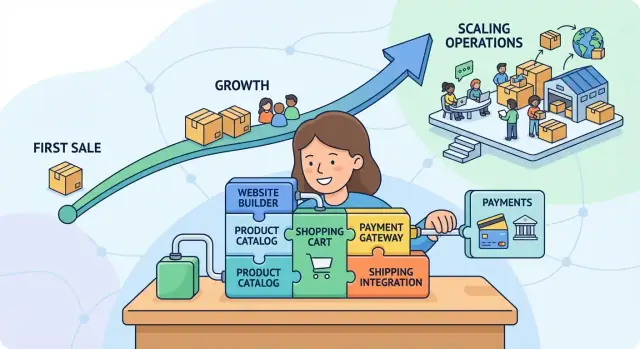
Why tooling and payments create a growth platform
A platform grows when the people using it grow. In ecommerce, the “platform effect” isn’t just about having more features—it’s about whether a merchant can reach a first sale quickly, handle the unglamorous weekly work, and then scale without rebuilding everything from scratch.
Tooling and payments are powerful together because they cover the two jobs every business must do from day one:
- Run the store: products, inventory, shipping, taxes, customer communication, and basic operations.
- Get paid: reliable checkout, payment acceptance, refunds, fraud controls, and payouts you can plan around.
When these are treated as one system—rather than separate vendors stitched together—merchants spend less time troubleshooting and more time selling. A new business doesn’t have to become an “integration project” before it becomes a business.
Why this matters for new merchants
Early-stage merchants typically have limited time, cash, and confidence. Every extra setup step (another account, another dashboard, another support queue) adds friction at the exact moment they need momentum. A unified approach reduces the number of moving parts—and makes it easier to understand what’s working.
Practical, not hype
The focus here is on real workflows: launching a checkout, managing orders, reconciling payouts, handling refunds, and making changes without breaking the store. If a tool doesn’t simplify a weekly task, it’s not helping growth.
From first sale to scaling
We’ll move along the merchant journey: starting with the essentials, then adding operational structure, selling across channels, extending capabilities with apps, and finally using data, risk controls, and market expansion options to grow steadily—without losing control of the business.
Starting small: what new merchants need on day one
Most new merchants don’t start with a “commerce stack.” They start with a product idea and a deadline—sell something this week, take a payment, ship it, and avoid getting surprised by taxes. Day one is about getting the basics working together.
The day-one essentials
A new store typically needs a few fundamentals in place before anything else matters:
- A storefront that looks credible on mobile (customers decide fast)
- Product setup: photos, variants (size/color), pricing, inventory, and clear policies
- Checkout and payment acceptance: a way to get paid without manual invoices
- Shipping basics: rates, labels, and a simple way to fulfill orders
- Taxes: enough configuration to avoid obvious mistakes
- Store management tools: order notifications, basic analytics, and customer contact capture
These aren’t “nice to have.” If any one is missing, the first sales attempt often turns into a support email, a refund, or a customer who simply leaves.
Speed to launch beats long setup cycles
Early-stage businesses are fragile. The longer setup takes, the more likely the project gets paused and never resumed—because life happens, confidence drops, or the costs start to feel risky.
Fast launch matters because it creates momentum: a working storefront, a shareable link, and a real checkout enable quick feedback from real buyers. Even a small signal—one order—helps a merchant justify improving photography, expanding the catalog, or investing in marketing.
What “getting to first sale” usually requires
The path to a first sale is usually simple, but it has to be complete:
- Add a small set of products (often 1–10) with clear pricing and delivery expectations
- Enable payment acceptance so checkout feels familiar and trustworthy
- Set shipping rules that won’t erase margins
- Publish the store and share it where customers already are (social, email, local community)
When the core pieces are straightforward, merchants spend less time wrestling with setup and more time doing the work that actually drives revenue: telling their story, refining the offer, and serving customers well.
Payments as infrastructure, not an add-on
For a customer, payment is the moment of truth: the point where interest turns into an order. If paying feels uncertain, slow, or unfamiliar, many shoppers won’t “try anyway”—they’ll leave.
Why payments drive trust (and conversion)
A smooth checkout signals legitimacy. Recognizable payment options, clear security cues, and a consistent flow reduce the quiet doubts that cause abandonment. Payments also affect conversion through basic mechanics: fewer steps, fewer redirects, fewer form fields, and fewer surprises at the final click.
Even small details matter—like whether the buyer can use a saved wallet, whether their preferred local method is available, or whether the checkout works cleanly on mobile.
The essentials: methods people actually use
Most merchants start with card acceptance, but growth often depends on meeting customers where they are:
- Cards (credit/debit) as the baseline expectation
- Digital wallets (like Apple Pay or Google Pay) for faster, low-friction checkout
- Local payment methods where they’re common, especially for international selling
Offering the right mix isn’t about having “everything.” It’s about matching your audience so checkout feels familiar.
Checkout friction is a sales problem, not a finance detail
If customers hit a failed payment, a confusing verification step, or a redirect that looks suspicious, you don’t just lose a transaction—you lose confidence. Payment infrastructure should minimize failed attempts, handle mobile gracefully, and keep the buyer in a predictable flow.
Operations: payouts and reconciliation shape your day-to-day
Payments also power the back office. Predictable payout timing helps with inventory and cash flow, while clean reconciliation makes it easier to match orders, fees, refunds, and chargebacks without spreadsheets taking over your week.
When payments are built into the platform (for example, with Shopify Payments), these finance chores tend to become simpler, faster, and less error-prone.
Tooling that makes everyday commerce manageable
Running a store isn’t only about making a sale—it’s dozens of small operational decisions every day. The right tooling turns those decisions into repeatable routines, so merchants spend less time “figuring it out” and more time serving customers.
Store basics: catalog, themes, and discounts
Most day-to-day work starts with the catalog: adding products, organizing variants (size, color), setting prices, and updating images and descriptions. When these basics are structured well, customers can find what they want quickly, and you can launch new items without chaos.
Themes help merchants keep the storefront consistent without redesigning every week. Instead of starting from scratch, you adjust layouts, typography, and key sections (homepage, product pages, cart) to fit your brand and seasonal campaigns.
Discount tools matter because promotions get messy fast. With clear rules—percentage off, free shipping thresholds, buy‑X‑get‑Y—you can run offers that are easy for customers to understand and easy for you to audit later.
Dashboards and reporting that guide decisions
A central dashboard acts like a daily briefing: sales trends, best-selling items, conversion rate, and traffic sources in one place.
Reporting should answer practical questions:
- Which products deserve a restock?
- Did that promotion actually increase profit?
- Are refunds creeping up?
The goal isn’t “more data.” It’s fewer guesses.
Inventory and order management that prevent mistakes
Inventory and order tools reduce the most common operational errors: overselling, missed shipments, and incorrect fulfillment. When stock levels update with each order, you avoid taking money for items you can’t ship. Order views and fulfillment statuses help you spot what’s pending, what’s delayed, and what needs customer outreach before it becomes a complaint.
Customer management that supports repeat purchases
Customer profiles make follow-up easier: purchase history, contact details, and notes from prior issues. This enables better support (“we’ll replace the same size as last time”) and smarter retention—like targeting loyal buyers with early access or sending a reminder when replenishment products typically run out.
Together, these tools make commerce feel manageable—even as volume increases.
How integration reduces friction across the business
When your storefront, checkout, and payments are connected, getting started is simpler. You’re not stitching together separate providers, copying settings across dashboards, or reconciling mismatched reports. Instead, you can focus on the basics: adding products, setting shipping, and making your first sale.
A smoother setup, fewer moving parts
Integrated payments typically reduce “setup tax” for new merchants. You don’t have to think as much about how payment acceptance will talk to your store, how refunds will be processed, or where transaction records will live.
The goal isn’t magic—it’s fewer steps and fewer opportunities for something to break.
One place for orders, refunds, and payouts
Operationally, the biggest win is having a single source of truth:
- Orders and payment status sit together, so you can confirm what was paid and what still needs attention.
- Refunds can be initiated from the same workflow you use to manage orders, with clearer tracking of what happened and when.
- Payouts are easier to follow when the money movement is visible alongside sales activity, helping with cash-flow planning and bookkeeping.
This matters most when volume increases. A small delay or mismatch in one system can create customer support headaches in another.
Risk basics: clarity without complexity
Payments also involve risk controls—things like automated fraud checks, verification steps, and chargeback handling. No system can prevent every issue, but integrated tooling can make it easier to understand what’s happening, respond quickly, and keep records organized.
Transparency over promises
Look for clear reporting, plain-language explanations, and predictable processes. Be wary of anyone implying guaranteed approval, specific rates, or “no chargebacks ever.” The real value is visibility and smoother day-to-day operations as your business grows.
Growing operations: from side hustle to real business
The shift from “I’m testing an idea” to “this is a real business” usually happens in predictable steps. You add more SKUs (because customers ask for variations), orders become steady (then suddenly spiky), and you start selling in more places—your online store, social, marketplaces, maybe even in person.
At that point, the work isn’t just marketing and product anymore. Operations becomes the difference between growth that feels exciting and growth that feels like constant cleanup.
When volume rises, manual work breaks first
Early on, it’s normal to run the store from your phone: update inventory, fulfill orders, respond to emails, and keep notes in a spreadsheet. As volume increases, those “small tasks” stack up and mistakes get expensive—overselling, delayed shipments, duplicate refunds, inconsistent answers to customers.
Automation becomes essential because it protects your time and your customer experience. Common areas where automation pays off quickly:
- Order routing and fulfillment notifications
- Inventory updates across products and variants
- Abandoned checkout and post-purchase emails
- Basic fraud and payment checks, so you’re not reviewing every order by hand
Teams need structure: roles and permissions
Growth usually means help—an assistant packing orders, a partner managing customer support, an agency running ads. That’s when clear roles and permissions matter. Instead of sharing logins (risky and messy), you can give each person access only to what they need: shipping, customer service, analytics, or product management.
This makes collaboration smoother and reduces the chance of someone accidentally changing settings that affect checkout or payments.
Operational maturity: returns, exchanges, and support workflows
A “real business” isn’t defined by revenue—it’s defined by repeatable processes. Returns and exchanges should feel like a system, not a scramble. Customer support needs templates, tagging, and a simple workflow so issues don’t slip through.
When your tooling supports these routines, scaling becomes less about heroic effort and more about consistent execution—even on your busiest weeks.
Selling everywhere without losing control
Growth often looks like “more places to sell.” A merchant might start with a Shopify online store, then add Instagram shopping, TikTok, a pop-up, or marketplaces where their customers already browse. The upside is reach; the risk is turning your business into a spreadsheet juggling act.
One catalog, many storefronts
When you sell across channels, the simplest way to stay sane is treating your products as one shared source of truth. The goal is to manage product titles, descriptions, variants, and pricing in one place—then publish where it makes sense.
Inventory is where things get real. If a size sells out on a marketplace but your online store still shows “in stock,” you’ll spend the next week emailing apologies and processing refunds. Centralized inventory tracking helps keep counts aligned so every channel reflects what you can actually ship.
A checkout that feels consistent
Customers notice when buying feels smooth—especially at checkout. Consistency isn’t only visual; it’s about payment options, currency handling, and clear confirmation.
Using a unified payments approach can reduce “why can’t I pay this way here?” moments and make returns/refunds easier to manage because transactions aren’t scattered across unrelated systems.
The tradeoff: more channels, more complexity
Each new channel adds decisions: different image requirements, listing rules, fees, fulfillment expectations, customer messages, and promotional calendars. More sales surfaces can also create pricing pressure (e.g., marketplace discount expectations) and extra customer support load.
A practical rule: add channels in stages. Expand only when you can keep product data tidy, inventory accurate, and the checkout experience dependable—so “selling everywhere” still feels like one business, not five.
The ecosystem effect: extending the platform with apps
A “platform ecosystem” is just a helpful way to describe what happens when your store can plug into other tools—without you having to rebuild everything from scratch. Shopify provides the core (your storefront, checkout, and admin), and apps act like add-ons that extend what your business can do as it grows.
How apps extend capabilities over time
Most merchants don’t need an advanced setup on day one. The value of an ecosystem is that you can start simple, then add tools only when a new problem appears—like saving time, improving conversion, or keeping your books cleaner.
For example, you might begin with a basic theme and a few products. Later, you add an integration that automates repetitive work (like syncing orders to accounting) or makes the customer experience smoother (like product reviews). Over time, these small upgrades compound—less manual effort, fewer mistakes, and more consistency across channels.
One practical note: as you grow, you may outgrow “off-the-shelf” apps for certain workflows (custom fulfillment rules, bespoke reporting, unusual product configuration, internal tools for your team). In those cases, it can be faster to build a lightweight companion web app that connects to Shopify via APIs than to force-fit a generic plugin. Tools like Koder.ai can help here by letting you describe the workflow in chat and generate a web (React) or backend service (Go + PostgreSQL) quickly, with options to export source code, deploy, and iterate using snapshots and rollback.
Common app categories (and what they’re for)
A few categories tend to show up again and again:
- Email & retention: capture emails, send abandoned cart reminders, newsletters, and post-purchase flows.
- Reviews & social proof: collect product reviews, display ratings, and answer common pre-purchase questions.
- Accounting & finance: sync sales, taxes, and payouts to bookkeeping tools so month-end doesn’t become a crisis.
- Shipping & fulfillment: print labels, compare rates, automate tracking emails, and manage returns.
You don’t need all of these at once. Add them when they remove a real bottleneck.
How to choose tools without creating chaos
Start with the need, not the app store ranking. Write down the outcome you want (e.g., “reduce support tickets about shipping by 30%” or “cut time spent on bookkeeping to 1 hour/week”), then pick the simplest tool that can deliver it.
After installing, measure the outcome for a couple of weeks: time saved, conversion rate changes, fewer errors, or higher repeat purchase rate. If it’s not moving the metric—or it’s adding complexity—remove it.
A healthy ecosystem isn’t “more apps.” It’s the right set of integrations that earns its place in your workflow.
Data and insights that help entrepreneurs make better calls
Most merchants aren’t asking for “more data.” They want a single, reliable view of what’s selling, what it costs to fulfill, and when cash actually hits the bank. When sales, fees, refunds, shipping, and marketing spend live in separate tools, decisions turn into guesswork—or hours of spreadsheet work.
Why payment data matters for clarity
Payments are where intent becomes revenue. Because payment events record what happened at checkout (successful charges, declines, refunds, chargebacks, payout timing), they can make reporting more accurate and more actionable.
Instead of looking at “orders” alone, entrepreneurs can connect performance to real cash flow: what you collected, what you paid in fees, what was refunded, and what’s pending payout.
That’s especially helpful when you’re planning inventory or deciding whether a promotion worked. A discount that boosts orders may still hurt if it increases refunds or reduces margins after fees.
KPIs worth tracking (and how to use them)
A few metrics cover most early-stage decisions:
- Conversion rate: reveals whether your store and checkout are doing their job.
- Average order value (AOV): helps you evaluate bundles, upsells, and shipping thresholds.
- Repeat purchase rate: shows if customers come back—and whether retention efforts are paying off.
Tie these to basics like product margin and payout timing so you’re optimizing profit, not just volume.
A caution: don’t over-optimize one number
It’s easy to “win” a single metric and lose the business outcome. For example, raising AOV with aggressive bundles can reduce conversion rate; chasing conversion with heavy discounts can shrink margin and increase support load.
Treat KPIs as a system, review trends over time, and sanity-check insights against what’s happening operationally (inventory, fulfillment, and customer experience).
Trust, risk, and operational resilience as you scale
Growth is exciting until the “small” problems stop being small. What felt manageable with a handful of weekly orders can turn into real operational risk when volume spikes, you add new channels, or a promotion goes viral.
The scaling challenges that show up first
As you scale, pressure tends to cluster around a few areas:
- Compliance and taxes: more jurisdictions, more rules, more edge cases (refunds, discounts, shipping, digital goods).
- Fraud and chargebacks: higher order volume attracts more bad actors, and one messy week can eat time and margins.
- Support load: more customers means more “where is my order?” messages, address changes, and return requests—often all at once.
The key shift is that risk stops being occasional and becomes continuous. You need systems that can absorb mistakes and keep the business moving.
Predictable processes beat heroic effort
At low volume, you can patch issues with quick manual fixes. At scale, consistency matters more than speed. Clear workflows for order review, refunds, dispute handling, and tax settings reduce variance—so outcomes are reliable even when you’re tired, hiring, or busy fulfilling.
This is where payments and tooling matter together: when your payment acceptance, order status, and customer communications follow a repeatable path, you’re less likely to lose money or trust during high-stress moments.
Reliability is a business feature
Operational resilience isn’t just “uptime.” It’s the ability to keep selling, keep fulfilling, and keep serving customers when something unexpected happens—traffic spikes, a supplier delay, or a support backlog.
Look for tools that help you monitor what’s happening and recover quickly, rather than relying on memory and spreadsheets.
Don’t ignore documentation and support
When problems occur, time-to-answer matters. Prioritize platforms with clear help docs, escalation paths, and community guidance. Shopify’s documentation can reduce guesswork and shorten the gap between “something’s wrong” and “it’s handled.”
Expanding into new markets: what changes and what doesn’t
International growth often starts as a small test: a handful of overseas orders, a new ad campaign, or a distributor inquiry. The key is knowing which parts of your business stay stable—and which parts need deliberate updates.
What doesn’t change
Your core product, brand promise, and operational habits should stay consistent. The same store management routines—catalog hygiene, inventory discipline, clear policies, and reliable fulfillment partners—are still the foundation.
Expansion works best when it builds on systems you already trust, rather than reinventing everything at once.
What changes as you expand
Most merchants expand along predictable paths: adding new countries, supporting multiple currencies, and opening additional shipping zones. Each step introduces localization decisions.
Localization isn’t only translation. It also includes:
- Currency display and pricing psychology (rounding, taxes, shipping thresholds)
- Local payment methods customers expect (cards, wallets, bank redirects)
- Address formats and delivery expectations (pickup points, longer lead times)
Returns and support get more complex
International returns can become a major hidden cost. Shipping labels, duties, and “return-to-sender” scenarios vary by country, so your return policy may need region-specific rules.
Customer support changes too: more “Where is my order?” messages due to cross-border tracking gaps, time zones, and language differences. Plan for clearer order notifications, translated macros, and a process for handling customs delays.
Roll out in phases
Avoid a big-bang launch. Start with one market and a narrow product set, then expand.
A practical phased approach:
- Pilot one country with clear shipping rates and a limited ad budget
- Validate conversion with localized currency and payment options
- Stress-test fulfillment, returns, and support for 30–60 days
- Scale to the next market only after the first is steady
This keeps growth measurable—and prevents international demand from overwhelming day-to-day operations.
Practical checklist: choosing tools that grow with you
Choosing a commerce platform is less about picking “the best” and more about picking what will still work when your order volume, product range, and team size change. Use this checklist to compare options with your future self in mind.
Must-haves (day one → first 100 orders)
Start with the basics that prevent early headaches:
- Fast, reliable checkout with the payment methods your customers actually use (cards, wallets, local options where relevant)
- Clear fees and predictable payouts so cash flow isn’t a mystery
- Simple store management tools: products, inventory, discounts, shipping, taxes
- Mobile-friendly admin so you can run the business without being chained to a laptop
- Customer support and documentation you can understand without a technical background
Nice-to-haves (when you’re stabilizing)
These are valuable, but shouldn’t block your launch:
- Automation for routine tasks (tags, follow-ups, low-stock alerts)
- Built-in reporting beyond sales totals (top channels, repeat customers, margin basics)
- Flexible themes and branding controls without custom code
- Basic integrations for email marketing, shipping, and accounting
Growth requirements (when you’re optimizing and expanding)
As your business becomes more complex, prioritize:
- Multi-channel selling (online store plus social, marketplaces, in-person) with centralized inventory
- Permissions and roles for staff, agencies, and contractors
- App ecosystem quality (credible reviews, strong support, clear pricing)
- Risk and fraud controls that don’t punish good customers
If you anticipate building custom internal tools (ops dashboards, finance reconciliation helpers, support consoles) or customer-facing add-ons, factor in how quickly you can ship and iterate. A platform like Koder.ai can be useful for teams that want to move fast: you can draft requirements in chat, use planning mode to reduce surprises, deploy and host, and export the source code when you want full control.
A simple adoption plan
Launch: start with core storefront + payments + shipping.
Stabilize: tighten operations (returns, customer service workflows, basic analytics).
Optimize: improve conversion (checkout experience, offers, retention).
Expand: add channels, apps, and process depth only when you can measure impact.
If you want to compare packages and features at a high level, you can learn more on /pricing.
FAQ
Why does combining store tooling and payments matter for ecommerce growth?
Treat them as one system because checkout affects both conversion and operations. When storefront, orders, refunds, and payouts share the same records, you spend less time reconciling mismatched dashboards and more time improving products and marketing.
What are the true day-one essentials for getting to a first sale?
Focus on the minimum complete path:
- Publish a mobile-credible storefront
- Add 1–10 products with clear pricing and delivery expectations
- Enable familiar payment methods (cards plus wallets if available)
- Set shipping rates that protect margin
- Configure basic taxes and store policies
If any one of these is missing, first buyers often drop at checkout or create avoidable support work.
How do payments influence trust and conversion in checkout?
Payment is the “moment of truth.” Improve conversion by reducing uncertainty and steps:
- Offer methods your customers recognize (cards, Apple Pay/Google Pay, relevant local methods)
- Keep checkout fast on mobile and avoid unnecessary redirects
- Make totals and delivery expectations clear before the final click
Then monitor declines and abandoned checkouts to find the biggest friction points.
Which payment methods should a new merchant start with?
Prioritize methods that match your audience rather than trying to offer everything:
- Cards as a baseline
- Digital wallets for speed and mobile convenience
- Local methods if you sell internationally or to regions with strong preferences
Add new methods only after you see consistent traffic from a market where the method is common.
What should I look for in payouts and reconciliation to avoid cash-flow surprises?
Look for predictable payout timing and clean records that tie money movement to orders. Practically, you want to be able to answer:
- Which orders are paid, refunded, or disputed?
- What fees were taken and why?
- When will funds hit the bank?
If you can’t answer those quickly, cash-flow planning and bookkeeping will become a weekly drag.
What tooling makes day-to-day store operations manageable as orders increase?
Start with the workflows you repeat every week:
- Inventory updates per order (to prevent overselling)
- Clear fulfillment statuses (to avoid missed shipments)
- Refund initiation from the order view (to reduce mistakes)
- Basic customer profiles (to speed up support)
The goal is fewer manual handoffs and fewer “where did that transaction go?” moments.
How does integration between checkout, orders, and payments reduce friction?
Integration reduces setup and ongoing maintenance:
- Fewer accounts and dashboards to manage
- Less copying settings across tools
- One source of truth for orders, payment status, refunds, and payouts
This becomes more valuable as volume grows, because small mismatches turn into large support and accounting problems.
How can I sell across channels without losing control of inventory and customer experience?
Add channels in stages and keep product data centralized:
- Manage titles, variants, pricing, and inventory in one place
- Publish to new channels only when stock syncing is reliable
- Confirm checkout experience and refund handling stays consistent
If adding a channel forces spreadsheet-based inventory, pause and fix the system before expanding further.
How do I choose apps and integrations without creating an unmanageable stack?
Choose apps based on a measurable outcome, not popularity:
- Define the bottleneck (e.g., “reduce bookkeeping to 1 hour/week”)
- Install the simplest app that solves it
- Measure for 2–4 weeks (time saved, fewer errors, conversion/retention lift)
- Remove anything that adds complexity without moving the metric
A healthy setup is a small set of tools that earn their place.
What metrics should I track to make better decisions as I scale?
Track a small KPI set tied to real cash outcomes:
- Conversion rate (store + checkout health)
- Average order value (bundles, thresholds, pricing)
- Repeat purchase rate (retention)
Pair these with margin and payout timing so you’re optimizing profit and liquidity—not just order count. If you’re comparing plans, start with what you need for checkout, reporting, and operations, then review /pricing for high-level options.