

Simple background job queue patterns for emails and webhooks
Learn simple background job queue patterns to send emails, run reports, and deliver webhooks with retries, backoff, and dead-letter handling, without heavy tools.
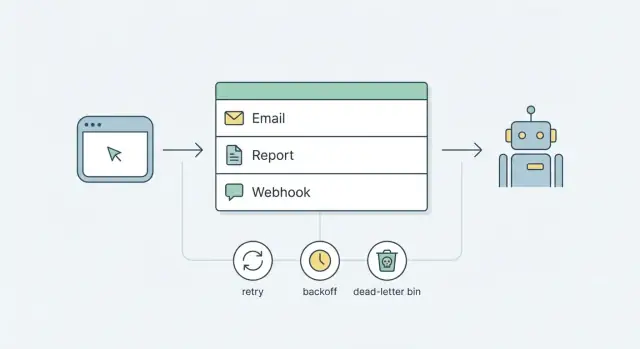
Why you need background jobs (and why it gets messy fast)
Any work that can take longer than a second or two shouldn't run inside a user request. Sending emails, generating reports, and delivering webhooks all depend on networks, third-party services, or slow queries. Sometimes they pause, fail, or just take longer than you expect.
If you do that work while the user waits, people notice immediately. Pages hang, "Save" buttons spin, and requests time out. Retries can also happen in the wrong place. A user refreshes, your load balancer retries, or your frontend resubmits, and you end up with duplicate emails, duplicate webhook calls, or two report runs competing with each other.
Background jobs fix this by keeping requests small and predictable: accept the action, record a job to do later, respond quickly. The job runs outside the request, with rules you control.
The hard part is reliability. Once work moves out of the request path, you still have to answer questions like:
- What if the email provider is down for 3 minutes?
- What if a webhook endpoint returns 500, or times out?
- What if the job runs twice?
- How do you notice stuck jobs before users complain?
Many teams respond by adding "heavy infrastructure": a message broker, separate worker fleets, dashboards, alerting, and playbooks. Those tools are useful when you truly need them, but they also add new moving parts and new failure modes.
A better starting goal is simpler: reliable jobs using parts you already have. For most products, that means a database-backed queue plus a small worker process. Add a clear retry and backoff strategy, and a dead-letter pattern for jobs that keep failing. You get predictable behavior without committing to a complex platform on day one.
Even if you're building quickly with a chat-driven tool like Koder.ai, this separation still matters. Users should get a fast response now, and your system should finish slow, failure-prone work safely in the background.
What a queue is in simple terms
A queue is a waiting line for work. Instead of doing slow or unreliable tasks during a user request (send an email, build a report, call a webhook), you put a small record in a queue and return quickly. Later, a separate process picks up that record and does the work.
A few words you'll see often:
- Job: one unit of work, like "send welcome email to user 123".
- Worker: the code that pulls jobs and runs them.
- Attempt: one try at running a job.
- Schedule: when the job should run (now, or later).
- Queue: where jobs wait until a worker takes them.
The simplest flow looks like this:
-
Enqueue: your app saves a job record (type, payload, run time).
-
Claim: a worker finds the next available job and "locks" it so only one worker runs it.
-
Run: the worker performs the task (send, generate, deliver).
-
Finish: mark it done, or record a failure and set the next run time.
If your job volume is modest and you already have a database, a database-backed queue is often enough. It's easy to understand, easy to debug, and fits common needs like email job processing and webhook delivery reliability.
Streaming platforms start to make sense when you need very high throughput, lots of independent consumers, or the ability to replay huge event histories across many systems. If you're running dozens of services with millions of events per hour, tools like Kafka can help. Until then, a database table plus a worker loop covers a lot of real-world queues.
The minimum data you should track for every job
A database queue only stays sane if each job record answers three questions quickly: what to do, when to try next, and what happened last time. Get that right and operations become boring (which is the goal).
What to store in the payload (and what not to)
Store the smallest input needed to do the work, not the entire rendered output. Good payloads are IDs and a few parameters, like { "user_id": 42, "template": "welcome" }.
Avoid storing big blobs (full HTML emails, large report data, huge webhook bodies). It makes your database grow faster and makes debugging harder. If the job needs a large document, store a reference instead: report_id, export_id, or a file key. The worker can fetch the full data when it runs.
The fields that pay for themselves
At minimum, make room for:
- job_type + payload:
job_typeselects the handler (send_email, generate_report, deliver_webhook).payloadholds small inputs like IDs and options. - status: keep it explicit (for example:
queued,running,succeeded,failed,dead). - attempt tracking:
attempt_countandmax_attemptsso you can stop retrying when it clearly won't work. - time fields:
created_atandnext_run_at(when it becomes eligible). Addstarted_atandfinished_atif you want better visibility into slow jobs. - idempotency + last error: an
idempotency_keyto prevent double effects, andlast_errorso you can see why it failed without digging through a pile of logs.
Idempotency sounds fancy, but the idea is simple: if the same job runs twice, the second run should detect that and do nothing dangerous. For example, a webhook delivery job can use an idempotency key like webhook:order:123:event:paid so you don't deliver the same event twice if a retry overlaps with a timeout.
Also capture a few basic numbers early. You don't need a big dashboard to start, just queries that tell you: how many jobs are queued, how many are failing, and the age of the oldest queued job.
Step by step: a simple database queue you can build today
If you already have a database, you can start a background queue without adding new infrastructure. Jobs are rows, and a worker is a process that keeps picking due rows and doing the work.
1) Create a jobs table
Keep the table small and boring. You want enough fields to run, retry, and debug jobs later.
CREATE TABLE jobs (
  id            bigserial PRIMARY KEY,
  job_type      text NOT NULL,
  payload       jsonb NOT NULL,
  status        text NOT NULL DEFAULT 'queued', -- queued, running, done, failed
  attempts      int  NOT NULL DEFAULT 0,
  next_run_at   timestamptz NOT NULL DEFAULT now(),
  locked_at     timestamptz,
  locked_by     text,
  last_error    text,
  created_at    timestamptz NOT NULL DEFAULT now(),
  updated_at    timestamptz NOT NULL DEFAULT now()
);

CREATE INDEX jobs_due_idx ON jobs (status, next_run_at);
If you're building on Postgres (common with Go backends), jsonb is a practical way to store job data like { "user_id":123,"template":"welcome" }.
2) Enqueue safely (especially for user actions)
When a user action should trigger a job (send an email, fire a webhook), write the job row in the same database transaction as the main change when possible. That prevents "user created but job missing" if a crash happens right after the main write.
Example: when a user signs up, insert the user row and a send_welcome_email job in one transaction.
3) Run a worker loop that can scale
A worker repeats the same cycle: find one due job, claim it so no one else can take it, process it, then mark it done or schedule a retry.
In practice, that means:
- Pick one job where
status='queued'andnext_run_at <= now(). - Claim it atomically (in Postgres,
SELECT ... FOR UPDATE SKIP LOCKEDis a common approach). - Set
status='running',locked_at=now(),locked_by='worker-1'. - Process the job.
- Mark it finished (for example
done/succeeded), or recordlast_errorand schedule the next attempt.
Multiple workers can run at the same time. The claim step is what prevents double-picking.
4) Handle shutdown without breaking jobs
On shutdown, stop taking new jobs, finish the current one, then exit. If a process dies mid-job, use a simple rule: treat jobs stuck in running past a timeout as eligible to be re-queued by a periodic "reaper" task.
If you're building in Koder.ai, this database-queue pattern is a solid default for emails, reports, and webhooks before you add specialized queue services.
Retries and backoff that don't cause chaos
Retries are how a queue stays calm when the real world is messy. Without clear rules, retries turn into a noisy loop that spams users, hammers APIs, and hides the real bug.
Start by deciding what should retry and what should fail fast.
Retry temporary problems: network timeouts, 502/503 errors, rate limits, or a brief database connection blip.
Fail fast when the job won't succeed: a missing email address, a 400 response from a webhook because the payload is invalid, or a report request for a deleted account.
Backoff is the pause between attempts. Linear backoff (5s, 10s, 15s) is simple, but it can still create waves of traffic. Exponential backoff (5s, 10s, 20s, 40s) spreads load better and is usually safer for webhooks and third-party providers. Add jitter (a small random extra delay) so a thousand jobs don't retry at the exact same second after an outage.
Rules that tend to behave well in production:
- Retry only on clearly temporary errors (timeouts, 429, 5xx).
- Use exponential backoff with jitter.
- Cap attempts, then stop and mark the job as failed.
- Set a timeout per attempt so workers don't get stuck.
- Make every job idempotent so retries don't create duplicates.
Max attempts is about limiting damage. For many teams, 5 to 8 attempts is enough. After that, stop retrying and park the job for review (a dead-letter flow) instead of looping forever.
Timeouts prevent "zombie" jobs. Emails might time out at 10 to 20 seconds per attempt. Webhooks often need a shorter limit, like 5 to 10 seconds, because the receiver may be down and you want to move on. Report generation might allow minutes, but it should still have a hard cutoff.
If you're building this in Koder.ai, treat should_retry, next_run_at, and an idempotency key as first-class fields. Those small details keep the system quiet when something goes wrong.
Dead-letter handling and simple operations
A dead-letter state is where jobs go when retries are no longer safe or useful. It turns silent failure into something you can see, search, and act on.
What to save on a dead-letter job
Save enough to understand what happened and to replay the job without guessing, but be careful about secrets.
Keep:
- The job inputs (payload) exactly as used, plus the job type and version
- The last error message and a short stack trace (or an error code if you don't have stacks)
- Attempt count, first run time, last run time, and next run time (if it was scheduled)
- The worker identity (service name, host) and a correlation ID for logs
- A dead-letter reason (timeout, validation error, 4xx from vendor, etc.)
If the payload includes tokens or personal data, redact or encrypt before storing.
A simple triage workflow
When a job hits dead-letter, make a quick decision: retry, fix, or ignore.
Retry is for external outages and timeouts. Fix is for bad data (missing email, wrong webhook URL) or a bug in your code. Ignore should be rare, but it can be valid when the job is no longer relevant (for example, the customer deleted their account). If you ignore, record a reason so it doesn't look like the job vanished.
Manual requeue is safest when it creates a new job and keeps the old one immutable. Mark the dead-letter job with who requeued it, when, and why, then enqueue a fresh copy with a new ID.
For alerting, watch for signals that usually mean real pain: dead-letter count rising quickly, the same error repeating across many jobs, and old queued jobs that aren't being claimed.
If you're using Koder.ai, snapshots and rollback can help when a bad release suddenly spikes failures, because you can back out quickly while you investigate.
Finally, add safety valves for vendor outages. Rate-limit sends per provider, and use a circuit breaker: if a webhook endpoint is failing hard, pause new attempts for a short window so you don't flood their servers (and yours).
Patterns for emails, reports, and webhooks
A queue works best when each job type has clear rules: what counts as success, what should be retried, and what must never happen twice.
Emails. Most email failures are temporary: provider timeouts, rate limits, or short outages. Treat those as retryable, with backoff. The bigger risk is duplicate sends, so make email jobs idempotent. Store a stable dedupe key such as user_id + template + event_id and refuse to send if that key is already marked as sent.
It's also worth storing the template name and version (or a hash of the rendered subject/body). If you ever need to re-run jobs, you can choose whether to resend the exact same content or regenerate from the latest template. If the provider returns a message ID, save it so support can trace what happened.
Reports. Reports fail differently. They can run for minutes, hit pagination limits, or run out of memory if you do everything in one go. Split work into smaller pieces. A common pattern is: one "report request" job creates many "page" (or "chunk") jobs, each processing a slice of data.
Store results for later download instead of keeping the user waiting. That can be a database table keyed by report_run_id, or a file reference plus metadata (status, row count, created_at). Add progress fields so the UI can show "processing" vs "ready" without guessing.
Webhooks. Webhooks are about delivery reliability, not speed. Sign every request (for example, HMAC with a shared secret) and include a timestamp to prevent replay. Retry only when the receiver might succeed later.
A simple ruleset:
- Retry on timeouts and 5xx responses, using backoff and a max attempt count.
- Treat most 4xx responses as permanent failures and stop retrying.
- Record the last status code and a short response body for debugging.
- Use an idempotency key so receivers can safely ignore duplicates.
- Cap payload size and log what you actually sent.
Ordering and priority. Most jobs don't need strict ordering. When order matters, it usually matters per key (per user, per invoice, per webhook endpoint). Add a group_key and only run one in-flight job per key.
For priority, separate urgent work from slow work. A large report backlog shouldn't delay password reset emails.
Example: after a purchase, you enqueue (1) an order confirmation email, (2) a partner webhook, and (3) a report update job. The email can retry quickly, the webhook retries longer with backoff, and the report runs later at low priority.
A realistic example: signup flow plus webhook plus nightly report
A user signs up for your app. Three things should happen, but none of them should slow down the signup page: send a welcome email, notify your CRM with a webhook, and include the user in a nightly activity report.
What gets queued at signup
Right after you create the user record, write three job rows to your database queue. Each row has a type, a payload (like user_id), a status, an attempt count, and a next_run_at timestamp.
A typical lifecycle looks like this:
queued: created and waiting for a workerrunning: a worker has claimed itsucceeded: done, no more workfailed: failed, scheduled for later or out of retriesdead: failed too many times and needs a human look
The welcome email job includes an idempotency key like welcome_email:user:123. Before sending, the worker checks a table of completed idempotency keys (or enforces a unique constraint). If the job runs twice because of a crash, the second run sees the key and skips sending. No double welcome emails.
A failure and how it recovers
Now the CRM webhook endpoint is down. The webhook job fails with a timeout. Your worker schedules a retry using backoff (for example: 1 minute, 5 minutes, 30 minutes, 2 hours) plus a little jitter so many jobs don't retry at the same second.
After the max attempts, the job becomes dead. The user still signed up, got the welcome email, and the nightly report job can run as normal. Only the CRM notification is stuck, and it's visible.
The next morning, support (or whoever is on call) can handle it without digging through logs for hours:
- Filter dead jobs by type (for example
webhook.crm). - Read the last error message and confirm the payload looks right.
- Verify the CRM is back up.
- Requeue the job (dead -> queued, reset attempts) or disable that destination temporarily.
If you build apps on a platform like Koder.ai, the same pattern applies: keep the user flow fast, push side effects into jobs, and make failures easy to inspect and re-run.
Common mistakes that make queues unreliable
The fastest way to break a queue is to treat it as optional. Teams often start with "just send the email in the request this one time" because it feels simpler. Then it spreads: password resets, receipts, webhooks, report exports. Soon the app feels slow, timeouts rise, and any third-party hiccup becomes your outage.
Another common trap is skipping idempotency. If a job can run twice, it must not create two results. Without idempotency, retries turn into duplicate emails, repeated webhook events, or worse.
A third issue is visibility. If you only learn about failures from support tickets, the queue is already harming users. Even a basic internal view that shows job counts by status plus searchable last_error saves time.
Reliability killers to watch for
A few issues show up early, even in simple queues:
- Retrying immediately on failure. If a provider is down, rapid retries create your own traffic spike.
- Mixing slow jobs with urgent jobs. A 10-minute report can block a "verify your email" message.
- Treating errors as temporary forever. Jobs that will never succeed keep cycling and hide real problems.
- No ownership of payload versions. If you change the job shape, old jobs can start failing.
- Ignoring rate limits. Queues can flood providers that throttle you.
Backoff prevents self-made outages. Even a basic schedule like 1 minute, 5 minutes, 30 minutes, 2 hours makes failure safer. Also set a max attempts limit so a broken job stops and becomes visible.
If you're building on a platform like Koder.ai, it helps to ship these basics alongside the feature itself, not weeks later as a cleanup project.
Quick checklist and next steps
Before you add more tooling, make sure the basics are solid. A database-backed queue works well when each job is easy to claim, easy to retry, and easy to inspect.
A quick reliability checklist:
- Every job has: id, type, payload, status, attempts, max_attempts, run_at/next_run_at, and last_error.
- Workers claim jobs safely (one worker gets one job) and recover after crashes (lock timeout + reaper).
- Each job has a clear timeout so stuck work becomes retryable instead of hanging forever.
- Retries are capped and the retry delay grows (backoff) to avoid thundering herds.
- There's a dead-letter state (or table) plus a clear way to re-run or discard jobs.
Next, pick your first three job types and write down their rules. For example: password reset email (fast retries, short max), nightly report (few retries, longer timeouts), webhook delivery (more retries, longer backoff, stop on permanent 4xx).
If you're unsure when a database queue stops being enough, watch for signals like row-level contention from many workers, strict ordering needs across many job types, large fan-out (one event triggers thousands of jobs), or cross-service consumption where different teams own different workers.
If you want a fast prototype, you can sketch the flow in Koder.ai (koder.ai) using planning mode, generate the jobs table and worker loop, and iterate with snapshots and rollback before deploying.
FAQ
When should I move work into a background job instead of doing it in the request?
If a task can take more than a second or two, or depends on a network call (email provider, webhook endpoint, slow query), move it to a background job.
Keep the user request focused on validating input, writing the main data change, enqueueing a job, and returning a fast response.
Is a database-backed queue really enough, or do I need a message broker?
Start with a database-backed queue when:
- You already use PostgreSQL and your volume is modest
- You want the simplest thing that’s easy to debug
- One service owns both enqueueing and processing
Add a broker/streaming tool later when you need very high throughput, many independent consumers, or cross-service event replay.
What fields should every job record have?
Track the basics that answer: what to do, when to try next, and what happened last time.
A practical minimum:
job_type,payloadstatus(queued,running,succeeded,failed,dead)attempts,max_attemptsnext_run_at, pluscreated_atlocked_at,locked_bylast_erroridempotency_key(or another dedupe mechanism)
What should I put in the job payload (and what should I avoid)?
Store inputs, not big outputs.
Good payloads:
- IDs and small options (for example
user_id,template,report_id)
Avoid:
- Full rendered HTML emails
- Large report data blobs
- Huge webhook bodies
If the job needs big data, store a reference (like report_run_id or a file key) and fetch the real content when the worker runs.
How do multiple workers avoid picking the same job?
The key is an atomic “claim” step so two workers can’t take the same job.
Common approach in Postgres:
- Select due rows with a lock (often
FOR UPDATE SKIP LOCKED) - Immediately mark the job
runningand setlocked_at/locked_by
Then your workers can scale horizontally without double-processing the same row.
How do I prevent duplicate emails or duplicate webhook deliveries?
Assume jobs will run twice sometimes (crashes, timeouts, retries). Make the side effect safe.
Simple patterns:
- Add an
idempotency_keylikewelcome_email:user:123 - Enforce uniqueness (unique index or a separate table of completed keys)
- On repeat, detect the key and skip sending/delivering
This is especially important for emails and webhooks to prevent duplicates.
What retry and backoff strategy should I start with?
Use a clear default policy and keep it boring:
- Retry only temporary failures (timeouts, 429, 5xx)
- Exponential backoff with jitter (random small delay)
- Cap attempts (often 5–8)
- Set a per-attempt timeout so workers don’t hang
Fail fast on permanent errors (like missing email address, invalid payload, most 4xx webhook responses).
What is a dead-letter job, and when should I use it?
Dead-letter means “stop retrying and make it visible.” Use it when:
- Attempts exceeded
max_attempts - The error is clearly permanent
- Retrying would cause harm (spam, repeated bad webhooks)
Store enough context to act:
- job type, payload (redacted if needed)
- attempt count and timestamps
last_errorand last status code (for webhooks)
When you replay, prefer creating a new job and keeping the dead one immutable.
How do I deal with jobs that get stuck in running after a crash?
Handle “stuck running” jobs with two rules:
- Every job attempt has a timeout (so work can’t run forever)
- A periodic reaper detects
runningjobs older than a threshold and re-queues them (or marks them failed)
This lets the system recover from worker crashes without manual cleanup.
How do I handle priority and ordering (so reports don’t delay critical emails)?
Use separation so slow work can’t block urgent work:
- Put urgent jobs (password reset, verification emails) in a high-priority queue
- Put heavy jobs (large reports) in a low-priority queue
If ordering matters, it’s usually “per key” (per user, per webhook endpoint). Add a group_key and ensure only one in-flight job per key to preserve local ordering without forcing global ordering.