

Single prompt vs agent workflow: how to choose
Single prompt vs agent workflow: learn when one instruction is enough and when to split work into planning, coding, testing, and refactor roles.
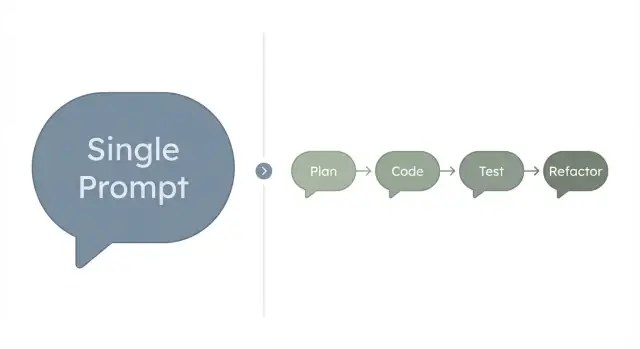
What you are choosing between
A single prompt is one big instruction you give the model, asking for the full output in one go. You describe the goal, constraints, and format, and you expect a complete result: a plan, code, copy, or a solution.
A workflow (often called an agent workflow) splits the same job into smaller steps. One step plans, another writes the code, another checks it, and another refactors or fixes issues. The work is still done by AI, but it is staged so you can review and guide it as it goes.
The real decision is not about “better AI.” It’s about the trade you want between speed, reliability, and control.
A one-shot prompt is usually fastest. It’s a good fit when you can judge the result quickly and the cost of being a little wrong is low. If it misses something, you rerun with a clearer prompt.
A staged workflow is slower per run, but it often wins when mistakes are expensive or hard to notice. Breaking the job into steps makes it easier to catch gaps, confirm assumptions, and keep the output consistent with your rules.
A simple way to compare them:
- Speed: one big prompt tends to be quickest.
- Reliability: staged steps reduce silent errors.
- Control: checkpoints give you more chances to steer.
- Repeatability: workflows are easier to reuse across tasks and teammates.
This matters most for builders and teams shipping features. If you’re writing production code, changing a database, or touching auth and payments, the extra verification from a workflow is usually worth it.
If you use a vibe-coding platform like Koder.ai (koder.ai), this split becomes practical: you can plan first, generate changes across React and Go, and then do a focused review or refactor before you export or deploy.
When a single prompt works well
A single prompt is the fastest option when the job is small, the rules are clear, and you can quickly tell whether the output is good.
It shines when you want one clean result, not a process. Think “solid draft with minor edits,” where mistakes are cheap.
Good fits include short writing tasks (an email, a product blurb, a meeting recap), small idea-generation jobs (name ideas, a handful of test cases for one function, FAQ questions), or text transformations (rewrite, summarize, change tone). It also works well for small code snippets you can eyeball, like a regex or a tiny helper function.
A one-shot prompt also works when you can give the full context upfront: the inputs, the required format, and an example or two. The model doesn’t need to guess.
Where it breaks is also predictable. One big instruction can hide assumptions: what types are allowed, what to do on errors, what “secure” means, what you consider “done.” It can miss edge cases because it’s trying to satisfy everything at once. And when the result is wrong, it’s harder to debug because you don’t know which part of the instruction caused the mistake.
You’re probably overloading a single prompt if you keep adding “also” and “don’t forget” clauses, if the output needs careful testing (not just reading), or if you find yourself asking for a rewrite two or three times.
As a practical example, asking for “a React login page” is often fine in one prompt. Asking for “a login page with validation, rate limiting, accessibility, tests, and a rollback plan” is a sign you want separated steps or roles.
When a workflow is the better fit
A workflow is usually the better choice when you don’t just need an answer, you need work you can trust. If the task has multiple moving parts, a one-shot prompt can blur intent and hide mistakes until the end.
It’s strongest when the outcome must be correct, consistent, and easy to review. Breaking the job into smaller roles makes it clearer what “done” means at each step, so you can catch issues early instead of rewriting everything later.
What you gain from separation
Each step has a smaller goal, so the AI can focus. You also get checkpoints that are easy to scan.
- Plan: define scope, constraints, and acceptance criteria.
- Build: implement the smallest set of changes that meet the plan.
- Test: check behavior against the criteria, including edge cases and regressions.
- Refactor: improve naming and structure without changing behavior.
A simple example: you want to add “invite a teammate” to an app. Planning forces decisions (who can invite, email rules, what happens if the user already exists). Building implements it. Testing verifies permissions and failure cases. Refactoring makes the code readable for the next change.
The tradeoff (and why it’s often worth it)
A workflow takes more steps, but usually less rework. You spend a little more time upfront on clarity and checks, and you buy back time you would’ve spent chasing bugs later.
Tools that support planning and safe checkpoints can make this feel lighter. For example, Koder.ai includes a planning mode and snapshots/rollback, which helps you review changes in stages and recover quickly if a step goes wrong.
A simple decision framework (complexity, risk, verification)
Don’t start with the tool. Start with the shape of the task. These factors usually tell you what will work with the least pain.
1) Complexity and change rate
Complexity is how many moving parts you have: screens, states, integrations, edge cases, and “if this, then that” rules. If requirements are still changing mid-task, the difficulty jumps because you’re also managing revisions.
A single prompt works best when the task is narrow and stable. A workflow earns its keep when you need planning first, then implementation, then corrections.
2) Risk and verification
Risk is what happens if the result is wrong: money, security, user data, uptime, and reputation. Verification is how easily you can prove the output is correct.
High risk plus hard verification is the strongest signal to split work into steps.
If you can check the output in minutes (a short email, a slogan, a small helper function), one prompt is often enough. If you need tests, review, or careful reasoning, a multi-step flow is safer.
A quick way to decide:
- How many components or systems does this touch?
- What is the worst-case impact if it’s wrong?
- Can I verify it fast, or do I need tests and logs?
- How often will I change my mind while building it?
- Do I need speed right now, or fewer fixes later?
Generating a simple “reset password” email is low risk and easy to verify. Building a password reset feature is different: token expiry, rate limits, audit logging, and edge cases matter.
Step-by-step: how to choose for your next task
Start by making “done” concrete, then see how much uncertainty is left.
A simple 5-step method
-
Write the goal in one sentence, then describe what “done” looks like (a file, a UI screen, a test passing).
-
List inputs and constraints. Inputs are what you already have (notes, API docs, sample data). Constraints are what you can’t change (deadline, stack, tone, privacy rules). Add a couple of non-goals so the model doesn’t wander.
-
Choose the approach. If it’s small, low-risk, and easy to verify by inspection, try one prompt. If it includes multiple parts (data changes, edge cases, tests), split it into stages.
-
Run a small first pass. Ask for the minimum useful slice, then expand. “Happy path only” first, then validation and errors.
-
Add checks before you trust it. Define acceptance criteria, then require proof: tests, sample inputs/outputs, or a short manual test plan.
Example: “Add a settings toggle” to a web app. If it’s just wording and layout, one prompt is often enough. If it needs database changes, API updates, and UI state, a staged workflow is safer.
If you work in Koder.ai, this maps cleanly: agree on scope in planning mode, implement in small steps (React, Go, PostgreSQL), then verify. Snapshots and rollback help you experiment without losing progress.
A habit that prevents bad handoffs: before you accept the final output, require a short checklist like “What changed?”, “How do I test it?”, and “What could break?”
What the roles look like in practice
A multi-role approach isn’t bureaucracy. It separates kinds of thinking that often get mixed together.
A practical set of roles:
- Planner: turns a fuzzy request into acceptance criteria, calls out edge cases, and defines what’s out of scope.
- Coder: makes the smallest change that moves the feature forward, keeping the diff easy to review.
- Tester: tries to break the feature, covering the happy path plus a few failure cases.
- Refactorer: cleans up naming and structure, removes duplication, and standardizes error handling.
- Reviewer (optional): compares the result against the criteria and flags gaps or risky assumptions.
Example: “Users can update their profile photo.” The Planner confirms allowed file types, size limits, where it’s shown, and what happens if upload fails. The Coder implements upload and saves the URL. The Tester checks oversized files, invalid formats, and network failures. The Refactorer extracts repeated logic and makes error messages consistent.
Realistic example: a small app feature from start to finish
Say you need a booking form that collects name, email, date, and notes. After submit, the user sees a confirmation message. An admin page shows a list of bookings.
The one-shot attempt
A single prompt often produces the happy path fast: a form component, a POST endpoint, and an admin table. It looks done until someone actually uses it.
What’s usually missed is the boring stuff that makes the feature real: validation (bad emails, missing date, date in the past), error states (timeouts, server errors, duplicate submit), empty states (no bookings yet), basic security (who can access the admin list), and data details (timezone, date format, trimming input).
You can patch these with follow-up prompts, but you often end up reacting to problems instead of preventing them.
The staged attempt
Now split the work into roles: plan, build, test, refactor.
The plan sets field rules, admin access, edge cases, and a clear definition of done. The build implements the React form and the Go endpoint with PostgreSQL. The test step tries bad inputs and verifies the admin list when the table is empty. The refactor step cleans up names and removes duplication.
Then product asks, “Add a dropdown for service type, and send a confirmation email.” In a one-shot flow, you might bolt on a field and forget to update the database, admin list, and validation. In a staged flow, you update the plan first, then each step touches the parts it owns, so the change lands cleanly.
Common mistakes and traps
The most common failure mode is trying to force everything into one instruction: plan the feature, write the code, test it, fix it, and explain it. The model usually does some parts well and hand-waves the rest, and you only notice after you run it.
Another trap is a fuzzy definition of done. If “make it better” is the goal, you can end up in endless revisions where each change creates new work. Clear acceptance criteria turns vague feedback into a simple check.
Mistakes that cause most rework:
- Mixing planning, building, and verification in one pass, so errors hide until late.
- Shipping without acceptance criteria, then arguing with the output instead of testing it.
- Leaving tests to the end, then chasing bugs that a small test would catch early.
- Changing requirements mid-way but not updating the plan or the task breakdown.
- Asking for “production-ready” code without stating constraints (security, performance, data rules, edge cases).
A concrete example: you ask for a “login page with validation” and get a nice React UI, but no clear rules for password length, error messages, or what counts as success. If you then add “also add rate limiting” without updating the plan, you’re likely to get mismatched UI and backend behavior.
If you use Koder.ai, treat planning mode, code generation, and testing as separate checkpoints. Snapshots and rollback help, but they don’t replace clear criteria and early verification.
Quick checklist before you start
Before you choose an approach, score the task with a few practical checks. This prevents the common failure: picking the “quick” option and then spending more time fixing it than you would have spent planning.
If you answer “yes” to most of the first questions, a single prompt is often enough. If you answer “yes” to most of the last questions, a workflow usually saves time.
- Can you describe the task clearly in about 5 to 8 bullets, without leaving big gaps?
- Can you verify the result quickly and objectively (not just “looks good”)?
- Do you have acceptance criteria, plus a couple of test cases or example inputs/outputs?
- Would a wrong answer be expensive, embarrassing, or hard to undo?
- Will the work touch multiple files, screens, or integrations (auth, payments, email, database, APIs)?
If you’re not sure about verification, treat that as a warning sign. “Hard to verify” tasks (pricing logic, permissions, migrations, edge cases) tend to benefit from separated steps: plan, build, test, then refactor.
A simple trick: if you can’t write two or three clear acceptance criteria, write those first. Then pick the lightest approach that still lets you confirm the result.
How to keep a workflow fast, not heavy
Workflows feel slow when they try to solve the whole problem in one marathon. Keep it quick by making each step earn its place: plan just enough, build in small chunks, and verify as you go.
Start with a thin slice. Plan only the first user story that creates visible value, like “user can save a note,” not “notes app with tags, search, sharing, and offline mode.”
Add guardrails early so you don’t pay for rework later. Simple constraints like naming rules, expected error handling, and “no breaking changes to existing endpoints” stop the work from wandering.
Lightweight rules that keep things moving:
- Timebox planning to one page, then build.
- Keep outputs small: one component, one endpoint, or one migration per step.
- Save safe points: take snapshots before risky edits so you can roll back quickly.
- Ask for proof, not prose: tests, sample inputs/outputs, or a short runbook.
- Decide when to stop: do a final review against acceptance criteria and end the loop once it passes.
Safe points matter more than perfect prompts. If a refactor goes sideways, rolling back is faster than debating what the agent “meant.”
Next steps: pick an approach and run a small experiment
Complexity and risk should decide this more than preference. If the task is small, low-stakes, and easy to eyeball, a single prompt usually wins. If the work can break something, affect users, or needs proof it works, separated steps start paying for themselves.
A solid default: use one prompt for drafts and exploration, and use roles when you’re trying to ship. Drafts include outlines, rough copy, quick ideas, and throwaway prototypes. Shipping includes changes that touch auth, payments, data migrations, reliability, or anything you’ll maintain.
A small experiment to try this week:
- Pick one feature that fits in half a day.
- Do a short plan pass: acceptance criteria, edge cases, and what “done” means.
- Do a build pass: implement only what the plan says.
- Do a test pass: try failure cases and confirm the criteria.
- Do a refactor pass: name things clearly, remove duplication, add brief notes.
Keep the scope tight so you learn the workflow, not fight the workload. “Add a search filter to a list” is a better test than “build the whole list page.”
If you’re already working in Koder.ai, use planning mode for the plan pass, take snapshots as checkpoints, and roll back freely when an experiment goes sideways. If you like the result, you can export the source code and continue with your usual tools.
After the experiment, ask two questions: did you catch issues earlier, and did you feel more confident shipping? If yes, keep the roles for similar tasks. If not, go back to a single prompt and save the structure for higher-risk work.
FAQ
When should I use a single prompt instead of a workflow?
Use a single prompt when the task is small, the rules are clear, and you can verify the result by reading it.
Good examples:
- Short copy (email, blurb, recap)
- Simple rewrites/summaries
- Small code snippets you can quickly review
When is an agent workflow worth the extra steps?
Choose a workflow when mistakes are expensive or hard to spot until later.
It’s a better fit for:
- Features touching auth, payments, or permissions
- Database changes and migrations
- Anything that needs tests, logs, or careful verification
Is a workflow always slower than a one-shot prompt?
Speed comes from fewer passes, but reliability comes from checkpoints.
A practical rule: if you expect to rerun the one-shot prompt two or three times to get it right, a workflow is often faster overall because it reduces rework.
How do I know I’m overloading a single prompt?
Look for signals that the prompt is doing too much:
- You keep adding “also” and “don’t forget” clauses
- The output needs testing, not just reading
- You can’t tell which part failed when it’s wrong
- The task touches multiple files, screens, or systems
What are acceptance criteria, and why do they matter here?
Write 2–5 acceptance criteria that you can check.
Examples:
- “Submitting invalid email shows a clear error message”
- “Non-admin users can’t access the admin list endpoint”
- “Dates in the past are rejected”
If you can’t state criteria clearly, do a planning step first.
What’s a simple workflow I can reuse for most features?
A lightweight default is:
- Plan: scope, constraints, edge cases, and “done”
- Build: implement the smallest slice that meets the plan
- Test: verify happy path + a few failure cases
- Refactor: clean up structure without changing behavior
This keeps each step focused and easier to review.
What kinds of mistakes does a workflow catch that a single prompt often misses?
Plan the happy path first, then add the most likely failures.
Typical failure cases:
- Missing/invalid inputs
- Duplicates (double submit)
- Permission checks
- Timeouts and server errors
- Empty states (no data yet)
Workflows help because you explicitly test these instead of hoping they’re covered.
How should teams decide between speed and reliability?
Use the same complexity/risk questions, but keep the output smaller.
A good approach:
- One prompt to get a quick draft or prototype
- Then a workflow to make it shippable (rules, edge cases, tests, cleanup)
This gives you speed early and control before release.
How does a vibe-coding platform like Koder.ai fit into this decision?
Yes. Platforms like Koder.ai make the workflow practical because you can:
- Plan first in a dedicated planning mode
- Implement changes across frontend and backend in small steps
- Use snapshots and rollback to create safe checkpoints
- Export or deploy only after a focused review
The key benefit is safer iteration, not just faster generation.
How do I keep a workflow from turning into busywork?
Keep it lean:
- Timebox planning (for example, one page or 15 minutes)
- Build in thin slices (one component/endpoint/migration at a time)
- Require proof, not essays (tests, sample inputs/outputs, quick manual test plan)
- Stop when acceptance criteria pass
The goal is fewer late surprises, not a long process.