

How Small Teams with AI Ship Faster Than Big Engineering Orgs
Learn why small teams using AI can ship faster than large engineering orgs: less overhead, tighter feedback loops, smarter automation, and clearer ownership.
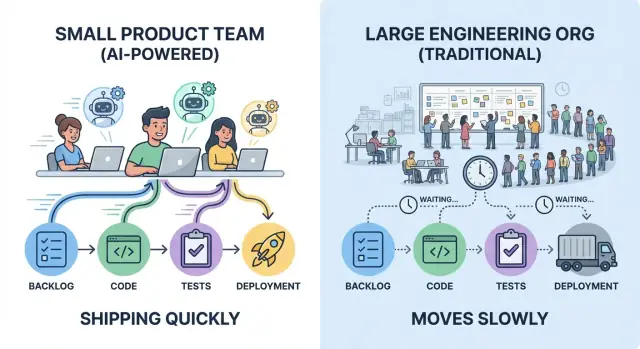
What “Speed” Means in Real Product Delivery
“Shipping faster” isn’t just typing code quickly. Real delivery speed is the time between an idea becoming a reliable improvement users can feel—and the team learning whether it worked.
The metrics that actually describe speed
Teams argue about speed because they’re measuring different things. A practical view is a small set of delivery metrics:
- Lead time: how long it takes to go from “we decided to do this” to “it’s live for users.”
- Cycle time: how long a piece of work spends “in progress” once someone starts it.
- Deployment frequency: how often you can safely release (daily, weekly, on demand).
- Time-to-learning: how quickly you get a trustworthy signal (usage, support tickets, retention, revenue) that tells you what to do next.
A small team that deploys five small changes per week often learns faster than a larger org that deploys one big release per month—even if the monthly release contains more code.
What “using AI” means (and what it doesn’t)
In practice, “AI for engineering” usually looks like a set of assistants embedded into existing work:
- Copilots for drafting code, refactors, and documentation
- Test generation and test maintenance helpers
- Code review support (spotting edge cases, suggesting simplifications)
- Support and ops bots (summarizing incidents, drafting runbooks, answering “where is this implemented?”)
AI helps most with throughput per person and reducing rework—but it doesn’t replace good product judgment, clear requirements, or ownership.
The core idea: overhead vs. iteration loops
Speed is mostly constrained by two forces: coordination overhead (handoffs, approvals, waiting) and iteration loops (build → release → observe → adjust). AI amplifies teams that already keep work small, decisions clear, and feedback tight.
Without habits and guardrails—tests, code review, and release discipline—AI can also accelerate the wrong work just as efficiently.
The Hidden Tax of Scale: Coordination Overhead
Big engineering orgs don’t just add people—they add connections. Each new team boundary introduces coordination work that doesn’t ship features: syncing priorities, aligning designs, negotiating ownership, and routing changes through the “right” channels.
Where the time actually goes
Coordination overhead shows up in familiar places:
- Meetings to “get everyone on the same page” (status, planning, roadmap alignment)
- Reviews that require multiple stakeholders (security, privacy, architecture, brand)
- Handoffs between roles or teams (product → design → engineering → platform → SRE)
- Documentation written to enable those handoffs and defend decisions later
None of these are inherently bad. The problem is that they compound—and they grow faster than headcount.
Dependencies create waiting, not work
In a large org, a simple change often crosses several dependency lines: one team owns the UI, another owns the API, a platform team owns deployment, and an infosec group owns approval. Even if each group is efficient, the queue time dominates.
Common slowdowns look like:
- A feature blocked on a quarterly architecture review board
- A small API tweak waiting two weeks in a platform backlog
- A release held until a central QA or compliance window opens
- “We need a sign-off from Team X” that turns into a three-meeting thread
How overhead stretches lead time
Lead time isn’t just coding time; it’s elapsed time from idea to production. Every extra handshake adds latency: you wait for the next meeting, the next reviewer, the next sprint, the next slot in someone else’s queue.
Small teams often win because they can keep ownership tight and decisions local. That doesn’t eliminate reviews—it reduces the number of hops between “ready” and “shipped,” which is where large orgs quietly lose days and weeks.
Small Teams Win with Clear Ownership and Fewer Handoffs
Speed isn’t just about typing faster—it’s about making fewer people wait. Small teams tend to ship quickly when work has single-threaded ownership: one clearly responsible person (or pair) who drives a feature from idea to production, with a named decision maker who can resolve tradeoffs.
Single-threaded ownership makes decisions cheap
When one owner is accountable for outcomes, decisions don’t bounce between product, design, engineering, and “the platform team” in a loop. The owner gathers input, makes the call, and moves forward.
This doesn’t mean working alone. It means everyone knows who is steering, who approves, and what “done” means.
Fewer handoffs means less rework
Every handoff adds two types of cost:
- Context loss: details get simplified, assumptions go unspoken, and edge cases disappear.
- Rework: the next person discovers constraints too late and sends the work back upstream.
Small teams avoid this by keeping the problem inside a tight loop: the same owner participates in requirements, implementation, rollout, and follow-up. The result is fewer “wait, that’s not what I meant” moments.
How AI helps one owner cover more ground
AI doesn’t replace ownership—it extends it. A single owner can stay effective across more tasks by using AI to:
- Draft first-pass specs, release notes, and customer updates
- Summarize long threads, incident history, or prior decisions into a short brief
- Scaffold implementation: generate boilerplate, test outlines, migration scripts, or API client stubs
The owner still validates and decides, but the time spent getting from blank page to workable draft drops sharply.
If you’re using a vibe-coding workflow (for example, Koder.ai), this “one owner covers the whole slice” model gets even easier: you can draft a plan, generate a React UI plus a Go/PostgreSQL backend skeleton, and iterate through small changes in the same chat-driven loop—then export source code when you want tighter control.
Signals you have strong ownership
Look for these operational signs:
- One backlog per initiative (not scattered across multiple tools or teams)
- One definition of done, including testing and rollout (not “done in dev”)
- A single decision maker for priority and scope
- Clear interfaces with other teams: requests are explicit, time-boxed, and documented
When these signals are present, a small team can move with confidence—and AI makes that momentum easier to sustain.
Tighter Feedback Loops Beat Bigger Plans
Big plans feel efficient because they reduce the number of “decision moments.” But they often push learning to the end—after weeks of building—when changes are most expensive. Small teams move faster by shrinking the distance between an idea and real-world feedback.
Short loops prevent wasted work
A short feedback loop is simple: build the smallest thing that can teach you something, put it in front of users, and decide what to do next.
When feedback arrives in days (not quarters), you stop polishing the wrong solution. You also avoid over-engineering “just in case” requirements that never materialize.
What fast learning looks like
Small teams can run lightweight cycles that still produce strong signals:
- Quick prototypes: clickable mockups or thin “happy path” flows to validate whether users understand the value.
- Early user interviews: 5–8 conversations often surface the top objections and missing pieces.
- Rapid A/B iterations: small UI or onboarding changes measured over a short window can reveal which direction reduces friction.
The key is to treat each cycle as an experiment, not a mini-project.
AI can accelerate the learning, not just the building
AI’s biggest leverage here isn’t writing more code—it’s compressing the time from “we heard something” to “we know what to try next.” For example, you can use AI to:
- Summarize feedback from interviews, support tickets, app reviews, or sales notes into crisp takeaways.
- Cluster themes (e.g., confusion points, missing features, trust concerns) so patterns emerge quickly.
- Draft experiments: propose hypotheses, success metrics, and the smallest test that could confirm or reject them.
That means less time in synthesis meetings and more time running the next test.
Shipping speed vs. learning speed
Teams often celebrate shipping velocity—how many features went out. But real speed is learning velocity: how quickly you can reduce uncertainty and make better decisions.
A large org can ship a lot and still be slow if it learns late. A small team can ship less “volume” but move faster by learning earlier, correcting sooner, and letting evidence—not opinions—shape the roadmap.
AI as a Force Multiplier, Not a Replacement
AI doesn’t make a small team “bigger.” It makes the team’s existing judgment and ownership travel further. The win isn’t that AI writes code; it’s that it removes drag from the parts of delivery that steal time without improving the product.
High-leverage uses that compound
Small teams get outsized gains when they aim AI at work that’s necessary but rarely differentiating:
- Boilerplate generation: scaffolding new endpoints, test files, migration templates, CI config, or repetitive UI components.
- Refactors with a plan: renaming, extracting helpers, converting patterns, and updating call sites—especially when paired with clear constraints (“don’t change behavior,” “keep public API stable”).
- Documentation first drafts: release notes, ADR outlines, API docs, onboarding guides, and “how to run locally” instructions.
The pattern is consistent: AI accelerates the first 80% so humans can spend more time on the final 20%—the part that requires product sense.
Where AI helps most (and where it doesn’t)
AI shines on routine tasks, “known problems,” and anything that starts from an existing codebase pattern. It’s also great for exploring options quickly: propose two implementations, list tradeoffs, or surface edge cases you may have missed.
It helps least when requirements are unclear, when the architecture decision has long-term consequences, or when the problem is highly domain-specific with little written context. If the team can’t explain what “done” means, AI can only generate plausible-looking output faster.
Speed without shortcuts: validation is non-negotiable
Treat AI as a junior collaborator: useful, fast, and sometimes wrong. Humans still own the outcome.
That means every AI-assisted change should still have review, tests, and basic sanity checks. The practical rule: use AI to draft and transform; use humans to decide and verify. This is how small teams ship faster without turning velocity into future cleanup.
Reducing Context Switching with AI Assistance
Context switching is one of the quiet killers of speed on small teams. It’s not just “being interrupted”—it’s the mental reboot every time you bounce between code, tickets, docs, Slack threads, and unfamiliar parts of the system. AI helps most when it turns those reboots into quick pit stops.
How AI cuts the switching cost
Instead of spending 20 minutes hunting for an answer, you can ask for a fast summary, a pointer to likely files, or a plain-English explanation of what you’re looking at. Used well, AI becomes a “first draft” generator for understanding: it can summarize a long PR, turn a vague bug report into hypotheses, or translate a scary stack trace into likely causes.
The win isn’t that AI is always right—it’s that it gets you oriented faster so you can make real decisions.
Practical tactics that work in real teams
A few prompt patterns consistently reduce thrash:
- Ask for options: “Give me 3 approaches to fix this, with tradeoffs and risk.”
- Explain this code: “Explain what this function does, edge cases, and what would break if we change X.”
- Generate a plan: “Create a step-by-step plan to ship this in two small PRs, including tests.”
- Write a checklist: “Checklist for releasing this safely (monitoring, rollback, validation).”
These prompts shift you from wandering to executing.
Make prompts reusable, not heroic
Speed compounds when prompts become templates the whole team uses. Keep a small internal “prompt kit” for common jobs: PR reviews, incident notes, migration plans, QA checklists, and release runbooks. Consistency matters: include the goal, constraints (time, scope, risk), and the expected output format.
Limits and guardrails
Don’t paste secrets, customer data, or anything you wouldn’t put in a ticket. Treat outputs as suggestions: verify critical claims, run tests, and double-check generated code—especially around auth, payments, and data deletion. AI reduces context switching; it shouldn’t replace engineering judgment.
Ship Small, Ship Often: Practices AI Amplifies
Shipping faster isn’t about heroic sprints; it’s about reducing the size of each change until delivery becomes routine. Small teams already have an advantage here: fewer dependencies make it easier to keep work sliced thin. AI amplifies that advantage by shrinking the time between “idea” and “safe, releasable change.”
A lightweight delivery pipeline (that scales down well)
A simple pipeline beats an elaborate one:
- Trunk-based development: integrate into main frequently instead of long-lived branches.
- Small PRs: changes that can be reviewed in minutes, not hours.
- Frequent deploys: release whenever a change is ready, not when a batch is “big enough.”
AI helps by drafting release notes, suggesting smaller commits, and flagging files that are likely to be touched together—nudging you toward cleaner, tighter PRs.
AI-accelerated tests: coverage without the drag
Tests are often where “ship often” breaks down. AI can reduce that friction by:
- Generating starter unit/integration tests from existing code patterns.
- Brainstorming edge cases you might miss (time zones, empty states, retries, rate limits).
- Proposing test data and mocks that match real API shapes.
Treat AI-generated tests as a first draft: review for correctness, then keep the ones that meaningfully protect behavior.
Release confidence: monitor, alert, rollback
Frequent deploys require fast detection and fast recovery. Set up:
- Basic health checks and dashboards for core user flows
- Alerts tied to symptoms (error rate, latency, failed jobs), not vanity metrics
- A one-command rollback (or automated rollback) so a bad release becomes a small hiccup
If your delivery fundamentals need a refresher, link this into your team’s shared reading: /blog/continuous-delivery-basics.
With these practices, AI doesn’t “make you faster” by magic—it removes the small delays that otherwise accumulate into week-long cycles.
Decision Latency: Approvals vs. Guardrails
Big engineering organizations rarely move slowly because people are lazy. They move slowly because decisions queue up. Architectural councils meet monthly. Security and privacy reviews sit behind ticket backlogs. A “simple” change can require a tech lead review, then a staff engineer review, then a platform sign-off, then a release manager approval. Each hop adds wait time, not just work time.
Small teams can’t afford that kind of decision latency, so they should aim for a different model: fewer approvals, stronger guardrails.
What approvals try to solve (and why they stall)
Approval chains are a risk-management tool. They reduce the chance of bad changes, but they also centralize decision-making. When the same small group must bless every meaningful change, throughput collapses and engineers start optimizing for “getting approval” rather than improving the product.
Guardrails: the small-team alternative
Guardrails shift quality checks from meetings to defaults:
- Clear coding standards and definitions of done
- Lightweight checklists for risky areas (auth, payments, data deletion)
- Automated checks: tests, linting, type checking, dependency scanning
Instead of “Who approved this?”, the question becomes “Did this pass the agreed gates?”
How AI reduces the cost of guardrails
AI can standardize quality without adding more humans to the loop:
- Lint and refactor suggestions to align code with team standards
- PR summaries that explain intent, scope, and risk in plain language
- Review checklists generated from the diff (e.g., “touches PII: confirm retention policy”) so reviewers don’t rely on memory
This improves consistency and makes reviews faster, because reviewers start from a structured brief rather than a blank screen.
Keeping compliance lightweight (without skipping it)
Compliance doesn’t need a committee. Keep it repeatable:
- Define “requires review” triggers (PII, money movement, permissions)
- Use templates for evidence (PR summary + checklist + test results)
- Store decisions in the PR thread so audits are a search away
Approvals become the exception for high-risk work; guardrails handle the rest. That’s how small teams stay fast without being reckless.
Design Work as Thin Slices to Keep Momentum
Big teams often “design the whole system” before anyone ships. Small teams can move faster by designing thin slices: the smallest end-to-end unit of value that can go from idea → code → production and be used (even by a small cohort).
What a thin slice actually is
A thin slice is vertical ownership, not a horizontal phase. It includes whatever is needed across design, backend, frontend, and ops to make one outcome real.
Instead of “redesign onboarding,” a thin slice might be “collect one extra signup field, validate it, store it, show it in the profile, and track completion.” It’s small enough to finish quickly, but complete enough to learn from.
How AI helps you slice work (without guessing)
AI is useful here as a structured thinking partner:
- Propose 2–4 milestone options (smallest viable, medium, full)
- Generate a task breakdown by layer (UI, API, data, analytics, rollout)
- Flag hidden dependencies (migrations, permissions, edge cases)
- Suggest a rollout plan (feature flag, limited cohort, fallback)
The goal isn’t more tasks—it’s a clear, shippable boundary.
Define “done” for each slice
Momentum dies when “almost done” drags on. For every slice, write explicit Definition of Done items:
- User-visible behavior (what changed, for whom)
- Acceptance criteria (happy path + key edge cases)
- Instrumentation (event names, dashboards, alerts if needed)
- Deployment/rollback steps (or feature flag rules)
Examples of thin slices
- One endpoint:
POST /checkout/quotereturning price + taxes - One screen: a settings page for notification preferences
- One workflow: password reset from request → email → new password → confirmation
Thin slices keep design honest: you’re designing what you can ship now, learning quickly, and letting the next slice earn its complexity.
Risks of AI-Accelerated Speed (and How to Manage Them)
AI can help a small team move quickly, but it also changes the failure modes. The goal isn’t to “slow down to be safe”—it’s to add lightweight guardrails so you can keep shipping without accumulating invisible debt.
Common risks when AI is in the loop
Moving faster increases the chance that rough edges slip into production. With AI assistance, a few risks show up repeatedly:
- Inconsistent code and style: AI-generated patches can vary in patterns, naming, and architecture, making the codebase harder to maintain.
- Security issues: suggestions may introduce insecure defaults (weak auth checks, missing input validation, unsafe deserialization).
- Hallucinated logic: code can look plausible but be subtly wrong (edge cases, wrong API assumptions, incorrect error handling).
- Dependency sprawl: AI may pull in new libraries “to make it easy,” increasing attack surface and maintenance cost.
Guardrails that keep speed without chaos
Keep rules explicit and easy to follow. A few practices pay off quickly:
- Secure coding guidelines: a short checklist for common areas (auth, permissions, validation, logging, encryption).
- Secret scanning in CI and pre-commit hooks, plus clear rules on where secrets live.
- Dependency policies: approved libraries list, version pinning, and a “new dependency requires a reason” standard.
Human checks that matter most
AI can draft code; humans must own outcomes.
- Threat modeling for changes that touch data, auth, payments, or admin flows. Even a 10-minute review catches high-impact risks.
- Code review that focuses on behavior, not just style: inputs/outputs, error paths, permissions, and data handling.
- Testing strategy: require unit tests for logic, integration tests for critical flows, and a small set of high-signal end-to-end checks.
Using AI safely day to day
Treat prompts like public text: don’t paste secrets, tokens, or customer data. Ask the model to explain assumptions, then verify with primary sources (docs) and tests. When something feels “too convenient,” it usually needs a closer look.
If you use an AI-driven build environment like Koder.ai, apply the same rules: keep sensitive data out of prompts, insist on tests and review, and rely on snapshots/rollback-style workflows so “fast” also means “recoverable.”
How to Measure Gains and Build a Repeatable System
Speed only matters if you can see it, explain it, and recreate it. The goal isn’t “use more AI”—it’s a simple system where AI-assisted practices reliably reduce time-to-value without raising risk.
Metrics that show real delivery speed (not activity)
Pick a small set you can track weekly:
- Cycle time: from “work started” to “in production.”
- PR size: lines/files changed (smaller usually means easier reviews and safer releases).
- Review time: median time a PR waits for first review and for merge.
- Incidents/regressions: production issues per week (and severity), plus mean time to recover.
- Customer response time: time from user feedback to a shipped change.
Add one qualitative signal: “What slowed us down most this week?” It helps you spot bottlenecks metrics won’t.
A lightweight operating rhythm
Keep it consistent, and keep it small-team friendly:
- Weekly goals (30 minutes): 1–3 outcomes, not a long task list.
- Daily async updates: yesterday/today/blockers in Slack/Linear/GitHub.
- Demo cadence (weekly or biweekly): show shipped work, not slides. This reinforces “done means in users’ hands.”
A 30-day rollout plan for AI workflows
Week 1: Baseline. Measure the metrics above for 5–10 working days. No changes yet.
Weeks 2–3: Pick 2–3 AI workflows. Examples: PR description + risk checklist generation, test-writing assistance, release notes + changelog drafting.
Week 4: Compare before/after and lock in habits. If PR size drops and review time improves without more incidents, keep it. If incidents rise, add guardrails (smaller rollouts, better tests, clearer ownership).
Checklist: start this week
- Choose 3 metrics to post in a weekly thread.
- Set a default PR size target (and enforce it with social norms, not bureaucracy).
- Add an AI-assisted “pre-review” step: summarize changes, risks, and test coverage.
- Schedule one demo on the calendar.
- Run one “bottleneck retro” question: what caused the biggest delay, and what will we change next week?
FAQ
What does “speed” actually mean in product delivery?
Delivery speed is the elapsed time from an idea becoming a decision to a reliable change being live for users and generating feedback you can trust. It’s less about “coding fast” and more about minimizing waiting (queues, approvals, handoffs) and tightening build → release → observe → adjust loops.
Why focus on lead time, cycle time, deployment frequency, and time-to-learning?
They capture different bottlenecks:
- Lead time shows end-to-end latency (including waiting).
- Cycle time shows how long work is stuck “in progress.”
- Deployment frequency shows how often you can safely ship.
- Time-to-learning shows how quickly you get a signal to decide what to do next.
Using all four prevents optimizing one number while the real delay hides elsewhere.
Why do big engineering orgs often feel slower even with more people?
Coordination overhead grows with team boundaries and dependencies. More handoffs mean more:
- Queue time (waiting for reviews, meetings, other teams’ backlogs)
- Context loss (misunderstandings that create rework)
- Decision latency (approvals scheduled on someone else’s cadence)
A small team with clear ownership can often keep decisions local and ship in smaller increments.
What is “single-threaded ownership,” and how does it speed delivery?
It means one clearly accountable owner drives a slice from idea to production, gathers input, and makes calls when tradeoffs appear. Practically:
- One person/pair is responsible for outcomes
- “Done” includes testing + rollout (not just “merged”)
- Stakeholders advise, but the owner decides and executes
This reduces back-and-forth and keeps work moving.
What does “using AI for engineering” realistically look like?
AI works best as an accelerator for drafts and transformations, such as:
- Scaffolding code, refactors, and repetitive changes
- Drafting tests and suggesting edge cases
- Summarizing PRs, incidents, and long threads
- Drafting specs, release notes, and runbooks
It increases throughput per person and reduces rework—but it doesn’t replace product judgment or verification.
How do small teams use AI to speed up learning, not just coding?
AI can make it easier to ship the wrong thing faster if you don’t keep learning tight. Good practice is to pair AI-assisted building with AI-assisted learning:
- Summarize support tickets/interviews and cluster themes
- Draft experiment hypotheses and success metrics
- Propose the smallest next test to reduce uncertainty
Optimize for learning velocity, not feature volume.
How can we avoid quality regressions when AI increases throughput?
Treat AI output like a fast junior collaborator: helpful, but sometimes wrong. Keep guardrails lightweight and automatic:
- Require review + tests for AI-assisted changes
- Use linters/type checks/CI gates as defaults
- Add a diff-based risk checklist (auth, payments, PII, deletion)
- Prefer smaller PRs so mistakes are easier to spot and revert
Rule of thumb: AI drafts; humans decide and verify.
What’s the difference between approvals and guardrails, and why does it matter?
Use guardrails to make “safe by default” the normal path:
- A clear Definition of Done (tests, rollout, monitoring)
- Automated checks (CI, linting, dependency scanning, secret scanning)
- Templates for PR summaries and risk notes
Reserve human approvals for truly high-risk changes rather than routing everything through a committee.
What is a “thin slice,” and how do we define one?
A thin slice is a small, end-to-end unit of value (design + backend + frontend + ops as needed) that can ship and teach you something. Examples:
- One endpoint with real validation and logging
- One settings screen with persistence + analytics
- One workflow (e.g., password reset) with a measurable success metric
Thin slices keep momentum because you reach production and feedback faster.
How do we measure whether AI is actually making us faster?
Start with a baseline and focus on a few weekly signals:
- Cycle time (start → production)
- Review time (wait for first review + merge)
- PR size (lines/files changed)
- Incidents/regressions and time to recover
- Time from user feedback to shipped change
Run a short weekly check: “What slowed us down most?” If your delivery fundamentals need alignment, standardize on a shared reference like /blog/continuous-delivery-basics.