

Why Software Creation Isn’t Just for Engineers Anymore
No-code tools, AI assistants, and APIs let designers, analysts, and operators build apps without losing quality. Learn what changed and how to do it safely.
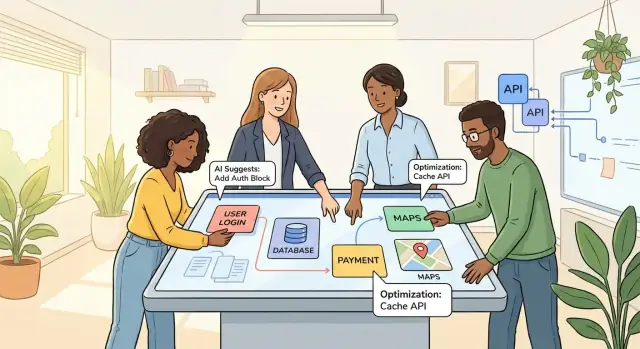
Software Is Being Built by More Than Engineers
“Software creation” used to mean writing code from scratch and deploying it on servers. Today it includes a much broader set of activities: building internal apps, automating workflows, assembling dashboards, and connecting systems through integrations.
A sales ops lead might create lead-routing automation in a workflow tool. A finance analyst might build a forecasting dashboard that refreshes automatically. A support manager might connect a helpdesk to Slack so urgent tickets trigger alerts. None of these require someone to author thousands of lines of code—but they still produce working software that changes how a team operates.
More builders, not “everyone becomes an engineer”
This shift doesn’t mean every employee should become a professional engineer. Engineering is still essential for complex products, performance-critical systems, and anything that demands deep architecture or custom infrastructure.
What’s changed is that many useful solutions sit in the middle: they’re real software, but they’re closer to “configuring and composing” than traditional programming. People who understand the problem best—operations, marketing, HR, finance, customer success—can often build these solutions faster because they don’t have to translate requirements across multiple handoffs.
The barrier to building and shipping got lower
The cost of going from idea to something usable has dropped. Prebuilt components, templates, visual editors, integrations, and guided deployment paths make it easier to ship software that’s not just a prototype, but something a team can rely on day-to-day.
That’s why software is increasingly being built by product teams, domain experts, and “citizen developers,” with engineers focusing where their leverage is highest: scalable foundations, critical integrations, and the guardrails that keep everything safe.
Why Building Software Used to Be Engineer-Only
For a long time, “building software” meant speaking a language most people couldn’t read. Business teams might understand the problem, but turning it into working code required specialized training, specific tools, and a lot of patience.
The old model: scarce skills, slow cycles
Software was written in specialized languages, compiled, and deployed through processes that weren’t designed for frequent change. Even small updates could take weeks because they depended on:
- Engineers who knew the stack and internal systems
- Carefully scheduled release windows (often monthly or quarterly)
- Limited access to infrastructure—servers, databases, and permissions were tightly controlled
That setup wasn’t irrational. Production systems were expensive, fragile, and hard to roll back. The safest path was to let a small group build and ship.
Why business teams lived on tickets and IT backlogs
Because engineers controlled the tools and environments, business teams interacted with software creation through requests: tickets, requirements documents, and meetings to “translate” needs into specifications.
This created a bottleneck. IT and product teams had to prioritize across the whole organization, so many requests sat in backlogs. If your need wasn’t tied to revenue or compliance, it often waited behind higher-stakes work.
The “hidden software” people built anyway
Work doesn’t stop just because an app doesn’t exist. Teams created their own systems in whatever tools they had—spreadsheets that became mini-databases, email chains that acted like approval workflows, shared folders with versioned documents, and copied-and-pasted checklists for repeatable processes.
These workarounds functioned like software—capturing data, enforcing steps, triggering actions—but they were hard to maintain, easy to break, and nearly impossible to govern. They also revealed something important: many business problems were software problems, even when no one called them that.
Reusable Components Changed the Economics
For a long time, building software meant paying the “from-scratch tax.” Every new app needed basics like user accounts, permissions, data storage, hosting, and a usable interface—before it delivered any real business value. That made software expensive, slow, and naturally concentrated in engineering teams.
Reusable components flipped that math. Instead of reinventing the same foundations, teams can start with proven pieces and focus effort on what’s unique.
From custom plumbing to ready-made foundations
Cloud platforms removed much of the setup work that used to consume weeks:
- Hosting and scaling are largely configured, not hand-built.
- Databases are provisioned in minutes with backups and monitoring already available.
- Authentication and authorization can be enabled with built-in services (single sign-on, role-based access, MFA).
The outcome is less “build the infrastructure” and more “connect the features.” Even when engineers are involved, they spend more time shaping business logic and less time wiring servers.
Libraries, templates, and marketplaces as building blocks
Reusable building blocks show up in many forms:
- Libraries and SDKs that provide common functions (payments, reporting, file uploads).
- Templates and starter kits that include a prebuilt structure for common app types (customer portals, internal tools).
- SaaS features that are effectively “prebuilt modules” (CRM workflows, ticketing, analytics dashboards).
- App marketplaces where integrations and add-ons can be installed instead of developed.
These components don’t just save time—they reduce risk. They’ve been tested across many customers and updated as requirements change.
“Assemble and configure” beats “write everything”
When an app is mostly assembling proven parts, the skills needed shift. You can get far by specifying workflows, choosing data fields, setting permissions, and configuring rules—work that product teams and domain experts can often do well.
That economic shift is a major reason software creation is no longer limited to people who can code every layer from scratch.
No-Code and Low-Code: What They Enable
No-code and low-code tools let people create useful software without starting from a blank code editor.
No-code means you build by configuring pre-made blocks—drag-and-drop screens, forms, automations, and data tables—using visual settings instead of writing code.
Low-code is similar, but it also allows (or expects) some coding for parts that don’t fit the standard blocks—like custom rules, unique UI behavior, or advanced integrations.
What people actually build with them
These platforms shine when the goal is to ship a working workflow quickly, especially inside a company where the “users” are known and the requirements are practical.
Common examples include:
- Forms and intake flows (requests, support tickets, onboarding checklists)
- Approvals and routing (expense approvals, content review, purchase requests)
- Lightweight CRMs and contact tracking for a specific team
- Internal tools (inventory lists, status dashboards, reporting views)
- Simple customer portals (basic account updates, submission trackers, appointment requests)
A big reason they work is that much of business software is repetitive: collect information, validate it, store it, notify the next person, and keep an audit trail. No-code/low-code tools package these patterns into components you can assemble.
Where the limits show up
No-code and low-code aren’t a replacement for engineering—they’re a faster path for the right kind of app.
You’ll often need engineering support when:
- The product requires complex custom logic (edge cases, heavy calculations, unusual permission models)
- You need high scale (large data volumes, high traffic, strict performance goals)
- There are strict security/compliance requirements (fine-grained access control, encryption policies, regulated environments)
- The app must be highly maintainable over years with automated testing, versioning, and code review
In practice, the best outcomes happen when no-code/low-code handles the “80% workflow,” and engineers step in for the tricky 20%—custom integrations, data modeling, and guardrails that keep everything reliable.
AI Assistants Made Starting Much Easier
A big reason software creation has opened up is simple: you no longer need to start from a blank screen. AI assistants can produce a first draft in minutes, which lowers the “activation energy” to try an idea.
This is also where “vibe-coding” platforms are emerging: instead of assembling blocks or writing everything by hand, you describe the app in plain language and iterate with an assistant until it works. For example, Koder.ai lets teams create web, backend, and mobile applications through a chat interface—useful when you want more flexibility than typical no-code tools, but still want a fast path from idea to a running system.
What AI can draft for you
For non-engineers, the most practical value is getting workable starting points:
- Code snippets for common tasks (input validation, sending emails, reading/writing files, simple web pages)
- Formulas and expressions inside spreadsheets and no-code tools (filtering, conditional logic, date math)
- SQL queries to explore data and power dashboards (joins, group-by summaries, simple segmentation)
- Tests and checklists that describe what “correct” looks like (edge cases, error states)
- Documentation that explains what a workflow does and how to use it
That’s often enough to turn “I think we could automate this” into a prototype you can show a teammate.
The new skill: asking and reviewing
The main skill shift is less about memorizing syntax and more about asking good questions and reviewing what you get back. Clear prompts that include examples, constraints, and desired outputs lead to better drafts. Equally important is reading the result with a critical eye: does it match the business rule, the data meaning, and the real-world process?
Some teams formalize this with a “planning first” habit: write down the workflow, edge cases, and success metrics before generating anything. (Koder.ai includes a planning mode for this style of work, which helps make the build more deliberate rather than purely improvisational.)
Validation isn’t optional
AI can be wrong, inconsistent, or insecure—sometimes confidently. Treat outputs as suggestions, not truth.
Validate by:
- Testing with real and “weird” inputs (empty fields, unusual dates, duplicates)
- Spot-checking SQL results against known totals
- Looking for security issues (exposed secrets, overly broad permissions, unsafe data handling)
- Having someone else review anything customer-facing or mission-critical
Used this way, AI doesn’t replace expertise—it accelerates the path from idea to something you can evaluate.
APIs and Integrations Turn Tools Into Building Blocks
APIs (Application Programming Interfaces) are best understood as connectors: they let one tool securely ask another tool for data or trigger an action. Instead of rebuilding features from scratch, teams can “snap together” existing services—your CRM, spreadsheets, payment provider, support inbox, analytics—into a workflow that behaves like a custom app.
When tools expose APIs, they stop being isolated products and start acting like building blocks. A form submission can open a ticket, a new customer can be added to billing, and a status change can notify a Slack channel—without anyone writing a full system end-to-end.
Integration patterns non-engineers can use
You don’t need to know how to code an API client to benefit from APIs. Many platforms wrap them in friendly interfaces, typically through:
- Webhooks: simple event notifications (e.g., “new order created”) sent from one system to another.
- Zap-style automation: if-this-then-that rules that connect popular apps in a few clicks.
- iPaaS flows: more structured integration builders (often with branching, retries, and approvals) designed for business processes.
These patterns cover a lot of real work: lead routing, invoice creation, onboarding checklists, reporting pipelines, and basic workflow automation.
Guardrails that keep integrations safe
The biggest risk with integrations isn’t ambition—it’s ungoverned access. Non-engineers can connect systems safely when organizations provide clear boundaries:
- Approved integrations and connectors (a catalog of supported apps and templates).
- Least-privilege permissions (scoped API tokens, role-based access, limited fields).
- Shared environments (separate test vs. production connections).
- Lightweight review for anything touching money, customer data, or critical operations.
With these guardrails, integration work becomes a practical way for citizen developers to deliver value quickly, while engineers stay focused on core systems, reliability, and the few integrations that truly require custom code.
Domain Experts Are Better Positioned to Build Certain Apps
A growing share of “software building” now happens outside engineering—and for certain types of apps, that’s a feature, not a problem.
Who’s building now (and what they’re building)
Teams that live inside day-to-day operations often create the most useful internal tools because they feel the friction firsthand:
- Operations teams automating handoffs, approvals, and exception handling
- Marketing teams spinning up campaign trackers, landing-page workflows, and lead routing
- Finance teams building reconciliation checklists, budget request flows, and invoice triage
- Support teams creating macros, escalation workflows, and “next best action” dashboards
- Product managers prototyping new flows and validating requirements before a full build
- Designers assembling interactive prototypes that behave like lightweight apps
These aren’t usually “build a new database engine” projects. They’re practical apps that coordinate people, data, and decisions.
Why domain expertise matters
Domain experts understand the real workflow—including the messy parts that never make it into a spec. They know the edge cases (refund exceptions, compliance steps, special customer segments), the hidden dependencies (which spreadsheet is the source of truth), and the time-sensitive constraints (month-end close, campaign launch windows).
That knowledge is hard to transfer through tickets and meetings. When the person who owns the process can also shape the tool, the app reflects reality sooner—and breaks less often in the ways that matter.
What you get: speed, clarity, and fewer handoffs
When domain experts can prototype or ship small tools themselves, outcomes tend to improve quickly:
- Faster experiments: try a new intake form or routing rule in hours, not weeks
- Fewer handoffs: less back-and-forth translating “what we mean” into requirements
- Clearer requirements for engineering: prototypes make scope, data needs, and UX explicit
The best result is not replacing engineers—it’s arriving at the right solution faster, with fewer misunderstandings and less wasted effort.
Citizen Developers and Engineers Can Complement Each Other
“Citizen development” is when people outside traditional engineering roles—ops, finance, HR, sales, customer success—build small apps, automations, dashboards, or workflows using no-code/low-code tools and approved integrations. The point isn’t to replace engineers; it’s to let the closest-to-the-work experts solve everyday problems without waiting in a long queue.
Where engineers focus (and why it matters)
As more building blocks become accessible, engineers increasingly shift toward work that requires deeper technical judgment: designing shared platforms, creating standards, and owning complex systems that must scale, stay reliable, and meet security requirements.
That might include:
- Building internal APIs and data models that other tools can safely use
- Setting authentication/permissions patterns (who can see or change what)
- Maintaining core services where downtime or data loss would be costly
When engineers own these foundations, citizen developers can move quickly without accidentally “breaking the building.”
Collaboration patterns that actually work
The best setups treat software creation as a team sport, with clear boundaries and easy ways to get help.
Office hours and lightweight reviews. A weekly drop-in session (or async channel) lets citizen developers sanity-check an idea: Is this safe? Is there an existing template? Should this be a ticket for engineering instead?
Reusable templates. Pre-built, approved starting points—like an onboarding workflow, lead routing automation, or incident intake form—reduce one-off solutions and keep processes consistent.
Shared component libraries. Whether it’s UI components in a low-code tool or standardized connectors to systems like CRM/ERP, shared libraries prevent everyone from reinventing the same pieces in slightly different ways.
The result is a healthier division of labor: domain experts build the “last mile” workflows they understand best, and engineers provide the guardrails, primitives, and complex infrastructure that make those workflows dependable.
The Risks: Security, Quality, and Sprawl
When more people can build software, more software gets built—and not all of it is safe, maintainable, or even visible to the organization. The upside (speed and empowerment) is real, but so are the risks.
Security and compliance risks
Non-engineer-built apps often start with a simple goal—“connect these two tools” or “track requests in a spreadsheet”—and quickly grow into systems that handle sensitive data. The most common risk areas include:
- Data access and permissions: automations created with broad admin tokens can expose far more than intended.
- Privacy and sensitive data handling: customer data, HR records, or financial details may be stored in tools not approved for that purpose.
- Compliance exposure: regulated workflows (SOC 2, HIPAA, GDPR, PCI) can be broken by unreviewed data flows or retention practices.
- Outages and operational risk: if a key workflow automation stops, teams may lose orders, miss approvals, or fail to respond to customers.
- Vendor lock-in: heavy reliance on a single no-code platform’s proprietary logic can make future migration expensive.
- Shadow IT: tools and integrations built outside official processes may be unknown to IT and security teams.
Quality risks: it works—until it doesn’t
Many citizen-built workflows are “happy-path” designs. They run fine in a demo, then fail under real conditions. Typical quality issues include brittle automations, missing error handling (no retries, no alerts, no fallback), and undocumented logic that only the original builder understands.
A small change—renaming a field, updating a form, hitting an API limit—can silently break a chain of steps. Without logging and ownership, the failure may go unnoticed for days.
Sprawl: too many tools, too little clarity
Sprawl happens when multiple teams solve the same problem with different tools and slightly different definitions. You end up with duplicate apps, inconsistent metrics (“What counts as an ‘active customer’?”), and unclear ownership (“Who maintains this automation?”).
Over time, sprawl creates friction: onboarding gets harder, reporting becomes unreliable, and security reviews take longer because nobody has a complete map of what exists.
Guardrails That Keep Non-Engineer-Built Software Safe
Empowering non-engineers to build apps and automations is valuable—but it also means you need lightweight rules that prevent accidental data leaks, broken workflows, and “mystery tools” nobody owns. Guardrails should make the safe path the easy path.
Basic governance (who owns what)
Start with clarity and consistency. Even a small team benefits from a few shared habits:
- App ownership: every app/automation has an owner (and a backup) responsible for fixes and updates.
- Access reviews: review who can view/edit/run the app on a schedule (monthly or quarterly), especially after org changes.
- Naming conventions: use predictable names like
Team-Purpose-Processso people can find the right tool. - Documentation: a short “readme” that states what it does, what data it uses, and how to request changes.
These simple steps reduce the “it broke, who built this?” problem.
Technical guardrails (safe by default)
Non-engineers shouldn’t need to become security experts. Platforms and admins can enforce safer defaults:
- Least-privilege roles: give only the permissions needed (read vs. write, limited datasets, scoped folders).
- Approved connectors: allow integrations to vetted services and block risky or unreviewed connectors.
- Separate environments: use dev/test/prod so experiments don’t affect live operations.
This prevents “quick fixes” from silently turning into high-risk shortcuts.
Release habits (change without chaos)
Treat important business apps like real products—even if they’re built with no-code:
- Keep a changelog of what changed and why.
- Use peer review for edits to critical workflows (one other person checks logic, permissions, and edge cases).
- Have a rollback plan: a previous version, export, or toggle to revert quickly.
- Add monitoring and alerts: notifications for failed runs, unusual volumes, or permission errors.
These practices get easier when your tooling supports them natively. For instance, Koder.ai includes snapshots and rollback, plus source code export—helpful when a prototype graduates into something you want to govern like a real software asset.
How to Decide What Should Be Built by Whom
Not every piece of software needs a full engineering team—and not every idea should ship from a spreadsheet macro. The trick is matching the build approach to the risk and complexity of the job.
A quick set of criteria
Start by scoring your idea on a few practical dimensions:
- User impact: Is this for one team, or will many people rely on it daily?
- Data sensitivity: Does it touch customer data, payments, HR records, regulated info, or secrets?
- Complexity: Are there lots of branching rules, edge cases, or complicated permissions?
- Performance needs: Does it need to handle high volume, real-time updates, or strict uptime?
- Integration depth: Is it a simple “send data to Slack,” or does it require complex, bidirectional syncing across multiple systems?
If you’re low on most of these, a domain expert (a “citizen developer”) can often build it safely with no-code/low-code.
A simple decision rule
Default to the cheapest tool that can be governed:
- Start with no-code for prototypes, internal workflows, simple dashboards, and lightweight approvals.
- Move to low-code when you need custom logic, reusable components, or better control over data models.
- Escalate to engineering when limits show up: security requirements, complex integrations, heavy usage, or anything that becomes business-critical.
AI-driven app builders can fit between steps 2 and 3: they can produce production-style code and deployment artifacts faster than traditional development, while still giving engineering teams something concrete to review. (Koder.ai, for example, generates full-stack apps using a React frontend and a Go + PostgreSQL backend, and can also produce Flutter mobile apps—useful when the “prototype” needs to become a real, maintainable application.)
A clean handoff process (prototype → production)
When a no-code prototype proves value, treat it as a spec—not the final system.
Capture the problem statement, key screens, rules/edge cases, sample data, required integrations, and success metrics. Then engineers can rebuild it with production-grade practices (testing, monitoring, access controls), while keeping the original builder involved to validate behavior and priorities.
If compliance or data residency matters, include it in the handoff early—where the app runs, what data crosses borders, and who needs access. Many modern platforms (including Koder.ai on global AWS regions) can deploy in specific geographies to meet privacy and trans-border data transfer requirements, but only if those constraints are made explicit upfront.
FAQ
Does this mean everyone needs to become an engineer?
No. Engineers still handle complex products, high-traffic systems, custom infrastructure, and strict security needs. Other teams can build smaller workflows, dashboards, and internal tools when the risk and scope stay manageable.
What is the difference between no-code and low-code?
No-code tools use prebuilt screens, forms, data tables, and automations that you configure visually. Low-code tools offer the same starting point but let you add code when the standard options do not fit.
What can non-engineers realistically build?
Teams often build approval flows, intake forms, lead routing, status dashboards, lightweight CRMs, and customer request portals. These work best when they follow a clear process and serve a known group of users.
How does AI make software creation easier?
AI can draft app screens, code, formulas, SQL queries, tests, and documentation from a plain-language request. Treat that draft as a starting point, then test it against real rules and data before relying on it.
How should I prompt an AI app builder?
Describe the users, the workflow, the data involved, the rules, and the desired result. Include examples and exceptions, then review each generated change instead of assuming the first version is correct.
When should a project go to engineering?
Use it when the app needs complex custom logic, handles sensitive data, has strict uptime or performance targets, or connects deeply with core systems. Ask early if the tool will affect payments, customer records, HR data, or compliance obligations.
How can citizen developers keep apps secure?
Start with minimum access: give each app only the data and actions it needs. Use approved connectors, separate test and live environments, and have another person review workflows that touch money, customer data, or critical operations.
How do we prevent abandoned automations and app sprawl?
Give every app an owner and a backup owner. Keep a short description of its purpose, data sources, permissions, and change process so the team can fix it when the original builder is unavailable.
What should happen when a prototype needs to become a production app?
A prototype should capture the actual workflow, rules, edge cases, sample data, and user feedback. Engineers can then rebuild the proven idea with testing, monitoring, access controls, and maintainable architecture.
Where does Koder.ai fit in this workflow?
Koder.ai lets users describe and iterate on web, backend, and mobile apps through chat. It supports planning, deployment, custom domains, snapshots, rollback, and source-code export, so a team can move from an idea to a governed application more quickly.