

SOP to software: map the process before the first build
Use this SOP to software plan to pull out steps, approvals, exceptions, and data fields so your first build fits real daily operations.
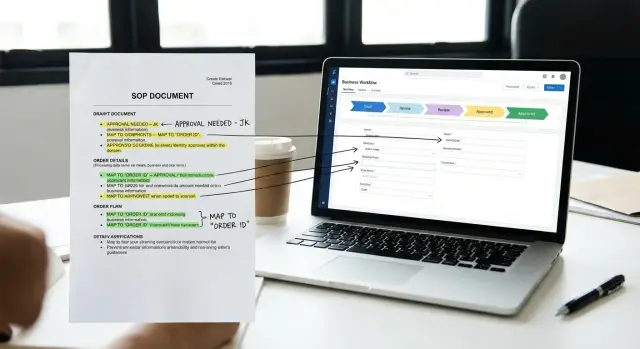
Why SOPs fail in the first build
A written SOP can look clear and complete, but real work is rarely that neat. The document shows what should happen. It often misses what people actually do when they are under pressure, waiting on missing information, or handling an urgent request.
That gap is why many SOP to software projects stumble early. The first version often follows the document too closely. Then the team discovers that everyday operations depend on workarounds, side conversations, and judgment calls that were never written down.
Hidden exceptions are a common reason things break. An SOP may say, "Manager approves requests over $1,000," but what happens if the manager is out, the amount is split across two requests, or the customer needs an answer the same day? Small cases like these can shape the whole workflow.
Approvals are another weak point. On paper, the flow looks clean and linear. In real life, people approve things in email, chat, meetings, or a quick phone call. If the first build ignores that, the app feels slow and unrealistic because it does not match how decisions are actually made.
Data problems show up fast too. An SOP may describe the steps but not the exact fields people need to complete them. Then users open the new tool and realize they still need a spreadsheet to track notes, dates, exceptions, or reference numbers.
The usual pattern is simple. The document captures intent, not daily behavior. Edge cases are treated like rare events even when they happen every week. Approval paths live outside the written process. Key fields are missing, so people create side systems.
Take a purchase request SOP. It may list submit, review, approve, and pay. But the real process may also include checking vendor status, asking finance for a budget code, and flagging urgent orders. Skip those details, and the software looks complete right up until people try to use it.
The goal is not to copy the SOP line by line. The goal is to capture the real process behind it.
What to pull from the document first
Before you think about screens or automations, pull out the raw process facts. A good SOP to software build starts with the order of work, not with design ideas.
Read the document once for the big picture. Then read it again and mark the actual sequence of work. Write the steps in order, even if they seem obvious. Software follows the path you define, so small details matter.
For each step, note four things: what happens, who does it, what they use or create, and what must be true before the next step can start. This turns a vague document into something you can actually build from. If two people read the SOP and describe the flow differently, the process is not ready yet.
Next, mark the trigger and the finish line. Every process starts somewhere: a submitted form, a customer request, a manager email, or a scheduled date. Every process ends somewhere too: approved, rejected, shipped, paid, archived, or handed off.
If you skip the true start or end, the app may look finished but still fail in daily use. A request approval tool is not done just because a manager clicks approve. You still need to know what happens after that approval and who owns the next action.
Then collect the materials used at each step. That includes forms, spreadsheets, PDFs, emails, uploaded files, notes, and any data copied from one place to another. These details show what inputs the app needs and what records it must store.
A simple review table can help here. Use five columns: step number, owner, trigger, inputs, and result. That alone will usually expose missing pieces before the first build starts. If you're drafting the process in Koder.ai, this kind of outline also gives you a much better starting point for turning a written procedure into a working web or mobile app.
How to turn the SOP into a workflow
Start by reading the SOP without trying to fix the wording. Your job is to find three things: the trigger, the actions, and the end point. If you cannot describe those in one sentence, the process is still too vague to build.
A good workflow starts with a clear trigger such as "customer submits a request" or "manager receives an invoice." It ends with a visible outcome such as "request approved and scheduled" or "invoice paid and archived." Everything in between should be a step that someone actually performs.
Most SOPs hide several actions inside one long paragraph. Break those paragraphs into single actions. If a sentence says, "Review the form, confirm the budget, and notify finance," that is not one step. It is three. Each one may need a different owner, status, or time limit.
When you see words like "if," "unless," or "when needed," turn them into yes-or-no decisions. That makes the workflow easier to build and test. Instead of writing "send to manager if over budget," write the branch clearly: "Is the amount over the limit? Yes - send to manager. No - continue to finance."
Keep the language plain. Write one rule per step. "Sales adds the client name" is much better than "Client data is captured during intake." Clear wording reduces mistakes when you move from process mapping for apps into an actual build.
A small workflow draft can fit into five columns: trigger, step, owner, decision, and end result. That simple structure reveals gaps quickly. You may notice a missing approval, an unclear handoff, or a step that depends on information the SOP never names.
Before anyone starts building, walk through the draft with the people who do the work every day. Ask where delays happen, what gets skipped, and what people do when the SOP does not match reality. Those details matter more than polished wording.
This is where many first builds go wrong. The document looks complete, but the real process lives in habits and exceptions. If the team can follow your draft from start to finish without extra explanation, you are ready to define workflow requirements. If they keep adding "one more thing," keep refining.
How to capture exceptions early
Most process documents describe the happy path. Real work almost never stays on that path for long.
If you want the first build to match daily operations, ask a different question at every step: what happens when this does not go as planned? That is where most rework begins in any SOP to software effort.
Start with missing information. If a form arrives without a customer ID, invoice number, or manager name, does the work stop, go back to the sender, or move forward with a warning? A small rule like that changes screens, notifications, and status labels.
Urgent cases need their own path too. Teams often say, "Normally we wait for approval," but urgent requests may be pushed through by phone, chat, or a senior manager. If manual overrides exist, write down who can use them, when they are allowed, and what record must be kept afterward.
Another common exception is the skipped step. Some requests bypass normal approval because of low cost, repeat orders, contract type, or customer tier. If you miss that rule, the first version feels slow and wrong to the people using it.
A simple way to uncover exceptions is to ask the same four questions at each step:
- What happens if required information is missing?
- What makes this urgent?
- When can someone skip or override this step?
- What causes the work to be rejected, returned, or stuck?
Look closely at handoffs where work stalls. Items often sit in an inbox because ownership is unclear, someone is waiting on one missing field, or a reviewer sends the task back without a clear reason. Those moments should show up as visible statuses in the app, not as hidden side conversations.
Think about an expense approval SOP. The normal path is submit, review, approve, reimburse. But the real exceptions may include missing receipts, same-day travel, skipped approvals for small amounts, and claims returned because the cost center is wrong. If you capture those cases before building, the first version will feel much closer to real operations and need fewer fixes after launch.
Approvals, owners, and handoffs
A process breaks when a task has no clear owner. For each step in the SOP, name one person or role responsible for moving it forward. Not the people copied on the message. Not the person who "usually helps." The one owner who must act.
Then separate three kinds of authority: who can approve, who can reject, and who can edit. These are often different people. A finance lead may approve spend, an operations manager may reject incomplete requests, and a coordinator may edit details without being allowed to sign off.
If you're doing approval flow design, this is where vague wording causes bad builds. Phrases like "manager reviews" or "team confirms" are too loose for software. The app needs exact rules: which role sees the task, what buttons they get, and what happens after each choice.
Every handoff also needs a trigger. Work should move to the next person because something specific happened, such as a form being completed, a document uploaded, or an approval given. If that trigger is unclear, the task will sit in limbo or bounce between people.
A good handoff definition includes the event that finishes the current step, the next owner, the status change, any required notes or attachments, and the due date for the next action.
Add timing rules early. Decide who gets alerted when a task is assigned, when reminders go out, and when overdue items escalate. Even a simple workflow works better when the right person gets the right message at the right time.
Here is a small example. If a purchase request is over $5,000, it may go from a department lead to a finance director. If it is missing a vendor quote, it returns to the requester for edits. That one branch defines the owner, the approval rights, the rejection path, and the handoff conditions in a way a builder can actually use.
The data fields you really need
A first build gets messy when teams collect too much data too early. Start with the fields people need to finish the work, not every detail that might be useful later. If a field does not support a step, a decision, or a report someone already uses, it probably does not belong in version one.
A simple rule helps: every field should have a job. It should identify something, help someone decide what to do next, or prove that a task was completed.
Start with must-have fields
Split fields into two groups: must-have and nice-to-have. Must-have fields are the ones that stop the process if they are missing. Nice-to-have fields may help with future analysis, but they should not block the first release.
A practical data fields checklist should answer a few questions. What must be entered to start the process? What does each step need before someone can continue? What does a manager need to approve or reject? What does the system have to store for audit or reporting? What can wait until a later version?
Then match each field to the exact place where it is used. If purchase amount affects approval, it belongs at the decision step. If a contract file is needed before legal review, add it where the handoff happens, not at the very beginning.
Format matters more than many teams expect. Write down whether a field is a date, amount, file upload, dropdown, checkbox, or free text. This avoids familiar problems later, like dates entered in different ways or currency typed without decimals.
You should also capture the rules people already follow by habit. An invoice number may need to be unique. An amount may need to be greater than zero. An attachment may be required only when the total is above a set limit. These are validation rules even if the SOP never names them.
Finally, watch for duplicate entry across teams. If sales enters a customer name and finance retypes it later, that is a sign to reuse one record instead of creating two. In practice, small data mistakes often turn into daily frustration. Clean field choices make the workflow easier, faster, and far closer to real operations.
A simple example from one SOP
Imagine a small company that buys laptops, monitors, and other equipment through email and spreadsheets. The SOP may look clear on paper, but the real task is to turn those steps into something people can use without guessing.
Start with the basic path. An employee opens a request and enters three core details: the item, the expected cost, and the reason for the purchase. The request should not move forward until those fields are complete because they shape every step that follows.
Next, the manager reviews it. If the request makes sense, the manager approves it and sends it to finance. If something is missing or unclear, the manager sends it back with a note, and the employee updates the request instead of starting over.
Finance is doing a different job from the manager. The manager checks need. Finance checks budget. If money is available, the request can move to purchasing. If not, it may be declined or held until the next budget cycle.
The useful part is usually in the exceptions. A broken laptop for a new hire may need urgent replacement. In that case, the request should be marked urgent and skip the normal queue, but it should still leave a record of who approved the faster path.
Another common exception is a missing quote. If the SOP says purchases over a certain amount need a vendor quote, the form should catch that early. Instead of letting the request reach finance and fail there, the system can ask for the quote during submission.
For a first build, the key fields are probably simple: item name, cost estimate, business reason, urgency, and whether a quote is attached. That one example shows how a plain document becomes screens, decisions, and rules people can follow every day.
Common mistakes that slow the project
Many teams lose time before the first version is even usable. The problem is usually not the SOP itself. It is how people read it, interpret it, and turn it into a build.
One common mistake is trying to include every rare scenario in version one. That sounds careful, but it often creates a messy app with too many screens, rules, and decision points. A better first build handles the main path well, then adds uncommon cases after real testing.
Another delay happens when the team copies the document into tickets without speaking to the people who actually do the work. SOPs often describe the official process, not the real one. A manager may approve a step on paper, while in practice the team handles it in a quick chat or shared inbox. If you skip those conversations, the software matches the document but misses the job.
Policy language causes trouble too. Many SOPs mix business rules, compliance notes, and approval logic in the same paragraph. If you turn all of that into workflow rules too early, the app becomes hard to follow. Keep the actual approval path separate from background policy. The system needs to know who approves what, when, and under which condition. It does not need every policy sentence built into version one.
Watch for friction, not just logic
Teams also slow themselves down by asking for too many fields on day one. If a form is long, people guess, skip steps, or go back to email. Start with the fields required to move work forward, report status, and support decisions.
A few simple questions help: which fields trigger an action or approval, which fields are only nice to have, what do people still send through email or chat, and where do handoffs fail today?
That last question matters more than many teams expect. If users still rely on inbox threads, direct messages, or side conversations, the real workflow is happening outside the SOP. A request may look complete in the document, but in practice someone always sends a message to clarify one missing detail. If the app does not capture that moment, delays continue.
This is where a fast builder can help, but only if the process is already clear. Koder.ai is useful for turning a mapped process into a working app draft quickly, especially for teams that want to test a real workflow without waiting through a long development cycle. Speed helps most when the steps, approvals, and fields are already defined.
Quick checks before the first build
A first version goes much better when the whole process fits on one page. If you need a long meeting just to explain what happens, the flow is still too fuzzy. One page should show where the work starts, what happens next, who makes decisions, and where the process ends.
This is one of the fastest ways to make an SOP to software plan usable. If a new team member can read that page and repeat the flow back to you, you are close. If they get lost between steps, approvals, or edge cases, the build will probably miss something important.
Before anyone starts building, check five basics:
- Every step has one clear owner.
- Each decision point has a matching outcome, including reject, return, or request more detail.
- Rework paths are visible, not hidden in notes.
- Required fields support the decision at that step.
- One real user can walk through the draft without extra explanation.
Ownership matters more than people expect. "Finance reviews it" is not enough if three different roles might do that review. Name the actual role that acts, approves, or sends work back.
Rejection and rework paths also need the same detail as the happy path. If a request is incomplete, who fixes it, what changes, and where does it return? Many first builds fail because they only model the ideal case.
Your fields should match your decisions. If a manager must approve based on budget, department, and due date, those values need to be required before the request reaches that manager. Otherwise people end up approving with missing context.
A simple test works well here: ask one real user to act out a recent request from start to finish. If they can do it without help, the first build is probably grounded in real operations. If they cannot, the problem is usually not missing features. It is unclear rules.
Next steps for a usable first version
The best first version is narrow. Pick one process, one team, and one clear goal. If the software has to handle everything on day one, the project usually gets stuck before anyone can use it.
A good goal sounds like this: "route purchase requests for the finance team" or "track client onboarding for account managers." That gives you a real problem to solve and makes the jump from SOP to software much easier.
Before you build more features, test the draft with real examples from last month. Use actual cases, not ideal ones. Look at requests that were incomplete, approvals that took too long, and exceptions that forced someone to step in manually.
That review usually exposes the gaps that matter most: missing approval rules, unclear ownership at handoffs, undefined data fields, exception paths for unusual cases, and steps that exist in practice but not in the SOP.
Fix those rules first. Resist the urge to add dashboards, extra roles, or edge features too early. A usable first version should handle the common path well and deal with the most important exceptions without confusion.
It also helps to keep a simple version-two list as feedback comes in. If someone says, "It would be nice if it also did this," write it down and move on unless it blocks the main process. That keeps version one focused and easier to finish.
If you already have the workflow mapped, Koder.ai can help you turn that outline into a working app draft for the web or mobile more quickly. But the same rule still applies: the clearer the process, the better the first build.
That is the right finish line for version one: clear steps, clear owners, the right fields, and just enough structure for the team to trust it.
FAQ
What is the first thing to pull from an SOP before building software?
Start with the real flow of work. Identify the trigger, each action, each decision, the owner of every step, and the end result.
Do not jump straight to screens or features. If you cannot explain the process in a few clear steps, the build is not ready yet.
Why do SOP-based first builds often fail?
Because SOPs usually show the ideal process, not the daily one. People often rely on chat, email, workarounds, and judgment calls that never made it into the document.
If you build only from the written SOP, the app may look correct but feel wrong in real use.
How do I turn a written SOP into a workflow?
Break each paragraph into single actions. Then rewrite vague rules into clear decisions with yes or no outcomes.
For example, instead of "send to manager if needed," define exactly when it goes to the manager and what happens next.
How can I find exceptions early?
Ask what happens when the normal path breaks. Check for missing information, urgent requests, skipped approvals, rejected items, and tasks that get stuck between people.
These cases are often more common than teams think, so capture them before version one.
What should I define for approvals and handoffs?
Each step should have one clear owner who is responsible for moving it forward. You should also define who can approve, who can reject, and who can edit.
If those roles are blurry, tasks will sit in limbo or bounce between people.
How do I know which data fields belong in version one?
Only collect fields that help someone complete a step, make a decision, or prove the work was done. Start with must-have fields and leave nice-to-have data for later.
If a field does not support the workflow, it probably should not be required in the first version.
How can I tell if the process is clear enough to build?
Use a simple walk-through with a real recent request. If the team needs extra explanation, side notes, or outside messages to finish it, the process is still incomplete.
A good draft can be followed from start to finish without guessing.
What mistakes slow down an SOP-to-software project?
Trying to include every rare case too early is a common mistake. Another is copying the SOP into tickets without talking to the people who actually do the work.
Teams also slow themselves down by adding too many fields and mixing policy text with workflow rules.
What should a good first version include?
Keep the first version narrow. Pick one process, one team, and one clear goal, then test it with real examples from recent work.
That usually reveals the missing rules and exceptions faster than trying to design a perfect system up front.
Can Koder.ai help turn an SOP into a working app?
Yes, if the workflow is already mapped clearly. Koder.ai can help turn defined steps, approvals, fields, and exception paths into a working web or mobile app draft faster.
The better your process outline is, the better the first build will match real operations.