

SQL vs NoSQL Databases: Key Differences and Use Cases
Learn the real differences between SQL and NoSQL databases: data models, scalability, consistency, and when each type works best for your applications.
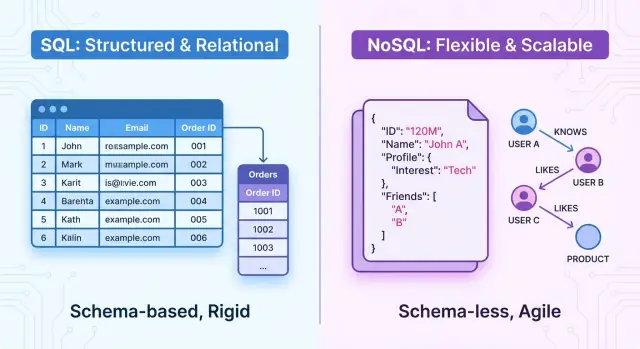
Overview: SQL and NoSQL at a glance
Choosing between SQL and NoSQL databases shapes how you design, build, and scale your application. The database model influences everything from data structures and query patterns to performance, reliability, and how quickly your team can evolve the product.
At a high level, SQL databases are relational systems. Data is organized into tables with fixed schemas, rows, and columns. Relationships between entities are explicit (through foreign keys), and you query data using SQL, a powerful declarative language. These systems emphasize ACID transactions, strong consistency, and well-defined structure.
NoSQL databases are non-relational systems. Instead of a single rigid table model, they offer several data models designed for different needs, such as:
- Key-value stores
- Document databases
- Wide-column stores
- Graph databases
That means “NoSQL” is not one technology but an umbrella term for multiple approaches, each with its own trade-offs in flexibility, performance, and data modeling. Many NoSQL systems relax strict consistency guarantees in favor of high scalability, availability, or low latency.
This article focuses on the difference between SQL and NoSQL—data models, query languages, performance, scalability, and consistency (ACID vs eventual consistency). The aim is to help you choose between SQL and NoSQL for specific projects and understand when each type of database fits best.
You don’t have to pick just one, though. Many modern architectures use polyglot persistence, where SQL and NoSQL databases coexist in one system, each handling the workloads they are best at.
What is an SQL (relational) database?
An SQL (relational) database stores data in a structured, tabular form and uses Structured Query Language (SQL) to define, query, and manipulate that data. It is built around the mathematical concept of relations, which you can think of as well-organized tables.
Core structure: tables, rows, columns, and schemas
Data is organized into tables. Each table represents one type of entity, such as customers, orders, or products.
- A row (record) is a single instance of that entity, like one customer.
- A column (field) is a specific attribute, such as
emailororder_date.
Every table follows a fixed schema: a predefined structure that specifies
- which columns exist
- their data types (e.g.,
INTEGER,VARCHAR,DATE) - constraints (e.g.,
NOT NULL,UNIQUE)
The schema is enforced by the database, which helps keep data consistent and predictable.
Keys and relationships
Relational databases excel at modeling how entities relate to one another.
- A primary key uniquely identifies each row in a table (for example,
customer_id). - A foreign key is a column that refers to a primary key in another table, linking related rows.
These keys allow you to define relationships such as:
- One-to-many (one customer, many orders)
- Many-to-many (products in many orders, orders with many products)
Transactions and ACID properties
Relational databases support transactions—groups of operations that behave as a single unit. Transactions are defined by the ACID properties:
- Atomicity: all operations succeed, or none do.
- Consistency: transactions move the database from one valid state to another.
- Isolation: concurrent transactions do not interfere with each other.
- Durability: once committed, data is safely stored.
These guarantees are crucial for financial systems, inventory management, and any application where correctness matters.
Common SQL databases
Popular relational database systems include:
- MySQL and MariaDB
- PostgreSQL
- Microsoft SQL Server
- Oracle Database
All of them implement SQL, while adding their own extensions and tooling for administration, performance tuning, and security.
What is a NoSQL (non-relational) database?
NoSQL databases are non-relational data stores that do not use the traditional table–row–column model of SQL systems. Instead, they focus on flexible data models, horizontal scalability, and high availability, often at the cost of strict transactional guarantees.
Flexible data models
Many NoSQL databases are described as schema-less or schema-flexible. Instead of defining a rigid schema up front, you can store records with different fields or structures in the same collection or bucket.
This is especially useful for:
- Evolving application requirements
- Handling semi-structured data (logs, events, user profiles)
- Storing nested data like JSON documents
Because fields can be added or omitted per record, developers can iterate quickly without running migrations for every structural change.
Main NoSQL types
NoSQL is an umbrella term covering several distinct models:
- Document databases: Store data as JSON-like documents with nested fields. Example: MongoDB, Couchbase.
- Key–value stores: Simple associative arrays where each key maps to a value. Great for caching and session data. Example: Redis, Amazon DynamoDB (key–value mode).
- Column-family stores: Organize data by column families for high write throughput and wide tables. Example: Apache Cassandra, HBase.
- Graph databases: Focus on nodes and relationships, ideal for highly connected data. Example: Neo4j, Amazon Neptune.
Consistency models
Many NoSQL systems prioritize availability and partition tolerance, providing eventual consistency instead of strict ACID transactions across the whole dataset. Some offer tunable consistency levels or limited transactional features (per document, partition, or key range), so you can choose between stronger guarantees and higher performance for specific operations.
Data models: structure, schemas, and relationships
Data modeling is where SQL and NoSQL feel the most different. It shapes how you design features, query data, and evolve your application.
Structure and schemas
SQL databases use structured, predefined schemas. You design tables and columns up front, with strict types and constraints:
CREATE TABLE users (
  id INT PRIMARY KEY,
  name VARCHAR(100) NOT NULL
);

CREATE TABLE orders (
  id INT PRIMARY KEY,
  user_id INT NOT NULL,
  total DECIMAL(10, 2) NOT NULL,
  FOREIGN KEY (user_id) REFERENCES users(id)
);
Every row must follow the schema. Changing it later usually means migrations (ALTER TABLE, backfilling data, etc.).
NoSQL databases typically support flexible schemas. A document store might allow each document to have different fields:
{
  "_id": 1,
  "name": "Alice",
  "orders": [
    { "id": 101, "total": 49.99 },
    { "id": 102, "total": 15.50 }
  ]
}
Fields can be added per document without a central schema migration. Some NoSQL systems still use optional or enforced schemas, but they are generally looser.
Normalization vs denormalization
Relational models encourage normalization: splitting data into related tables to avoid duplication and keep integrity. This favors fast, consistent writes and smaller storage, but complex reads might require joins across many tables.
NoSQL models often favor denormalization: embedding related data together for the reads you care about most. This improves read performance and simplifies queries, but writes can be slower or more complex because the same information may live in multiple places.
Modeling relationships
In SQL, relationships are explicit and enforced:
- One-to-many: foreign keys (users → orders)
- Many-to-many: join tables (users_roles)
In NoSQL, relationships are modeled by:
- Embedding (user document contains orders array) for tightly coupled data
- Referencing (user_id inside an order document) for loosely coupled or large collections
The choice is dictated by your access patterns:
- If you always fetch a user and their 10 most recent orders together, embedding may be ideal.
- If orders are huge, frequently updated, or accessed independently, references plus separate queries are often better.
Impact on evolving requirements
With SQL, schema changes demand more planning but give you strong guarantees and consistency across the dataset. Refactors are explicit: migrations, backfills, constraint updates.
With NoSQL, evolving requirements are usually easier to support in the short term. You can start storing new fields immediately and gradually update old documents. The trade-off is that application code must handle multiple document shapes and edge cases.
Choosing between normalized SQL models and denormalized NoSQL models is less about “better or worse” and more about aligning data structure with your query patterns, write volume, and how often your domain model changes.
Query languages and access patterns
SQL: declarative and standardized
SQL databases are queried with a declarative language: you describe what you want, not how to fetch it. Core constructs like SELECT, WHERE, JOIN, GROUP BY, and ORDER BY let you express complex questions over multiple tables in a single statement.
Because SQL is standardized (ANSI/ISO), most relational systems share a common core syntax. Vendors add their own extensions, but skills and queries often transfer reasonably well between PostgreSQL, MySQL, SQL Server, and others.
This standardization brings a rich ecosystem of tools: ORMs, query builders, reporting tools, BI dashboards, migration frameworks, and query optimizers. You can plug many of these into any SQL database with minimal changes, which reduces vendor lock-in and speeds up development.
NoSQL: query APIs and patterns
NoSQL systems expose queries in more varied ways:
- Document stores (MongoDB, Couchbase) use JSON-like query objects and sometimes their own query languages.
- Key-value stores (Redis, DynamoDB-style APIs) typically focus on primary-key lookups and a small set of secondary index queries.
- Wide-column stores (Cassandra, HBase) optimize for queries that follow a predefined primary-key and clustering-key pattern.
- Search engines (Elasticsearch, Solr) use query DSLs aimed at full-text and relevance-based queries.
Some NoSQL databases offer aggregation pipelines or MapReduce-like mechanisms for analytics, but cross-collection or cross-partition joins are limited or absent. Instead, related data is often embedded in the same document or denormalized across records.
Access patterns and productivity
Relational queries often rely on JOIN-heavy patterns: normalize data, then reconstruct entities at read time with joins. This is powerful for ad hoc reporting and evolving questions, but complex joins can be harder to optimize and understand.
NoSQL access patterns tend to be document- or key-centric: design data around the application’s most frequent queries. Reads are fast and simple—often a single key lookup—but changing access patterns later can require reshaping data.
For learning and productivity:
- SQL’s declarative model and abundance of learning resources make it approachable and durable as a skill.
- NoSQL querying can be easier for simple, well-known access patterns, but every system has its own syntax and limitations, so skills are less portable.
Teams that need rich, ad hoc querying across relationships usually favor SQL. Teams with stable, predictable access patterns at very high scale often find NoSQL query models more aligned with their needs.
Consistency, transactions, and the CAP trade-offs
ACID: strict guarantees in SQL systems
Most SQL databases are designed around ACID transactions:
- Atomicity: a transaction either fully succeeds or fully fails.
- Consistency: every committed transaction moves the data from one valid state to another, enforcing constraints.
- Isolation: concurrent transactions do not interfere in visible ways (via isolation levels like READ COMMITTED, REPEATABLE READ, SERIALIZABLE).
- Durability: once committed, data survives crashes (via write-ahead logs, replication, etc.).
This makes SQL databases a strong fit when correctness is more important than raw write throughput.
BASE and eventual consistency in many NoSQL systems
Many NoSQL databases lean toward BASE properties:
- Basically Available: the system tries hard to stay up and respond.
- Soft state: data may be temporarily inconsistent between replicas.
- Eventual consistency: if no new updates occur, all replicas will converge.
Writes can be very fast and distributed, but a read might briefly see stale data.
CAP theorem in practice
CAP says a distributed system under network partitions must choose between:
- Consistency (C): all clients see the same data at the same time.
- Availability (A): every request receives a response.
You cannot guarantee both C and A during a partition.
Typical patterns:
- Many SQL deployments favor strong consistency: better for payments, inventory, account balances, bookings, and any workflow where a stale read can lose money or violate legal rules.
- Many NoSQL setups favor availability and eventual consistency: fine for analytics, social feeds, product catalogs, logs, caching, and other use cases where small, temporary inconsistencies are acceptable and speed/uptime are more valuable.
Modern systems often mix modes (e.g., tunable consistency per operation) so different parts of an application can choose the guarantees they need.
Scalability and performance differences
How SQL databases usually scale
Traditional SQL databases are designed for a single, powerful node.
You typically start by scaling vertically: adding more CPU, RAM, and faster disks to one server. Many engines also support read replicas: additional nodes that accept read-only traffic while all writes go to the primary. This pattern works well for:
- Moderate write volume
- Heavy analytical or reporting queries
- Workloads where strong consistency is critical
However, vertical scaling hits hardware and cost limits, and read replicas can introduce replication lag for reads.
NoSQL and horizontal scaling
NoSQL systems are usually built for horizontal scaling: spreading data across many nodes using sharding or partitioning. Each shard holds a subset of the data, so both reads and writes can be distributed, increasing throughput.
This approach suits:
- Massive write-heavy workloads
- Very large datasets that exceed a single machine’s storage
- Global applications that need data close to users
The trade-off is higher operational complexity: choosing shard keys, handling rebalancing, and dealing with cross-shard queries.
Performance patterns and indexing
For read-heavy workloads with complex joins and aggregations, an SQL database with well-designed indexes can be extremely fast, as the optimizer uses statistics and query plans.
Many NoSQL systems favor simple, key-based access patterns. They excel at low-latency lookups and high throughput when queries are predictable and data is modeled around access patterns rather than ad-hoc queries.
Latency in NoSQL clusters can be very low, but cross-partition queries, secondary indexes, and multi-document operations may be slower or more limited. Operationally, scaling NoSQL often means more cluster management, while scaling SQL often means more hardware and careful indexing on fewer nodes.
When an SQL database is usually the better choice
Transaction‑heavy, business‑critical workloads
Relational databases shine when you need reliable, high‑volume OLTP (online transaction processing):
- Financial systems (payments, accounting, trading)
- Order management and inventory
- ERP, CRM, and billing platforms
These systems rely on ACID transactions, strict consistency, and clear rollback behavior. If a transfer must never double‑charge or lose money between two accounts, an SQL database is usually safer than most NoSQL options.
Structured data and complex relationships
When your data model is well understood and stable, and entities are heavily interrelated, a relational database is often the natural fit. Examples:
- Customer, orders, invoices, products, and shipments
- Healthcare records with patients, visits, prescriptions, and labs
SQL’s normalized schemas, foreign keys, and joins make it easier to enforce data integrity and query complex relationships without duplicating data.
Analytics on well‑defined schemas
For reporting and BI over clearly structured data (star/snowflake schemas, data marts), SQL databases and SQL‑compatible warehouses are usually the preferred choice. Analytical teams know SQL, and existing tools (dashboards, ETL, governance) integrate directly with relational systems.
Maturity, skills, and compliance
Relational vs non relational database debates often overlook operational maturity. SQL databases offer:
- Long‑proven reliability and tooling
- A large pool of engineers, DBAs, and analysts fluent in SQL
- Features for auditing, access control, encryption, and backups that satisfy strict regulatory frameworks (finance, government, healthcare)
When audits, certifications, or legal exposure are significant concerns, an SQL database is often the more straightforward and defensible choice in the SQL vs NoSQL trade‑off.
When a NoSQL database is usually the better choice
NoSQL databases tend to be a better fit when scale, flexibility, and always-on access matter more than complex joins and strict transactional guarantees.
High traffic and large-scale systems
If you expect massive write volume, unpredictable traffic spikes, or datasets that grow into terabytes and beyond, NoSQL systems (like key-value or wide-column stores) are often easier to scale horizontally. Sharding and replication are usually built-in, letting you add capacity by adding nodes instead of constantly re-architecting a single powerful server.
This is a common pattern for:
- High-traffic web and mobile applications
- Gaming backends and real-time leaderboards
- Ad tech, recommendation engines, and personalization services
Flexible data during rapid product iteration
When your data model changes frequently, a flexible or schema-less design is valuable. Document databases let you evolve fields and structures without migrations for every change.
This works well for:
- Content management systems and product catalogs
- User profiles and preferences
- Activity feeds and event logs, where new event types appear regularly
IoT, caching, and time-series data
NoSQL stores are also strong for append-heavy and time-ordered workloads:
- IoT telemetry and sensor data
- Metrics, logging, and monitoring
- Caching layers for frequently read data (sessions, tokens, feature flags)
Key-value and time-series databases in particular are tuned for very fast writes and simple reads.
Global distribution and always-on experiences
Many NoSQL platforms prioritize geo-replication and multi-region writes, allowing users around the world to read and write with low latency. This is useful when:
- The app must remain available during regional outages
- Users in different continents need local response times
The trade-off is that you often accept eventual consistency instead of strict ACID semantics across regions.
Trade-offs and limitations
Choosing NoSQL often means giving up some features you might take for granted in SQL:
- Weaker or configurable consistency; not every read sees the latest write
- Limited ad-hoc querying and joins; you design queries around access patterns up front
- More responsibility in the application layer for enforcing some data integrity rules
When these trade-offs are acceptable, NoSQL can deliver better scalability, flexibility, and global reach than a traditional relational database.
Hybrid patterns and polyglot persistence
Polyglot persistence means deliberately using multiple database technologies in the same system, choosing the best tool for each job rather than forcing everything into one store.
Typical hybrid setup
A common pattern is:
- SQL database for core data: orders, payments, user profiles, configuration. Here you need strong consistency, transactions, and rich querying.
- NoSQL for sessions and caching: a key‑value store (e.g., Redis‑style) for user sessions, rate limits, feature flags, or hot aggregates; sometimes a document store for user preferences or activity feeds.
This keeps the “system of record” in a relational database, while offloading volatile or read‑heavy workloads to NoSQL.
Mixing different NoSQL types
You can also combine NoSQL systems:
- Key‑value for caching and session data.
- Document for content or user‑generated data with flexible schemas.
- Wide‑column or time‑series for metrics and event logs.
- Search engine (e.g., Lucene‑based) for full‑text and analytics queries.
The goal is to align each datastore with a specific access pattern: simple lookups, aggregates, search, or time‑based reads.
Integration and operational costs
Hybrid architectures rely on integration points:
- ETL or streaming to sync data between stores or build read models.
- Event streaming to propagate changes (e.g., from SQL to caches or analytics stores).
- APIs that hide underlying databases so services don’t need to know where data lives.
The trade‑off is operational overhead: more technologies to learn, monitor, secure, back up, and troubleshoot. Polyglot persistence works best when each extra datastore clearly solves a real, measurable problem—not just because it seems modern or interesting.
How to choose between SQL and NoSQL for a project
Choosing between SQL and NoSQL is about matching your data and access patterns to the right tool, not following a trend.
1. Start with your data and relationships
Ask:
- Is my data naturally tabular with clear entities (users, orders, invoices)?
- Do I have many joins and rich relationships (1‑to‑many, many‑to‑many)?
If yes, a relational SQL database is usually the default. If your data is document‑like, nested, or varies a lot from record to record, a document or other NoSQL model might fit better.
2. Clarify consistency and transaction needs
- Do I need multi‑row or multi‑table ACID transactions for correctness (e.g., payments, inventory)?
- Is it acceptable for some reads to return slightly stale data?
Strict consistency and complex transactions usually favor SQL. High write throughput with relaxed consistency can favor NoSQL.
3. Understand scale and performance
- Expected read/write volume now? In 2–3 years?
- Do I need low latency across multiple regions?
Most projects can scale far with SQL using good indexing and hardware. If you anticipate very large scale with simple access patterns (key‑value lookups, time‑series, logs), certain NoSQL systems may be more economical.
4. Query patterns and reporting
- Will I need ad‑hoc analytics, joins, and flexible reporting?
- Who will query the data (engineers only, or analysts and business users)?
SQL shines for complex queries, BI tools, and ad‑hoc exploration. Many NoSQL databases are optimized for predefined access paths and can make new query types harder or more expensive.
5. Team skills, tooling, and hosting
- What does my team already know: SQL, schema design, or specific NoSQL systems?
- What is available in my hosting environment (managed PostgreSQL/MySQL, managed MongoDB, DynamoDB, etc.)?
- Which ecosystem has better libraries, drivers, and monitoring for our stack?
Favor technologies your team can operate confidently, especially for production troubleshooting and migrations.
6. Cost and operational complexity
- Can we afford to run and manage distributed NoSQL clusters, or will a managed SQL instance cover our needs?
- How do storage and read/write pricing compare for our expected workload?
A single managed SQL database is often cheaper and simpler until you clearly outgrow it.
7. Always test with realistic workloads
Before committing:
- Model a representative subset of your data in both an SQL schema and a candidate NoSQL model.
- Implement a few critical queries and writes.
- Run load tests with realistic data volumes and traffic patterns.
- Measure latency, throughput, error rates, and operational effort.
Use those measurements—not assumptions—to choose. For many projects, starting with SQL is the safest path, with the option to introduce NoSQL components later for very specific, high‑scale or specialized use cases.
Common myths about SQL and NoSQL databases
Myth 1: NoSQL will replace SQL
NoSQL didn’t arrive to kill relational databases; it arrived to complement them.
Relational databases still dominate for systems of record: finance, HR, ERP, inventory, and any workflow where strict consistency and rich transactions matter. NoSQL databases shine where flexible schemas, huge write throughput, or globally distributed reads are more important than complex joins and strict ACID guarantees.
Most organizations end up using both, picking the right tool for each workload.
Myth 2: SQL databases can’t scale horizontally
Relational databases have historically scaled up on bigger servers, but modern engines support:
- Read replicas
- Sharding/partitioning
- Distributed SQL (e.g., NewSQL-style systems)
Scaling a relational system can be more involved than adding nodes to some NoSQL clusters, but horizontal scale is absolutely possible with the right design and tooling.
Myth 3: NoSQL has no schemas or rules
“Schema-less” really means “schema is enforced by the application, not the database.”
Document, key–value, and wide-column stores still have structure. They just allow that structure to evolve per record or per collection. This flexibility is powerful, but without clear data contracts, governance, and validation, it quickly leads to inconsistent data.
Myth 4: One type is always faster
Performance depends far more on data modeling, indexing, and access patterns than on “SQL vs NoSQL.”
A poorly indexed NoSQL collection will be slower than a well-tuned relational table for many queries. Likewise, a relational schema that ignores query patterns will underperform compared to a NoSQL model tailored to those queries.
Myth 5: SQL is always safer and more reliable than NoSQL
Many NoSQL databases support strong durability, encryption, auditing, and access control. Conversely, a misconfigured relational database can be insecure and fragile.
Security and reliability are properties of the specific product, deployment, configuration, and operational maturity—not of “SQL” or “NoSQL” as categories.
Migration and coexistence strategies
Teams usually move between SQL and NoSQL for two reasons: scaling and flexibility. A high‑traffic product might keep a relational database as the trusted system of record, then introduce NoSQL to handle reads at scale or to support new features with more flexible schemas.
Migration patterns
A big‑bang migration from SQL to NoSQL (or the reverse) is risky. Safer options include:
- Incremental migration: carve out one bounded context (e.g., product catalog) and move only that data and traffic to NoSQL while everything else stays in SQL.
- Dual writes: for a period, services write to both SQL and NoSQL. Once the new store is proven in production, you gradually retire the old path.
- Sync pipelines: keep one database as primary and stream data to the other using CDC (change data capture), messaging queues, or ETL jobs.
Schema and model pitfalls
Moving from SQL to a non‑relational database tempts teams to mirror tables as documents or key‑value pairs. That often leads to:
- over‑normalized NoSQL data with too many joins at the application layer
- documents that grow without bounds
Plan the new access patterns first, then design the NoSQL schema around actual queries.
Coexistence and safety nets
A common pattern is SQL for authoritative data (billing, user accounts) and NoSQL for read‑heavy views (feeds, search, caching). Whatever the mix, invest in:
- repeatable backfills and rollbacks
- data validation between stores
- load tests that reflect real query patterns
This keeps SQL vs NoSQL migrations controlled rather than painful one‑way moves.
Summary and practical recommendations
SQL and NoSQL differ mainly in four areas:
- Data model – SQL uses tables, rows, and well-defined schemas; NoSQL favors documents, key-value pairs, wide columns, or graphs, with more flexible structure.
- Queries – SQL offers a single, expressive query language; NoSQL typically uses database-specific APIs or query syntaxes.
- Consistency & transactions – SQL centers on ACID transactions and strong consistency; many NoSQL systems trade some guarantees for availability, scale, or latency.
- Scaling – SQL databases traditionally scale up (and increasingly out via clustering); NoSQL systems are usually designed to shard and replicate across many nodes.
Neither category is universally better. The “right” choice depends on your actual requirements, not on trends or slogans.
How to choose in practice
-
Write down your needs:
- Data structure and relationships
- Query patterns and reporting needs
- Consistency vs availability expectations
- Peak traffic, data volume, and latency targets
- Operational skills and tooling your team already has
-
Default sensibly:
- Prefer SQL for transactional systems, analytics, and well-structured business data.
- Consider NoSQL for high-write workloads, very large scale, or highly variable/semi-structured data.
-
Start small and measure:
- Build a thin vertical slice or proof-of-concept.
- Collect metrics: query latency, throughput, error rates, operational effort.
- Iterate on schema, indexes, and partitioning based on real usage.
-
Stay open to hybrids:
- Use multiple databases if different parts of the system have very different needs.
- Document decisions, trade-offs, and patterns in your internal knowledge base (for example under
/docs/architecture/datastores).
For deeper dives, extend this overview with internal standards, migration checklists, and further reading in your engineering handbook or /blog.
FAQ
What is the core difference between SQL and NoSQL databases?
SQL (relational) databases:
- Use tables with rows and columns.
- Enforce a fixed schema (defined columns, types, constraints).
- Rely on SQL as a standardized query language.
- Emphasize ACID transactions and strong consistency.
NoSQL (non‑relational) databases:
- Use flexible models (documents, key‑value, wide‑column, graph).
- Often allow schema‑flexible or schema‑less data.
- Use database‑specific query APIs or DSLs.
- Often trade some consistency guarantees for scalability and availability.
When is an SQL database usually the better choice?
Use an SQL database when:
- Your data is well‑structured and relational (users, orders, invoices).
- You need multi‑row or multi‑table ACID transactions.
- Correctness and consistency are more important than raw throughput.
- You expect many ad‑hoc queries, joins, and reporting needs.
- Compliance, auditing, and long‑term maintainability are critical.
For most new business systems of record, SQL is a sensible default.
When is a NoSQL database usually the better choice?
NoSQL fits best when:
- You need to scale writes and storage horizontally across many nodes.
- Your data is semi‑structured, nested, or changes shape frequently.
- Access patterns are well‑known and can be modeled around key or document lookups.
- Temporary inconsistencies are acceptable (e.g., feeds, logs, analytics views).
- You handle IoT telemetry, time‑series, caching, or user‑generated content at large scale.
How do schemas and data modeling differ between SQL and NoSQL?
SQL databases:
- Use predefined schemas; every row must match the table definition.
- Encourage normalization to reduce duplication and enforce integrity.
- Use foreign keys and constraints to manage relationships.
NoSQL databases:
- Allow documents/records to have different fields in the same collection.
- Often encourage denormalization and embedding related data.
- Rely more on the application to enforce data rules.
This means schema control moves from the database (SQL) to the application (NoSQL).
How do SQL and NoSQL differ in consistency and transactions?
SQL databases:
- Center on ACID transactions with strong consistency.
- Are ideal when every read must see a valid, up‑to‑date state.
Many NoSQL systems:
- Prioritize availability and partition tolerance.
- Use BASE and eventual consistency: replicas converge over time.
- May offer tunable consistency per operation or per key/partition.
Choose SQL when stale reads are dangerous; choose NoSQL when brief staleness is acceptable in exchange for scale and uptime.
How do SQL and NoSQL databases usually scale?
SQL databases typically:
- Start with vertical scaling (bigger single servers).
- Add read replicas for scaling reads.
- Sometimes use sharding or distributed SQL products for scale‑out.
NoSQL databases typically:
- Are designed for horizontal scaling from the start.
- Shard or partition data across many nodes.
- Make it easier to add capacity by adding commodity servers.
The trade‑off is that NoSQL clusters are operationally more complex, while SQL can hit limits on a single node sooner.
Can I use SQL and NoSQL together in the same system?
Yes. Polyglot persistence is common:
- Use SQL as the system of record (payments, accounts, core entities).
- Add NoSQL for sessions, caches, feeds, logs, or search.
Integration patterns include:
- Change data capture or event streams from SQL to NoSQL.
- Periodic ETL jobs to build read‑optimized views.
- Services that hide underlying stores behind stable APIs.
The key is to add each extra datastore only when it solves a clear problem.
How should I approach migrating between SQL and NoSQL?
To move gradually and safely:
- Identify a bounded context (e.g., product catalog) to migrate.
- Model data around new access patterns, not table‑for‑table.
- Use dual writes or CDC to keep old and new stores in sync temporarily.
- Validate data between stores and plan repeatable backfills.
- Shift traffic incrementally, with rollbacks ready.
Avoid big‑bang migrations; prefer incremental, well‑monitored steps.
What factors should I evaluate when choosing between SQL and NoSQL?
Consider:
- Data structure: tabular with clear relationships vs flexible documents/events.
- Consistency needs: strict ACID vs acceptable staleness.
- Scale and latency: expected write volume, dataset size, global users.
- Query patterns: ad‑hoc joins and analytics vs predictable key/doc lookups.
- Team skills and tooling: what your team can operate confidently.
- Cost and operations: managed options vs running distributed clusters.
Prototype both options for critical flows and measure latency, throughput, and complexity before deciding.
What are some common myths about SQL vs NoSQL databases?
Common misconceptions include:
- "NoSQL will replace SQL" – in practice they complement each other.
- "SQL can’t scale horizontally" – modern relational systems support replicas, sharding, and distributed SQL.
- "NoSQL has no schema" – schemas still exist, but are enforced by applications or validators.
- "One type is always faster" – performance mainly depends on modeling, indexing, and workload.
Evaluate specific products and architectures instead of relying on category‑level myths.