

Tobias Lütke and Shopify: From Store Builder to Infrastructure
A practical look at Tobias Lütke’s path and how Shopify evolved from a store builder into a commerce infrastructure platform powering entrepreneurs worldwide.
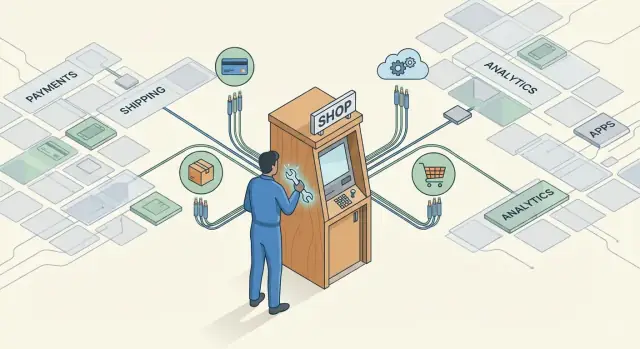
What This Story Explains
This isn’t a full biography of Tobias Lütke, and it’s not a blow-by-blow history lesson. Think of it as a guided explanation of how a founder’s product decisions helped Shopify evolve from “a way to build an online store” into something closer to a utility that millions of businesses rely on.
The core idea: enabling entrepreneurs at scale
The through-line is simple: Shopify wins when more people can start, run, and grow a business with less friction. That mission sounds broad, but it becomes concrete when you look at Shopify’s choices—reducing setup time, absorbing complicated back-office tasks, and standardizing the parts of commerce that shouldn’t require custom engineering.
What “internet infrastructure” means here (in plain terms)
When people say Shopify became “internet infrastructure,” they don’t mean routers and cables. They mean software services other businesses depend on the way you depend on electricity: mostly invisible, always on, and painfully obvious when it breaks.
For merchants, that infrastructure includes:
- A reliable checkout experience
- Payments that settle correctly
- Tools to manage products, inventory, and orders
- Integrations that connect marketing, shipping, support, and accounting
When those pieces work smoothly, a merchant can focus on products and customers instead of duct-taping systems together.
The shifts this story will track
To understand the evolution, we’ll follow four major shifts:
- From product to platform: Store builder features expanded into a foundation others could build on.
- From platform to ecosystem: Apps, partners, and agencies multiplied what Shopify could offer without building everything itself.
- From features to operations: Payments, shipping, and fulfillment became core layers rather than optional add-ons.
- From small sellers to scaling brands: Shopify kept lowering the barrier to entry while also supporting larger, more complex businesses.
By the end, you’ll have a simple way to recognize when a business is becoming infrastructure—and how that changes the experience for the people who depend on it.
From Building a Store to Building a Platform
Tobias Lütke didn’t start out trying to build an ecommerce platform. He was, first and foremost, a developer—someone who preferred shipping working software over writing grand strategy decks. That bias matters, because Shopify’s story begins less as a “startup idea” and more as a practical response to a frustrating problem.
The early problem: selling online was needlessly hard
For a small business, launching an online store used to feel like choosing between two bad options: pay a lot for a custom build, or stitch together tools that weren’t designed to work smoothly together. The result was often slow, expensive, and fragile.
Even when you got a storefront live, day-to-day operations were still messy: managing products, updating inventory, handling taxes, processing orders, and supporting customers. Basic commerce tasks required technical help—and that meant time, money, and constant risk.
Built from firsthand merchant pain
Shopify’s early value wasn’t “more features.” It was relief. The product was shaped by direct exposure to what merchants actually struggled with: getting set up quickly, making changes without calling a developer, and running a business without fighting the software.
That firsthand perspective also explains how Shopify approached entrepreneurship at scale. Instead of building a tool for one store, it built a repeatable way for many stores to exist—with the same core capabilities available to everyone.
The shift from store builder to infrastructure
As more merchants used Shopify, the job expanded. A simple store builder naturally grows into shared building blocks: checkout, admin, integrations, and rules that keep everything reliable. Over time, this becomes closer to a commerce operating system—software that sits underneath millions of transactions.
That’s the key transition: not just helping one entrepreneur sell online, but creating dependable rails that help entrepreneurs start, run, and grow—without reinventing the basics each time.
The Early Shopify Value: A Simple Way to Start Selling
Shopify’s original promise was refreshingly practical: you shouldn’t need to be a developer—or hire one—to start and run an online shop. If you had a product and a point of view, the software would handle the messy parts of selling online so you could focus on customers and fulfillment.
The essentials, packaged for real life
Early Shopify wasn’t trying to be everything. It focused on the core building blocks that turn “a website” into “a store,” including:
- Themes that made a storefront look credible out of the box, without custom design work
- A product catalog for items, variants, pricing, inventory basics, and product pages
- A checkout that customers could trust (and that merchants didn’t have to stitch together)
- Orders that tracked what was sold, to whom, and what needed to ship
- An admin that brought it all together—products, discounts, customers, and simple reporting—in one place
Each piece is straightforward on its own. The early magic was that they were already connected, so a merchant didn’t have to manage five tools and ten integrations just to collect money and send a package.
Why “easy” is a growth lever
Ease of use isn’t a cosmetic feature for small teams—it’s leverage. When setup takes hours instead of weeks, entrepreneurs can launch faster, test demand, iterate pricing, and respond to customer feedback without waiting on technical help. That speed compounds: more experiments, more learning, more chances to find what sells.
From “website builder” to “running the business”
Even early on, Shopify hinted at a bigger direction. It wasn’t only helping people publish a storefront; it was quietly organizing the day-to-day operations behind selling—catalog, checkout, orders, and workflow. That shift—from pages to processes—is the first step toward becoming a platform businesses can run on.
What Makes Commerce Feel Like Infrastructure
Most software is something you use. Infrastructure is something you depend on. The difference shows up when the stakes rise: infrastructure has to be available when you’re asleep, reliable when traffic spikes, and capable of scaling without a rewrite.
Commerce pushes products in that direction because selling isn’t one feature—it’s a chain of always-on systems. A typical order touches checkout, payments, inventory updates, tax calculations, confirmation emails, fraud checks, shipping labels, and tracking. If any link is slow or down, revenue doesn’t just “degrade”—it stops.
Always-on, not “nice to have”
A merchant can tolerate a buggy analytics chart for a day. They can’t tolerate a checkout that fails for 10 minutes during peak hours. That’s why commerce starts to look like utilities: it has to work under load, across time zones, and during unpredictable bursts.
Trust is the hidden requirement
Infrastructure also carries trust. Buyers hand over payment details; merchants rely on accurate payouts and records. That raises expectations around security, uptime, and compliance. The bar is simply higher than most business apps because real money is moving.
A plain example: the flash-sale test
Imagine a small brand posts a video that goes viral and launches a two-hour flash sale. In “regular software,” the site might slow down, carts might reset, or orders might duplicate. In infrastructure-like commerce, the store should keep taking payments, reserve inventory correctly, calculate taxes, and hand orders to shipping—so a good moment doesn’t turn into a customer-support crisis.
Shopify leaned into this shift: treating selling online less like building a website, and more like plugging into dependable rails that carry commerce every day.
Turning a Product Into a Platform
A product is something you use as-is. A platform is something you build on.
In simple terms, a platform is one strong core product (in Shopify’s case: a reliable online store) plus many integrations that let you shape it for different businesses—without Shopify having to personally add every niche feature.
The “core + connectors” idea
Shopify’s core stays focused: catalog, checkout, themes, basic orders, customers. But once merchants want subscriptions, wholesale pricing, loyalty points, advanced search, custom shipping rules, or a unique POS workflow, a single one-size-fits-all product breaks down.
That’s where connectors matter. Shopify exposes parts of the core through APIs (ways for software to talk to software) and developer tools, so other people can safely extend what the store can do.
APIs and developer tools: new capabilities without one giant roadmap
APIs let developers add functionality while keeping Shopify’s foundation consistent. Instead of Shopify building 10,000 features for 10,000 edge cases, developers can:
- Read and update products, orders, and customers
- Automate workflows across tools (email, accounting, support)
- Create custom experiences (like a tailored checkout flow or B2B portal)
Developer tools—documentation, SDKs, testing environments, and review processes—turn “possible” into “practical,” so extensions don’t feel like fragile hacks.
The app ecosystem: pick what you need, skip what you don’t
A platform becomes real when there’s a market of add-ons. An app ecosystem means merchants can choose the pieces that match their business stage:
- Launch lean with a few essentials
- Add marketing, analytics, and operations tools as sales grow
- Swap apps out when needs change
That’s how a simple store builder becomes a flexible commerce toolkit.
The tradeoff: flexibility vs. complexity
More choice can also mean more decisions, more settings, and more things to troubleshoot. Platforms manage that tension by offering defaults that work out of the box, clear app quality standards, and guardrails so extensions stay compatible as the core evolves.
Payments as a Core Layer of the Stack
Payments can look like a bolt-on feature—something you add after the store is built. In practice, it’s closer to the engine. If checkout is slow, confusing, or feels untrustworthy, conversion drops. If fraud climbs, margins disappear. If payouts are unpredictable, cash flow gets tight.
That’s why Shopify treating payments as a core layer matters: it directly shapes whether selling online feels reliable or stressful.
Why payments sit at the center
A payment isn’t just the final step; it’s where trust is tested. Buyers want familiar methods, clear totals, and a secure experience. Merchants need high approval rates, protection from chargebacks, and insight into what’s happening in real time. When those pieces are fragmented across multiple providers, diagnosing issues becomes guesswork.
What integrated payments change for merchants
With integrated payments, setup tends to be faster (fewer accounts, fewer technical handoffs), and day-to-day management gets simpler. Reporting is unified: orders, refunds, disputes, and payouts live in the same place as your store data. That makes it easier to answer practical questions—Which channel has the most failed payments? Are refunds rising? How do chargebacks affect net revenue?
It also reduces the “vendor maze.” Fewer external systems means fewer dashboards to reconcile, fewer support teams to coordinate, and fewer surprises when something breaks at checkout.
The unavoidable reality: risk and regulation
Running payments means handling compliance rules, card network requirements, and risk decisions around fraud and disputes. Merchants benefit when the platform absorbs much of that complexity, while still keeping controls visible and understandable.
If you want a primer on the moving parts (authorization rates, chargebacks, fraud tools), see /blog/payments-basics.
Shipping and Fulfillment: Connecting the Physical World
Selling online is easy to picture as a website and a checkout. The hard part starts after the payment: getting a real package to a real person, fast, with clear tracking—and handling the inevitable returns.
The operational pain points merchants run into
For small teams, shipping becomes a weekly tax on attention. Common problems show up quickly:
- Printing labels across different carrier sites, then copying tracking numbers back into orders
- Guessing at rates, overpaying for postage, or undercharging customers at checkout
- Splitting orders across locations without a clear workflow (home office, 3PL, retail store)
- Returns handled through email threads, manual refunds, and lost packages
These aren’t strategy problems. They’re operational frictions that create errors—wrong addresses, duplicate labels, missed pickups—and pull founders away from product and marketing.
What integrated shipping changes
Shopify’s approach is to make shipping feel like a built-in step of commerce rather than a separate project. When labels, rates, tracking, and basic return flows live inside the same admin as orders and payments, merchants spend less time reconciling systems and more time fulfilling accurately.
It’s important to be clear about what this integration is (and isn’t): carriers and logistics partners still do the physical delivery. The platform coordinates the workflow—rate selection, label generation, tracking updates, customer notifications, and cleaner handoffs to fulfillment providers.
A 200-orders-a-week scenario
Imagine a one-person brand shipping 200 orders per week. Without integration, they might bounce between three tabs for rates, labels, and tracking, then answer “Where’s my order?” emails all afternoon.
With shipping tools inside the same order screen, they can batch-buy labels, auto-send tracking emails, and keep order status accurate. Fewer manual steps means fewer mistakes—and that’s often the difference between staying small by necessity and growing by choice.
Omnichannel Commerce Without the Headaches
Omnichannel sounds like a buzzword until you’re the merchant trying to keep five “stores” in sync: your website, Instagram/TikTok, marketplaces like Amazon or Etsy, and a physical counter at a pop-up or retail location. Customers don’t experience these as separate worlds—they just want to browse, buy, return, and get support wherever it’s convenient.
The headache begins when each channel behaves like its own mini-business. Inventory counts drift. Customer records fragment. Reports disagree. The same product update gets repeated in three different dashboards.
Why a single source of truth matters
The practical fix isn’t “more tools.” It’s one core system that treats channels as outputs, not separate inputs.
A single source of truth means:
- Inventory: one set of numbers that updates as items sell across channels
- Customers: one customer history instead of disconnected profiles per channel
- Reporting: one view of what’s working, so decisions aren’t based on conflicting totals
When these live in one place, teams reduce duplicate work—less copying, fewer manual reconciliations, fewer “which spreadsheet is right?” debates.
Point-of-sale, conceptually
Point-of-sale (POS) is often misunderstood as “the iPad on the counter.” Conceptually, it’s the in-person transaction layer that should connect to the same underlying commerce system.
When POS is integrated with the rest of the stack, in-store sales aren’t a separate accounting universe. They’re another way to complete an order, update inventory, and attach purchases to a customer record.
The real outcome: consistency at scale
Omnichannel done well doesn’t make commerce more complex—it hides complexity behind consistent operations. Merchants can spend less time reconciling channels and more time improving products, marketing, and customer experience, without needing a different process for every place they sell.
The Ecosystem: Apps, Partners, and Network Effects
Shopify didn’t just ship features—it enabled a whole cast of people to build around merchants. That ecosystem is a big reason the product can stay simple at the center while still supporting thousands of different business models.
Who does what (and why it matters)
At the core are merchants, who run the business and decide what “good” looks like: more sales, higher margins, less time spent on operations.
Around them are developers, agencies, and partners who translate those goals into working systems:
- Developers build apps and integrations for specific needs (subscriptions, B2B pricing, returns, loyalty).
- Agencies design storefronts, set up analytics, improve conversion, and manage ongoing optimization.
- Partners (including tech providers, consultants, and service firms) connect Shopify to the rest of a business—accounting, email, inventory, fulfillment.
How app marketplaces create network effects (in plain terms)
An app marketplace becomes more useful as more people participate. More merchants attract more developers because there’s a bigger audience willing to pay for solutions. More apps attract more merchants because there are more ready-made answers to common problems. Each side reinforces the other, accelerating improvements without Shopify having to build everything itself.
A practical way to avoid tool sprawl
More apps isn’t automatically better. A clean stack is usually faster, cheaper, and easier to manage.
Start with a minimum viable stack: the few tools you truly need to sell, get paid, fulfill, and support customers.
When evaluating an app, ask:
- Does it replace a manual workflow or increase revenue enough to justify the cost?
- Will it integrate cleanly with what you already use (and not duplicate features)?
- What happens if you uninstall—do you lose data or break key flows?
Treat apps like hires: bring them in for a clear job, measure performance, and remove anything that’s just adding noise.
Serving Bigger Businesses While Staying Accessible
Shopify’s growth story isn’t only about adding more merchants—it’s also about handling more complexity. As some sellers scaled from “a few orders a day” to major launches, international audiences, and large catalogs, they needed the platform to behave less like a simple website tool and more like an operating layer for a business.
Why scaling merchants ask for deeper controls
Larger teams don’t just need more features; they need clearer guardrails. That’s where expanded controls matter: roles and permissions so staff can do their jobs without risking critical settings, workflows that reflect how approvals happen in real companies, and more granular access to products, pricing, content, and financial tools.
This isn’t about turning small merchants into corporate org charts. It’s about letting growing brands add structure without losing speed.
Flexibility without “enterprise-only” friction
As volumes rise, customization shifts from “make it look nice” to “make it fit our business.” That can include:
- Storefront flexibility for different regions, brands, or campaigns
- Integrations with systems a team already relies on (inventory, accounting, support)
- Data needs: cleaner reporting, consistent product information, and reliable exports
The key is that these capabilities can expand as a merchant expands. You don’t want a platform that forces a rebuild the moment you hire a second team—or the moment you launch a second market.
Staying accessible as complexity increases
Shopify’s challenge is to add depth without making the starting experience feel heavy. The best version of “moving upmarket” is invisible to beginners: advanced tools are there when you need them, while the core path to selling stays straightforward.
How Shopify’s Approach Changes the Merchant Experience
Shopify’s big shift isn’t just “more features.” It’s a change in what it feels like to run a business: fewer moving parts, fewer decisions that don’t create customer value, and more time spent on product and brand.
What “merchant success” looks like in practice
For most merchants, success isn’t measured by how customizable the admin is—it’s outcomes:
- Time saved: less manual work (inventory updates, order exports, tax settings repeated across tools)
- Fewer tools to juggle: one place for store, payments, shipping, analytics, and marketing basics
- Clearer reporting: consistent numbers across channels instead of “why does this dashboard disagree with that one?”
- Better customer experience: faster checkout, reliable delivery expectations, smoother returns and support
When these improve, merchants can ship new products faster and spend more energy on demand, not duct-taping software.
The platform tradeoff: standardization vs. uniqueness
A platform approach standardizes the hard, repetitive parts of commerce (checkout logic, payment flows, order objects, integrations). That standardization is exactly what makes operations easier—and what can feel limiting when a brand wants something truly specific.
The practical tension is:
- Standard flows reduce breakage and speed up execution
- Unique requirements sometimes need extra layers (apps, customizations, or bespoke builds)
A simple decision checklist
Use this to decide whether to rely on built-in tools, add apps, or go custom:
- Is this a core revenue flow (checkout, payments, taxes, shipping)? Prefer built-in where possible to reduce risk.
- Is the need common across many merchants? An established app is usually faster and cheaper than custom work.
- Does the requirement create real differentiation for your customers? If yes—and it can’t be met reliably with apps—consider custom.
- What’s the long-term cost? Include maintenance, upgrades, and “what breaks when we change themes or channels?”
If you want a more detailed worksheet version of this, see /blog/choosing-ecommerce-platform.
Takeaways and a Simple Framework to Apply Today
Shopify’s story is less about a store builder and more about becoming a commerce operating system: a set of dependable layers that let millions of merchants run the same core jobs—selling, getting paid, shipping, measuring—without rebuilding everything from scratch.
The key takeaway
Scale doesn’t come from adding endless features. It comes from turning the fundamentals into infrastructure: stable checkout, reliable payments, predictable shipping workflows, and an ecosystem that extends the edges without breaking the core.
What you can apply (even if you’re not Shopify)
Prioritize reliability over novelty. Customers don’t remember your tech stack—they remember whether checkout worked.
Build modularly. When parts are well-defined, you can improve one layer (like payments) without rewriting the storefront.
Treat “boring” workflows as competitive advantage. Taxes, fraud checks, refunds, inventory sync, and receipts are where trust is won.
If you’re building your own product platform, there’s a parallel here beyond ecommerce: founders increasingly want to turn “idea → working app” into a repeatable system, with secure defaults and extensibility instead of one-off builds. That’s the same philosophy behind Koder.ai, a vibe-coding platform where teams create web, backend, and mobile apps through chat—using an agent-based architecture under the hood—and can export source code, deploy, and roll back via snapshots when needed.
A simple next step: map your commerce stack into layers
Take 20 minutes and sketch your current setup as layers:
- Storefront: where people browse and decide
- Checkout: where intent becomes an order
- Payments: authorization, fraud, payouts, refunds
- Shipping/Fulfillment: labels, tracking, returns
- Marketing: email, ads, promotions, loyalty
- Analytics: attribution, cohort retention, LTV
Now mark what’s “core” (must be reliable) vs. “edge” (safe to experiment with). Invest first where failure stops revenue: checkout, payments, and fulfillment.
If you want help simplifying your stack or choosing what to standardize, see /pricing or reach out via /contact.
FAQ
What does it mean to say Shopify became “internet infrastructure”?
In this context, “internet infrastructure” means software services merchants depend on to sell every day—like checkout, payments, order management, and integrations. It’s expected to be:
- Always available (especially during spikes)
- Reliable with real money and inventory
- Mostly invisible when it works—and very painful when it doesn’t
What is the core idea behind Shopify’s evolution in this story?
The story argues Shopify wins when it reduces friction for starting and running a business. Practically, that looks like:
- Faster setup and fewer technical dependencies
- Standardized “boring” commerce workflows (tax, orders, payouts, shipping)
- Tools that let merchants focus on products and customers instead of stitching systems together
What are the four major shifts the post tracks?
It highlights four shifts:
- Product → platform (a store builder becomes shared building blocks)
- Platform → ecosystem (apps/partners expand what’s possible)
- Features → operations (payments, shipping, fulfillment become core layers)
- Small sellers → scaling brands (supports both easy starts and complex growth)
What’s the practical difference between a product and a platform?
A product is something you use “as-is.” A platform is something others can build on.
For Shopify, that means keeping a strong core (catalog, checkout, orders, admin) while exposing extension points (APIs, developer tooling) so merchants can add subscriptions, B2B pricing, loyalty, custom workflows, and more—without Shopify shipping every niche feature itself.
What did early Shopify get right for first-time merchants?
You typically start with the essentials that make a store operational:
- A credible theme
- Product catalog (variants, pricing, inventory basics)
- A trustworthy checkout
- Order tracking and status
- An admin that ties it together
The point isn’t “more features”—it’s connected defaults that work without custom engineering.
Why are payments treated as a core layer instead of a bolt-on?
Integrated payments reduce the “vendor maze” and make commerce operations easier to manage in one place. Benefits commonly include:
- Faster setup (fewer accounts and handoffs)
- Unified reporting for orders, refunds, disputes, and payouts
- Simpler troubleshooting when conversion or approval rates drop
For a deeper primer on payment moving parts, the post references /blog/payments-basics.
How does integrated shipping and fulfillment reduce operational friction?
Because the hard part of ecommerce starts after the sale: labels, rates, tracking, returns, and coordination with carriers/3PLs. Integration helps by:
- Generating labels and tracking from the order screen
- Reducing manual copy/paste across carrier dashboards
- Keeping order status accurate (which cuts “Where’s my order?” support)
Carriers still do delivery—the platform streamlines the workflow.
What does omnichannel commerce look like when it’s done well?
Omnichannel gets messy when each channel becomes its own mini-system. A “single source of truth” means:
- One inventory count that updates across channels
- One customer history instead of fragmented profiles
- One reporting view so totals don’t conflict
POS is best understood as the in-person transaction layer connected to the same underlying commerce system—not just “an iPad on the counter.”
How can merchants avoid tool sprawl in an app ecosystem?
Treat apps like hires: bring them in for a clear job and remove them if they don’t pay off. A practical evaluation checklist:
- Does it replace a manual workflow or materially increase revenue?
- Does it integrate cleanly without duplicating existing tools?
- What breaks—or what data do you lose—if you uninstall?
Start with a minimum viable stack, then add tools only as needs become real.
What’s a simple framework to apply from the post to your own commerce stack?
Map your stack into layers, then prioritize reliability where failure stops revenue.
Suggested layers:
- Storefront
- Checkout
- Payments (auth, fraud, payouts, refunds)
- Shipping/Fulfillment (labels, tracking, returns)
- Marketing
- Analytics
Mark what’s core vs. edge. Invest first in checkout, payments, and fulfillment—then experiment at the edges. For a related decision worksheet, the post references /blog/choosing-ecommerce-platform.