

Why Tooling and Ecosystems Often Matter More Than Syntax
Syntax is only the surface. Learn how tooling, libraries, docs, and community shape developer speed, reliability, and long-term maintainability.
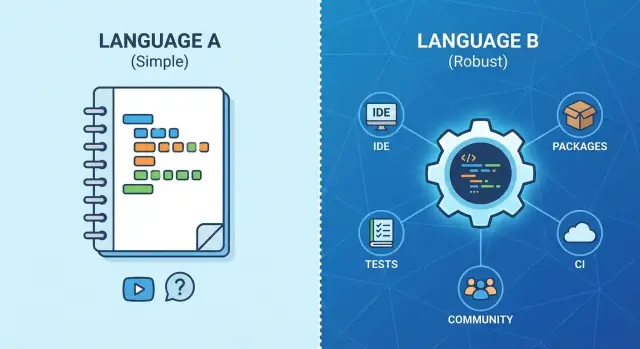
The Big Idea: Syntax Is the Tip of the Iceberg
Picture two programming languages that look almost interchangeable in a code snippet. Variables, loops, and functions read the same. Yet one team ships features weekly, while the other keeps stalling on “setup,” “build issues,” and “dependency weirdness.” The difference usually isn’t syntax—it’s everything around it.
Syntax is what you notice first because it’s visible: curly braces vs. indentation, verbose vs. concise, strict vs. flexible. But most of the work of building software happens outside the language grammar. It happens in editors, package registries, build systems, testing tools, deployment workflows, and the collective knowledge you can tap when something breaks.
The main idea
A language’s ecosystem—its tooling, libraries, conventions, and community—often drives day-to-day productivity more than the rules of the language itself. Strong tooling turns “I have an idea” into “it’s running” quickly, and then keeps the project maintainable as it grows.
Who this is for
This is for product teams, founders, and non-specialist decision makers who need to pick a stack (or approve one) without turning it into a never-ending debate between engineers.
What to expect in this article
This isn’t a popularity contest or a “best language” argument. Instead, we’ll focus on practical factors you can compare across options:
- How quickly a new developer gets a working result
- Whether the IDE helps you write and change code safely
- How dependencies are managed and updated
- How testing, builds, and releases fit into your workflow
- How fast you can get unstuck when problems appear
If you evaluate these “iceberg” factors, the right syntax choice usually becomes clearer—or at least far less risky.
What We Mean by Tooling and Ecosystem (Without Jargon)
When people talk about a programming language, they often start with syntax—the “shape” of the code you type.
Syntax: the surface rules
Syntax is the set of writing conventions the language expects: its keywords (like if, while, class), where brackets go, how you mark blocks (curly braces vs. indentation), how you end statements (semicolons or not), and the general style the language nudges you toward.
Syntax affects readability and comfort, especially early on. But once a team is past the first few weeks, most developers can adapt to different syntax faster than you might think.
Tooling: everything that helps you work faster
Tooling is the support around the language that makes day-to-day work smoother. Think:
- Editors and IDEs (code completion, quick fixes)
- Debuggers (breakpoints, step-through, variable inspection)
- Formatters (automatic consistent style)
- Linters (catch common mistakes and code smells)
- Build tools (turn source code into something runnable)
- Test runners and coverage tools
Good tooling reduces “paper cuts”: small slowdowns that happen dozens of times a day.
Ecosystem: what you can reuse instead of reinvent
An ecosystem is the collection of things you can reach for when building real software:
- Libraries and frameworks (web, data access, auth, UI, etc.)
- Package managers and registries (how you find and add those libraries)
- Community conventions (project templates, best practices)
- Learning resources (docs, tutorials, examples, Q&A)
Why this shows up every day
A team doesn’t spend most of its time admiring syntax—it spends time reading code, navigating projects, running tests, fixing bugs, and integrating dependencies. Tooling and ecosystem quality directly changes how long those tasks take.
If the debugger is clunky, upgrades are painful, or key libraries are immature, you’ll feel it constantly. When those pieces are strong, the whole workflow becomes calmer: fewer interruptions, faster feedback, and less effort spent on “work around the work.”
Time-to-First-Result Matters More Than Perfect Syntax
“Time to first success” is the time it takes to go from an idea to a running, working project you can click, test, and share. Not a “hello world” in a terminal—something closer to your real use case: a web page that loads, an API endpoint that returns data, a small app that actually builds and runs.
When that first result arrives quickly, teams gain confidence, momentum, and clearer feedback. When it’s slow, people start second-guessing the language, the approach, and sometimes the whole project—long before the real work even begins.
Templates and scaffolding reduce early mistakes
Strong ecosystems usually ship with well-maintained starters: project templates, scaffolding tools, and “recommended defaults.” These do a lot of quiet work for you:
- Create the right folder structure
- Configure builds and environment settings
- Add common dependencies in compatible versions
- Set up linting, formatting, and basic tests
That matters because the earliest stage is when you’re most likely to make accidental decisions you’ll regret later (like inconsistent configs, odd build scripts, or missing quality checks). Good scaffolding removes those traps.
Clear error messages are a practical feature
Syntax can be elegant, but if the toolchain answers mistakes with cryptic errors, you pay for it every day. Great ecosystems invest in friendly compiler or runtime messages, actionable hints (“did you mean…?”), and links to docs. That shortens the loop from “it’s broken” to “it’s fixed,” especially for newer team members.
The hidden cost of small frictions
A language can look clean on paper yet still drain time through tiny annoyances: slow installs, confusing project setup, inconsistent formatting, brittle configuration, or needing three commands where one should do.
Each friction might cost only 30 seconds. Repeat it dozens of times a week across a team, and it turns into real budget. Time-to-first-result is the first place you feel that truth—and a strong ecosystem makes it obvious in the best way.
A modern shortcut: treating “ecosystem” as a workflow
One way teams reduce early friction is by standardizing the “golden path” from idea → running app → deployment. Platforms like Koder.ai are designed around that idea: you describe what you want in a chat interface, and it generates a working web, backend, or mobile app (commonly React on the web, Go + PostgreSQL on the backend, and Flutter for mobile), with options for deployment, hosting, custom domains, and even snapshots/rollback.
This doesn’t replace the need to choose a language ecosystem—but it can make a proof-of-concept much faster and more consistent, especially when you want a realistic end-to-end slice before you commit.
IDE, Debugging, and Code Intelligence: Daily Productivity
A language can look elegant on paper and still feel slow in day-to-day work if the tooling around it is weak. Most developers spend far more time navigating, understanding, and changing existing code than writing new lines. That’s where IDE support, debuggers, and code intelligence turn “nice syntax” into actual speed.
What “good IDE support” really means
Good IDE support isn’t just colored keywords. It’s the ability to move through a codebase confidently and make changes without fear.
Autocomplete should be context-aware: showing the right methods for the type you’re holding, suggesting valid parameters, and warning you when you’re about to pass the wrong value.
Refactors should be safe and repeatable: rename a function, move a file, extract a method, and trust that all references update correctly.
Go-to-definition and “find all references” should work reliably across your whole project, including dependencies and generated code. When those features are flaky, developers fall back to manual search, which is slower and more error-prone.
Debuggers shorten feedback loops
A debugger reduces guesswork. Instead of adding print statements and re-running the app over and over, you can pause execution, inspect variables, step through logic, and see the real state that caused a bug.
This matters most when the issue is timing-related, data-dependent, or happens only in certain environments. A good debugging experience (breakpoints, call stacks, watch expressions, conditional breakpoints) can turn a multi-hour investigation into a few minutes of focused work.
Formatters and linters: fewer debates, cleaner reviews
Automated formatting and linting are productivity tools disguised as “style rules.” When the formatter is standard and easy to run (ideally on save or in CI), teams stop spending code review time on indentation, naming, or quote styles.
Linters catch common mistakes early—unused variables, suspicious comparisons, missing error handling—so reviewers can focus on design and correctness. Consistent formatting also makes diffs smaller and easier to read, which speeds up collaboration.
Better tooling helps newer developers succeed faster
Strong tooling is an accessibility feature for teams. Newer developers benefit from inline errors, quick fixes, type hints, and guided refactors because the IDE teaches the “shape” of the codebase as they work.
That support reduces the mental load of learning unfamiliar projects and lowers the risk of breaking changes. In practice, better code intelligence means more people can contribute sooner—and senior developers spend less time doing rescue missions.
Package Managers and Dependencies: The Real Workhorse
Most teams don’t “use a language” day to day—they use the language plus its package manager. That’s the system that fetches libraries, decides which versions are allowed, and makes sure everyone on the team (and in CI) is building the same thing.
It’s not about downloads—it’s about repeatability
A good package manager gives you predictable results. Versioning rules (like semantic version ranges) and lockfiles mean your laptop, your teammate’s laptop, and your production build can all resolve the exact same dependency set.
Without that, a harmless install on Monday can silently pull newer versions on Friday, and suddenly “nothing changed” turns into a mysterious bug.
Dependency quality: maintenance beats popularity
Libraries are part of your product. Before adopting one, look for signals that it’s maintained:
- Recent releases (not just stars)
- Clear release notes that explain changes and breaking updates
- Compatibility info (supported language/runtime versions)
- A healthy issue tracker: questions answered, bugs triaged, PRs reviewed
This is where ecosystems differ sharply. Some make it easy to understand what will break during upgrades; others leave you guessing.
Security basics: know what you’re shipping
Dependencies can introduce known vulnerabilities. Mature ecosystems support practical workflows: security advisories, automated alerts, and simple commands or CI checks to flag risky versions.
Just as important: a straightforward update path. If upgrading a library routinely breaks your build, teams postpone updates—exactly when they shouldn’t.
The long-term risk of abandoned libraries (and how teams cope)
The biggest hidden cost isn’t installing packages—it’s when a critical library stops being maintained.
Teams mitigate this by limiting “deep” dependencies, preferring boring, widely-used building blocks, and regularly reviewing the dependency tree. When necessary, they pin versions, swap to an alternative, or fork and maintain the library internally until a cleaner migration is possible.
A language with strong package management and dependency hygiene saves time every week—and prevents the slow creep of fragile, un-upgradable software.
Frameworks and Integrations: Shipping Features Faster
A language’s frameworks and integrations determine how quickly you can turn “we need X” into a working feature. Syntax rarely blocks progress; missing building blocks do.
The common needs every product hits
Most teams end up implementing the same categories of functionality:
- Web APIs (routing, request validation, rate limits)
- Data access (ORMs/query builders, migrations)
- Authentication and authorization (sessions, OAuth, roles)
- UI (server rendering, component systems, mobile/Desktop tooling)
- Background jobs and scheduling
- Messaging and events (queues, pub/sub)
When an ecosystem has mature, widely used solutions for these, you’re not starting from scratch. You’re assembling proven pieces.
“Well-trodden paths” beat custom architecture
Well-supported frameworks encode patterns that have already been stress-tested: project structure, error handling, configuration, dependency injection, and deployment conventions. That reduces the number of decisions your team has to invent (and later re-litigate).
It also makes troubleshooting easier. If thousands of teams have deployed the same stack, the failure modes are known, and the fixes are searchable. You spend more time shipping and less time building internal mini-frameworks.
Integrations that remove weeks of glue code
Real products rely on external services: cloud storage, payments, analytics, email, search, feature flags, and observability (logging, metrics, tracing). Strong ecosystems offer official SDKs, maintained community packages, and framework adapters.
The difference is dramatic: a payment flow might be a weekend with a well-maintained library, or a multi-sprint effort if you must hand-roll edge cases, webhooks, retries, and signature validation.
The balance problem: too few vs. too many options
Sparse ecosystems can trap teams into custom work. But ecosystems with endless competing frameworks can create confusion, fragmentation, and inconsistent codebases.
A good sign: one or two “default” choices for the core stack, plus healthy alternatives for specialized needs—enough flexibility without constant debates.
Build, Test, and Quality Tooling: Fewer Surprises in Production
Great syntax doesn’t save you if every release feels like a coin flip. The ecosystems that win long-term are the ones that make building, testing, and checking code boringly predictable—both on a laptop and in CI.
Build speed and simplicity (local and CI)
Fast, straightforward builds tighten the feedback loop. When a language has a standard build tool and conventions, developers can run the same commands locally that CI runs later. That reduces “works on my machine” moments.
Pay attention to:
- Cold-start build time (fresh checkout) and incremental builds (after a small change)
- How easy it is to reproduce CI: pinned versions, lockfiles, caching support
- Whether the default tooling supports monorepos, artifacts, and environment configuration without custom glue
Testing support that fits how you ship
Testing isn’t just “does it have a test runner?” Mature ecosystems offer a complete set of practical tools:
- Test runners that are fast and easy to integrate into CI
- Mocking/fakes, fixtures, and good ergonomics for integration tests
- Snapshot testing where it makes sense (UI output, API responses)
- Coverage tooling that’s accurate and simple to report and enforce
When these tools are first-class, teams write more tests—not because they’re disciplined heroes, but because it’s frictionless.
Static analysis and quality gates
Quality tooling that catches issues before runtime can prevent entire categories of incidents. Depending on the language, this can include type checking, linters, formatters, security scanners, and dependency audits.
The key is consistency: a formatter everyone uses, lint rules that match your risk tolerance, and checks that run automatically in CI.
Why this matters to the business
Reliable build-and-test pipelines lead to fewer production incidents, faster root-cause analysis, and simpler rollbacks. That translates directly into less downtime, fewer emergency fixes, and more confidence shipping improvements on a predictable cadence.
Documentation and Community: How Fast You Get Unstuck
Syntax rarely blocks a project for long. Getting stuck on configuration, authentication, deployment quirks, or a confusing error message is what burns hours. That’s where documentation and community support quietly decide whether a language feels “easy” or exhausting.
Why official docs speed up onboarding
Clear, maintained official documentation reduces onboarding time because it answers the first-week questions without tribal knowledge: how to install tools, structure a project, handle common tasks, and follow recommended conventions.
Good docs don’t just list options—they explain defaults, trade-offs, and “when to use what.” They also match the current version. Outdated pages are worse than no pages because they send new developers down dead ends.
Examples and reference apps beat theory
Tutorials are helpful, but real progress often comes from examples that resemble your situation: a minimal “hello world,” a medium-sized reference app, and a few focused recipes (logging, background jobs, database migrations, API auth).
Reference apps are especially valuable because they show how pieces fit together in practice: folder structure, configuration, dependency setup, tests, and deployment. When a language ecosystem provides these, teams spend less time inventing patterns and more time shipping.
Community channels: your unofficial support desk
Even great docs can’t cover every edge case. Healthy ecosystems have active places to ask and search:
- Q&A sites (and well-tagged questions)
- Official forums and community forums
- Chat groups (Discord, Slack, Matrix) for quick debugging help
- Meetups and local groups for learning norms and best practices
A responsive community also signals that the ecosystem is alive: tools are maintained, libraries get fixes, and common pitfalls are widely known.
A quick evaluation: can you get answers fast?
Before committing, test how quickly you can solve “normal” problems. Search for solutions to a few scenarios you’ll definitely hit (e.g., setting up linting, handling env variables, connecting to a database, running tests in CI). If answers are easy to find, current, and consistent across sources, you’ll get unstuck faster—again and again.
Hiring and Onboarding: People Costs Beat Syntax Costs
A language can look elegant on paper, but most costs show up in people time: recruiting, ramp-up, and day-to-day coordination. If two options are close technically, the ecosystem that helps you hire and onboard faster usually wins.
Hiring: availability drives timelines and budgets
Talent availability isn’t just “Can we find someone?” It’s also how long it takes, how much you pay, and how picky you can be. A popular ecosystem tends to produce more candidates with relevant experience in its package managers, libraries, frameworks, and common deployment patterns.
That directly affects delivery:
- Fewer weeks spent searching means features ship sooner.
- A larger candidate pool reduces salary pressure and recruiter fees.
- You can hire for product knowledge and teamwork—not only “the one person who knows this niche stack.”
Onboarding: tutorials, conventions, and standard layouts
Onboarding is where ecosystems quietly save (or burn) money. Mature ecosystems usually have clear beginner-to-intermediate paths: official tutorials, respected courses, and community “gold standard” starter projects.
Just as important: conventions. When the ecosystem has established answers to “Where does this code go?” and “How do we structure a service?”, new hires spend less time reverse-engineering decisions. Standard project layouts, common build and test commands, and predictable dependency management make the first week productive rather than confusing.
Team consistency beats “every project is different”
When a language’s developer tooling encourages shared practices—formatting, linting, testing, and CI templates—teams converge on similar workflows. That reduces friction in code reviews, lowers the chance of accidental regressions, and makes it easier to move engineers between projects.
Learning curve: patterns matter more than cleverness
Syntax readability helps, but established patterns matter more. Clear, widely used approaches (for web apps, CLIs, data processing, etc.) make codebases easier to understand and maintain—especially for engineers joining midstream. The best ecosystem is the one where “How do we do X?” has a well-known, well-documented answer.
Longevity and Upgrades: Can You Maintain It for Years?
Choosing a language isn’t just about how quickly you can start—it’s about whether you can still ship confidently three years later. The “feel” of maintenance is heavily shaped by how the ecosystem evolves: how often it changes, how it breaks, and how predictable those changes are.
Release cadence and backward compatibility
A fast release cadence can be great—security fixes land quickly, features arrive steadily—but only if the ecosystem protects existing code. Look for clear compatibility promises: Do minor releases avoid breaking changes? Are deprecations announced early with warnings? Is there a published upgrade guide for each release?
If the norm is “upgrade and hope,” your team pays for it repeatedly: time lost chasing subtle breakages, reworking build pipelines, and updating dependencies that aren’t ready yet.
LTS and how upgrades feel in practice
Long-term support (LTS) isn’t just a label; it’s a planning tool. With an LTS option, you can standardize on a stable baseline while still having a path forward when you’re ready.
In practice, “how upgrades feel” comes down to the tooling:
- Are there codemods or automated migration tools?
- Do compiler/runtime warnings point to exactly what changed?
- Can you upgrade incrementally, or does everything need to move at once?
A smooth upgrade experience means you can budget upgrades like regular maintenance, instead of scheduling a stressful “upgrade quarter.”
Governance: who decides and how conflicts get resolved
Ecosystems last when decision-making is transparent. Pay attention to governance: Is there a foundation, a steering committee, or a single company calling the shots? How are proposals discussed and accepted? When the community disagrees, is there a documented process to resolve it?
This matters because governance shapes everything: compatibility policies, deprecation timelines, and whether critical issues get prioritized.
Vendor neutrality vs. single-vendor control
Single-vendor control can be efficient—one roadmap, quick decisions—but it introduces risk if priorities change, licensing shifts, or products get sunset.
Vendor-neutral ecosystems can reduce that dependency, especially when multiple organizations maintain key libraries and infrastructure. As a quick gut check, look at who maintains the core tools and the top dependencies you’d rely on. If you’re betting your business on it, you want the ecosystem’s future to be bigger than any one company.
A Practical Checklist for Choosing a Language Ecosystem
Picking a language is really picking a working environment: how quickly you can build, ship, fix, and staff your product over time. Use this checklist to evaluate the ecosystem, not just the syntax.
A short checklist (what to verify)
- Tooling maturity: Does the language have reliable IDE support, autocomplete, refactoring, debugging, and profiling?
- Libraries and frameworks: Are the common building blocks (web, auth, payments, data access, queues) available and actively maintained?
- Docs and learning path: Are the official docs clear? Are there up-to-date tutorials and examples for your use case?
- Hiring and onboarding: How hard is it to hire? Can a new developer be productive in days, not weeks?
- Hosting and operations: Are there well-worn deployment options, monitoring integrations, and predictable performance?
- CI/testing support: Are test runners, coverage, linters, formatters, and CI templates easy to set up and widely used?
Questions to ask before you commit
Start with constraints, not preferences:
- What does our team already know well enough to deliver quickly?
- What are the timeline and reliability expectations (prototype vs. revenue-critical system)?
- Do we have compliance, security, or audit requirements that narrow our options?
- Which integrations are non-negotiable (identity provider, database, cloud services, third-party APIs)?
- What’s the long-term plan: a small app, or a platform that will grow for years?
A small proof-of-concept plan
Before standardizing, build one real feature end-to-end:
- Implement a thin API plus one UI flow (or a worker job, if that’s your product).
- Add dependency management, tests, and a basic CI pipeline.
- Deploy to a staging environment and instrument logs/metrics.
- Have a second developer onboard and make a change using the same setup.
If you want to compress the evaluation timeline, you can also prototype that same slice in a platform like Koder.ai. Because it supports source code export, snapshots/rollback, and deployment/hosting, it can act as a fast “ecosystem simulator” for the workflow you ultimately need: building a real app, iterating, and shipping.
Takeaway: choose the ecosystem that best supports your delivery goals—speed, reliability, and maintainability—not the one with the most elegant syntax.
FAQ
Why can two languages with similar syntax lead to very different productivity?
Syntax is what the code looks like, but most engineering time goes into setup, debugging, testing, dependency updates, and deployment. A strong ecosystem reduces friction in those areas with reliable tooling, standard workflows, and reusable libraries—so teams spend more time shipping and less time fighting the stack.
What does “time-to-first-result” mean in practice?
It’s the time from “new idea” to a running result that resembles your real use case (e.g., an API endpoint, a page you can click through, a worker that runs). Measure it by doing a fresh setup on a clean machine and seeing how long it takes to:
- scaffold a project
- run it locally
- add one dependency
- run tests
- deploy to a staging environment
What should I look for in IDE support when evaluating a language?
Look for:
- reliable autocomplete based on real types/structures
- accurate “go to definition” and “find references” across the whole repo
- safe refactors (rename/move/extract) that don’t break things silently
- fast feedback (inline errors, quick fixes)
If these features are flaky, developers compensate with manual searching and cautious changes, which slows everything down.
Why is debugger quality such a big deal?
Print statements work for simple bugs, but debuggers cut investigation time when issues are data-dependent, timing-related, or environment-specific. Practical debugger capabilities include:
- breakpoints and conditional breakpoints
- call stacks and variable inspection
- watch expressions
- stepping through code across libraries/framework code
If debugging is painful, teams avoid it—and bug-fixing becomes guesswork.
How do formatters and linters impact team velocity?
Because they standardize the team’s workflow and reduce review overhead:
- Formatters eliminate style debates and make diffs smaller.
- Linters catch common mistakes early (unused variables, risky patterns, missing checks).
- Running both in CI prevents “it passes locally” inconsistencies.
A good ecosystem makes these tools easy to adopt with sensible defaults.
What makes a package manager “good” for real teams?
A package manager isn’t just a download tool—it’s what makes builds repeatable. Strong signals include:
- lockfiles that pin exact versions
- clear versioning rules and predictable resolution
- fast, reliable installs (local and CI)
- good support for private packages and monorepos (if you need them)
Without repeatability, “nothing changed” failures become common and expensive to debug.
How can I evaluate dependency quality before adopting a library?
Prefer libraries that show active, responsible maintenance:
- recent releases with clear changelogs
- compatibility stated for runtime/language versions
- issues and pull requests triaged, not abandoned
- an upgrade path that doesn’t routinely break builds
Popularity can help, but maintenance quality is what keeps your product upgradable and secure.
Which ecosystem “building blocks” usually matter most for shipping features?
Start with what you ship every week:
- web APIs (routing, validation)
- database access (migrations, ORM/query tools)
- auth (sessions, OAuth, roles)
- background jobs and scheduling
- integrations (payments, email, storage, observability)
An ecosystem with well-trodden paths and maintained adapters saves weeks of glue code and reduces architectural churn.
How do I compare ecosystems without turning it into a subjective debate?
Treat it like a product decision and run a small proof of concept:
- build one real feature end-to-end
- add tests, linting/formatting, and a basic CI pipeline
- deploy to staging and add logs/metrics
- have a second developer onboard and make a change
Choose the ecosystem that makes these steps fast and predictable—not the one with the nicest syntax.
What are the key longevity and upgrade risks to check before committing?
Ask whether you can still ship confidently years later:
- Does the ecosystem have clear compatibility promises (especially for minor releases)?
- Are there LTS options or stable baselines?
- Do upgrades have guides, warnings, or automated migrations (codemods)?
- Is governance transparent (foundation/committee vs. single-vendor control)?
A smooth upgrade story turns maintenance into routine work instead of periodic crises.