

How to Build a Trust & Reviews Page for Local Businesses
Learn how to build a local business trust and reviews page that earns confidence with real testimonials, ratings, photos, policies, and FAQs.
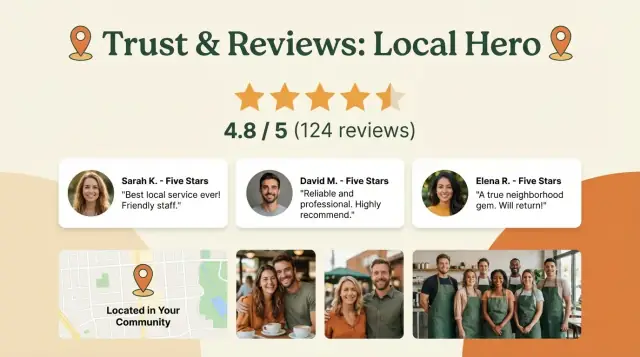
What a Trust & Reviews Page Does for a Local Business
A Trust & Reviews page is a dedicated place on your local business website that collects the proof people look for before they call, book, or walk in. It helps a visitor quickly answer:
- “Are you legitimate?”
- “Are you consistent?”
- “Will you treat me well if something goes wrong?”
For local buyers, trust is practical. They’re comparing you with two or three nearby options, often on a phone, often in a hurry. A well-built Trust & Reviews page reduces hesitation by showing real experiences from real customers, plus signals that you’re established and accountable.
What it should do (the outcomes)
When this page is done right, it turns “maybe later” into action. Common results include:
- More calls from people who feel confident you’ll pick up and help
- More bookings because the perceived risk is lower
- More walk-ins after someone checks reviews before heading over
- Fewer repetitive questions (hours, guarantees, what to expect) because the page answers them
What this page is not
This isn’t a sales pitch or a “we’re the best” manifesto. It’s also not a dumping ground for every nice quote you’ve ever received.
Most importantly: it’s not fake reviews, edited screenshots with no source, or testimonials so polished they sound written by marketing. Those tactics usually backfire—people can sense them.
What you’ll build by the end
By the end of this guide, you’ll have a Trust & Reviews page that:
- Highlights believable testimonials and third‑party reviews
- Makes proof easy to scan on mobile
- Adds supporting trust signals (photos, credentials, mini case studies)
- Encourages more reviews without pressure or gimmicks
Think of it as your website’s “confidence page”—quietly earning trust when you’re not there to explain it.
Start with Customer Questions and One Clear Goal
A Trust & Reviews page works best when it answers the exact doubts people have right before they pick up the phone—or click away. Before you collect testimonials or embed Google reviews, decide:
- What your visitor is trying to figure out
- What you want them to do next
Start by listing the “decision questions”
Most customers don’t arrive thinking “I want social proof.” They arrive thinking:
- “Are you reliable and on time?”
- “How much will this cost, and are there surprise fees?”
- “Have you done jobs like mine before?”
- “What happens if something goes wrong?”
- “Are you licensed/insured/certified?”
Write down the top 5–8 questions you hear on calls, in DMs, or at the counter. Those questions become the organizing logic for what reviews to feature and what supporting details to include.
Define your ideal visitor (so you don’t write for everyone)
A single page can’t persuade every type of shopper equally. Pick the main reader:
- New customer: needs reassurance, proof, and a simple next step
- Returning customer: wants a quick reminder that they’re making a safe choice
- Price-checker: needs clarity on value (what’s included, guarantees, outcomes)
When you choose one, your copy gets sharper—and your testimonials will feel more relevant.
Choose one primary action
Decide the one action this page should drive. Common options for local services:
- Call now (best for urgent needs)
- Book online (best for appointments)
- Request a quote (best for custom pricing)
- Get directions / visit location (best for walk-ins)
Everything else should support that action—especially your featured reviews and trust signals.
Know what “proof” matters in your industry
Different businesses require different evidence. Home services often benefit from before/after photos, healthcare and personal services lean on credentials, and time-sensitive services win with speed and responsiveness.
Pick the proof that matches how people decide, then prioritize reviews that mention it directly.
Best Placement: Navigation, Links, and URL Structure
A Trust & Reviews page only works if people can find it quickly—especially when they’re comparing you with two or three similar local businesses. Placement is about reducing “where do I look?” friction.
Where to put it in your navigation
For most local business websites, the simplest approach is:
- Top menu (best for lead-driven sites): Add “Reviews” or “Trust” as a main item if you have room.
- Near Contact / Book / Get a Quote: If your header is tight, place it right next to your primary action button so it’s seen at decision time.
- Footer (minimum): Always include it in the footer alongside /contact, /services, and /about.
If you can only choose one spot, put it in the top navigation or directly beside “Contact”—that’s where last-minute reassurance matters.
Keep the URL short and predictable
Use a URL people can guess and that’s easy to share:
- /reviews (most common)
- /testimonials (fine, but less inclusive of third-party reviews)
- /trust or /trust-reviews (good if the page includes credentials + guarantees)
Avoid long URLs like /what-people-say-about-our-company-in-your-city.
Add links from high-intent pages
Don’t rely on navigation alone. Add a visible link to the page from:
- Your homepage (near your main call to action)
- Each service page
- Booking or request-a-quote pages
- Your contact page (right above the form is ideal)
A practical pattern: add a small “Trust” block on service pages (e.g., “4.8★ from 230+ locals”) that links to /reviews for full details.
Above-the-Fold Layout: First Impressions That Feel Credible
The top of your Trust & Reviews page should answer one question in under five seconds: “Can I rely on this business for my problem, here?” A clean above-the-fold layout builds confidence before someone scrolls.
1) A headline that’s specific (service + area)
Write a clear headline that matches what you do and where you do it. Specific beats clever.
Example: “Trusted HVAC Repair in Mesa, AZ — Verified Customer Reviews”
2) A short, factual trust summary
Add a compact summary that gives context without hype. Keep it strictly true:
- Average rating (e.g., 4.8/5)
- Number of reviews (e.g., 327 reviews)
- Years in business (only if true and easily supported)
If you have multiple sources (Google, Yelp, Facebook), you can show a combined snapshot, but avoid inflating numbers or rounding up.
3) One visible call-to-action button
Put a single, clear button above the fold so visitors don’t have to hunt for the next step. Match it to your business type:
- “Request an Estimate”
- “Call Now”
- “Book an Appointment”
If you include a phone number, make it tap-to-call on mobile.
4) Quick trust badges (only if verified)
Include 2–4 small trust badges near the summary—enough to reassure, not clutter. Good examples:
- Licensed / Insured (only if verified)
- Background-checked team (only if your process supports it)
- Guarantee / Warranty (only if offered)
- Same-day service (only if consistently available)
Keep badges simple and readable. If a badge needs explanation, link to a short details page like /guarantee or /about so the top section stays clean.
Done well, the above-the-fold area feels calm, specific, and honest—setting up the rest of the page to do the convincing.
Pick and Format Testimonials People Actually Believe
A trust page lives or dies by whether visitors think your testimonials sound like real people—not marketing copy. The goal is to make reviews specific, verifiable, and easy to connect to the service you provide.
Choose the right 6–12 testimonials
Pick 6–12 of your strongest testimonials and make sure they map to your main services. If you do tree trimming and stump grinding, show both. If you serve multiple neighborhoods, include a few different areas.
Include a mix of recent and older feedback. A brand-new review shows you’re active; a great review from two years ago shows you’ve been consistent. Together, they feel more believable than a wall of only “last week” praise.
Add the details people look for
When allowed, format each testimonial with:
- Full name + last initial (e.g., “Maria S.”)
- City/area (e.g., “South Austin”)
- Service type (e.g., “Water heater replacement”)
Those details make the review feel grounded and help a reader quickly find someone “like them.”
Photos: helpful, but only with permission
Customer photos can increase trust, but only use them if you have clear permission (a quick written “yes” is enough). If you don’t, keep it text-only—it’s still effective when the review is specific.
Edit carefully (or not at all)
Don’t rewrite testimonials. Visitors can sense when a review has been polished into a sales pitch. If you edit, only fix obvious typos and avoid changing meaning, tone, or emphasis.
If a customer wrote “They were 10 minutes late but did great work,” keep that honesty—it often increases credibility.
A simple format that works
Use a consistent card layout: short quote, then name/area/service, and (if available) date. Consistency helps people scan, and the details help them believe.
Add Third-Party Reviews (Google, Yelp, and More) the Right Way
Third‑party reviews are powerful because they’re not “on your turf.” A visitor can see that feedback also exists on platforms they already trust—and can verify it.
Where to pull reviews from
Start with the sources your customers actually use:
- Google reviews (often the first place people check)
- Yelp reviews (especially for food, home services, and cities where Yelp is popular)
- Facebook recommendations
- Industry sites (Tripadvisor, Angi, Thumbtack, Healthgrades, Houzz, Avvo, etc.)
Pick 1–3 primary sources so the page feels consistent, not cluttered.
Three ways to display third‑party reviews
1) Official widgets / embeds (best when available). They’re typically the most credible because they pull live data, but they can be slower to load and harder to style.
2) Screenshots (good for design control). Great for “as seen on Google” sections, but keep them readable on mobile and add text context (reviewer name/initials, star rating, date).
3) Copied quotes (best for scanning). Use short excerpts with clear attribution like “— Jamie R., Google” and link out to the original when possible.
Always attribute and link out
When you can, add a simple “Read more on Google” link that points to the original review source. It’s a small trust signal that says, “You can verify this.” Keep the rest of your site navigation internal, like /contact or /book.
A quick note on moderation
Review platforms may remove reviews for policy reasons (spam detection, conflicts of interest, incentivized reviews, or account issues). Add a short line near your third‑party section explaining that review counts can change because platforms moderate and occasionally remove posts—so visitors understand why numbers may fluctuate.
Make Reviews Easy to Scan: Filters, Sorting, and Mobile Design
A Trust & Reviews page works best when visitors can find “someone like me” fast. If they have to read a wall of text, they’ll bounce—even if your reviews are great.
Add simple filters people understand
Keep filters focused on how locals actually choose a business:
- Service type (e.g., “Brake repair,” “Move-out cleaning,” “Family portraits”)
- Neighborhood / area served (helpful for multi-location or city-wide service)
- Rating (e.g., 5-star only, 4+)
- Keyword tags (short tags like “on time,” “clean,” “great with kids,” “same-day”)—avoid making this a long, messy list
The goal isn’t to build an advanced search tool; it’s to help someone confirm, “Yes, they handle my exact situation.”
Sorting that feels fair (and low-maintenance)
Default sorting should be Most recent so the page feels current. Add optional sorting like Highest rated or Lowest rated for transparency.
A “Most helpful” section can work, but only if you can maintain it. If you can’t reliably track votes or rotate highlighted reviews, skip it—stale “most helpful” picks can feel overly curated.
Mobile-friendly review cards (and accessible, too)
Most visitors will read reviews on a phone. Use simple “cards” that are easy to skim:
- Large, readable font (no tiny gray text)
- High contrast and generous spacing
- Star rating + date visible without tapping
- “Read more” expansion for longer reviews
Make sure filters and sort controls are tap-friendly (big enough buttons, clear labels) and keyboard-accessible where possible.
Prevent clutter as you grow
Don’t dump 200 reviews on one page. After a set number (like 10–20), use pagination or a “Load more” button. This keeps scrolling reasonable, improves performance, and makes it easier for visitors to keep their place.
Support Reviews with Photos, Credentials, and Mini Case Studies
Reviews are powerful, but they’re even more believable when visitors can see the people, places, and proof behind them. A few simple trust signals around your testimonials help customers feel confident that you’re real, local, and consistent.
Use real photos (not stock)
Add a small gallery near the top or between review sections:
- Your team (a candid group shot beats a posed headshot grid)
- Your storefront, office, or service area signage
- Vehicles, uniforms, and branded equipment (especially for home services)
- Completed work photos (before/after when appropriate)
Keep it honest: real lighting, real locations, no heavy filters. If you’re in a sensitive industry, blur faces/addresses and get permission when needed.
Show credentials people can verify
Credentials work best when they’re specific and checkable. Include only what you can back up:
- Certifications and licenses (with license numbers when relevant)
- Awards (year + issuing organization)
- Memberships (local chamber, trade associations)
A simple “Credentials” block with logos and short text is enough. If you have supporting pages, link them (e.g., /about or /licenses-and-insurance).
Add mini case studies (short, realistic, specific)
Case studies bridge the gap between a happy review and the customer’s situation. Keep them brief—three to six sentences—and avoid exaggerated claims.
Use this format:
- Problem: What the customer needed (include constraints like time, budget, or urgency)
- Solution: What you did and why
- Result: Clear outcome (time saved, issue resolved, next steps), without overpromising
Example:
Problem: Leaking pipe under the kitchen sink two days before hosting guests.
Solution: Same-day visit, replaced the damaged section, and tested water pressure.
Result: Leak stopped, area dried and secured, and the homeowner got maintenance tips to prevent repeats.
Explain your process in 3–5 steps
A short “What to expect” section reduces anxiety and makes reviews feel more relatable:
- Request a quote / schedule
- Quick confirmation and arrival window
- Work walkthrough and approval
- Service completion and cleanup
- Payment, follow-up, and warranty info
When visitors can match your process to the stories in your reviews, trust builds faster.
How to Get More Reviews Ethically (Templates Included)
A steady flow of honest reviews starts with two things: good timing and a simple ask. Make it easy for happy customers to share their experience—without pressure, tricks, or “special deals.”
Timing: when to ask (and who should ask)
Ask as close to the positive moment as possible:
- Service businesses: right after the job is complete and the customer confirms they’re satisfied
- Retail/food: right after purchase (receipt, card, or a quick SMS) or the next morning
- Appointments: same day after checkout, once you’ve solved the problem
If possible, have the request come from a real person they interacted with (owner, manager, technician), using their name.
A simple system: one link that routes customers
Create a dedicated page like /review that thanks the customer and offers buttons to the platforms you use (Google, Yelp, Facebook, industry sites). This keeps your messages consistent, lets you update destinations anytime, and avoids sending different people to different places.
Templates you can copy/paste
SMS (short and direct)
Hi {{FirstName}}—thanks for choosing {{BusinessName}} today. If you have 30 seconds, would you leave us a review? It really helps:
{{YourSite}}/review
—{{YourName}}
Email (slightly more context)
Subject: Quick favor?

Hi {{FirstName}},

Thanks again for visiting {{BusinessName}}. If everything felt good, would you share a quick review? Here’s the link:
{{YourSite}}/review

We read every comment.

Thanks,
{{YourName}}
{{BusinessName}}
Follow-up (only once, 2–4 days later)
Hi {{FirstName}}—just checking in. If you meant to leave a review but got busy, here’s the link again:
{{YourSite}}/review
Thank you!
Do’s and don’ts (to stay compliant and credible)
Do: ask all customers consistently, keep the message neutral, and say feedback helps.
Don’t: offer incentives where prohibited, ask only happy customers (review gating), or coach people on what to say.
In-store QR code idea
Print a small sign at the counter that says: “Share feedback—scan to review.” The QR code should go to /review, not directly to a single platform, so you can adjust options over time.
Handle Negative Reviews and Add Reassurance Sections
Negative reviews don’t ruin trust—silence and defensiveness do. A strong Trust & Reviews page shows that you listen, investigate issues, and treat people fairly.
A simple response framework (copy/paste friendly)
For positive reviews:
- Thank them by name (if available)
- Mention one specific detail (“Glad the same-day repair helped”)
- Invite the next step (“Call us anytime for seasonal maintenance”)
For negative reviews:
Keep it calm and short. Don’t argue facts publicly.
- Acknowledge the experience: “I’m sorry this was frustrating.”
- Take responsibility for investigating: “We’d like to look into what happened.”
- Offer a next step with a real person: “Please call/text us at (###) ###-#### or email support@… so we can make it right.”
- Close professionally: “Thank you for bringing this to our attention.”
If you can, move the resolution offline, then follow up publicly once resolved (without sharing private details).
Add a “What we do if something goes wrong” box
This reassurance section reduces hesitation for new customers—only include what’s true.
Examples:
- “If we miss an appointment window, we’ll reschedule at your earliest convenience.”
- “If the work doesn’t meet the agreed scope, we’ll return to correct it.”
- “If a refund applies, we explain the options clearly before processing.”
Mini FAQ that removes doubt
Keep it tight and practical:
- Pricing: Do you offer estimates? What affects final cost?
- Scheduling: Typical lead times? Emergency options?
- Warranties/guarantees: What’s covered and for how long?
- Service area: Neighborhoods/towns you serve (link to /contact or /service-areas)
Clear contact options for resolution
End this section with a small “Need help?” block linking to /contact and listing phone, email, and a short form option—so unhappy customers (and cautious new ones) know exactly where to go.
SEO and Tracking: Help the Page Get Found and Prove Its Value
A Trust & Reviews page shouldn’t just reassure visitors—it should also be easy to find and easy to measure. With a few SEO and tracking basics, you can turn it into a page that supports local rankings and proves it’s helping you win more customers.
Local SEO: write for real searches
Keep the copy naturally focused on what you do and where you do it. Mention your primary services and service areas in plain language (not a list of keywords).
For example, if you’re a plumber, a short sentence like “Serving Tacoma, Gig Harbor, and the South Sound for water heater installs and emergency repairs” helps match local intent without feeling spammy.
Also link to the pages people need next:
- If they’re ready to talk: /contact
- If they want details: /services
- If pricing is a frequent question: /pricing
Schema markup (simple, optional, and worth it)
If your site supports it, add LocalBusiness schema to reinforce who you are, and Review schema to help search engines understand individual reviews.
Two important rules:
- Only mark up reviews that are actually shown on the page.
- Don’t claim star ratings you can’t verify. Your markup should match what’s visible (and current) on the page.
If you use JSON-LD, your developer or platform may add something like this (use real values only):
{
  "@context": "https://schema.org",
  "@type": "LocalBusiness",
  "name": "Your Business Name",
  "areaServed": ["City A", "City B"],
  "url": "/reviews"
}
Track what matters (and tie it to revenue)
Set up tracking so you can answer: “Is this page creating leads?” Focus on actions, not pageviews.
Track:
- Clicks to call (tap-to-call events on mobile)
- Bookings / form submits (especially from /contact)
- Time on page (are people actually reading?)
- Clicks on outbound review links (Google, Yelp, etc.)
In GA4, these can be simple event goals. If you share review-request links from this page, add UTM tags so you can see which clicks lead to posted reviews.
Finally, monitor search queries in Search Console for service + location terms. If you see gaps, add one short paragraph that answers that intent—without changing the tone of real customer proof.
Building the page faster (without compromising credibility)
If you want to ship this page quickly, start with a clean layout and a simple content model (featured testimonials + third-party sources + credentials + FAQ). A vibe-coding platform like Koder.ai can help you generate the first working version via chat—then you can refine the copy, add your real reviews, and iterate on mobile layout, filters, and CTAs.
Because Koder.ai supports building full-stack apps (React on the front end and Go/PostgreSQL on the back end) plus deployment and custom domains, it’s also practical if you decide to go beyond a static page—like adding review tagging, “load more” pagination, or an internal dashboard to manage which testimonials are featured (while still keeping everything accurate and verifiable).
FAQ
What is a Trust & Reviews page, and why does a local business need one?
A Trust & Reviews page is a single page that gathers your most believable customer proof (testimonials, third‑party ratings, photos, credentials) and points visitors to one clear next step (call, book, request a quote, or get directions).
It reduces last‑minute hesitation for people comparing a few local options on their phone.
What should the main goal (CTA) of the page be?
Pick the action that best matches how customers buy from you:
- Call now for urgent services
- Book online for appointment-based businesses
- Request a quote for custom pricing
- Get directions for walk-ins
Then make everything on the page support that action (top reviews, trust badges, and a single primary button).
What’s the best URL and navigation placement for a reviews page?
Use a short, predictable URL that people can guess and share:
- /reviews (most common)
- /testimonials (fine, but narrower)
- /trust or /trust-reviews (best when you also show credentials/guarantees)
Also link to it from high-intent pages like /contact, service pages, and booking/quote pages.
What should be above the fold on a Trust & Reviews page?
Aim to answer “Can I rely on you for my problem, here?” in a few seconds:
- Specific headline (service + location)
- Factual snapshot (average rating, review count, years in business only if verifiable)
- One clear CTA button (tap-to-call on mobile)
- 2–4 verified trust badges (licensed/insured, warranty, background-checked, etc.)
Avoid hype; calm and specific reads as credible.
How many testimonials should I feature, and what details make them believable?
Feature 6–12 strong testimonials that map to your core services and common customer doubts.
Include grounding details when allowed:
- Name + last initial
- City/neighborhood
- Service type
- Date (helpful for recency)
Edit minimally (only obvious typos) so the voice still sounds like a real customer.
How do I add Google/Yelp/third-party reviews without looking sketchy?
Use 1–3 platforms your customers actually check (often Google, then Yelp/Facebook or an industry site).
Ways to display them:
- Official embeds/widgets (most verifiable, sometimes slower)
- Screenshots (design control, must stay readable on mobile)
- Short quoted excerpts with attribution (fast to scan)
Whenever possible, add a “Read more on…” link to the original source so visitors can verify.
How do I make reviews easy to scan on mobile?
Don’t show a wall of text. Make it easy to find “someone like me”:
- Simple filters: service type, area served, rating, a few keyword tags
- Default sort: Most recent (feels current)
- Optional sort: highest/lowest rated (signals transparency)
- Use review cards with readable font, visible date, and “Read more” expansion
Limit initial load (e.g., 10–20) and use pagination or “Load more” for performance.
What else should I include besides testimonials and star ratings?
Add a few supporting trust signals that are real and verifiable:
- Real photos (team, storefront, vehicles, completed work) with permission where needed
- Credentials (licenses/certs, award name + year, memberships)
- 1–3 mini case studies (problem → solution → result in 3–6 sentences)
- A short “What to expect” process (3–5 steps)
These help visitors trust the business behind the reviews.
What’s the ethical way to ask customers for more reviews?
Use a simple, consistent system:
- Ask right after a positive moment (job complete, checkout, same-day follow-up)
- Use a single routing page like /review with buttons to your preferred platforms
- Keep the ask neutral; don’t coach what to say
- Avoid incentives where prohibited and avoid review gating (only asking happy customers)
Send at most one polite reminder 2–4 days later.
How should I handle negative reviews and still build trust?
Keep responses calm and action-oriented:
- Acknowledge the experience
- Say you’ll investigate
- Offer a real offline next step (phone/email)
- Close professionally
On your page, add a short “What we do if something goes wrong” box (only true policies) and a clear “Need help?” block linking to /contact so cautious visitors know you’re accountable.