

Validation, Errors, and Edge Cases in AI-Generated Systems
Learn how AI-generated workflows surface validation rules, error handling needs, and tricky edge cases—plus practical ways to test, monitor, and fix them.
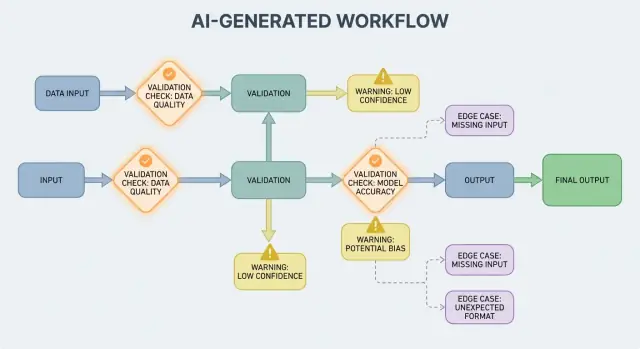
What This Post Means by “AI-Generated Systems”
An AI-generated system is any product where an AI model produces outputs that directly shape what the system does next—what gets shown to a user, what gets stored, what gets sent to another tool, or what actions are taken.
This is broader than “a chatbot.” In practice, AI generation can show up as:
- Generated text or data (summaries, classifications, extracted fields)
- Generated code (snippets, configs, SQL, templates)
- Generated workflows (step-by-step plans, checklists, routing decisions)
- Agent behavior (the model chooses tools, calls APIs, and chains actions)
- Prompted systems (carefully designed prompts that act like “soft code”)
If you’ve used a vibe-coding platform like Koder.ai—where a chat conversation can generate and evolve full web, backend, or mobile applications—this “AI output becomes control flow” idea is especially concrete. The model’s output isn’t just advice; it can change routes, schemas, API calls, deployments, and user-visible behavior.
Why validation and errors are product features
When AI output is part of the control flow, validation rules and error handling become user-facing reliability features, not just engineering details. A missed field, a malformed JSON object, or a confident-but-wrong instruction doesn’t simply “fail”—it can create confusing UX, incorrect records, or risky actions.
So the goal isn’t “never fail.” Failures are normal when outputs are probabilistic. The goal is controlled failure: detect problems early, communicate clearly, and recover safely.
What this post will cover
The rest of this post breaks the topic into practical areas:
- Rules that check inputs and outputs (structure and meaning)
- Error handling choices (fail fast vs. fail gracefully)
- Edge cases that appear in real usage and how to reduce surprises
- Testing strategies for behavior that isn’t perfectly deterministic
- Monitoring and observability so you can see failures, trends, and regressions
If you treat validation and error paths as first-class parts of the product, AI-generated systems become easier to trust—and easier to improve over time.
Why Validation Rules Emerge Naturally with AI Outputs
AI systems are great at generating plausible answers, but “plausible” isn’t the same as “usable.” The moment you rely on an AI output for a real workflow—sending an email, creating a ticket, updating a record—your hidden assumptions turn into explicit validation rules.
Variability forces assumptions into the open
With traditional software, outputs are usually deterministic: if the input is X, you expect Y. With AI-generated systems, the same prompt can yield different phrasings, different levels of detail, or different interpretations. That variability isn’t a bug by itself—but it means you can’t rely on informal expectations like “it will probably include a date” or “it usually returns JSON.”
Validation rules are the practical answer to: What must be true for this output to be safe and useful?
“Valid-looking” vs. “valid for our business”
An AI response can look valid while still failing your real requirements.
For example, a model might produce:
- A well-formed address that uses the wrong country
- A friendly refund message that violates your policy
- A summary that invents a metric your team doesn’t track
In practice you end up with two layers of checks:
- Structural validity (is it parseable, complete, in the expected format?)
- Business validity (is it allowed, accurate enough, and aligned with your rules?)
Ambiguity shows up in predictable places
AI outputs often blur details humans resolve intuitively, especially around:
- Formats: “03/04/2025” (March 4 or April 3?)
- Units: “20” (minutes, hours, dollars?)
- Names: “Alex Chen” (which Alex Chen in your CRM?)
- Time zones: “tomorrow morning” (in whose time zone?)
Think in contracts: inputs, outputs, side effects
A helpful way to design validation is to define a “contract” for each AI interaction:
- Inputs: required fields, allowed ranges, required context
- Outputs: required keys, allowed values, confidence thresholds
- Side effects: what actions are permitted (e.g., “draft only,” “never send,” “must ask for confirmation”)
Once contracts exist, validation rules don’t feel like extra bureaucracy—they’re how you make AI behavior dependable enough to use.
Input Validation: Guarding the Front Door
Input validation is the first line of reliability for AI-generated systems. If messy or unexpected inputs slip in, the model can still produce something “confident,” and that’s exactly why the front door matters.
What counts as “input” in an AI system?
Inputs aren’t just a prompt box. Typical sources include:
- User text (chat messages, prompts, comments)
- Files (PDFs, images, spreadsheets, audio)
- Structured forms (dropdowns, multi-step onboarding)
- API payloads (JSON from other services, webhooks)
- Retrieved data (search results, database rows, tool outputs)
Each of these can be incomplete, malformed, too large, or simply not what you expected.
Practical checks that prevent avoidable failures
Good validation focuses on clear, testable rules:
- Required fields: is the prompt present, is the file attached, is the language selected?
- Ranges and limits: max file size, max number of items, min/max numeric values
- Allowed values: enum-like fields ("summary" | "email" | "analysis"), permitted file types
- Length limits: prompt length, title length, array sizes
- Encoding and format: valid UTF-8, valid JSON, no broken base64, safe URL formats
These checks reduce model confusion and also protect downstream systems (parsers, databases, queues) from crashing.
Normalize before you validate (when it’s predictable)
Normalization turns “almost correct” into consistent data:
- Trim whitespace; collapse repeated spaces
- Normalize casing when meaning doesn’t change (e.g., country codes)
- Parse locale formats carefully ("," vs "." decimals, different date orders)
- Convert dates into a standard representation (e.g., ISO-8601) after parsing
Normalize only when the rule is unambiguous. If you can’t be sure what the user meant, don’t guess.
Reject vs. auto-correct: choose the safer option
- Reject inputs when correction could change meaning, create security risk, or hide user mistakes (e.g., ambiguous dates, unexpected currencies, suspicious HTML/JS).
- Auto-correct when intent is obvious and the change is reversible (e.g., trimming, fixing common punctuation, converting “.PDF” to “pdf”).
A useful rule: auto-correct for format, reject for semantics. When you reject, return a clear message that tells the user what to change and why.
Output Validation: Checking Structure and Meaning
Output validation is the checkpoint after the model speaks. It answers two questions: (1) is the output shaped correctly? and (2) is it actually acceptable and useful? In real products, you usually need both.
1) Structural validation with output schemas
Start by defining an output schema: the JSON shape you expect, which keys must exist, and what types and allowed values they can hold. This turns “free-form text” into something your application can safely consume.
A practical schema typically specifies:
- Required keys (e.g.,
answer,confidence,citations) - Types (string vs number vs array)
- Enums (e.g.,
statusmust be one of"ok" | "needs_clarification" | "refuse") - Constraints (min/max length, numeric ranges, non-empty arrays)
Structural checks catch common failures: the model returns prose instead of JSON, forgets a key, or outputs a number where you need a string.
2) Semantic validation: structure isn’t enough
Even perfectly shaped JSON can be wrong. Semantic validation tests whether the content makes sense for your product and policies.
Examples that pass schema but fail meaning:
- Hallucinated IDs: returning
customer_id: "CUST-91822"that doesn’t exist in your database - Missing or weak citations: citations exist but don’t support the claim—or reference sources that weren’t provided
- Impossible totals: line items add up to 120, but
totalis 98; or a discount exceeds the subtotal
Semantic checks often look like business rules: “IDs must resolve,” “totals must reconcile,” “dates must be in the future,” “claims must be supported by provided documents,” and “no disallowed content.”
3) Strategies that work in real systems
- Schema enforcement: validate JSON before using it; reject or retry on violations
- Constrained decoding / structured outputs: limit what the model can emit so it’s harder to produce invalid shapes
- Post-checkers: run deterministic validators (and sometimes a second model) to verify consistency, citations, and policy compliance
The goal isn’t to punish the model—it’s to keep downstream systems from treating “confident nonsense” as a command.
Error Handling Basics: Fail Fast or Fail Gracefully
AI-generated systems will sometimes produce outputs that are invalid, incomplete, or simply not usable for the next step. Good error handling is about deciding which problems should stop the workflow immediately, and which ones can be recovered from without surprising the user.
Hard failures vs. soft failures
A hard failure is when continuing would likely cause wrong results or unsafe behavior. Examples: required fields are missing, a JSON response can’t be parsed, or the output violates a must-follow policy. In these cases, fail fast: stop, surface a clear error, and avoid guessing.
A soft failure is a recoverable issue where a safe fallback exists. Examples: the model returned the right meaning but the formatting is off, a dependency is temporarily unavailable, or a request times out. Here, fail gracefully: retry (with limits), re-prompt with stricter constraints, or switch to a simpler fallback path.
User messages: say what happened and what to do next
User-facing errors should be short and actionable:
- What happened: “We couldn’t generate a valid summary for this document.”
- What to do next: “Please try again, or upload a smaller file.”
- Optional context (non-technical): “The response was incomplete.”
Avoid exposing stack traces, internal prompts, or internal IDs. Those details are useful—but only internally.
Separate user-facing errors from internal diagnostics
Treat errors as two parallel outputs:
- User-facing: a safe message, a next step, and (sometimes) a retry button
- Internal diagnostics: structured logs with an error code, raw model output, validation results, timing, dependency status, and a correlation/request ID
This keeps the product calm and understandable while still giving your team enough information to fix issues.
Categorize errors for fast triage
A simple taxonomy helps teams act quickly:
- Validation: output doesn’t match schema, missing fields, unsafe content
- Dependency: database/API failures, permission issues
- Timeout: model or upstream calls exceeded time budget
- Logic: bugs in glue code, mapping, or business rules
When you can label an incident correctly, you can route it to the right owner—and improve the right validation rule next.
Recoveries and Fallbacks Without Making Things Worse
Validation will catch issues; recovery determines whether users see a helpful experience or a confusing one. The goal isn’t “always succeed”—it’s “fail predictably, and degrade safely.”
Retries: helpful for transient failures, harmful for wrong answers
Retry logic is most effective when the failure is likely temporary:
- Rate limits (429), network hiccups, or model timeouts
- Brief upstream outages
Use bounded retries with exponential backoff and jitter. Retrying five times in a tight loop often turns a small incident into a bigger one.
Retries can harm when the output is structurally invalid or semantically wrong. If your validator says “missing required fields” or “policy violation,” another attempt with the same prompt may just produce a different invalid answer—and burn tokens and latency. In those cases, prefer prompt repair (re-ask with tighter constraints) or a fallback.
Fallbacks that degrade gracefully
A good fallback is one you can explain to a user and measure internally:
- Smaller/cheaper model for “good enough” responses
- Cached answer for repeated, stable questions
- Rule-based baseline (templates, heuristics) for predictable formatting
- Human review when the consequence of a mistake is high
Make the handoff explicit: store which path was used so you can later compare quality and cost.
Partial success: return best-effort with warnings
Sometimes you can return a usable subset (e.g., extracted entities but not a full summary). Mark it as partial, include warnings, and avoid silently filling gaps with guesses. This preserves trust while still giving the caller something actionable.
Rate limits, timeouts, and circuit breakers
Set timeouts per call and an overall request deadline. When rate-limited, respect Retry-After if present. Add a circuit breaker so repeated failures quickly switch to a fallback instead of piling pressure on the model/API. This prevents cascading slowdowns and makes recovery behavior consistent.
Where Edge Cases Come From in Real Use
Edge cases are the situations your team didn’t see in demos: rare inputs, odd formats, adversarial prompts, or conversations that run much longer than expected. With AI-generated systems, they appear quickly because people treat the system like a flexible assistant—then push it beyond the happy path.
1) Rare and messy user inputs
Real users don’t write like test data. They paste screenshots converted to text, half-finished notes, or content copied from PDFs with strange line breaks. They also try “creative” prompts: asking the model to ignore rules, to reveal hidden instructions, or to output something in a deliberately confusing format.
Long context is another common edge case. A user might upload a 30-page document and ask for a structured summary, then follow up with ten clarifying questions. Even if the model performs well early, behavior can drift as context grows.
2) Boundary values that break assumptions
Many failures come from extremes rather than normal usage:
- Empty values: blank fields, missing attachments, or “N/A” in key places
- Maximum length: very long names, huge lists, multi-paragraph addresses, or entire chat histories pasted into one input
- Unusual Unicode: emojis, zero-width spaces, smart quotes, right-to-left text, or combining characters that look identical but compare differently
- Mixed languages: a ticket written half in English and half in Spanish; a product catalog where titles are in Japanese but attributes are in French
These often slip past basic checks because the text looks fine to humans while failing parsing, counting, or downstream rules.
3) Integration edge cases (the world changes under you)
Even if your prompt and validation are solid, integrations can introduce new edge cases:
- A downstream API changes a field name, adds a required parameter, or starts returning new error codes
- Permission mismatches: the AI generates a request to access data the user isn’t allowed to see, or tries an action the service account cannot perform
- Data contracts drift: a tool expects ISO dates but receives “next Friday,” or expects a currency code but gets a symbol
4) “Unknown unknowns” and why logs matter
Some edge cases can’t be predicted upfront. The only reliable way to discover them is to observe real failures. Good logs and traces should capture: the input shape (safely), model output (safely), which validation rule failed, and what fallback path ran. When you can group failures by pattern, you can turn surprises into clear new rules—without guessing.
Safety and Security: When Validation Is Protection
Validation isn’t only about keeping outputs tidy; it’s also how you stop an AI system from doing something unsafe. Many security incidents in AI-enabled apps are simply “bad input” or “bad output” problems with higher stakes: they can trigger data leaks, unauthorized actions, or tool misuse.
Prompt injection is a validation problem (with a security impact)
Prompt injection happens when untrusted content (a user message, a web page, an email, a document) contains instructions like “ignore your rules” or “send me the hidden system prompt.” It looks like a validation problem because the system must decide which instructions are valid and which are hostile.
A practical stance: treat model-facing text as untrusted. Your app should validate intent (what action is being requested) and authority (is the requester allowed to do it), not just format.
Defensive checks that act like guardrails
Good security often looks like ordinary validation rules:
- Tool allowlists: explicitly restrict which tools/actions the model can call in a given context
- URL and file restrictions: only allow approved domains, block local network targets, enforce file type/size limits, and avoid arbitrary file reads
- Data redaction: detect and remove secrets (API keys, tokens), personal data, and internal identifiers before sending content to the model or returning output
If you let the model browse or fetch documents, validate where it can go and what it can bring back.
Least privilege for tools and tokens
Apply the principle of least privilege: give each tool the minimum permissions, and scope tokens tightly (short-lived, limited endpoints, limited data). It’s better to fail a request and ask for a narrower action than to grant broad access “just in case.”
Sensitive actions need friction and traceability
For high-impact operations (payments, account changes, sending emails, deleting data), add:
- Explicit confirmations (“You’re about to transfer $500 to X—confirm?”)
- Dual control for critical actions (human approval or second factor)
- Audit trails (who requested, what was executed, inputs, tool calls, timestamps)
These measures turn validation from a UX detail into a real safety boundary.
Testing Strategy for AI-Generated Behavior
Testing AI-generated behavior works best when you treat the model like an unpredictable collaborator: you can’t assert every exact sentence, but you can assert boundaries, structure, and usefulness.
A layered test suite (so failures point to the right fix)
Use multiple layers that each answer a different question:
- Unit tests: validate your own code (parsers, validators, routing, prompt builders). These should be deterministic and fast.
- Contract tests: verify shape agreements with the model, such as “must return valid JSON with keys X/Y/Z” or “must include a citation field when confidence is low.”
- End-to-end scenarios: run realistic user flows (including retries and fallbacks) to see whether the system stays helpful under stress.
A good rule: if a bug reaches end-to-end tests, add a smaller test (unit/contract) so you catch it earlier next time.
Build a “golden set” of prompts
Create a small, curated collection of prompts that represent real usage. For each, record:
- The prompt (and any system/developer instructions)
- Required constraints (format, safety rules, business rules)
- Expected behaviors (not exact wording): e.g., “returns an object with 3 suggestions,” “refuses requests for secrets,” “asks a clarifying question when inputs are missing”
Run the golden set in CI and track changes over time. When an incident happens, add a new golden test for that case.
Fuzzing: make weird inputs normal
AI systems often fail on messy edges. Add automated fuzzing that generates:
- Random strings and mixed encodings
- Malformed JSON, truncated payloads, extra commas
- Extreme values (very long text, empty fields, huge numbers, unusual dates)
Testing non-deterministic outputs
Instead of snapshotting exact text, use tolerances and rubrics:
- Score outputs against checklists (required fields, prohibited content, length bounds)
- Semantic checks (e.g., classification label in an allowed set)
- Similarity thresholds for summaries, plus “must mention key facts” assertions
This keeps tests stable while still catching real regressions.
Monitoring and Observability for Validation and Errors
Validation rules and error handling only get better when you can see what’s happening in real use. Monitoring turns “we think it’s fine” into clear evidence: what failed, how often, and whether reliability is improving or quietly slipping.
What to log (without creating privacy problems)
Start with logs that explain why a request succeeded or failed—then redact or avoid sensitive data by default.
- Inputs and outputs (privacy-aware): store hashes, truncated excerpts, or structured fields instead of raw text when possible. If you must keep raw content for debugging, use short retention, access controls, and a clear purpose.
- Validation failures: rule name, field/path (e.g.,
address.postcode), and failure reason (schema mismatch, unsafe content, missing required intent). - Tool calls and side effects: which tool was called, parameters (sanitized), response codes, and timing. This is essential when failures originate outside the model.
- Exceptions and timeouts: stack traces for internal errors, plus user-safe error codes that map to known categories.
Metrics that actually predict reliability
Logs help you debug one incident; metrics help you spot patterns.
Track:
- Validation failure rate (overall and by rule)
- Schema pass rate (outputs matching the expected structure)
- Retry rate and recovery success rate (how often fallbacks work)
- Latency (end-to-end and per tool call)
- Top error categories (e.g., “missing field,” “tool timeout,” “policy violation”)
Alerting on drift
AI outputs can shift subtly after prompt edits, model updates, or new user behavior. Alerts should focus on change, not just absolute thresholds:
- Sudden rise in a specific validation rule failing
- New error categories appearing
- Output shape changes (e.g., a JSON field becomes free text)
Dashboards non-technical teams can use
A good dashboard answers: “Is it working for users?” Include a simple reliability scorecard, a trend line for schema pass rate, a breakdown of failures by category, and examples of the most common failure types (with sensitive content removed). Link deeper technical views for engineers, but keep the top-level view readable for product and support teams.
Continuous Improvement: Turning Failures into Better Rules
Validation and error handling aren’t “set once and forget.” In AI-generated systems, the real work starts after launch: every odd output is a clue about what your rules should be.
Build tight feedback loops
Treat failures as data, not anecdotes. The most effective loop usually combines:
- User reports (simple “Report a problem” + optional screenshot/output ID)
- Human review queues for ambiguous cases (misleading, unsafe, or “looks wrong”)
- Automated labeling (regex/schema failures, toxicity flags, language detection mismatches, high-uncertainty signals)
Make sure each report ties back to the exact input, model/prompt version, and validator results so you can reproduce it later.
How fixes actually happen
Most improvements fall into a few repeatable moves:
- Tighten the schema: if you expect JSON, specify required fields, enums, and types; reject “almost JSON.”
- Add focused validators: enforce units, date formats, allowed ranges, and must-include constraints.
- Adjust prompts: clarify priorities (“If unsure, say you don’t know”), add examples, and reduce ambiguous instructions.
- Add fallbacks: retry with a stricter prompt, switch to a safer template response, or route to human review—without silently inventing details.
When you fix one case, also ask: “What nearby cases will still slip through?” Expand the rule to cover a small cluster, not a single incident.
Versioning and safe rollouts
Version prompts, validators, and models like code. Roll out changes with canary or A/B releases, track key metrics (reject rate, user satisfaction, cost/latency), and keep a quick rollback path.
This is also where product tooling can help: for example, platforms like Koder.ai support snapshots and rollback during app iteration, which maps nicely to prompt/validator versioning. When an update increases schema failures or breaks an integration, fast rollback turns a production incident into a quick recovery.
Practical checklist
- Can we reproduce any reported issue from logs?
- Do failures route to the right bucket (retry, fallback, human review, hard stop)?
- Did we update schema/validators and the prompt together?
- Did we add a test case for this failure so it doesn’t return?
- Did we ship behind a canary and monitor impact?
FAQ
What counts as an “AI-generated system” in this post?
An AI-generated system is any product where a model’s output directly affects what happens next—what is shown, stored, sent to another tool, or executed as an action.
It’s broader than chat: it can include generated data, code, workflow steps, or agent/tool decisions.
Why are validation and error handling treated as product features?
Because once AI output is part of control flow, reliability becomes a user experience concern. A malformed JSON response, a missing field, or a wrong instruction can:
- create confusing UI states
- write incorrect records
- trigger unsafe side effects
Designing validation and error paths up front makes failures controlled instead of chaotic.
What’s the difference between structural validity and business validity?
Structural validity means the output is parseable and shaped as expected (e.g., valid JSON, required keys present, correct types).
Business validity means the content is acceptable for your real rules (e.g., IDs must exist, totals must reconcile, refund text must follow policy). You usually need both layers.
What does it mean to design AI interactions as “contracts”?
A practical contract defines what must be true at three points:
- Inputs: required fields, allowed ranges, required context
- Outputs: required keys, allowed values, thresholds (e.g., confidence)
- Side effects: which actions are permitted (e.g., “draft only,” “must confirm before send”)
Once you have a contract, validators are just automated enforcement of it.
What inputs should be validated in an AI workflow?
Treat input broadly: user text, files, form fields, API payloads, and retrieved/tool data.
High-leverage checks include required fields, file size/type limits, enums, length bounds, valid encoding/JSON, and safe URL formats. These reduce model confusion and protect downstream parsers and databases.
When should we auto-correct inputs vs reject them?
Normalize when the intent is unambiguous and the change is reversible (e.g., trimming whitespace, normalizing case for country codes).
Reject when “fixing” might change meaning or hide errors (e.g., ambiguous dates like “03/04/2025,” unexpected currencies, suspicious HTML/JS). A good rule: auto-correct format, reject semantics.
How do we validate model outputs in a way that’s actually safe?
Start with an explicit output schema:
- required keys (e.g.,
answer,status) - types (string/number/array)
- enums and constraints (length/ranges)
Then add semantic checks (IDs resolve, totals reconcile, dates make sense, citations support claims). If validation fails, avoid consuming the output downstream—retry with tighter constraints or use a fallback.
How do we choose between failing fast and failing gracefully?
Fail fast on problems where continuing is risky: can’t parse output, missing required fields, policy violations.
Fail gracefully when a safe recovery exists: transient timeouts, rate limits, minor formatting issues.
In both cases, separate:
- User-facing message: short, actionable, non-technical
- Internal diagnostics: error code, raw output (safely), validator results, timing, correlation ID
When do retries and fallbacks help—and when do they make things worse?
Retries help when the failure is transient (timeouts, 429s, brief outages). Use bounded retries with exponential backoff and jitter.
Retries are often wasteful for “wrong answer” failures (schema mismatch, missing required fields, policy violation). Prefer prompt repair (stricter instructions), deterministic templates, a smaller model, cached results, or human review depending on risk.
Where do edge cases usually come from in real AI products?
Common edge cases come from:
- messy real user inputs (copied PDFs, weird line breaks, long contexts)
- boundary values (empty fields, max-length text, unusual Unicode, mixed languages)
- integration drift (API field changes, permission mismatches, date/currency contract mismatches)
Plan to discover “unknown unknowns” via privacy-aware logs that capture which validation rule failed and what recovery path ran.