

How Vibe Coding Speeds Up Build–Measure–Learn for Discovery
Learn how vibe coding shortens the Build–Measure–Learn loop with faster prototypes, tighter feedback, and smarter experiments—so teams discover winning ideas sooner.
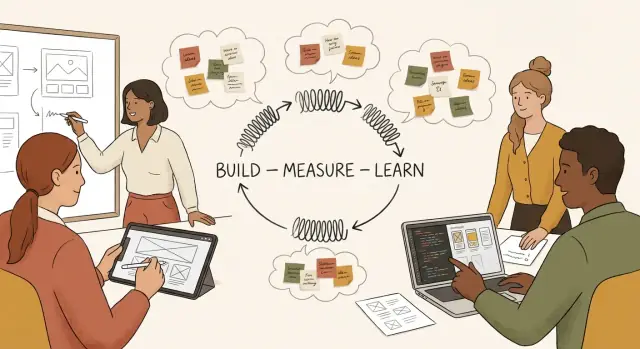
What We Mean by Vibe Coding and the Build–Measure–Learn Loop
Product discovery is mostly a learning problem: you’re trying to find out what people actually need, what they’ll use, and what they’ll pay for—before you invest months building the wrong thing.
The Build–Measure–Learn loop (plain terms)
The Build–Measure–Learn loop is a simple cycle:
- Build: create the smallest thing that can test a specific assumption (a prototype, a landing page, a concierge workflow, a clickable demo).
- Measure: watch what happens using signals you trust (activation, task completion, willingness to book a call, retention, qualitative feedback).
- Learn: decide what to do next—iterate, pivot, or stop—based on evidence, not gut feel.
The goal isn’t “build faster.” It’s reduce the time between a question and a reliable answer.
What “vibe coding” means here
In a product context, vibe coding is rapid, exploratory building—often with AI-assisted coding—where you focus on expressing intent (“make a flow that lets users do X”) and quickly shaping working software that feels real enough to test.
It’s not the same as shipping messy production code. It’s a way to:
- turn ideas into usable prototypes in hours or days,
- explore multiple approaches cheaply,
- get something in front of users while the question is still fresh.
Faster learning, not skipping validation
Vibe coding only helps if you still measure the right things and stay honest about what your prototype can prove. Speed is useful when it shortens the loop without weakening the experiment.
What you’ll do in this guide
Next, we’ll translate assumptions into experiments you can run this week, build prototypes that generate reliable signals, add lightweight measurement, and make faster decisions without fooling yourself.
Why Product Discovery Slows Down in Real Teams
Product discovery rarely fails because teams don’t have ideas. It slows down because the path from “we think this might work” to “we know” is full of friction—much of it invisible when you’re planning the work.
The everyday delays nobody budgets for
Even simple experiments get stuck behind setup time. Repos need to be created, environments configured, analytics debated, permissions requested, and pipelines fixed. A one-day test quietly turns into two weeks because the first few days are spent just getting to “hello world.”
Then comes overengineering. Teams often treat a discovery prototype like a production feature: clean architecture, edge-case handling, full design polish, and refactors “so we don’t regret it later.” But discovery work exists to reduce uncertainty, not to ship a perfect system.
Stakeholder waiting is another loop-killer. Feedback cycles depend on reviews, approvals, legal checks, brand sign-off, or simply getting time on someone’s calendar. Each wait adds days, and the experiment’s original question gets diluted as people chime in with new preferences.
Long loops turn learning into opinions
When it takes weeks to test a hypothesis, the team can’t rely on fresh evidence. Decisions get made from memory, internal debate, and the loudest viewpoint:
- “I’ve seen this before—it won’t work.”
- “We need to build it properly if we’re going to test it.”
- “Customers didn’t ask for this.”
None of these are inherently wrong, but they’re substitutes for direct signal.
The hidden costs: slow learning, missed timing, frustration
The real cost of slow discovery isn’t just velocity. It’s lost learning per month. Markets move, competitors launch, and customer needs shift while you’re still preparing to run a test.
Teams also burn energy. Engineers feel like they’re doing busywork. Product managers feel stuck negotiating process instead of discovering value. Momentum drops, and eventually people stop proposing experiments because “we’ll never get to it.”
The goal: compress cycle time without lowering signal quality
Speed alone isn’t the target. The goal is to shorten the time between assumption and evidence while keeping the experiment trustworthy enough to guide a decision. That’s where vibe coding can help: reducing setup and build friction so teams can run more small, focused tests—and learn sooner—without turning discovery into guesswork.
How Vibe Coding Compresses Build–Measure–Learn
Vibe coding compresses the Build–Measure–Learn loop by turning “we think this could work” into something people can actually click, use, and react to—fast. The goal isn’t to ship a perfect product sooner; it’s to get to a reliable signal sooner.
Where the time is saved
Most discovery cycles don’t slow down because teams can’t code—they slow down because of everything around the code. Vibe coding removes friction in a few repeatable places:
- Scaffolding: spinning up a new app, routes, auth stubs, forms, and basic data models without spending half a day on setup.
- UI assembly: generating usable screens (not pixel-perfect) so you can test the flow, wording, and value proposition early.
- Integration shortcuts: mocking third‑party services, using sample datasets, or swapping “real” integrations for thin adapters so the experiment still behaves realistically.
From “perfect plan” to “testable artifact”
Traditional planning often tries to reduce uncertainty before building. Vibe coding flips that: build a small artifact to reduce uncertainty through use. Instead of debating edge cases in meetings, you create a narrow slice that answers one question—then let evidence drive the next step.
Small, reversible bets
Compressed loops work best when your experiments are:
- Small: one hypothesis, one core behavior to test.
- Reversible: easy to throw away without regret.
- Instrumentable: simple events or questions that tell you what happened.
Before/after timeline (days → hours)
Before: 1 day scoping + 2 days setup/UI + 2 days integration + 1 day QA = ~6 days to learn “users don’t understand step 2.”
After vibe coding: 45 minutes scaffold + 90 minutes assemble key screens + 60 minutes mocked integration + 30 minutes basic tracking = ~4 hours to learn the same thing—and iterate again the same day.
When Vibe Coding Is the Right Tool (and When It Isn’t)
Vibe coding is best when your goal is learning, not perfection. If the decision you’re trying to make is still uncertain—“Will people use this?” “Do they understand it?” “Will they pay?”—then speed and flexibility beat polish.
Good candidates (high learning, low downside)
A few places where vibe-coded experiments shine:
- New user flows: a redesigned checkout, a new “create project” path, or a simplified settings screen.
- Pricing pages and packaging tests: layout, copy, plan names, add-ons, and upgrade prompts.
- Onboarding: first-run tours, empty states, email capture, and “aha moment” scaffolding.
- Internal tools: admin dashboards, ops utilities, support workflows—fast to ship, fast to iterate.
These tend to be easy to scope, easy to measure, and easy to roll back.
Poor candidates (high risk, hard to unwind)
Vibe coding is a bad fit when mistakes are expensive or irreversible:
- Safety-critical features (health, finance, security controls, anything that can harm users)
- Deep infrastructure (data models, permissions architecture, payment rails, migration-heavy changes)
- Regulated workflows (compliance-heavy industries where logging, approvals, and audits are mandatory)
In these cases, treat AI-assisted speed as supportive—not the primary driver.
A quick decision checklist
Before you start, answer four questions:
- Risk: What’s the worst credible failure mode?
- Reversibility: Can you turn it off or revert quickly?
- Dependencies: Does it require coordination across teams/systems?
- Audience size: Can you start with a small segment or internal users first?
If risk is low, reversible is high, dependencies are minimal, and audience can be limited, vibe coding is usually appropriate.
Start with “thin slices” that still feel real
A thin slice isn’t a fake demo—it’s a narrow, end-to-end experience.
Example: instead of “build onboarding,” build just the first-run screen + one guided action + a clear success state. Users can complete something meaningful, and you get reliable signals without committing to the full build.
Turning Assumptions into Experiments You Can Run This Week
Fast iteration only helps if you’re learning something specific. The easiest way to waste a week of vibe coding is to “improve the product” without defining what you’re trying to prove or disprove.
1) Start with one learning question
Pick a single question that would change what you do next. Keep it behavioral and concrete, not philosophical.
Example: “Will users complete step 2?” is better than “Do users like the onboarding?” because it points to a measurable moment in the flow.
2) Turn assumptions into testable hypotheses
Write your assumption as a statement you can check within days—not months.
- Assumption: “People will trust us enough to connect their account.”
- Hypothesis: “At least 4 out of 10 first-time users who reach the connect screen will click ‘Connect’ within 60 seconds.”
Notice how the hypothesis includes who, what action, and a threshold. That threshold is what prevents you from interpreting any outcome as a win.
3) Define the smallest build that answers the question
Vibe coding shines when you draw hard scope boundaries.
Decide what you will build to learn fastest (prototype scope boundaries):
- What must be real (e.g., the critical screen, the call-to-action, the copy)
- What can be fake (e.g., sample data, manual approval, placeholder integrations)
- What you will not touch (e.g., settings, edge cases, performance tuning)
If the experiment is about step 2, don’t “clean up” step 5.
4) Timebox it—and set stop conditions
Choose a timebox and “stop conditions” to avoid endless tweaking.
For example: “Two afternoons to build, one day to run 8 sessions. Stop early if 6 users in a row fail at the same point.” That gives you permission to learn quickly and move on, instead of polishing your way into uncertainty.
Build: Rapid Prototypes That Still Produce Reliable Signals
Speed is only helpful if the prototype produces signals you can trust. The goal in the Build phase isn’t “shipping,” it’s creating a believable slice of the experience that lets users attempt the core job-to-be-done—without weeks of engineering.
Start with reuse, not reinvention
Vibe coding works best when you assemble, not craft. Reuse a small set of components (buttons, forms, tables, empty states), a page template, and a familiar layout. Keep a “prototype starter” that already includes navigation, auth stubs, and a basic design system.
For data, use mock data deliberately:
- Seed 10–30 realistic records (names, dates, prices) so screens don’t feel empty.
- Use a simple fake API layer so you can switch to real endpoints later without rewriting UI.
Build “just enough” UI + wiring
Make the critical path real; keep everything else as a convincing simulation.
- Fully implement the one action you’re testing (e.g., “create request,” “compare options,” “share draft”).
- Stub secondary paths with clear, friendly placeholders (e.g., “Next step: invite a teammate”).
- Prefer one happy path plus one common failure state (validation error, empty result). That’s usually enough for discovery.
Add observability on day one
If you can’t measure it, you’ll debate it. Add lightweight tracking from the start:
- Events for key steps (viewed screen, started flow, completed step)
- Timestamps to see time-to-value
- Drop-off points (where people abandon the flow)
Keep event names plain-language so everyone can read them.
Don’t skip accessibility and copy basics
Test validity depends on users understanding what to do.
- Use clear labels (“Send request” beats “Submit”).
- Ensure focus states, keyboard navigation, and sufficient contrast.
- Add one-sentence helper text where confusion is likely.
A prototype that’s fast and comprehensible gives you cleaner feedback—and fewer false negatives.
Measure: Lightweight Instrumentation and Feedback That Matter
Fast building is only useful if you can tell—quickly and credibly—whether the prototype moved you closer to the truth. With vibe coding, measurement should be as lightweight as the build: enough signal to make a decision, not a full analytics overhaul.
Pick the right measurement approach
Match the method to the question you’re trying to answer:
- Usability sessions (5–8 people) when you need to learn why something is confusing or where users get stuck.
- Click tests (remote, unmoderated) when you’re validating navigation, labels, or information hierarchy.
- Fake-door tests when you’re checking demand for a feature before building it (a button, pricing tile, or “Request access” flow).
- A/B tests when you already have traffic and you’re choosing between two working options, not guessing at basics.
Define success metrics—and guardrails
For discovery, pick 1–2 primary outcomes tied to behavior:
- Conversion (e.g., % who start a trial, request a demo, or complete a key step)
- Time-to-value (e.g., minutes to first successful result)
- Error rate (e.g., % who hit validation errors or abandon at a step)
Add guardrails so you don’t “win” by breaking trust: increased support tickets, higher refund rate, worse completion on core tasks.
Be realistic about sample size
Early discovery is about direction, not statistical certainty. A handful of sessions can expose major UX problems; tens of click-test responses can clarify preferences. Save strict power calculations for optimization (A/B tests on high-traffic flows).
Avoid vanity metrics
Page views, time on page, and “likes” can look good while users fail to complete the job. Prefer metrics that reflect outcomes: completed tasks, activated accounts, retained usage, and repeatable value.
Learn: Making Decisions Faster Without Fooling Yourself
Speed is only useful if it leads to clear choices. The “learn” step is where vibe coding can quietly go wrong: you can build and ship so quickly that you start mistaking activity for insight. The fix is simple—standardize how you summarize what happened, and make decisions from patterns, not anecdotes.
Synthesize results in minutes, not meetings
After each test, pull signals into a short “what we saw” note. Look for:
- Themes: repeated reactions (“I expected X,” “I don’t get Y”).
- Moments of confusion: where users pause, ask for reassurance, or backtrack.
- Drop-off points: the step where people abandon the flow or stop engaging.
Aim to label each observation as frequency (how often) and severity (how much it blocked progress). One strong quote is helpful, but the pattern is what earns a decision.
Decide: iterate, pivot, or stop
Use a small set of rules so you don’t renegotiate every time:
- Iterate when the core intent is validated but execution is shaky (people want it, but the flow/wording/pricing is unclear).
- Pivot when users consistently try to solve a different problem than the one you designed for.
- Stop when the problem feels real but your approach shows weak pull after multiple attempts—or when the effort to reach a reliable signal outweighs the upside.
Capture learnings in one lightweight format
Keep a running log (one row per experiment):
Hypothesis → Result → Decision
Example:
- Hypothesis: “Teams will book a call after seeing a 2-minute demo.”
- Result: 18 visits, 0 bookings; 6 asked “Is this for agencies?”
- Decision: Pivot positioning toward agencies; rewrite landing page; retest tomorrow.
A cadence that protects momentum
- Daily (10–15 min): review yesterday’s result, pick today’s single decision.
- Weekly (30–45 min): zoom out, compare experiments, and choose the next bet.
If you want a template to make this routine stick, add it to your team’s checklist in /blog/a-simple-playbook-to-start-compressing-your-loop-now.
Avoiding the Traps of Fast Iteration
Speed is only helpful if you’re learning the right thing. Vibe coding can compress your cycle time so much that it becomes easy to ship “answers” that are actually artifacts of how you asked, who you asked, or what you happened to build first.
Common ways fast loops fool teams
A few pitfalls show up again and again:
- Leading questions: “Would you use this?” often gets polite yeses. Prefer questions about real behavior: “When was the last time you…?”
- Cherry-picked feedback: one enthusiastic user can outweigh ten quiet non-users if you’re not careful.
- Overfitting to a single user: a prototype tuned to one workflow may break the moment you broaden the sample.
When speed hurts quality
Fast iteration can quietly reduce quality in two ways: you accumulate hidden tech debt (harder to change later) and you accept weak evidence (“it worked for me” becomes “it works”). The risk isn’t that the prototype is ugly—it’s that your decision is built on noise.
Practical safeguards that keep learning real
Keep the loop fast, but put guardrails around the “measure” and “learn” moments:
- Predefine success metrics before you show the prototype. Even one or two metrics (activation rate, task completion, time-to-value) beats vibes.
- Keep a decision log: hypothesis → experiment → result → decision. This prevents rewriting history after the fact.
- Separate “build” from “judge”: timebox building, then pause and review evidence with fresh eyes (ideally with someone who didn’t implement it).
Ethics: treat experiments like real interactions
Set clear expectations: tell users what’s a prototype, what data you collect, and what happens next. Keep risk minimal (no sensitive data unless necessary), provide an easy opt-out, and avoid dark patterns that push users into “success.” Fast learning is not an excuse to surprise people.
Team Workflow: How to Collaborate Around Vibe-Coded Experiments
Vibe coding works best when the team treats it like a coordinated experiment, not a solo speed run. The goal is to move quickly together while protecting the few things that can’t be “fixed later.”
Clear roles: one question, one flow, one fast build
Start by assigning ownership for the core pieces:
- PM: frames the learning goal (“What decision will this experiment unlock?”), defines success signals, and writes the assumptions in plain language.
- Designer: shapes the user flow and the minimum UI needed to make the test feel coherent (copy, key screens, empty states).
- Engineer: optimizes for speed and safety—chooses the easiest path to working software, sets up guardrails, and makes sure the prototype can be measured.
This division keeps the experiment focused: the PM protects why, the designer protects what users experience, the engineer protects how it runs.
Boundaries: what must be reviewed every time
Fast iteration still needs a short, non-negotiable checklist. Require review for:
- Security and permissions (auth, access control, secrets)
- Data handling (PII, retention, analytics consent)
- Brand and legal risks (public-facing claims, regulated copy)
Everything else is allowed to be “good enough” for a learning loop.
Timeboxed discovery sprints with demo-based alignment
Run discovery sprints (2–5 days) with two fixed rituals:
- 15-minute daily check-in: what we built, what we’ll measure, what changed.
- Demo at the end (always): show the working artifact, the metric view, and the decision it supports.
Keep stakeholders engaged with concrete artifacts
Stakeholders stay aligned when they can see progress. Share:
- A one-page experiment brief (question, audience, pass/fail)
- A clickable prototype or live link
- A short “results note” with screenshots, numbers, and the recommendation
Concrete artifacts reduce opinion battles—and make “speed” feel trustworthy.
Tooling and Practices That Keep Speed Sustainable
Vibe coding is easiest when your stack makes “build something, ship it to a few people, learn” the default path—not a special project.
A prototype stack that stays lightweight
A practical baseline looks like this:
- Component library/design system (even a small one): shared buttons, forms, empty states. It removes 80% of UI friction.
- Feature flags: ship experiments safely, target specific cohorts, and roll back without redeploying.
- Analytics: one event stream with a short naming convention (e.g.,
exp_signup_started). Track only what answers the hypothesis. - Error tracking: know when “fast” accidentally becomes “broken,” and keep confidence high.
If you’re already offering a product, keep these tools consistent across experiments so teams don’t reinvent the wheel.
If you’re using an AI-assisted build workflow, it helps when the tooling supports quick scaffolding, iterative changes, and safe rollbacks. For example, Koder.ai is a vibe-coding platform where teams can create web, backend, and mobile prototypes through a chat interface—useful when you want to go from hypothesis to a testable React flow quickly, then iterate without spending days on setup. Features like snapshots/rollback and planning mode can also make rapid experiments feel safer (especially when you’re running multiple variants in parallel).
Prototype-to-production: rewrite, harden, or discard
Decide early which path an experiment is on:
- Rewrite when the goal is learning a workflow, not validating architecture.
- Harden when the experiment is clearly becoming a core feature (add tests, types, accessibility, performance budgets).
- Discard when the result is negative or ambiguous—don’t “rescue” it with extra scope.
Make the decision explicit at kickoff and revisit after the first learning milestone.
Keep technical debt visible (without slowing down)
Use a tiny checklist stored next to the experiment ticket:
- What corners were cut (validation, auth, edge cases)?
- What data is unreliable (sample bias, missing events)?
- What would break at 10× usage?
- What must be done before widening rollout?
Visibility beats perfection: the team stays fast, and nobody is surprised later.
A Simple Playbook to Start Compressing Your Loop Now
This is a repeatable 7–14 day cycle you can run with vibe coding (AI-assisted coding + fast prototyping) to turn uncertain ideas into clear decisions.
The 7–14 day loop (with checkpoints)
Day 1 — Frame the bet (Learn → Build kickoff): Pick one assumption that, if wrong, makes the idea not worth pursuing. Write the hypothesis and success metric.
Days 2–4 — Build a testable prototype (Build): Ship the smallest experience that can produce a real signal: a clickable flow, a fake-door, or a thin end-to-end slice.
Checkpoint (end of Day 4): Can a user complete the core task in under 2 minutes? If not, cut scope.
Days 5–7 — Instrument + recruit (Measure setup): Add only the events you’ll actually use, then run 5–10 sessions or a small in-product test.
Checkpoint (end of Day 7): Do you have data you trust and notes you can quote? If not, fix measurement before building more.
Days 8–10 (optional) — Iterate once: Make one targeted change that addresses the biggest drop-off or confusion.
Days 11–14 — Decide (Learn): Choose: proceed, pivot, or stop. Capture what you learned and what to test next.
Copyable templates
Hypothesis statement
We believe that [target user] who [context] will [do desired action]
when we provide [solution], because [reason].
We will know this is true when [metric] reaches [threshold] within [timeframe].
Metric table
Primary metric: ________ (decision driver)
Guardrail metric(s): ________ (avoid harm)
Leading indicator(s): ________ (early signal)
Data source: ________ (events/interviews/logs)
Success threshold: ________
Experiment brief
Assumption under test:
Prototype scope (what’s in / out):
Audience + sample size:
How we’ll run it (sessions / in-product / survey):
Risks + mitigations:
Decision rule (what we do if we win/lose):
From ad hoc to a discovery system
Start ad hoc (one-off prototypes) → become repeatable (same 7–14 day cadence) → get reliable (standard metrics + decision rules) → reach systematic (shared backlog of assumptions, weekly review, and a library of past experiments).
Your next step
Pick one assumption right now, fill in the hypothesis template, and schedule the Day 4 checkpoint. Run one experiment this week—then let the result (not the excitement) decide what you build next.
FAQ
What is “vibe coding” in this product discovery context?
It’s rapid, exploratory building—often with AI assistance—aimed at creating a testable artifact fast (a thin end-to-end slice, fake-door, or clickable flow). The point is to reduce time from question → evidence, not to ship messy production code.
What is the Build–Measure–Learn loop in plain terms?
The loop is:
- Build: the smallest thing that tests one assumption.
- Measure: capture trusted signals (task completion, activation, time-to-value, qualitative feedback).
- Learn: decide to iterate, pivot, or stop based on evidence.
The goal is shortening cycle time without weakening the experiment.
Why does product discovery slow down in real teams?
Because the delays are often around the code:
- environment/repo/permissions setup
- analytics debates and instrumentation churn
- overengineering prototypes like production
- stakeholder review queues
Fast prototyping removes much of that friction so you can run more small tests sooner.
Where exactly does vibe coding save time?
By saving time on repeatable tasks:
- Scaffolding (routes, auth stubs, forms, basic models)
- UI assembly (usable screens to test the flow and copy)
- Integration shortcuts (mock services, sample datasets, thin adapters)
That can turn a multi-day loop into a few hours—enough to learn and iterate the same day.
What are good candidates for vibe-coded experiments?
Use it when downside is low and learning is high, for example:
- new user flows (onboarding, checkout, settings simplification)
- pricing/packaging pages and upgrade prompts
- internal tools and ops/support workflows
These are usually easy to scope, easy to measure, and easy to roll back.
When is vibe coding a bad fit?
Avoid it (or heavily constrain it) when failures are expensive or irreversible:
- safety-critical or security-sensitive features
- deep infrastructure changes (permissions architecture, payment rails, migrations)
- regulated workflows requiring strict logging/audits
In these cases, speed can help—but it shouldn’t be the main driver.
How do I turn assumptions into testable hypotheses quickly?
Write a hypothesis with:
- who (target user)
- what action (observable behavior)
- threshold (pass/fail line)
- timeframe (how quickly)
Example: “At least 4/10 first-time users who reach the connect screen click ‘Connect’ within 60 seconds.”
How do I build a fast prototype that still produces reliable signals?
Draw hard boundaries:
- Make the critical path real (the one action you’re testing).
- Fake what doesn’t affect the hypothesis (sample data, manual steps, placeholder integrations).
- Don’t touch out-of-scope areas (edge cases, performance tuning, step 5 if you’re testing step 2).
Aim for one happy path plus one common failure state.
What’s the minimum measurement setup I need for vibe-coded experiments?
Start with lightweight observability:
- events for key steps (viewed screen, started flow, completed step)
- timestamps for time-to-value
- drop-off points (where users abandon)
Keep event names plain-language and limit tracking to what answers the hypothesis—otherwise you’ll slow down and still debate outcomes.
How do we decide to iterate, pivot, or stop without fooling ourselves?
Use a consistent decision rule and a simple log:
- Iterate if intent is validated but execution is unclear.
- Pivot if users repeatedly try to solve a different problem.
- Stop if pull is weak after multiple attempts or the cost to get a reliable signal is too high.
Capture each experiment as Hypothesis → Result → Decision so you don’t rewrite history later.