

Vibe Coding: Speeding Up Learning Without Lowering Standards
Vibe coding is about rapid learning cycles: build, test, and adjust fast while keeping clear quality guardrails. Learn how to do it responsibly.
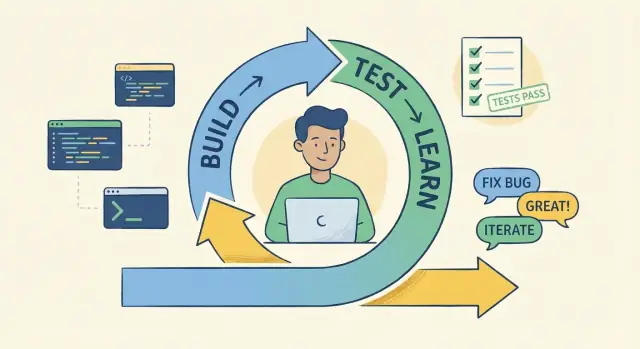
What “Vibe Coding” Actually Means
“Vibe coding” is a way of building software that optimizes for fast learning. The goal isn’t to type faster or to look busy—it’s to shorten the time between having an idea and finding out whether that idea is actually good.
A definition that’s useful
Vibe coding means you bias toward quick, testable increments: you build the smallest thing that can teach you something, put it in front of reality (a user, a teammate, real data, a real constraint), and then adjust.
That emphasis on feedback changes what “progress” looks like. Progress isn’t a big plan document or a perfect architecture up front—it’s a series of small bets that quickly become informed.
What it is not
Vibe coding is not:
- Skipping thinking (you still make decisions—you just make them in smaller steps)
- Ignoring users (feedback is the whole point)
- Shipping broken code (speed without basic quality checks is just debt with momentum)
If you’re cutting corners that make future changes painful, you’re not vibe coding—you’re just rushing.
The core loop
The loop is simple:
idea → build → feedback → adjust
The “feedback” can be a user reaction, a metric, a failing test, a teammate’s review, or even the discomfort you feel when the code becomes hard to change.
What to expect next
The rest of this article is about keeping the speed and the standards: how to create fast feedback loops, where feedback should come from, and what guardrails keep experimentation from turning into chaos.
Why People Mistake Speed for Laziness
Fast work is easy to misread because the visible parts of software development don’t always reflect the care behind it. When someone ships a prototype in a day, observers may only see the speed—without seeing the timeboxing, the deliberate shortcuts, or the checks happening in the background.
Why the “lazy” label happens
Speed can look like carelessness when the usual signals of “serious work” aren’t obvious. A quick demo often skips the polish people associate with effort: naming, documentation, perfect edge cases, and clean UI. If stakeholders don’t know it’s an experiment, they assume it’s the final standard.
Another reason: some teams have been burned by “move fast” cultures where speed meant dumping complexity on future maintainers. So when they see rapid output, they pattern-match it to past pain.
Moving fast vs being reckless
Moving fast is about reducing cycle time—how quickly you can test an idea and learn. Being reckless is about avoiding accountability for what you ship.
A fast experiment has clear boundaries:
- a specific question to answer (e.g., “Will users use this flow?”)
- a time limit (e.g., “two days, then decide”)
- an explicit “not production-ready” label
Recklessness has none of those. It quietly turns temporary shortcuts into permanent decisions.
How low standards actually show up
Low standards aren’t “I coded quickly.” They look like:
- no tests where failure would be costly
- no review for changes that can break others
- no monitoring or logging, so issues go unseen
- no rollback path, so small mistakes become incidents
The reframe: timeboxed experiments, not permanent commitments
Vibe coding is best understood as temporary speed in service of learning. The goal isn’t to avoid quality—it’s to postpone irreversible decisions until you’ve earned them with feedback.
Speed vs Standards: You Can Have Both
The false choice is: “Either we go fast and ship messy code, or we go slow and keep quality.” Vibe coding is better described as changing the order of work, not lowering the bar.
Two modes: exploration vs. exploitation
Treat your work as two distinct modes:
- Exploration (learn): You’re trying to find the right solution. The goal is insight—does the idea work, does the user care, is the approach viable?
- Exploitation (harden): You’re turning a proven idea into something reliable. The goal is stability—clear behavior, tests, maintainability, and safe changes.
The common failure mode is mixing them: insisting on production-level polish while you’re still guessing, or staying in “quick and dirty” mode after the answer is already known.
“Make it work, then make it right” with boundaries
This phrase only helps if you define boundaries up front:
- Time-box the exploration. For example, “90 minutes to get a spike working.”
- Label the output. A spike is not a feature. It’s an experiment.
- Set an exit rule. If it’s going to ship, it must go through hardening (tests, cleanup, review).
That’s how you keep speed without normalizing mess.
Staged standards (by design)
Standards can be staged without being inconsistent:
- Early: readable code, basic error handling, notes on assumptions.
- Later: tests, refactoring, naming, docs, performance checks, security review.
What changes is when you apply each standard, not whether you believe in it.
Standards are choices, not vibes
“Vibe” should describe your pace and learning rhythm—not your quality bar. If a team’s standards feel fuzzy, write them down and attach them to phases: exploration has rules, production has stricter rules, and moving between them is an explicit decision.
Learning and Feedback Loops: The Real Goal
Vibe coding isn’t “move fast and hope.” It’s optimizing for how quickly you can learn what’s true—about the user, the system, and your own assumptions.
What counts as feedback?
Feedback is any signal that changes what you do next. The most useful signals are concrete and close to reality:
- User behavior: clicks, drop-offs, session replays, and “they didn’t even notice the feature.”
- Errors and reliability data: crash reports, logs, alerts, and “this endpoint times out on real traffic.”
- Reviewer notes: a teammate flags confusing naming, edge cases, or maintainability risks.
- Performance data: slow queries, memory spikes, and front-end load metrics.
Why fast feedback prevents wasted effort
When you get signals quickly, you stop investing in the wrong idea sooner. A prototype that reaches users today can invalidate a week of “perfect” implementation tomorrow. That’s not lowering standards—it’s avoiding work that never mattered.
Small iterations reduce risk
Short cycles keep changes readable and reversible. Instead of betting everything on a big-bang build, you ship a thin slice, learn, then tighten. Each iteration is a controlled experiment: smaller diff, clearer outcome, easier rollback.
High-leverage feedback examples
A failing test that captures a bug you didn’t anticipate. A short user clip showing confusion at a key step. A support ticket that reveals a missing workflow. These are the moments that turn “fast” into “smart.”
Where Feedback Should Come From
Vibe coding only works when feedback is real, timely, and tied to the stage you’re in. The trick is choosing the right source at the right moment—otherwise you get noise, not learning.
Feedback sources by stage
1) Self-checks (minutes to hours)
Before anyone else sees it, run quick sanity checks: tests you already have, linting/formatting, a “happy path” click-through, and a short README-style note explaining what you built. Self-feedback is fastest and prevents wasting other people’s time.
2) Teammates (hours to days)
When the idea looks plausible, get peer feedback: a short demo, a small pull request, or a 20-minute pairing session. Teammates are best for catching unclear intent, risky design choices, and maintainability issues—especially when you’re moving fast.
3) Users (days to weeks)
As soon as the prototype is usable, users give the most valuable feedback: “Does this solve the problem?” Early user feedback beats internal debate, but only after you have something coherent to try.
4) Production signals (ongoing)
For live features, rely on evidence: error rates, latency, conversion, retention, support tickets. These signals tell you whether you improved things—or created new problems.
Avoiding “feedback theater”
If feedback is mostly opinions (“I don’t like it”) without a specific scenario, metric, or reproducible issue, treat it as low confidence. Ask: What would change your mind? Then design a quick test.
Simple processes that keep it grounded
Use quick demos, short review cycles, and feature flags to limit blast radius. A flagged rollout plus basic monitoring turns feedback into a tight loop: ship small, observe, adjust.
Practical Vibe Coding Techniques That Keep You Honest
Vibe coding works best when it’s treated like a controlled experiment, not a free-for-all. The goal is to learn fast while keeping your thinking visible to future-you and everyone else.
1) Timebox the experiment (and phrase it as a question)
Pick a short window—typically 30–120 minutes—and write a single question you’re trying to answer, such as: “Can we process payments with provider X without changing our checkout UI?” When the timer ends, stop and decide: continue, pivot, or discard.
2) Build the smallest end-to-end slice
Instead of polishing a design up front, aim for the thinnest path that proves the thing works end to end. That might mean one button, one API call, and one visible result. You’re optimizing for proof, not perfection.
3) Keep changes tiny and readable
Try to keep work to “one behavior per commit/PR” when possible. Small changes are easier to review, easier to revert, and harder to rationalize into messy “while I’m here” expansions.
4) Use spike branches or draft PRs to label exploration
Exploration is fine; hidden exploration is risky. Put spikes on a clearly named branch (e.g., spike/provider-x) or open a draft PR. That signals “this may be thrown away” while still allowing comments, checkpoints, and visibility.
5) Write down what you learned before moving on
Before you merge, extend, or delete the work, capture the takeaway in a few lines:
- What did we try?
- What did we learn?
- What’s the next smallest step?
Add it to the PR description, a short /docs/notes/ entry, or your team’s decision log. The code can be temporary; the learning shouldn’t be.
Quality Guardrails That Prevent Low Standards
Vibe coding only works when speed is paired with a few non-negotiables. The point is to move fast on learning, not to create a pile of fragile code you’re afraid to touch next week.
Non‑negotiables (even for “quick” work)
Keep a small baseline that applies to every change:
- Basic tests: at least one happy-path test for new behavior, plus a failure case if the feature can break in an obvious way.
- Linting/formatting: automatic, so style never becomes a debate.
- Code review expectations: someone else scans for unclear logic, missing edge cases, and “will this wake us up at 2am?” risks.
A lightweight “Definition of Done”
A fast prototype can be “done” without being perfect, but it still needs safety rails. Examples to include in your Definition of Done:
- Error handling: what happens when inputs are missing, APIs time out, or permissions fail?
- Logging/metrics: enough signals to debug real usage.
- Rollback plan: feature flag, config toggle, or quick revert path if the change misbehaves.
Checklists beat memory
Use short checklists to keep quality consistent without slowing down. The checklist should be boring and repeatable—exactly the stuff teams forget when they’re excited.
Add guardrails early (automate the boring parts)
Set up pre-commit hooks, CI, and type checks as soon as a prototype looks like it might survive. Early automation prevents “we’ll clean it up later” from turning into permanent debt.
If you’re using a vibe-coding platform like Koder.ai to generate a first working slice from chat, treat these guardrails as the “truth layer” around the speed layer: keep CI green, review the diffs, and rely on easy rollback mechanisms (for example, snapshots/rollback) so experiments stay reversible.
Know when to refactor
Refactor when you feel repeated friction: confusing naming, copy/pasted logic, flaky behavior, or tests that fail randomly. If it’s slowing learning down, it’s time to tidy up.
Decision-Making Without Overengineering
Vibe coding moves fast, but it’s not “no planning.” It’s right-sized planning: enough to make the next step safe and informative, without pretending you can predict the final shape of the product.
The one-page design note
Before you touch code, write a short design note (often 5–10 minutes). Keep it lightweight, but specific:
- Goal: what will be true when this is done?
- Constraints: performance, security, timelines, dependencies, “must integrate with X.”
- Risks: what could break, what’s hard to undo, what needs validation.
- Open questions: what you’ll learn by building the first version.
This note is mainly a tool for future-you (and teammates) to understand why you made a call.
Choose “good enough” on purpose
Speed doesn’t mean random shortcuts. It means selecting patterns that fit the problem today, and naming the tradeoff. For example: “Hard-code the rules in one module for now; if we see more than three variants, we’ll switch to a config-driven approach.” That’s not low standards—it’s intentional scope control.
Avoid premature abstraction
Overengineering usually starts with trying to solve the “future” version of the problem.
Prefer:
- Simple, replaceable components over general frameworks
- Copy/paste with a plan to refactor over building a reusable library too early
- Clear seams (small modules, stable interfaces) over elaborate architecture
The goal is to keep decisions reversible. If a choice is hard to undo (data model, API contract, permissions), slow down and be explicit. Everything else can be simple first, improved later.
When Vibe Coding Is the Wrong Tool
Vibe coding is great when the goal is learning fast with low consequences. It’s a bad fit when mistakes are expensive, irreversible, or hard to detect. The key question isn’t “Can we build this quickly?”—it’s “Can we safely learn by trying?”
Red flags: high consequences and tight rules
Avoid vibe coding (or narrow it to small, isolated spikes) when you’re working in areas where a small error can cause real harm or major downtime.
Common red flags include safety-critical work, strict compliance requirements, and systems where an outage has a high cost (money, trust, or both). If a bug could leak customer data, break payments, or trigger regulatory reporting, you don’t want a “ship first, adjust later” rhythm.
When you need deeper upfront design
Some work demands more thinking before typing because the cost of rework is huge.
Data migrations are a classic example: once data is transformed and written, rolling back can be messy or impossible. Security changes are another: adjusting authentication, authorization, or encryption isn’t a place to “see what happens,” because the failure mode may be silent.
Also be cautious with cross-cutting changes that touch many services or teams. If coordination is the bottleneck, fast coding won’t produce fast learning.
How to slow down deliberately (without getting stuck)
If you’re in a risky area but still want momentum, switch from “vibe mode” to “deliberate mode” with explicit guardrails:
- Require reviews, ideally from someone who owns the system
- Do quick threat modeling before implementation
- Validate in staging with targeted tests (not just “it works on my machine”)
This isn’t about bureaucracy; it’s about changing the feedback source from “production consequences” to “controlled verification.”
Set clear “no vibe coding here” boundaries
Teams do best when they name sensitive zones explicitly: payment flows, permission systems, customer data pipelines, infrastructure, anything tied to SLAs or audits. Put it in writing (even a short page like /engineering/guardrails) so people don’t have to guess.
Vibe coding can still help around these areas—like prototyping a UI, exploring an API shape, or building a throwaway experiment—but the boundary keeps speed from turning into avoidable risk.
How Teams Can Use Vibe Coding Without Chaos
Vibe coding works best in teams when “move fast” is paired with a shared definition of “safe.” The goal isn’t to ship half-finished work; it’s to learn quickly while keeping the codebase understandable and predictable for everyone.
Make it team-friendly with shared guardrails
Agree on a small set of non-negotiables that apply to every change—no matter how experimental. This creates a shared vocabulary: “This is a spike,” “This is production,” “This needs tests,” “This is behind a flag.” When everyone uses the same labels, speed stops feeling like disorder.
A simple rule: prototypes can be messy, but production paths can’t be mysterious.
Keep momentum with small PRs, quick reviews, and clear ownership
Chaos usually comes from work that’s too big to review quickly. Prefer small pull requests that answer one question or implement one narrow slice. Reviewers can respond faster, and it’s easier to spot quality issues early.
Clarify ownership up front:
- Who will merge it?
- Who will support it for the next week?
- What’s the rollback plan if it misbehaves?
If you’re pairing with AI tools, it’s even more important: the author still owns the outcome, not the tool. (This applies whether you’re using an editor assistant or a chat-first builder like Koder.ai that can generate a React UI, a Go backend, and a PostgreSQL schema from a conversation—someone still needs to validate behavior, tests, and operational safety.)
Use pairing and mob sessions for alignment
Pairing (or short mob sessions) speeds up the most expensive part of collaboration: getting unstuck and agreeing on direction. A 30-minute session can prevent days of diverging approaches, inconsistent patterns, or “I didn’t know we were doing it that way.”
Agree on escalation paths when quality concerns show up
Fast iteration needs a pressure-release valve. Decide what happens when someone spots risk:
- “Stop and fix now” issues (security, data loss, breaking changes)
- “Ship behind a flag” issues (uncertainty, incomplete UX)
- “Follow-up ticket” issues (cleanup, refactor, extra tests)
The key is that anyone can raise a concern—and the response is predictable, not political.
Document conventions so speed doesn’t create confusion
You don’t need a huge playbook. Keep lightweight notes on naming, folder structure, testing expectations, feature flags, and what qualifies as “prototype to production.” A short internal page or a living README is enough to keep iterative development from turning into improvisation.
How to Tell If It’s Working (or Hurting)
Vibe coding is only useful if it increases learning per week without quietly increasing the cost of ownership. The fastest way to know is to track a small set of signals that reflect both learning speed and operational stability.
Metrics that show you’re learning (not just typing)
Look for evidence that you’re validating assumptions quickly, not just shipping more commits.
- Cycle time: how long from “idea” to “something a user can react to.”
- Validated assumptions per sprint/week: count decisions you confirmed (or rejected) with real feedback.
- Bug escape rate: how many issues reach users that should have been caught earlier.
If cycle time improves but validated assumptions stay flat, you may be producing activity rather than learning.
Signals your quality is slipping
Speed without stability is a warning sign. Track a few operational indicators that are hard to argue with.
- Rollback frequency: how often you need to revert releases.
- Test flakiness: percentage of runs that fail “randomly,” slowing everyone down.
- On-call pain: pages per week, incident duration, and how often the same class of incident repeats.
A simple rule: if people avoid deploying on Fridays, vibe coding isn’t “fast”—it’s risky.
Balance the two, don’t pick a side
A healthy pattern is: cycle time goes down while rollbacks and on-call load stay flat (or improve). An unhealthy pattern is: cycle time goes down and rollbacks/on-call load trend upward.
Use retros to tune guardrails, not blame people
When you see warning signs, don’t start with “Who broke it?” Start with “Which guardrail was missing?” In retros, adjust one lever at a time—add a small test, tighten a definition of done, or require a lightweight review for risky areas. (More on guardrails in /blog/quality-guardrails-that-prevent-low-standards.)
Example Workflow: From Quick Prototype to Reliable Feature
Here’s a practical “vibe coding” workflow that keeps speed focused on learning, then gradually raises the bar.
Phase 1: Prototype (1–2 days)
Goal: validate the idea, not the implementation.
You might build a thin vertical slice (UI → API → data) with hardcoded data or a simple table. Testing is minimal: a few “happy path” checks and manual exploration. Architecture is intentionally plain—one service, one endpoint, one screen.
Tradeoff: you accept messier internals to get real user reactions fast.
Phase 2: Pilot (1–2 weeks)
Goal: confirm value under limited real usage.
Now you add guardrails:
- Tests: critical unit tests + one end-to-end flow for the core use case.
- Architecture: extract one or two boundaries (e.g., a service layer) to stop the prototype from spreading chaos.
- Monitoring: basic logs, error tracking, and one dashboard metric that matches the product goal (e.g., successful submissions/day).
Feedback guides priorities: if users abandon step 2, fix UX before refactoring internals.
Phase 3: Production hardening (2–4 weeks)
Goal: make it dependable.
You broaden tests (edge cases, regression), add performance checks, tighten permissions, and formalize observability (alerts, SLOs). You pay down the “prototype debt” that repeatedly slowed fixes.
Copyable template
- Hypothesis: ______
- Prototype by: date ______ (what you will not build: ______)
- Pilot success metric: ______
- Guardrails for pilot: tests ______, logging ______, rollback plan ______
- Production checklist: security ______, monitoring ______, refactor targets ______
Getting Started: A Simple Plan for the Next Week
Vibe coding works best when you treat it like a controlled experiment: a small bet, fast feedback, and clear quality boundaries. Here’s a simple one-week plan you can actually follow.
Day 1: Pick one small feature with real feedback
Choose a feature that’s small enough to ship in a week and has an obvious “yes/no” outcome.
Good examples: a new onboarding step, a search filter, a report export button, a small automation, or a clearer error message flow. Avoid “refactors” or vague goals like “improve performance” unless you can measure it quickly.
Write one sentence that defines success (e.g., “Users can complete X without asking for help”).
Day 2: Set the minimum guardrails (non-negotiable)
Your goal is speed within boundaries. Define a tiny guardrail set that must stay green:
- CI runs on every push
- Auto-formatting (so you don’t waste time debating style)
- A few basic tests that cover the riskiest behavior
- One lightweight review before merge
Keep the rules minimal, but treat them as strict. If you don’t have these yet, start small and expand later.
Day 3: Timebox the experiment and define a stop condition
Decide how much time you’re willing to spend before you either ship, rethink, or drop it.
Example: “Two focused sessions per day for three days.” Also define a stop condition, like:
- If we can’t make it work without breaking core flows, stop.
- If we can’t explain the change in three bullet points, stop.
This prevents “quick experiments” from turning into endless messy work.
Days 4–6: Short iterations, short notes, short demos
Work in small slices. At the end of each slice:
- Demo it (even informally)
- Write 3–5 lines of notes: what changed, what you learned, what’s next
- Decide the next smallest step
If you’re using AI tools, treat them like a fast drafting partner—then verify with tests, review, and real usage.
Day 7: Decide—ship, harden, or stop
End the week with an explicit decision:
- Ship if it meets the success sentence and guardrails stayed green.
- Harden if it’s valuable but needs reliability work.
- Stop if learning says it’s not worth it.
If you want more practical workflows, check /blog. If you’re evaluating tooling to shorten the “idea → working app” step while keeping safety rails—like Koder.ai’s chat-based building, planning mode, and easy rollback—see /pricing.
FAQ
What is vibe coding in plain terms?
It’s an approach to building software that optimizes for fast learning, not for typing speed. You build the smallest testable slice, put it in contact with reality (users, real data, real constraints), and iterate based on what you learn.
Why do people sometimes think vibe coding is “lazy”?
Because a fast prototype often lacks the usual “signals of effort” (polish, documentation, perfect naming, exhaustive edge cases). If you don’t clearly label something as an experiment, others assume it represents your final quality bar.
How is moving fast different from being reckless?
Moving fast reduces cycle time (idea → feedback). Reckless work avoids accountability and quietly turns shortcuts into permanent decisions.
A healthy fast experiment has:
- a specific question it’s trying to answer
- a timebox
- an explicit “not production-ready” label
What counts as “feedback” in vibe coding?
Any concrete signal that changes what you do next, such as:
- user behavior (drop-offs, confusion, “they didn’t notice it”)
- failing tests and bug reports
- code review feedback on maintainability
- production metrics (latency, error rate)
How do you keep standards high while iterating quickly?
Use staged standards:
- Exploration: keep code readable, capture assumptions, do basic error handling.
- Hardening: add tests, refactor, tighten naming, add monitoring, do security/performance checks.
The key is making the transition explicit: “This is shipping, so it must be hardened first.”
Where should feedback come from at each stage?
Start with the fastest, cheapest checks and move outward:
- Self-checks: lint/format, existing tests, quick manual happy-path run.
- Teammates: small PRs, short demos, quick pairing for design risks.
- Users: once it’s coherent enough to try.
- Production signals: error rates, logs, support tickets, conversion/retention.
How do you timebox an experiment effectively?
Timebox it and frame it as a single question.
Example:
- Timebox: 60–120 minutes
- Question: “Can we integrate provider X without changing checkout UI?”
- Decision at the end: continue, pivot, or discard
This prevents “spikes” from quietly becoming permanent architecture.
What are the non-negotiable guardrails for vibe coding?
Keep a small baseline that applies to every change:
- minimal tests where failure would be costly
- automated linting/formatting
- lightweight review for anything that can break others
- basic logging/metrics for real usage
- a rollback path (feature flag, config toggle, or fast revert)
A short checklist is often enough to make this consistent.
When is vibe coding the wrong tool?
It’s a bad fit (or should be tightly constrained) when mistakes are expensive, irreversible, or hard to detect—e.g., payments, auth/permissions, sensitive data, compliance-heavy flows, risky migrations, or cross-cutting infrastructure.
In those areas, switch to deliberate mode: deeper upfront design, stronger review, and controlled verification in staging.
How can a team tell if vibe coding is helping or hurting?
Track both learning speed and operational stability:
- Cycle time: idea → something a user can react to
- Validated assumptions per week: decisions confirmed or rejected with evidence
- Bug escape rate / rollbacks: how often issues reach users or releases revert
- On-call pain: incident frequency and duration
If cycle time drops while rollbacks and incidents climb, add or tighten guardrails (see /blog/quality-guardrails-that-prevent-low-standards).