

Vibe Coding in the Startup Lifecycle: From Idea to Traction
Learn how vibe coding supports each startup phase: explore ideas, prototype fast, ship an MVP, test growth channels, and iterate quickly while managing quality risks.
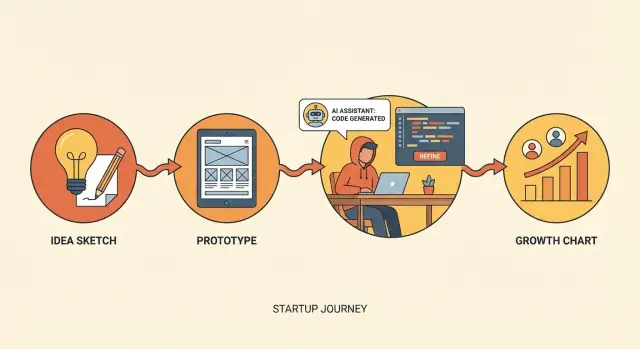
What Vibe Coding Means for a Startup Team
Vibe coding is a way of building software quickly by combining an AI coding assistant with a founder’s (or team’s) product intuition. You describe what you want, generate a first draft fast, and then steer the result through tight feedback loops—tweaking prompts, editing code, and testing the experience until it matches the “vibe” you’re aiming for.
In practice, platforms built for vibe coding (for example, Koder.ai) make this loop even tighter: you can go from a chat prompt to a working web/server/mobile app, iterate on the UI and flows, and then export or deploy when you’re ready—without turning early experiments into month-long engineering projects.
The plain-language definition
Think of it as rapid building for learning: you’re not trying to write the perfect system on day one. You’re trying to get something usable in front of real people so you can find out what matters.
What vibe coding is not
Vibe coding still requires ownership and judgment. It’s not:
- No plan: you still need a clear user, a problem, and a goal for the build.
- No testing: even lightweight checks (happy paths, edge cases, basic security) matter.
- No accountability: “the AI wrote it” isn’t a shield—your team ships it, so your team owns it.
Why startups adopt it
Startups use vibe coding because time and headcount are limited. It can help you:
- Ship prototypes in days, not weeks
- Explore multiple approaches cheaply (different flows, pricing pages, onboarding, etc.)
- Learn faster by turning ideas into something testable with users
Where it works best (and where it struggles)
It shines in early-stage work: prototypes, internal tools, scrappy MVP slices, and quick experiments. It struggles when reliability and scale become the main job—complex permissions, heavy data integrity requirements, compliance, and long-term maintainability.
When the stakes rise, the “vibe” needs more structure: clearer specs, stronger reviews, and more deliberate engineering.
Where It Fits in the Startup Lifecycle
Vibe coding fits best in the parts of the startup lifecycle where speed is a feature—not a risk. Use it to turn fuzzy ideas into testable artifacts quickly, so the team can learn what users actually want before investing heavily in “perfect” engineering.
Discovery → MVP → Traction
Discovery (product discovery and problem validation): This is vibe coding’s sweet spot. You’re exploring options, testing flows, and pressure-testing assumptions. The goal isn’t clean architecture—it’s creating something you can put in front of users within days.
MVP build (minimum lovable, not maximum complete): Vibe coding still helps, but with more structure. You narrow to a small set of use cases, harden only what’s necessary, and avoid features that exist only to “finish the product.”
Early traction (experiments and growth): Vibe coding shines again for marketing pages, onboarding tweaks, feature flags, and quick experiments. You’re shipping improvements that increase activation, retention, or conversion—while keeping the core stable.
The core loop to optimize
The operating rhythm is simple: build → show → measure → adjust. Each loop should answer one question (e.g., “Do users understand the value in 10 seconds?”), not ten. The outcome to optimize is learning, not perfect code.
When to slow down
Move carefully—or switch to more traditional engineering—when you touch:
- Security and privacy (auth, permissions, sensitive data)
- Payments and billing (money flow, compliance, chargebacks)
- Reliability-critical paths (data integrity, uptime expectations)
A good rule: vibe code the edges to learn fast, and deliberately engineer the center once you know it’s worth scaling.
Phase 1: Idea Exploration With Fast Prototypes
Early on, your goal isn’t to “build the product.” It’s to reduce uncertainty. Vibe coding helps you explore ideas quickly by treating code as a sketchpad: use an AI coding assistant to produce small, disposable prototypes that make an idea concrete enough to discuss, critique, and test.
From problem statement to concept demos
Start with a clear problem statement (“Busy clinic admins can’t confirm appointments fast enough”), then translate it into a tiny concept demo—often in the same day. You’re not proving scalability or perfect UX yet; you’re creating something people can react to.
Vibe coding is strong here because you can generate multiple solution directions to compare in hours, not weeks. For example, you might prototype:
- A simple SMS-based confirmation flow
- A lightweight admin dashboard
- An automated voice call script with sample transcripts
Seeing three approaches side-by-side makes tradeoffs obvious early.
Build “testable artifacts,” not features
The best prototypes are artifacts that answer questions. Instead of building real integrations, create clickable flows, sample outputs, or mock data that mimic reality just enough to test comprehension and desire.
A useful habit: document assumptions and the question each prototype should answer. Keep it short and explicit:
- Assumption: Users trust automated reminders. Question: “Would you enable this if it sent messages from your clinic name?”
- Assumption: Admins prefer bulk actions. Question: “Which screen would you use daily?”
By the end of Phase 1, you should have a small set of prototypes that (1) make the idea tangible, (2) clarify what you’re actually betting on, and (3) set up the next step: turning what you learned into buildable hypotheses.
Turning User Research Into Buildable Hypotheses
User research isn’t “done” when you have quotes and recordings. It’s useful when you can translate it into a clear hypothesis your team can test in days—not weeks. Vibe coding helps by turning raw conversations into testable artifacts quickly, while keeping the scope intentionally small.
Build interview helpers that standardize learning
Consistency is what makes interviews comparable. Use vibe coding to generate:
- A short interview script (opening, core questions, wrap-up)
- A note template that forces you to capture context, trigger, current workaround, and impact
- An objection checklist (price, switching cost, trust, timing) so you don’t “forget” to ask
A simple note template you can paste into your doc:
Problem:
Trigger moment:
Current workaround:
Cost of workaround (time/money/stress):
What would “better” look like?
Top objections:
Confidence score (1–5):
Convert insights into “before/after” hypotheses
Good hypotheses describe a change in the user’s world:
Before: what they do today, why it’s painful, and what they risk.
After: what becomes faster, simpler, or more certain.
Example format:
If we help [persona] go from [before] to [after], they will [take action] because [reason]. We’ll know it’s true when [signal].
Test messaging with lightweight landing pages
Instead of debating copy internally, ship a minimal landing page that matches your hypothesis. Use it to test:
- The specific pain you’re solving
- The promised “after” outcome
- One clear call-to-action
Keep it simple: headline, three bullets, one proof element (quote or stat), and a CTA.
Collect signals without overbuilding
Your goal is evidence, not features. Start with low-friction signals: emails collected, waitlist sign-ups, calls booked, replies to a follow-up question. These are strong enough to guide your next build step—without committing to a full product too early.
Phase 2: Prototype-to-Validation Without Overbuilding
Phase 2 is where many teams accidentally trade learning for “building.” Vibe coding helps you stay in validation mode: move fast, keep scope tight, and treat every prototype as a question you’re trying to answer—not a product you’re trying to ship.
Start by prototyping the core workflow
Define what to prototype by choosing the single flow that proves the value: the moment a user goes from “I have a problem” to “I got a result.” Skip edge cases, settings screens, role management, and perfect onboarding. If the core path doesn’t work, none of the polish matters.
A simple check: can a user complete the main task in under two minutes during a live test?
Use AI for scaffolding, not decisions
Use an AI coding assistant to generate UI scaffolds quickly—forms, tables, navigation, empty states, and dummy content—so you can spend your time on what you’re testing (the workflow and messaging). Keep it intentionally lightweight: minimal styling, minimal architecture, minimal abstractions.
Add “fake it” layers to learn sooner
To validate demand and usability without a full backend, add controlled shortcuts:
- Hardcoded responses for common scenarios
- A manual back-office step (you complete the work after the user submits)
- A “request received” screen that triggers a Slack/email for your team
These aren’t hacks to hide problems—they’re tools to isolate what you’re measuring: willingness to try, clarity of the flow, and whether the output is actually useful.
Decide pass/fail criteria before you show it
Before user sessions, write down what “success” means. Examples:
- 6/10 users complete the flow without help
- 3/5 say they’d use it weekly
- At least 2 users ask, unprompted, “Can I use this with my real data?”
If you don’t hit the criteria, don’t add features. Change the hypothesis, adjust the flow, and re-test. That’s prototype-to-validation—without overbuilding.
Phase 3: Building the MVP With a “Minimum Lovable” Focus
Phase 3 is where you stop treating the product like a demo and start treating it like something people can rely on—without turning it into a full-blown platform. “Minimum lovable” means the smallest feature set that still delivers the promised outcome and feels coherent, not hacked together.
Pick the smallest set that delivers the outcome
Start with the user promise, not the feature wishlist. Ask: What is the one result the user is hiring us for? Then choose only the features required to reliably reach that result.
A helpful test: if a feature doesn’t reduce time-to-value, increase trust, or remove a blocker, it probably doesn’t belong in the MVP.
Turn the MVP into a short, buildable spec
Before you vibe code anything, write a one-page spec that your whole team can agree on:
- Users: who it’s for (one primary persona)
- Jobs: the top 1–2 jobs-to-be-done
- Key screens/steps: the smallest happy path (and one common failure case)
- Data: what you store, what you don’t, and what can be fake for now
This keeps speed from turning into surprise scope.
Use vibe coding where it shines
Vibe coding is great for accelerating the “boring but necessary” parts:
- scaffolding projects, routing, basic UI components
- integrations (auth, payments, email, analytics events)
- repetitive CRUD, migrations, form validation, test stubs
Treat it like a fast junior dev: excellent at output, needs clear constraints and review.
If you want a tighter path from prompt → app → deployment, a dedicated vibe-coding platform like Koder.ai can help standardize this phase: it’s designed to generate and iterate on React-based web apps, Go backends with PostgreSQL, and Flutter mobile apps, with practical features like planning mode, source code export, and one-click hosting.
Simple architecture rule: easy to change beats “future-proof”
Prefer decisions you can unwind:
- one codebase, one database, minimal services
- clear boundaries (UI, domain logic, data access)
- avoid premature abstraction; write the second version after you see repetition
The goal isn’t perfection—it’s an MVP you can ship, learn from, and iterate on without a rewrite.
Quality Guardrails That Keep Speed From Backfiring
Vibe coding is great at generating momentum—but momentum without guardrails can quietly turn into flaky behavior, confusing bugs, and “why did this break?” releases. The goal isn’t heavyweight process. It’s a few lightweight rules that preserve speed while keeping your product trustworthy.
1) Automate the basics (so humans can focus)
Set guardrails that run every time you push code: formatting, linting, type checks, and a thin layer of tests.
- Formatting + linting prevent style churn and catch common mistakes.
- Type checks (even partial) catch bad assumptions early.
- Basic tests should cover: critical flows, billing/auth boundaries, and any code that touches user data.
If you’re using an AI coding assistant, these tools also act like a second opinion on what it produced.
2) Make every release observable
Add structured logging and error tracking from day one. When you’re iterating quickly, you need to answer: “What’s failing, for whom, and when did it start?” without guesswork.
At minimum, log key events (signup, checkout, key actions) and capture errors with request IDs and user/session context (without storing sensitive data).
3) Define “shipped” so speed is repeatable
Create a short “definition of shipped” checklist:
- Works: the main flow succeeds end-to-end.
- Observable: logs/alerts exist for the happy path and common failures.
- Rollbackable: you can revert quickly (feature flag, config switch, or simple redeploy).
If your platform supports snapshots and rollback (Koder.ai includes this), bake that into your release habit early—it’s one of the simplest ways to keep fast iteration from turning into risky iteration.
4) Review AI-generated code like a risk surface
Before merging, explicitly scan for:
- Security issues (auth checks, injection risks, dependency choices)
- Data handling (PII exposure, logging secrets, insecure storage)
- Correctness (edge cases, error states, retries, timeouts)
These guardrails keep vibe coding fun—and keep your team from paying for speed later.
Rapid Iteration Loops: From Feedback to Shipping
Fast shipping only helps if it’s tied to learning. A good iteration loop turns messy signals (support emails, sales calls, session notes) into a clear “what we’ll ship next” plan—and just as importantly, what we’ll stop doing.
A simple weekly loop that stays sane
Treat each week like a small experiment cycle:
- Monday: decide the bets. Pick 1–2 things to build, 1 metric to watch, and a deadline.
- Midweek: ship something real. Even a small change is fine if users can touch it.
- Friday: review and prune. Keep what moved the metric or reduced user friction; drop the rest.
The key is being explicit: what to build, how to measure, what to drop. That makes speed useful rather than noisy.
Use AI to translate feedback into priorities
Vibe coding gets more powerful when you use an AI coding assistant as a product ops helper, not just a code generator. Paste in a batch of feedback and ask for:
- a grouped summary (“top pain points”)
- suggested fixes mapped to effort and impact
- a prioritized change list you can sanity-check as a team
You still make the calls, but AI helps you go from scattered comments to a crisp backlog in minutes.
Avoid thrash: timebox and limit WIP
Iteration dies when everything is “in progress.” Limit work-in-progress to what you can finish this week. Timebox experiments (for example, “two days to test onboarding copy”). If you can’t ship it in the timebox, shrink the scope until you can.
Keep a user-facing changelog
Maintain a simple changelog users can understand: what changed and why. It builds trust, invites better feedback, and keeps the team aligned on the learning goal behind each release.
Phase 4: Early Traction Experiments Powered by Vibe Coding
Phase 4 is about proving you can reliably bring the right people in—and get them to their first “aha” moment—without turning your codebase into a science fair. Vibe coding works well here because most traction work is small, time-bound experiments: you’re building just enough tooling to learn what moves the needle.
Pick channels you can test quickly
Choose 1–2 traction channels per sprint so you can attribute results. Common early candidates are content (SEO or community posts), outbound (email/LinkedIn), partnerships (integrations, affiliates), and paid ads. The goal isn’t scale yet; it’s signal.
Instead of debating channel strategy for weeks, vibe code the minimum assets you need to run the test: a focused landing page, a simple signup flow, and one clear promise.
Ship experiment tooling in hours, not weeks
Early traction experiments fail when you can’t measure them. Use vibe coding to add lightweight plumbing:
- UTM capture on signup and first session
- referral codes or invite links for partner tests
- onboarding checkpoints (so you can see where people drop)
Keep the data model small and the logs readable. If you can’t explain what a metric means in one sentence, don’t track it yet.
Improve activation with micro-changes
Activation gains often come from “small UX, big impact” work: clearer onboarding steps, better empty states, and a stronger success moment (e.g., the first report generated, first message sent, first result shared). Vibe coding helps you iterate fast while watching real user behavior.
Pricing and packaging tests—carefully
Run pricing tests with discipline: change one variable at a time, keep tiers understandable, and document what changed so support and sales aren’t surprised. Consider limiting exposure (e.g., new visitors only) until you’re confident.
If you’re using a platform like Koder.ai, it can also simplify packaging experiments because the product itself is tiered (free, pro, business, enterprise), which is a useful mental model for your own pricing: keep each tier’s value clear, and avoid “mystery bundles.”
Measuring What Matters Without Getting Lost in Analytics
Vibe coding makes shipping feel effortless—which is exactly why measurement needs to stay small and disciplined. If you track everything, you’ll spend your new speed building dashboards instead of learning what users actually want.
Pick a tiny “startup scoreboard”
Choose a small set of metrics that directly reflect whether the product is working:
- Activation: did new users reach the “aha” moment?
- Retention: do they come back and repeat the behavior?
- Revenue (or intent): are they paying, upgrading, or at least trying to?
- Support load: are you creating confusion, bugs, or manual work?
Keep definitions simple and written down (even in a README). “Activated” should be one clear event, not five.
Simple dashboards and alerts beat a complex stack
Start with the easiest setup that answers weekly questions. A basic dashboard plus a few alerts (drop in activation, spike in errors, rising refunds) is usually enough. The goal is to notice changes fast, not to build a perfect data warehouse.
If you already have a product analytics tool, use it. If not, log a handful of events and start with a spreadsheet-style view. When you outgrow it, you’ll know why.
Use AI for qualitative signal, not just numbers
An AI coding assistant can also help you summarize and tag qualitative feedback:
- Cluster support tickets by theme (onboarding confusion, missing feature, bugs)
- Extract top “jobs to be done” from call notes
- Draft a weekly insight memo with quotes, frequency, and suggested experiments
Decide what to stop
Every week, make one explicit “stop” decision: a feature that isn’t moving retention, a channel that isn’t activating users, or a segment that produces high support load. Vibe coding is powerful, but focus is what turns speed into traction.
Team Workflow: Making Vibe Coding Repeatable (Not Chaotic)
Vibe coding works best when it’s treated like a team sport, not a solo sprint. The goal is to keep the speed, while making decisions traceable and quality predictable.
Clear roles (so “fast” doesn’t mean “random”)
Define who does what before the first prompt:
- Prompter (Driver): writes prompts, runs experiments, assembles working slices.
- Reviewer (Navigator): checks logic, edge cases, security basics, and whether the output matches intent.
- Decider (Owner): product or tech owner who approves trade-offs and merges changes.
One person can hold multiple roles in a tiny team, but make the “final call” explicit.
Shared prompt patterns everyone can reuse
Create a small prompt template and store it in a team doc (or /playbook). A good default includes:
- Context: repo/module, user story, current behavior.
- Constraints: libraries to use/avoid, performance needs, data privacy rules.
- Acceptance criteria: test cases, UI states, error handling, and “done means…”
This reduces rework and makes outputs comparable across teammates.
Lightweight reviews that fit a startup pace
Keep reviews short and specific:
- Require a small PR (or patch) per change.
- Use a checklist: correctness, security footguns, maintainability, and whether logging/metrics were added where needed.
- Prefer pair-reviewing high-risk areas (auth, payments, data deletion), even if everything else is async.
Capture learnings as you go
After each experiment or feature spike, write a 5-line note:
What we tried → what happened → what we learned → what we’ll do next → link to PR/issue.
Over time, this becomes your internal memory: prompt patterns that work, guardrails that matter, and shortcuts you can trust.
Risks, Limits, and When to Move Beyond Vibe Coding
Vibe coding is great for getting to “something real” quickly—but speed has a price. If you treat every phase like a hackathon, the product can quietly become harder to change, riskier to run, and harder to trust.
Common failure modes to watch for
A frequent downside is a codebase that reflects every idea you tried, not the product you decided to build:
- Messy structure and hidden dependencies: quick patches, duplicated logic, “temporary” toggles that never leave.
- Security gaps: rushed auth, weak input validation, secrets in the wrong places, overly broad permissions.
- Unclear product behavior: edge cases handled inconsistently, confusing UX, and features that don’t map to a clear promise.
These issues don’t always show up in demos—usually they appear when real users start using the product in messy, unpredictable ways.
Signs it’s time to shift gears
Vibe coding stops paying off when the cost of change rises faster than the value of shipping.
Look for patterns like:
- Bugs are rising and fixes keep creating new ones.
- Shipping slows down because every change requires “careful touching” of fragile areas.
- Customer trust starts to wobble: incidents, data concerns, reliability complaints, or more sales/security questions.
If your team starts avoiding certain parts of the app, that’s a strong signal the prototype mindset has overstayed its welcome.
Stabilization sprints: keep momentum without chaos
Instead of “we’ll clean it up later,” schedule short stabilization sprints that are explicitly not about new features. Typical focus areas:
- Refactor the hot paths (the most-changed modules) and delete dead code.
- Add a thin test layer around the critical flows (signup, payments, core actions).
- Improve documentation and runbooks so onboarding and on-call aren’t tribal knowledge.
- Hardening: rate limits, audit logs, permission checks, error handling, backups.
Planning the transition to sustainable development
The goal isn’t to abandon vibe coding—it’s to place it where it belongs. Keep it for discovery work and bounded experiments, while shifting the core product to repeatable practices: clearer ownership, defined standards, and a “make it easy to change” mindset.
A good rule: once customers rely on it, you’re no longer building a prototype—you’re operating a product.
FAQ
What is vibe coding in plain terms?
Vibe coding is a fast way to build software by combining an AI coding assistant with your product intuition. You generate a rough first draft quickly, then steer it through tight loops of prompting, editing, and testing until it matches the intended user experience.
It’s best treated as rapid building for learning, not as a shortcut to “perfect engineering.”
Why do startups adopt vibe coding so quickly?
Because it compresses time-to-prototype and time-to-feedback. It helps you:
- Ship prototypes in days instead of weeks
- Try multiple solution directions cheaply
- Turn ideas into user-testable artifacts quickly
For small teams, this often means learning faster with the same headcount.
Is vibe coding just “let the AI write everything”?
No. Vibe coding still needs planning, testing, and ownership. In practice, it’s not:
- “No plan” (you still need a user, problem, and build goal)
- “No testing” (at least happy paths, edge cases, and basic security checks)
- “No accountability” (your team ships it, so your team owns it)
Treat AI output like a draft that requires judgment and review.
Where does vibe coding fit best in the startup lifecycle?
It shines in Discovery and early validation because you can turn fuzzy ideas into concrete demos quickly. It also works well for early traction experiments (landing pages, onboarding tweaks, feature-flagged tests).
It struggles as the core job becomes reliability and scale—complex permissions, data integrity, compliance, and long-term maintainability.
What’s the fastest feedback loop for vibe coding?
Use a simple operating rhythm: build → show → measure → adjust. Make each loop answer one question (for example, “Do users understand the value in 10 seconds?”), then ship the smallest change that tests that question.
Keep loops short (days, not weeks) and write down what you’re measuring before you show anyone.
What counts as a “testable artifact” instead of a full feature?
A testable artifact is something users can react to immediately—without you building the full system. Examples:
- Clickable flows with mock data
- Sample outputs (reports, messages, transcripts)
- A “request received” form that triggers a manual back-office step
The goal is to test comprehension and desire, not to finish integrations.
How do you turn user research into buildable hypotheses?
Translate research into a clear before/after hypothesis you can test:
- Before: what the user does today and why it’s painful
- After: what becomes faster/simpler/more certain
A practical template:
- If we help [persona] go from [before] to [after], they will [take action] because [reason]. We’ll know it’s true when [signal].
How do you avoid overbuilding when moving from prototype to validation?
Pick the single workflow that proves value: the moment the user goes from “I have a problem” to “I got a result.” Skip settings, roles, edge-case handling, and “platform” work.
A useful check: can a user complete the main task in under two minutes during a live test? If not, tighten the flow before adding anything else.
What quality guardrails keep vibe coding from backfiring?
Add lightweight guardrails that run every time:
- Formatting/linting/type checks
- A thin layer of tests around critical flows
- Error tracking + structured logging
- A simple “definition of shipped” (works, observable, rollbackable)
Then review AI-generated code explicitly for security, data handling, and correctness (edge cases, retries, timeouts).
When should a team stop vibe coding and shift to traditional engineering?
Slow down—or switch to more deliberate engineering—when you touch:
- Security and privacy (auth, permissions, sensitive data)
- Payments and billing (money flow, compliance, chargebacks)
- Reliability-critical paths (data integrity, uptime expectations)
A practical rule: vibe code the edges to learn fast, and deliberately engineer the center once customers rely on it.