

Vibe-Coding: How a New Workflow Is Reshaping Software Teams
Vibe-coding blends AI prompts with rapid iteration to ship features faster. Learn what it is, where it works, risks, and how teams can use it safely.
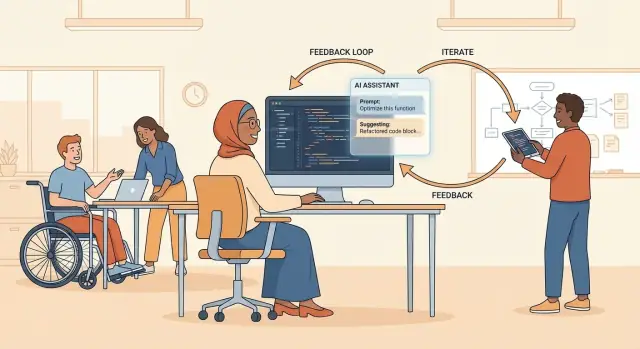
What “vibe-coding” means
“Vibe-coding” is a casual name for building software by describing what you want in plain language, then letting an AI coding tool generate most of the code while you steer the direction. Instead of starting with a detailed design and typing every line yourself, you iterate: ask for a feature, run it, react to what you see, and refine the prompt until the app behaves the way you intended.
It’s not “no coding.” You still make decisions, debug, test, and shape the product. The difference is where your effort goes: more time on intent (what should happen) and verification (did it happen safely and correctly), and less time on writing boilerplate or looking up patterns.
Why the term is trending
Developers and founders started using “vibe-coding” as a slightly tongue-in-cheek way to describe a new reality: you can move from idea to working prototype in hours—sometimes minutes—by collaborating with an LLM. That speed makes it feel like you’re “coding by feel,” tweaking the output until it matches the product vision.
It’s trending because it captures a real cultural shift:
- People are shipping earlier and iterating in public.
- Non-traditional builders can produce software with less upfront training.
- Experienced engineers are using AI to skip busywork and explore more options.
What this post will cover
This article breaks vibe-coding down into practical, non-hyped terms: what’s new about it, where it’s genuinely faster, and where it can bite teams later. We’ll walk through a simple workflow you can copy, the tools commonly used, and the guardrails that keep speed from turning into messy code, security issues, or surprise costs. We’ll also cover prompting habits, review norms, and the basic privacy and legal considerations teams should have on day one.
How it differs from traditional development
Traditional software work often starts with a spec: requirements, edge cases, acceptance criteria, then tickets, then code that aims to match the plan. Vibe-coding flips that sequence for many tasks. You start by exploring a solution—often in conversation with an AI—then tighten requirements after you can see something running.
Spec-first vs. “show me a version”
In a spec-first approach, the “shape” of the project is decided early: architecture, data models, API contracts, and a clear definition of done. Vibe-coding typically begins with an executable draft: a rough UI, a working endpoint, a script that proves the idea. The spec still matters, but it’s frequently written after the first implementation exists, based on what you learned.
The starting point changes with AI chat and suggestions
Instead of beginning from a blank file, you begin from a prompt.
AI chat tools help you:
- generate a first pass at code and wiring
- ask “what am I missing?” for edge cases and failure modes
- iterate quickly by describing behavior rather than rewriting everything by hand
Inline code suggestions push this further: while you type, the tool guesses the next function, test, or refactor. That turns development into a continuous loop of “describe → generate → adjust,” rather than “design → implement → verify.”
Overlap with prototyping, pair programming, and REPL habits
Vibe-coding isn’t entirely new—it borrows from familiar workflows:
- Prototyping: prioritize speed and learning over polish.
- Pair programming: the AI acts like an always-available pairing partner (with uneven judgment).
- REPL-style iteration: short cycles, frequent runs, quick feedback.
The difference is scale: AI makes that fast, conversational iteration possible across bigger chunks of code, not just single lines or tiny experiments.
Why vibe-coding feels so fast
Vibe-coding feels fast because it replaces long “think first, then build” stretches with tight, continuous cycles. Instead of spending an hour planning the perfect approach, you can try something in minutes, see what happens, and steer from there.
Fast feedback loops: prompt → code → run → adjust
The core speed-up is the loop. You describe what you want, get working code, run it, and then refine your request based on real behavior. That quick “did it work?” moment changes everything: you’re no longer guessing in your head—you’re reacting to a live prototype.
This also shortens the time between an idea and a concrete artifact you can share. Even a rough result makes it easier to decide what to keep, what to drop, and what “done” should look like.
Lower barrier for small apps, scripts, and internal tools
Many tasks don’t need a perfect architecture to be useful: a one-off script, a report generator, a simple dashboard, an internal admin page. Vibe-coding gets you to “good enough to test” quickly, which is often the biggest bottleneck.
Because you can ask for specific behavior (“import this CSV, clean these columns, output a chart”), you spend less time on boilerplate and more time validating whether the tool solves the problem.
Momentum beats the blank page
Vibe-coding reduces blank-page moments. Having something—anything—running creates momentum: it’s easier to edit than to invent. You can explore alternatives quickly, compare approaches, and keep moving forward even when you’re not sure what the final design should be.
The tools people use for vibe-coding
Vibe-coding isn’t one product—it’s a stack. Most teams mix a few tool categories depending on how “in the flow” they want to be versus how much control and traceability they need.
Common tool categories
Chat assistants are the quick-thinking partner: you describe what you want, paste context, and iterate on ideas, fixes, or explanations. They’re great for “I don’t know where to start” moments, turning requirements into an outline, or asking for alternatives.
IDE copilots work directly inside your editor, suggesting code as you type and helping with small, continuous steps. This is ideal for momentum: fewer context switches, faster boilerplate, and quick refactors.
Code search and Q&A tools focus on retrieval: finding the right file, surfacing related functions, or explaining an unfamiliar codebase. These matter when the codebase is big and the risk of “hallucinated” glue code is high.
A newer category is end-to-end “chat-to-app” platforms, which take you beyond snippets and help you generate and iterate on whole applications (UI, backend, database) from a single conversational workflow. For example, Koder.ai is built around this vibe-coding style: you describe the product, iterate in chat, and generate working web/server/mobile apps, with options like planning mode, snapshots, rollback, and source-code export.
Local vs. cloud models: practical tradeoffs
Cloud models typically feel smarter and faster to start with, but they raise privacy questions (especially for proprietary code) and have ongoing usage costs.
Local models can reduce data exposure and sometimes cut long-term spend, but they may be slower, require setup, and often need more careful prompting to get comparable results.
IDE integration vs. a separate chat window
Use integrated IDE tools when you’re editing existing code, making small changes, or relying on autocomplete-style suggestions.
Use a separate chat when you need planning, multi-step reasoning, comparing approaches, or producing artifacts like test plans or migration checklists. Many teams do both: chat for direction, IDE for execution. If you’re building an app from scratch, a dedicated chat-to-app workflow (like Koder.ai) can reduce the setup and wiring overhead that normally slows down “day zero.”
A practical vibe-coding workflow
Vibe-coding works best when you treat the model like a fast pair-programmer—not a vending machine for finished features. The goal is to ship a thin, working slice, then expand it safely.
1) Start with a thin slice (one user flow end-to-end)
Pick a single user journey you can complete in hours, not weeks—like “sign in → view dashboard → log out.” Define what done means (screens, API calls, and a couple of acceptance checks). This prevents the project from turning into a pile of half-finished components.
2) Prompt with real context, not wishes
Before asking for code, paste the minimum context the model needs:
- Tech stack (framework, language, database)
- Constraints (performance, accessibility, coding standards)
- Existing code structure (folder tree, key files, a couple of relevant snippets)
- What you want changed, and what must stay the same
A good prompt sounds like: “Here’s our current routes.ts and auth middleware. Add a GET /me endpoint, using our existing session cookie, and include tests.”
If you’re using a platform that generates multiple layers (frontend, backend, DB), be equally explicit about boundaries: “React UI only,” “Go + PostgreSQL backend,” “Flutter client,” “keep existing schema,” etc. That kind of constraint is exactly what keeps vibe-coding output aligned in tools like Koder.ai.
3) Iterate in small steps—and test every step
Ask for one change at a time: one endpoint, one UI state, one refactor. After each change:
- run unit/integration tests
- click through the flow locally (or in a preview env)
- scan the diff for “weird but plausible” mistakes (naming, edge cases, error handling)
4) Close the loop
Once the slice works, have the model help with cleanup: tighten error messages, add missing tests, update docs, and propose follow-ups. The workflow stays fast because the codebase stays coherent.
Where vibe-coding works best
Vibe-coding shines when you’re trying to get something real on the screen quickly—especially while you’re still figuring out what “the right thing” is. If the goal is learning, exploring, or validating an idea with users, the speed boost can be worth more than perfect architecture on day one.
Great fits: fast feedback loops
UI prototypes and product experiments are a natural match. When the main question is “Do users understand this flow?” you can iterate in hours instead of weeks. Vibe-coding is also strong for small internal tools where the interface and data model are straightforward.
CRUD apps (create/read/update/delete) are another sweet spot: admin dashboards, lightweight inventory tools, simple customer portals, or back-office forms. These apps often repeat familiar patterns—routing, forms, validation, pagination—where AI assistance can generate a solid baseline quickly.
Automations work well too: scripts that pull data from one place, transform it, and push it somewhere else; scheduled reports; “glue code” connecting APIs. The output is easy to verify (the job ran, the file looks right, the Slack message arrived), which keeps risk manageable.
When requirements are fuzzy (and that’s okay)
Vibe-coding is especially effective when requirements are still emerging. Early on, teams don’t need perfect solutions—they need options. Using AI to generate a few variants (different UI layouts, alternative data models, multiple approaches to the same workflow) can help stakeholders react to something concrete.
This is also useful in exploratory work: quick proof-of-concepts, early-stage data pipelines, or “can we even do this?” spikes. The goal is reducing uncertainty, not producing a final long-lived system.
When not to use it
Avoid vibe-coding as the primary approach for safety-critical systems (medical devices, automotive, aviation), where small mistakes can cause real harm. Be cautious in heavy compliance environments where traceability, strict change control, and documentation are mandatory. And be careful with complex concurrency or highly distributed systems: AI-generated code may look plausible while hiding subtle race conditions and reliability issues.
In those cases, vibe-coding can still help with documentation, small utilities, or test scaffolding—but the core logic should follow more deliberate engineering practices.
Risks teams must plan for
Vibe-coding can feel like a superpower: you describe what you want, and working code appears. The catch is that speed changes where risk hides. Instead of mistakes showing up while you type, they often show up later—during testing, in production, or when another teammate has to maintain what was generated.
Hallucinations and “looks-right” code
LLM-generated code can confidently reference APIs that don’t exist, use outdated library functions, or assume data shapes that aren’t real. Even when it runs, subtle issues slip through: off-by-one errors, missing edge cases, incorrect error handling, or performance traps. Because the output is usually well-formatted and plausible, teams can over-trust it and skip the careful reading they’d normally do.
Security pitfalls that scale with speed
When code is created quickly, security can be accidentally skipped just as quickly. Common failures include injection risks (SQL, command, template), hardcoded secrets or logging sensitive data, and pulling in unsafe dependencies because “it worked in the snippet.” Another risk is copy-pasting generated code into multiple services, multiplying vulnerabilities and making patching harder.
Long-term costs: architecture and ownership debt
Vibe-coding tends to optimize for “get it working now,” which can lead to messy architecture: duplicated logic across files, inconsistent patterns, and unclear boundaries between modules. Over time, teams may lose clarity on who owns which pieces of behavior—especially if many people are generating similar components. The result is higher maintenance cost, slower onboarding, and more fragile releases, even if early prototypes shipped fast.
Planning for these risks doesn’t mean rejecting vibe-coding—it means treating it as a high-output drafting tool that still needs verification, security checks, and architectural intent.
Quality guardrails that keep speed without chaos
Vibe-coding can feel like pure momentum—until a small change breaks something you didn’t even know depended on it. The trick is to keep the creative speed while putting “rails” around what’s allowed to ship.
1) Treat tests as the contract
When AI generates or edits code, your best defense is a clear, executable definition of “working.” Use tests as that definition:
- Unit tests for core logic (fast feedback, cheap to run).
- Integration tests for connections between services, APIs, and data stores.
- End-to-end tests for the critical user journeys (log in, checkout, create project, etc.).
A useful habit: ask the model to write or update tests first, then implement changes until tests pass. It turns “vibes” into verifiable behavior.
2) Automate the boring checks
Humans shouldn’t waste attention on formatting, obvious mistakes, or easy-to-detect issues. Add automated gates:
- Linters and formatters to keep style consistent.
- Type checks (where applicable) to catch mismatched data early.
- CI gates so every pull request runs the same suite of checks before merge.
This is where AI helps twice: it writes code quickly, and it can fix the lint/type failures quickly.
3) Make changes small, reviewable, and reversible
AI is great at producing big diffs—and big diffs are hard to understand. Prefer small refactors over big rewrites, and keep work flowing through pull requests that clearly explain intent, risks, and how to test.
If something goes wrong, small PRs make it easy to revert, isolate the problem, and keep shipping without drama. If your workflow supports snapshots/rollback (for example, Koder.ai includes snapshots you can roll back to), use that as an extra safety net—but don’t treat it as a substitute for review and tests.
Prompting techniques that improve results
Good vibe-coding isn’t about “clever prompts.” It’s about giving the model the same signals a strong teammate would need: constraints, context, and a clear definition of done.
Use prompt patterns that reduce guesswork
Start with constraints, then intent, then acceptance criteria. Constraints keep the model from inventing frameworks, rewriting everything, or drifting away from your codebase.
A reliable pattern:
- Context: what repo/module you’re in, and what files are relevant
- Goal: what you want to change and why
- Constraints: language/version, libraries allowed, style rules, performance limits
- Acceptance tests: specific behaviors, edge cases, and “must not break” requirements
Add one crucial line: “Ask clarifying questions first if anything is ambiguous.” This often saves more time than any other trick, because it prevents multi-step rework.
Provide examples (even tiny ones)
Models learn fastest from concrete examples. If you have an existing pattern—an API handler, a test style, a naming convention—paste a small representative snippet and say: “Match this style.”
Examples also work for behavior:
- “Given input X, output should be Y.”
- “When the user is unauthenticated, return 401 with this JSON shape.”
Ask for diffs and explanations, not just full files
Full-file output is hard to review and easy to misapply. Instead, request:
- A unified diff against specific files
- A short explanation of what changed and why
- A checklist of what to verify locally (tests to run, manual checks)
This keeps you in control, makes code review cleaner, and helps you spot accidental scope creep.
Create reusable prompt templates for your stack
High-performing teams standardize prompts the same way they standardize PR templates. Create a few “go-to” prompts for common tasks:
- Add a feature behind a flag
- Write unit/integration tests in your preferred framework
- Refactor a function without changing behavior
- Debug a failing test with minimal changes
Store them in the repo (for example, /docs/ai-prompts.md) and evolve them as your codebase and conventions change. The result is more consistent output—and fewer surprises—no matter who’s doing the vibe-coding.
Code review and team norms
Vibe-coding can speed up how code gets written, but it doesn’t remove the need for judgment. The core norm to adopt is simple: treat AI output as untrusted until a human has reviewed it. That mindset keeps teams from confusing “it runs” with “it’s correct, safe, and maintainable.”
Review like you’re inheriting it
AI-generated code should be reviewed as if it was submitted by a new contractor you’ve never met: verify assumptions, check edge cases, and confirm that it matches your product’s rules.
A practical review checklist:
- Does it do the right thing for real inputs, not just the happy path?
- Are error messages and failures handled in a user-friendly way?
- Is the code readable enough that someone else can maintain it next month?
- Are tests included—and do they actually prove the important behavior?
Team rules: what’s allowed vs. what’s authored
Teams move faster when they stop negotiating standards in every pull request. Write down clear rules about:
- What can be generated (boilerplate, simple CRUD, small utilities)
- What must be authored or heavily edited (business logic, security rules, data access patterns)
- When AI suggestions are prohibited (secrets, customer data, proprietary code blocks)
Make these rules part of your PR template and onboarding, not tribal knowledge.
Documentation habits that prevent “mystery code”
Fast code without context becomes expensive later. Require lightweight documentation:
- Decision notes in the PR description: why this approach, what alternatives were rejected
- Short code comments where intent isn’t obvious
- Internal references to prior decisions so reviewers can trace reasoning quickly
Good norms turn vibe-coding into a repeatable team workflow—speed with accountability.
Security, privacy, and legal basics
Vibe-coding moves quickly, which makes it easy to forget that “asking an AI for help” can be the same as sharing data with a third party or introducing code with unclear ownership. A few simple habits prevent most of the scary outcomes.
Privacy: treat prompts like external messages
If a tool sends prompts to a hosted model, assume anything you type could be stored, reviewed for abuse prevention, or used to improve the service—depending on the vendor’s terms.
- Avoid pasting secrets or proprietary data into external tools. That includes API keys, access tokens, customer data, private repo snippets, and internal incident details.
If you need AI help on sensitive code, prefer options like redaction, local models, or enterprise plans with clear data-handling guarantees. If you’re evaluating platforms (including Koder.ai), ask specifically about data handling, retention, and where workloads can be hosted to meet cross-border and privacy requirements.
Security: generated code is still code
AI can produce insecure patterns (weak crypto, unsafe deserialization, missing auth checks) while sounding confident. Keep your standard security checks in place:
- run automated tests and linters
- scan dependencies for known vulnerabilities
- validate inputs and handle errors explicitly
For teams, a lightweight rule helps: anything AI writes must pass the same CI gates and review checklist as human-written code.
Legal: know where the code might be “from”
Generated code can resemble training examples. That doesn’t automatically mean it’s infringing, but it raises practical questions about licensing and attribution.
- Check licensing and attribution expectations for generated code.
Also watch for “copy-paste prompts” that include licensed snippets. If you wouldn’t paste it into a public forum, don’t paste it into a model.
Governance: leave a paper trail without slowing down
When work moves fast, accountability matters more.
- Keep an audit trail: tickets, PR descriptions, and model usage notes.
A good minimum: mention the tool used, the intent (“generated a first draft of X”), and what you verified (tests run, security checks performed). This keeps compliance and incident response manageable without turning vibe-coding into paperwork.
What vibe-coding changes for developers and teams
Vibe-coding shifts effort away from typing code line-by-line and toward steering, verifying, and integrating. Teams that adopt it well often find the “center of gravity” moving from individual implementation speed to shared judgment: what to build, what to trust, and how to keep changes safe.
How roles may shift
Developers spend more time in product-thinking mode: clarifying requirements, exploring alternatives quickly, and translating fuzzy ideas into testable behavior. At the same time, the review function grows—someone has to confirm the AI-generated changes fit the system, follow conventions, and don’t introduce subtle bugs.
Testing also becomes a bigger part of the daily rhythm. When code can be produced quickly, the bottleneck becomes confidence. Expect more emphasis on writing good test cases, improving fixtures, and tightening feedback loops in CI.
Skills worth investing in
The most valuable vibe-coding skills look surprisingly classic:
- Debugging: reading unfamiliar code, reproducing issues, and isolating root causes.
- System design: spotting when a quick change will create future complexity.
- Clear writing: concise prompts, better docstrings, and crisp PR descriptions that explain intent.
Teams also benefit from people who can translate between product and engineering—turning “make it simpler” into specific constraints, acceptance criteria, and measurable outcomes.
Suggested next steps (without overhauling everything)
Start with a pilot project: a small internal tool, a contained feature, or a low-risk refactor. Define a few metrics up front—cycle time, review time, defect rate, and how often changes are reverted.
Then write a lightweight playbook (1–2 pages) covering: which tools are allowed, what must be tested, what reviewers should look for, and what data can or cannot be pasted into assistants. Over time, turn repeated lessons into team norms and checklists.
If your team wants to push beyond “assistant in an editor” into full app generation, pick one contained workflow and trial a chat-to-app platform like Koder.ai alongside your existing stack. Evaluate it the same way you’d evaluate any delivery pipeline: code quality, diff/review ergonomics, deploy/rollback safety, and whether it actually reduces cycle time without increasing defects.
Done well, vibe-coding doesn’t replace engineering discipline—it makes discipline the multiplier. "}
FAQ
What does “vibe-coding” mean in practical terms?
Vibe-coding is a workflow where you describe desired behavior in plain language, let an AI generate a first draft of the code, then you iteratively run, inspect, and refine it.
You’re still responsible for decisions, debugging, testing, and shipping safely—the “vibe” is the rapid loop of describe → generate → run → adjust.
How is vibe-coding different from traditional spec-first development?
Spec-first tries to decide architecture, edge cases, and acceptance criteria before implementation. Vibe-coding often starts with an executable draft (a rough UI, endpoint, or script) and tightens the spec after you can see and test something real.
Many teams end up combining both: quick drafts first, then formalizing requirements once the direction is validated.
Why does vibe-coding feel so much faster?
It feels fast because it collapses planning and implementation into short cycles with immediate feedback. Seeing a working prototype quickly reduces “blank page” friction and makes it easier to choose what to keep or discard.
It also accelerates common patterns (CRUD screens, wiring, boilerplate) so you spend more time verifying behavior than typing scaffolding.
What tools do people typically use for vibe-coding?
A practical stack usually includes:
- Chat assistants for planning, debugging, checklists, and alternative approaches.
- IDE copilots for inline suggestions, small edits, and boilerplate.
- Code search/Q&A tools for navigating a larger repo and reducing “made-up glue code.”
Most teams use chat for direction and the IDE for execution.
What’s a simple vibe-coding workflow a team can copy?
Start with a thin slice you can complete end-to-end (one user flow), then iterate in small, testable steps.
A reliable loop is:
- Define “done” for one flow
- Provide minimal real context (stack, constraints, relevant files)
- Ask for one change at a time
- Run tests and click through the flow
- Review the diff, then clean up (tests, docs, error handling)
What prompting habits improve results the most?
Provide constraints and concrete context so the model doesn’t guess. Include:
- Stack and versions
- Repo structure and the specific files involved
- What must not change
- Acceptance criteria (inputs/outputs, status codes, edge cases)
Two high-leverage habits:
- Ask it to ask clarifying questions when ambiguous.
- Request diffs + a verification checklist instead of full file rewrites.
What are the biggest technical risks of vibe-coding?
Common risks include:
- Hallucinations: plausible code that references nonexistent APIs or wrong data shapes.
- Subtle bugs: off-by-one, missing edge cases, incorrect error handling.
- Architecture drift: duplicated logic and inconsistent patterns from many generated chunks.
Mitigation is mostly process: small diffs, strong reviews, and tests as the contract.
What guardrails keep vibe-coding fast without creating chaos?
Treat AI output as untrusted until it passes the same gates as any other change:
- Automated tests (unit, integration, key end-to-end flows)
- Lint/type checks in CI
- Small, reviewable pull requests you can revert
A useful pattern is “tests first”: have the model draft or update tests, then implement until they pass.
When should you avoid vibe-coding, and when is it a great fit?
Be cautious with safety-critical systems (medical, automotive, aviation), strict compliance environments that require heavy traceability, and complex concurrency/distributed reliability work.
Vibe-coding is usually a strong fit for:
- UI prototypes and product experiments
- CRUD/internal tools
- Automations and “glue code” where outputs are easy to verify
What privacy, security, and legal basics should teams follow from day one?
If prompts go to a hosted model, treat them like external messages:
- Don’t paste secrets, tokens, customer data, or proprietary snippets.
- Prefer redaction, local models, or enterprise plans when needed.
Legally, avoid pasting licensed code you wouldn’t share publicly, and align on a team policy for attribution/licensing review. In PRs, leave a lightweight audit trail (tool used, intent, tests/checks run) so accountability stays clear.