

Vibe Coding vs No‑Code: What’s Different and Why It Feels Real
Learn how vibe coding differs from no-code tools: flexibility, ownership, and control. See why it feels like real building—even with AI in the loop.
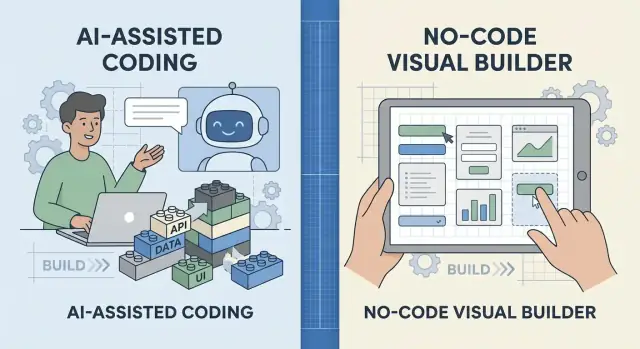
What We Mean by Vibe Coding and No-Code
“Vibe coding” isn’t a formal job title. It’s a way of building software where you use AI as a fast partner: you describe what you want, get working code, run it, tweak it, and repeat.
The “vibe” part is the flow: you’re iterating quickly, testing ideas, and shaping behavior as you go—often without writing every line from scratch. But the output is still code: files in a repo, functions, APIs, databases, deployments. You can open it, change it, refactor it, or move it anywhere.
Vibe coding (plain definition)
Vibe coding = AI-assisted coding + rapid iteration.
You might start with a prompt (“build a simple onboarding form with email verification”), then adjust specifics (“add rate limiting,” “store events,” “make the copy friendlier”), and keep pushing until the product matches what you imagined. AI helps you move faster, but you’re still making engineering choices—what data to store, what edge cases matter, what “done” looks like.
No-code tools (plain definition)
No-code tools are visual builders and workflow platforms designed to create apps without writing code. They’re usually template-driven and come with guardrails:
- drag-and-drop UI
- prebuilt components and integrations
- constrained logic blocks (if/then, triggers, automations)
- hosting and permissions handled for you
This makes no-code great for getting something usable quickly, especially when the product fits the platform’s model.
The core question: why one feels like “real” building
Vibe coding tends to feel like “real” building because you’re working with open-ended materials (code) rather than staying inside a defined toolset. You can always go one layer deeper.
That doesn’t make no-code “less valid.” It’s just a different tradeoff: speed and safety through constraints versus flexibility and control through code.
The goal of this comparison isn’t to pick a winner—it’s to help you choose based on what you’re trying to ship, learn, and own.
Why This Comparison Matters Now
The vibe-coding vs no-code debate isn’t just semantics. It’s about what people expect when they say they’re “building” something—and what tools actually let them do once the first version is live.
Where no-code earned its place
No-code started by removing the hardest parts of getting online and getting organized. Website builders made publishing simple. Internal tool platforms let teams create dashboards and CRUD apps without a developer. Workflow automation tools connected apps with “if this, then that” logic.
The promise was speed and accessibility: ship something useful without needing to understand servers, databases, or deployment.
How AI changed the coding experience
AI-assisted coding reduced the friction that used to make programming feel slow and intimidating—especially at the start. Instead of staring at a blank project, you can describe what you want, generate a working scaffold, and iterate in small steps.
That shift matters because it moves coding closer to the “drag-and-drop” feeling no-code popularized, while keeping the open-ended nature of software.
Why they overlap now
Both approaches aim to reduce wasted effort:
- No-code reduces effort by limiting choices and offering prebuilt patterns.
- Vibe coding reduces effort by helping you explore choices quickly (with AI as a partner).
So the overlap is real: both can produce prototypes fast, both can connect APIs, and both can power real business workflows.
Why “real building” still feels different
When people say “real building,” they usually mean a few things:
- Control: you can shape features beyond what a template or block allows.
- Craft: you can refine details—behavior, performance, UX—until it matches your intent.
- Problem-solving: you can handle edge cases rather than working around them.
This comparison matters now because teams are choosing not just how to launch, but how to grow. The early tool choice influences what’s easy later: customization, integrations, cost, ownership, and whether your product can evolve without hitting a hard ceiling.
The Practical Differences: How You Build Day to Day
Day to day, vibe coding and no-code feel different because they start from different “inputs” and produce different “outputs.” One is closer to writing instructions and refining them; the other is closer to assembling pre-made parts.
Input: prompts + edits vs drag-and-drop + settings
With vibe coding, you typically begin by describing what you want (“build a signup flow with email verification”), then you review the generated code and edit it. Your work alternates between prompting, reading, and making small, precise changes—renaming variables, adjusting logic, adding a new API call, or changing how errors are handled.
With no-code, you build by placing components (forms, lists, buttons) and configuring rules and properties. Most of your time goes into selecting the right widget, connecting it to data, and tuning settings to match the behavior you want.
Output: portable code vs platform-bound apps
Vibe coding outputs code you can run anywhere: on your laptop, a server, a cloud platform, or inside an existing codebase. Even if you used AI to get started, you can usually copy, test, version, and deploy it like any other project.
No-code outputs a project inside a platform. It’s usable and often shippable fast, but it’s typically tied to that vendor’s runtime, editor, and deployment model.
Iteration: tweak logic directly vs adjust components and rules
When something is off in vibe coding, you open the relevant file and change the exact function or query. When something is off in no-code, you search for the right configuration panel, rule, or workflow step and adjust it.
Typical constraints: libraries/APIs vs platform limits and pricing tiers
Vibe coding is constrained by what you (and your tools) can integrate—libraries, APIs, auth, hosting, and debugging. No-code is constrained by what the platform supports, plus limits that may appear later (custom logic, performance, exports, advanced permissions, and pricing-tier gates).
Flexibility: Templates vs Open-Ended Solutions
No-code tools usually start from a template: a database table, a form, a workflow, a dashboard. That’s not a weakness—it’s the point. If your product matches a common pattern (CRUD apps, simple portals, intake forms, internal request systems), you can move fast because the rails are already there.
Vibe coding starts from intent rather than a predefined shape. You describe what you want, generate code, edit it, and keep iterating. Because the result is “just software,” you’re not limited to what a platform decided should be configurable.
Where no-code shines
No-code feels great when the requirements are standard:
- Create/read/update/delete records
- Simple approval flows and notifications
- Basic permissions (admin vs member)
- Forms → database → dashboard
In these cases, flexibility is less important than speed and clarity. The template is a shortcut to a working system.
Where vibe coding stretches further
The moment you hit “weird” requirements, templates can start to feel tight. Examples:
- Custom validation: “If a user selects X, require Y, but only on Tuesdays and only for EU addresses.”
- Integrations with edge cases: one API is rate-limited, another returns inconsistent fields, and you need retries + fallbacks.
- Unique UI interactions: dynamic filters, nested editors, drag-and-drop, offline mode.
- Complex data rules: derived fields, versioning, audit logs, partial updates.
With vibe coding, these are design problems—not platform limitations. You can implement custom logic, refactor when it gets messy, and choose any library or service that fits.
When each approach starts to feel limiting
No-code becomes limiting when you’re fighting the tool: workarounds, duplicated workflows, or “almost” rules that never quite match reality.
Vibe coding becomes limiting when you’re reinventing solved plumbing: auth, admin screens, basic CRUD, and permissions. If 80% of your app is standard, no-code may be the faster foundation, with vibe coding used for the 20% that makes it special.
Ownership and Portability: Who Controls the Output?
The biggest “feel” difference between vibe coding and no‑code is simple: what you build is something you can actually take with you.
With vibe coding, the output is an asset
When you vibe code (even with heavy AI assistance), you end up with code and files you can store in Git, review, version, test, and ship again tomorrow. That matters because it changes your relationship with the project:
- You can move it to a different host, framework, or team.
- You can add automated tests and catch regressions.
- You can refactor without waiting for a platform’s feature roadmap.
In practice, the “product” isn’t just the running app—it’s the repository. That repository is transferable knowledge and future leverage.
No‑code often means portability depends on the platform
No‑code tools vary, but many rely on proprietary components: visual logic builders, hosted databases, platform-specific authentication, or workflow engines. Exports (when they exist) may give you data, sometimes a static site, and occasionally code—but not always the full system in a form you can run elsewhere.
This is where lock‑in sneaks in: your app works, but the easiest way to keep it working is to keep paying and keep building inside the same tool.
Hosting choices reveal who’s in control
Vibe-coded projects typically let you choose:
- Self-hosted (you run the server)
- Managed (a cloud provider runs parts for you)
- Platform-hosted (serverless, app platforms, etc.)
No‑code often defaults to platform-hosted by design—convenient, but it ties operations, pricing, and limits to that ecosystem.
Why ownership changes confidence (and identity)
When you control the code, you tend to feel like a builder: you can inspect what’s happening, fix it, and migrate when your needs change. That long-term confidence is hard to replicate if the core logic lives behind a vendor’s UI.
Learning and Craft: Why Vibe Coding Feels Like Building
Vibe coding sits in a sweet spot: you get the speed of AI-assisted coding, but you still touch the system you’re creating. Even if a model writes the first draft, you’re the one reading it, questioning it, and shaping it into something that works. That interaction is what gives it a “real building” feeling.
Seeing the whole machine (not just the controls)
With no-code tools, complexity is often hidden behind menus and toggles. That’s a feature: it helps you move fast and avoid footguns. But it can also make it harder to understand why something behaves a certain way, or what tradeoffs you’re accepting.
Vibe coding (often prompt-to-code) encourages you to look under the hood. You see files, functions, data shapes, and requests. Over time, you start recognizing patterns—how software building actually holds together.
Debugging is part of the craft
The “craft” feeling usually shows up the first time something breaks and you fix it.
In vibe coding, the feedback loop is explicit:
- an error message tells you what failed
- logs show what happened
- tests confirm whether you truly fixed it
That loop trains a builder mindset. You aren’t only arranging blocks; you’re forming hypotheses (“it’s failing because the input is missing”), making a change, and verifying the result. AI can suggest likely fixes, but you decide which one matches reality.
Learning by doing (even with AI help)
AI-assisted coding doesn’t remove learning—it changes how you learn. You can ask, “Explain this function,” “Why is this failing?” or “Show a simpler approach,” then compare answers against what the code actually does.
No-code can be perfect for rapid prototyping and automation workflows when you don’t need depth. But if you want portability, custom behavior, or confidence that you can debug and extend what you built, vibe coding pulls you into the mechanics—and that’s why it feels like building, not just configuring.
The Role of AI: Copilot, Not Autopilot
AI is the reason vibe coding feels fast, but it’s not the “builder” in the way a no‑code platform can be. With AI-assisted coding, your job shifts: you supervise, steer, and verify instead of typing every line yourself.
What actually changes day to day
You still make product decisions—what the app should do, what “correct” means, what risks are acceptable—but you express more of it as instructions and questions.
A practical loop looks like this:
- Describe the feature in plain language (and constraints).
- Ask the AI to propose an approach and generate code.
- Review the output like a draft: test it, tweak it, and ask follow-up questions.
- Lock it in with checks (tests, validation, logging) so you can trust it later.
The key skill is asking better questions
Good prompts are less “build me a login” and more “build login with email + password, rate limiting, password reset, and session expiration; use server-side validation; return clear error messages.”
Then you validate. You don’t need to know every detail, but you do need to know what to check.
“Human in the loop” (simple, real examples)
AI can generate authentication flows, but you must confirm rules like: when does a session expire, what counts as a strong password, and how are reset links protected?
For payments, AI can wire up Stripe quickly, but you must verify: are webhooks handled safely, are retries idempotent, and do you store only what you should?
For data rules, AI can create “delete account” features, but you decide: what gets deleted vs retained, and what requires confirmation.
The risk: trusting outputs you don’t understand
AI-generated code can look confident while quietly missing edge cases (security checks, error handling, data validation). Vibe coding works best when you treat AI as a copilot—great at drafts and acceleration—while you stay responsible for correctness.
Maintenance, Debugging, and Teamwork
The real difference between vibe coding and no-code often shows up after the first “it works!” moment. Building is fun; keeping something working is where products either mature—or quietly fall apart.
Maintenance: your updates vs their updates
With vibe coding, you own the maintenance surface area. That means updating libraries, handling dependency changes, and occasionally refactoring when a framework shifts. The upside is control: you can pin versions, schedule upgrades, and decide when to modernize.
No-code maintenance is the reverse. You usually don’t manage dependencies, but you do live with platform updates. A new editor, a deprecated feature, or a pricing-tier change can force unexpected rewrites. When something breaks, you may be waiting on a vendor fix rather than shipping your own.
Debugging: visibility vs guesswork
In code, debugging is imperfect but direct. You can add logging, read stack traces, write a quick test, and isolate the failing function. AI can help explain errors, suggest fixes, or generate test cases, but you still have the underlying signals.
In many no-code tools, failures show up as “this step failed” with limited context. You might not see the raw payload, the actual query, or the precise condition that triggered the problem. Debugging becomes trial-and-error: duplicate a workflow, add a few “inspect” steps, and hope the platform reveals enough.
Team collaboration: Git vs shared workspaces
Vibe coding tends to scale through Git: branches, pull requests, code reviews, CI checks, and clear ownership of changes. It’s easier to answer “what changed, when, and why?” and to roll back safely.
No-code teams collaborate through shared workspaces, permissions, and visual diffs (when available). This can feel smoother at first, especially for non-developers, but it can get messy when multiple people edit the same flow and the tool can’t merge changes cleanly.
As a rule: no-code scales well for coordinated, modular workflows; vibe coding scales better when complexity, testing, and long-term change management become the main job.
Risk and Reliability: Security, Limits, and Quality
The “it works on my screen” moment is easy to reach with both vibe coding and no‑code. The real test is what happens when real users, real data, and real expectations show up. Risk isn’t just about bugs—it’s about where your data sits, what your tooling can prove, and how quickly you can respond when something breaks.
Security and compliance: know where data lives
No‑code platforms often make security simpler by centralizing hosting, authentication, and permissions. Many offer role-based access control and audit logs out of the box—but you still need to verify what’s included on your plan and what’s configurable.
With vibe coding, you can meet stricter requirements because you choose the infrastructure: database region, encryption settings, log retention, identity provider, and more. The tradeoff is responsibility: you must configure access control, secrets management, backups, and audit trails yourself (or via your stack).
A practical rule: before you build too much, write down the data types you’ll handle (emails, payment details, health info), and check what compliance expectations follow from that.
Integrations and APIs: connectors vs custom endpoints
No‑code shines when your workflow matches prebuilt connectors (CRM, email, spreadsheets). The risk is edge cases: a connector may not expose the exact endpoint you need, may lag behind API changes, or may impose its own retry/timeout behavior.
Vibe coding gives you direct control: you can call any API, build custom endpoints, and shape data exactly how your product needs. Reliability then depends on your engineering choices—rate limiting, retries, idempotency, monitoring, and fallbacks.
Performance and reliability: quotas are real
No‑code tools commonly include quotas (requests, runs, storage) and platform limits (execution time, concurrency). This can be fine for internal tools and early prototypes, but it’s something to measure early if you expect spikes.
With vibe coding, you can optimize code paths, database queries, caching, and scaling. You’re less constrained by a vendor’s ceilings, but you’re also exposed to the full complexity of uptime and incident response.
The safest approach is to check requirements early: traffic expectations, data sensitivity, required auditability, and integration depth. That clarity tells you whether “fast to ship” will stay “safe to run.”
When to Use Each (and When to Combine Them)
Choosing between no-code and vibe coding isn’t about which one is “real.” It’s about what you’re trying to ship, what needs to change later, and who has to own it day to day.
Choose no-code when speed and standardization win
No-code tools shine when the problem fits a familiar shape and you want value fast.
Use no-code when:
- You need a quick MVP to validate demand, pricing, or onboarding
- The workflow is standard (forms, approvals, CRM updates, notifications)
- Non-technical teammates must be able to maintain it without waiting on a developer
- The risk of hitting platform limits is acceptable (because the scope is contained)
Choose vibe coding when control and portability matter
Vibe coding (AI-assisted, prompt-to-code building) pays off when “almost works” isn’t enough.
Use vibe coding when:
- You need custom logic (edge cases, complex rules, unusual data models)
- You care about portability: hosting, moving data, switching vendors, version control
- You expect requirements to change and don’t want to rebuild from scratch
- You need deeper integration options (APIs, background jobs, custom auth, performance tuning)
Combine them for the best of both
Hybrid setups are often the fastest path to something that ships and survives.
Common combinations:
- No-code front-end + coded services: a no-code UI calls a small API you own for the tricky logic
- Coded product + no-code admin: the app is code, but internal operations run on no-code workflows
A simple decision checklist
Ask:
- Is this mostly standard workflow? If yes, start no-code.
- Do we need custom rules that will evolve? If yes, lean vibe coding.
- Who must own changes weekly? Non-technical = no-code; mixed team = hybrid.
- Would vendor lock-in be painful? If yes, prefer vibe coding or hybrid.
If you’re still unsure, build the first iteration in no-code and move the parts that hurt into code as soon as the constraints show up.
Getting Started: A Practical First Build Plan
The fastest way to understand the difference is to build the same tiny product two ways. Pick something you can finish in a weekend: a “request tracker” for a club, a simple quote calculator, or a personal CRM. Keep it small and real.
1) Choose one clear user goal
Write a one‑sentence goal that a user can complete in under a minute, for example: “Submit a request and see its status.” If you can’t describe the goal plainly, both vibe coding and no‑code will feel messy.
2) Build it with vibe coding (AI + code)
Start by creating a repo and a short README describing the goal, data you need, and a few example screens.
Then ask your AI tool for scaffolding: a basic app structure, routing, and a simple data layer. Commit that first draft.
If you want a more “end-to-end” vibe-coding workflow (generate, run, iterate, then deploy), platforms like Koder.ai are designed around that loop: you build web, backend, and even mobile apps through chat, then export the source code when you want full ownership and long-term control.
Next, refine like a builder:
- Replace placeholders with real fields and validation
- Add two or three test cases (even simple “happy path” checks)
- Run the app, click everything, and fix what breaks
This is where vibe coding feels “real”: you’re shaping the system’s structure, not just configuring it.
3) Build it with no‑code (configure + connect)
Begin with your data model: map the tables/collections and relationships (Requests, Users, Status history).
Then build screens around the workflow: create, list, detail view. Add rules/automations for status changes and notifications.
Finally, stress-test edge cases:
- Duplicate submissions
- Missing required fields
- Permission errors (who can edit what?)
4) Plan for handoff and scale
Before you call it “done,” document the basics: how to log in, where data lives, how to back it up, who has admin access, and what the next scaling step is. A simple “handoff” page in your repo or workspace can save you later.
If you want a deeper checklist, add a short follow-up section to your own notes (or link internally to /blog/shipping-your-first-tool).
FAQ
What’s the simplest difference between vibe coding and no-code?
Vibe coding is AI-assisted coding plus rapid iteration: you describe what you want, generate working code, run it, tweak it, and repeat.
No-code is visual building inside a platform: you assemble prebuilt components and workflows with configuration, guardrails, and platform-managed hosting.
Why does vibe coding feel more like “real building” to many people?
Because you’re working with open-ended materials (code). You can inspect files, change functions, refactor architecture, add tests, and implement edge cases without waiting for a platform feature.
No-code often feels like configuring because you’re operating within a predefined model of what the platform allows.
When is no-code the best choice?
Start with no-code when:
- The problem is mostly standard workflow (forms, approvals, dashboards, CRUD).
- Non-technical teammates need to maintain it weekly.
- You want a fast MVP and accept some platform constraints.
Measure early whether you’ll hit limits (permissions, performance, exports, pricing tiers).
When is vibe coding the better option?
Choose vibe coding when:
- You need custom rules or weird edge cases that will evolve.
- You care about portability (owning a repo, moving hosts, switching vendors).
- You expect deeper integrations (custom APIs, background jobs, custom auth).
- You want strong debugging signals (logs, tests, stack traces).
Treat the AI output as a draft you review and verify.
What does “portability” mean in practice, and why does it matter?
Portability is the ability to take your product elsewhere.
- With vibe coding, the output is a repo you can run and deploy on different infrastructure.
- With no-code, the app often lives inside the vendor’s runtime; exports may give you data, but not always a runnable system.
If migration would be painful, plan for that before you build too much.
How does vendor lock-in show up with no-code tools?
Common lock-in points include:
- Proprietary workflow engines and visual logic builders
- Platform-hosted databases and auth that don’t translate cleanly
- Limited exports (data yes, full behavior no)
- Pricing tiers gating critical features (permissions, performance, environments)
To reduce risk, keep core data models simple and document how you’d migrate if needed.
How do debugging and troubleshooting differ between the two?
In vibe coding, you can typically:
- Read stack traces and logs
- Add targeted logging
- Write a quick test to reproduce the bug
- Patch the exact function/query that failed
In no-code, you may get a generic “step failed” signal and do more trial-and-error inside the editor, depending on how much the platform exposes.
Which approach scales better for teams and collaboration?
With vibe coding, you can use Git workflows:
- Branches and pull requests
- Code review
- CI checks and tests
- Clear diffs and rollbacks
No-code collaboration is often shared workspaces and permissions. It can be fast early on, but may get messy if multiple people edit the same flows and the platform can’t merge changes well.
How do security and compliance considerations change the decision?
In no-code, security can be simpler because hosting, auth, and permissions are centralized—but you must confirm what your plan includes.
In vibe coding, you can meet stricter requirements by choosing infrastructure (region, encryption, logging, retention), but you also own:
- Secrets management
- Access control
- Backups
- Audit trails
Write down what data you handle (emails, payments, sensitive info) before committing.
Can you combine vibe coding and no-code effectively?
A practical hybrid looks like:
- No-code UI + coded services: the visual app calls a small API you own for tricky logic.
- Coded product + no-code admin/workflows: the core app is code, but internal ops run in no-code.
A good rule: start where you’re fastest, then move the parts that hurt (limits, edge cases, ownership) into code.