

Vibe Coding vs Traditional Engineering: Speed, Risk, Maintainability
A practical comparison of vibe coding and traditional engineering. See where each wins on speed, risk management, and long-term maintainability.
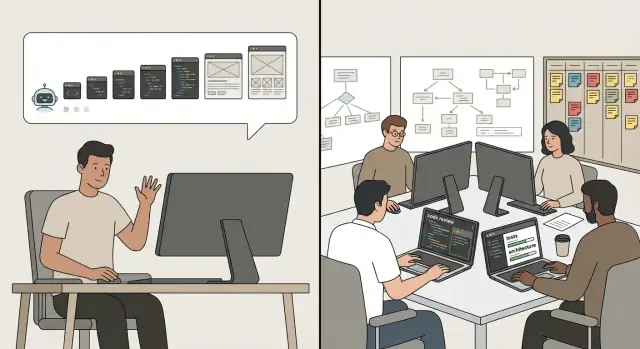
What We Mean by Vibe Coding and Traditional Engineering
“Vibe coding” is a style of building software where you move fast by leaning heavily on AI-generated code and your own intuition about what “looks right.” You describe the outcome you want, accept a suggested solution, try it, tweak prompts, and repeat. The feedback loop is mostly: run it, see what happens, adjust. It’s less about planning up front and more about rapid iteration until the product feels correct.
Traditional software engineering emphasizes the opposite: reducing surprises by adding structure before and during implementation. That typically includes clarifying requirements, sketching a design, breaking work into tickets, writing tests, doing code review, and documenting decisions. The loop is still iterative, but it’s guided by shared standards and checks that aim to catch mistakes early.
Why compare them?
This article compares the two approaches across three practical dimensions:
- Speed: how quickly you can ship something users can touch.
- Risk: how often you introduce failures, security issues, or “it works on my machine” problems.
- Maintainability: how expensive it becomes to change the system a month later—or a year later.
What this article is (and isn’t)
This isn’t a moral argument for one “right” way to build software. Vibe coding can be a smart choice for prototypes, internal tools, or early product discovery. Traditional engineering can be essential when outages, security incidents, or compliance failures have real consequences.
It also isn’t an AI hype piece. AI can speed up both styles: vibe coding uses AI as the primary driver, while traditional engineering uses AI as a helper inside a structured process. The goal here is to make the trade-offs clear so you can choose intentionally—based on team size, timelines, and how costly mistakes would be.
Workflow Overview: From Idea to Merge
Two teams can build the same feature and still follow radically different paths to get it into main. The difference isn’t just tools—it’s where “thinking” happens: upfront in artifacts and reviews, or continuously through rapid iteration.
Vibe coding: prompt → generate → try → adjust
A typical vibe coding loop starts with a concrete goal (“add a billing page with Stripe checkout”) and moves straight into prompts, code generation, and immediate hands-on testing.
The main artifacts tend to be:
- Prompt history (often scattered across chat threads)
- A running app and quick demos
- Incremental commits that reflect what “seemed to work”
Feedback is fast and local: run it, click around, tweak prompts, repeat. The “merge” moment often happens when the feature looks right and doesn’t obviously break anything.
This workflow shines for solo builders and small teams building prototypes, internal tools, or greenfield products where requirements are still forming.
If you’re doing this in a dedicated vibe-coding environment like Koder.ai, you can often keep the loop tight while still adding a bit more safety: planning mode for upfront intent, snapshots for rollback, and the option to export source code when you’re ready to harden the prototype in a more traditional pipeline.
Traditional engineering: clarify → design → implement → review → merge
A traditional workflow invests more effort before code changes land.
Common artifacts include:
- Tickets/user stories with acceptance criteria
- Lightweight design notes (or formal design docs)
- Code review threads and structured approvals
Feedback loops are staged: early feedback from product/design, then technical feedback in review, then confidence from tests and pre-merge checks. The “merge” is a checkpoint: code is expected to be understandable, testable, and safe to maintain.
This approach fits larger teams, long-lived codebases, and organizations with reliability, security, or compliance constraints—where “it works on my machine” isn’t good enough.
Where they meet
Most real teams blend them: use AI to accelerate implementation while anchoring work in clear requirements, review, and automated checks that make merges boring—in a good way.
Speed: Short-Term Delivery vs Rework
Speed is where vibe coding looks unbeatable—at first. It’s optimized for momentum: fewer decisions up front, more “ship something that works,” and rapid iteration with AI assistance.
Where vibe coding is genuinely faster
Vibe coding shines when the work is mostly about assembling pieces rather than designing a system.
- Setup and scaffolding: Spinning up a new app, wiring a router, adding auth screens, basic data models, and a working build pipeline can happen in hours instead of days.
- UI and product experiments: Landing pages, dashboards, form-heavy flows, and quick UX iterations are ideal. The cost of “wrong” is low, and visual progress is immediate.
- Glue code and integrations: Connecting APIs, mapping fields, transforming data, and adding one-off automations often benefits from copy/paste patterns and AI-generated snippets.
In these zones, the fastest path is usually “make it run, then refine.” That’s exactly what vibe coding is built for.
Where traditional engineering wins over time
Traditional engineering starts slower because it invests in decisions that reduce future work: clear boundaries, reusable components, and predictable behavior.
It often becomes faster later because you get:
- More reuse: you’re not rebuilding the same patterns across the codebase.
- Fewer regressions: changes are less likely to break unrelated features.
- Cleaner iteration loops: when the structure is consistent, adding “just one more feature” stays simple longer.
The rework tax (and why it changes the speed math)
The hidden cost of vibe coding is the rework tax: time spent later untangling shortcuts that were reasonable in the moment—duplicated logic, unclear naming, inconsistent patterns, missing edge cases, and “temporary” solutions that became permanent.
Rework taxes show up as:
- Fixing the same bug in three places
- Slowing down because every change has surprise side effects
- Rewriting a feature once requirements solidify
If your first version takes 2 days but the next month adds 10 days of cleanup, your “fast” approach may end up slower overall.
How to measure speed (so you’re not guessing)
Instead of debating feelings, track a few simple metrics:
- Cycle time: How long from starting a task to shipping it?
- Lead time: How long from request to release?
- Iteration count: How many passes does a feature need before it’s stable?
Vibe coding often wins cycle time early. Traditional engineering often wins lead time once the product needs steady, reliable delivery.
Risk: What Can Go Wrong and How Often
Risk isn’t just “bugs.” It’s the chance that what you ship causes real harm: money lost, time wasted, trust damaged, or systems taken down. The key difference between vibe coding and traditional engineering is how visible that risk is while you’re building.
Common risk types
Correctness: The feature works in your happy-path demo, but fails with real data, edge cases, or different environments.
Reliability: Things time out, crash under load, or break during deploys and rollbacks.
Security: Secrets leaked, unsafe permissions, injection vulnerabilities, insecure dependencies, or weak authentication flows.
Compliance and privacy: Logging personal data by accident, missing consent flows, failing audit requirements, or violating retention rules.
Why vibe coding can increase hidden risk
Vibe coding tends to be optimistic: you move forward based on what “seems right” in the moment. That speed often relies on unspoken assumptions—about inputs, user behavior, infrastructure, or data shape. AI-assisted development can amplify this by filling in gaps with plausible code that looks correct but isn’t validated.
The risk isn’t that the code is always wrong; it’s that you don’t know how wrong it might be until it hits production. Common failure patterns include:
- Missing error handling (network failures, partial writes, retries)
- Unchecked edge cases (empty states, time zones, large payloads)
- Incomplete security decisions (CORS, auth boundaries, token storage)
- “It worked locally” surprises (config drift, permissions, rate limits)
How engineering reduces risk (and makes it measurable)
Traditional engineering reduces risk by forcing clarity before shipping. Practices like code review, threat modeling, and testing aren’t about ceremony—they create checkpoints where assumptions get challenged.
- Reviews catch logic errors, unclear interfaces, and risky shortcuts.
- Threat modeling asks “how could this be abused?” before it’s public.
- Automated tests turn “I think it works” into “it keeps working after changes.”
The result is not zero risk, but lower and more predictable risk over time.
The risk traditional engineering can add
Process can introduce its own risk: delays that push teams to ship late and stressed, or over-design that locks you into complexity you didn’t need. If your team builds too much “just in case,” you can end up with slower learning, bigger migrations, and features that never deliver value.
The practical goal is to match guardrails to stakes: the higher the impact of failure, the more structure you want upfront.
Maintainability: The Hidden Cost Curve
Maintainability is how easily a codebase can be understood, changed, and trusted over time. It’s not a vague “clean code” ideal—it’s a practical mix of readability, modularity, tests, docs, and clear ownership. When maintainability is high, small product changes stay small. When it’s low, every tweak turns into a mini-project.
Why the cost curve bends upward
Early on, vibe coding often feels cheaper: you move fast, features appear, and the app “works.” The hidden cost shows up later, when the same speed creates compounding friction—each change requires more guesswork, more regression fixes, and more time rediscovering intent.
Maintainability is a product cost, not an aesthetic preference. It affects:
- Lead time for changes (how long it takes to ship the next iteration)
- Reliability (how often fixes create new bugs)
- Team scalability (how quickly new people can contribute)
Where AI-generated code tends to drift
AI-assisted output can subtly reduce maintainability when it’s produced in many bursts without a consistent frame. Common drift patterns include inconsistent naming, mixed architectural styles, duplicate logic, and “magic” behavior that isn’t explained anywhere. Even if each snippet is reasonable, the whole system can become a patchwork where no one is sure what the standard is.
How traditional engineering preserves maintainability
Traditional engineering practices keep the curve flatter by design: shared conventions, modular boundaries, tests as living specifications, lightweight docs for key decisions, and clear ownership (who maintains which parts). These aren’t rituals—they’re the mechanisms that make future changes predictable.
If you want vibe-coding speed without long-term drag, treat maintainability as a feature you’re shipping continuously, not a cleanup task you’ll “get to later.”
Debugging and Observability: Finding Issues Faster
Debugging is where the difference between vibe coding and traditional engineering becomes obvious. When you’re shipping quickly, it’s easy to mistake “the bug is gone” for “the system is understood.”
Prompt-and-try vs reproduce-and-fix
Vibe coding often uses a prompt-and-try loop: describe the symptom to an AI tool, apply a suggested patch, rerun the happy path, and move on. This can work well for isolated issues, but it’s fragile when bugs are caused by timing, state, or integration details.
Traditional engineering leans toward reproduce-and-fix: get a reliable reproduction, isolate the cause, then fix it in a way that prevents the same class of failure. It’s slower upfront, but it produces fixes you can trust and explain.
Observability: the difference between guessing and knowing
Without basic observability, prompt-and-try tends to degrade into guesswork. The “works on my machine” risk rises because your local run doesn’t match production data, traffic patterns, permissions, or concurrency.
Useful observability usually means:
- Structured logs (with request IDs and key fields, not only strings)
- Metrics (latency, error rate, saturation, queue depth)
- Traces (to see where time is spent across services)
- Error reporting (grouped exceptions with stack traces and affected users)
With those signals, you spend less time debating what happened and more time fixing it.
In practice, tooling can reinforce good habits here. For example, when you deploy and host apps on a platform like Koder.ai, pairing fast generation with snapshots/rollback can reduce the “panic factor” during debugging—especially when a quick experiment goes sideways and you need to revert safely.
A reliable debugging checklist (any workflow)
When something breaks, try this sequence:
- Write down the exact symptom (what, where, who is impacted).
- Get a reproduction (steps, sample input, environment details).
- Add one signal: a log line, metric, or trace span that confirms your theory.
- Reduce the scope: smallest failing case, minimal module or endpoint.
- Fix the root cause, not only the symptom.
- Add a regression test (even a small one) to lock the fix in.
- Verify in a production-like setup (config, data shape, permissions).
Fast teams aren’t the ones who never see bugs—they’re the ones who can prove what happened quickly and prevent repeats.
Requirements and Design: How Much Structure Is Enough?
The biggest difference between vibe coding and traditional engineering isn’t the tools—it’s the “spec.” In vibe coding, the spec is often implicit: it lives in your head, in a chat thread, or in the shape of whatever the code currently does. In traditional engineering, the spec is explicit: written requirements, acceptance criteria, and a design that others can review before heavy implementation starts.
Implicit vs explicit specs
An implicit spec is fast and flexible. It’s ideal when you’re still discovering the problem, when requirements are unstable, or when the cost of being wrong is low.
An explicit spec slows you down up front, but it reduces churn. It’s worth it when multiple people will work on the feature, when edge cases matter, or when failure has real consequences (money, trust, compliance).
Lightweight intent docs for vibe coding
You don’t need a 10-page document to avoid confusion. Two lightweight options work well:
- Decision notes (ADR-lite): 5–10 lines capturing what you chose and why (and what you didn’t choose).
- Intent notes: a short “what/why/how-to-verify” comment in the PR description or a
/docs/notesfile.
The goal is simple: make future-you (and reviewers) understand the intended behavior without reverse-engineering the code.
When full requirements pay off
Full requirements and acceptance criteria are worth the effort when:
- The feature will be maintained for months, not days
- There are multiple stakeholders (support, sales, operations)
- Integration points are involved (billing, auth, third-party APIs)
- You can’t “just roll back” if it goes wrong
A minimum spec template for production features
Use this as a small but sufficient baseline:
**Problem**: What user/business pain are we solving?
**Non-goals**: What are we explicitly not doing?
**Proposed behavior**: What changes for the user? Include key flows.
**Acceptance criteria**: Bullet list of verifiable outcomes.
**Edge cases**: Top 3–5 tricky scenarios.
**Data/contracts**: Inputs/outputs, events, permissions.
**Rollout & rollback**: Feature flag? Migration plan?
**Observability**: What to log/measure to know it works?
This level of structure keeps vibe-driven speed, while giving production work a clear target and a shared definition of “done.”
Testing Strategy: The Safety Net That Changes Everything
Testing is where vibe coding and traditional engineering most sharply diverge—not because one group cares more, but because testing determines whether speed turns into reliability or into rework.
Ad-hoc checks vs automated suites
A common vibe-coding pattern is: generate code, click through the happy path, ship, then fix what users report. That can be perfectly reasonable for a throwaway prototype, but it’s fragile once real data, payments, or other teams depend on it.
Traditional engineering leans on repeatable automated tests. The goal isn’t perfection; it’s to make “did we break something?” cheap to answer every time you change the code.
The few tests that pay off the most
You don’t need hundreds of tests to get value. High-impact layers usually look like:
- Smoke tests: “Does the app start and can a user do the one core action?”
- Unit tests: small rules and edge cases (formatting, calculations, permissions checks).
- Integration tests: boundaries that tend to fail (database writes, third-party APIs, queues).
- End-to-end tests: a small number for the most valuable user flows (signup, checkout, report export).
Pairing AI generation with tests
AI works best when tests provide a target. Two practical options:
- Test-first: ask the AI to write tests from requirements, then implement to satisfy them.
- Test-as-you-go: after generating a feature, immediately add tests for the “gotchas” you just learned.
Coverage goals based on risk (not vanity)
Chasing a coverage percentage can waste time. Instead, tie effort to impact:
- High-risk areas (money, auth, data loss): aim for strong unit + integration coverage.
- Medium-risk UX flows: a few end-to-end tests.
- Low-risk UI polish: minimal automated tests, rely on smoke checks.
Good testing doesn’t slow delivery—it keeps today’s speed from turning into tomorrow’s firefight.
Code Review and Collaboration: Quality at Team Scale
Code review is where “it works on my machine” turns into “it works for the team.” Vibe coding often optimizes for momentum, so review ranges from none to a quick self-check before pushing. Traditional engineering tends to treat review as a default step, with peer review and gated merges (no approvals, no merge) as the norm.
Review norms: from solo to team-safe
At a high level, teams usually fall into one of these patterns:
- No review: fastest merges, highest chance of subtle regressions and inconsistent patterns.
- Self-review: a short pause to re-read the diff; helps catch obvious mistakes but misses blind spots.
- Peer review: another set of eyes checks clarity, edge cases, and impact on adjacent code.
- Gated merges: branch protection + required approvals + CI checks; slower, but predictable quality.
What reviews catch that tests often don’t
Even strong tests can miss problems that are “correct” but costly later:
- Design drift: duplicated logic, leaky abstractions, or a quick fix that makes future changes harder.
- Misaligned requirements: the code matches the spec as written, but not the intent.
- Operational concerns: logging, error handling, performance traps, and backwards compatibility.
Fast review patterns for small teams
You can keep speed without skipping the safety step:
- Time-boxed reviews (10–15 minutes): focus on the highest-risk lines and public interfaces.
- A lightweight checklist: naming, error paths, security-sensitive inputs, and “can I delete this later?”
- Two-tier reviews: small changes get a fast pass; risky changes require deeper review.
Reviewing AI-assisted changes
When AI wrote part of the code, reviewers should explicitly verify:
- Logic and edge cases (AI can sound confident while being wrong)
- Dependencies (new packages, versions, transitive risk)
- Licensing and provenance (snippets, copied code, unclear attribution)
Good review culture isn’t bureaucracy—it’s a scaling mechanism for trust.
Security and Compliance: Guardrails vs Guesswork
Fast iteration can ship value quickly, but it also ships mistakes quickly—especially security mistakes that don’t show up in a demo.
Common pitfalls in “move fast” coding
The most frequent issues aren’t exotic exploits; they’re basic hygiene failures:
- Secrets in code: API keys pasted into source files, prompt logs, or sample configs that later get committed.
- Weak auth defaults: endpoints left open “for now,” missing authorization checks, or admin-only features exposed to normal users.
- Injection risks: dynamic SQL, string-built queries, or unsafe template rendering that turns user input into code.
Vibe coding increases these risks because code is often assembled from snippets and suggestions, and it’s easy to accept a “looks right” solution without verifying threat models.
Dependency and supply-chain risk
AI-generated snippets frequently pull in libraries “because they work,” not because they’re appropriate. That can introduce:
- Outdated or vulnerable packages
- Unmaintained dependencies that break later
- Typosquatting risks (a nearly identical package name)
- License surprises that matter for commercial use
Even if the code is clean, the dependency graph can quietly become the weakest link.
Practical guardrails that don’t slow you down
Treat security checks like spellcheck: automatic, always on.
- Secret scanning in git hooks and CI to block accidental commits.
- Dependency scanning (SCA) with alerts on known CVEs.
- SAST (static analysis) tuned to your stack to catch injection patterns and unsafe APIs.
- Baseline security headers and auth middleware as templates, so new routes inherit safe defaults.
Centralize these in CI so the “fast path” is also the safe path.
Regulated environments: make compliance visible
If you operate under SOC 2, ISO 27001, HIPAA, or similar rules, you’ll need more than good intentions:
- Audit trails: link changes to tickets and approvals.
- Required reviews for security-sensitive areas (auth, payments, data export).
- Release attestations: what was tested, scanned, and approved.
Vibe coding can still work—but only when guardrails are policy, not memory.
When to Use Each Approach (and When Not To)
Choosing between vibe coding and traditional engineering isn’t about ideology—it’s about matching the approach to the stakes. A useful rule: the more users, money, or sensitive data involved, the more you want predictability over raw speed.
Where vibe coding shines
Vibe coding is great when the goal is learning fast rather than building something that must last.
It works well for prototypes that test a concept, internal tools with a small audience, demos for stakeholders, one-off scripts, and exploratory spikes (“can we do X at all?”). If you can tolerate rough edges and occasional rewrites, the speed is a real advantage.
Where traditional engineering is safer
Traditional engineering earns its keep when failure has real consequences.
Use it for payments and billing flows, healthcare or legal systems, authentication and authorization, infrastructure and deployment tooling, and anything that handles regulated or sensitive data. It’s also the better choice for long-lived products with multiple developers, where onboarding, consistent patterns, and predictable change matter.
A practical hybrid pattern
A common winning move: vibe to discover, engineer to deliver.
Start with vibe coding to shape the feature, prove usability, and clarify requirements. Once the value is confirmed, treat the prototype as disposable: rewrite or harden it with clear interfaces, tests, logging, and review standards before it becomes “real.”
Quick decision table
| Factor | Vibe coding fits | Traditional engineering fits |
|---|---|---|
| Stakes (cost of failure) | Low | High |
| Number of users | Few / internal | Many / external |
| Data sensitivity | Public / non-critical | Sensitive / regulated |
| Change rate | Rapid experimentation | Steady, planned iterations |
If you’re unsure, assume it will grow—and at least add tests and basic guardrails before shipping.
A Practical Hybrid Playbook for Speed Without Chaos
A good hybrid approach is simple: use vibe coding to explore quickly, then apply traditional engineering discipline before anything becomes “real.” The trick is setting a few non-negotiables so speed doesn’t turn into a maintenance bill.
Maintainable vibe coding rules (lightweight, strict)
Keep the fast loop, but constrain the output:
- Auto-format + lint on save/commit (pre-commit hooks or CI). No debates, no drift.
- Small, named modules: one file per concept (auth, billing, email), not “misc/utils.”
- Clear boundaries: UI, business logic, and data access should not be tangled.
- No copy-paste repetition: if you paste it twice, extract a function.
- Dependency diet: add a new library only when you can explain why it beats built-ins.
If you’re building on a platform like Koder.ai (which generates full web/server/mobile apps through chat), these rules still apply—arguably more so—because fast generation can outpace your ability to notice architectural drift. Using planning mode before you generate and keeping changes in small, reviewable increments helps keep the speed while avoiding a patchwork codebase.
A “Definition of Done” for AI-assisted code
If AI helped generate it, finishing it should mean:
- Tests exist for the behavior that matters (happy path + one failure case at minimum).
- Docs updated: a short README section or inline comments for assumptions and edge cases.
- Reviewable diff: broken into small commits or a small PR that a human can reason about.
- Observability included: meaningful logs and at least one metric for critical flows.
- Security basics checked: input validation, secrets not in code, least-privilege access.
When you do need to move from prototype to “real,” prioritize a clean handoff path. For example, Koder.ai supports source code export and deploy/hosting with custom domains, which makes it easier to start fast and then transition to stricter engineering controls without rebuilding from scratch.
Metrics that tell you if the hybrid is working
Track a few signals weekly:
- Bug rate (especially regressions after “quick wins”)
- Rollback rate / hotfix frequency
- On-call load (pages per week, time-to-mitigate)
- Code churn (how often recent files are rewritten)
If these rise while delivery speed stays flat, you’re paying interest on rushed work.
Simple adoption plan
Start with one low-risk feature or internal tool. Set guardrails (linting, tests, PR review, CI). Ship, measure the metrics above, and tighten the rules only where the data shows pain. Iterate until the team can move fast without leaving a mess behind.
FAQ
What is “vibe coding,” and how is it different from traditional software engineering?
Vibe coding is a fast, iterative style where you lean heavily on AI-generated code and intuition, using a loop like prompt → generate → try → adjust.
Traditional engineering is more structured: clarify requirements, sketch a design, implement with tests, get code review, and merge with checks that reduce surprises.
When is vibe coding genuinely faster than traditional engineering?
Vibe coding tends to win early when you’re assembling known pieces quickly:
- Prototypes and MVPs
- UI experiments and form-heavy flows
- Scaffolding (routing, auth screens, basic models)
- Glue code/integrations with low stakes
The speed comes from minimizing upfront planning and maximizing rapid feedback from a running app.
Why can traditional engineering be faster over time, even if it starts slower?
Traditional engineering often wins once you’re iterating on a real product, because it reduces the rework tax (cleanup, regressions, duplicated logic, and surprise side effects).
You pay more up front for clarity and consistency, but you often ship more predictably over weeks and months—especially as team size and codebase size grow.
What is the “rework tax,” and how do I recognize it?
The “rework tax” is the hidden time cost you pay later for shortcuts that were reasonable in the moment.
Common signs include:
- Fixing the same bug in multiple places
- Features that become harder to change every week
- Surprise regressions from small edits
- Needing to rewrite once requirements stabilize
If you’re repeatedly untangling yesterday’s code, your early speed is turning into ongoing interest payments.
What kinds of risks tend to increase with vibe coding?
Typical risk categories include:
- Correctness: fails on edge cases or real-world data
- Reliability: timeouts, crashes, deploy/rollback failures
- Security: secrets exposure, auth gaps, injection flaws
- Compliance/privacy: accidental PII logging, missing auditability
Vibe coding can increase hidden risk because AI-generated code may look plausible while embedding untested assumptions.
What metrics should I track to compare “speed” between the approaches?
Measure it with simple, repeatable signals:
- Cycle time: start → shipped
- Lead time: request → release
- Iteration count: how many passes until stable
If cycle time is great but lead time grows due to bugfixes, hotfixes, and rewrites, you’re likely paying for speed with instability.
What’s the minimum observability I should add before shipping vibe-coded features?
Basic observability reduces guesswork and “works on my machine” surprises:
- Structured logs with request IDs and key fields
- Metrics (latency, error rate, saturation)
- Traces for cross-service timing
- Error reporting with grouped stack traces
With these in place, you can move quickly and know what broke, where, and why.
What testing strategy gives the best ROI for AI-assisted or vibe-coded work?
Focus on a small set of high-leverage tests:
- Smoke test: app starts; core action works
- Unit tests: edge cases and business rules
- Integration tests: DB writes, queues, third-party APIs
- A few E2E tests: signup/checkout/export (your money flows)
A practical rule: at least happy path + one failure case for anything important.
How can small teams do code review without losing the speed vibe coding provides?
Keep it lightweight but consistent:
- Use time-boxed peer review (10–15 minutes) for most PRs
- Gate risky changes (auth, billing, data migrations) with stricter review + CI
- Require a small checklist: naming clarity, error paths, security-sensitive inputs, rollback considerations
Reviews catch design drift and operational issues that tests often miss.
When should I use each approach, and what’s a good hybrid pattern?
Use a hybrid approach: vibe to discover, engineer to deliver.
Vibe coding fits:
- Prototypes, demos, exploratory spikes
- Internal tools with low stakes
Traditional engineering fits:
- Payments, auth, sensitive/regulated data
- Long-lived systems with multiple contributors
If you’re unsure, add guardrails (tests, CI checks, secret scanning, basic logging) before shipping to production.