

Create a Web App That Tracks App Health and Business KPIs
Learn how to build a web app that unifies uptime, latency, and errors with revenue, conversions, and churn—plus dashboards, alerts, and data design.
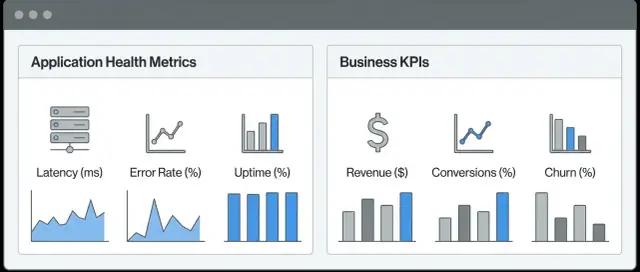
What “App Health + Business KPIs” Means (and Why It Matters)
A combined “App Health + Business KPIs” view is a single place where teams can see whether the system is working and whether the product is delivering outcomes the business cares about. Instead of bouncing between an observability tool for incidents and an analytics tool for performance, you connect the dots in one workflow.
Technical metrics vs. business metrics
Technical metrics describe the behavior of your software and infrastructure. They answer questions like: Is the app responding? Is it erroring? Is it slow? Common examples include latency, error rate, throughput, CPU/memory usage, queue depth, and dependency availability.
Business metrics (KPIs) describe user and revenue outcomes. They answer questions like: Are users succeeding? Are we making money? Examples include sign-ups, activation rate, conversion, checkout completion, average order value, churn, refunds, and support ticket volume.
The goal isn’t to replace either category—it’s to link them, so a spike in 500 errors isn’t just “red on a chart,” but clearly connected to “checkout conversion dropped 12%.”
What teams get from putting them together
When health signals and KPIs share the same interface and time window, teams typically see:
- Faster triage: Confirm impact quickly (e.g., errors increased and paid upgrades fell) and avoid chasing “noisy” issues that don’t affect customers.
- Clearer priorities: Rank incidents and performance work by customer impact, not by whoever shouts loudest.
- Fewer blind spots: Business teams notice drops in outcomes, engineering sees the correlated technical signals, and both work from the same facts.
What to expect from this guide
This guide focuses on structure and decisions: how to define metrics, connect identifiers, store and query data, and present dashboards and alerts. It’s intentionally not tied to a specific vendor, so you can apply the approach whether you’re using off-the-shelf tools, building your own, or combining both.
Start with Clear Use Cases and a Short List of Metrics
If you try to track everything, you’ll end up with a dashboard nobody trusts. Start by deciding what the monitoring app needs to help you do under pressure: make fast, correct decisions during an incident and track progress week to week.
The incident questions your app must answer
When something goes wrong, your dashboards should quickly answer:
- What broke? (Which service, endpoint, dependency, region?)
- Who is impacted? (All users, a segment, a plan tier, a specific customer?)
- How much does it hurt? (Drop in conversions, failed payments, support tickets, churn risk?)
If a chart doesn’t help answer one of these, it’s a candidate for removal.
Choose 5–10 health metrics that explain “is the app working?”
Keep the core set small and consistent across teams. A good starting list:
- Availability (successful requests vs total)
- Latency (p50/p95/p99 response time)
- Error rate (4xx/5xx, exceptions)
- Saturation (CPU, memory, queue depth, DB connections)
- Traffic (requests per second)
These map well to common failure modes and are easy to alert on later.
Choose 5–10 business KPIs that explain “is the business healthy?”
Pick metrics that represent the customer funnel and revenue reality:
- Signups
- Activation (first key action completed)
- Conversion (trial → paid, add-to-cart → purchase, etc.)
- Revenue (MRR/ARR, payments succeeded)
- Retention (cohort retention, churn)
Prevent dashboard drift with owners and cadence
For each metric, define an owner, a definition/source of truth, and a review cadence (weekly or monthly). If nobody owns a metric, it will quietly become misleading—and your incident decisions will suffer.
Map Technical Signals to Customer Journeys and Outcomes
If your health charts live in one tool and your business KPI dashboard lives in another, it’s easy to argue about “what happened” during an incident. Anchor monitoring around a few customer journeys where performance clearly affects outcomes.
Start with 3–5 critical journeys
Pick flows that directly drive revenue or retention, such as onboarding, search, checkout/payment, account login, or content publishing. For each journey, define the key steps and what “success” means.
Example (checkout):
- Step: Cart → Shipping → Payment → Confirmation
- Success outcome: completed order
- Failure outcome: payment error, abandonment, timeout
Connect technical signals to outcomes
Map the technical signals that most strongly influence each step. This is where application health monitoring becomes business-relevant.
- Leading indicators: early warnings that predict pain before it shows up in KPIs (p95 latency spikes, error-rate increases, queue depth, DB connection saturation).
- Lagging indicators: what customers actually did (conversion rate, drop-off rate, average order value, support tickets).
For checkout, a leading indicator might be “payment API p95 latency,” while a lagging indicator is “checkout conversion rate.” Seeing both on one timeline makes the causal chain clearer.
Create a metric dictionary (and stick to it)
A metric dictionary prevents confusion and “same KPI, different math” debates. For every metric, document:
- Name (consistent across teams)
- Definition/formula (e.g., conversion = orders / checkout sessions)
- Granularity (per minute/hour/day; per region/device)
- Data source (APM, logs, analytics, warehouse)
- Owner (who maintains it)
Avoid vanity metrics and duplicates
Page views, raw signups, or “total sessions” can be noisy without context. Prefer metrics tied to decisions (completion rate, error budget burn, revenue per visit). Also deduplicate KPIs: one official definition beats three competing dashboards that disagree by 2%.
Choose an Architecture: Build, Integrate, or Hybrid
Before you write UI code, decide what you’re actually building. A “health + KPIs” app usually has five core components: collectors (metrics/logs/traces and product events), ingestion (queues/ETL/streaming), storage (time-series + warehouse), a data API (for consistent queries and permissions), and a UI (dashboards + drill-down). Alerting can be part of the UI, or delegated to an existing on-call system.
Build vs. integrate: a practical rule
- Integrate when you mostly need to assemble existing observability and analytics data into one experience. You’ll move faster by using tools like Prometheus/Grafana, Datadog, or your analytics platform, then add a thin layer that standardizes identity and navigation.
- Build when you need a highly opinionated workflow (e.g., “revenue drop → impacted endpoints → recent deploy → customer segment”), strict permissions, or bespoke calculations that don’t fit vendor dashboards.
- Hybrid is the common choice: build the data API + UI shell, but keep specialized charting/incident tooling where it already works well.
If you’re prototyping the UI and workflow quickly, a vibe-coding platform like Koder.ai can help you stand up a React-based dashboard shell with a Go + PostgreSQL backend from a chat-driven spec, then iterate on drill-down navigation and filters before committing to a full data platform rewrite.
Production vs staging vs dev (and why separation matters)
Plan separate environments early: production data should not be mixed with staging/dev. Keep distinct project IDs, API keys, and storage buckets/tables. If you want “compare prod vs staging,” do it through a controlled view in the API—not by sharing raw pipelines.
“Single pane” without rebuilding everything
A single pane doesn’t mean re-implementing every visualization. You can:
- Embed existing charts (fast, familiar), and add consistent filters (service, region, customer segment) via URL/query parameters.
- Re-implement only the views that need cross-source joins and custom drill-down.
If you choose embedding, define a clear navigation standard (e.g., “from KPI card to trace view”) so users don’t feel bounced between tools.
Collect Data from the Right Sources (and Align Identifiers)
Your dashboards will only be as trustworthy as the data behind them. Before you build pipelines, list the systems that already “know” what’s happening, then decide how often each one needs to be refreshed.
App health sources (signals you can act on fast)
Start with the sources that explain reliability and performance:
- Metrics from Prometheus and/or OpenTelemetry (request rate, error rate, latency, CPU/memory, queue depth).
- Logs for debugging and for counting key events (failed payments, permission errors, timeouts).
- Traces to connect slow user experiences to specific services and endpoints.
- Uptime checks (synthetic monitoring) to validate the app from the outside, including DNS/TLS and core flows.
A practical rule: treat health signals as near-real-time by default, because they drive alerts and incident response.
Business KPI sources (signals that explain outcomes)
Business KPIs often live in tools owned by different teams:
- Product analytics (signups, activation, feature usage, retention cohorts).
- Billing/CRM (MRR, renewals, churn reasons, plan upgrades).
- Database aggregates (orders completed, refunds, average order value), often the most authoritative source for money-related numbers.
Not every KPI needs second-by-second updates. Daily revenue can be batch; checkout conversion might need fresher data.
Decide near-real-time vs. batch—and document the expected delay
For each KPI, write down a simple latency expectation: “Updates every 1 minute,” “Hourly,” or “Next business day.” Then reflect that directly in the UI (for example: “Data as of 10:35 UTC”). This prevents false alarms and avoids arguments over “wrong” numbers that are simply delayed.
Align identifiers across systems (the make-or-break step)
To connect a spike in errors to lost revenue, you need consistent IDs:
- user_id (person)
- account_id / org_id (customer/company)
- order_id / invoice_id (transaction)
Define one “source of truth” for each identifier and ensure every system carries it (analytics events, logs, billing records). If systems use different keys, add a mapping table early—retroactive stitching is expensive and error-prone.
Design Storage: Time-Series for Health, Warehouse for KPIs
If you try to store everything in one database, you’ll usually end up with slow dashboards, expensive queries, or both. A cleaner approach is to treat app health telemetry and business KPIs as different data shapes with different read patterns.
Use a time-series store for health data
Health metrics (latency, error rate, CPU, queue depth) are high-volume and queried by time range: “last 15 minutes,” “compare to yesterday,” “p95 by service.” A time-series database (or metrics backend) is optimized for fast rollups and range scans.
Keep tags/labels limited and consistent (service, env, region, endpoint group). Too many unique labels can explode cardinality and cost.
Use a warehouse/lake for KPIs and long history
Business KPIs (signups, paid conversions, churn, revenue, orders) often need joins, backfills, and “as-of” reporting. A warehouse/lake is better for:
- Slowly changing dimensions (plan, segment, country)
- Historical accuracy (recomputing KPIs when definitions change)
- Slice-and-dice analysis across months/years
Add a unified access layer (one safe API)
Your web app shouldn’t talk directly to both stores from the browser. Build a backend API that queries each store, enforces permissions, and returns a consistent schema. Typical pattern: health panels hit the time-series store; KPI panels hit the warehouse; drill-down endpoints may fetch both and merge by time window.
Retention and aggregation rules to control cost
Set clear tiers:
- Raw health metrics: 7–30 days
- Downsampled health (1m → 5m → 1h): 90–400 days
- KPI facts: keep long-term (years), but partition by date
Pre-aggregate common dashboard views (hourly/daily) so most users never trigger expensive “scan everything” queries.
Build a Data API That Supports Dashboards and Drill-Downs
Your UI will only be as usable as the API behind it. A good data API makes the common dashboard views fast and predictable, while still letting people click into detail without loading a totally different product.
Define endpoints around how people explore
Design endpoints that match the main navigation, not the underlying databases:
GET /api/dashboardsandGET /api/dashboards/{id}to fetch saved layouts, chart definitions, and default filters.GET /api/metrics/timeseriesfor health and KPI charts withfrom,to,interval,timezone, andfilters.GET /api/drilldowns(or/api/events/search) for “show me the underlying requests/orders/users” behind a chart segment.GET /api/filtersfor enumerations (regions, plans, environments) and to power typeaheads.
Support the query patterns dashboards need
Dashboards rarely need raw data; they need summaries:
- Rollups: sum, count, avg, min/max across time buckets.
- Percentiles: p50/p95/p99 latency and “time-to-complete” style KPIs.
- Segmentation: break down by plan, geo, device, or release version.
- Cohorts: “users who signed up in week X” and their conversion/retention over time.
Keep expensive queries safe (and fast)
Add caching for repeat requests (same dashboard, same time range) and enforce rate limits for wide queries. Consider separate limits for interactive drill-downs vs. scheduled refreshes.
Return consistent buckets and units
Make charts comparable by always returning the same bucket boundaries and units: timestamps aligned to the chosen interval, explicit unit fields (ms, %, USD), and stable rounding rules. Consistency prevents confusing chart jumps when users change filters or compare environments.
Design Dashboards People Will Actually Use
A dashboard succeeds when it answers a question quickly: “Are we okay?” and “If not, where do I look next?” Design around decisions, not around everything you can measure.
Start with a small set of pages
Most teams do better with a few purposeful views than one mega-dashboard:
- Overview page: today’s app health (latency, error rate, traffic) plus the 1–3 business KPIs that matter most (signups, purchases, revenue). Make it obvious what changed.
- Service page: per service/API, with drill-down to endpoints, dependencies, and recent deploys.
- Business funnel page: steps like landing → signup → activation → purchase, with drop-off rates and time to convert.
- Incident page: what happened, when it started, what users felt, current status, and links to related alerts and changes.
Use a shared time picker and global filters
Put a single time picker at the top of every page, and keep it consistent. Add global filters people actually use—region, plan, platform, and maybe customer segment. The goal is to compare “US + iOS + Pro plan” to “EU + Web + Free” without rebuilding charts.
Make correlation effortless
Include at least one correlation panel per page that overlays technical and business signals on the same time axis. For example:
- error rate + checkout conversion
- p95 latency + trial activation
- payment failures + revenue per minute
This helps non-technical stakeholders see impact, and helps engineers prioritize fixes that protect outcomes.
Design for clarity (and define good vs. bad)
Avoid clutter: fewer charts, larger fonts, clear labels. Every key chart should show thresholds (good / warning / bad) and the current status should be readable without hovering. If a metric doesn’t have an agreed good/bad range, it’s usually not ready for the homepage.
Add SLOs and Alerts That Connect to Business Impact
Monitoring is only useful when it drives the right action. Service Level Objectives (SLOs) help you define “good enough” in a way that matches user experience—and alerts help you react before customers notice.
SLI/SLO basics (without the jargon overload)
- SLI (Service Level Indicator): the measurable signal of user experience (for example: “% of checkout requests that succeed” or “p95 page load time”).
- SLO: the target for that SLI over a time window (for example: “99.9% successful checkouts over 30 days”).
Pick SLIs that users actually feel: errors, latency, and availability on key journeys like login, search, and payment—not internal metrics.
Alert on symptoms first, then causes
When possible, alert on symptoms of user impact before you alert on likely causes:
- Symptom alerts: “Checkout success rate dropped below SLO,” “p95 API latency exceeded threshold,” “login errors spiked.”
- Cause alerts: “CPU high,” “memory pressure,” “DB connections near limit.”
Cause alerts are still valuable, but symptom-based alerts reduce noise and focus the team on what customers are experiencing.
Add business-impact alerts alongside technical ones
To connect health monitoring with business KPIs, add a small set of alerts that represent real revenue or growth risk, such as:
- Conversion rate drop on a key funnel step (landing → signup, cart → purchase)
- Payment failure rate spike (by provider, region, or client version)
- Orders/minute or signups/minute sudden decline (after adjusting for normal seasonality)
Tie each alert to an “expected action”: investigate, roll back, switch provider, or notify support.
Escalation rules and where alerts go
Define severity levels and routing rules up front:
- Critical: active user impact or revenue risk → page on-call and post to the incident channel
- High: likely to become user impact soon → notify on-call and create a ticket
- Info: trend warnings → email digest or dashboard-only
Make sure every alert answers: what is affected, how bad is it, and what should someone do next?
Handle Permissions, Privacy, and Compliance Early
Mixing application health monitoring with a business KPI dashboard raises the stakes: one screen might show error rates next to revenue, churn, or customer names. If permissions and privacy are added late, you’ll either over-restrict the product (no one can use it) or over-expose data (a real risk).
Role-based access (RBAC) that matches real users
Start by defining roles around decisions, not around org charts. For example:
- Engineering: service performance metrics, logs, traces, SLO and SLA tracking
- Support/CS: customer-level status and incident timelines, but not revenue
- Finance/Leadership: business KPIs and trends, with limited technical drill-down
Then implement least-privilege defaults: users should see the minimum data needed, and request broader access when justified.
Protect sensitive data (PII, revenue, and customer identifiers)
Treat PII as a separate class of data with stricter handling:
- Masking and redaction in tables and exports (e.g., partial emails, hashed user IDs)
- Row-level security for customer-specific views
- Environment separation so production PII never appears in staging dashboards
If you must join observability signals to customer records, do it with stable, non-PII identifiers (tenant_id, account_id) and keep the mapping behind tighter access controls.
Auditability: KPI definitions and dashboard changes
Teams lose trust when KPI formulas quietly change. Track:
- who changed a metric definition (numerator/denominator, filters)
- when dashboards or alert thresholds were edited
- which version was active during an incident
Expose this as an audit log and attach it to key widgets.
Multi-tenant planning (even for “internal” tools)
If multiple teams or clients use the app, design for tenancy early: scoped tokens, tenant-aware queries, and strict isolation by default. It’s much easier than retrofitting after analytics integration and incident response are already live.
Test Data Quality and Performance Before Rolling Out
Testing an “app health + KPI” product isn’t only about whether charts load. It’s about whether people trust the numbers and can act on them quickly. Before anyone outside the team sees it, validate both correctness and speed under realistic conditions.
Set performance baselines for the monitoring app
Treat your monitoring app like a first-class product with its own targets. Define baseline performance goals such as:
- Dashboard load time (e.g., initial render within a few seconds on a typical laptop)
- Query time for common filters (time range, region, plan)
- Drill-down latency (clicking from KPI to underlying incidents or traces)
Run these tests with “realistic bad days” too—high-cardinality metrics, larger time ranges, and peak traffic windows.
Add health checks for your data pipeline
A dashboard can look fine while the pipeline is silently failing. Add automated checks and surface them in an internal view:
- Ingestion lag (how far behind “now” your latest data is)
- Missing data rates (per source and per key metric)
- Schema change detection (new/removed fields, type changes)
These checks should fail loudly in staging so you don’t discover issues in production.
Use synthetic data and replay to test safely
Create synthetic datasets that include edge cases: zeros, spikes, refunds, duplicated events, and timezone boundaries. Then replay real production traffic patterns (with identifiers anonymized) into staging to validate dashboards and alerts without risking customer impact.
QA steps for KPI correctness
For each core KPI, define a repeatable correctness routine:
- Sampling: pick random users/orders and verify they roll up correctly
- Reconciliation: compare totals against your source of truth (billing, CRM, analytics)
- Backfills: verify late-arriving events update historical periods predictably
If you can’t explain a number to a non-technical stakeholder in one minute, it’s not ready to ship.
Rollout Plan, Adoption, and Ongoing Maintenance
A combined “health + KPIs” app only works if people trust it, use it, and keep it current. Treat rollout as a product launch: start small, prove value, and build habits.
Start small: one journey, one service
Pick a single customer journey that everyone cares about (for example, checkout) and one backend service most responsible for it. For that thin slice, ship:
- A journey overview: conversion rate, drop-off points, revenue per visit
- The health view for the supporting service: latency, error rate, saturation
- One drill-down path that connects a KPI drop to the technical signals behind it
This “one journey + one service” approach makes it obvious what the app is for, and it keeps early debates about “which metrics matter” manageable.
Drive adoption with a weekly review
Set a recurring 30–45 minute weekly review with product, support, and engineering. Keep it practical:
- Which dashboards were actually used this week (and by whom)?
- Which alerts were noisy or ignored—and why?
- Did we catch any customer-impacting issue earlier than before?
- What decision did the data support (pause a release, roll back a change, adjust a funnel step)?
Treat unused dashboards as a signal to simplify. Treat noisy alerts as bugs.
Create a maintenance checklist (and stick to it)
Assign ownership (even if it’s shared) and run a lightweight checklist monthly:
- Update metric definitions and KPI formulas (and document changes)
- Retire unused charts and stale dashboards
- Review SLO targets against real user expectations and seasonality
- Check identifier mapping (user/org/order IDs) for drift after product changes
- Validate data freshness, late-arriving events, and missing sources
Next steps
Once the first slice is stable, expand to the next journey or service with the same pattern.
If you want implementation ideas and examples, browse /blog. If you’re evaluating build vs. buy, compare options and scope on /pricing.
If you want to accelerate the first working version (dashboard UI + API layer + auth), Koder.ai can be a pragmatic starting point—especially for teams that want a React frontend with a Go + PostgreSQL backend, plus the option to export source code when you’re ready to move it into your standard engineering workflow.
FAQ
What does “App Health + Business KPIs” mean in practice?
It’s a single workflow (usually one dashboard + drill-down experience) where you can see technical health signals (latency, errors, saturation) and business outcomes (conversion, revenue, churn) on the same timeline.
The goal is correlation: not just “something is broken,” but “checkout errors increased and conversion dropped,” so you can prioritize fixes by impact.
Why combine observability metrics with business KPIs instead of keeping separate dashboards?
Because incidents are easier to triage when you can confirm customer impact immediately.
Instead of guessing whether a latency spike matters, you can validate it against KPIs like purchases/minute or activation rate and decide whether to page, roll back, or monitor.
What’s a good starting set of metrics to include?
Start with the incident questions:
- What broke (service/endpoint/dependency/region)?
- Who is impacted (segment/plan/customer)?
- How much does it hurt (conversion, revenue, support volume)?
Then pick 5–10 health metrics (availability, latency, error rate, saturation, traffic) and 5–10 KPIs (signups, activation, conversion, revenue, retention). Keep the homepage minimal.
How do we map technical signals to customer journeys like checkout or onboarding?
Choose 3–5 critical journeys that map directly to revenue or retention (checkout/payment, login, onboarding, search, publishing).
For each journey, define:
- Steps and “success”
- Leading indicators (p95 latency, error rate, queue depth)
- Lagging indicators (conversion, drop-off, refunds, tickets)
This keeps dashboards aligned to outcomes instead of infrastructure trivia.
What should a metric dictionary include, and who should own it?
A metric dictionary prevents “same KPI, different math” problems. For each metric, document:
- Name and definition/formula
- Granularity (minute/hour/day; per region/device)
- Data source (APM, logs, analytics, warehouse)
- Owner and review cadence
Treat unowned metrics as deprecated until someone maintains them.
How do we align identifiers across logs, traces, analytics, and billing data?
If systems can’t share consistent identifiers, you can’t reliably connect errors to outcomes.
Standardize (and carry everywhere):
user_idaccount_id/org_idorder_id/invoice_id
If keys differ across tools, create a mapping table early; retroactive stitching is usually costly and inaccurate.
What storage architecture works best for health data vs. KPI data?
A practical split is:
- Time-series backend for high-volume health telemetry (fast range scans, rollups, percentiles)
- Warehouse/lake for KPI facts and long history (joins, backfills, “as-of” reporting)
Add a backend data API that queries both, enforces permissions, and returns consistent buckets/units to the UI.
Should we build this app or integrate existing observability and analytics tools?
Use this rule:
- Integrate if you mainly need one place to navigate existing tools (embed charts, unify filters, standardize drill-down paths).
- Build if you need opinionated workflows, strict permissions, or custom joins/calculations that vendor dashboards don’t support.
- Hybrid is common: build the data API + UI shell, keep specialized tooling where it already works.
“Single pane” doesn’t require re-implementing everything.
How should we design SLOs and alerts that reflect business impact?
Alert on symptoms of user impact first, then add cause alerts.
Good symptom alerts:
- Checkout success rate below SLO
- p95 latency threshold exceeded on key journeys
- Login errors spiking
Add a small set of business-impact alerts (conversion drop, payment failures, orders/minute decline) with clear expected actions (investigate, roll back, switch provider, notify support).
What are the key privacy and permissions considerations for a combined dashboard?
Mixing revenue/KPIs with operational data raises privacy and trust risks.
Implement:
- RBAC based on real needs (engineering vs support vs finance)
- Masking/redaction and row-level security for sensitive fields
- Environment separation so production PII never leaks into staging
- Audit logs for KPI definition and dashboard/threshold changes
Prefer stable non-PII IDs (like account_id) for joins.