

Web app first or mobile app first? A simple launch choice
Compare web app first or mobile app first by feedback speed, offline use, user habits, and support load before you launch your product.
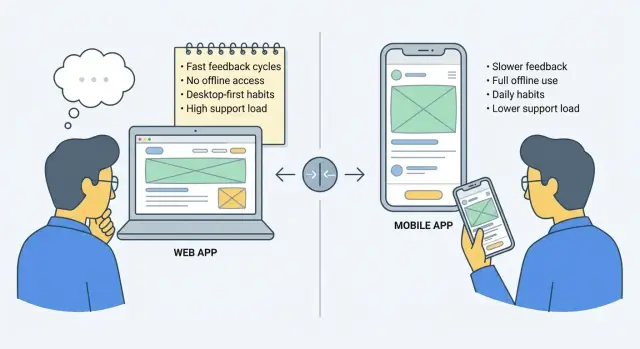
Why this choice is hard at the start
Choosing between a web app and a mobile app sounds simple until you look at what a first launch really costs. You are not just choosing a screen size. You are choosing where your team will spend its time, money, and attention for the next few months.
That is why this decision matters so much early on. Your first version should help you learn fast. You need real users to try it, get confused, ask questions, and show you what they actually need. If you choose the wrong path, you can still ship something, but you will learn much more slowly.
A web app often feels easier at the start because people can open it right away in a browser. A mobile app can feel more personal and convenient, but it also brings extra work around devices, app store rules, updates, and support. Neither option is automatically better. Each one changes what you build first and what problems show up first.
From day one, this choice affects how quickly people can try the product, how fast you can improve it, what kind of support requests you get, and which future features become easier or harder.
A founder building a booking tool, for example, might assume mobile should come first because customers use phones all day. But if the real need is testing pricing, forms, reminders, and staff workflows, a web app may answer those questions faster. On the other hand, if workers need to update jobs while moving between locations with weak signal, mobile may deserve priority.
Even when tools like Koder.ai make it faster to build both web and mobile products from chat, the launch choice still matters. Faster building does not remove the need to decide where learning should happen first. The best first version is usually the one that gets honest feedback with the least extra weight.
Start with where your users already are
A good launch choice starts with one simple question: where are people when this problem shows up?
If they are sitting at a desk, already juggling email, spreadsheets, and browser tabs, a web app often feels natural. If they are walking between jobs, standing in a shop, or checking something in short bursts on a phone, mobile may fit better.
This is the most useful way to think about the decision. Do not start with what sounds more impressive. Start with real behavior.
Watch the moment of use. A salon owner checking bookings between clients may reach for a phone. A small team updating customer records during office hours may already live in a browser. People usually stick with the device that matches their routine, especially early on when they are still deciding if your product is worth keeping.
A few questions make the answer clearer:
- What device is in their hand when the need happens?
- Are they already working in a browser most of the day?
- Is the task quick and simple, or does it require reading and typing?
- Would switching devices feel annoying or normal?
Quick phone sessions matter more than many founders expect. If users mainly check status, confirm something, send a short update, or upload a photo, mobile can match that habit well. But if the job involves comparing options, reviewing details, or typing a lot, the browser often wins because it feels easier.
Imagine a home service business using a booking tool. The office manager may prefer the web app to manage the full schedule on a laptop. The technician in the field may only need a phone to view the next job and mark it complete. If you have to choose one first, pick the side where the main daily value happens.
The best first product fits into life with the least friction. When the place of use matches real habits, people need less explanation and adoption feels more natural.
Compare feedback speed on web and mobile
When you are deciding where to launch first, feedback speed is one of the clearest ways to choose. Early on, you do not just need users. You need quick lessons about what confuses them, what they ignore, and what they want next.
A web app usually gives you those lessons faster. You can change a screen, adjust a form, fix a broken step, and let users try it again right away in a browser. There is no install step, so more people will test it without much thought.
That matters because early users are not only judging polish. They are telling you whether the idea works in real life.
Why web often wins early
With a web app, the loop is short. People can open it without downloading anything, you can test small changes the same day, and each extra test gives you a clearer idea of what to improve next.
Mobile apps can still be the right choice, but feedback often moves more slowly. Even a small fix can take longer to reach users because of release steps and app store review. That delay is frustrating when you are still learning basic things like button labels, signup flow, or which feature people actually care about.
Imagine you launch a booking tool for local service businesses. In week one, five users tell you they cannot find the reschedule option. On the web, you can move that button, rename it, and ask them to try again that afternoon. On mobile, the same improvement may take longer to get into everyone’s hands.
This is why browser access is such a strong advantage at launch. It removes install friction and gets more first time users into the product. More users means more feedback, and more feedback means better decisions.
If you are building with a fast tool like Koder.ai, this gap can stand out even more. You can update a web flow quickly, test it with real users, and keep improving before spending extra time on app store polish.
At the start, speed usually beats perfection. If users can reach your product easily and you can improve it fast, you learn sooner. That is often worth more than a smoother mobile experience on day one.
When offline use really matters
Offline support sounds important until you ask a simple question: when will people actually lose connection while using your app?
That answer should guide the decision, not the fact that a mobile app exists.
Start by mapping the real moments when signal drops or internet access is blocked. This often matters for field staff working in basements, parking garages, rural areas, client sites with poor reception, or workplaces with unstable networks.
If those situations are common, offline use may be a core need. If they happen only once in a while, building for offline from day one can add a lot of extra work without helping many users.
The next step is to decide what must still work without internet. Usually, not everything needs to. Focus on the few actions that would block the user if they stopped working.
A field worker may need to view today’s job list, check customer notes, capture photos, and save a status update to sync later. They probably do not need full reporting, admin settings, or live team chat offline. Keeping the offline scope small makes a first launch much easier.
Two questions help here:
- What task would make the app useless if the connection drops?
- How often does that happen in a normal week?
If the answer is "almost never," a web app may be enough first. Modern web apps work well on phones, and for many early products that is the fastest way to test demand and collect feedback.
This matters because offline support is not just a feature. It changes syncing, storage, error handling, and support. If two users edit the same record and one device reconnects later, you now have to handle conflicts too.
For many founders, the better first move is simple: launch on the web unless weak signal is a daily problem. Build true offline support only when user behavior proves it is necessary.
Count the support work before you choose
A launch choice is not only about build time. It is also about what happens the week after people start using your product.
If you go mobile first, support usually gets heavier fast. Users may have different phones, different operating systems, and different app versions. One person cannot log in on an older Android device. Another says the app looks wrong after a system update. A third cannot find the latest release in the app store yet.
Web apps avoid many of those problems. People open a browser and use the newest version right away. There is no install step, no app store delay, and less confusion about updates. For a small team, that can mean fewer tickets and faster fixes.
Permissions add another layer of support. The moment your app asks for camera, location, microphone, contacts, or notifications, questions go up. Some users tap "deny" without noticing. Others have settings that block alerts and assume the app is broken.
The extra work usually shows up in a few places:
- device and OS differences
- app store approval and update timing
- install, reinstall, and login issues
- permission settings users do not understand
- push notifications that fail or arrive late
This is why the choice between web and mobile should include support capacity, not just product vision. A mobile app can be the right first step, but only if your team can handle more edge cases.
A useful rule is to match your first release to the amount of support you can realistically provide. If you have a founder, one builder, and no dedicated support person, web is often the safer start. It reduces moving parts and lets you learn from user feedback without spending every day on device specific problems.
A home service tool makes this clear. If customers mainly book appointments, check status, and pay invoices, a web app may cover the job with less support. If workers need photo capture, live location, and alerts while on the road, mobile may still be worth the added burden. The key is to choose the path your team can support well, not just the one that sounds bigger.
A simple way to choose
If you are stuck, use a simple scorecard. The goal is not to predict the future. It is to pick the version that helps real users fastest with the least extra work.
Start with one clear promise. What is the main job a person wants done in the first few minutes of using your product?
- Write the main job in one sentence. Keep it narrow and concrete. Not "manage my business," but "book a job and send a confirmation" or "check today’s tasks and mark them done."
- Mark where that job happens most often. Is the user at a desk, moving between appointments, standing in a shop, or relaxing at home?
- Score both options from 1 to 5 on four things. Look at feedback speed, offline needs, user habits, and support burden.
- Build the smallest version on the higher score. Test the core job, not the full product.
- Review the choice after 20 to 30 real users. Watch what they do, where they get stuck, and what they ask for next.
This kind of scorecard keeps the decision grounded. Web often wins on fast testing and easier updates. Mobile may win if people expect push alerts, camera use, or reliable access with weak signal.
Do not build every feature. Build just enough to test the job. If a home service team only needs booking, a schedule view, and status updates, start there. The smaller the first version, the easier it is to learn what deserves more investment.
Example: a booking tool for a home service business
For a small home service business, the choice often becomes clearer when you look at one normal workday.
A customer finds the business through search, a message from a friend, or a shared post. In all of those cases, a web app is the easiest place to send them. They can open it right away, check available time slots, and book without installing anything. That removes friction at the exact moment they are ready to act.
If the goal is to get bookings fast and learn what customers actually want, web usually gives quicker feedback.
Inside the business, staff often works differently from customers. An office manager or owner may sit at a laptop between calls, move jobs around, confirm appointments, and check the next day’s schedule. For that kind of work, a larger screen and a browser based dashboard are usually enough.
A sensible launch path might look like this:
- Start with a web booking page for customers.
- Add a web dashboard for staff.
- Build a mobile app later if field teams need faster updates on the go.
This staged approach keeps the first version focused. It also lowers support work because you are maintaining one main experience instead of a website plus iPhone and Android apps from day one.
Mobile becomes more important when technicians are in the field all day. If they need to mark jobs complete, upload photos, collect signatures, or check addresses from a phone, a mobile app can save time. But even then, offline support matters only when weak signal is common and those updates still have to happen.
If weak signal is rare, launching on the web first is often the smarter move. You can prove demand, fix scheduling problems, and learn real user habits before taking on the extra build and support burden of mobile.
Common mistakes when picking first
A lot of teams make this decision by looking outward instead of inward. They see what a big competitor offers now and assume they need the same thing on day one. That often leads to building for scale before proving the basics.
Large companies usually added their mobile app, offline mode, or advanced account features after years of customer feedback. If you copy the end result instead of the path, you can spend months on work that early users never asked for.
One common mistake is treating "we need an app" as proof of demand. People say this for many reasons. Sometimes they really mean, "I want this to work on my phone," not "I need to install it from an app store."
A mobile friendly web app can often satisfy that need at the start. It lets you test the core job faster and learn what people actually do, not just what they say they want.
Another mistake is building offline features too early. Offline support sounds important, but in many products it matters only for a small part of usage. If most customers have a connection when they book, message, approve, or check status, full offline mode may not change much.
Before adding it, ask a narrower question: what breaks when the internet drops for five minutes? That answer is usually more useful than a broad plan for full offline use.
Support work is also easy to underestimate. Mobile apps often bring extra tasks that teams forget to count, including release steps, update delays, login issues across devices, permission prompts, and more device specific bug reports.
A small home service business is a good example. If customers mainly book appointments, check messages, and pay invoices, a web app may cover the real need. If the team jumps straight to mobile because a bigger competitor has one, they may end up solving permission problems and update issues before they have steady bookings.
The safest starting point is usually the smallest version that can test behavior fast. Build for the habit people already have, then add complexity only when real usage proves it belongs.
Quick checklist before you commit
Before you choose a side, pressure test the decision with a few simple questions. If most answers point in one direction, that is usually your best launch path.
- Can people start using it right away? If users only need to open a link and try the product, web usually wins.
- How often will they be stuck with weak or no signal? If poor connection is a daily problem, mobile may need to come earlier.
- Can your team support stores, devices, and updates? A mobile launch means more support work as well as more building work.
- Which option gets you real feedback faster? Early feedback matters more than perfect polish.
- Do you have one strong reason to delay the other platform? The reason should be concrete, not vague.
A practical example makes this easier. If you are building a booking tool for local service teams, web may be enough at first for office staff and customers. But if technicians need schedules, notes, and job updates while driving between areas with bad reception, mobile moves up the list.
If you still feel split, choose the option that helps you learn faster with less support work. You can always add the second platform once the main user behavior is clear.
What to do next
If you are still unsure, do not treat this like a permanent decision. Treat it like a 60 to 90 day test. Pick one path, build the smallest useful version, and learn from real use instead of guessing.
Choose one clear goal before launch. That goal should be easy to measure and easy to explain to your team. You might track signups if your biggest risk is getting attention, or repeat use if your biggest risk is whether people come back after trying the product once.
A simple plan looks like this:
- Choose one platform for the first 60 to 90 days.
- Set one success metric and review it every week.
- Write down every user request that points to the second platform.
- Wait for patterns, not one off opinions.
This keeps the choice grounded in evidence. If ten users ask for push notifications, that matters. If one user says, "I only use mobile," that is useful, but it should not decide your roadmap alone.
It also helps to separate platform requests from product requests. Sometimes people ask for a mobile app when what they really want is faster access, fewer steps, or better reminders. You may be able to solve that without changing your whole launch plan.
If you want to test both directions quickly, Koder.ai can be useful here. It lets people create web, server, and mobile applications through chat, which can make it easier to compare simple flows before committing to a full build.
The next move does not need to be perfect. It needs to be focused, measurable, and easy to change once real users show you what matters.
FAQ
Should most startups launch a web app first?
Usually, yes. A web app is often the best first launch because people can open it in a browser right away, and you can update it faster as you learn. It is a strong default when your main goal is testing demand and fixing confusion quickly.
When does mobile app first make more sense?
Choose mobile first when the main job happens on a phone and speed on the go really matters. That is common for field teams, photo capture, location-based work, push alerts, or frequent use in places where a laptop is not practical.
Do I need an app store app if users ask for mobile?
Not always. Many users say they want an app when they really mean they want something that works well on their phone. A mobile-friendly web app can often solve that early without adding app store delays and extra support work.
How important is offline support on day one?
Only if weak signal is a normal part of the job. If connection problems happen rarely, full offline support can add a lot of complexity without helping much. Start by asking what must still work when the internet drops, then keep that scope small.
Which option helps me get feedback faster?
Web usually wins here. You can change a screen or flow and let users try it again almost immediately, which makes early learning much faster. Mobile can still work, but release steps and store review can slow small fixes.
Is mobile harder to support after launch?
Yes, in most cases. Mobile often brings more edge cases like device differences, OS versions, install problems, permission prompts, notification issues, and release timing. A web app is usually simpler for a small team to maintain at the start.
What if customers and staff use different devices?
Start with the side where the main daily value happens. For example, customers might book through the web while staff later use mobile for quick job updates. You do not need to launch every use case at once.
How do I decide if I still feel split?
Use a simple scorecard. Compare web and mobile on user habits, feedback speed, offline needs, and support burden, then pick the higher score. If one option helps you learn faster with less overhead, that is usually the right first move.
Can I change direction later if I pick the wrong one?
Yes. This is not a forever decision. Treat the first version like a 60 to 90 day test, watch real behavior, and add the second platform once patterns are clear. What matters most is learning quickly, not guessing perfectly.
How can Koder.ai help with this choice?
Koder.ai can help you test ideas faster because it lets you create web, server, and mobile apps through chat. That makes it easier to compare simple flows, but you should still choose one launch path first so your feedback is focused.