

Web Workers vs Service Workers: what they are and why
Learn what Web Workers and Service Workers are, how they differ, and when to use each for faster pages, background tasks, caching, and offline support.
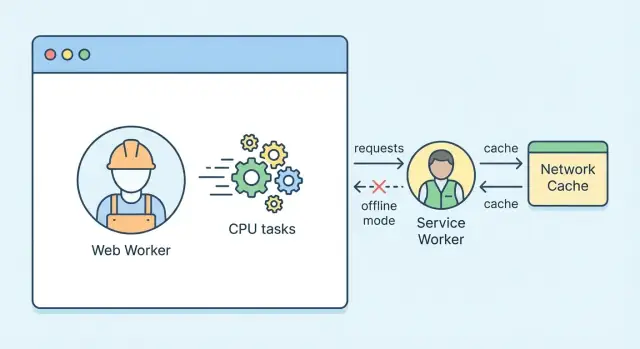
Web Workers vs Service Workers: the quick overview
Browsers run most of your JavaScript on the main thread—the same place that handles user input, animations, and painting the page. When heavy work happens there (parsing big data, image processing, complex calculations), the UI can stutter or “freeze.” Workers exist to move certain tasks off the main thread or out of the page’s direct control, so your app stays responsive.
The problem workers solve
If your page is busy doing a 200ms computation, the browser can’t smoothly scroll, respond to clicks, or keep animations at 60fps. Workers help by letting you do background work while the main thread focuses on the interface.
Quick definitions
A Web Worker is a background JavaScript thread you create from a page. It’s best for CPU-heavy tasks that would otherwise block the UI.
A Service Worker is a special kind of worker that sits between your web app and the network. It can intercept requests, cache responses, and enable features like offline support and push notifications.
A simple mental model: “threads” vs “network proxy”
Think of a Web Worker as a helper doing calculations in another room. You send it a message, it works, and it messages back.
Think of a Service Worker as a gatekeeper at the front door. Requests for pages, scripts, and API calls pass by it, and it can decide whether to fetch from the network, serve from cache, or respond in a custom way.
What you’ll learn in this article
By the end, you’ll know:
- when a web worker is the right tool for performance (and what it can’t access)
- what a service worker enables for offline caching, updates, and progressive web app behavior
- how messaging (like
postMessage) fits into the worker model, and why the Cache Storage API matters for offline
This overview sets the “why” and the mental model—next we’ll dive into how each worker type behaves and where it fits in real projects.
Why browsers have workers in the first place
When you open a web page, most of what you “feel” happens on the main thread. It’s responsible for drawing pixels (rendering), reacting to taps and clicks (input), and running a lot of JavaScript.
The main thread is a shared checkout line
Because rendering, input handling, and JavaScript often take turns on the same thread, one slow task can make everything else wait. That’s why performance problems tend to show up as responsiveness problems, not just “slow code.”
What “blocking” feels like to users:
- Scrolling stutters (jank)
- Buttons don’t respond to clicks right away
- Typing lags behind your keyboard
- Animations freeze for a moment
Async isn’t the same as parallel
JavaScript has many asynchronous APIs—fetch(), timers, events—that help you avoid waiting idly. But async doesn’t magically make heavy work happen at the same time as rendering.
If you do expensive computation (image processing, big JSON crunching, crypto, complex filtering) on the main thread, it still competes with UI updates. “Async” can delay when it runs, but it may still run on the same main thread and still cause jank when it executes.
Where workers fit in the browser architecture
Workers exist so browsers can keep the page responsive while still doing meaningful work.
- Web Workers let you run JavaScript on a background thread for CPU-heavy tasks.
- Service Workers run separately from any one page, acting more like a network and caching layer that can work even when the page isn’t open.
In short: workers are a way to protect the main thread so your app can stay interactive while doing real work in the background.
What is a Web Worker?
A Web Worker is a way to run JavaScript off the main thread. Instead of competing with UI work (rendering, scrolling, responding to clicks), a worker runs in its own background thread so heavy tasks can finish without making the page feel “stuck.”
Think of it as: the page stays focused on user interaction, while the worker handles CPU-heavy work like parsing a big file, crunching numbers, or preparing data for charts.
Where it runs
A Web Worker runs in a separate thread with its own global scope. It still has access to many web APIs (timers, fetch in many browsers, crypto, etc.), but it’s intentionally isolated from the page.
Dedicated Worker vs Shared Worker
There are a couple of common flavors:
- Dedicated Worker: connected to a single page/tab. When that page goes away, the worker is typically terminated.
- Shared Worker: can be shared by multiple pages/tabs from the same origin, making it useful for coordinating work across tabs (for example, sharing a single connection or synchronizing state).
If you’ve never used workers before, most examples you’ll see are dedicated workers.
How Web Workers communicate
Workers don’t directly call functions in your page. Instead, communication happens by sending messages:
- The page sends data to the worker with
postMessage(). - The worker responds back with
postMessage()as well. - The data is transferred using the structured clone algorithm, which supports many built-in types (objects, arrays, strings, numbers, Maps/Sets, ArrayBuffers, and more).
For large binary data, you can often improve performance by transferring ownership of an ArrayBuffer (so it isn’t copied), which keeps message passing fast.
Common limits (by design)
Because a worker is isolated, there are a few key constraints:
- No direct DOM access: a worker can’t read or modify the page’s HTML, CSS, or layout.
- Different globals: you don’t get
windowordocument. Workers run underself(a worker global scope), and APIs available can differ from the main page. - Async mindset: since everything is message-based, you structure your code around sending work in and receiving results back.
Used well, a Web Worker is one of the simplest ways to improve main thread performance without changing what your app does—just where the expensive work happens.
When to use Web Workers (and when not to)
Web Workers are a great fit when your page feels “stuck” because JavaScript is doing too much work on the main thread. The main thread is also responsible for user interactions and rendering, so heavy tasks there can cause jank, delayed clicks, and frozen scrolling.
Best fits for Web Workers
Use a Web Worker when you have CPU-heavy work that doesn’t need direct access to the DOM:
- Heavy computation: calculations, simulations, data crunching.
- Parsing and transformation: large JSON parsing, CSV parsing, schema validation.
- Compression / decompression: zip/gzip-style workloads, encoding/decoding.
- Image processing: resizing, filtering, generating thumbnails (often paired with OffscreenCanvas in supported browsers).
A practical example: if you receive a large JSON payload and parsing it causes the UI to stutter, move parsing into a worker, then send back the result.
Data handling tips (for speed)
Communication with a worker happens through postMessage. For large binary data, prefer transferable objects (like ArrayBuffer) so the browser can hand memory ownership to the worker instead of copying it.
// main thread
worker.postMessage(buffer, [buffer]); // transfers the ArrayBuffer
This is especially useful for audio buffers, image bytes, or other large chunks of data.
When not to use Web Workers
Workers have overhead: extra files, message passing, and a different debugging flow. Skip them when:
- The task is tiny (milliseconds) and runs infrequently.
- The work requires frequent DOM reads/writes (workers can’t touch the DOM).
- You need ultra-low-latency back-and-forth messaging; constant
postMessageping-pong can erase the benefit.
A simple rule of thumb
If a task can cause a noticeable pause (often ~50ms+) and can be expressed as “input → compute → output” without DOM access, a Web Worker is usually worth it. If it’s mostly UI updates, keep it on the main thread and optimize there instead.
What is a Service Worker?
A Service Worker is a special kind of JavaScript file that runs in the background of the browser and acts like a programmable network layer for your site. Instead of running on the page itself, it sits between your web app and the network, letting you decide what happens when the app requests resources (HTML, CSS, API calls, images).
Lifecycle basics (register → install → activate → control)
A Service Worker has a lifecycle that’s separate from any single tab:
- Register: the page tells the browser “this site has a service worker” (usually from your main JS).
- Install: the browser downloads it and runs an install step, often used to pre-cache important files.
- Activate: the new worker takes over, typically after closing old tabs or when it’s safe to replace an older version.
- Control: once active, it can “control” pages within its scope and start intercepting requests.
Because it can be stopped and restarted at any time, treat it like an event-driven script: do work quickly, store state in persistent storage, and avoid assuming it’s always running.
Scope and origin rules (high level)
Service Workers are restricted to the same origin (same domain/protocol/port) and only control pages under their scope—usually the folder where the worker file is served (and below). They also require HTTPS (except localhost) because they can affect network requests.
Key APIs you’ll see often
- Fetch event: intercept requests and decide whether to use the network, a cache, or a custom response.
- Cache Storage API: store and retrieve cached responses for offline use and speed.
- Clients API: communicate with and manage open tabs/windows your worker controls.
What Service Workers are used for
A Service Worker is mainly used to sit between your web app and the network. It can decide when to use the network, when to use cached data, and when to do a bit of work in the background—without blocking the page.
Offline support (smart caching)
The most common job is enabling offline or “poor connection” experiences by caching assets and responses.
A few practical caching strategies you’ll see:
- Cache-first: great for static files (CSS, JS, logos). Fast, works offline.
- Network-first: good for frequently changing content (news, feeds). Falls back to cache when offline.
- Stale-while-revalidate: shows cached content immediately, then refreshes it in the background for next time.
This is usually implemented with the Cache Storage API and fetch event handling.
Faster repeat visits
Service Workers can improve perceived speed on return visits by:
- Precaching: saving the “must-have” app files during installation (often called the app shell).
- Runtime caching: caching pages or API responses as the user navigates.
The result is fewer network requests, faster start-up, and more consistent performance on flaky connections.
Background features (when supported)
Service Workers can power background capabilities such as push notifications and background sync (support varies by browser and platform). That means you can notify users or retry a failed request later—even if the page isn’t currently open.
PWA building blocks
If you’re building a progressive web app, Service Workers are a core piece behind:
- Installability (paired with a web app manifest)
- Reliable offline pages (e.g., a friendly fallback)
- The app shell model for snappy navigation
Key differences: Web Worker vs Service Worker
If you remember only one thing: Web Workers help your page do heavy work without freezing the UI, while Service Workers help your app control network requests and behave like an installable app (PWA).
Where they run (what job they’re for)
A Web Worker is for CPU-heavy tasks—parsing large data, generating thumbnails, crunching numbers—so the main thread stays responsive.
A Service Worker is for request handling and app lifecycle tasks—offline support, caching strategies, background sync, and push notifications. It can sit between your app and the network.
Lifetime and “who owns it”
A Web Worker is typically tied to a page/tab. When the page goes away, the worker usually goes away too (unless you’re using special cases like SharedWorker).
A Service Worker is event-driven. The browser can start it to handle an event (like a fetch or push), then stop it when it’s idle. That means it can run even when no tab is currently open, as long as an event wakes it.
Network access and control
A Web Worker cannot intercept network requests made by the page. It can fetch() data, but it can’t rewrite, cache, or serve responses for other parts of your site.
A Service Worker can intercept network requests (via the fetch event), decide whether to go to the network, respond from cache, or return a fallback.
Storage and caching
A Web Worker doesn’t manage HTTP caching for your app.
A Service Worker commonly uses the Cache Storage API to store and serve request/response pairs—this is the foundation for offline caching and “instant” repeat loads.
How to set them up (high-level steps)
Getting a worker running is mostly about where it runs from and how it’s loaded. Web Workers are created directly by a page script. Service Workers are installed by the browser and sit “in front” of network requests for your site.
Web Worker: create it from your page
A Web Worker starts life when your page creates one. You point to a separate JavaScript file, then communicate via postMessage.
// main.js (running on the page)
const worker = new Worker('/workers/resize-worker.js', { type: 'module' });

worker.postMessage({ action: 'start', payload: { /* ... */ } });

worker.onmessage = (event) => {
  console.log('From worker:', event.data);
};
A good mental model: the worker file is just another script URL your page can fetch, but it runs off the main thread.
Service Worker: register it (once) and let the browser install it
Service Workers must be registered from a page that your user visits:
// main.js
if ('serviceWorker' in navigator) {
  navigator.serviceWorker.register('/sw.js');
}
After registration, the browser handles the install/activate lifecycle. Your sw.js can listen for events like install, activate, and fetch.
Why Service Workers require HTTPS
Service Workers can intercept network requests and cache responses. If registration were allowed over HTTP, a network attacker could swap in a malicious sw.js and effectively control future visits. HTTPS (or http://localhost for development) protects the script and the traffic it can influence.
Versioning mindset: treat worker files like deployable “releases”
Browsers cache and update workers differently than normal page scripts. Plan for updates:
- Change the file when behavior changes (often by deploying a new
sw.js/worker bundle). - In Service Workers, expect an “update” flow: a new worker installs, then activates when safe.
- When you change caching rules, include cleanup logic during activation so old caches don’t linger.
If you want a smoother rollout strategy later, see /blog/debugging-workers for testing habits that catch update edge cases early.
Debugging and testing workers in the browser
Workers fail in different ways than “normal” page JavaScript: they run in separate contexts, have their own console, and can be restarted by the browser. A solid debugging routine saves hours.
Web Worker debugging (DevTools)
Open DevTools and look for worker-specific targets. In Chrome/Edge, you’ll often see workers listed under Sources (or via the “Dedicated worker” entry) and in the Console context selector.
Use the same tools you’d use on the main thread:
- Console logging: logs from a Web Worker appear in DevTools, but make sure you’re viewing the correct context.
- Breakpoints: set breakpoints inside the worker script; step through
onmessagehandlers and long-running functions. - Performance profiling: record a Performance trace and verify the main thread stays responsive while the worker does heavy work.
If messages seem “lost,” inspect both sides: verify you’re calling worker.postMessage(...), that the worker has self.onmessage = ..., and that your message shape matches.
Service Worker debugging (Application panel)
Service Workers are best debugged in the Application panel:
- Check registration status, scope, and the active/waiting/installed versions.
- Use lifecycle controls like Skip waiting and Unregister to reset a bad state.
- Enable Update on reload to avoid chasing stale code while iterating.
Also watch the Console for install/activate/fetch errors—these often explain why caching or offline behavior isn’t working.
Common pitfalls and testing tips
Caching issues are the #1 time sink: caching the wrong files (or too aggressively) can keep old HTML/JS around. During tests, try hard reload behavior and confirm what’s actually served from the cache.
For realistic testing, use DevTools to:
- simulate Offline mode and verify fallback pages
- apply network throttling
- reload multiple times to validate Service Worker updates and message handling
If you’re iterating quickly on a PWA, it can help to generate a clean baseline app (with a predictable Service Worker and build output) and then refine caching strategies from there. Platforms like Koder.ai can be useful for this kind of experimentation: you can prototype a React-based web app from a chat prompt, export the source code, and then tweak your worker setup and caching rules with a tighter feedback loop.
Security, privacy, and performance considerations
Workers can make apps smoother and more capable, but they also change where code runs and what it can access. A quick check on security, privacy, and performance will save you from surprising bugs—and unhappy users.
Security boundaries (and why same-origin matters)
Both Web Workers and Service Workers are restricted by the same-origin policy: they can only directly interact with resources from the same scheme/host/port (unless the server explicitly allows cross-origin access via CORS). This prevents a worker from quietly pulling data from another site and mixing it into your app.
Service Workers have extra guardrails: they generally require HTTPS (or localhost in development) because they can intercept network requests. Treat them like privileged code: keep dependencies minimal, avoid dynamic code loading, and version your caching logic carefully so old caches don’t keep serving outdated files.
Privacy and user expectations
Background features should feel predictable. Push notifications are powerful, but permission prompts are easy to abuse.
Ask for permission only when there’s a clear benefit (for example, after a user enables alerts in settings), and explain what they’ll receive. If you sync or prefetch data in the background, communicate it in plain language—users notice unexpected network activity or notifications.
Performance risks to watch
Workers aren’t “free performance.” Overusing them can backfire:
- Message overhead: frequent
postMessagecalls (especially with large objects) can become a bottleneck. Prefer batching and using transferable objects when appropriate. - Memory costs: each worker has its own memory and startup overhead; too many workers can increase RAM use and battery drain.
- Cache growth: a Service Worker that caches aggressively can bloat storage. Add cache limits and cleanup during updates.
Graceful fallback
Not every browser supports every capability (or users may block permissions). Feature-detect and degrade cleanly:
if ('serviceWorker' in navigator) {
  // register service worker
} else {
  // continue without offline features
}
The goal: core functionality should still work, with “nice-to-haves” (offline, push, heavy computations) layered on when available.
Common patterns that use both together
Web Workers and Service Workers solve different problems, so they pair well when an app needs both heavy computation and fast, reliable loading. A good mental model is: Web Worker = compute, Service Worker = network + caching, main thread = UI.
Pattern 1: Image processing + offline gallery
Say your app lets users edit photos (resize, filters, background removal) and view a gallery later without a connection.
- A Web Worker does the CPU-heavy work (decode, transform, generate thumbnails) so scrolling and taps stay smooth.
- A Service Worker caches the resulting thumbnails and originals in Cache Storage (or metadata in IndexedDB) and serves them instantly on repeat visits or offline.
This “compute then cache” approach keeps responsibilities clear: the worker produces outputs, and the service worker decides how to store and serve them.
Pattern 2: Data sync + background caching
For apps with feeds, forms, or field data:
- A Web Worker can normalize large JSON payloads, run diffing, or validate data without blocking UI.
- A Service Worker can cache API responses for quick startup and handle offline reads. When connectivity returns, it can refresh caches and (where supported) coordinate background sync.
Even without full background sync, a service worker still improves perceived speed by serving cached responses while the app updates in the background.
Keeping responsibilities separate
Avoid mixing roles:
- UI thread: rendering, user input, accessibility, minimal state wiring.
- Web Worker: pure computation and data preparation (often via
postMessage). - Service Worker: request routing, caching strategy, offline fallbacks.
Quick checklist: which one do you need?
- Is the task CPU-heavy (parsing, encoding, crypto, image/audio processing)? Use a Web Worker.
- Is the task about fetch interception, offline behavior, or caching? Use a Service Worker.
- Do you need both fast UI and fast loading/offline? Use both, but keep the boundary clear: compute in the web worker, store/serve via the service worker.
FAQ: practical questions people ask
Can a Service Worker access the DOM?
No. A Service Worker runs in the background, separate from any page tab, and it doesn’t have direct access to the DOM (the page’s HTML elements).
That separation is intentional: Service Workers are designed to keep working even when no page is open (for example, to respond to a push event or to serve cached files). Because there may be no active document to manipulate, the browser keeps it isolated.
If a Service Worker needs to affect what a user sees, it communicates with pages via messaging (for example, postMessage) so the page can update the UI.
Do I need a Service Worker for a Web Worker?
No. Web Workers and Service Workers are independent features.
- Use a Web Worker when you want to move heavy JavaScript work off the main thread (like parsing, calculations, image processing) to keep the UI responsive.
- Use a Service Worker when you want network-level features (offline caching, intercepting requests, background sync, push notifications).
You can use either one alone, or both together if your app needs both background networking and background computation.
Are workers supported everywhere?
In modern browsers, Web Workers are widely supported and usually the safer “baseline” choice.
Service Workers are also widely supported in current versions of major browsers, but there are more requirements and edge cases:
- They require HTTPS (except
localhostfor development). - Some features (like push notifications) vary by browser and platform.
If broad compatibility matters, treat Service Worker features as progressive enhancement: build a good core experience first, then add offline/push where available.
Will this make my site faster automatically?
Not automatically.
- A Web Worker helps when your site is slowed by CPU-heavy JavaScript on the main thread. Moving that work can reduce jank and improve responsiveness—but you still pay overhead to send data back and forth.
- A Service Worker helps when your site is slowed by network requests. Caching and smart fetch handling can make repeat visits feel instant—but caching the wrong things can cause stale content.
The real gains come from using the right worker for the right bottleneck, and measuring before and after.
FAQ
How do I decide whether I need a Web Worker?
Use a Web Worker when you have CPU-heavy work that can be expressed as input → compute → output and doesn’t need the DOM.
Good fits include parsing/transforming large payloads, compression, crypto, image/audio processing, and complex filtering. If the work is mostly UI updates or frequent DOM reads/writes, a worker won’t help (and can’t access the DOM anyway).
How do I decide whether I need a Service Worker?
Use a Service Worker when you need network control: offline support, caching strategies, faster repeat visits, request routing, and (where supported) push/background sync.
If your problem is “the UI freezes while computing,” that’s a Web Worker problem. If your problem is “loading is slow/offline is broken,” that’s a Service Worker problem.
Do Web Workers require a Service Worker (or vice versa)?
No. Web Workers and Service Workers are independent.
- Web Worker: created by a page for background computation.
- Service Worker: installed/activated by the browser to intercept requests and manage caching.
You can use either alone, or combine them when you need both compute and offline/network features.
What’s the biggest difference in lifetime between Web Workers and Service Workers?
Mostly scope and lifetime.
- A Web Worker is usually tied to a page/tab (especially a Dedicated Worker) and typically goes away when the page closes.
- A Service Worker is event-driven and can wake up to handle events (like
fetch) even when no page is open, then shut down when idle.
Can a Web Worker access or modify the DOM?
No. Web Workers don’t have window/document access.
If you need to affect the UI, send data back to the main thread via postMessage(), then update the DOM in your page code. Keep the worker focused on pure computation.
Can a Service Worker access the DOM?
No. Service Workers don’t have DOM access.
To influence what the user sees, communicate with controlled pages via messaging (for example using the Clients API + postMessage()), and let the page update the UI.
What’s the best way to send data to a Web Worker efficiently?
Use postMessage() on both sides.
- Main thread → worker:
worker.postMessage(data) - Worker → main thread:
self.postMessage(result)
For large binary data, prefer transferables (like ArrayBuffer) to avoid copying:
worker.postMessage(buffer, [buffer]);
How does offline caching work with a Service Worker?
Service Workers sit between your app and the network and can respond to requests using the Cache Storage API.
Common strategies:
- Cache-first: great for static assets
- Network-first: better for frequently changing data
- Stale-while-revalidate: fast response now, refresh in background
Pick a strategy per resource type (app shell vs API data), not one global rule.
Can I use a Web Worker and Service Worker together in the same app?
Yes, but keep responsibilities clear.
A common pattern is:
- Web Worker: compute (e.g., generate thumbnails, normalize large JSON)
- Service Worker: cache/serve (store results for offline and fast repeat loads)
- Main thread: UI
This avoids mixing UI logic into background contexts and keeps performance predictable.
What are the quickest debugging steps when workers don’t behave as expected?
Use the right DevTools surface for each.
- Web Worker: check the worker target in DevTools (Sources/Console context), set breakpoints in
onmessage, and profile to confirm the main thread stays responsive. - Service Worker: use the Application panel to inspect registration/scope, use “Update on reload,” and reset state with “Unregister” or “Skip waiting.”
When debugging caching bugs, always verify what’s actually served (network vs cache) and test offline/throttling.