

WebSockets vs Server-Sent Events: pick the right one
WebSockets vs Server-Sent Events explained for live dashboards, with simple rules for choosing, scaling basics, and what to do when connections drop.
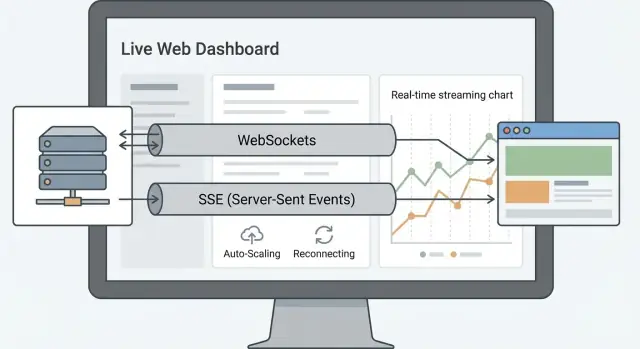
What live dashboards actually need
A live dashboard is basically a promise: numbers change without you hitting refresh, and what you see is close to what is happening right now. People expect updates to feel quick (often within a second or two), but they also expect the page to stay calm. No flicker, no jumping charts, no "Disconnected" banner every few minutes.
Most dashboards are not chat apps. They mainly push updates from server to browser: new metric points, a changed status, a fresh batch of rows, or an alert. The common shapes are familiar: a metrics board (CPU, signups, revenue), an alerts panel (green/yellow/red), a log tail (latest events), or a progress view (job at 63%, then 64%).
The choice between WebSockets and Server-Sent Events (SSE) is not just a technical preference. It changes how much code you write, how many odd edge cases you need to handle, and how expensive it gets when 50 users becomes 5,000. Some options are easier to load balance. Some make reconnection and catch-up logic simpler.
The goal is simple: a dashboard that stays accurate, stays responsive, and does not turn into an on-call nightmare as it grows.
WebSockets and SSE, explained simply
WebSockets and Server-Sent Events both keep a connection open so a dashboard can update without constant polling. The difference is how the conversation works.
WebSockets in one sentence: a single, long-lived connection where the browser and server can both send messages at any time.
SSE in one sentence: a long-lived HTTP connection where the server continuously pushes events to the browser, but the browser does not send messages back on that same stream.
That difference usually decides what feels natural.
- If your dashboard mostly needs live updates (new rows, changing metrics, status lights), SSE is often a clean fit.
- If your dashboard includes interactive features that need instant back-and-forth (live commands, collaborative actions, controls that need immediate server feedback), WebSockets tends to fit better.
A concrete example: a sales KPI wallboard that only shows revenue, active trials, and error rates can run happily on SSE. A trading screen where a user places orders, receives confirmations, and gets immediate feedback on each action is much more WebSocket-shaped.
No matter which you choose, a few things do not change:
- You still need a reliable data source (database, queue, cache) that represents "truth".
- You still need permissions, because "live" data is still private data.
- You still need a plan for disconnects and reconnects, because networks drop.
Transport is the last mile. The hard parts are often the same either way.
How the data moves: one-way vs two-way
The main difference is who can talk, and when.
With Server-Sent Events, the browser opens one long-lived connection and only the server sends updates down that pipe. With WebSockets, the connection is two-way: the browser and server can both send messages at any time.
For many dashboards, most traffic is server to browser. Think "new order arrived", "CPU is 73%", "ticket count changed". SSE fits that shape well because the client mostly listens.
WebSockets make more sense when the dashboard is also a control panel. If a user needs to send actions frequently (acknowledge alerts, change shared filters, collaborate), two-way messaging can be cleaner than constantly creating new requests.
Message payloads are usually simple JSON events either way. A common pattern is to send a small envelope so clients can route updates safely:
{"type":"metric","name":"active_users","value":128,"ts":1737052800}
Fan-out is where dashboards get interesting: one update often needs to reach many viewers at once. Both SSE and WebSockets can broadcast the same event to thousands of open connections. The difference is operational: SSE behaves like a long HTTP response, while WebSockets switch to a separate protocol after an upgrade.
Even with a live connection, you will still use normal HTTP requests for things like initial page load, historical data, exports, create/delete actions, auth refresh, and large queries that do not belong in the live feed.
A practical rule: keep the live channel for small, frequent events, and keep HTTP for everything else.
Simplicity: which is easier to build and keep stable
If your dashboard only needs to push updates to the browser, SSE usually wins on simplicity. It is an HTTP response that stays open and sends text events as they happen. Fewer moving parts means fewer edge cases.
WebSockets are great when the client must talk back often, but that freedom adds code you have to maintain.
What the code feels like
With SSE, the browser connects, listens, and processes events. Reconnects and basic retry behavior are built in for most browsers, so you spend more time on event payloads and less time on connection state.
With WebSockets, you quickly end up managing the socket lifecycle as a first-class feature: connect, open, close, error, reconnect, and sometimes ping/pong. If you have many message types (filters, commands, acknowledgements, presence-like signals), you also need a message envelope and routing on both client and server.
A good rule of thumb:
- Choose SSE when the server mostly broadcasts updates and the client rarely sends messages.
- Choose WebSockets when the client must send frequent actions and you need instant two-way feedback.
Debugging and operations
SSE is often easier to debug because it behaves like regular HTTP. You can usually see events clearly in browser devtools, and many proxies and observability tools already understand HTTP well.
WebSockets can fail in less obvious ways. Common issues are silent disconnects from load balancers, idle timeouts, and "half-open" connections where one side thinks it is still connected. You often notice problems only after users report stale dashboards.
Example: if you are building a sales dashboard that only needs live totals and recent orders, SSE keeps the system stable and readable. If the same page must also send rapid user interactions (shared filters, collaborative editing), WebSockets may be worth the extra complexity.
Scale: what changes as dashboards get popular
When a dashboard goes from a few viewers to thousands, the main problem is not raw bandwidth. It is the number of open connections you must keep alive, and what happens when some of those clients are slow or flaky.
With 100 viewers, both options feel similar. At 1,000, you start caring about connection limits, timeouts, and how often clients reconnect. At 50,000, you are operating a connection-heavy system: every extra kilobyte buffered per client can turn into real memory pressure.
Where scaling gets hard
Scaling differences often show up at the load balancer.
WebSockets are long-lived, two-way connections, so many setups need sticky sessions unless you have a shared pub/sub layer and any server can handle any user.
SSE is also long-lived, but it is plain HTTP, so it tends to work more smoothly with existing proxies and can be easier to fan out.
Keeping servers stateless is usually simpler with SSE for dashboards: the server can push events from a shared stream without remembering much per client. With WebSockets, teams often store per-connection state (subscriptions, last-seen IDs, auth context), which makes horizontal scaling trickier unless you design for it early.
Slow clients and backpressure
Slow clients can quietly hurt you in both approaches. Watch for these failure modes:
- Buffers grow when the client reads slowly, increasing memory per connection.
- Broadcast bursts (many updates at once) cause queues to pile up.
- Mobile networks trigger frequent reconnects, spiking CPU and auth checks.
- Large messages amplify the cost of one slow viewer.
A simple rule for popular dashboards: keep messages small, send less often than you think, and be willing to drop or coalesce updates (for example, only send the latest metric value) so one slow client does not drag the whole system down.
Failure recovery: reconnects, retries, and data gaps
Live dashboards fail in boring ways: a laptop sleeps, Wi-Fi switches networks, a mobile device goes through a tunnel, or the browser suspends a background tab. Your transport choice matters less than how you recover when the connection drops.
With SSE, the browser has reconnection built in. If the stream breaks, it retries after a short delay. Many servers also support replay using an event id (often via a Last-Event-ID style header). That lets the client say, "I last saw event 1042, send me what I missed", which is a simple path to resilience.
WebSockets usually need more client logic. When the socket closes, the client should retry with backoff and jitter (so thousands of clients do not reconnect at once). After reconnecting, you also need a clear resubscribe flow: authenticate again if needed, then rejoin the right channels, then request any missed updates.
The bigger risk is silent data gaps: the UI looks fine, but it is stale. Use one of these patterns so the dashboard can prove it is up to date:
- Add a sequence number to every update and detect missing numbers.
- Offer a snapshot endpoint to rebuild state after reconnect.
- Send periodic full refreshes (every N seconds/minutes) as a safety net.
- Keep a short server buffer so clients can replay recent events.
Example: a sales dashboard that shows "orders per minute" can tolerate a brief gap if it refreshes totals every 30 seconds. A trading dashboard cannot; it needs sequence numbers and a snapshot on every reconnect.
Security and access control without surprises
Live dashboards keep long-lived connections open, so small auth mistakes can linger for minutes or hours. Security is less about the transport and more about how you authenticate, authorize, and expire access.
Start with the basics: use HTTPS and treat every connection as a session that must expire. If you rely on session cookies, make sure they are scoped correctly and rotated on login. If you use tokens (like JWTs), keep them short-lived and plan how the client refreshes them.
One practical gotcha: browser SSE (EventSource) does not let you set custom headers. That often pushes teams toward cookie auth, or putting a token in the URL. URL tokens can leak via logs and copy-paste, so if you must use them, keep them short-lived and avoid logging full query strings. WebSockets typically give you more flexibility: you can authenticate during the handshake (cookie or query string) or immediately after connect with an auth message.
For multi-tenant dashboards, authorize twice: on connect and on every subscribe. A user should only be able to subscribe to streams they own (for example, org_id=123), and the server should enforce it even if the client asks for more.
To reduce abuse, cap and watch connection usage:
- Limit connections per user, per IP, and per tenant.
- Rate limit subscribe or filter changes (they can be expensive).
- Close idle or stuck connections, and reject oversized messages.
- Log connects, disconnects, auth success/failure, subscribe attempts, permission denials, and server errors.
Those logs are your audit trail and the fastest way to explain why someone saw a blank dashboard or someone else’s data.
Decision steps: choose this when... rules
Start with one question: is your dashboard mostly watching, or also talking back all the time? If the browser mainly receives updates (charts, counters, status lights) and user actions are occasional (filter change, acknowledge alert), keep your real-time channel one-way.
Next, look 6 months ahead. If you expect lots of interactive features (inline edits, chat-like controls, drag-and-drop operations) and many event types, plan for a channel that handles both directions cleanly.
Then decide how correct the view must be. If it’s OK to miss a few intermediate updates (because the next update replaces the old state), you can favor simplicity. If you need exact replay (every event matters, audits, financial ticks), you need stronger sequencing, buffering, and re-sync logic no matter what you use.
Finally, estimate concurrency and growth. Thousands of passive viewers usually pushes you toward the option that plays nicely with HTTP infrastructure and easy horizontal scaling.
Choose SSE when:
- The browser mostly receives updates, and sends actions via normal HTTP requests.
- You want the simplest setup, with built-in reconnection and retry behavior.
- Your UI can recover from gaps by reloading the latest state (snapshots beat perfect event replay).
- You expect many viewers per dashboard and want straightforward scaling.
Choose WebSockets when:
- You need steady two-way messaging (frequent client actions or low-latency commands).
- You expect richer interaction soon and want one channel for everything.
- You need custom message patterns (acknowledgements, backpressure rules, binary payloads).
- You can invest in operational details (connection limits, sticky sessions or shared state) as you scale.
If you are stuck, pick SSE first for typical read-heavy dashboards, and switch only when two-way needs become real and constant.
Common mistakes that cause outages or confusing dashboards
The most common failure starts with picking a tool that is more complex than your dashboard needs. If the UI only needs server-to-client updates (prices, counters, job status), WebSockets can add extra moving parts for little benefit. Teams end up debugging connection state and message routing instead of the dashboard.
Reconnect is another trap. A reconnect usually restores the connection, not the missing data. If a user’s laptop sleeps for 30 seconds, they can miss events and the dashboard may show wrong totals unless you design a catch-up step (for example: last seen event id or since timestamp, then refetch).
High-frequency broadcasting can quietly take you down. Sending every tiny change (every row update, every CPU tick) increases load, network chatter, and UI jitter. Batching and throttling often make the dashboard feel faster because updates arrive in clean chunks.
Watch for these production gotchas:
- No keepalives until real traffic hits, then idle connections die behind proxies.
- Timeouts set too low (or never set), causing random disconnect storms.
- No backpressure rules, so slow clients pile up and increase memory.
- Message shapes change without versioning, so old clients break silently.
- Auth checks that work locally, but no clear rules for who can subscribe to what.
Example: a support team dashboard shows live ticket counts. If you push each ticket change instantly, agents see numbers flicker and sometimes go backwards after reconnect. A better approach is to send updates every 1-2 seconds and, on reconnect, fetch the current totals before resuming events.
Example: picking a transport for a real dashboard
Picture a SaaS admin dashboard that shows billing metrics (new subscriptions, churn, MRR) plus incident alerts (API errors, queue backlog). Most viewers just watch the numbers and want them to update without refreshing the page. Only a few admins take action.
Early on, start with the simplest stream that meets the need. SSE is often enough: push metric updates and alert messages one-way from server to browser. There is less state to manage, fewer edge cases, and reconnect behavior is predictable. If an update is missed, the next message can include the latest totals so the UI heals quickly.
A few months later, usage grows and the dashboard becomes interactive. Now admins want live filters (change time window, toggle regions) and maybe collaboration (two admins acknowledging the same alert and seeing it update instantly). This is where the choice can flip. Two-way messaging makes it easier to send user actions back on the same channel and keep shared UI state in sync.
If you need to migrate, do it safely instead of switching overnight:
- Keep SSE running and add a WebSocket channel in parallel.
- Mirror the same events into both channels for a while.
- Run side-by-side tests with real reconnection and server restarts.
- Gradually move a small percent of users to WebSockets.
- Cut over, then keep SSE as a fallback briefly.
Quick checklist before you ship
Before you put a live dashboard in front of real users, assume the network will be flaky and some clients will be slow.
Data checks
Give every update a unique event ID and a timestamp, and write down your ordering rule. If two updates arrive out of order, which one wins? This matters when a reconnect replays older events or when multiple services publish updates.
Client checks
Reconnect must be automatic and polite. Use backoff (fast at first, then slower) and stop retrying forever when the user signs out.
Also decide what the UI does when data is stale. For example: if no updates arrive for 30 seconds, gray out the charts, pause animations, and show a clear "stale" state instead of silently showing old numbers.
Server checks
Set limits per user (connections, messages per minute, payload size) so one tab storm does not take down everyone else.
Track memory per connection and handle slow clients. If a browser cannot keep up, do not let buffers grow without limit. Drop the connection, send smaller updates, or switch to periodic snapshots.
Ops checks
Log connect, disconnect, reconnect, and error reasons. Alert on unusual spikes in open connections, reconnect rate, and message backlog.
Keep a simple emergency switch to disable streaming and fall back to polling or manual refresh. When something goes wrong at 2 a.m., you want one safe option.
User checks
Show "Last updated" near the key numbers, and include a manual refresh button. It reduces support tickets and helps users trust what they see.
Next steps: prototype, test failure cases, then scale up
Start small on purpose. Pick one stream first (for example, CPU and request rate, or just alerts) and write down the event contract: event name, fields, units, and how often it updates. A clear contract keeps the UI and backend from drifting apart.
Build a throwaway prototype that focuses on behavior, not polish. Make the UI show three states: connecting, live, and catching up after reconnect. Then force failures: kill the tab, toggle airplane mode, restart the server, and watch what the dashboard does.
Before you scale traffic, decide how you will recover from gaps. A simple approach is to send a snapshot on connect (or reconnect), then switch back to live updates.
Practical steps to run before a wider rollout:
- Define one event stream and its contract (including versioning).
- Add a reconnect test plan (offline, server restart, slow network).
- Add a snapshot-on-reconnect path (so gaps are obvious and fixable).
- Instrument production metrics: drop rate, reconnect success, and end-to-end lag.
- Do a small canary release, then expand.
If you are moving fast, Koder.ai (koder.ai) can help you prototype the full loop quickly: a React dashboard UI, a Go backend, and the data flow built from a chat prompt, with source code export and deployment options when you are ready.
Once your prototype survives ugly network conditions, scaling up is mostly repetition: add capacity, keep measuring lag, and keep the reconnect path boring and reliable.
FAQ
When should I choose SSE for a live dashboard?
Use SSE when the browser mostly listens and the server mostly broadcasts. It’s a great fit for metrics, alerts, status lights, and “latest events” panels where user actions are occasional and can go over normal HTTP requests.
When do WebSockets make more sense than SSE?
Pick WebSockets when the dashboard is also a control panel and the client needs to send frequent, low-latency actions. If users are constantly sending commands, acknowledgements, collaborative changes, or other real-time inputs, two-way messaging usually stays simpler with WebSockets.
What’s the simplest difference between SSE and WebSockets?
SSE is a long-lived HTTP response where the server pushes events to the browser. WebSockets upgrade the connection to a separate two-way protocol so both sides can send messages any time. For read-heavy dashboards, that extra two-way flexibility is often unnecessary overhead.
How do I avoid missing data when a user disconnects and reconnects?
Add an event ID (or sequence number) to each update and keep a clear “catch-up” path. On reconnect, the client should either replay missed events (when possible) or fetch a fresh snapshot of the current state, then resume live updates so the UI is correct again.
How can I detect and show a stale dashboard instead of silently freezing?
Treat staleness as a real UI state, not a hidden failure. Show something like “Last updated” near key numbers, and if no events arrive for a while, mark the view as stale so users don’t trust outdated data by accident.
What usually breaks first when a dashboard scales from dozens to thousands of viewers?
Start by keeping messages small and avoiding sending every tiny change. Coalesce frequent updates (send the latest value instead of every intermediate value), and prefer periodic snapshots for totals. The biggest scaling pain is often open connections and slow clients, not raw bandwidth.
How do I handle slow clients without taking down the whole service?
A slow client can cause server buffers to grow and eat memory per connection. Put a cap on queued data per client, drop or throttle updates when a client can’t keep up, and favor “latest state” messages over long backlogs to keep the system stable.
What’s the safest way to handle auth and permissions for live streams?
Authenticate and authorize every stream like it’s a session that must expire. SSE in browsers typically pushes you toward cookie-based auth because custom headers aren’t available, while WebSockets often require an explicit handshake or first message auth. In both cases, enforce tenant and stream permissions on the server, not in the UI.
What data should go over the live stream vs normal HTTP requests?
Send small, frequent events on the live channel and keep heavy work on normal HTTP endpoints. Initial page load, historical queries, exports, and large responses are better as regular requests, while the live stream should carry lightweight updates that keep the UI current.
How can I migrate from SSE to WebSockets (or the other way) without breaking users?
Run both in parallel for a while and mirror the same events into each channel. Move a small slice of users first, test reconnects and server restarts under real conditions, then gradually cut over. Keeping the old path briefly as a fallback makes rollouts much safer.