

What AI Replaces in Developer Work (and What It Doesn’t)
A practical breakdown of developer responsibilities AI can replace, where it mainly augments humans, and which tasks still need full ownership in real teams.
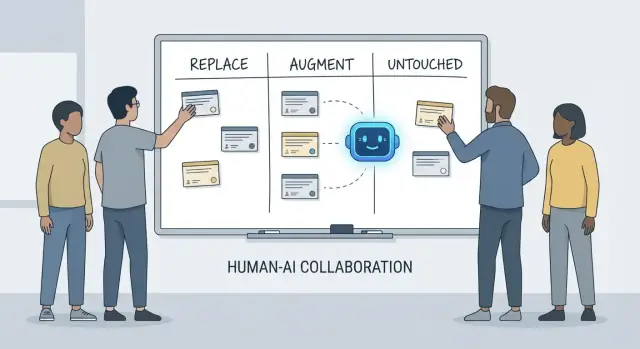
Replace, Augment, Untouched: A Simple Framework
Conversations about what “AI will do to developers” get confusing fast because we often mix up tools with responsibilities. A tool can generate code, summarize a ticket, or suggest tests. A responsibility is what the team is still accountable for when the suggestion is wrong.
This article uses a simple framework—replace, augment, untouched—to describe day-to-day work on real teams with deadlines, legacy code, production incidents, and stakeholders who expect reliable outcomes.
What “replace” means (and what it doesn’t)
Replace means the AI can complete the task end-to-end most of the time with clear guardrails, and the human role shifts to supervision and spot checks.
Examples tend to be bounded work: generating boilerplate, translating code between languages, drafting repetitive test cases, or producing first-pass documentation.
Replace does not mean “no human accountability.” If the output breaks production, leaks data, or violates standards, it’s still on the team.
What “augment” means
Augment means the AI makes a developer faster or more thorough, but it doesn’t reliably finish the job without human judgment.
This is the common case in professional engineering: you’ll get useful drafts, alternative approaches, quick explanations, or a shortlist of likely bugs—but a developer still decides what’s correct, safe, and appropriate for the product.
What stays “untouched”
Untouched means the core responsibility remains human-led because it requires context, trade-offs, and accountability that don’t compress well into prompts.
Think: negotiating requirements, choosing system-level constraints, handling incidents, setting quality bars, and making calls where there isn’t a single “right” answer.
Why responsibilities are the unit of analysis
Tools change quickly. Responsibilities change slowly.
So instead of asking “Can an AI write this code?”, ask “Who owns the outcome?” That framing keeps expectations grounded in accuracy, reliability, and accountability—things that matter more than impressive demos.
What We Mean by “Developer Responsibilities”
When people ask what AI “replaces” in development, they often mean tasks: write a function, generate tests, draft documentation. Teams, however, don’t ship tasks—they ship outcomes. That’s where developer responsibilities matter.
The usual bundle of responsibilities
A developer’s job typically spans more than coding time:
- Delivery: turning a vague idea into working software that ships on time.
- Quality: correctness, maintainability, and preventing regressions.
- Security & privacy: safe defaults, data handling, and threat awareness.
- Operations: keeping services running, understanding failure modes, and responding to incidents.
- Communication: aligning with product, design, support, and other engineers.
These responsibilities sit across the whole lifecycle—from “what should we build?” to “is it safe?” to “what happens at 3 a.m. when it breaks?”
Why it’s more than a checklist
Each responsibility is really many small decisions: what edge cases matter, which metrics indicate health, when to cut scope, whether a fix is safe to ship, how to explain a trade-off to stakeholders. AI can help execute pieces of this work (draft code, propose tests, summarize logs), but responsibility is about owning the result.
Where handoffs fail
Breakdowns often happen at handoff boundaries:
- “QA will catch it” (but no one defined what quality means).
- “Security will review” (but the design already locked in risky choices).
- “Ops will handle it” (but the service wasn’t built to be operable).
When ownership is unclear, work falls into the gaps.
Decision rights: who decides vs. who executes
A useful way to talk about responsibilities is decision rights:
- Who decides requirements, trade-offs, and acceptable risk?
- Who executes implementation and verification?
AI can speed up execution. The decision rights—and accountability for outcomes—still need a human name next to them.
Work AI Can Often Replace (with Guardrails)
AI coding assistants are genuinely useful when the work is predictable, low-stakes, and easy to verify. Think of them as a fast junior teammate: great at producing a first pass, but still needing clear instructions and a careful check.
In practice, some teams increasingly use “vibe-coding” platforms (like Koder.ai) to speed up these replaceable chunks: generating scaffolds, wiring up CRUD flows, and producing initial drafts of UI and backend code from chat. The key is the same: guardrails, review, and clear ownership.
Low-risk boilerplate
A lot of developer time goes into scaffolding projects and wiring things together. AI can often generate:
- starter files and folders (controllers, routes, DTOs)
- repetitive “glue code” between layers
- simple CRUD endpoints that follow an established pattern
The guardrail here is consistency: make sure it matches your existing conventions and doesn’t invent new patterns or dependencies.
Mechanical refactors and migrations
When a change is mostly mechanical—renaming a symbol across a codebase, reformatting, or updating a straightforward API usage—AI can accelerate the busywork.
Still, treat it like a bulk edit: run the full test suite, scan diffs for unintended behavior changes, and avoid letting it “improve” things beyond the requested refactor.
Documentation drafts (review required)
AI can draft READMEs, inline comments, and changelog entries based on code and commit notes. This can speed up clarity, but it can also create confident-sounding inaccuracies.
Best practice: use AI for structure and phrasing, then verify every claim—especially setup steps, configuration defaults, and edge cases.
Basic test generation as a starting point
For well-specified, pure functions, AI-generated unit tests can provide initial coverage and remind you of edge cases. The guardrail is ownership: you still choose what matters, add assertions that reflect real requirements, and ensure tests fail for the right reasons.
Summaries of threads and logs
When you have long Slack threads, tickets, or incident logs, AI can convert them into concise notes and action items. Keep it grounded by supplying the full context and then verifying key facts, timestamps, and decisions before sharing.
Work AI Mostly Augments: Faster, Not Finished
AI coding assistants are at their best when you already know what you want and need help moving faster. They can reduce the time spent on “typing work” and surface helpful context, but they don’t remove the need for ownership, verification, and judgment.
Speeding up implementation (a strong first pass)
Given a clear spec—inputs, outputs, edge cases, and constraints—AI can draft a reasonable starting implementation: boilerplate, data mapping, API handlers, migrations, or a straightforward refactor. The win is momentum: you get something runnable quickly.
The catch is that first-pass code often misses subtle requirements (error semantics, performance constraints, backward compatibility). Treat it like an intern’s draft: useful, but not authoritative.
Proposing options—with trade-offs you must validate
When you’re choosing between approaches (e.g., caching vs. batching, optimistic vs. pessimistic locking), AI can propose alternatives and list trade-offs. This is valuable for brainstorming, but the trade-offs must be checked against your system’s realities: traffic shape, data consistency needs, operational constraints, and team conventions.
Code comprehension and codebase navigation
AI is also strong at explaining unfamiliar code, pointing out patterns, and translating “what is this doing?” into plain language. Paired with search tools, it can help answer “Where is X used?” and generate an impact list of likely call sites, configs, and tests to revisit.
Developer ergonomics: better feedback loops
Expect practical quality-of-life improvements: clearer error messages, small examples, and ready-to-paste snippets. These reduce friction, but they don’t replace careful review, local runs, and targeted tests—especially for changes that affect users or production systems.
Product Understanding and Requirements: Still Human-Led
AI can help you write and refine requirements, but it can’t reliably decide what you should build or why it matters. Product understanding is rooted in context: business goals, user pain, organizational constraints, edge cases, and the cost of getting it wrong. Those inputs live in conversations, history, and accountability—things a model can summarize, but not truly own.
Turning fuzzy goals into something buildable
Early requests often sound like “Make onboarding smoother” or “Reduce support tickets.” A developer’s job is to translate that into clear requirements and acceptance criteria.
That translation is mostly human work because it depends on probing questions and judgment:
- What user segment are we optimizing for, and what behavior should change?
- What counts as “done,” and how will we measure it?
- Which constraints are non-negotiable (privacy, performance, deadlines)?
AI can suggest possible metrics or draft acceptance criteria, but it won’t know which constraints are real unless someone provides them—and it won’t push back when a request is self-contradictory.
Trade-offs and expectation management
Requirements work is where uncomfortable trade-offs surface: time vs. quality, speed vs. maintainability, new features vs. stability. Teams need a person to make risks explicit, propose options, and align stakeholders on the consequences.
A good spec is not just text; it’s a decision record. It should be testable and implementable, with crisp definitions (inputs, outputs, edge cases, and failure modes). AI can help structure the document, but the responsibility for correctness—and for saying “this is ambiguous, we need a decision”—stays with humans.
System Design and Architecture Decisions
System design is where “what should we build?” turns into “what should we build it on, and how will it behave when things go wrong?” AI can help you explore options, but it can’t own the consequences.
Picking an architecture that fits reality
Choosing between a monolith, modular monolith, microservices, serverless, or managed platforms isn’t a quiz with one right answer. It’s a fit problem: expected scale, budget limits, time-to-market, and the team’s skills.
An assistant can summarize patterns and suggest reference architectures, but it won’t know that your team rotates on-call weekly, that hiring is slow, or that your database vendor contract renews next quarter. Those details often decide whether an architecture succeeds.
Making trade-offs explicit
Good architecture is mostly trade-offs: simplicity vs. flexibility, performance vs. cost, speed today vs. maintainability later. AI can produce pros/cons lists quickly, which is useful—especially for documenting decisions.
What it can’t do is set priorities when trade-offs hurt. For example, “We accept slightly slower responses to keep the system simpler and easier to operate” is a business choice, not a purely technical one.
Boundaries, data ownership, and failure modes
Defining service boundaries, who owns which data, and what happens during partial outages requires deep product and operational context. AI can help brainstorm failure modes (“What if the payment provider is down?”), but you still need humans to decide the expected behavior, customer messaging, and rollback plan.
APIs that stay usable
Designing APIs is designing a contract. AI can help generate examples and spot inconsistencies, but you must decide versioning, backwards compatibility, and what you’re willing to support long-term.
Deciding when not to build (or when to delete)
Perhaps the most architectural decision is saying “no”—or deleting a feature. AI can’t measure opportunity cost or political risk. Teams can, and should.
Debugging and Root-Cause Analysis in Practice
Debugging is where AI often looks impressive—and where it can quietly waste the most time. An assistant can scan logs, point out suspicious code paths, or suggest a fix that “seems right.” But root-cause analysis isn’t just generating explanations; it’s proving one.
AI can suggest; you confirm the root cause
Treat AI output as hypotheses, not conclusions. Many bugs have multiple plausible causes, and AI is especially prone to picking a tidy story that matches the code snippet you pasted, not the reality of the running system.
A practical workflow is:
- Ask AI for possible causes and what evidence would distinguish them.
- Reproduce the issue and collect that evidence.
- Only then accept a fix (and verify it truly removes the failing condition).
Reproduction and evidence gathering are still human-led
Reliable reproduction is a debugging superpower because it turns a mystery into a test. AI can help you write a minimal repro, draft a diagnostic script, or propose extra logging, but you decide what signals matter: request IDs, timing, environment differences, feature flags, data shape, or concurrency.
When users report symptoms (“the app froze”), you still need to translate that into system behavior: which endpoint stalled, what timeouts fired, what error-budget signals changed. That requires context: how the product is used and what “normal” looks like.
Avoid “plausible but wrong” explanations
If a suggestion can’t be validated, assume it’s wrong until proven otherwise. Prefer explanations that make a testable prediction (e.g., “this will only happen on large payloads” or “only after cache warm-up”).
Patch, revert, or redesign?
Even after finding the cause, the hard decision remains. AI can outline trade-offs, but humans choose the response:
- Patch quickly to stop the bleeding.
- Revert to restore known-good behavior.
- Redesign if the failure reveals a deeper mismatch (performance, data model, or assumptions).
Root-cause analysis is ultimately accountability: owning the explanation, the fix, and the confidence that it won’t return.
Code Review: Judgment and Standards Don’t Automate
Code review isn’t just a checklist for style issues. It’s the moment a team decides what it’s willing to maintain, support, and be accountable for. AI can help you see more, but it can’t decide what matters, what fits your product intent, or what trade-offs your team accepts.
What AI is good at in reviews
AI coding assistants can act like a tireless second set of eyes. They can quickly:
- Flag likely bugs, suspicious patterns, missing null checks, or unsafe string handling.
- Suggest clearer naming, refactors, or simpler control flow.
- Point out inconsistent formatting or obvious duplication.
- Generate review questions (“What happens if this API returns an empty list?”).
Used this way, AI shortens the time between “opened the PR” and “noticed the risk.”
What still requires human judgment
Reviewing for correctness isn’t only about whether code compiles. Humans connect changes to real user behavior, production constraints, and long-term maintenance.
A reviewer still needs to decide:
- What to ship: AI can list issues, but it can’t choose which ones are release-blocking.
- Readability and maintenance: “Technically correct” code can still be confusing, brittle, or hard to extend.
- Edge cases and environment gaps: Many failures are “works on my machine” problems—configuration, data quirks, concurrency, or deployment timing. AI can’t reliably infer your runtime reality.
- Standards and intent: Only the team knows its conventions, risk tolerance, and product goals. A change can be clean code and still be the wrong behavior.
A practical workflow: AI as co-reviewer
Treat AI as a second reviewer, not the final approver. Ask it for a targeted pass (security checks, edge cases, backwards compatibility), then make a human decision about scope, priority, and whether the change aligns with team standards and product intent.
Testing Strategy and Quality Ownership
AI coding assistants can generate tests quickly, but they don’t own quality. A test suite is a set of bets about what can break, what must never break, and what you’re willing to ship without proving every edge case. Those bets are product and engineering decisions—still made by people.
AI can draft tests; humans set the targets
Assistants are good at producing unit test scaffolding, mocking dependencies, and covering “happy path” behaviors from an implementation. What they can’t reliably do is decide what coverage matters.
Humans define:
- Which modules need deep coverage because they’re safety-critical or frequently changed.
- What “done” means for a risky refactor vs. a small bug fix.
- When to invest in regression tests vs. monitoring and rollback plans.
Choosing the right mix of test types
Most teams need a layered strategy, not “more tests.” AI can help write many of these, but the selection and boundaries are human-led:
- Unit tests for business rules and tricky edge cases.
- Integration tests for database/queue/service interactions.
- End-to-end tests for critical user journeys (few, stable, high value).
- Contract tests to keep APIs compatible across teams/services.
- Performance tests to protect latency and cost under load.
Avoiding flaky tests and false confidence
AI-generated tests often mirror the code too closely, creating brittle assertions or over-mocked setups that pass even when real behavior fails. Developers prevent this by:
- Testing observable behavior, not internal implementation details.
- Keeping deterministic data and controlling time, randomness, and network calls.
- Reviewing failures to decide: real bug, test bug, or environment issue.
Aligning strategy with risk and release cadence
A good strategy matches how you ship. Faster releases need stronger automated checks and clearer rollback paths; slower releases can afford heavier pre-merge validation. The quality owner is the team, not the tool.
Measuring outcomes that matter
Quality isn’t a coverage percentage. Track whether testing is improving outcomes: fewer production incidents, faster recovery, and safer changes (smaller rollbacks, quicker confident deploys). AI can speed the work, but accountability stays with developers.
Security, Privacy, and Compliance Responsibilities
Security work is less about generating code and more about making trade-offs under real constraints. AI can help surface checklists and common mistakes, but the responsibility for risk decisions stays with the team.
Threat modeling needs context
Threat modeling isn’t a generic exercise—what matters depends on your business priorities, users, and failure modes. An assistant can suggest typical threats (injection, broken auth, insecure defaults), yet it won’t reliably know what is truly costly for your product: account takeover vs. data leaks vs. service disruption, or which assets are legally sensitive.
App-specific risks don’t look like patterns
AI is good at recognizing known anti-patterns, but many incidents come from app-specific details: a permissions edge case, a “temporary” admin endpoint, or a workflow that accidentally bypasses approvals. Those risks require reading the system’s intent, not just the code.
Secrets, permissions, and retention are intentional choices
Tools can remind you not to hardcode keys, but they can’t own the full policy:
- Where secrets live (vault, CI, runtime) and how they rotate.
- Least-privilege roles and access reviews.
- Data retention: what you store, for how long, and who can export it.
Dependencies and supply-chain risk
AI may flag outdated libraries, but teams still need practices: pinning versions, verifying provenance, reviewing transitive dependencies, and deciding when to accept risk vs. invest in remediation.
Compliance and audits require evidence
Compliance isn’t “add encryption.” It’s controls, documentation, and accountability: access logs, approval trails, incident procedures, and proof you followed them. AI can draft templates, but humans must validate evidence and sign off—because that’s what auditors (and customers) ultimately rely on.
Operations, Reliability, and Incident Response
AI can make ops work faster, but it doesn’t take ownership. Reliability is a chain of decisions under uncertainty, and the cost of a wrong call is usually higher than the cost of a slow one.
Where AI helps day-to-day
AI is useful for drafting and maintaining operational artifacts—runbooks, checklists, and “if X then try Y” playbooks. It can also summarize logs, cluster similar alerts, and propose first-pass hypotheses.
For reliability work, that translates into quicker iteration on:
- Monitoring dashboards and alert descriptions.
- Capacity notes and scaling heuristics.
- Error budget reporting templates.
These are great accelerators, but they’re not the work itself.
The parts that stay human-owned
Incidents rarely follow the script. On-call engineers deal with unclear signals, partial failures, and messy trade-offs while the clock is ticking. AI can suggest likely causes, but it can’t reliably decide whether to page another team, disable a feature, or accept short-term customer impact to preserve data integrity.
Deployment safety is another human responsibility. Tools can recommend rollbacks, feature flags, or staged releases, but teams still need to choose the safest path given business context and blast radius.
Postmortems: learning is the point
AI can draft timelines and pull key events from chat, tickets, and monitoring. Humans still do the critical parts: deciding what “good” looks like, prioritizing fixes, and making changes that prevent repeats (not just the same symptom).
If you treat AI as a co-pilot for ops paperwork and pattern-finding—not an incident commander—you’ll get speed without surrendering accountability.
Team Communication, Mentoring, and Ownership
AI can explain concepts clearly and on demand: “What’s CQRS?”, “Why does this deadlock happen?”, “Summarize this PR.” That helps teams move faster. But communication at work isn’t only about transferring information—it’s about building trust, establishing shared habits, and making commitments people can rely on.
Onboarding: more than documentation
New developers don’t just need answers; they need context and relationships. AI can help by summarizing modules, suggesting reading paths, and translating jargon. Humans still have to teach what matters here: which trade-offs the team prefers, what “good” looks like in this codebase, and who to talk to when something feels off.
Alignment across roles
Most project friction shows up between roles: product, design, QA, security, support. AI can draft meeting notes, propose acceptance criteria, or rephrase feedback more neutrally. People still need to negotiate priorities, resolve ambiguity, and notice when a stakeholder is “agreeing” without actually agreeing.
Definition of done and ownership boundaries
Teams fail when responsibility is fuzzy. AI can generate checklists, but it can’t enforce accountability. Humans must define what “done” means (tests? docs? rollout plan? monitoring?), and who owns what after merge—especially when AI-generated code hides complexity.
Checklist: responsible AI in team workflows
- Disclose AI use when it affects decisions, estimates, or authored code.
- Verify facts: links, APIs, security claims, and “best practices” before sharing.
- Keep prompts free of secrets (keys, customer data, incident details).
- Treat AI outputs as drafts; assign a human owner for every decision.
- Write down team norms: when AI is allowed, when it’s not, and review expectations.
- Prefer small, reviewable changes—avoid “big bang” AI refactors.
FAQ
What does the “replace / augment / untouched” framework actually mean?
It separates tasks (things a tool can help execute) from responsibilities (outcomes your team is accountable for).
- Replace: AI can complete the task end-to-end most of the time with guardrails; humans supervise.
- Augment: AI speeds you up, but you still decide what’s correct and safe.
- Untouched: The responsibility stays human-led because it depends on context, trade-offs, and accountability.
Why focus on responsibilities instead of tasks?
Because teams don’t ship “tasks,” they ship outcomes.
Even if an assistant drafts code or tests, your team still owns:
- correctness and regressions
- security and privacy
- operability and incident impact
- meeting the real requirements (not just the prompt)
What kinds of developer work can AI often replace safely?
“Replace” means bounded, verifiable, low-stakes work where mistakes are easy to catch.
Good candidates include:
- boilerplate and glue code that follows an established pattern
- mechanical refactors (renames, straightforward API migrations)
- first-pass docs or changelog entries (with review)
- starter unit tests for pure, well-specified functions
What guardrails make “replace” work reliable on real teams?
Use guardrails that make errors obvious and cheap:
- constrain the request: exact scope, files, conventions, dependencies
- require tests and run them (plus lint/type checks)
- review diffs like a bulk edit—watch for “extra improvements”
- verify any factual claims in docs (setup steps, defaults, edge cases)
- keep changes small and reversible
Why is AI usually “augment” rather than “replace” for professional engineering work?
Because “augment” work usually contains hidden constraints the model won’t reliably infer:
- backward compatibility expectations
- performance and latency budgets
- operational realities (deployments, on-call, feature flags)
- product intent and edge-case semantics
Treat AI output as a draft you adapt to your system, not an authoritative solution.
How should I use AI for debugging without getting misled?
Use it to generate hypotheses and an evidence plan, not conclusions.
A practical loop:
- ask for multiple plausible causes and what evidence would differentiate them
- reproduce the issue and collect that evidence (logs, traces, configs, data shape)
- only accept a fix that changes the observed failure mode and prevents recurrence
If you can’t validate a suggestion, assume it’s wrong until proven otherwise.
What role should AI play in code review?
AI can help you notice issues faster, but humans decide what’s acceptable to ship.
Useful AI review prompts:
- “List potential edge cases and failure modes.”
- “Check for security/privacy risks and unsafe defaults.”
- “Call out backward-compatibility concerns.”
Then do a human pass for intent, maintainability, and release risk (what is release-blocking vs. follow-up).
Can AI take over testing and quality ownership?
AI can draft lots of tests, but it can’t choose what coverage actually matters.
Keep humans responsible for:
- deciding the right mix (unit/integration/e2e/contract/performance)
- preventing flaky tests (control time, randomness, network)
- testing behavior over implementation details
- aligning effort with risk and release cadence
Use AI for scaffolding and edge-case brainstorming, not as the quality owner.
Why are requirements and system design considered “untouched” responsibilities?
Not reliably, because these decisions depend on business context and long-term accountability.
AI can:
- propose architectures and trade-offs
- brainstorm failure modes and API inconsistencies
- draft decision docs
Humans must still decide:
- constraints that actually matter (budget, team skills, on-call model)
- service boundaries, data ownership, and versioning policies
- what behavior is acceptable during partial outages
How do I use AI safely with security, privacy, and compliance constraints?
Never paste secrets or sensitive customer/incident data into prompts.
Practical rules:
- redact keys, tokens, credentials, and proprietary endpoints
- avoid customer identifiers and raw incident timelines if they’re sensitive
- keep prompts focused on minimal reproductions and sanitized logs
- have a team norm: disclose AI use when it affects decisions, estimates, or authored code