

What Is BLE? Key Differences From Classic Bluetooth Explained
Discover what Bluetooth Low Energy (BLE) is, how it differs from classic Bluetooth, and how to choose the right option for audio, IoT, and mobile devices.
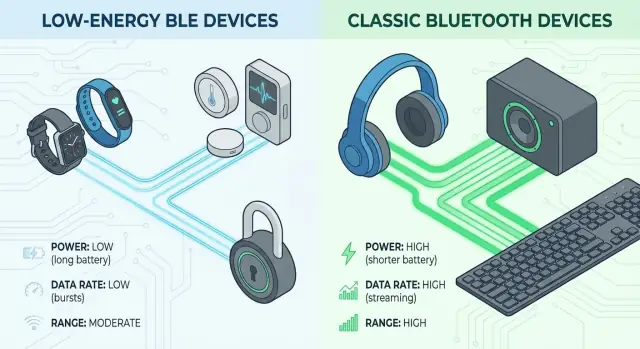
Bluetooth and BLE at a glance
Bluetooth is a short‑range wireless technology designed for personal area networks: devices talking directly to each other over a few meters without cables. It’s used for things like wireless headphones, keyboards, car hands‑free systems, and file transfers between nearby devices.
BLE stands for Bluetooth Low Energy. It is a distinct wireless protocol under the same Bluetooth brand, designed primarily for small, infrequent bursts of data with very low power use. Where classic Bluetooth targets continuous data streams (like audio), BLE is tuned for sensors and devices that must run for months or years on tiny batteries.
Both are specified by the Bluetooth SIG and share parts of the stack and the “Bluetooth” logo, but BLE and classic Bluetooth are not the same thing technically. They use different radio procedures, different data models, and are optimized for different jobs.
Typical BLE devices
You interact with BLE technology all the time, often without noticing:
- Fitness trackers and smartwatches
- Heart‑rate straps and medical wearables
- Smart locks and tags
- Beacons in stores or venues
- Environmental sensors and other IoT nodes
What this guide will focus on
This article explains BLE vs classic Bluetooth in practical terms: how they differ in radio behavior, power consumption, range, throughput, latency, security, and data models (like GATT profiles). You’ll see where BLE shines (IoT sensors, wearables, beacons) and where classic Bluetooth still rules (audio, HID, some legacy accessories), so you can choose the right technology for your next product or project.
Why BLE was created in the first place
Bluetooth’s original mission: cable replacement
Early versions of Bluetooth (1.x, 2.x, 3.0) were designed mainly as a wireless replacement for short cables: headsets instead of audio jacks, keyboards and mice instead of USB, file transfer instead of serial ports.
That world assumed devices with decent batteries or constant power. Phones, laptops, and car systems could afford radios that stayed connected for long periods, streaming audio or moving large files.
The power problem for tiny devices
As people started imagining wireless sensors, wearables, beacons, and medical gadgets, classic Bluetooth’s power profile became a liability.
Keeping a classic Bluetooth link alive requires frequent radio activity and a relatively complex protocol stack. For a smartwatch, coin-cell sensor, or door sensor that should last months or years, that level of energy use is simply too high.
Other low‑power wireless options existed (like proprietary 2.4 GHz links), but they lacked Bluetooth’s interoperability and ecosystem.
Bluetooth 4.0 and the birth of BLE
Bluetooth 4.0 introduced Bluetooth Low Energy (BLE) as a new mode alongside classic Bluetooth, not as a minor tweak.
BLE was designed around a different assumption: many devices only need to wake up briefly, send or receive a small piece of data, then go back to sleep. Think “heart rate is 72 bpm,” “door is open,” or “temperature is 21.3 °C,” not continuous audio.
Connections are lighter, advertising is efficient, and radios can stay off most of the time.
Dual‑mode chips: best of both worlds
Modern Bluetooth chips often support both BLE and classic modes. A smartphone can stream audio over classic Bluetooth to headphones while talking BLE with a fitness tracker or beacon nearby, all through a single radio module.
How BLE works at a high level
BLE is built around short, efficient exchanges of small packets, rather than continuous high-throughput streams. At a high level, it works in two main phases: discovery (via advertising) and data transfer (via a structured data model called GATT).
Advertising and discovery
Most BLE interactions start with advertising. A peripheral device (for example, a sensor or beacon) periodically sends tiny broadcast packets on specific radio channels. These advertising packets:
- Announce that the device exists
- Optionally include a small payload (like an ID, flags, or a few bytes of sensor data)
- Indicate how and whether a central can connect
A central device (typically a phone, tablet, or gateway) scans for these packets. When it finds an interesting peripheral, it can either just read the broadcasted data (connectionless mode) or initiate a connection.
Connection-oriented vs connectionless
BLE supports:
- Connectionless (broadcast) mode – peripherals keep advertising; centrals just listen. Good for beacons, one-way telemetry, presence detection.
- Connection-oriented mode – the central initiates a link with one peripheral. They then exchange packets on a schedule, with acknowledgments and security.
GATT, services, and characteristics
Once connected, BLE uses the Generic Attribute Profile (GATT) for structured data exchange. GATT defines:
- A server (usually the peripheral) that exposes data
- A client (usually the central) that reads or writes that data
Data is organized into:
- Services – groupings by function (e.g., Heart Rate, Battery)
- Characteristics – individual data items within a service
Each characteristic can be read, written, or subscribed to for notifications.
Typical BLE attribute values are small, often from a few bytes up to tens of bytes per characteristic. Instead of streaming large blocks, devices perform many quick, targeted transactions: reads, writes, and notifications that carry concise, application-specific payloads.
Classic Bluetooth in simple terms
Classic Bluetooth is the original version of the Bluetooth standard, designed for devices that need a fairly steady stream of data and can afford to stay connected most of the time. Its goal is to provide reliable, continuous links with higher data rates than BLE typically offers.
Where BLE focuses on short bursts of data and long sleep periods, classic Bluetooth assumes the radio will be active a lot more. That makes it better for tasks like audio or real‑time input, but it also means higher and more constant power draw.
Classic Bluetooth and BLE both operate in the 2.4 GHz ISM band, but they use different strategies on top of it. Classic Bluetooth uses a form of frequency hopping optimized for ongoing connections and streaming, while BLE is tuned for brief, efficient exchanges.
Common classic Bluetooth profiles
Classic Bluetooth defines many standardized profiles so devices know how to talk to each other:
- A2DP – for high-quality audio streaming (headphones, speakers).
- HFP – Hands-Free Profile for calls in headsets and car kits.
- HID – Human Interface Device, used by keyboards, mice, and game controllers.
- SPP – Serial Port Profile, emulating a serial cable over Bluetooth.
Typical use cases
Because of its design goals and profiles, classic Bluetooth is best for:
- Music and voice audio streaming (headphones, speakers, car stereos).
- Keyboards and mice, which send frequent input events.
- Game controllers, which need low-latency, steady communication.
All of these scenarios assume a device with relatively stable power availability (phones, laptops, car systems, powered speakers), not tiny coin-cell-powered sensors.
Under the hood: radio and data flow differences
Modulation, channels, and hopping
Classic Bluetooth (BR/EDR) and BLE share the 2.4 GHz ISM band but carve it up differently.
-
Classic Bluetooth
- Uses 79 channels, each 1 MHz wide (2.402–2.480 GHz).
- Base Rate (BR): GFSK at 1 Mb/s.
- Enhanced Data Rate (EDR): π/4-DQPSK (2 Mb/s) and 8DPSK (3 Mb/s).
- Hops across all 79 channels 1,600 times per second using a pseudo-random sequence.
-
BLE
- Uses 40 channels, each 2 MHz wide.
- Original PHY: GFSK at 1 Mb/s (LE 1M).
- Optional PHYs: 2 Mb/s (LE 2M) and coded PHY (long range, lower effective bit rate).
- Hopping still happens, but over a smaller set of channels with a different channel selection algorithm that simplifies low-power operation and coexistence.
The wider channels and simpler modulation options for BLE are optimized for low power and small bursts of data, not for continuous high-throughput streaming.
Connection topology and data flow
-
Classic Bluetooth
- Uses piconets: one master with up to seven active slaves.
- Multiple piconets can form a scatternet, but support is limited in real products.
- Data is often treated as relatively continuous streams (e.g., audio, serial replacement).
-
BLE
- Uses a simpler star topology: one central, many peripherals.
- A central (phone, gateway) can maintain dozens of low-duty-cycle links.
- Data is exchanged in short connection events or via advertising packets without a connection.
Data rate and latency characteristics
-
Classic BR/EDR throughput
- Theoretical: up to 3 Mb/s at the PHY.
- Real-world application payload: typically 1–2 Mb/s for streaming.
- Latency tuned for continuous traffic; audio paths often achieve tens of milliseconds end-to-end.
-
BLE throughput
- LE 1M PHY theoretical: 1 Mb/s; practical application payload often 0.1–0.8 Mb/s depending on MTU, connection interval, and stack.
- LE 2M can roughly double raw rate but still carries protocol overhead.
- Latency is event-based: with a 7.5 ms connection interval, single-packet latency can be a few milliseconds, but power-saving modes use longer intervals, increasing latency to save battery.
Overall, classic is better for steady, high-throughput, low-latency streams, while BLE is tuned for short, infrequent bursts with flexible latency–power trade-offs.
Coexistence on the same chip or phone
Most phones and many modules are dual-mode: one RF front end and antenna, shared by BR/EDR and BLE controllers.
Conceptually, inside the chip:
- A single radio transceiver is time-sliced between classic and BLE.
- The controller firmware runs two link layers, scheduling when each can transmit or listen.
- The host stack (on the OS side) exposes one Bluetooth identity, while internally routing traffic to either the BR/EDR or BLE controller.
The scheduler ensures classic audio streams get the timing they need while BLE connections and advertisements are interleaved in the gaps, so both protocols can operate concurrently without interfering with each other at the application level.
Power consumption and battery life comparison
BLE’s biggest advantage over classic Bluetooth is how little time it keeps the radio awake. Everything in the protocol is tuned for very low duty cycles: short bursts of activity separated by long sleep periods.
Why BLE sips power
A BLE device spends most of its life in deep sleep, waking only to:
- Send or listen for advertising packets
- Exchange data during brief connection events
Each of these events typically lasts a few milliseconds. Between them, the radio and most of the MCU are off, drawing microamps instead of milliamps.
Classic Bluetooth, by contrast, keeps an active connection with frequent polling. Even when little data is sent, the radio wakes often, so the average current stays much higher.
Advertising intervals and sleep modes
Power in BLE is dominated by how often you wake up:
- Advertising interval: Beacons might advertise every 100 ms, 500 ms, or several seconds. A longer interval means the radio wakes less often, cutting average current dramatically.
- Connection interval: Once connected, the devices meet at fixed intervals (e.g., every 7.5 ms–4 s). Each meeting is short; in between, the peripheral can sleep.
- Sleep states: Modern BLE SoCs use deep sleep currents of ~1–3 µA. Radio-on peaks might be 10–20 mA, but only for a few ms.
Example: If a device draws 15 mA for 3 ms every 100 ms, the duty cycle is 3%. The average is roughly 0.45 mA (450 µA). Push the interval to 1 s and the duty cycle drops to 0.3%, cutting average current by 10×.
BLE vs classic Bluetooth: current draw
Typical ballpark numbers (real values depend on hardware and settings):
- Classic Bluetooth audio headset: 20–30 mA while streaming; idle still in the mA range due to constant connection maintenance.
- BLE sensor, connected periodically: 10–20 mA during brief connection events; tens to hundreds of µA average over time.
- BLE beacon: Often <20–50 µA average at moderate transmit power and 1 s advertising intervals.
This order-of-magnitude difference is why classic Bluetooth products are usually rechargeable while BLE peripherals are often coin-cell powered.
What really matters for battery life
For BLE, these parameters dominate lifetime more than almost anything else:
- Connection interval: Longer intervals → fewer wakeups → lower average current, but higher latency and potentially less responsive user experience.
- Slave latency: Allows a peripheral to skip some connection events, reducing energy while keeping the link alive.
- MTU and data chunking: A larger MTU lets you move more data per connection event, shrinking the total number of wakeups for a given data volume. MTU doesn’t affect idle power, but it affects how expensive each data transfer is.
- Transmit power level: Higher TX power increases current per event but may allow longer intervals or fewer retries. There’s a trade-off between range, reliability, and consumption.
- Power states of the MCU and sensors: It’s common for the radio to be highly optimized while sensors or the application MCU quietly dominate the budget. Properly sleeping everything between events is critical.
Coin cells, months, and years of operation
With careful tuning, BLE devices can run a very long time on tiny batteries:
-
BLE beacon on a CR2032 (≈220 mAh)
- Average current ~15 µA (e.g., low TX power, 1–2 s advertising)
- Theoretical life: 220 mAh / 0.015 mA ≈ 14,600 hours → 1.5–2 years (real-world is lower due to leakage, temperature, and battery aging).
-
Environmental sensor on a CR2477 (≈1000 mAh)
- Wakes every minute, takes a reading, sends data in a short BLE connection
- Carefully designed average current of 20–30 µA is realistic
- Theoretical life: 3–5 years.
-
Wearables (e.g., fitness trackers)
- Higher duty cycle due to frequent updates and display use
- Typically charge every few days to weeks, but the BLE radio is a minor part of the total budget compared to display, vibration motor, and sensors.
Classic Bluetooth can hardly reach these lifetimes on coin cells under normal usage, because it keeps the radio engaged more continuously. BLE’s low-duty-cycle design and aggressive sleep behavior are what enable multi-month to multi-year operation in IoT and sensor applications.
Range, throughput, and latency trade-offs
Range in real environments
On paper, both BLE and classic Bluetooth quote ranges from 10 m up to 100+ m. In practice, you usually see:
- Indoors (offices, homes): 5–15 m reliable for both
- Open space, line-of-sight: 30–50 m is common; more is possible with good hardware
BLE 5.x can reach several hundred meters in ideal outdoor tests using the Coded PHY, but that comes with much lower data rates.
Actual range depends much more on implementation than on “BLE vs classic” alone.
What really affects range
Key factors that shift range far more than the protocol choice:
- Transmit power (dBm): higher power, more range, more battery use
- Receiver sensitivity: better radios hear weaker signals
- Antenna design and orientation: chip vs PCB vs external antennas
- Obstacles and materials: concrete, brick, metal, and even people attenuate 2.4 GHz
- Interference: Wi‑Fi, microwaves, and other 2.4 GHz devices
- PHY and data rate: lower data rates improve sensitivity and range
BLE gains an edge here because it offers multiple PHYs (1M, 2M, and Coded) that let you trade data rate for range.
Throughput: bursts vs streams
BLE is optimized for small, efficient bursts of data.
- BLE 4.x: practical throughput ~100–300 kbps
- BLE 5 (1M / 2M PHY): up to ~700–900 kbps in ideal conditions
- BLE Coded PHY: far less throughput, but much longer range
Classic Bluetooth (BR/EDR) still wins for continuous, high-bandwidth streams:
- Practical throughput often in the 1–2 Mbps range
- Tailored for audio codecs and uninterrupted data flow
That’s why audio headsets, speakers, and many legacy data links still rely on classic Bluetooth.
Latency: control vs audio
BLE connections can use very short connection intervals (as low as 7.5 ms), giving low-latency control that feels instantaneous for buttons, sensors, and HID devices.
However, BLE is less suitable for continuous low-latency audio. Packet scheduling, retransmissions, and the lack of classic-style audio profiles make it hard to match the sub‑100 ms, steady latency that BR/EDR audio achieves.
Rule of thumb:
- BLE: great for interactive control, telemetry, and event-driven traffic
- Classic Bluetooth: better for continuous media streams where high throughput and stable latency matter
Profiles, GATT, and data models in BLE vs classic
What “profiles” mean in Bluetooth
Bluetooth profiles are standardized usage patterns that sit above the core radio and link layers. A profile defines:
- What roles devices play (e.g., source vs sink)
- Which protocols they use
- How data is formatted and exchanged
Classic Bluetooth relies heavily on such profiles. Examples include:
- A2DP for high-quality audio
- HFP for hands-free calling
- HID for keyboards and mice
- SPP for serial-port-style data
If two devices implement the same classic profile, they can typically interoperate without custom app logic.
BLE’s GATT: attribute-based instead of channel-based
BLE kept the idea of “profiles” but shifted to an attribute-based data model:
- ATT (Attribute Protocol): low-level protocol that exposes data as a table of attributes, each with a handle, type (UUID), value, and permissions.
- GATT (Generic Attribute Profile): defines how a client discovers, reads, writes, and subscribes to these attributes.
Data is grouped into:
- Services: logical groupings (e.g., Heart Rate, Battery)
- Characteristics: individual data points (e.g., heart rate measurement, battery level)
- Descriptors: metadata about characteristics (e.g., units, human-readable description)
BLE profiles are now defined as combinations of services, characteristics, and behaviors on top of GATT.
Standard vs custom BLE services
The Bluetooth SIG publishes many standard GATT-based services, such as:
- Heart Rate Service (HRS)
- Device Information Service (DIS)
- Battery Service (BAS)
Using these improves interoperability: any app that understands, say, the Heart Rate Service can talk to compatible heart rate sensors without vendor-specific hacks.
When no standard service fits, vendors define custom services using 128-bit UUIDs. These still use GATT procedures but follow proprietary data formats.
Classic profiles vs BLE GATT: key contrasts
Classic Bluetooth:
- Profiles are often tied to specific use cases and protocols (e.g., audio over A2DP using SBC/aptX codecs, data channels with RFCOMM/L2CAP).
- Data is exchanged over streams or channels; interpretation is often left to the application or higher-level spec.
- Interoperability depends heavily on both sides implementing exactly the same profile.
BLE:
- Everything visible to the application is modeled as attributes (services, characteristics, descriptors).
- Profiles describe attribute sets and procedures, not long-lived data streams.
- Interoperability is driven by common GATT services and characteristics, not by a single monolithic profile per use case.
Examples: how real BLE devices model data
A heart rate sensor typically exposes:
- Heart Rate Service with a
Heart Rate Measurementcharacteristic that supports notifications. - Device Information Service with model name and firmware version.
- Often a Battery Service with current battery level.
A generic peripheral (e.g., sensor node) might expose:
- A custom service
Sensor Servicewith characteristics likeTemperature,Humidity, andConfig. TemperatureandHumidityare read/notify.Configis read/write for parameters such as sampling rate.
Implications for app and firmware engineers
For firmware engineers, BLE means you must design a GATT database:
- Decide which data points become characteristics.
- Pick standard services when possible to avoid reinvention.
- Set properties (read, write, notify, indicate) and permissions (encryption, authentication) carefully.
For app developers, interacting with BLE devices is less about sockets and more about:
- Discovering services and characteristics.
- Reading/writing small pieces of data.
- Subscribing to notifications for changes.
This attribute-centric model is usually easier to reason about than crafting a custom binary protocol over classic SPP, but it does require:
- Knowing UUIDs and data formats for each characteristic.
- Handling asynchronous notifications and connection state.
In short, classic Bluetooth gives you profiles built on channels and streams, while BLE gives you a standardized attribute model (GATT) that you shape into profiles by defining services and characteristics with clear semantics.
Security, pairing, and privacy differences
Security is one of the biggest practical differences between classic Bluetooth and BLE. The radio is similar, but the pairing flow, key management, and privacy tools are not.
Classic Bluetooth: pairing and bonding in brief
Classic Bluetooth devices typically:
- Discover each other (inquiry + scan).
- Pair using either legacy PIN-based pairing or Secure Simple Pairing (SSP):
- Just Works: no user verification, weakest against MITM.
- Passkey Entry: user types a 6‑digit code.
- Numeric Comparison: user confirms that two numbers match.
- Out-of-Band (OOB): uses another channel (e.g., NFC) to exchange data.
- Derive a link key, then enable 128‑bit AES-CCM encryption.
- Optionally bond, storing the link key for future automatic reconnection.
Device addresses are static, so classic Bluetooth offers little built‑in privacy beyond encryption.
BLE: security modes, LE Secure Connections, and privacy
BLE defines explicit security modes and levels:
- Security Mode 1 (link security)
- Level 1: no security
- Level 2: unauthenticated encryption
- Level 3: authenticated encryption
- Level 4: LE Secure Connections (authenticated, ECDH-based)
- Security Mode 2: data signing with AES-CMAC
BLE pairing has two flavors:
- LE Legacy Pairing: older, uses a Short Term Key (STK), weaker against MITM.
- LE Secure Connections: uses Elliptic Curve Diffie–Hellman (P‑256) to derive the Long Term Key (LTK). This is the recommended option and matches modern cryptographic expectations.
BLE also introduces privacy features:
- Resolvable private addresses that change periodically.
- Identity Resolving Key (IRK) so trusted devices can still recognize each other.
These make device tracking harder while preserving paired relationships.
UX differences: prompts, PINs, and pairing flows
From the user’s perspective:
- Classic Bluetooth often shows a pairing dialog when you connect headphones, speakers, or car kits, with numeric comparison or a fixed PIN like
0000. - BLE devices may connect and exchange some data without pairing (for non-sensitive use), or trigger pairing only when accessing protected characteristics.
- Many BLE gadgets (sensors, beacons) have no screen or keypad, so they use Just Works or OOB (e.g., QR codes, NFC, or a printed passkey) instead of PIN entry.
This flexibility is powerful, but it also means UX and security are heavily influenced by the app and device design, not just the protocol.
Encryption strength and privacy comparison
- Both classic Bluetooth and BLE use 128‑bit AES-CCM for link encryption.
- The main difference is how keys are established and protected against MITM.
- Weak, guessable PINs in classic legacy pairing significantly reduce security.
- LE Secure Connections with ECDH and authenticated pairing provides much stronger guarantees.
- BLE’s address randomization and IRK-based resolution provide privacy features that classic Bluetooth essentially lacks.
Best practices for choosing security levels
For engineers deciding how to secure a Bluetooth link:
- Prefer LE Secure Connections wherever BLE is available; disable LE Legacy Pairing if you can.
- Use authenticated pairing (Numeric Comparison or Passkey) for:
- Health data
- Access control (locks, vehicles)
- Payments or credentials
- Avoid Just Works except for low‑risk data or when no UI is available; consider OOB to regain authentication.
- Require encryption before reading or writing any personally identifiable, control, or configuration data.
- Enable BLE privacy (resolvable private addresses) and short advertising intervals; avoid broadcasting identifiers that directly encode user identity.
- Limit bonding to devices that really need persistent relationships; more bonds mean more long‑lived keys to protect.
Done well, BLE can match or exceed classic Bluetooth in security while offering much better privacy controls and more flexible user flows.
Typical use cases: when BLE or classic Bluetooth fits best
Where BLE shines
BLE is built for devices that send small bursts of data and must run for months or years on tiny batteries.
Typical BLE sweet spots:
- Sensors: temperature, humidity, motion, door/window, soil sensors.
- Beacons: asset tracking tags, proximity beacons in stores or offices.
- Wearables: fitness bands, smartwatches (for step count, heart rate, notifications).
- Smart locks & access control: door locks, bike locks, badges that wake up briefly to authenticate.
In these cases, the app can connect quickly, sync a few bytes, then let both sides go back to sleep, giving long battery life with acceptable latency.
Where classic Bluetooth is the right tool
Classic is tuned for continuous, higher‑throughput streams.
Ideal classic Bluetooth use cases:
- Audio: headphones, speakers, car kits, hearing aids (many modern aids use BLE for control + classic/LE Audio for streaming).
- HID devices: keyboards, mice, game controllers (especially when low latency is critical).
- Tethering and data modems: routing internet from phone to laptop or car systems.
Here, power use is higher, but users expect stable, low‑glitch streams and are usually willing to recharge.
Gray areas: either BLE or classic
Some products can go either way:
- File transfer of small logs or settings: BLE is fine if transfers are infrequent and not huge; classic helps if you move many megabytes regularly.
- PC peripherals: BLE keyboards/mice can last longer on coin cells, but classic may feel slightly more responsive and connect faster on older hosts.
- Remote controls: BLE saves power and supports richer data; classic may reconnect faster to legacy TVs or set‑top boxes.
User experience depends on connection behavior:
- Setup time: BLE often pairs through an app, which can feel smoother than OS‑level pairing dialogs, but adds an app dependency.
- Reconnection: classic usually maintains a stable link once paired; BLE may disconnect aggressively to save power, then reconnect on demand.
- Stability: classic tends to be more predictable for streams; BLE links can feel "bursty" if the firmware is too aggressive about sleeping.
Simple rules of thumb
When choosing between BLE and classic Bluetooth:
- If your data pattern is bursty and lightweight (sensor readings, control commands, status), pick BLE.
- If you need audio or continuous low‑latency streams, pick classic (or LE Audio where supported).
- If your product must run on a coin cell for months+, strongly favor BLE.
- If you control both ends and can require newer phones/OS versions, BLE gives better power and flexibility.
- If you must support legacy laptops, car systems, and TVs, classic Bluetooth compatibility may matter more than power.
Use power budget and data pattern as your primary filters; then refine the choice based on target platforms and the user’s tolerance for charging vs connection smoothness.
Compatibility, dual-mode devices, and real-world quirks
Almost every phone, tablet, and laptop sold in the last decade supports both classic Bluetooth and BLE. If your device says "Bluetooth 4.0" or newer, it almost certainly means BLE is available alongside classic.
How dual‑mode chips actually work
Most products use a single Bluetooth SoC that implements both stacks:
- One radio and antenna
- Time-sliced between classic and BLE
- Shared baseband and controller, separate logical stacks
To your app or firmware, it may look like two personalities: classic for audio/legacy profiles, BLE for data-centric, low-power use. Under the hood it’s the same chip scheduling packets for both.
A quirk: some operating systems expose separate APIs for classic and BLE, and not all profiles are reachable from all frameworks. On phones, classic is often reserved for audio and accessories, while BLE is the preferred path for custom device communication.
Interoperability across Bluetooth versions
Bluetooth versions are mostly backward compatible, but details matter:
- BLE requires Bluetooth 4.0+ hardware.
- Newer features (e.g., long range, 2M PHY, LE Audio) need 5.x hardware and stack support.
- Classic-only devices (older car kits, headsets) cannot speak BLE at all.
Even if the radio version matches, profile compatibility is critical: two devices must support the same profile (classic) or services/characteristics (BLE GATT) to work together.
Firmware, certification, and profile behavior
Real-world issues often stem from software, not the radio:
- Firmware updates can fix pairing bugs, connection drops, and interoperability problems.
- Bluetooth SIG qualification ensures your implementation follows the spec, but does not guarantee perfect behavior with every phone.
- Vendors may implement only parts of a profile, or add custom behavior that trips up some stacks.
If you ship a product, track firmware versions carefully and keep release notes about Bluetooth fixes; support teams will rely on them.
Testing with different phones and OS versions
Bluetooth behavior can differ significantly between platforms and even OS builds. Useful practices:
- Maintain a test matrix of key phones (iOS and Android from several manufacturers) and at least one Windows/macOS host.
- Test pairing, reconnection, and bonding removal (forget device) on each; caches behave differently.
- Verify behavior with screen locked, app in background, and after switching Wi‑Fi or airplane mode.
- Re-test after OS updates—Bluetooth stacks change more than most people expect.
For BLE specifically, watch for:
- Different connection interval and MTU defaults
- Scan/filter quirks and background scanning limits
- OS-driven reconnection attempts that your device must handle gracefully
Designing for dual-mode and broad compatibility means assuming the radio is fine, but the stack and OS behavior will be different everywhere—and testing accordingly.
How to choose between BLE and classic Bluetooth
Choosing between BLE and classic Bluetooth is really about being honest with your product’s constraints and use cases. Start from requirements, not from the buzzword.
Step 1: Clarify what you’re sending
Ask a few basic questions:
- How much data? Continuous audio or large file transfers almost always mean classic Bluetooth (A2DP, HFP, etc.). Small, occasional telemetry packets, sensor readings, or control commands usually mean BLE.
- How often? If the radio can sleep most of the time and wake briefly to send data, BLE’s low duty cycle is ideal. If you need a nearly continuous link, classic is often simpler and more predictable.
- How fast? If you truly need hundreds of kbps sustained, validate that BLE’s practical throughput (often 50–300 kbps depending on PHY and stack) is enough; otherwise lean toward classic.
Step 2: Battery and form factor
- Battery size and replacement cost. Coin‑cell or energy‑harvested devices strongly favor BLE.
- Charging is easy? Products that are recharged daily or plugged in (headsets, speakers) can comfortably use classic.
Write these constraints down—battery capacity, expected lifetime, and allowed power budget for radio—and check if classic’s always‑on link is acceptable.
Step 3: Target devices and ecosystem
- Which phones, PCs, or hubs must you support? All modern phones support BLE; classic audio profiles are also widely supported but may not exist on some small gateways or MCUs.
- Needed profiles and APIs. If you rely on standard audio profiles, classic is still the mainstream choice, but LE Audio (BLE‑based) is spreading on newer phones, earbuds, and TVs. For data‑oriented products, BLE GATT and its tooling (sniffers, mobile SDKs, profile libraries) are very mature.
Check OS APIs and certification requirements early; they can dictate which side of Bluetooth you end up on.
Step 4: Future‑proofing
If your product will ship for years:
- Consider Bluetooth 5.x+ features (long‑range, 2M PHY, Coded PHY) that enhance BLE for IoT.
- Track LE Audio adoption if you need audio; it may let you drop classic in future revisions.
Design your hardware so you can switch firmware or modules later (e.g., pin‑compatible dual‑mode radios) if standards or market expectations move.
Step 5: Development effort and complexity
Classic Bluetooth stacks and profiles can be heavier and more complex, especially for custom data channels. BLE’s GATT model is often easier to prototype, especially with mobile apps, though you must still tune connection parameters and security.
Talk to your firmware, mobile, and QA teams:
- Which stack do they know?
- Which tools (analyzers, SDKs, test suites) are already in place?
Sometimes the “easier” radio is simply the one your team can debug and certify faster.
Step 6: Document before you commit
Before locking in a module or SoC, capture:
- Required data rate and latency range
- Typical duty cycle and battery targets
- Supported host platforms (OS versions, hardware)
- Security level (pairing, bonding, privacy needs)
- Expected product lifetime and upgrade path
Use this checklist to compare BLE‑only, classic‑only, and dual‑mode options. If BLE meets your data needs and battery is tight, choose BLE. If high‑quality audio or heavy streaming is core to the product, choose classic (possibly with BLE alongside it). Documenting these trade‑offs early prevents costly radio changes late in the design.
Practical implementation notes for engineers
Hardware, RF, and certifications
Decide early between a BLE-only chip, a dual-mode (BLE + classic) chip, or a pre-certified module. Modules simplify RF design and regulatory approvals but cost more and may limit flexibility.
If you design your own board, pay close attention to antenna layout, ground planes, and keep-out zones from the reference design. Small enclosure changes or nearby metal can cut range dramatically, so plan for RF tuning and real over-the-air tests.
Factor in certifications: FCC/IC, CE, and Bluetooth SIG qualification. Using a qualified module often reduces the effort to listing and paperwork rather than full testing from scratch.
OS support and APIs
iOS exposes BLE via Core Bluetooth; classic Bluetooth is mostly reserved for system features and MFi accessories. Android supports both classic and BLE, but through different APIs and permission models.
Be ready for quirks: background scanning limits, vendor differences on Android, and aggressive power management that pauses scans or disconnects idle links.
Architectures and patterns
Common patterns include:
- Peripheral sensors speaking BLE to a phone, which syncs to the cloud.
- Gateways (Wi‑Fi or cellular) that bridge many BLE peripherals to backend services.
- Devices combining BLE for local control with LTE-M/NB-IoT for direct cloud access.
Debugging tools and reducing friction
Use protocol sniffers (e.g., nRF Sniffer, Ellisys, Frontline) when pairing or GATT issues are unclear. Complement them with test apps like nRF Connect or LightBlue, plus platform logs (Xcode, Android logcat).
To cut connection problems and user friction:
- Choose conservative default connection parameters and test with many phones.
- Implement retries and clear error handling for pairing and reconnect.
- Handle permissions, Bluetooth state, and location prompts gracefully.
- Keep characteristics small, use notifications/indications instead of polling, and test in noisy RF environments.
Common myths, FAQs, and quick recap
Common myths
“BLE always has better range.”
Not necessarily. Range depends on radio power, antenna design, environment, and PHY (1M, 2M, Coded). Classic can match or beat BLE range in some products. BLE just gives more flexible options (e.g., Coded PHY) for long-range at lower data rates.
“Classic Bluetooth is obsolete.”
Classic is still the default for audio (headsets, speakers, car kits) and many HID devices. BLE is taking over sensors, wearables, and IoT data links, but classic will remain relevant wherever classic audio profiles are needed.
“LE Audio replaces all classic audio today.”
LE Audio runs over BLE radios but uses its own set of profiles and the LC3 codec. It will coexist with classic A2DP/HFP for a long time, and many devices will support both.
FAQs: using BLE and classic together
Can one product use both?
Yes. Dual‑mode chips support classic + BLE on the same 2.4 GHz radio. The stacks are separate, but they share hardware.
Typical pattern: BLE for control, provisioning, and data logging; classic for high‑bandwidth audio.
Any trade‑offs?
More complexity (two stacks to integrate, test, and certify) and tighter resource budgeting (RAM/flash, radio scheduling).
Quick troubleshooting tips
- Delete old bonds on both sides and re‑pair.
- Verify you’re advertising the expected services and using compatible security settings.
- Check connection parameters; very long intervals can feel like “lag” or dropped notifications.
Recap and decision snapshot
- Use BLE for: low‑power sensors, wearables, beacons, configuration apps, and most IoT links.
- Use classic for: legacy support and current‑generation audio (A2DP/HFP).
- Use both when you need modern app control/telemetry and classic‑profile audio.
Your core criteria: power budget, data rate, audio needs, and ecosystem/compatibility. Choose the radio mode that matches those constraints instead of assuming one is “better” in every case.
FAQ
What is the main practical difference between BLE and classic Bluetooth?
BLE (Bluetooth Low Energy) is optimized for short, infrequent data exchanges with very low power consumption, while classic Bluetooth is optimized for continuous, higher-throughput links like audio.
Key practical differences:
- BLE: small packets, bursty traffic, long sleep times → ideal for sensors, wearables, beacons.
- Classic: steady stream, radio active more often → ideal for music, calls, game controllers.
- BLE uses GATT (services/characteristics) for structured data; classic uses profiles based on data channels and streams.
They share the Bluetooth brand and often the same chip, but use different protocols and are not directly interoperable on the air interface.
When should I choose BLE instead of classic Bluetooth for a new product?
Choose BLE when your device:
- Sends small amounts of data (sensor readings, control commands, status).
- Can tolerate slight latency in exchange for long battery life.
- Needs to run on coin cells or very small batteries for months or years.
- Talks mainly to phones/tablets via an app (IoT sensors, wearables, smart locks, beacons).
Classic Bluetooth is usually a better fit if you need:
- Continuous audio (music, calls).
- High, steady throughput (hundreds of kbps–Mbps sustained).
- Compatibility with older cars, TVs, laptops, or legacy accessories that only support classic profiles.
Can I use BLE for audio streaming like headphones and speakers?
BLE was not designed for traditional, continuous audio like A2DP over classic Bluetooth. While LE Audio runs over BLE radios, it uses new profiles and codecs and is only supported on newer devices.
For now:
- Use classic Bluetooth (A2DP/HFP) for mainstream music and voice.
- Use BLE for audio control and telemetry (volume, EQ, battery status, settings).
- Consider LE Audio only if you control the ecosystem and can require recent Bluetooth 5.x hardware and OS support.
Trying to stream classic-style audio over plain BLE GATT usually results in poor quality and latency issues.
How long can a BLE device run on a coin-cell battery, and how do I estimate it?
Rough expectations if you design carefully:
- BLE beacon on CR2032 (~220 mAh): about 1–2 years at low TX power and 1–2 s advertising intervals.
- BLE environmental sensor on CR2477 (~1000 mAh): about 3–5 years if it sends short updates every minute or so.
To estimate lifetime:
- Calculate average current: account for radio peaks (10–20 mA for a few ms) and deep sleep (~1–3 µA).
- Use:
battery_mAh / average_mA ≈ hours(then convert to days/years). - Reduce advertising and connection frequency and aggressively sleep MCU/sensors to extend life.
Classic Bluetooth generally cannot reach similar lifetimes on coin cells under normal use.
Do BLE devices always need pairing, or can they work without it?
Not always. BLE lets you:
- Read some data without pairing (e.g., public beacons, non-sensitive sensor readings).
- Require pairing and encryption only for sensitive actions (locks, configuration, user data).
Good practice:
- Use unauthenticated, unencrypted access only for low-risk data.
- Require LE Secure Connections with authenticated pairing (numeric comparison or passkey) for:
- Locks and access control.
- Health or personal data.
- Firmware updates and configuration.
Let the app trigger pairing only when it needs protected characteristics, to keep UX simple but secure.
Will my phone or laptop work with BLE devices by default?
Almost all phones, tablets, and laptops from the last decade support BLE as long as they are Bluetooth 4.0+. In practice:
- iOS and Android phones: BLE support is standard on any reasonably modern device.
- Windows/macOS laptops: most Bluetooth adapters from ~2013 onward include BLE.
- Older car systems, TVs, and headsets may be classic-only and cannot talk BLE.
To be sure, check:
- Device specs for “Bluetooth 4.0/4.1/4.2/5.x”.
- OS version and API support (some old Android builds have buggy BLE stacks).
Remember that even if BLE is present, your app must use the BLE-specific APIs, not classic Bluetooth APIs.
Can one product use both BLE and classic Bluetooth at the same time?
Yes. Most modern SoCs are dual-mode, supporting classic Bluetooth and BLE on the same radio.
Typical split:
- Classic: audio profiles (A2DP, HFP), HID for some peripherals.
- BLE: configuration, telemetry, provisioning, firmware updates, sensor data.
Trade-offs to consider:
- More complexity: two stacks to integrate, test, and qualify.
- Resource use: extra flash/RAM and tighter scheduling of radio time slices.
- Certification: you must comply with both classic profiles and BLE GATT requirements.
A common pattern is: use BLE for app control and logging, classic for audio streaming in the same product.
Is BLE secure enough for things like smart locks or medical devices?
BLE can be very secure when configured correctly.
For sensitive applications (locks, medical, payments):
- Use LE Secure Connections (ECDH-based) rather than legacy pairing.
- Prefer authenticated pairing (Numeric Comparison, Passkey, or secure OOB) over Just Works.
- Require encrypted links before allowing control, configuration, or reading personal data.
- Enable privacy features (resolvable private addresses) to prevent long-term tracking.
With these settings, BLE security is comparable to other modern encrypted links and generally stronger and more privacy-aware than legacy classic PIN-based pairing.
How can I improve the range of a BLE device in my design?
Range depends more on RF design and settings than on BLE vs classic alone. To improve BLE range:
- Increase TX power where regulations and battery budget allow.
- Choose a good antenna and follow the RF reference layout closely.
- Avoid metal near the antenna and keep a clear keep-out zone in your PCB and enclosure.
- Use lower-rate PHYs (e.g., BLE Coded PHY) if your hardware and stack support them.
- Place gateways/phones to minimize walls, concrete, and metal between devices.
Test early in real enclosures and environments; small mechanical changes can have a big impact on range.
What do app developers need from firmware engineers when integrating a BLE device?
Coordinate early so both sides agree on the GATT model and behavior. App teams typically need:
- A list of services and characteristics with their UUIDs.
- For each characteristic: properties (read/write/notify), data format, units, and valid ranges.
- Information on security requirements (when encryption or pairing is mandatory).
- Expected connection parameters (intervals, MTU, notification rates) and any timing constraints.
In return, firmware teams need to know:
- How often the app will read/write.
- Which data needs low latency vs can be batched.
Document this “BLE contract” before implementation; it prevents many integration bugs and performance issues later.