

What Are Cross-Platform Mobile Applications? A Clear Guide
Learn what cross-platform mobile applications are, how they work, key benefits and trade-offs, popular frameworks, and when to choose them over native apps.
Definition: cross-platform mobile applications
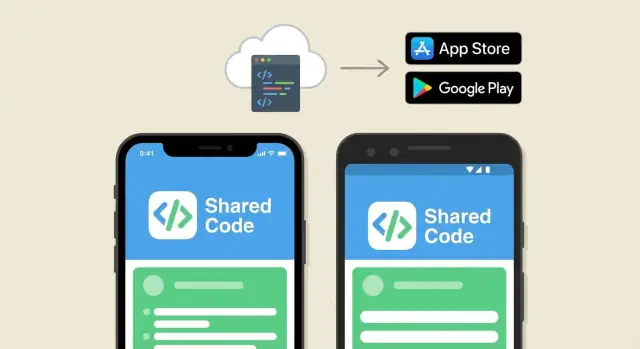
Cross-platform mobile applications are apps built to run on more than one operating system—most commonly iOS and Android—without creating (and maintaining) two completely separate versions.
Instead of writing one app for iPhones and another app for Android phones, a cross-platform approach aims to deliver a single app experience for both platforms using a shared codebase as the starting point.
What “platform” means here
A platform is the environment your app runs in, including its operating system, device rules, and app store requirements. In mobile app discussions, “platform” usually means:
- iOS (Apple iPhone and iPad)
- Android (phones and tablets from many manufacturers)
Sometimes “cross-platform” also includes web (a browser version) or even desktop (Windows/macOS). The core idea stays the same: reuse as much of the product as possible across multiple targets.
The “one codebase” idea (in plain terms)
Cross-platform app development typically centers on one primary codebase that powers the app on multiple platforms. That shared codebase usually includes:
- The app’s screens and navigation
- Business rules (what happens when a user taps a button, signs in, checks out, etc.)
- Data handling (fetching info from servers, saving settings)
Under the hood, your framework translates that shared code into apps that run on each platform. You may still need some platform-specific work (for example, handling Apple Sign In on iOS), but the goal is to keep those differences small and isolated.
A simple real-world example
Imagine a small retailer wants an app where customers can browse products, save favorites, and track orders. With a cross-platform mobile app, the core experience—product list, search, account login, order status—can be built once and shipped to both iOS and Android.
Customers on either device see the same inventory, follow similar flows, and get updates at roughly the same time—while the business avoids building two separate apps from scratch.
Cross-platform vs native vs web: what’s the difference?
All mobile apps can aim for the same outcome—great UX, solid performance, and reliable features—but they can be built in different ways. The key difference is how much is shared across iOS and Android versus how much is built specifically for each platform.
Native apps
A native app is built separately for each platform using its preferred tools (for example, Swift/Objective‑C for iOS and Kotlin/Java for Android). Because it uses platform-native APIs and UI toolkits directly, it often has the most direct access to device features and can feel the most platform-consistent.
Cross-platform apps
Cross-platform mobile apps are built with a shared codebase (often using frameworks like Flutter, React Native, or Xamarin/.NET MAUI) and then deployed to both iOS and Android. The popular promise is “write once, run anywhere,” but the reality is closer to “write once, adapt where needed.”
You may still need some platform-specific work—for example:
- Connecting certain iOS/Android device APIs
- Matching platform UI conventions
- Handling edge cases like permissions or background behavior
The payoff is usually faster development and higher code reuse, especially when features and screens are broadly similar across platforms.
Web apps and hybrid apps (adjacent options)
A web app runs in a mobile browser and isn’t installed from an app store (unless delivered as a PWA). It’s often easier to ship, but has limitations around deep device access and app-store distribution.
A hybrid app typically means a web app packaged inside a native shell (often using WebView-based tools). It can be quick to build, but UX and performance can vary widely depending on what the app does.
How cross-platform apps work (in simple terms)
Cross-platform apps let you build one product for iOS and Android without writing everything twice. The core model is a shared codebase (most UI and logic) plus platform-specific layers (small pieces that talk to iOS- or Android-only features).
One codebase, two “wrappers”
Think of the shared codebase as the app’s brain: screens, navigation, data handling, and business rules. Around that, each platform has its own thin layer that handles app startup, permissions, and integration with the operating system.
Compilation vs runtime (high level)
Frameworks generally take one of two approaches:
- Compile-time approach: your shared code is turned into an app that runs directly on the device.
- Runtime approach: your shared code runs through a runtime engine inside the app package, which interprets/executes it on the device.
In practice, you don’t need to pick based on theory alone—what matters is how it performs for your most important screens and workflows.
How the UI shows up on screen
Cross-platform frameworks render UI in different ways:
- Native components: the framework maps your UI code to real iOS/Android widgets.
- Custom rendering: the framework draws the interface itself (then handles touch, animations, and layout).
Both can look great; the difference often shows up in details like scrolling feel, animation smoothness, and how closely controls match each platform’s defaults.
Accessing device features (plugins/bridges)
For camera, GPS, push notifications, biometrics, or payments, frameworks use plugins (also called bridges or modules) that connect shared code to native APIs. When a plugin doesn’t exist (or isn’t reliable), teams may write small amounts of iOS/Android-specific code to fill the gap.
Main benefits of cross-platform development
Cross-platform app development means you build one mobile app that runs on iOS and Android. For many products, that translates into practical advantages you can feel in the schedule, the budget, and day-to-day teamwork.
Faster development through shared work
Instead of building two separate apps, your team can implement most screens, business rules, and integrations once and ship them to both platforms. That code reuse often speeds up delivery, especially for standard features like login, onboarding, profiles, content feeds, and basic payments.
Potential cost savings (without “magic numbers”)
Because a large portion of the app is shared, you may pay for fewer duplicated tasks: fewer parallel implementations, fewer repeated bug fixes, and less duplicated QA effort. The exact savings depend on your scope and quality bar, but the basic idea is simple—less rebuilding the same thing twice.
Faster time-to-market
When iOS and Android share a single roadmap and build process, it’s typically easier to release an initial version sooner and iterate quickly. This is especially valuable when validating an idea, racing a competitor, or learning from real user behavior early.
More consistent user experience across platforms
Cross-platform frameworks make it easier to keep navigation patterns, layouts, and feature behavior aligned between iOS and Android. Users still expect each platform to “feel right,” but consistency helps when you want the same flows, the same terminology, and the same core experience everywhere.
Team advantages: one team instead of two
A single cross-platform team can own design implementation, feature delivery, and maintenance end-to-end. That usually means fewer handoffs, clearer accountability, and simpler planning—especially for small to mid-sized companies.
Common trade-offs and limitations
Cross-platform mobile apps can be a great way to ship faster with shared code—but they aren’t a free lunch. Knowing the typical compromises upfront helps you set realistic expectations for quality, budget, and timeline.
Performance: when it matters (and when it doesn’t)
Many apps feel smooth with Flutter, React Native, or similar tools—especially content-heavy apps (forms, feeds, dashboards). Performance trade-offs tend to show up when you need:
- Very complex animations or heavy graphics
- Real-time video/audio processing
- High-frequency sensor input (e.g., fitness tracking, AR)
- Extremely fast startup times on older devices
Validate performance early with a prototype on target devices, not just a simulator.
New platform features may arrive later
Apple and Google release new OS features every year. Cross-platform frameworks and plugins may take time to expose the latest APIs. If your product depends on “day-one” access to a new capability, you might need native code anyway—or accept a short delay.
UI expectations differ by platform
Users notice when an app doesn’t “feel” like it belongs. Navigation patterns, typography, gestures, and small controls can differ between iOS and Android. Cross-platform UI can look consistent, but you may still need platform-specific tweaks to match expectations (and reduce support complaints).
Debugging and dependency risks
Cross-platform apps rely on a framework plus third-party plugins (for payments, analytics, camera, maps, etc.). This can introduce:
- Harder debugging when issues occur at the boundary between shared code and native layers
- Plugin maintenance risks (abandoned libraries, slow updates, breaking changes)
Mitigation: prefer well-supported plugins, keep dependencies minimal, and budget time for upgrades and testing.
When cross-platform is a good choice
Cross-platform app development is a strong option when you want to reach both iOS and Android quickly without maintaining two separate codebases. It’s especially appealing when the core product value is the same on both platforms and you’d rather spend time improving features than duplicating work.
App types that tend to be a great fit
Cross-platform mobile apps often shine for products like:
- MVPs and prototypes where speed and iteration matter more than platform-specific polish
- Content-driven apps (news, blogs, learning, video libraries) with consistent layouts
- Marketplaces (listings, search, filters, chat, payments) where flows are similar across devices
- Dashboards and internal tools (analytics, admin panels, field reports) focused on utility
When a shared UX is an advantage
If you want your app to look and behave consistently across platforms—same navigation patterns, same components, same release timing—cross-platform makes that easier. This can be useful for brands that value a unified experience, companies with limited design resources, or teams that run one mobile product team instead of separate iOS and Android squads.
Feature sets that usually work well
Many common features translate well across frameworks like Flutter or React Native:
- Authentication, profiles, and settings
- Feeds, lists, search, sorting, and filtering
- Forms, onboarding, subscriptions, and in-app purchases (with platform-specific configuration)
- Push notifications, deep links, basic offline caching
- Maps, location, and camera upload (often via well-supported plugins)
Why it helps long-term roadmaps
If your roadmap includes frequent releases, A/B tests, or a steady stream of improvements, one shared codebase can reduce coordination overhead. A single team can ship updates to both platforms in the same sprint, keep features aligned, and invest in shared architecture (analytics, experimentation, UI components) that compounds over time.
When native apps may be the better option
Cross-platform app development is a strong default for many products, but there are cases where building separately for iOS (Swift/SwiftUI) and Android (Kotlin/Jetpack Compose) is the safer choice. Native can reduce technical risk when you need the last bit of performance, platform-specific polish, or immediate access to new capabilities.
Scenarios where native is a better fit
Native development is often favored when your app needs:
- Heavy graphics or real-time rendering, such as AR features, advanced camera pipelines, or complex animations that must stay consistently smooth
- High-performance games, especially those pushing frame rates, physics, or low-latency input
- Deep OS integration, for example: advanced background processing, system-wide sharing extensions, home screen widgets with complex behavior, custom keyboards, device-to-device connectivity, or sophisticated Bluetooth/health integrations
Design requirements and accessibility edge cases
If your organization has strict platform design requirements—wanting an iOS experience that feels unmistakably iOS and an Android experience that follows Material patterns closely—native UI toolkits can make that easier to execute and maintain.
Accessibility can also surface edge cases. While cross-platform frameworks support accessibility well in many common flows, native APIs sometimes provide more direct control for highly regulated products or nuanced requirements (screen readers, dynamic type scaling, focus management, and platform-specific accessibility settings).
Day-one support for new OS features
If you must adopt new iOS/Android APIs on release day (for example, new permission models, privacy requirements, new widgets, or new device capabilities), native is typically the fastest path. Cross-platform frameworks may need time to expose new APIs through stable plugins or releases.
Why some teams still build two native apps
Some teams choose two native apps to optimize for maximum performance, predictable access to platform features, and long-term maintainability when iOS and Android roadmaps diverge. It can also simplify hiring for platform specialists and reduce dependency on third-party plugins for critical functionality.
Key decision factors before you choose
Choosing cross-platform app development isn’t just about picking a framework—it’s about matching your product goals to what your team can realistically build and support.
1) Team skills and hiring reality
Start with what your team already knows (or can learn quickly). A strong JavaScript team may move faster with React Native, while teams comfortable with modern UI tooling may prefer Flutter.
Also consider hiring: if you expect to scale later, check the availability of developers in your market and the maturity of your preferred toolchain.
2) Existing code you can reuse
If you have a web app or shared business logic already (APIs, validation, data models), cross-platform can reduce duplicate work—especially when you can share non-UI code.
But be honest about what’s reusable. UI code and platform-specific integrations (camera, Bluetooth, background tasks) still need platform-aware work.
3) UI and user experience requirements
If your app needs highly custom animations, very platform-specific UI patterns, or “pixel-perfect” native components everywhere, cross-platform can take more effort than expected.
If your UI is fairly standard (forms, lists, dashboards, content), cross-platform usually fits well.
4) Timeline and budget range
Cross-platform is often chosen to shorten time to market and reduce initial build cost by sharing a large portion of code.
As a rough planning guide:
- Lean MVP: a few core screens, basic auth, simple backend integration
- Mid-size product: multiple user roles, offline support, analytics, payments
- Complex app: heavy multimedia, real-time features, deep OS integrations
Your exact budget depends on scope and integrations, but the key is aligning expectations early. If you need help scoping, see /pricing.
5) Third-party SDK and integration needs
List required SDKs up front: analytics, crash reporting, push notifications, payments, maps, authentication, customer support chat, etc.
Then validate:
- Is there a well-supported plugin/package for your framework?
- Does it support both iOS and Android features you need?
- How active is maintenance (recent releases, open issues, compatibility updates)?
6) Testing on real devices (non-negotiable)
Emulators are useful, but they don’t catch everything. Plan time and budget to test on real iOS and Android devices (different screen sizes, OS versions, and manufacturers). This is where you find performance hiccups, camera quirks, notification behavior, and permission edge cases.
7) Maintenance planning and long-term health
Cross-platform apps still require ongoing care:
- OS updates can break plugins or permissions behavior
- App store requirements change
- Framework upgrades may require refactoring
Choose tooling with a healthy ecosystem and plan for regular updates, not “one-and-done” releases. A simple maintenance cadence (monthly checks, quarterly upgrades) prevents expensive surprises later.
Popular cross-platform frameworks (quick overview)
Choosing a framework is less about “the best technology” and more about fit: your team’s skills, the type of UI you need, and how closely you want to mirror iOS and Android behavior.
Flutter
Flutter (by Google) is known for highly consistent, custom UIs across platforms. It draws the interface using its own rendering engine, which makes it easier to build polished designs that look the same on iOS and Android.
Typical use cases include:
- Consumer apps where UI and animations matter
- Products that need a strong, consistent brand look
- Teams that want one UI codebase with predictable results
A common strength is speed of iteration: you can adjust layouts and styling quickly, which can reduce overall app development cost and improve time to market.
React Native
React Native (backed by Meta) is popular for teams familiar with JavaScript/TypeScript and the broader web ecosystem. It uses native UI components where possible, which can help apps feel “at home” on each platform.
Its strengths include a large community, many third-party libraries, and strong hiring availability. Typical use cases:
- Apps that share logic with existing web projects
- Products that need access to many device features through mature libraries
- Teams optimizing for code reuse without fully custom-drawn UI
.NET MAUI (and Xamarin context)
If your organization already builds with C# and .NET, .NET MAUI is often the starting point for cross-platform app development. Xamarin is the older, widely used predecessor—many existing apps still run on it, so you may encounter it when maintaining or modernizing a product.
Ionic + Capacitor (web-first)
For web-first teams, Ionic with Capacitor can be a practical route: you build with web technologies and package it as a mobile app, adding native features through plugins. It’s frequently used for internal tools, simpler apps, or when speed and familiarity outweigh highly custom native UI needs.
Performance: what to expect and how to validate it
For most business apps, “good performance” doesn’t mean console-level graphics or extreme frame rates. It means the app feels responsive and predictable: taps register quickly, screens load without awkward pauses, and everyday interactions don’t stutter.
What “good performance” usually includes
Focus on the moments users notice most:
- Startup time: how quickly the app becomes usable after tapping the icon
- Scrolling: smooth lists (products, messages, feeds) without hitching
- Animations and transitions: simple motions (opening menus, switching tabs) that don’t feel jittery
- Offline storage and sync: caching, fast local reads, and reliable syncing when the connection returns
Where performance can get tricky (and how to handle it)
Some hotspots push a cross-platform framework harder: heavy image processing, real-time video, complex maps, advanced audio, or very large lists with frequent updates.
When you hit those areas, you don’t necessarily need to abandon the approach. Many teams keep most screens cross-platform and use native modules for a few performance-critical pieces (for example, a custom camera flow or a specialized rendering component).
Validate with prototypes, not assumptions
Performance debates often become guesswork. A better approach is to build a small prototype that includes your most demanding screens (long lists, heavy animations, offline scenarios) and measure:
- cold start vs warm start times
- scroll smoothness under real data
- memory usage on mid-range devices
If you’re deciding between approaches, this kind of test gives you evidence early—before you commit budgets and timelines. For related planning, see /blog/key-decision-factors-before-you-choose.
Testing, releases, and app store considerations
Cross-platform app development can reduce duplicate work, but it doesn’t eliminate the need to test thoroughly. Your app still runs across many real-world combinations of devices, screen sizes, OS versions, and manufacturer tweaks—especially on Android.
Testing across devices and OS versions
Plan to test on a mix of:
- The most common iOS devices (a newer model and an older one)
- A few popular Android phones from different brands
- Tablets if your audience uses them
- Multiple OS versions (not just the latest)
Automated tests help you move faster (smoke tests, critical flows), but you’ll still want hands-on testing for gestures, permissions, camera, biometrics, and edge-case UI issues.
CI/CD and predictable builds
A simple CI/CD setup keeps releases consistent: every change can trigger builds for both iOS and Android, run tests, and produce installable packages for internal QA. This reduces “it works on my machine” problems and makes it easier to ship small updates more often.
App store review and release cadence
Apple and Google have different review processes and policies. Expect:
- App Store reviews that can take longer and may reject for guideline issues
- Google Play releases that are usually faster, but still require policy compliance
Coordinate your release cadence so features don’t drift between platforms. If timing matters, consider phased rollouts to reduce risk.
Analytics and crash reporting
After launch, tracking doesn’t stop. Crash reporting and analytics are ongoing necessities to spot device-specific crashes, measure adoption of new features, and confirm that performance stays acceptable across updates.
Practical checklist and next steps
If you’re close to choosing cross-platform app development, a short, structured check can save weeks of rework later. Treat this as a planning tool you can complete in one meeting.
Quick checklist (15–30 minutes)
Start with clarity on what “success” looks like.
- Goals: What problem does the app solve, and for whom? What should users be able to do in the first version?
- Must-have features: List the non-negotiables (e.g., login, payments, offline mode, camera, push notifications).
- Constraints: Budget range, timeline, team skills, required devices/OS versions, security/compliance needs.
- Success metrics: Define measurable outcomes (e.g., activation rate, conversion rate, retention, support tickets, crash-free sessions).
Build a small proof of concept for risky features
Cross-platform mobile apps handle many UI and API tasks well, but some features carry higher uncertainty—especially those tied to device hardware or heavy performance requirements.
Pick one or two riskiest features (for example: real-time video, complex animations, background location, Bluetooth, or large offline data sync) and build a small proof of concept (PoC). The goal isn’t pretty screens—it’s to confirm:
- performance feels acceptable on mid-range devices
- needed native integrations are feasible
- the user experience matches expectations
Compare 2–3 frameworks against your needs
Rather than debating “best framework,” compare a short list—often Flutter, React Native, or .NET MAUI/Xamarin (depending on your team and product). Use the same scoring criteria for each:
- your must-have integrations (payments, maps, camera, etc.)
- UI requirements (custom design vs standard components)
- team familiarity and hiring availability
- long-term maintenance and ecosystem maturity
A simple spreadsheet with 5–10 criteria and a quick prototype can make the decision much clearer.
Where Koder.ai can help (especially for MVPs)
If your main goal is to validate a cross-platform idea quickly, a vibe-coding workflow can reduce early friction. Koder.ai lets you create web, server, and Flutter-based mobile apps from a chat interface, with planning mode, snapshots/rollback, deployment/hosting, and source code export when you’re ready to take the project further. That can be useful for turning a PoC into a real MVP without maintaining separate iOS and Android codebases from day one.
Next step
If you want help scoping the MVP, choosing a framework, or planning a PoC, reach out here: /contact
FAQ
What is a cross-platform mobile application?
A cross-platform mobile app is built to run on both iOS and Android using a largely shared codebase, rather than maintaining two separate native apps.
In practice, it’s usually “write once, adapt where needed,” because some features still require platform-specific work.
What does “platform” mean in cross-platform development?
“Platform” mainly means the mobile operating system and its rules—most commonly:
- iOS (iPhone/iPad)
- Android (many manufacturers)
Sometimes teams also target web or desktop, but mobile cross-platform typically focuses on iOS + Android.
How do cross-platform apps work under the hood?
Most of the app (screens, navigation, business logic, data handling) lives in one shared project.
When the app needs something specific to iOS or Android (permissions, sign-in flows, certain device APIs), the framework uses plugins/bridges or small native modules to connect to the OS.
Do cross-platform apps use native UI components?
It depends on the framework. Common approaches include:
- Mapping your UI code to native components (real iOS/Android widgets)
- Custom rendering, where the framework draws the UI itself
Both can produce good results; the difference usually shows up in fine UI details, animation feel, and how closely controls match platform defaults.
When is cross-platform the right choice?
Cross-platform is often a good fit when:
- You need iOS and Android quickly with one team
- Your screens/features are similar across platforms (feeds, forms, dashboards)
- You want aligned releases and consistent behavior
If you’re validating an MVP, it’s often the fastest way to learn from real users.
When should I choose native instead of cross-platform?
Native may be safer when you need:
- Heavy graphics, real-time rendering, or performance-critical media
- Deep OS integration (advanced background work, complex Bluetooth/health, extensions/widgets)
- Day-one access to brand-new iOS/Android APIs
A common compromise is cross-platform for most screens plus native modules for the few “hotspot” features.
How is performance different from native apps, and how can I validate it?
Many business apps perform well cross-platform, especially content and form-driven products.
To avoid surprises, validate early with a small prototype on real devices and measure:
- cold vs warm start
- scroll smoothness with real data
- memory use on mid-range phones
Can cross-platform apps use device features like camera, GPS, and push notifications?
Cross-platform apps can access camera, GPS, push notifications, biometrics, maps, and more via plugins/bridges.
Before committing, list your required SDKs and confirm:
- the plugin supports both iOS and Android features you need
- the library is actively maintained
- there’s a fallback plan (small native module) if the plugin is incomplete
What testing and release considerations matter most for cross-platform apps?
Don’t rely on simulators alone. Plan for:
- multiple iOS models (newer + older)
- several Android brands and OS versions
- real testing for permissions, notifications, camera, biometrics, and background behavior
A basic CI/CD pipeline that builds iOS and Android on every change helps catch issues earlier and keeps releases predictable.
How do I pick a framework like Flutter vs React Native vs .NET MAUI?
Start with your “must-haves” (payments, offline, camera, maps, background tasks), then build a small proof of concept for the riskiest 1–2 features.
Next, compare 2–3 frameworks against the same criteria (team skills, UI needs, plugin maturity, long-term maintenance). If you need help scoping, see /pricing or reach out via /contact.