

What Is FastAPI? A Practical Guide for Building APIs
FastAPI is a modern Python framework for building APIs quickly, with type hints, validation, and automatic OpenAPI docs. Learn the basics and uses.
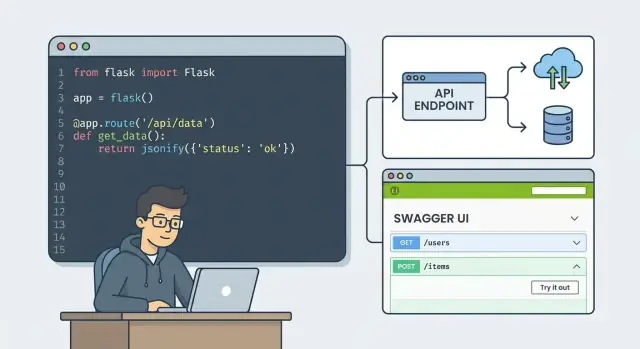
FastAPI in One Minute: The Simple Definition
FastAPI is a Python framework for building web APIs quickly, with clear code and automatic documentation. You write small functions (called “endpoints”) that declare what data your API accepts and what it returns, and FastAPI handles the web plumbing—routing, validation, and producing JSON responses.
What’s an API? A Simple Example
An API is a set of URLs that lets one piece of software talk to another.
For example, a weather app on your phone might call a URL like GET /weather?city=Berlin. The server replies with structured data (usually JSON), such as temperature and forecast. The phone app doesn’t need direct access to the server’s database—it just asks the API and displays the result.
FastAPI helps you create those URLs and responses in Python.
Who Is FastAPI For?
- Beginners who want a modern, guided way to build APIs without writing lots of boilerplate.
- Solo developers who need to move fast while keeping code readable.
- Teams building production services that benefit from strong validation, consistent contracts, and great docs.
You don’t need to be an async expert to start; you can write simple endpoints and adopt more advanced patterns as you grow.
What You’ll Learn in This Guide
- What makes FastAPI different from other Python API options
- How requests and responses work (and what “async” really means)
- How data validation works with Pydantic
- How FastAPI generates OpenAPI docs (Swagger UI and ReDoc)
- How to structure apps with dependencies, security, tests, and deployment basics
Why FastAPI Became Popular
FastAPI caught on quickly because it removes a lot of the everyday friction people hit when building APIs in Python.
It tackles common API pain points
Traditional API projects often start with slow setup and lots of “plumbing”:
- Manually writing (and keeping in sync) request parsing, validation, and error messages
- Unclear API contracts—what exactly does this endpoint accept and return?
- Documentation that lags behind the code, especially as the team grows
FastAPI’s core features target these problems directly, so teams spend more time designing endpoints and less time fighting framework boilerplate.
Type hints make the code act like a contract
FastAPI leans heavily on Python type hints. When you declare that a field is an int, optional, or a list of something, FastAPI uses that information to validate inputs and shape outputs.
This reduces “stringly-typed” mistakes (for example, treating an ID as text in one place and a number in another) and encourages consistent endpoint behavior. It’s still Python, but with clearer expectations baked into the function signatures.
Automatic docs help teams move faster
Because the API schema is derived from the code, FastAPI can generate interactive documentation automatically (OpenAPI + Swagger UI/ReDoc). That matters for collaboration: frontend developers, QA, and integrators can explore endpoints, try requests, and see exact models without waiting for a separate docs effort.
Popular, but not magic
FastAPI won’t fix a poorly designed API. You still need good naming, versioning, error handling, and security decisions. What it does offer is a cleaner path from “idea” to “well-defined API” with fewer surprises along the way.
Key Concepts You Need to Know
FastAPI feels straightforward once you understand a few core ideas it builds on. You don’t need to memorize internals—just recognize the moving parts you’ll use every day.
FastAPI is a framework
A framework is a set of tools and conventions for building an API without starting from scratch. FastAPI provides the “plumbing” for common API tasks: defining endpoints, reading input, returning output, handling errors, and organizing code into a maintainable structure.
Routing: how endpoints are defined
Routing is how you map a URL and HTTP method to a piece of Python code.
For example, you might route GET /users to “list users” and POST /users to “create a user.” In FastAPI, you typically define routes with decorators like @app.get(...) and @app.post(...), which makes it easy to see what your API offers at a glance.
Requests and responses
Every API call is a request (what the client sends) and a response (what your server returns).
FastAPI helps you:
- Read data from the path (
/users/{id}), query string (?page=2), headers, and request body - Return structured JSON responses with the right status codes (like
200,201,404)
ASGI (high level)
FastAPI runs on ASGI, a modern standard for Python web servers. Practically, this means FastAPI is designed to handle many connections efficiently, and it can support features like long-lived connections (for example, WebSockets) when you need them—without you having to manage low-level networking.
Type hints: more than “nice to have”
Python type hints (like str, int, list[Item]) aren’t just documentation in FastAPI—they’re a key input. FastAPI uses them to understand what data you expect, convert incoming values to the right types, and produce clearer, more predictable APIs.
Pydantic models for validation
Pydantic models let you define the shape of data (fields, types, optional values) in one place. FastAPI uses these models to validate incoming JSON, reject invalid input with helpful error messages, and serialize output consistently—so your API behaves reliably even when clients send messy data.
How FastAPI Handles Requests and Responses
FastAPI apps are built around endpoints: a URL path plus an HTTP method. Think of an endpoint as “what the client asks for” and “how they ask for it.” For example, a client might GET /users to list users, or POST /users to create one.
Endpoints = paths + methods
A path is the route, and the method is the action:
GET /products→ fetch dataPOST /products→ send data to create somethingPUT /products/123→ replace/update somethingDELETE /products/123→ remove something
Path parameters vs. query parameters
FastAPI separates data that’s part of the path from data that’s optional “filters” on the request.
- Path parameter: included in the URL structure.
- Example:
GET /users/42→42is the user ID.
- Example:
- Query parameter: appended after
?and typically optional.- Example:
GET /users?limit=10&active=true→limitandactivecontrol how results are returned.
- Example:
Request bodies for JSON payloads
When a client sends structured data (usually JSON), it goes in the request body, most often with POST or PUT.
Example: POST /orders with JSON like { "item_id": 3, "quantity": 2 }.
Response models and consistent output
FastAPI can return plain Python objects (like dicts), but it shines when you define a response model. That model acts as a contract: fields are shaped consistently, extra data can be filtered out, and types are enforced. The result is cleaner APIs—clients know what to expect, and you avoid “surprise” responses that break integrations.
Async in FastAPI: What It Is and When It Helps
“Async” (short for asynchronous) is a way for your API to handle many requests efficiently when a lot of time is spent waiting.
An everyday analogy: waiting on I/O
Imagine a barista taking orders. If they had to stand still and do nothing while the espresso machine runs, they’d serve fewer customers. A better approach is: start the coffee, then take the next order while the machine works.
Async works like that. Your FastAPI app can start an operation that waits on something slow—like a network request or a database query—and while it’s waiting, it can move on to handle other incoming requests.
When async helps the most
Async shines when your API does a lot of I/O (input/output) work—things that spend time waiting rather than “thinking.” Common examples:
- Calling a database (especially over the network)
- Calling external services (payment providers, maps, email APIs)
- Reading/writing files or talking to object storage
If your endpoints frequently wait on these operations, async can improve throughput and reduce the chance that requests pile up under load.
When async doesn’t matter much
Async is not a magic speed button for everything. If your endpoint is mostly CPU-heavy—like resizing large images, running data science calculations, or encrypting big payloads—async won’t make the computation itself faster. In those cases, you typically need different tactics (background workers, process pools, or scaling out).
Good news: sync code still works
You don’t have to rewrite everything to use FastAPI. You can write regular (sync) route functions and FastAPI will run them fine. Many projects mix both styles: keep simple endpoints synchronous, and use async def where it clearly helps (usually around database calls or external HTTP requests).
Data Validation and Serialization with Pydantic
Validation is the checkpoint between the outside world and your code. When an API accepts input (JSON body, query params, path params), you want to be sure it’s complete, correctly typed, and within reasonable limits—before you write to a database, call another service, or trigger business logic.
FastAPI relies on Pydantic models for this. You describe what “good data” looks like once, and FastAPI automatically:
- rejects bad input early
- converts types when possible (for example, turning "42" into an integer)
- returns consistent JSON responses (serialization)
Catching bad input early (with clear errors)
If a client sends the wrong shape of data, FastAPI responds with a 422 Unprocessable Entity and a structured error payload that points to the exact field and reason. That makes it easier for client developers to fix requests quickly, without guessing.
Common validation examples
Here’s a small model showing required fields, types, min/max constraints, and formats:
from pydantic import BaseModel, EmailStr, Field

class UserCreate(BaseModel):
    email: EmailStr
    age: int = Field(ge=13, le=120)
    username: str = Field(min_length=3, max_length=20)
- Required fields:
emailmust be present. - Types:
agemust be an integer. - Min/max:
ageis limited to 13–120. - Formats:
EmailStrenforces a valid email shape.
Serialization: returning clean, predictable JSON
The same models can shape output, so your API responses don’t accidentally leak internal fields. You return Python objects; FastAPI (via Pydantic) turns them into JSON with the right field names and types.
Automatic API Docs: OpenAPI, Swagger UI, ReDoc
One of FastAPI’s most practical features is that it generates API documentation for you automatically—based on the code you already wrote.
OpenAPI: a machine-readable API contract
OpenAPI is a standard way to describe an API in a structured format (usually JSON). Think of it as a “contract” that spells out:
- which endpoints exist (like
GET /users/{id}) - what parameters they accept
- what the request body should look like
- what responses and error formats to expect
Because it’s machine-readable, tools can use it to generate test clients, validate requests, and keep teams aligned.
Swagger UI and ReDoc: interactive docs out of the box
FastAPI serves two human-friendly docs pages automatically:
- Swagger UI (interactive): try endpoints directly in the browser, fill in parameters, send requests, and see responses.
- ReDoc (readable): a clean reference-style documentation page.
In a typical FastAPI project, you’ll find them at:
/docs(Swagger UI)/redoc(ReDoc)
Docs that stay in sync with your code
When you change your path parameters, request models, response models, or validation rules, the OpenAPI schema (and the docs pages) update automatically. No separate “docs maintenance” step.
Why this speeds up front-end and QA work
- Front-end developers can explore endpoints immediately and understand required fields without waiting for a manual spec.
- QA can quickly test edge cases (missing fields, wrong types) and see exact error responses.
- Everyone shares the same source of truth: the running API and its OpenAPI contract.
Your First FastAPI App (Conceptual Walkthrough)
A FastAPI app can be tiny and still feel “real.” You define a Python object called app, add a couple of routes, and run a local server to try it in your browser.
1) A minimal “hello” endpoint
Here’s the smallest useful example:
from fastapi import FastAPI

app = FastAPI()

@app.get("/")
def read_root():
    return {"message": "Hello, FastAPI"}
That’s it: one route (GET /) that returns JSON.
2) Add simple create/read item endpoints (in-memory)
To make it feel like an API, let’s store items in a list. This is not a database—data resets when the server restarts—but it’s perfect for learning.
from fastapi import FastAPI

app = FastAPI()
items = []

@app.post("/items")
def create_item(name: str):
    item = {"id": len(items) + 1, "name": name}
    items.append(item)
    return item

@app.get("/items")
def list_items():
    return items
You can now:
POST /items?name=Coffeeto add an itemGET /itemsto retrieve the list
3) Typical tiny project layout
A common starter structure is:
main.py(createsappand routes)requirements.txtorpyproject.toml(dependencies)
4) Running locally (conceptually)
You typically:
- Install dependencies (FastAPI + an ASGI server like Uvicorn)
- Start the dev server (for example:
uvicorn main:app --reload) - Open
http://127.0.0.1:8000and try the endpoints
Dependencies and Reusable Building Blocks
FastAPI “dependencies” are shared inputs your endpoints need to do their job—things like a database session, the current logged-in user, app settings, or common query parameters. Instead of manually creating or parsing these in every route, you define them once and let FastAPI provide them wherever they’re needed.
What a dependency is (in plain terms)
A dependency is usually a function (or class) that returns a value your endpoint can use. FastAPI will call it for you, figure out what it needs (based on its parameters), and inject the result into your path operation function.
This is often called dependency injection, but you can think of it as: “declare what you need, and FastAPI wires it up.”
Why it reduces repetition
Without dependencies, you might:
- Open/close database connections in every endpoint
- Repeat authentication checks everywhere
- Re-parse the same pagination parameters across multiple routes
With dependencies, you centralize that logic. If you later change how you create a DB session or how you load the current user, you update one place—not dozens of endpoints.
Common dependency examples
- Database session: Create a session per request and close it reliably.
- Settings/config: Provide environment-based settings without passing them manually.
- Pagination: Reuse
page/limitparsing and validation. - Auth user: Retrieve the current user from a token and enforce permissions.
How dependencies plug into endpoints
Here’s the conceptual pattern you’ll see in many FastAPI apps:
from fastapi import Depends, FastAPI

app = FastAPI()

def get_settings():
    return {"items_per_page": 20}

@app.get("/items")
def list_items(settings=Depends(get_settings)):
    return {"limit": settings["items_per_page"]}
You declare the dependency with Depends(...), and FastAPI passes its result into your endpoint parameter. The same approach works for more complex building blocks (like get_db() or get_current_user()), helping your code stay cleaner as your API grows.
Security Basics: Authentication and Authorization
FastAPI doesn’t “auto-secure” your API—you choose the scheme and wire it into your endpoints. The good news is that FastAPI provides building blocks (especially through its dependency system) that make common security patterns straightforward to implement.
Authentication vs. authorization
Authentication answers: “Who are you?” Authorization answers: “What are you allowed to do?”
Example: a user may be authenticated (valid login/token) but still not authorized to access an admin-only route.
Common authentication approaches (high level)
- API keys: simple for service-to-service access. Usually sent via a header (e.g.,
X-API-Key). Manage rotation and revocation. - OAuth2: a standard for delegated access; common for “Sign in with …” or separating auth from your API.
- JWT (JSON Web Tokens): often used as bearer tokens. Convenient for stateless APIs, but you must handle expiry, signing keys, and revocation strategy.
FastAPI supports these patterns via utilities like fastapi.security and by documenting them cleanly in OpenAPI.
Password handling basics
If you store user passwords, never store plain text. Store a salted, slow hash (e.g., bcrypt/argon2 via a well-known library). Also consider rate limiting and account lockout policies.
A careful note
Security is about details: token storage, CORS settings, HTTPS, secret management, and correct authorization checks on every sensitive endpoint. Treat built-in helpers as a starting point, and validate your approach with reviews and tests before relying on it in production.
Testing FastAPI Apps
Testing is where FastAPI’s “it works on my machine” promise turns into confidence you can ship. The good news: FastAPI is built on Starlette, so you get strong testing tools without a lot of setup.
Unit tests vs. integration tests
Unit tests focus on small pieces: a function that calculates a value, a dependency that loads the current user, or a service method that talks to the database (often mocked).
Integration tests exercise the API end-to-end: you call an endpoint and assert on the full HTTP response. These are the tests that catch routing mistakes, dependency wiring issues, and validation problems.
A healthy test suite usually has more unit tests (fast) and fewer integration tests (higher confidence).
The TestClient idea
FastAPI apps can be tested “like a client” using Starlette’s TestClient, which sends requests to your app in-process—no server needed.
from fastapi.testclient import TestClient
from app.main import app

client = TestClient(app)

def test_healthcheck():
    r = client.get("/health")
    assert r.status_code == 200
What to test (practical checklist)
Test the things users and other systems rely on:
- Status codes (200 vs 201 vs 404 vs 422)
- Validation errors (missing fields, wrong types, extra fields)
- Response shape (keys present, types correct, empty lists handled)
- Edge cases (zero results, large inputs, boundary dates)
- Auth cases (no token, expired token, insufficient role)
Keep tests fast and repeatable
Use predictable data, isolate external services (mock or use a test DB), and avoid shared state between tests. Fast tests get run; slow tests get skipped.
Deploying FastAPI: Practical Options and Checklist
Getting a FastAPI app online is mostly about choosing the right “runner” and adding a few production essentials.
Development vs. production servers
When you run uvicorn main:app --reload locally, you’re using a development setup: auto-reload, chatty errors, and settings that prioritize convenience.
In production, you typically run Uvicorn without reload, often behind a process manager (like Gunicorn with Uvicorn workers) or behind a reverse proxy. The goal is stability: controlled restarts, predictable performance, and safer defaults.
Configuration with environment variables
A common pattern is:
- Store secrets and environment-specific values (database URL, API keys, allowed origins) in environment variables.
- Keep sane defaults in code for local use.
- Load and validate settings at startup (often via Pydantic settings).
This keeps one codebase deployable to multiple environments without editing files.
Common deployment targets (quick overview)
- Containers (Docker/Kubernetes): popular for repeatable builds and scaling.
- Virtual machines: simple and flexible; good if you manage your own servers.
- Serverless: can work for smaller APIs; watch cold starts and platform limits.
Practical deployment checklist
Before you call it “done,” confirm you have:
- Logging: structured logs, request IDs (if needed), and log levels per environment.
- Health checks: endpoints like
/healthfor uptime monitoring and load balancers. - Error handling: consistent JSON error responses; don’t expose stack traces to users.
- Timeouts and limits: request body size, worker timeouts, and rate limiting where appropriate.
- Docs policy: decide whether to expose Swagger UI/ReDoc publicly or restrict them.
If you’re moving from “working locally” to “shippable,” it also helps to standardize how you generate and manage your API contract. Some teams pair FastAPI’s OpenAPI output with automated workflows—for example, generating clients, validating requests in CI, and deploying consistently. Tools like Koder.ai can also fit into this stage: you can describe the API you want in chat, iterate on endpoints and models quickly, and then export source code for a normal review/deploy pipeline.
When to Use FastAPI (and When Not To)
FastAPI is a strong choice when you want a clean, modern way to build REST APIs in Python—especially if you care about clear request/response models and predictable behavior as your API grows.
Great use cases
FastAPI tends to shine in these situations:
- Internal services where teams need fast iteration, readable endpoints, and shared contracts between services.
- Public APIs that benefit from strict input validation and consistent error handling.
- Microservices where small, focused APIs are deployed independently.
- Prototypes and MVPs where you want to move quickly without giving up structure (validation + docs).
When another tool may be a better fit
FastAPI isn’t always the simplest answer:
- If you’re writing a one-off script or a tiny webhook handler, something lighter (or even plain Python) may be enough.
- If your project needs the full Django “batteries included” stack (ORM conventions, admin, templating, mature ecosystem patterns), Django or Django REST Framework may reduce decision-making and glue code.
A realistic word on performance
FastAPI can be very fast in practice, but speed depends on your database calls, network latency, and business logic. Expect solid throughput and good latency for typical API workloads—just avoid assuming the framework alone will “fix” slow I/O or inefficient queries.
Next steps
If FastAPI sounds like a match, focus next on routing patterns, Pydantic models, database integration, background tasks, and basic authentication.
A practical path is to build a small endpoint set, then expand with reusable dependencies and tests as your API grows. If you want to accelerate the early scaffolding (routes, models, and the first deployment-ready structure), consider using a vibe-coding workflow—e.g., mapping your endpoints in a “planning mode” and iterating from a single spec. That’s one area where Koder.ai can be useful: you can prototype an API-driven app from chat, then refine the generated code and export it when you’re ready to run it like any standard project.
FAQ
What is FastAPI in simple terms?
FastAPI is a Python web framework for building APIs with minimal boilerplate. You write endpoint functions (like @app.get("/users")) and FastAPI handles routing, request parsing, validation, and JSON responses.
A key benefit is that your type hints and Pydantic models act as an explicit contract for what the API accepts and returns.
What’s an API, and how does it relate to FastAPI?
An API is a set of URLs (endpoints) that other software can call to exchange data.
For example, a client might request weather data with GET /weather?city=Berlin, and the server responds with structured JSON. The client doesn’t need direct database access—it just uses the API response.
How do routes and HTTP methods work in FastAPI?
Routing maps an HTTP method + path to a Python function.
In FastAPI you typically use decorators:
@app.get("/items")for read operations@app.post("/items")for create operations@app.put("/items/{id}")to update/replace@app.delete("/items/{id}")to remove
This makes your API surface easy to scan directly from code.
What’s the difference between path parameters and query parameters?
Path parameters are part of the URL structure and usually identify a specific resource (required).
- Path:
GET /users/42→42is a path parameter
Query parameters are appended after ? and are usually optional filters or controls.
- Query:
GET /users?limit=10&active=true→limit,activeare query parameters
How does FastAPI validate data with Pydantic?
Pydantic models define the shape and rules of your data (types, required fields, constraints). FastAPI uses them to:
- Validate incoming requests
- Coerce types when possible (e.g., string to int)
- Return consistent, well-shaped JSON responses
If validation fails, FastAPI typically responds with 422 Unprocessable Entity and details about which field is wrong.
How does FastAPI generate automatic API documentation?
FastAPI automatically generates an OpenAPI schema from your endpoints, type hints, and models.
You usually get interactive docs for free:
- Swagger UI at
/docs - ReDoc at
/redoc
Because the schema is derived from code, the docs stay in sync as you change parameters and models.
When should I use async endpoints in FastAPI?
Use async def when your endpoint spends time waiting on I/O (database calls, external HTTP requests, file/object storage).
Use regular def when:
- The code is simple and synchronous
- You’re calling libraries that don’t support async
- Work is mostly CPU-bound (async won’t speed up computation)
Mixing sync and async endpoints in the same app is common.
What are FastAPI dependencies, and why are they useful?
Dependencies are reusable “building blocks” that FastAPI injects into endpoints via Depends().
They’re commonly used for:
- Database session per request
- Auth: loading the current user and enforcing permissions
- Shared query parsing (pagination, filters)
- App settings/config
This reduces repetition and centralizes cross-cutting logic so changes happen in one place.
What security basics should I know when building a FastAPI API?
FastAPI doesn’t secure your API by default—you choose an approach and apply it consistently.
Common patterns include:
- API keys (often via headers)
- OAuth2 flows
- Bearer tokens (commonly JWT)
Also remember the basics:
- Never store plaintext passwords; use a salted, slow hash (e.g., bcrypt/argon2)
- Separate authentication (who you are) from authorization (what you can do)
- Use HTTPS and review CORS settings for browser clients
How do I test and deploy a FastAPI app in practice?
For testing, you can use FastAPI/Starlette’s TestClient to call your API in-process (no server required).
Practical items to assert:
- Status codes (200/201/404/422)
- Validation behavior (missing fields, wrong types)
- Response shapes (fields present, correct types)
- Auth scenarios (no token, expired token, insufficient role)
For deployment, run an ASGI server (often Uvicorn; sometimes behind Gunicorn or a reverse proxy) and add production essentials like logging, health checks (e.g., /health), timeouts, and environment-based configuration.