

What Is Kafka and How Is It Used in Modern Systems?
Learn what Apache Kafka is, how topics and partitions work, and where Kafka fits in modern systems for real-time events, logs, and data pipelines.
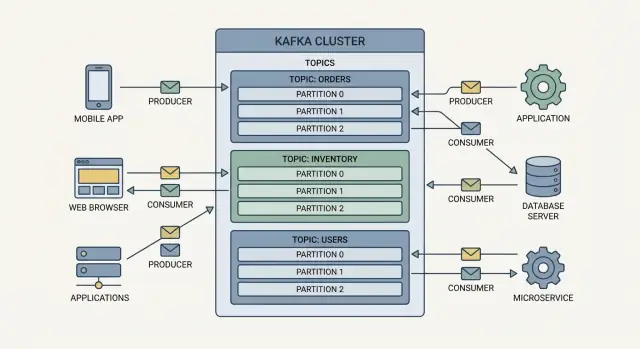
Kafka in Plain English
Apache Kafka is a distributed event streaming platform. Put simply, it’s a shared, durable “pipe” that lets many systems publish facts about what happened and lets other systems read those facts—quickly, at scale, and in order.
Teams use Kafka when data needs to move reliably between systems without tight coupling. Instead of one application calling another directly (and failing when it’s down or slow), producers write events to Kafka. Consumers read them when they’re ready. Kafka stores events for a configurable period, so systems can recover from outages and even reprocess history.
A few terms you’ll see
- Event / Message: A record of something that happened (for example, “OrderPlaced” or “PaymentFailed”). Kafka users often say “message,” but “event” emphasizes that it represents a real-world change.
- Stream: A continuous flow of events over time.
- Log: Kafka organizes events as an append-only log—new events are added to the end, and readers move forward at their own pace.
Who this guide is for (and what you’ll learn)
This guide is for product-minded engineers, data folks, and technical leaders who want a practical mental model of Kafka.
You’ll learn the core building blocks (producers, consumers, topics, brokers), how Kafka scales with partitions, how it stores and replays events, and where it fits in event-driven architecture. We’ll also cover common use cases, delivery guarantees, security basics, operations planning, and when Kafka is (or isn’t) the right tool.
Core Concepts: Producers, Consumers, Topics, Brokers
Kafka is easiest to understand as a shared event log: applications write events to it, and other applications read those events later—often in real time, sometimes hours or days after.
Producers and consumers
Producers are the writers. A producer might publish an event like “order placed,” “payment confirmed,” or “temperature reading.” Producers don’t send events directly to specific apps—they send them to Kafka.
Consumers are the readers. A consumer might power a dashboard, trigger a shipment workflow, or load data into analytics. Consumers decide what to do with events, and they can read at their own pace.
Topics: organizing events
Events in Kafka are grouped into topics, which are basically named categories. For example:
ordersfor order-related eventspaymentsfor payment eventsinventoryfor stock changes
A topic becomes the “source of truth” stream for that kind of event, which makes it easier for multiple teams to reuse the same data without building one-off integrations.
Brokers and clusters
A broker is a Kafka server that stores events and serves them to consumers. In practice, Kafka runs as a cluster (multiple brokers working together) so it can handle more traffic and keep running even if a machine fails.
Consumer groups: scaling readers without duplicating work
Consumers often run in a consumer group. Kafka spreads reading work across the group, so you can add more consumer instances to scale out processing—without every instance doing the same work.
How Topics and Partitions Make Kafka Scale
Kafka scales by splitting work into topics (streams of related events) and then splitting each topic into partitions (smaller, independent slices of that stream).
Partitions = parallelism and throughput
A topic with one partition can only be read by one consumer at a time within a consumer group. Add more partitions, and you can add more consumers to process events in parallel. That’s how Kafka supports high-volume event streaming and real-time data pipelines without turning every system into a bottleneck.
Partitions also help spread load across brokers. Instead of one machine handling all writes and reads for a topic, multiple brokers can host different partitions and share the traffic.
Ordering: what Kafka guarantees (and what it doesn’t)
Kafka guarantees ordering within a single partition. If events A, B, and C are written to the same partition in that order, consumers will read them A → B → C.
Ordering across partitions is not guaranteed. If you need strict ordering for a specific entity (like a customer or order), you typically make sure all events for that entity go to the same partition.
Keys decide where events go
When producers send an event, they can include a key (for example, order_id). Kafka uses the key to consistently route related events to the same partition. That gives you predictable ordering for that key while still letting the overall topic scale across many partitions.
Replicas keep data available
Each partition can be replicated to other brokers. If one broker fails, another broker with a replica can take over. Replication is a major reason Kafka is trusted for mission-critical pub-sub messaging and event-driven systems: it improves availability and supports fault tolerance without requiring every application to build its own failover logic.
Storage, Retention, and Replaying Events
A key idea in Apache Kafka is that events aren’t just handed off and forgotten. They’re written to disk in an ordered log, so consumers can read them now—or later. This makes Kafka useful not only for moving data, but also for keeping a durable history of what happened.
Events are persisted, not just “in transit”
When a producer sends an event to a topic, Kafka appends it to storage on the broker. Consumers then read from that stored log at their own pace. If a consumer is down for an hour, the events still exist and can be caught up on once it recovers.
Retention: how long Kafka keeps data
Kafka keeps events according to retention policies:
- Time-based retention: keep events for a set period (for example, 7 days).
- Size-based retention: keep events until the log reaches a configured size, then delete oldest data.
Retention is configured per topic, which lets you treat “audit trail” topics differently from high-volume telemetry topics.
Compaction: keeping the latest value per key
Some topics are more like a changelog than a historical archive—for example, “current customer settings.” Log compaction keeps at least the most recent event for each key, while older superseded records may be removed. You still get a durable source of truth for the latest state, without unbounded growth.
Replaying events: rebuild state and recover from bugs
Because events remain stored, you can replay them to reconstruct state:
- Rebuild a search index or materialized view from scratch
- Recover a service after a bad deployment by reprocessing from an earlier point
- Onboard a new consumer and let it read historical data
In practice, replay is controlled by where a consumer “starts reading” (its offset), giving teams a powerful safety net when systems evolve.
Reliability and Fault Tolerance Basics
Kafka is built to keep data flowing even when parts of the system fail. It does this with replication, clear rules about who is “in charge” of each partition, and configurable write acknowledgments.
Replication: leader and followers (high level)
Each topic partition has one leader broker and one or more follower replicas on other brokers. Producers and consumers talk to the leader for that partition.
Followers continuously copy the leader’s data. If the leader goes down, Kafka can promote an up-to-date follower to become the new leader, so the partition remains available.
What happens during a broker failure (briefly)
If a broker fails, any partitions it hosted as leaders become unavailable for a moment. Kafka’s controller (internal coordination) detects the failure and triggers leader election for those partitions.
If at least one follower replica is sufficiently caught up, it can take over as leader and clients resume producing/consuming. If no in-sync replica is available, Kafka may pause writes (depending on your settings) to avoid losing acknowledged data.
Durability: acknowledgments and replication factor
Two main knobs shape durability:
- Replication factor: how many copies of each partition exist (for example, 3 copies across 3 brokers).
- Acknowledgments (acks): when the producer considers a write successful.
At a conceptual level:
- acks=0: producer doesn’t wait—fast, but you might lose messages.
- acks=1: leader confirms the write—better, but if the leader fails before followers copy the data, you can lose recently written messages.
- acks=all (or -1): leader waits for replicas that are “in sync” to confirm—safer, usually a bit slower.
To reduce duplicates during retries, teams often combine safer acks with idempotent producers and solid consumer handling (covered later).
The latency vs safety trade-off
Higher safety typically means waiting for more confirmations and keeping more replicas in sync, which can add latency and reduce peak throughput.
Lower latency settings can be fine for telemetry or clickstream data where occasional loss is acceptable, but payments, inventory, and audit logs usually justify the extra safety.
Kafka’s Role in Event-Driven Architecture
Event-driven architecture (EDA) is a way of building systems where things that happen in the business—an order placed, a payment confirmed, a package shipped—are represented as events that other parts of the system can react to.
Publish events, react with consumers
Kafka often sits at the center of EDA as the shared “event stream.” Instead of Service A calling Service B directly, Service A publishes an event (for example, OrderCreated) to a Kafka topic. Any number of other services can consume that event and take action—send an email, reserve inventory, start fraud checks—without Service A needing to know they exist.
Loose coupling (fewer direct dependencies)
Because services communicate through events, they don’t have to coordinate request/response APIs for every interaction. This reduces tight dependencies between teams and makes it easier to add new features: you can introduce a new consumer for an existing event without changing the producer.
Asynchronous workflows and spike resistance
EDA is naturally asynchronous: producers write events quickly, and consumers process them at their own pace. During traffic spikes, Kafka helps buffer the surge so downstream systems don’t immediately fall over. Consumers can scale out to catch up, and if one consumer goes down temporarily, it can resume from where it left off.
A practical mental model
Think of Kafka as the system’s “activity feed.” Producers publish facts; consumers subscribe to the facts they care about. That pattern enables real-time data pipelines and event-driven workflows while keeping services simpler and more independent.
Common Kafka Use Cases in Modern Systems
Kafka tends to show up where teams need to move a lot of small “facts that happened” (events) between systems—quickly, reliably, and in a way that multiple consumers can reuse.
Activity tracking and audit logs
Applications often need an append-only history: user sign-ins, permission changes, record updates, or admin actions. Kafka works well as a central stream of these events, so security tools, reporting, and compliance exports can all read the same source without adding load to the production database. Because events are retained for a period of time, you can also replay them to rebuild an audit view after a bug or schema change.
Microservices communication via events
Instead of services calling each other directly, they can publish events like “order created” or “payment received.” Other services subscribe and react in their own time. This reduces tight coupling, helps systems keep working during partial outages, and makes it easier to add new capabilities (for example, fraud checks) by simply consuming the existing event stream.
Data pipelines to analytics and warehouses
Kafka is a common backbone for moving data from operational systems into analytics platforms. Teams can stream changes from application databases and deliver them to a warehouse or lake with low delay, while keeping the production app separate from heavy analytical queries.
IoT and telemetry with bursty traffic
Sensors, devices, and app telemetry often arrive in spikes. Kafka can absorb bursts, buffer them safely, and let downstream processing catch up—useful for monitoring, alerting, and long-term analysis.
Kafka Ecosystem: Connect, Streams, and Tooling
Kafka is more than brokers and topics. Most teams rely on companion tools that make Kafka practical for everyday data movement, stream processing, and operations.
Kafka Connect: moving data without custom code
Kafka Connect is Kafka’s integration framework for getting data into Kafka (sources) and out of Kafka (sinks). Instead of building and maintaining one-off pipelines, you run Connect and configure connectors.
Common examples include pulling changes from databases, ingesting SaaS events, or delivering Kafka data to a data warehouse or object storage. Connect also standardizes operational concerns like retries, offsets, and parallelism.
Kafka Streams: real-time processing inside your apps
If Connect is for integration, Kafka Streams is for computation. It’s a library you add to your application to transform streams in real time—filtering events, enriching them, joining streams, and building aggregates (like “orders per minute”).
Because Streams apps read from topics and write back to topics, they fit naturally into event-driven systems and can scale by adding more instances.
Schema management: keeping events consistent
As multiple teams publish events, consistency matters. Schema management (often via a schema registry) defines what fields an event should have and how they evolve over time. That helps prevent breakages like a producer renaming a field that a consumer depends on.
Tooling: monitoring what matters
Kafka is operationally sensitive, so basic monitoring is essential:
- Consumer lag: are consumers falling behind?
- Throughput: how many events per second are flowing?
- Errors: failed fetches, produce errors, connector task failures
Most teams also use management UIs and automation for deployments, topic configuration, and access control policies (see /blog/kafka-security-governance).
Delivery Guarantees and Processing Patterns
Kafka is often described as “durable log + consumers,” but what most teams really care about is: will I process each event once, and what happens when something fails? Kafka gives you building blocks, and you choose the trade-offs.
Delivery guarantees (high level)
At-most-once means you might lose events, but you won’t process duplicates. This can happen if a consumer commits its position first and then crashes before finishing the work.
At-least-once means you won’t lose events, but duplicates are possible (for example, the consumer processes an event, crashes, and then reprocesses it after restart). This is the most common default.
Exactly-once aims to avoid both loss and duplicates end-to-end. In Kafka, this typically involves transactional producers and compatible processing (often via Kafka Streams). It’s powerful, but more constrained and requires careful setup.
Idempotency and deduplication
In practice, many systems embrace at-least-once and add safeguards:
- Idempotent writes: make the “apply event” step safe to repeat (e.g., upserts, conditional updates, unique keys).
- Deduplication: store an event id (or business key) and ignore repeats within a window.
Consumer offsets: your “bookmark”
A consumer offset is the position of the last processed record in a partition. When you commit offsets, you’re saying, “I’m done up to here.” Commit too early and you risk loss; commit too late and you increase duplicates after failures.
Retries and poison messages
Retries should be bounded and visible. A common pattern is:
- retry with backoff for transient errors,
- then send the failing record to a dead-letter topic for inspection and replay.
This keeps one “poison message” from blocking an entire consumer group while preserving the data for later fixes.
Security and Governance Considerations
Kafka often carries business-critical events (orders, payments, user activity). That makes security and governance part of the design, not an afterthought.
Authentication and authorization
Authentication answers “who are you?” Authorization answers “what are you allowed to do?” In Kafka, authentication is commonly done with SASL (for example, SCRAM or Kerberos), while authorization is enforced with ACLs (access control lists) at the topic, consumer group, and cluster levels.
A practical pattern is least privilege: producers can write only to the topics they own, and consumers can read only the topics they need. This reduces accidental data exposure and limits blast radius if credentials leak.
Encryption in transit (TLS)
TLS encrypts data as it moves between apps, brokers, and tooling. Without it, events can be intercepted on internal networks, not just the public internet. TLS also helps prevent “man-in-the-middle” attacks by validating broker identities.
Multi-tenant Kafka and naming conventions
When multiple teams share a cluster, guardrails matter. Clear topic naming conventions (for example, <team>.<domain>.<event>.<version>) make ownership obvious and help tooling apply policies consistently.
Pair naming with quotas and ACL templates so one noisy workload doesn’t starve others, and so new services start with safe defaults.
Data governance: PII, retention, and alignment
Treat Kafka as a system of record for event history only when you intend to. If events include PII, use data minimization (send IDs instead of full profiles), consider field-level encryption, and document which topics are sensitive.
Retention settings should match legal and business requirements. If policy says “delete after 30 days,” don’t keep 6 months of events “just in case.” Regular reviews and audits keep configurations aligned as systems evolve.
Operating Kafka: What Teams Need to Plan For
Running Apache Kafka isn’t just “install and forget.” It behaves more like a shared utility: many teams depend on it, and small missteps can ripple out to downstream apps.
Capacity planning basics
Kafka capacity is mostly a math problem you revisit regularly. The biggest levers are partitions (parallelism), throughput (MB/s in and out), and storage growth (how long you retain data).
If traffic doubles, you may need more partitions to spread load across brokers, more disk to hold retention, and more network headroom for replication. A practical habit is to forecast peak write rate and multiply by retention to estimate disk growth, then add buffer for replication and “unexpected success.”
Day-to-day operational tasks
Expect routine work beyond keeping servers up:
- Upgrades: plan rolling upgrades, test client compatibility, and schedule changes when traffic is lowest.
- Rebalancing: consumer group rebalances can cause brief pauses; you’ll want safe deployment patterns and clear ownership.
- Incident response: have playbooks for broker failures, disk-full events, and misconfigured producers flooding a topic.
Cost drivers and deployment choices
Costs are driven by disks, network egress, and the number/size of brokers. Managed Kafka can reduce staffing overhead and simplify upgrades, while self-hosting can be cheaper at scale if you have experienced operators. The trade-off is time-to-recovery and on-call burden.
What to measure (so you’re not guessing)
Teams typically monitor:
- End-to-end latency (produce to consume)
- Consumer lag (how far behind consumers are)
- Broker health (disk usage, under-replicated partitions, request error rates)
Good dashboards and alerts turn Kafka from a “mystery box” into an understandable service.
When to Use Kafka (and When Not To)
Kafka is a strong fit when you need to move lots of events reliably, keep them for a while, and let multiple systems react to the same data stream at their own pace. It’s especially useful when data must be replayable (for backfills, audits, or rebuilding a new service) and when you expect more producers/consumers to be added over time.
Great times to choose Kafka
Kafka tends to shine when you have:
- High-throughput event streams (clicks, orders, sensor data)
- Many consumers that need the same events (analytics, monitoring, fraud, notifications)
- A need for replay and long-lived history, not just “deliver once and forget”
- Integration work where decoupling teams and services matters
When Kafka may be too heavy
Kafka can be overkill if your needs are simple:
- A single low-volume queue between two services
- Short-lived tasks (background jobs) where replay isn’t valuable
- Teams without time to operate and monitor a distributed system
In these cases, the operational overhead (cluster sizing, upgrades, monitoring, on-call) may outweigh the benefits.
Alternatives and complements
- RabbitMQ: great for classic work queues and routing patterns.
- NATS: lightweight messaging with low latency.
- Cloud pub/sub: good when you want managed infrastructure and simpler ops.
Kafka also complements—not replaces—databases (system of record), caches (fast reads), and batch ETL tools (large periodic transformations).
Quick decision checklist
Ask:
- Do we need multiple consumers and replay?
- Will throughput grow significantly?
- Do we need event history/retention as a feature?
- Can we support operational ownership (or use managed Kafka)?
- Are we streaming events, not just sending commands/tasks?
If you answer “yes” to most of these, Kafka is usually a sensible choice.
Getting Started: A Simple Adoption Path
Kafka fits best when you need a shared “source of truth” for real-time event streams: many systems producing facts (orders created, payments authorized, inventory changed) and many systems consuming those facts to power pipelines, analytics, and reactive features.
Step 1: Pick one concrete use case
Start with a narrow, high-value flow—like publishing “OrderPlaced” events for downstream services (email, fraud checks, fulfillment). Avoid turning Kafka into a catch-all queue on day one.
Step 2: Define your events and topics
Write down:
- Events: what happened, in plain business terms
- Topics: where those events live (often one topic per event type or domain)
- Consumers: which teams/services need the events, and why
Keep early schemas simple and consistent (timestamps, IDs, and a clear event name). Decide whether you’ll enforce schemas up front or evolve carefully over time.
Step 3: Establish ownership and operating basics
Kafka succeeds when someone owns:
- Topic creation and naming conventions
- Retention and access policies
- On-call responsibilities and runbooks
Add monitoring immediately (consumer lag, broker health, throughput, error rates). If you don’t yet have a platform team, start with a managed offering and clear limits.
Step 4: Build a “thin” first pipeline
Produce events from one system, consume them in one place, and prove the loop end-to-end. Only then expand to more consumers, partitions, and integrations.
If you’re trying to move fast from “idea” to a working event-driven service, tools like Koder.ai can help you prototype the surrounding application quickly (React web UI, Go backend, PostgreSQL) and iteratively add Kafka producers/consumers via a chat-driven workflow. It’s especially useful for building internal dashboards and lightweight services that consume topics, with features like planning mode, source code export, deployment/hosting, and snapshots with rollback.
If you’re mapping this into an event-driven approach, see /blog/event-driven-architecture. For planning costs and environments, check /pricing.
FAQ
What is Apache Kafka in plain English?
Kafka is a distributed event streaming platform that stores events in durable, append-only logs.
Producers write events to topics, and consumers read them independently (often in real time, but also later) because Kafka retains data for a configured period.
When should a team choose Kafka instead of direct service-to-service calls?
Use Kafka when multiple systems need the same stream of events, you want loose coupling, and you may need to replay history.
It’s especially helpful for:
- Event-driven microservices (publish facts, react asynchronously)
- Real-time pipelines into analytics/warehouses
- Activity tracking, audit logs, telemetry with bursty traffic
What’s the difference between a topic and a partition?
A topic is a named category of events (like orders or payments).
A partition is a slice of a topic that enables:
- Higher throughput (writes/reads spread across brokers)
- Parallel consumption (multiple consumers in a group)
Kafka guarantees ordering only within a single partition.
How do keys affect ordering and scaling?
Kafka uses the record key (for example, order_id) to consistently route related events to the same partition.
Practical rule: if you need per-entity ordering (all events for an order/customer in sequence), choose a key that represents that entity so those events land in one partition.
What is a consumer group, and why does it matter?
A consumer group is a set of consumer instances that share the work for a topic.
Within a group:
- Each partition is processed by at most one instance at a time
- Adding more instances increases parallelism up to the number of partitions
If you need two different apps to each get every event, they should use different consumer groups.
How long does Kafka keep data, and what is retention used for?
Kafka retains events on disk based on topic policies, so consumers can catch up after downtime or reprocess history.
Common retention types:
- Time-based (keep for N days)
- Size-based (keep until log reaches N GB)
Retention is per-topic, so high-value audit streams can be kept longer than high-volume telemetry.
What is log compaction, and when is it better than normal retention?
Log compaction keeps at least the latest record per key, removing older superseded records over time.
It’s useful for “current state” streams (like settings or profiles) where you care about the latest value per key, not every historical change—while still keeping a durable source of truth for the latest state.
Will Kafka deliver events exactly once?
Kafka’s most common end-to-end pattern is at-least-once: you won’t lose events, but duplicates can happen.
To handle this safely:
- Make consumers idempotent (safe to apply the same event twice)
- Use unique event IDs or business keys for deduplication where needed
- Commit offsets after work is complete to reduce loss risk
What are consumer offsets, and how do retries and dead-letter topics fit in?
Offsets are a consumer’s “bookmark” per partition.
If you commit offsets too early, you can lose work on crashes; too late, you’ll reprocess and create duplicates.
A common operational pattern is bounded retries with backoff, then publish failures to a dead-letter topic so one bad record doesn’t block the whole consumer group.
What are Kafka Connect and Kafka Streams, and when should I use each?
Kafka Connect moves data in/out of Kafka using connectors (sources and sinks) instead of custom pipeline code.
Kafka Streams is a library for transforming and aggregating streams in real time inside your applications (filter, join, enrich, aggregate), reading from topics and writing results back to topics.
Connect is typically for integration; Streams is for computation.