

What Is Node.js? A Beginner-Friendly Explanation
Learn what Node.js is, how it runs JavaScript on servers, why its event loop matters, and when Node.js is a good choice for your app.
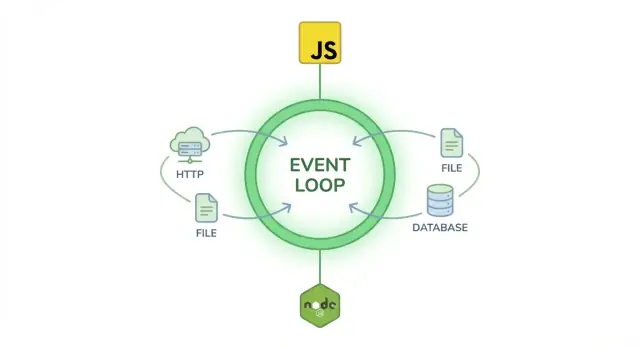
Node.js in Plain English
Node.js is a program that lets you run JavaScript on your computer (or a server), not only inside a web browser.
What it is (and what it isn’t)
It’s easy to mix up terms, so here’s the clean version:
- Node.js is not a programming language — the language is JavaScript.
- Node.js is not a framework — frameworks (like Express) are built on top of Node.js.
Think of Node.js as the “engine room” that can execute JavaScript code outside Chrome, Firefox, Safari, etc.
“Run JavaScript outside the browser” — what that actually means
Normally, JavaScript powers things you click and see on a webpage: menus, forms, interactive UI. The browser provides the environment (access to the page, buttons, windows, and so on).
Node.js provides a different environment. Instead of working with the webpage, your JavaScript can work with your computer and network: read files, talk to databases, handle web requests, and run scheduled tasks.
What you can build with it
Once JavaScript can run outside the browser, a few practical outcomes follow:
- Servers and APIs: build the “backend” that receives requests and sends data back.
- Scripts: automate repetitive tasks like renaming files, processing CSVs, or generating reports.
- Developer tools: build command-line tools and utilities other developers install and use.
So, when someone says “our backend is Node.js,” they usually mean: “Our server-side code is written in JavaScript, and it runs on Node.js.”
Why Node.js Exists (A Quick Background)
Node.js exists because early web servers struggled with a very specific, very common job: handling lots of small requests at the same time—especially when those requests involved waiting on slow things like databases, file systems, or external APIs.
The pain web developers felt before Node.js
Before Node.js, many server setups handled each incoming connection in a “one request, one thread/process” style. That approach can work, but it can become expensive and inefficient when thousands of users are connected at once.
A classic example is a chat app or a live dashboard: the server spends much of its time waiting (for network replies, disk reads, database queries). If each user “occupies” a heavyweight thread while the server waits, you burn memory and CPU just to sit idle.
The quick origin story
Node.js was created in 2009 by Ryan Dahl. The idea was straightforward:
- Use Google’s V8 JavaScript engine (fast JavaScript execution)
- Make I/O operations non-blocking by default
- Handle many connections efficiently without spinning up a thread per request
This design made Node.js especially good at building networked applications that need to stay responsive under concurrency.
How it took off: community + npm
Node.js grew quickly because it matched how web developers already thought: JavaScript everywhere. Soon after, npm (the Node package manager) made it easy to share and reuse code. That combination—familiar language + huge library ecosystem—helped Node move from “interesting experiment” to mainstream tooling.
Where Node.js fits in modern web stacks
Today, Node.js often powers:
- Backend APIs (REST/GraphQL)
- Real-time features (chat, collaboration, notifications)
- Frontend build tools (bundlers, linters, dev servers)
It can sit behind a web or mobile app, act as a “backend for frontend,” or run server-side rendering for frameworks that need it.
How Node.js Works Under the Hood
Node.js is often described as a “JavaScript runtime.” A runtime is simply an environment that can execute JavaScript code and provide extra capabilities that plain JavaScript doesn’t have by itself—like reading files, opening network connections, or starting other programs.
The engine: V8
At the core of Node.js is V8, the JavaScript engine also used by Google Chrome. V8 takes your JavaScript and runs it efficiently on your machine by compiling it into low-level instructions the computer can execute quickly.
Important detail: V8 is not Node.js. V8 focuses on running the JavaScript language. Node.js is the wider package: V8 plus the “glue” that connects JavaScript to your operating system.
The “extra powers”: Node’s built-in APIs
What makes Node.js feel like a server-side tool is its collection of built-in modules (APIs) that expose OS-level features in a JavaScript-friendly way. For example:
- Filesystem APIs let you read and write files (logs, uploads, configuration files).
- Networking APIs let you create servers, make HTTP requests, and work with sockets.
- Process APIs let you access environment variables, handle command-line arguments, and manage how your app runs.
When you call something like fs.readFile(...) or start an HTTP server, Node routes that work to the underlying system (and native libraries), then returns the result back to your JavaScript.
Node.js vs JavaScript (the language)
JavaScript is the programming language: syntax, variables, functions, and so on.
Node.js is one place you can run that language—specifically a place designed to build command-line tools and backend services, with access to the machine it’s running on. In a browser, JavaScript gets browser APIs (DOM, window). In Node, it gets Node APIs (filesystem, network, processes).
The Event Loop and Non-Blocking I/O (No Jargon)
When people say Node.js is “asynchronous,” they mostly mean it’s good at waiting without wasting time.
Asynchronous work: a simple everyday example
Imagine you’re making dinner and you put a pot of water on the stove. You don’t stand there staring at it until it boils—you chop vegetables, set the table, and check the sauce. When the water is ready, you react.
A lot of server work is like that: the program asks for something that takes time (reading a file, querying a database, calling an API), and then it waits for the result. In many systems, waiting can “block” the whole program. Node.js tries hard not to.
The event loop: a traffic controller
The event loop is like a traffic controller for tasks. Requests and callbacks line up, and the event loop decides what runs next. If a task can be started and then waited on (like an I/O operation), Node hands it off to the system, moves on to other work, and later gets notified when the result is ready.
That’s why a Node.js server can handle lots of connections efficiently: it’s not keeping one thread stuck waiting on each slow disk read or network response.
Non-blocking I/O in plain terms
“Non-blocking I/O” simply means: start the slow operation, then keep doing other things while it finishes. When it’s done, Node runs the next bit of code you provided (often a callback, promise resolution, or async/await continuation).
One important caveat: CPU-heavy tasks
This style shines for I/O-heavy workloads, but it’s not magic for everything. If you run a CPU-heavy calculation (like image processing, large encryption jobs, or complex data crunching) on the main thread, it can still slow down everything else—because the event loop can’t “skip” a task that’s actively using the CPU.
What Node.js Is Used For
Node.js is most often used to build server-side software with JavaScript: APIs a website or mobile app talks to, services that process background jobs, and web servers that deliver pages and data.
Because Node.js is good at handling lots of requests without waiting around, it’s a popular choice when your app does many small I/O tasks (reading from a database, calling other services, sending messages) rather than doing heavy math.
Common use cases
A few places Node.js shows up a lot:
- APIs and backend services: REST/JSON endpoints, authentication, dashboards, admin panels.
- Web servers: serving dynamic pages, server-side rendering, handling form submissions.
- Real-time apps: anything that benefits from quick updates to many users at once.
Great fits: “always-on” and real-time features
Node.js is a strong match for:
- Chat and collaboration (messages, typing indicators, presence)
- Notifications (push events, in-app alerts, email/SMS triggers)
- Streaming data (log streams, live feeds, incremental processing)
- Microservices (many small services talking to each other over the network)
Not just servers: tooling and automation
Node.js is also widely used for developer tools, such as build scripts, task runners, and CLI tools (commands you run in a terminal). A lot of modern front-end workflows rely on Node-based tooling even if the final app runs in the browser.
When Node.js isn’t ideal
Node.js is usually not the best choice for long, CPU-heavy computation (like complex video rendering or large scientific calculations) because those tasks can block the process. In those cases, teams often offload work to separate services, background workers, or languages better suited to heavy compute.
Node.js vs JavaScript in the Browser
JavaScript is the language. Node.js and your browser are two different environments that can run that language.
Same language, different “home”
If you know JavaScript basics—variables, functions, objects, async/await, promises—those concepts transfer directly. What changes is what your code can access.
What the browser gives you
Browser JavaScript is designed for building user interfaces. It has built-in access to things like the DOM (the page), events from clicks and typing, and browser APIs such as localStorage, cookies, and the permissions-based Web APIs.
It’s also heavily sandboxed for safety: web pages can’t freely read files on your computer or open raw network connections whenever they want. Browsers enforce strict security boundaries to protect users.
What Node.js adds
Node.js is aimed at running JavaScript outside the browser—often on servers. It gives your code system-level capabilities, such as:
- File system access (read/write files, process uploads, generate PDFs, etc.)
- Networking (run an HTTP server, open sockets, talk to databases)
- Environment variables via
process.env(store secrets and configuration)
This extra power also means different security expectations. Node apps aren’t automatically sandboxed the way browsers are. If your Node process has permission to read a file or connect to a network, it generally can—so you protect it with server security practices (access control, secret management, dependency hygiene).
A helpful way to remember it
Browser JS helps you build the front end (what users see). Node.js helps you build the back end (what runs behind the scenes). Same language—different tools and responsibilities.
npm and the Node Package Ecosystem
One reason Node.js took off so quickly is npm, the package manager that ships with Node. Think of npm as a convenient way to download, update, and share ready-made building blocks for your app.
What “packages” (modules) are
In Node.js, a package (also called a module) is a reusable piece of code that solves a specific problem—anything from parsing dates to building a web server.
Instead of writing everything from scratch, you can install a package and use it immediately. That speeds up development and helps you rely on code that many people have already tested in real projects.
How a project uses package.json
Most Node projects have a package.json file at the root. It’s the project’s “shopping list” and metadata card.
It typically includes:
- The project name and version
- A list of dependencies your app needs to run
- Development tools (like test runners or linters)
- Handy scripts such as
npm run startornpm test
When you run npm install, npm reads package.json, downloads the right versions, and places them in a folder called node_modules.
A quick safety checklist
The npm registry is huge, which is great—but it also means you should be selective.
Prefer packages that are actively maintained (recent updates, clear documentation, healthy issue tracker). Avoid blindly installing whatever a random snippet tells you to, and be wary of “copy‑paste” install commands you don’t understand. If a package feels overkill for a tiny task, a smaller or built-in option may be safer.
Popular Node.js Frameworks (Express and Friends)
Node.js gives you the basic building blocks to create a server: handle requests, send responses, read files, talk to databases, and more. A framework is a set of pre-made patterns and helpers that sit on top of Node.js to organize those building blocks into a clearer structure—so you don’t have to reinvent the same setup for every project.
Express: the common starting point
Express is often the first Node.js framework people learn because it’s small, flexible, and widely used.
With Express, you can:
- define routes like “when someone visits
/products, run this code” - plug in middleware (small functions) for things like logging, authentication, or parsing JSON
- keep your app easier to grow than a single giant file
It doesn’t force a strict project layout, which is great for learning and for smaller apps.
Other popular options (without the rabbit hole)
If you like Express’s simplicity but want speed and modern defaults, Fastify is a popular alternative.
If you prefer a more opinionated, “batteries-included” approach—especially for larger teams—NestJS is common. It encourages a structured architecture (controllers, services, modules), which can make big codebases easier to maintain.
When to use “just Node” vs a framework
Use just Node.js when you’re building something very small (a quick webhook, a tiny internal tool) or you want maximum control and minimal dependencies.
Choose a framework when you expect multiple routes, repeated request-handling logic, or a project that will grow over time. The framework’s structure saves you time and helps keep complexity from piling up.
Benefits and Trade-Offs of Node.js
Node.js is popular because it makes JavaScript a practical choice for server-side work—especially when your app spends most of its time waiting on network or database responses.
Benefits (when it’s a good fit)
One big advantage is using one language across the frontend and backend. Teams can share knowledge, reuse validation logic, and keep a consistent tooling setup.
Node.js also shines at fast I/O. If your app handles lots of concurrent requests—APIs, real-time updates, chat, dashboards, streaming data—Node’s non-blocking approach can be efficient and cost-friendly.
Finally, the ecosystem is huge. There are npm packages for almost anything: web servers, authentication, file uploads, payments, testing, and more. That can speed up delivery when you choose carefully.
Trade-offs (what can hurt)
Dependencies can get complex. Modern Node projects may pull in hundreds (or thousands) of transitive packages. That increases update work, security reviews, and the chance of conflicts.
There’s also an async learning curve. JavaScript’s asynchronous style (Promises, async/await, callbacks in older code) is powerful, but it can lead to hard-to-follow flows if a codebase isn’t structured well.
Node.js is not the best choice for CPU-heavy tasks (like large video encoding or complex scientific computation). It can do them, but you’ll often need workers, queues, or services in other languages to keep the app responsive.
Maintainability: why TypeScript is common
Many teams use TypeScript to make Node projects easier to maintain. Types catch mistakes earlier, improve autocomplete, and make refactors safer—helpful as the codebase and team grow.
The bottom line: Node.js pros and cons depend on your project’s workload, team experience, and how disciplined you are about dependencies and architecture.
How to Get Started with Node.js
Getting started with Node.js is mostly about installing the Node runtime on your machine so your computer can run JavaScript outside the browser.
What “install Node” actually means
When you install Node.js, you’re installing:
- The Node runtime (the program that executes JavaScript files)
- npm (Node’s package manager, used to install and manage libraries)
On a server, it’s the same idea: you install Node so the server can run your JavaScript app—typically as a long-running process.
Pick the right version: LTS vs Current
Node releases come in two common tracks:
- LTS (Long-Term Support): more stable, gets security and bug fixes for longer. This is the common choice for most people and most production apps.
- Current: newer features sooner, but updates more frequently.
If you’re unsure, choose LTS.
Your first steps: run a script, start a server, use npm
- Run a script
Create a file named hello.js:
console.log("Hello from Node!");
Run it:
node hello.js
- Start a tiny web server
import http from "node:http";

http.createServer((req, res) => {
  res.writeHead(200, { "Content-Type": "text/plain" });
  res.end("It works!\n");
}).listen(3000);

console.log("Server running on http://localhost:3000");
- Use npm packages
Initialize a project and install a package:
npm init -y
npm install express
Where Koder.ai can help (optional)
If your goal is to learn Node.js concepts but still ship something real quickly, a vibe-coding platform like Koder.ai can be a practical shortcut: you describe the app in chat (routes, data model, auth, UI), iterate with a planning mode, and export the source code when you’re ready to study or customize it. It’s not a replacement for understanding Node—but it can reduce setup friction while you focus on how APIs and async flows work.
Quick production checklist
Before deploying, make sure you’ve thought about:
- Logging: capture errors and key events (not just
console.log). - Monitoring: track uptime, performance, and crashes.
- Updates: keep Node (especially LTS) and dependencies patched for security.
Common Myths and FAQs About Node.js
Node.js attracts a lot of strong opinions—often based on half-true sound bites. Here are a few common myths, explained in plain language.
“Node.js is the same thing as npm”
They’re related, but not the same. Node.js is the program that runs JavaScript on your computer/server (a JavaScript runtime). npm is the package manager that helps you download and manage third‑party libraries (often called npm packages).
“Node.js is only for startups or small apps”
Node is used by tiny teams and large companies alike. It’s a practical choice for APIs, real-time features (chat, notifications), developer tools, and web backends where JavaScript on the server is convenient.
“Node is single-threaded, so it must be slow”
Node’s main JavaScript execution runs on one thread, but that doesn’t mean it can’t perform well. The key idea is non-blocking I/O: while Node is waiting on network or disk work, it can keep handling other requests instead of sitting idle.
CPU-heavy tasks (like video encoding) can still be a poor fit for a single JS thread—but for many web workloads, Node is fast and efficient.
“Node can’t scale”
Node scales in common, proven ways: you can run multiple processes/instances and spread traffic across them (for example, behind a load balancer). This is how many production Node systems handle high traffic.
“Should I choose Node.js for every project?”
No tool is universal. Node is great when you want JavaScript end-to-end, lots of ecosystem options, and strong performance for I/O-heavy apps. If your project is mostly CPU-bound or has strict runtime requirements, another stack may be a better match.
Choosing Node.js for Your Next Project
Node.js is a way to run JavaScript on the server, which means you can build backends, tools, and services using the same language many teams already use on the front end. It tends to shine when your app spends most of its time waiting on things like network requests, databases, file uploads, or third‑party APIs.
When Node.js is a great fit
Choose Node.js if you’re building:
- REST/JSON APIs for web or mobile apps
- Real-time features like chat, live dashboards, notifications, or collaboration
- BFF (Backend-for-Frontend) services that combine multiple APIs for a UI
- Serverless functions and small microservices where fast iteration matters
- Developer tooling (scripts, CLIs, build helpers) thanks to the npm ecosystem
A practical rule: if your project is mostly “handle lots of requests and coordinate I/O,” Node.js is often a strong choice.
When to think twice
Consider alternatives (or plan extra work) if:
- The core workload is CPU-heavy (video encoding, complex simulations, large-scale data crunching)
- You need strictly predictable latency under heavy compute
- Your team requires a heavily opinionated framework with built-in structure (Node can be very flexible, which cuts both ways)
Node.js can still handle many of these cases, but you may rely more on worker threads, external services, or a different runtime for the hot path.
Try a tiny “weekend-size” sample
A good first project: a small API that lets you add and list notes.
- Create two endpoints:
POST /notesandGET /notes - Store notes in memory first, then swap to a database later
- Add one “real” integration, like validating input or calling a public API
If you want to accelerate that experiment, you can also prototype the same idea in Koder.ai by describing the endpoints and data fields in chat, then iterating until the behavior matches what you’d build by hand.
What to learn next
If you want to keep going, these topics pair naturally with Node.js:
- REST fundamentals: /blog/rest-apis-basics
- Express basics: /blog/express-js-basics
- TypeScript with Node: /blog/typescript-with-node
FAQ
What is Node.js in simple terms?
Node.js is a runtime that lets you execute JavaScript on your machine or a server (not just in a browser).
It’s commonly used to build APIs, web servers, scripts, and developer tooling.
Is Node.js a programming language?
No. JavaScript is the language.
Node.js is an environment that runs JavaScript and provides server/OS-focused APIs (files, networking, processes).
Is Node.js a framework like Express?
No. Node.js is the foundation.
Frameworks like Express, Fastify, or NestJS run on top of Node.js to help you structure servers and routes more easily.
What does “run JavaScript outside the browser” actually mean?
In a browser, JavaScript mainly interacts with the page (DOM, clicks, UI).
In Node.js, JavaScript can do server-side and system tasks such as:
- Reading/writing files
- Listening for HTTP requests
- Connecting to databases
- Running CLI scripts
What is the Node.js event loop, and why does it matter?
The event loop is how Node keeps the app responsive.
It starts slow operations (like network or disk I/O), then keeps handling other work while waiting. When results are ready, it runs the next step of your code (callbacks, promises, or async/await).
Should I install the LTS or Current version of Node.js?
If you’re new or deploying to production, pick LTS (Long-Term Support).
LTS versions are more stable and receive security fixes longer. Use “Current” only if you specifically need the newest features and can update frequently.
How do I run my first Node.js script?
Create a file like hello.js:
console.log("Hello from Node!");
Then run:
node hello.js
When is Node.js a bad fit?
Node.js is usually great for I/O-heavy work, but CPU-heavy tasks can block the main thread.
If you need video encoding, large data crunching, or heavy crypto, consider:
- Worker threads / background jobs
- Moving the compute-heavy part to a separate service
How does Node.js scale if it’s “single-threaded”?
Node can scale by running multiple instances and distributing traffic (commonly behind a load balancer).
A practical approach is to deploy more Node processes/containers rather than trying to make one process handle everything.
How do I use npm safely in a Node.js project?
Use npm to install packages, but be selective:
- Prefer actively maintained libraries
- Avoid copy-pasting install commands you don’t understand
- Keep dependencies updated and review transitive dependency bloat
Your package.json records what you depend on, and npm install fetches those versions into node_modules.