

Server-Side Rendering (SSR) in Websites: A Clear Guide
Learn what SSR (server-side rendering) means for websites, how it works, and when to use it vs CSR or SSG for SEO, speed, and user experience.
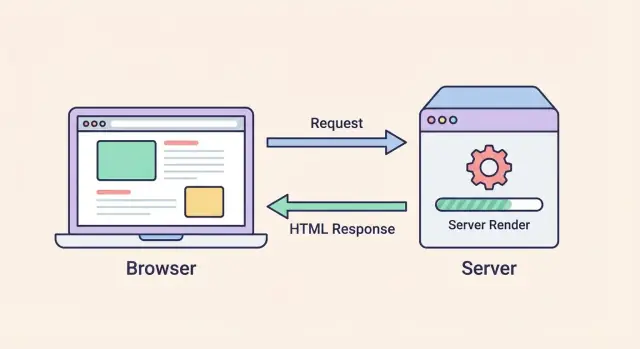
SSR in Websites: A Simple Definition
Server-side rendering (SSR) is a way to build web pages where the server generates the HTML for a page at the moment someone requests it, then sends that ready-to-display HTML to the browser.
In plain terms, SSR flips the usual “empty shell first” pattern: instead of shipping a mostly blank page and asking the browser to assemble content immediately, the server does the initial rendering work.
What users actually experience
With SSR, people typically see page content sooner—text, headings, and layout can appear quickly because the browser receives real HTML right away.
After that, the page still needs JavaScript to become fully interactive (buttons, menus, forms, dynamic filters). So the common flow is:
- HTML arrives and displays (you can read content)
- JavaScript loads and runs
- The page becomes interactive
This “show content first, then add interactivity” pattern is why SSR comes up so often in performance conversations (especially perceived speed).
SSR is a rendering strategy, not a hosting type
SSR doesn’t mean “hosted on a server” (nearly everything is). It’s specifically about where the initial HTML is produced:
- With server-side rendering, the HTML is produced on the server per request (or per cache miss).
- Other approaches may produce HTML in the browser, or ahead of time during a build.
So you can use SSR on many hosting setups—traditional servers, serverless functions, or edge runtimes—depending on your framework and deployment.
What this article will compare
SSR is just one option among common rendering strategies. Next, we’ll compare SSR vs CSR (client-side rendering) and SSR vs SSG (static site generation), and explain what changes for speed, UX, caching strategy, and SEO outcomes.
How Server-Side Rendering Works
SSR means the server prepares the page’s HTML before it reaches the browser. Instead of sending a mostly empty HTML shell and letting the browser build the page from scratch, the server sends a “ready-to-read” version of the page.
The SSR request flow (step by step)
- Request: A person visits a URL (for example,
/products/123). The browser sends a request to your web server. - Data fetch: The server figures out what data the page needs. It might query a database, call internal services, or fetch from external APIs.
- HTML render on the server: Using a template or framework renderer (React/Vue/etc. running on the server), the server combines the layout with fetched data to produce full HTML for that route.
- Response: The server returns that HTML to the browser, so content can appear quickly.
Why you still ship JavaScript
SSR typically sends HTML plus a JavaScript bundle. The HTML is for immediate display; the JavaScript enables client-side behavior like filters, modals, and “add to cart” interactions.
After the HTML loads, the browser downloads the JavaScript bundle and attaches event handlers to the existing markup. This handoff is what many frameworks refer to as hydration.
What this means in practice
With SSR, your server does more work per request—fetching data and rendering markup—so results depend heavily on API/database speed and how well you cache the output.
SSR and Hydration: Why Interactivity Still Needs JavaScript
SSR ships a “ready-to-read” HTML page from the server. That’s great for showing content quickly, but it doesn’t automatically make the page interactive.
The common pattern: SSR + hydration
A very common setup is:
- The server renders HTML for the route (text, links, product details, layout).
- The browser displays that HTML immediately.
- JavaScript downloads and runs to hydrate the page—connecting event handlers and state to the already-rendered HTML.
SSR can improve how quickly people can see the page, while hydration is what makes the page behave like an app.
What “hydration” means (and why it adds browser work)
Hydration is the process where the client-side JavaScript takes over the static HTML and attaches interactivity: click handlers, form validation, menus, dynamic filters, and any stateful UI.
That extra step costs CPU time and memory on the user’s device. On slower phones or busy tabs, hydration can be noticeably delayed—even if the HTML arrived fast.
If JavaScript is slow—or fails
When JavaScript is slow to load, users may see content but experience “dead” UI for a moment: buttons don’t respond, menus don’t open, and inputs may lag.
If JavaScript fails entirely (blocked, network error, script crash), SSR still means the core content can appear. But app-like features that rely on JavaScript won’t work unless you’ve designed fallbacks (for example, links that navigate normally, forms that submit without client code).
SSR doesn’t mean “no JavaScript”
SSR is about where HTML is generated. Many SSR sites still ship substantial JavaScript—sometimes almost as much as a CSR app—because interactivity still needs code running in the browser.
SSR vs CSR: What Changes for Speed and UX
Server-side rendering (SSR) and client-side rendering (CSR) can produce the same-looking page, but the order of work is different—and that changes how fast the page feels.
What the browser gets first
With CSR, the browser usually downloads a JavaScript bundle first, then runs it to build the HTML. Until that work finishes, users may see a blank screen, a spinner, or a “shell” UI. That can make the first view feel slow even if the app is powerful once loaded.
With SSR, the server sends ready-to-display HTML right away. Users can see headings, text, and layout sooner, which often improves perceived speed—especially on slower devices or networks.
Interactivity and “time to usable”
CSR often shines after the initial load: navigation between screens can be very fast because the app is already running in the browser.
SSR can feel faster at first, but the page still needs JavaScript to become fully interactive (buttons, menus, forms). If the JavaScript is heavy, users might see content quickly but still experience a short delay before everything responds.
Trade-offs that affect UX
- SSR benefits: faster first content visibility, smoother first impression, often better for content-heavy pages.
- CSR benefits: simpler hosting, fewer server rendering concerns, great for highly interactive experiences after load.
- SSR costs: more server load, more moving parts (caching, personalization, error handling).
Simple examples
- Marketing pages, blogs, documentation: SSR often improves first view and readability.
- Dashboards, internal tools: CSR can be a good fit because users log in and interact heavily, and fast in-app navigation matters more than the very first paint.
SSR vs SSG: When Pages Are Built
SSR (Server-Side Rendering) and SSG (Static Site Generation) can look similar to visitors—both often send real HTML to the browser. The key difference is when that HTML is created.
SSG: pages are built at deploy time
With SSG, your site generates HTML ahead of time—usually during a build step when you deploy. Those files can be served from a CDN like any other static asset.
That makes SSG:
- Very fast to deliver (great cacheability)
- Predictable under traffic spikes
- Simple to secure and operate (no per-request rendering work)
The trade-off is freshness: if content changes often, you either rebuild and redeploy, or use incremental techniques to update pages.
SSR: pages are built at request time
With SSR, the server generates the HTML on every request (or at least when the cache misses). This is useful when content must reflect the latest data for that specific visitor or moment.
SSR is a good fit for:
- Frequently changing pages (prices, inventory, live dashboards)
- Personalized views (logged-in states, user-specific recommendations)
- Content that depends on request context (location, A/B tests)
The trade-off is build time vs request time: you avoid long rebuilds for changing content, but you introduce per-request work on the server—which affects TTFB and operating cost.
Hybrid sites: mixing SSG and SSR
Many modern sites are hybrid: marketing pages and documentation are SSG, while account areas or search results are SSR.
A practical way to decide is to ask:
- Does this page need to be fresh for every visit?
- Can it be safely cached for minutes/hours?
- Would rebuilding the whole site on every change be acceptable?
Choosing rendering strategy per route often gives the best balance of speed, cost, and up-to-date content.
SSR and SEO: What It Helps With (and What It Doesn’t)
Server-side rendering often improves SEO because search engines can see real, meaningful content as soon as they request a page. Instead of receiving an almost-empty HTML shell that needs JavaScript to fill in, crawlers get full text, headings, and links right away.
What SSR helps with
Earlier content discovery. When the HTML already contains your page content, crawlers can index it faster and more consistently—especially for large sites where crawl budgets and timing matter.
More reliable rendering. Modern search engines can execute JavaScript, but it isn’t always immediate or predictable. Some bots render slowly, postpone JavaScript execution, or skip it under resource constraints. SSR reduces your dependence on “hope the crawler runs my JS.”
On-page SEO essentials. SSR makes it easier to output key signals in the initial HTML response, such as:
- Title tags and meta descriptions
- Open Graph/Twitter metadata for sharing previews
- Canonical tags to avoid duplicate-content confusion
- Structured data (JSON-LD) that is present immediately
What SSR doesn’t magically fix
Content quality and intent. SSR can help search engines access your content, but it can’t make that content useful, original, or aligned with what people search for.
Site structure and internal linking. Clear navigation, logical URL structure, and strong internal links still matter for discoverability and ranking.
Technical SEO hygiene. Issues like thin pages, duplicate URLs, broken canonicals, blocked resources, or incorrect noindex rules can still prevent good outcomes—even with SSR.
Think of SSR as improving your crawl-and-render reliability. It’s a strong foundation, not a shortcut to rankings.
Performance Basics: TTFB, LCP, and Perceived Speed
Performance talk around SSR usually boils down to a few key metrics—and one user feeling: “Did the page show up quickly?” SSR can improve what people see early, but it can also shift work to the server and to hydration.
The metrics that matter
TTFB (Time to First Byte) is how long it takes the server to start sending anything back. With SSR, TTFB often becomes more important because the server may need to fetch data and render HTML before it can respond. If your server is slow, SSR can actually make TTFB worse.
FCP (First Contentful Paint) is when the browser first paints any content (text, background, etc.). SSR often helps FCP because the browser receives ready-to-display HTML instead of an empty shell.
LCP (Largest Contentful Paint) is when the biggest “main” element (often a hero heading, image, or product title) becomes visible. SSR can help LCP too—if the HTML arrives quickly and critical CSS/assets don’t block rendering.
Where SSR can bottleneck
SSR adds server work on every request (unless cached). Two common bottlenecks are:
- Server latency: CPU time to render templates/components, plus queueing time under load.
- Data fetching: waiting on databases and APIs. If your SSR page needs three backend calls, your response time can become “the slowest call wins.”
A practical takeaway: SSR performance is often less about the framework and more about your data path. Reducing API round-trips, using faster queries, or precomputing parts of the page can make a bigger difference than tweaking front-end code.
Perceived speed vs. actual interactivity
SSR is great at “first view” speed: users may see content sooner, scroll sooner, and feel like the site is responsive. But hydration still needs JavaScript to wire up buttons, menus, and forms.
That creates a trade-off:
- Faster initial paint (good perceived performance)
- Potential delay until interaction works (hydration cost), especially on low-end devices or heavy pages
Caching is the main lever
The fastest SSR is often cached SSR. If you can cache the rendered HTML (at the CDN, reverse proxy, or app level), you avoid re-rendering and repeated data fetching on every request—improving TTFB and, in turn, LCP.
The key is choosing a caching strategy that matches your content (public vs. personalized) so you get speed without accidentally serving the wrong user’s data.
Caching SSR Pages Without Serving the Wrong Content
SSR can feel slow if every request forces your server to render HTML from scratch. Caching fixes that—but only if you’re careful about what’s safe to cache.
Common caching layers (and what they’re good at)
Most SSR stacks end up with multiple caches:
- CDN cache: stores full HTML close to users. Great for public pages (marketing, docs, category pages).
- Reverse proxy cache (e.g., Nginx/Varnish): sits in front of your app, caching responses and shielding your SSR server during traffic spikes.
- App cache: your code caches expensive computations or fragments (often in Redis or in-memory) so rendering is faster even when you can’t cache the whole page.
- Database cache: indexes, query caching, or read replicas reduce the cost of fetching data used during rendering.
Cache keys: what makes one “page” different from another
A cached SSR response is only correct if the cache key matches all the things that change the output. Besides the URL path, common variations include:
- Locale (language/region)
- Device class (mobile vs desktop) if you render different markup
- Auth state (logged in vs logged out)
- Experiments (A/B test buckets)
HTTP helps here: use the Vary header when output changes based on request headers (for example Vary: Accept-Language). Be cautious with Vary: Cookie—it can destroy cache hit rates.
Headers and revalidation patterns
Use Cache-Control to define behavior:
public, max-age=0, s-maxage=600(cache at CDN/proxy for 10 minutes)stale-while-revalidate=30(serve slightly old HTML while refreshing in the background)- ETag or Last-Modified for conditional requests (fast 304 responses)
The big warning: personalized pages
Never cache HTML that includes private user data unless the cache is strictly per-user. A safer pattern is: cache a public shell SSR response, then fetch personalized data after load (or render it server-side but mark the response private, no-store). One mistake here can leak account details across users.
SSR Downsides and Common Pitfalls
SSR can make pages feel faster and more complete on first load, but it also shifts complexity back to your server. Before committing, it’s worth knowing what can go wrong—and what tends to surprise teams.
More moving parts: runtime, deployments, monitoring
With SSR, your site isn’t just static files on a CDN. You now have a server (or serverless functions) rendering HTML on demand.
That means you’re responsible for runtime configuration, safer deployments (rollbacks matter), and monitoring real-time behavior: error rates, slow requests, memory usage, and dependency failures. A bad release can break every page request immediately, not just a single bundle download.
Higher infrastructure costs
SSR often increases compute per request. Even if HTML rendering is quick, it’s still work your servers must do for every visit.
Compared to purely static hosting, costs can rise due to:
- More CPU time (rendering templates/components)
- More server instances or higher serverless usage
- Extra caching layers to keep performance steady
Failure modes you don’t see with static pages
Because SSR happens at request time, you can hit edge cases such as:
- Timeouts when rendering takes too long
- Rate limits (your own or a provider’s) under traffic spikes
- Slow third-party APIs delaying page generation
If your SSR code calls an external API, one slow dependency can turn into a slow homepage. This is why timeouts, fallbacks, and caching are not optional.
Hydration and “mismatched UI” bugs
A common developer pitfall is when the server renders HTML that doesn’t exactly match what the browser renders during hydration. The result can be warnings, flicker, or broken interactivity.
Typical causes include random values, timestamps, user-specific data, or browser-only APIs during the initial render without guarding them properly.
Popular SSR Frameworks and Related Terms
Choosing “SSR” usually means choosing a framework that can render HTML on the server and then make it interactive in the browser. Here are common options and the terms you’ll see around them.
Popular SSR-capable frameworks
Next.js (React) is a default choice for many teams. It supports SSR per route, static generation, streaming, and multiple deployment targets (Node servers, serverless, and edge).
Nuxt (Vue) offers a similar experience for Vue teams, with file-based routing and flexible rendering modes.
Remix (React) leans into web standards and nested routing. It’s often chosen for data-heavy apps where routing and data loading should be tightly coupled.
SvelteKit (Svelte) combines SSR, static output, and adapters for different hosts, with a lightweight feel and straightforward data loading.
Related terms (quick definitions)
- SSR (Server-Side Rendering): HTML is generated on the server for each request (or for many requests via caching).
- SSG (Static Site Generation): HTML is generated at build time.
- ISR (Incremental Static Regeneration): “Static” pages are refreshed after deployment on a schedule or on-demand.
- Streaming: the server sends HTML in chunks so users can see content sooner.
- Edge rendering: SSR runs closer to the user (CDN/edge locations) to reduce latency.
Routing and data fetching: what differs
- Next.js / Nuxt / SvelteKit: commonly use file-based routing; data is usually fetched in framework-specific server hooks tied to routes.
- Remix: uses nested routes with per-route loaders/actions, so each route declares how it fetches data and handles form submissions.
How to choose
Choose based on your team’s UI library, how you want to host (Node server, serverless, edge), and how much control you need over caching, streaming, and data loading.
If you want a faster way to experiment before committing to a full SSR stack, a platform like Koder.ai can help you prototype a production-shaped app from a chat interface—typically with a React frontend and a Go + PostgreSQL backend—then iterate with features like planning mode, snapshots, and rollback. For teams evaluating SSR trade-offs, that “prototype-to-deploy” loop can make it easier to measure real TTFB/LCP impact instead of guessing.
When SSR Is the Right Choice
SSR is most valuable when you need pages to feel ready quickly and be reliably readable by search engines and social preview bots. It’s not a magic speed button, but it can be the right trade-off when first impressions matter.
Best fits for SSR
SSR tends to shine for:
- Content sites (blogs, documentation, news) where users often land on a single page from search or a link
- Ecommerce category and product pages, especially when browsing starts from Google
- Public listings (jobs, real estate, marketplaces) where many pages share a template but have different data
- Marketing and SEO-focused pages where fast first view and clean metadata matter
If your pages are publicly accessible and you care about discoverability, SSR is usually worth evaluating.
Less ideal scenarios
SSR can be a poor fit when:
- The app is private (behind login), highly interactive, and SEO is irrelevant
- Most user value happens after complex client-side interactions (dashboards, editors)
- Personalization is so heavy that every request produces a unique page, making caching difficult
In those cases, client-side rendering or a hybrid approach often keeps infrastructure simpler.
Decision factors to check
Consider SSR when these are true:
- Update frequency: content changes often enough that pre-building every page is inconvenient
- Personalization level: you can keep most of the HTML shared (or personalize in small, cache-safe parts)
- Traffic spikes: you have a plan for caching and capacity during launches or campaigns
Rule of thumb (non-technical)
- If a page should rank on Google → SSR (or SSG) is usually a good bet.
- If it’s a logged-in tool used daily by the same team → SSR is optional.
- If pages change every minute but must still be searchable → SSR + caching is often the sweet spot.
A Practical SSR Checklist Before You Commit
SSR can be a great fit, but it’s easiest to succeed when you decide with real constraints in mind—not just “faster pages.” Use this checklist to pressure-test the choice before you invest.
Decision checklist
- SEO needs: Do you rely on organic traffic for pages that must be indexed (product pages, category pages, marketing pages)? If key content is behind login or changes per user, SSR won’t automatically fix SEO.
- Caching plan: Which pages can be cached safely, and at what layer (CDN, reverse proxy, app)? How will you prevent personalized HTML from being cached and served to the wrong user?
- Data latency: What data does the server need to render the page, and how slow is it? Slow upstream APIs can turn SSR into higher TTFB and a slower-feeling site.
- Auth & personalization: Will SSR pages vary by session, region, A/B test, or permissions? Define what’s rendered on the server vs fetched after load.
Test before/after (don’t guess)
Measure a baseline in production-like conditions, then compare after a prototype:
- TTFB and server render time (do you get faster HTML, or just more server work?)
- LCP and time to usable content (especially on mobile)
- Crawlability checks: inspect server-delivered HTML to confirm critical content and metadata are present without waiting for client JavaScript
Monitor what can break
Set alerts and dashboards for:
- 5xx errors and timeouts
- render duration and slow routes
- cache hit rate (and cache bypass reasons)
Recommended next step
If the checklist raises concerns, evaluate a hybrid approach (SSR + SSG): pre-render stable pages with SSG, use SSR only where freshness or personalization truly matters. This often gives the best speed/complexity trade-off.
If you do decide to prototype, keep the loop tight: ship a minimal route in SSR, add caching, then measure. Tools that streamline building and deployment can help here—for example, Koder.ai supports deploying and hosting apps (with custom domains and source code export available), which makes it easier to validate SSR performance and rollout/rollback safely while you iterate.
FAQ
What is server-side rendering (SSR) in simple terms?
SSR (server-side rendering) means your server generates the page’s HTML when a user requests a URL, then sends that ready-to-display HTML to the browser.
It’s different from “being hosted on a server” (almost everything is). SSR specifically describes where the initial HTML is produced: on the server per request (or per cache miss).
How does SSR work step by step?
A typical SSR flow looks like this:
- Browser requests a route (e.g.,
/products/123). - Server fetches the needed data (DB/API/services).
- Server renders HTML using your framework/template.
- Browser shows the HTML immediately, then downloads JavaScript to enable interactivity.
The big UX difference is that users can often read content sooner because real HTML arrives first.
Does SSR eliminate the need for JavaScript?
SSR primarily improves how fast users can see content, but JavaScript is still required for app-like behavior.
Most SSR sites ship:
- HTML for fast first display
- a JS bundle that runs in the browser to attach event handlers and state
So SSR is usually “content first, interactivity second,” not “no JavaScript.”
What is hydration, and why can SSR pages still feel slow to interact with?
Hydration is the browser-side step where your JavaScript “activates” the server-rendered HTML.
Practically, hydration:
- connects click handlers, form logic, and state to existing markup
- costs CPU/memory on the user’s device
On slower devices or with large bundles, users may see content quickly but experience a short “dead UI” period until hydration finishes.
How is SSR different from CSR (client-side rendering)?
CSR (client-side rendering) typically downloads JavaScript first and then builds the HTML in the browser, which can mean a blank/shell UI until JS finishes.
SSR sends ready-to-display HTML first, which often improves perceived speed for first-time visits.
A common rule of thumb:
- SSR: better first view for content/SEO-focused pages
- CSR: often simpler deployment and fast in-app navigation after the app loads
How is SSR different from SSG (static site generation)?
SSG (static site generation) creates HTML at build/deploy time and serves it like static files—very cacheable and predictable under load.
SSR creates HTML at request time (or on cache miss), which helps when pages must be fresh, personalized, or depend on request context.
Many sites mix both: SSG for stable marketing/docs, SSR for search results, inventory, or user-context pages.
Does SSR improve SEO, and what doesn’t it fix?
SSR can help SEO by putting meaningful content and metadata directly in the initial HTML response, which makes crawling and indexing more reliable.
SSR helps with:
- faster content discovery (less dependence on JS execution)
- outputting essentials like titles, canonicals, and JSON-LD immediately
SSR does not fix:
- weak content
- poor internal linking / site structure
- technical issues like noindex, duplicates, or broken canonicals
How does SSR affect TTFB, LCP, and perceived performance?
The most relevant metrics are:
- TTFB: can increase with SSR if data fetching/rendering is slow
- FCP/LCP: often improve because HTML arrives ready to paint
- Time to interactive/usable: can be delayed by hydration and large JS bundles
SSR performance often depends more on your data path (API/DB latency, round trips) and caching than on the UI framework.
How do you cache SSR pages without leaking personalized content?
Caching SSR output is powerful, but you must avoid serving one user’s HTML to another.
Practical safeguards:
- Cache public pages at the CDN/proxy with
Cache-Control(e.g.,s-maxage,stale-while-revalidate). - Define cache keys carefully (URL + locale, device class, experiment bucket).
- Use
Varywhere appropriate (e.g.,Vary: Accept-Language), and be cautious withVary: Cookie. - For personalized pages, prefer
private, no-storeor cache only per-user (if you truly must).
When in doubt, cache a public shell and fetch personalized details after load.
What are the biggest downsides or common pitfalls of SSR?
Common SSR pitfalls include:
- Slow upstream dependencies: one slow API/DB query becomes a slow page.
- Timeouts and traffic spikes: request-time rendering can overload servers without caching.
- Hydration mismatch: server HTML differs from what the client renders (often due to randomness, timestamps, or browser-only APIs during initial render).
- Operational complexity: monitoring, rollbacks, and runtime failures affect every page request.
Mitigations: set timeouts/fallbacks, reduce data round trips, add caching layers, and keep server/client renders deterministic.