

WhatsApp commerce for D2C: map chat to order confirmation
WhatsApp commerce for D2C flow to go from product discovery to order confirmation, using click-to-WhatsApp, catalog sharing, and checkout links with clean data.
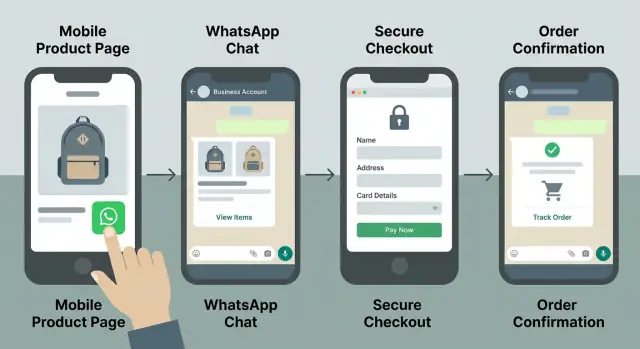
What you’re trying to achieve (in plain terms)
When someone taps a WhatsApp button, they want speed and clarity. They want to ask one quick question, see the right product, and get to payment without repeating themselves or waiting hours.
Most D2C brands lose orders in the gap between chat and payment. The usual causes are slow replies, too many questions up front, messy product info, or sending people to a checkout that feels disconnected from the conversation. The moment it feels like work, people drop.
“Clean customer data” just means you capture details you can actually use later, without guessing. In practice, that’s consistent fields like name, phone number, delivery address, email (optional), chosen variant, quantity, and consent for updates. It also means avoiding free-text chaos like three spellings of the same city or missing apartment numbers.
A solid WhatsApp order flow has a short, repeatable path:
- Entry: click-to-WhatsApp with a pre-filled message that explains the intent
- Discovery: a simple way to browse or request options (catalog, bestsellers, or guided questions)
- Data capture: a lightweight way to collect essentials in the right order
- Payment: a link-based checkout that matches what was agreed in chat
- Confirmation: an order summary and what happens next (delivery, support, returns)
Keep it fast by asking one question at a time, offering clear buttons or short replies (like “1, 2, 3”), and saving checkout for after the shopper picks a specific product and variant. A good flow feels like a helpful store assistant, not a form.
Define the flow boundaries first
Before you write messages and buttons, draw a clear line around what your WhatsApp flow is responsible for. If the boundary is fuzzy, chats get long, details get missed, and handoffs confuse shoppers.
Start with entry points. A shopper can arrive from a paid ad, a site button, a QR code on a flyer, or a packaging insert. Each entry point should have one clear job. An ad tap can start with a specific product. A QR code on packaging can go straight to reorders or support.
Next, list the decisions you must collect to place an order. Keep it short and non-negotiable, and treat everything else as optional.
Decide what stays in chat vs on a page
A simple rule: use WhatsApp for quick choices and reassurance, and use a page for structured data and payment. Chat is great for variant and quantity, answering questions, and confirming intent. A page is better for address, delivery options, and checkout because forms reduce typos.
Use this boundary checklist to stay disciplined:
- What triggers the chat (ad, site, QR, insert) and what the first message should include
- The minimum fields you need: variant, quantity, name, phone, address, payment choice
- Where each step happens: in WhatsApp, on a link-based checkout page, or in your ops tool
- What “success” means: order confirmed and clean customer data captured
- Your constraints: support hours, team size, returns policy, tax and privacy requirements
Write these boundaries on one page. It becomes the reference for copy, automation, and handoff to fulfillment.
Click-to-WhatsApp: make the first message do the work
The biggest win in a click-to-WhatsApp funnel is simple: the shopper shouldn’t have to explain why they’re here. If the first message already contains product context and intent, replies get faster and easier to track.
Pre-fill a message that carries context
For each campaign or product group, pre-fill a short message that includes (1) what they saw and (2) what they want next. Keep it natural, like something a person would type.
Example:
“Hi! I’m coming from the Winter Hoodie ad. I want the size guide and the price for size M.”
That single line confirms the product, sets the question, and makes it easy to respond without guessing.
To capture the source cleanly, add a compact tag you can parse later (or copy into your CRM). Keep it consistent and unobtrusive, like “Ref: IG_CreatorA_Hoodie” or “Ref: QR_StoreShelf_01”. Use a different pattern per source: campaign, landing page, creator, QR, or packaging insert.
Plan for repeat buyers. Returning customers often send “Hey” or “Need another one.” Your flow should detect it (by phone number match, past order lookup, or a quick question) and offer a fast path like “Reorder” or “Track my order.”
Set expectations in the first reply so the chat feels safe and predictable:
- Typical response time (for example: “We reply in under 10 minutes during business hours”)
- What can be done in chat (recommendations, size help, order status)
- What happens next (catalog, checkout link, confirmation)
- What info you’ll ask for (name, delivery pin code, email if needed)
Product discovery in chat, without overwhelming people
Discovery on WhatsApp should feel like a helpful shop assistant, not a scroll-heavy store. The goal is to get someone to the right item fast, with as few messages as possible.
Start by choosing how you’ll show products. A WhatsApp Catalog works well when people want to browse and you have clear categories. A short curated list in chat is better when the person arrived from a specific ad, influencer post, or a clear intent (like “gift under $50” or “best for acne”). You can combine both: send a curated list first, then offer the Catalog if they want to explore.
Share products in small batches. Three to six items is usually enough choice without decision fatigue. For each item, include only what helps someone compare quickly:
- Product name and price
- One key option (size, shade, pack size)
- Best use (who it’s for or what problem it solves)
- One simple next step (“Reply 1, 2, or 3”)
Then ask one quick question to narrow choices before you send the next set. Keep it answerable in one tap or a short reply: size (S/M/L), color (black/white), bundle (single/2-pack), or goal (“sleep better” vs “more energy”).
Plan for out-of-stock without stalling the conversation. If an item is unavailable, say it clearly, then present two close alternatives and why they match (same fit, same active ingredient). Offer a clean fallback like “Join waitlist” or “Show next best option.”
Capture clean customer data while staying conversational
Clean data is what makes the flow repeatable. The trick is to collect it the way a good cashier would: only ask what you need, in the order you need it, and keep it light.
Start with the minimum that lets you create an order and contact the customer. A simple pattern is: confirm the item first, then collect details.
Ask for details in one consistent format
Don’t ask five questions at once. Ask one, show an example, and wait. Use the same wording every time so customers learn the pattern.
A practical reply format you can reuse:
- Name: First Last
- City:
- Email (optional):
For product choices, capture selections in a structured way instead of “I want the blue one.” For example: “Reply with: SKU, variant, quantity” and show one example like “TSHIRT01, Black-M, 2”. If you have a catalog, mirror the same naming in chat so the customer’s words match your records.
Confirm what you captured before checkout
Before sending any checkout link, repeat back what you understood in one short message: item, variant, quantity, name, city, and the next step. This single confirmation prevents most “wrong size” and “wrong address” support tickets.
Example:
“Got it: TSHIRT01 Black-M x2 for Sam Lee in Austin. Next: I’ll send a checkout link to complete payment and shipping.”
Decide where this data lives so support can find it later. Keep one source of truth (even if you use multiple tools) and make sure it’s reusable for repeat buys and returns.
Link-based checkout: connect it to WhatsApp properly
Chat is great for choosing. Payments and addresses usually need a form. A link-based checkout gives you structure (totals, shipping rules, payment steps) without breaking the experience, as long as the handoff is intentional.
When you send the checkout link, pass enough context so the page feels like a continuation of the chat. That typically means cart items, selected variants, quantity, any discount code you promised, and a simple source tag (for example: “wa_ad” or “wa_catalog”). It helps reporting later and prevents the customer from re-explaining what they want.
Keep the checkout form short, but don’t postpone essentials by saying “we’ll ask in chat later.” That leads to missing shipping details and more back-and-forth.
Make sure checkout captures:
- Full name (as it should appear on the label)
- Phone number (with country code, basic validation, and consent text if needed)
- Delivery address (separate fields for apartment, city, postal code)
- Email (optional, but validated if collected)
- Delivery notes (optional, but kept short)
Abandonment is normal, so plan for it. If the shopper doesn’t complete payment, trigger a WhatsApp follow-up that references the exact cart and asks one simple question (for example, “Want me to hold this size?”). If payment fails, give a clear retry path, not a dead end.
After payment, show a confirmation page with a clear “Return to WhatsApp” step. The return message should include the order number, a short items summary, and what happens next (shipping timeline and support options) so customers don’t ask, “Did it go through?”
Step-by-step: discovery to confirmation
A good WhatsApp flow is quick to understand what the shopper wants, clear about the next step, and strict about confirming details before money changes hands.
Step 1: Entry tap to first message. The chat arrives with a pre-filled message that gives context (product, campaign, or intent). This reduces confusion and helps route the conversation.
Step 2: One intent question. Reply with a short choice question so the shopper can answer in one tap: browse, reorder, track an order, or support.
Step 3: Show products and capture selection. Share a small set of best matches (3 to 5) and ask for one clear reply like “Send 1, 2, or 3.” If you use catalog sharing, pair it with a simple question: “Which size and how many?”
Step 4: Confirm the cart in chat. Restate item name, variant, quantity, price, and delivery city. Ask for a single confirmation word like “Confirm.”
Step 5: Send checkout link and set expectations. Explain what happens next in one sentence: they complete address and payment there, then you confirm the order in WhatsApp.
Step 6: Confirm payment and the order. Send a tight confirmation message with order number, items, total, delivery estimate, and how to get help.
Example:
“Order #1842 confirmed: 2x Vitamin C Serum 30ml. Total $48. Ships in 24 hours.”
Order confirmation and post-purchase messages that reduce tickets
Order confirmation is where you remove doubt. Send it only after payment is captured (prepaid) or after the customer explicitly confirms the order details (COD). If you send it too early, people ask “Did it go through?” If you send it too late, they may reorder.
Keep the confirmation short, scannable, and complete. A good message answers the top questions before they become support chats.
Include these every time:
- Order ID and timestamp
- Items, quantities, and total paid or payable (including shipping)
- Delivery estimate as a simple range (for example, 2-4 business days)
- Delivery address summary (last line only, to catch mistakes)
- A single help prompt (one keyword or quick reply like “Change address”)
COD vs prepaid needs one extra line. For prepaid, confirm payment status (“Paid”) and the method. For COD, restate the payable amount and ask for a simple confirmation like “Reply YES to confirm COD.” If they don’t confirm within a set time (say 30 minutes), send one reminder and then pause updates.
After confirmation, run a simple status loop so customers don’t ask “Where is my order?” Keep it to a few high-signal updates: packed, shipped, delivered. Each update should repeat the order ID and the latest ETA.
Make support paths obvious. Instead of “Contact us for help,” offer specific actions:
- Return or exchange: ask for order ID + reason + photo (if needed)
- Address change: allow it only before “packed,” and confirm the new address
- Delivery issue: offer one-tap reporting like “Delayed” or “Wrong item”
Example message:
“Order #18473 confirmed. 2 items. Total: $42 paid. ETA: Tue-Thu. Address: 22 Pine St. Reply: CHANGE ADDRESS, RETURN, or STATUS.”
Common mistakes that cause drop-offs
Most WhatsApp commerce problems come from asking people to do too much, too soon. If the first 60 seconds feels like a form, many shoppers leave.
Chat isn’t a full storefront. It’s best at guiding a decision, confirming details, and handing off to checkout.
The issues that usually create drop-offs or messy orders:
- Collecting full name, address, and email before you confirm interest. Start with intent, then ask only what you need for the next step.
- Skipping cart confirmation. If you don’t restate item, variant, quantity, price, and shipping option before checkout, you’ll get wrong orders and refund requests.
- Sending a generic checkout link with no context. If it isn’t tied to a specific cart and chat session, tracking breaks and support can’t match payments to messages.
- Mixing variant formats. If one message uses “M,” another uses “Medium,” and a third uses “40,” your data becomes hard to search and hard to fulfill.
- No fallback when replies are slow. A quiet chat feels abandoned, even if you respond later.
Small fixes prevent most of this. Use one consistent way to capture variants (Size: M, Color: Black). Confirm the cart in one clean message, then send checkout. Collect details in a logical order: delivery city first, then address, then email only if you need it for receipts.
Example: A shopper asks, “Do you have the hoodie in black?” Don’t reply with five questions. Share the black hoodie option, ask for size, then send a cart summary:
“Black Hoodie, Size M, Qty 1, Total $59, Ships tomorrow. Reply YES to checkout or CHANGE to edit.”
If nobody is available, an auto-reply should set expectations and offer the next action (catalog, hours, or a keyword like “TRACK” or “HELP”).
Quick checklist before you launch
Do a dry run with a friend’s phone. Every chat should start with context, collect clean details, and end with an order that matches what the shopper saw.
First message and data hygiene
- The opening message should show what they clicked (product or collection) and where they came from (ad set, creator, email) using a consistent tag format.
- Capture the shopper’s name the same way every time and confirm the phone number you’ll use for order updates.
- Ask for variant details in plain words (size, color, pack) and repeat them back so the shopper can say “yes” or correct you.
- Confirm quantity explicitly, including any bundles.
Checkout and confirmation
- The checkout should open with the right cart contents and total, including shipping and any discount you promised.
- After payment, the outcome should show up in WhatsApp (paid, failed, or abandoned) so the shopper doesn’t have to explain what happened.
- Your confirmation message should include what happens next: dispatch window, how to change address, and one keyword to reply with for support.
A fast sanity test: pick a popular product, choose an uncommon variant, buy 2 units, then cancel the payment once. If your WhatsApp replies still stay accurate and calm, you’re ready.
Example flow: from ad tap to confirmed order
A shopper sees an Instagram ad for your best-seller, taps “Send message,” and lands in WhatsApp. This is where the channel works best: fast choices, a clear next step, and no guessing.
You reply with a tight opener that asks one thing:
- “Thanks for checking out the Cloud Tee. Which size do you want: S, M, L, XL?”
They answer “M.” You ask one more question to lock the variant:
- “Great. Pick a color: Black or Sand?”
After they choose, you offer a small add-on set, not your whole store:
- “Pairs well with: Everyday Shorts, Light Hoodie, Socks (3-pack), or the Summer Bundle (tee + shorts). Reply 1-4 or say ‘just the tee.’”
They pick the bundle. You confirm the cart in one message:
- “Cart: Cloud Tee (M, Black) + Everyday Shorts (M, Black). Total: $68. Reply YES to checkout, or type EDIT to change size/color.”
When they reply YES, you send the link-based checkout and set expectations:
- “Here’s your checkout link. After payment, I’ll confirm your delivery window here.”
Payment succeeds. You send a confirmation message with the delivery window and a support shortcut:
- “Confirmed. Order #18492. Estimated delivery: Tue-Thu. Reply TRACK anytime for updates.”
What you now have (clean and useful): the ad source, selected size/color, items considered, final cart, checkout completion status, phone number, name and address from checkout, and a clear order ID. That’s enough for retargeting (people who asked about Sand but didn’t pay) and faster support (variant, order number, delivery estimate in the same thread).
Next steps: implement, measure, improve
Start by writing the first version on one page: where the click starts, what the customer sees in WhatsApp, when you share the catalog, when you ask for details, and where checkout happens. If you can’t draw it in a single view, it’s probably doing too much.
Decide what you’ll automate on day one and what stays manual. A common starter setup is an automated greeting, product prompts, and basic data collection, with a human stepping in for edge cases (custom requests, out-of-stock issues, address questions). Increase automation once you see patterns.
Agree on a tiny data model early so clean customer data doesn’t fall apart as you grow:
- Customer: name, phone, city, consent status
- Cart: items, quantities, notes
- Order: payment status, delivery address, fulfillment state
- Source tags: campaign, influencer code, returning vs new
Then set up reporting that answers two questions: where do people drop, and what are they asking most? Track a few points (ad click to first reply, product view to cart, cart to checkout start, checkout start to payment). Tag incoming messages into a small set of topics so you can tighten replies and reduce repeat questions.
If you’re building a custom chat-to-checkout flow (especially if you want to keep the data fields consistent end to end), Koder.ai (koder.ai) can help you prototype the logic quickly, then export source code when you’re ready.
Pick a weekly routine: review metrics, read the top 20 chats, update one message and one rule, and ship the change.
FAQ
What should the first click-to-WhatsApp message say?
Use a short pre-filled opener that includes what they clicked and what they want next.
Example: “Hi! I’m coming from the Winter Hoodie ad. Can you share the price and size guide for size M?”
Add a small source tag like Ref: IG_Hoodie_01 so you can track where chats came from without asking.
What customer details are the “must-have” fields for a WhatsApp order?
Keep a strict minimum so you can place the order without back-and-forth:
- Product + variant + quantity
- Name
- Phone (usually already there)
- Delivery city + full address
- Payment choice (prepaid or COD)
- Consent for updates (if required where you sell)
Collect everything else only if it directly helps delivery or support.
What belongs in WhatsApp vs a checkout page?
Default rule: use chat for choices and reassurance, use a page for structured data and payment.
In WhatsApp: product selection, variant, quantity, quick Q&A, and a final cart confirmation.
On a page: address fields, shipping options, taxes, and payment—forms reduce typos and missing details.
Should I use a WhatsApp Catalog or just send product options in chat?
Start with a curated list when intent is clear (ad/product-specific), and use the catalog when intent is broad (browsing).
A practical flow:
- Send 3–6 best matches in chat with “Reply 1/2/3”
- Ask one narrowing question (size, color, budget, goal)
- Offer the catalog only if they want to explore more
How do I avoid messy variant data like “Medium” vs “M”?
Use one consistent format and mirror it everywhere (chat, ops sheet, checkout).
Good pattern:
- “Size: M, Color: Black, Qty: 2”
Avoid mixing labels like “M / Medium / 40” in different messages. Consistency makes fulfillment and reporting cleaner.
What should my “cart confirmation” message include?
Always confirm in one tight message before you send payment.
Include:
- Item + variant + quantity
- Price/total (and shipping if applicable)
- Delivery city
- One clear action: “Reply CONFIRM to get checkout”
This prevents wrong-size orders and reduces refund/support tickets later.
How should I handle prepaid vs cash-on-delivery (COD) in WhatsApp?
For prepaid: confirm it only after payment succeeds, then send order ID, items, total paid, and ETA.
For COD: confirm details first, then ask for an explicit COD confirmation like “Reply YES to confirm COD $42.” If they don’t confirm within your window, pause the order instead of assuming.
What’s the best way to handle out-of-stock items without losing the sale?
Be direct and offer two close alternatives immediately.
Example:
- “Black Hoodie in M is out of stock today. I can do Black in L (looser fit) or Navy in M (same fit). Reply 1 or 2.”
If neither works, offer a clean fallback: “waitlist” or “show next best option,” not an open-ended discussion.
How do I recover abandoned checkouts without annoying customers?
Follow up with context and one simple question.
- Reference the exact cart (item + variant)
- Ask a single friction-reducing question: “Want me to hold this size for you?”
- If payment failed, give a clear retry path (new checkout link) rather than asking them to start over
Keep reminders limited (for example, one nudge) so it doesn’t feel spammy.
How can Koder.ai help if I want a custom WhatsApp ordering flow?
If you’re building a custom chat-to-checkout flow, use a tool that helps you standardize steps and data fields end-to-end.
Koder.ai can help you prototype the WhatsApp flow logic (prompts, routing, data capture, handoff to checkout) quickly, then export the source code when you’re ready to own and extend it.