

When to Stop Vibe Coding and Harden Systems for Production
Learn the signs a prototype is becoming a real product, plus a practical checklist to harden reliability, security, testing, and operations for production.
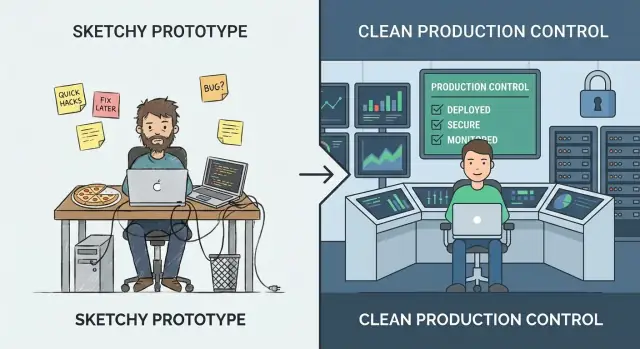
What “Vibe Coding” vs. “Production Hardening” Really Means
“Vibe coding” is the phase where speed beats precision. You’re experimenting, learning what users actually want, and trying ideas that might not survive the week. The goal is insight: validate a workflow, prove a value proposition, or confirm the data you need even exists. In this mode, rough edges are normal—manual steps, weak error handling, and code optimized to get to “working” fast.
“Production hardening” is different. It’s the work of making behavior predictable under real usage: messy inputs, partial outages, peak traffic, and people doing things you didn’t anticipate. Hardening is less about adding features and more about reducing surprises—so the system fails safely, recovers cleanly, and is understandable to the next person who has to operate it.
Switching too early vs. too late
If you harden too early, you can slow learning. You may invest in scalability, automation, or polished architecture for a product direction that changes next week. That’s expensive, and it can make a small team feel stuck.
If you harden too late, you create risk. The same shortcuts that were fine for a demo become customer-facing incidents: data inconsistency, security gaps, and downtime that damages trust.
You don’t have to choose one forever
A practical approach is to keep experimenting while hardening the “thin waist” of the system: the few key paths that must be dependable (sign-up, payments, data writes, critical integrations). You can still iterate quickly on peripheral features—just don’t let prototype assumptions govern the parts that real users rely on every day.
This is also where tooling choices matter. Platforms built for rapid iteration can help you stay in “vibe” mode without losing the ability to professionalize later. For example, Koder.ai is designed for vibe-coding via chat to create web, backend, and mobile apps, but it also supports source code export, deployment/hosting, custom domains, and snapshots/rollback—features that map directly to the “thin waist” mindset (ship fast, but protect critical paths and recover quickly).
A Simple Maturity Model: From Demo to Dependable
Vibe coding shines when you’re trying to learn quickly: can this idea work at all? The mistake is assuming the same habits will hold up once real people (or real business processes) depend on the output.
The stages most teams actually go through
A useful way to decide what to harden is to name the stage you’re in:
- Idea: exploring feasibility; throwaway code is fine.
- Demo: a clickable or runnable proof; success is “it shows the concept.”
- Pilot: a small, real workflow; success is “it helps a few people reliably.”
- Beta: broader access; success is “it works most of the time, with support.”
- Production: default tool for a job; success is “it’s dependable, safe, and maintainable.”
How requirements change when outcomes matter
As you move right, the question shifts from “Does it work?” to “Can we trust it?” That adds expectations like predictable performance, clear error handling, auditability, and the ability to roll back changes. It also forces you to define ownership: who is on the hook when something breaks?
The cost curve nobody likes
Bugs fixed during idea/demo are cheap because you’re changing code no one relies on. After launch, the same bug can trigger support time, data cleanup, customer churn, or missed deadlines. Hardening isn’t perfectionism—it’s reducing the blast radius of inevitable mistakes.
“Production” isn’t only customer-facing
An internal tool that triggers invoices, routes leads, or controls access is already production if the business depends on it. If a failure would stop work, expose data, or create financial risk, treat it like production—even if only 20 people use it.
Signals You’ve Outgrown the Prototype Phase
A prototype is allowed to be fragile. It proves an idea, unlocks a conversation, and helps you learn quickly. The moment real people start relying on it, the cost of “quick fixes” rises—and the risks shift from inconvenient to business-impacting.
The clearest signals to watch
Your audience is changing. If user count is steadily climbing, you’ve added paid customers, or you’ve signed anything with uptime/response expectations, you’re no longer experimenting—you’re delivering a service.
The data got more sensitive. The day your system starts touching PII (names, emails, addresses), financial data, credentials, or private files, you need stronger access controls, audit trails, and safer defaults. A prototype can be “secure enough for a demo.” Real data can’t.
Usage turns routine or mission-critical. When the tool becomes part of someone’s daily workflow—or when failures block orders, reporting, onboarding, or customer support—downtime and weird edge cases stop being acceptable.
Other teams depend on your outputs. If internal teams are building processes around your dashboards, exports, webhooks, or APIs, every change becomes a potential breaking change. You’ll feel pressure to keep behavior consistent and communicate changes.
Breaks become recurring. A steady stream of “it broke” messages, Slack pings, and support tickets is a strong indicator you’re spending more time reacting than learning. That’s your cue to invest in stability rather than more features.
A quick gut-check
If a one-hour outage would be embarrassing, you’re nearing production. If it would be expensive—lost revenue, breached promises, or damaged trust—you’re already there.
Decide Based on Risk, Not Vibes
If you’re arguing about whether the app is “ready,” you’re already asking the wrong question. The better question is: what’s the cost of being wrong? Production hardening isn’t a badge of honor—it’s a response to risk.
Start by defining “failure” in plain terms
Write down what failure looks like for your system. Common categories:
- Downtime: the service can’t be used at all
- Wrong results: it runs, but produces incorrect outputs (often worse than downtime)
- Slow responses: users abandon tasks, automations time out, support tickets spike
Be specific. “Search takes 12 seconds for 20% of users during peak” is actionable; “performance issues” isn’t.
Estimate business impact (even roughly)
You don’t need perfect numbers—use ranges.
- Revenue: lost sales, missed renewals, SLA penalties
- Churn and trust: users don’t come back after bad experiences
- Productivity loss: internal teams blocked, manual workarounds multiply
- Compliance: audit findings, contractual breaches, reporting obligations
If the impact feels hard to quantify, ask: Who gets paged? Who apologizes? Who pays?
List the top risks you’re carrying
Most prototype-to-production failures cluster into a few buckets:
- Data loss or corruption (no backups, unsafe migrations, weak access controls)
- Security breach (leaked tokens, overly broad permissions, exposed endpoints)
- Incorrect automation (LLM actions or scripts making the wrong change at scale)
Rank risks by likelihood × impact. This becomes your hardening roadmap.
Pick a “good enough” reliability target for your stage
Avoid perfection. Choose a target that matches current stakes—e.g., “business hours availability,” “99% success for core workflows,” or “restore within 1 hour.” As usage and dependency grow, raise the bar deliberately rather than reacting in a panic.
Production Readiness Starts With Ownership and Scope
“Hardening for production” often fails for a simple reason: nobody can say who is responsible for the system end-to-end, and nobody can say what “done” means.
Before you add rate limits, load tests, or a new logging stack, lock in two basics: ownership and scope. They turn an open-ended engineering project into a manageable set of commitments.
Name an Owner (End-to-End)
Write down who owns the system end-to-end—not just the code. The owner is accountable for availability, data quality, releases, and user impact. That doesn’t mean they do everything; it means they make decisions, coordinate work, and ensure someone is on point when things go wrong.
If ownership is shared, still name a primary: one person/team who can say “yes/no” and keep priorities consistent.
Define Critical Paths First
Identify primary user journeys and critical paths. These are the flows where failure creates real harm: signup/login, checkout, sending a message, importing data, generating a report, etc.
Once you have critical paths, you can harden selectively:
- Set reliability targets around those paths first.
- Decide what data must never be lost.
- Pick the few metrics that define “working.”
Set Scope to Avoid Endless Hardening
Document what’s in scope now vs. later to avoid endless hardening. Production readiness isn’t “perfect software”; it’s “safe enough for this audience, with known limits.” Be explicit about what you’re not supporting yet (regions, browsers, peak traffic, integrations).
Start a Runbook Skeleton
Create a lightweight runbook skeleton: how to deploy, rollback, debug. Keep it short and usable at 2 a.m.—a checklist, key dashboards, common failure modes, and who to contact. You can evolve it over time, but you can’t improvise it during your first incident.
Reliability: Make the System Predictable Under Load
Reliability isn’t about making failures impossible—it’s about making behavior predictable when things go wrong or get busy. Prototypes often “work on my machine” because traffic is low, inputs are friendly, and no one is hammering the same endpoint at the same time.
Put guardrails on every request
Start with boring, high-leverage defenses:
- Input validation at the boundaries (API, UI forms, webhook payloads). Reject bad data early with a clear error message.
- Timeouts everywhere you call something slow or external (databases, third-party APIs, queues). A missing timeout turns a small hiccup into a pile-up.
- Retries, carefully: only retry safe operations, use exponential backoff + jitter, and cap attempts. Blind retries can amplify outages.
- Circuit breakers to stop calling dependencies that are failing and to recover automatically when they stabilize.
Fail safely and visibly
When the system can’t do the full job, it should still do the safest job. That can mean serving a cached value, disabling a non-critical feature, or returning a “try again” response with a request ID. Prefer graceful degradation over silent partial writes or confusing generic errors.
Concurrency and idempotency aren’t optional
Under load, duplicate requests and overlapping jobs happen (double-clicks, network retries, queue redelivery). Design for it:
- Make key actions idempotent (the same request processed twice yields the same result).
- Use locks or optimistic concurrency where needed to prevent race conditions.
Protect data integrity
Reliability includes “don’t corrupt data.” Use transactions for multi-step writes, add constraints (unique keys, foreign keys), and practice migration discipline (backwards-compatible changes, tested rollouts).
Enforce resource limits
Set limits on CPU, memory, connection pools, queue sizes, and request payloads. Without limits, one noisy tenant—or one bad query—can starve everything else.
Security: The Minimum Bar Before Real Users
Security hardening doesn’t mean turning your prototype into a fortress. It means meeting a minimum standard where a normal mistake—an exposed link, a leaked token, a curious user—doesn’t become a customer-impacting incident.
Start with separation: dev, staging, prod
If you have “one environment,” you have one blast radius. Create separate dev/staging/prod setups with minimal shared secrets. Staging should be close enough to production to reveal problems, but it should not reuse production credentials or sensitive data.
Authentication and authorization (authn/authz)
Many prototypes stop at “log in works.” Production needs least privilege:
- Define clear roles (e.g., admin, support, standard user) and enforce boundaries server-side.
- Lock down internal tools and admin endpoints.
- Keep audit trails for sensitive actions (login, password reset, role changes, exports, deletes). You don’t need perfect analytics—just enough to answer “who did what, and when?”
Secrets management: get keys out of code and logs
Move API keys, database passwords, and signing secrets into a secrets manager or secure environment variables. Then ensure they can’t leak:
- Don’t print tokens in application logs.
- Avoid sending secrets to client-side code.
- Rotate any credential that has ever been committed to a repo.
Threats worth prioritizing early
You’ll get the most value by addressing a few common failure modes:
- Injection (SQL/command): use parameterized queries and safe libraries.
- Broken access control: verify permissions on every request, not just in the UI.
- Data exposure: encrypt in transit, limit data returned by default, and avoid over-broad exports.
Patching plan for dependencies
Decide who owns updates and how often you patch dependencies and base images. A simple plan (weekly check + monthly upgrades, urgent fixes within 24–72 hours) beats “we’ll do it later.”
Testing: Catch Breaks Before Customers Do
Testing is what turns “it worked on my machine” into “it keeps working for customers.” The goal isn’t perfect coverage—it’s confidence in the behaviors that would be most expensive to break: billing, data integrity, permissions, key workflows, and anything that’s hard to debug once deployed.
A test pyramid that matches reality
A practical pyramid usually looks like this:
- Unit tests for pure logic (fast, lots of them)
- Integration tests for boundaries (DB, queues, third-party APIs behind mocks)
- E2E tests for a few critical user journeys (slow, keep them minimal)
If your app is mostly API + database, lean heavier on integration tests. If it’s UI-heavy, keep a small set of E2E flows that mirror how users actually succeed (and fail).
Regression tests where it hurts most
When a bug costs time, money, or trust, add a regression test immediately. Prioritize behaviors like “a customer can’t check out,” “a job double-charges,” or “an update corrupts records.” This creates a growing safety net around the highest-risk areas instead of spraying tests everywhere.
Repeatable integration tests with seeded data
Integration tests should be deterministic. Use fixtures and seeded data so test runs don’t depend on whatever happens to be in a developer’s local database. Reset state between tests, and keep test data small but representative.
Performance smoke tests
You don’t need a full load-testing program yet, but you should have quick performance checks for key endpoints and background jobs. A simple threshold-based smoke test (e.g., p95 response time under X ms with small concurrency) catches obvious regressions early.
Automate checks in CI
Every change should run automated gates:
- linting and formatting
- type checks (if applicable)
- unit + integration suite
- basic security scans (dependency/vulnerability checks)
If tests aren’t run automatically, they’re optional—and production will eventually prove that.
Observability: Know What’s Happening Without Guessing
When a prototype breaks, you can usually “just try it again.” In production, that guesswork turns into downtime, churn, and long nights. Observability is how you shorten the time between “something feels off” and “here’s exactly what changed, where, and who is impacted.”
Start with logs that answer real questions
Log what matters, not everything. You want enough context to reproduce a problem without dumping sensitive data.
- Include a request ID on every request and carry it through the system.
- Add user/session identifiers safely (hashed or internal IDs; never raw passwords, payment data, or secrets).
- Record outcomes: success/failure, status codes, and meaningful error reasons.
A good rule: every error log should make it obvious what failed and what to check next.
Measure the “golden signals”
Metrics give you a live pulse check. At minimum, track the golden signals:
- Latency (how slow)
- Errors (how broken)
- Traffic (how much)
- Saturation (how close to capacity)
These metrics help you tell the difference between “more users” and “something is wrong.”
Add tracing when requests cross boundaries
If one user action triggers multiple services, queues, or third-party calls, tracing turns a mystery into a timeline. Even basic distributed tracing can show where time is spent and which dependency is failing.
Alerts should be actionable, not noisy
Alert spam trains people to ignore alerts. Define:
- What conditions deserve paging (user-visible impact)
- Who is on call and expected response times
- What “good” looks like (thresholds tied to SLAs/SLOs)
One dashboard that answers the big three
Build a simple dashboard that instantly answers: Is it down? Is it slow? Why? If it can’t answer those, it’s decoration—not operations.
Release and Operations: Ship Changes Without Drama
Hardening isn’t only about code quality—it’s also about how you change the system once people rely on it. Prototypes tolerate “push to main and hope.” Production doesn’t. Release and operations practices turn shipping into a routine activity instead of a high-stakes event.
Standardize builds and deployments (CI/CD)
Make builds and deployments repeatable, scripted, and boring. A simple CI/CD pipeline should: run checks, build the artifact the same way every time, deploy to a known environment, and record exactly what changed.
The win is consistency: you can reproduce a release, compare two versions, and avoid “works on my machine” surprises.
Use feature flags to deploy safely
Feature flags let you separate deploy (getting code to production) from release (turning it on for users). That means you can ship small changes frequently, enable them gradually, and shut them off quickly if something misbehaves.
Keep flags disciplined: name them clearly, set owners, and remove them when the experiment is done. Permanent “mystery flags” become their own operational risk.
Define rollback—and practice it
A rollback strategy is only real if you’ve tested it. Decide what “rollback” means for your system:
- Re-deploy the previous version?
- Disable a feature flag?
- Roll forward with a fix?
- Restore data from backups (slow, risky, sometimes necessary)?
Then rehearse in a safe environment. Time how long it takes and document the exact steps. If rollback requires an expert who’s on vacation, it’s not a strategy.
If you’re using a platform that already supports safe reversal, take advantage of it. For example, Koder.ai’s snapshots and rollback workflow can make “stop the bleeding” a first-class, repeatable action while you still keep iteration fast.
Version APIs and log changes to data
Once other systems or customers depend on your interfaces, changes need guardrails.
For APIs: introduce versioning (even a simple /v1) and publish a changelog so consumers know what’s different and when.
For data/schema changes: treat them as first-class releases. Prefer backwards-compatible migrations (add fields before removing old ones), and document them alongside application releases.
Capacity basics: quotas, rate limits, scaling thresholds
“Everything worked yesterday” often breaks because traffic, batch jobs, or customer usage grew.
Set basic protection and expectations:
- Quotas and rate limits to prevent one tenant/user from overwhelming the system
- Clear scaling thresholds (CPU, queue depth, request latency) that trigger action
- A lightweight plan for what happens when you hit limits (throttle, shed load, or scale)
Done well, release and operations discipline makes shipping feel safe—even when you’re moving fast.
Incidents: Prepare for the First Bad Day
Incidents are inevitable once real users rely on your system. The difference between “a bad day” and “a business-threatening day” is whether you’ve decided—beforehand—who does what, how you communicate, and how you learn.
A lightweight incident checklist
Keep this as a short doc everyone can find (pin it in Slack, link it in your README, or put it in /runbooks). A practical checklist usually covers:
- Identify: confirm impact, time started, affected users, and current symptoms.
- Mitigate: stop the bleeding first (rollback, disable a feature flag, scale up, fail over).
- Communicate: one owner posts updates on a set cadence (e.g., every 15–30 minutes) to internal stakeholders and, if needed, customers.
- Learn: capture what happened while it’s fresh; schedule a postmortem.
Postmortems without blame
Write postmortems that focus on fixes, not fault. Good postmortems produce concrete follow-ups: missing alert → add an alert; unclear ownership → assign an on-call; risky deploy → add a canary step. Keep the tone factual and make it easy to contribute.
Turn recurring issues into engineering work
Track repeats explicitly: the same timeout every week is not “bad luck,” it’s a backlog item. Maintain a recurring-issues list and convert the top offenders into planned work with owners and deadlines.
Be careful with SLAs/SLOs
Define SLAs/SLOs only when you’re ready to measure and maintain them. If you don’t yet have consistent monitoring and someone accountable for response, start with internal targets and basic alerting first, then formalize promises later.
A Practical Decision Checklist and Next Steps
You don’t need to harden everything at once. You need to harden the parts that can hurt users, money, or your reputation—and keep the rest flexible so you can continue learning.
Must-harden now (critical paths)
If any of these are in the user journey, treat them as “production paths” and harden them before expanding access:
- Auth & permissions: login, password resets, role checks, account deletion.
- Money & commitments: billing, refunds, plan changes, checkout, invoices.
- Data integrity: writes to primary records, idempotency, migrations, backups/restore.
- User-facing reliability: request timeouts, retries, rate limits, graceful degradation.
- Security basics: secrets handling, least-privilege access, input validation, audit trail for sensitive actions.
- Operational basics: monitoring for key SLIs (error rate, latency, saturation), alerts that page a human, runbooks for the top failure modes.
Can stay vibey (for now)
Keep these lighter while you’re still finding product–market fit:
- Internal tooling used by a small, trained team.
- Experiments and throwaway prototypes behind feature flags.
- UI polish that doesn’t change core workflows.
- Non-critical automations with easy manual fallbacks.
Run a time-boxed hardening sprint
Try 1–2 weeks focused on the critical path only. Exit criteria should be concrete:
- Top user flows have basic tests and a repeatable test run.
- Dashboards + alerts exist for the flows that matter.
- Rollback or safe deploy path is proven (even if manual).
- Known risks are written down with an owner and a mitigation plan.
Simple go/no-go gates
- Launch gate (limited access): “We can detect failures quickly, stop the bleeding, and protect data.”
- Expansion gate (more users/traffic): “We can handle predictable load increases and recover from a bad deploy without heroics.”
A sustainable cadence
To avoid swinging between chaos and over-engineering, alternate:
- Experiment weeks: ship learning-focused changes fast.
- Stabilization weeks: pay down reliability/security/testing gaps discovered during experiments.
If you want a one-page version of this, turn the bullets above into a checklist and review it at every launch or access expansion.
FAQ
What’s the difference between “vibe coding” and “production hardening”?
Vibe coding optimizes for speed and learning: prove an idea, validate a workflow, and discover requirements.
Production hardening optimizes for predictability and safety: handle messy inputs, failures, load, and long-term maintainability.
A useful rule: vibe coding answers “Should we build this?”; hardening answers “Can we trust this every day?”
How do I know if I’m hardening too early?
Harden too early when you’re still changing direction weekly and you’re spending more time on architecture than on validating value.
Practical signs you’re too early:
- No steady usage pattern yet (it’s still demos and experiments)
- Requirements are changing faster than you can stabilize
- You’re scaling/optimizing flows that may get removed
How do I know if I’m hardening too late?
You’ve waited too long when reliability issues are now customer-facing or business-blocking.
Common signals:
- Recurring “it broke” pings or support tickets
- Real users depend on it daily (or it affects money/data access)
- You’re touching PII, credentials, or financial data
- Other teams are building processes on top of your outputs (APIs, exports, webhooks)
What does it mean to harden the “thin waist” of the system?
The “thin waist” is the small set of core paths that everything depends on (the highest blast-radius flows).
Typically include:
- Auth (signup/login/password reset) and permissions checks
- Payments/billing/refunds (anything that creates commitments)
- Primary data writes (create/update/delete) and critical integrations
Harden these first; keep peripheral features experimental behind flags.
What reliability target is “good enough” for my current stage (pilot/beta/production)?
Use stage-appropriate targets tied to current risk, not perfection.
Examples:
- Pilot: “Core workflow succeeds 95–99% during business hours; restore within 1 hour.”
- Beta: “We can detect failures quickly, rollback safely, and protect data integrity.”
- Production: “Defined SLOs for critical paths; on-call + runbooks; tested rollback and backups.”
How do I decide what to harden first if we’re short on time?
Start by writing down failure modes in plain terms (downtime, wrong results, slow responses), then estimate business impact.
A simple approach:
- List top 10 risks
- Score each by likelihood × impact
- Address the top few with the biggest blast radius first (often data integrity, auth, and critical integrations)
If “wrong results” is possible, prioritize it—silent incorrectness can be worse than downtime.
What are the most important reliability guardrails to add before real users?
At minimum, put guardrails on boundaries and dependencies:
- Validate inputs at API/UI/webhook edges
- Add timeouts to all external calls (DB, APIs, queues)
- Retry only safe operations (idempotent) with backoff + jitter
- Add idempotency to key actions (avoid double charges, duplicate jobs)
- Use transactions/constraints to prevent data corruption
These are high-leverage and don’t require perfect architecture.
What’s the minimum security hardening before handling real customer data?
Meet a minimum bar that prevents common “easy” incidents:
- Separate dev/staging/prod (no shared prod secrets)
- Enforce least-privilege authorization server-side (not just UI)
- Move secrets out of code/logs; rotate anything that leaked
- Add audit trails for sensitive actions (role changes, exports, deletes)
- Patch dependencies on a schedule (and fast for critical CVEs)
If you process PII/financial data, treat this as non-negotiable.
What testing should I prioritize when moving from prototype to production?
Focus testing on the most expensive-to-break behaviors:
- A few critical E2E flows (login, checkout, key write paths)
- Integration tests around DB/queues/external APIs (with deterministic seeded data)
- Regression tests added immediately after high-impact bugs
Automate in CI so tests aren’t optional: lint/typecheck + unit/integration + basic dependency scanning.
What operational basics (observability, releases, incidents) should exist before scaling up access?
Make it easy to answer: “Is it down? Is it slow? Why?”
Practical starters:
- Structured logs with request IDs and clear error reasons (avoid sensitive data)
- Golden-signal metrics: latency, errors, traffic, saturation
- Actionable alerts tied to user impact (not noise)
- A rollback path you’ve practiced (redeploy, feature flag off, or roll-forward)
- A short runbook: deploy/rollback/debug steps and owners
This turns incidents into routines instead of emergencies.