

How Backend-as-a-Service Platforms Increased Startup Speed
Backend-as-a-Service (BaaS) helps startups ship MVPs faster with ready-made auth, databases, storage, and hosting—plus clear trade-offs.
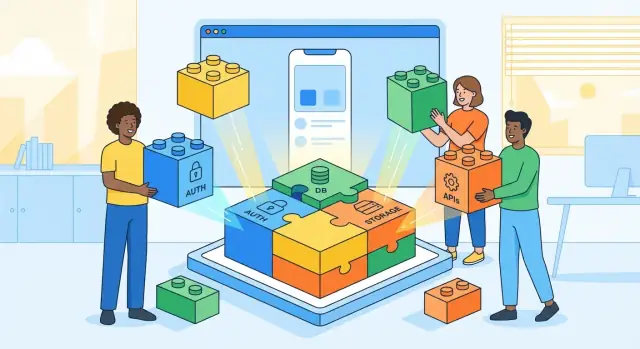
What BaaS Means and What “Startup Speed” Really Is
Backend-as-a-Service (BaaS) is a hosted “backend in a box” you plug into your app. Instead of building and running your own servers, databases, and user systems, you connect your product to a managed platform that already provides many of those building blocks.
Think of it like renting a fully equipped kitchen rather than building a restaurant kitchen from scratch. You still decide the menu (your product), but you don’t have to install ovens, run gas lines, or hire someone to maintain the equipment.
What startups usually mean by “speed”
Startup speed isn’t just “writing code faster.” It’s the time it takes to learn what customers want and ship the next improvement. In practice, it often breaks down into:
- Time to MVP: how quickly you can ship a usable first version.
- Iteration time: how fast you can test an idea, get feedback, and release a change.
- Hiring time: how quickly you can staff up (or avoid hiring) for backend work.
A BaaS platform affects all three by removing (or shrinking) the work required to get a reliable backend running.
BaaS vs. building a custom backend
With a custom backend, your team typically needs to choose and configure a database, set up authentication, build APIs, manage hosting, handle monitoring, and plan for security updates—before the product can even start learning from real users.
With BaaS, many of those pieces are already available as services and dashboards. Your team focuses more on product logic and user experience, and less on infrastructure setup and ongoing operations.
Who this article is for
This guide is written for founders, product managers, and early engineers who want to understand why BaaS platforms can accelerate early execution—and what “faster” really means beyond a catchy promise. It’s not a deep technical manual; it’s a practical way to frame the trade-offs and make better build-vs-buy decisions.
Why Startups Used to Move Slower Before BaaS
Before backend-as-a-service, even the simplest product idea usually started with infrastructure chores. A team couldn’t just “ship a login” or “save a user profile” without first standing up servers, picking a database, setting up deployments, and building basic admin tools to see what was happening in production.
The hidden checklist behind “just build the feature”
A typical early-stage app needed a long foundation phase:
- Provision hosting, configure environments, and automate deployments
- Design and migrate a database schema
- Set up user authentication, password resets, and session handling
- Build internal dashboards (or scripts) for support tasks and data fixes
- Add logging, monitoring, backups, and incident response basics
None of that looked like the product customers were asking for, but skipping it created reliability and data-loss risks.
Specialized roles were needed earlier
Because these pieces touched security and operations, startups often needed dedicated backend and DevOps skills from day one. Even when founders could code, production readiness demanded expertise: secure auth flows, permission models, rate limiting, secrets management, and safe database changes. Hiring for these roles early is expensive and time-consuming, and trying to “learn it all while shipping” often led to mistakes.
Long setup time slowed discovery
The biggest cost wasn’t only engineering hours—it was lost learning time. Weeks spent getting a backend stable delayed the first real customer conversations driven by a working product. Fewer iterations meant slower feedback loops: bugs and UX issues surfaced late, and teams had less evidence to guide what to build next.
How BaaS became the alternative
As cloud hosting matured and API-first tools spread, BaaS platforms packaged common backend needs—auth, databases, storage, and server-side logic—into ready-to-use services. That reduced the upfront “plumbing” work and let startups spend more of their early runway on product discovery.
The Core Building Blocks BaaS Provides Out of the Box
Backend-as-a-Service platforms speed teams up by packaging the backend “starter kit” that most apps need anyway. Instead of stitching together multiple services and writing everything from scratch, you get a set of ready-to-use building blocks with sensible defaults—and enough flexibility to customize later.
Authentication and user management
Nearly every product needs sign-up, login, and account recovery. BaaS platforms typically provide:
- Email/password authentication
- Password resets and email verification flows
- Social login (Google, Apple, GitHub, etc.)
- Basic user profiles and session management
This matters because auth is deceptively time-consuming: UX details, edge cases, rate limiting, and security best practices add up quickly.
Databases and data APIs (often real-time)
Most BaaS offerings include a managed database plus an API layer that your app can call directly. Depending on the provider, this might be SQL, NoSQL, or both—and often with real-time subscriptions so the UI updates instantly when data changes.
Instead of building and hosting your own API server on day one, you can focus on designing the data model and shipping features.
File storage and delivery
User uploads (avatars, attachments, product images) are another common blocker. BaaS platforms frequently include file storage, basic image handling, and CDN-style delivery so files load quickly for users in different regions.
Hosting, deployments, and environments
Many providers wrap backend hosting, deployments, and environment management into a guided workflow. That can mean simpler previews for staging, safer production releases, and fewer “it works on my machine” moments.
Background jobs, notifications, and analytics
App logic rarely stays purely request/response. Some BaaS platforms offer scheduled jobs, event triggers, push notifications, and lightweight analytics—useful for things like sending emails after an action or processing uploads in the background.
If you want a checklist view of what to confirm with a provider, see /blog/baas-evaluation-checklist.
How BaaS Cuts Time to MVP and Speeds Iteration
BaaS platforms accelerate MVP development by removing a big chunk of “week 1” backend work. Instead of setting up servers, configuring databases, wiring authentication, and building an admin surface from scratch, teams can start by connecting product screens to ready-made backend services.
Fewer infrastructure chores, more product shipping
A typical early sprint used to disappear into basics: user login, password resets, database schemas, file storage, and deployment pipelines. With a managed backend, those are usually available as toggles, APIs, and dashboards.
That shift matters because your MVP isn’t “a backend”—it’s an end-to-end experience. When the plumbing is prebuilt, you can spend those first days validating the product’s core workflow: onboarding, first successful action, and retention hooks.
Shorter feedback loops: ship, measure, adjust
Iteration speed is mostly about cycle time. BaaS helps reduce cycle time by making changes safer and faster:
- Add a field or a new collection/table without building an entire migration system on day one
- Use built-in analytics/events (or quick integrations) to see what users actually do
- Release small backend changes via configuration rather than redeploys
The practical result: you can ship a test on Monday, learn on Tuesday, and adjust by Wednesday—without needing an ops-heavy process.
SDKs and templates cut integration time
Most BaaS tools provide SDKs for web and mobile, plus starter templates for common flows like sign-up, email verification, and role-based access. That reduces “glue code” and helps keep clients consistent across platforms.
Small teams deliver full experiences sooner
Because authentication, user management, real-time data, and storage are standardized, a lean team can cover front end, product, and basic backend needs. You don’t need a dedicated backend engineer on day one to ship something real—often a product-minded developer can deliver an MVP that feels complete.
In practice, many teams stack these speed multipliers: a BaaS for the “boring” backend primitives, plus a rapid build workflow for the app itself. For example, Koder.ai can help you generate and iterate full web/mobile apps through a chat interface, while your BaaS handles auth, data, and storage—useful when the goal is to validate flows quickly before you invest in custom infrastructure.
How BaaS Changes Team Structure and Hiring Needs
BaaS doesn’t just change how you build—it changes who you need, when you need them, and what “full-stack” means on a small team. The earliest stage often shifts from “hire backend first” to “ship product first, then specialize.”
Smaller teams can ship complete user journeys
With managed authentication, databases, file storage, and serverless functions, product and frontend engineers can deliver end-to-end flows (sign-up → onboarding → core feature → notifications) without spending weeks standing up infrastructure.
That usually means fewer backend hires at the very beginning and a smaller initial burn. Instead of immediately recruiting a backend generalist who can do everything (APIs, databases, deployments, monitoring, security), startups can often start with:
- A strong product engineer (or two)
- A frontend-focused engineer who can also handle light backend configuration
- Occasional advisory help for architecture and security reviews
Hiring shifts from “builders” to “integrators”
BaaS-heavy teams value people who can connect services cleanly: designing data models, setting access rules, setting up auth flows, and writing small pieces of business logic in functions. The skill set leans toward product thinking, API design, and understanding trade-offs—less toward running servers day-to-day.
As you grow, you’ll still likely hire backend specialists—but later, and with a narrower mandate (performance tuning, data modeling at scale, custom services where BaaS limits show up).
Faster onboarding, more predictable execution
Managed platforms typically come with strong docs, dashboards, and standard patterns. New teammates can trace what’s happening without reverse-engineering homegrown infrastructure.
That also makes early execution more predictable when the team’s experience varies: fewer “mystery outages,” fewer bespoke scripts, and a clearer path from a product idea to a shipped feature.
Cost and Budget: What Gets Cheaper, What Can Surprise You
BaaS is often sold as “pay for what you use,” but the real win for startups is avoiding early fixed costs and time sinks. Instead of spending the first month standing up servers and dashboards, you can put money toward building and validating the product.
What typically gets cheaper early on
The biggest savings is the setup tax you don’t pay:
- No upfront server provisioning, load balancers, or database tuning
- Monitoring, logging, backups, and uptime work are usually included or one click away
- Fewer hours spent on on-call schedules, incident playbooks, and ops tooling
For an MVP, those savings can matter more than the monthly invoice—because they shorten the time to learning.
The “usage scaling” reality
Usage-based pricing can be great when you’re iterating: small user base, small bill. The surprise is that success can change the math quickly.
Most BaaS billing is driven by a few levers:
- Requests/reads/writes (API calls, database operations)
- Storage (files, database size, backups)
- Bandwidth/egress (data leaving the provider)
- Compute time (serverless functions, background jobs)
A single feature can be the difference between “cheap” and “why did our bill double?” For example: real-time updates that trigger frequent reads, image uploads without compression, or an analytics job that runs too often.
Budget triggers that keep you in control
Decide in advance when you’ll review architecture and pricing. A simple rule: set a recurring check when you hit 50–70% of your monthly budget or when a key metric spikes (daily active users, file uploads, or API calls).
At that point, you’re not forced to abandon BaaS—often you can optimize queries, add caching, or adjust data retention. The goal is to prevent “surprise scale” from becoming “surprise burn.”
Security, Privacy, and Compliance Basics for BaaS Users
Speed is only valuable if you can ship safely. With backend-as-a-service, security and compliance don’t disappear—they shift into a shared model where some controls are handled for you and others become your job.
Shared responsibility (what the provider does vs. what you do)
Most BaaS vendors secure the underlying platform: physical security, core infrastructure patching, DDoS protections, and baseline encryption at rest and in transit.
You still secure your application layer: authentication settings, authorization rules, API key handling, data model choices, and how your client apps talk to the backend. A “managed backend” can fail fast if the app configuration is weak.
Common risks that slow teams down later
The biggest incidents on BaaS are rarely exotic hacks—they’re simple mistakes:
- Misconfigured database rules or storage permissions that allow public reads/writes
- Exposed keys or tokens in client code, public repos, or logs
- Weak access control (e.g., trusting client-side flags instead of server-side checks)
- Over-broad roles (“admin” everywhere) that violate least-privilege
These issues often surface only after you gain users, when fixing them becomes a breaking change.
Data privacy basics you should implement early
Treat privacy as a set of defaults:
- Least privilege by design: deny-by-default rules, narrow scopes, per-resource access
- Auditability: enable audit logs where available; log security-relevant events (role changes, failed logins, token refreshes)
- Backups and recovery: confirm backup cadence, test restores, and document RPO/RTO expectations
- Retention controls: define what you keep, for how long, and how deletion requests are handled
Vendor questions worth asking before you commit
To avoid compliance surprises, ask vendors about:
- Certifications and reports (SOC 2, ISO 27001) and how to access them
- Data residency options and subprocessors
- Encryption details (at rest, in transit, key management)
- Incident response: notification timelines, support during investigations, and breach history
Getting clear answers up front keeps “startup speed” from turning into rework under pressure.
Trade-offs and Limits: When Speed Has a Cost
BaaS platforms earn their reputation by removing backend work—until your product starts asking questions the platform wasn’t designed to answer. The “speed boost” is real, but it’s not free: you trade some control for convenience.
Platform limits you only notice later
Most BaaS products are optimized for common app patterns (users, simple data models, event-driven features). As your data and traffic grow, a few limits can surface:
- Custom queries and data modeling constraints. Some platforms restrict joins, complex filters, or cross-collection queries, which can force awkward workarounds or duplicated data.
- Performance tuning is narrower. You may not be able to tune indexes, caching layers, connection pools, or background jobs the way you would on a managed backend you control.
- Regional availability can be a blocker. If you need data residency in a specific country or low latency in a particular region, the provider’s footprint may not match your needs.
Lock-in and portability challenges
BaaS products often expose proprietary APIs, auth flows, security rules, and real-time features. That can make migrating painful even if exporting data is possible. The real lock-in is usually application logic tied to platform-specific primitives (triggers, rules, SDK behavior), not just the database.
Feature gaps for complex workflows
If you need multi-service transactions, strict ordering guarantees, heavy compute, or long-running workflows, you may hit a ceiling. You can bolt on serverless functions or external services, but complexity returns—and you now have more moving parts to monitor.
Latency and reliability outside your control
Your app’s responsiveness becomes tightly coupled to the provider’s uptime, throttling policies, and incident handling. Even short outages can stall sign-ups, payments, or key user actions. Plan for graceful degradation, retries, and clear failure states—especially for critical paths like authentication and data writes.
When a Custom Backend May Be the Better Choice
BaaS is excellent for getting a product off the ground, but speed isn’t the only goal. Some startups are faster overall when they invest early in a custom backend—because it prevents painful workarounds, compliance headaches, or platform limits later.
Situations where custom wins
Highly regulated products often need tighter control than a hosted BaaS can offer. If you’re dealing with healthcare, finance, government, or enterprise procurement, you may face requirements like data residency, customer-managed encryption keys, detailed audit trails, or on‑prem deployment. When those are non‑negotiable, building (or heavily customizing) your backend can be the shortest path to signing customers.
Workloads with unusual performance needs can outgrow the “one size fits most” approach. Examples include high-frequency event ingestion, complex search and ranking, large-scale batch jobs, video processing, or heavy background processing with strict SLAs. BaaS can still be part of the stack, but core compute and data pipelines may need dedicated infrastructure.
Deep customization of your data layer and business logic is another trigger. If your product depends on complex domain rules (multi-step approvals, custom permissions, billing logic, or rich workflows), you may find yourself fighting the constraints of generic data models, query limitations, and rule engines.
Teams with strong backend/ops expertise may choose custom earlier—especially when they already have a clear target architecture. If your differentiator is infrastructure-heavy, “build” can be an advantage rather than a distraction.
Quick self-check
If you’re repeatedly hitting platform limits, writing lots of workarounds, or can’t meet customer compliance checklists without exceptions, it’s worth pricing the cost of a custom backend against the cost of staying on BaaS for another year.
A Practical Playbook for Choosing and Using BaaS Wisely
BaaS platforms can dramatically improve startup speed, but only if you treat them like a product decision—not just an engineering shortcut. This playbook keeps your time to market fast while protecting future flexibility.
1) Lock the MVP scope before you pick a provider
Start with a clear MVP scope and a list of must-have backend features. Write them down as outcomes (e.g., “users can sign up and reset passwords,” “admins can flag content,” “app works offline-ish”), then map those to common backend-as-a-service building blocks like authentication and user management, file storage, and real-time databases.
If a feature isn’t required for MVP development, don’t let it influence the choice.
2) Compare BaaS vendors with a small checklist
Evaluate vendors using a short checklist:
- Auth: social login, password reset, MFA options, session management
- Data model: relational vs document, querying, indexing, migrations
- Scaling: rate limits, quotas, regional options, performance tooling
- Pricing: free tier limits, per-seat vs per-request costs, egress fees (check /pricing)
- Docs & ecosystem: SDK maturity, examples, community, support
This keeps “build vs buy backend” discussions grounded in what you’ll actually ship.
3) Design for portability on day one
Design a clean domain model so you can swap providers later if needed. Keep your business concepts (User, Workspace, Subscription) stable, even if the provider’s schema is different.
Use internal abstractions (a service layer) rather than sprinkling SDK calls everywhere. For example, your app should call AuthService.signIn()—not VendorSDK.signIn() in twenty files. This makes serverless backends and managed backend services interchangeable later.
4) Keep an exit plan—without slowing down
Keep an exit plan: data export, auth migration, and API compatibility. Confirm you can:
- export data in usable formats
- migrate identities (or at least password reset flows)
- replace provider APIs with your own endpoints if needed
The goal isn’t to expect failure—it’s to preserve options while you iterate quickly.
Scaling Beyond BaaS: Hybrid and Migration Paths
BaaS is often the fastest way to reach early traction, but success changes the constraints. As usage grows, the “best” backend is less about how quickly you can ship and more about predictable performance, cost control, and feature flexibility.
Phase milestones: prototype → MVP → growth → scale
A typical journey looks like this:
- Prototype: Use BaaS defaults (auth, database, storage) to validate the idea with minimal setup.
- MVP: Add rules, roles, basic analytics, and a few serverless functions. Focus on fast iteration.
- Growth: Add background jobs, integrations, better observability, and stricter data modeling.
- Scale: Split out high-impact services, formalize SLAs, tighten security controls, and optimize latency/cost.
The key is to treat BaaS as an accelerator, not a lifetime commitment.
Signals it’s time to re-architect
You don’t need to “graduate” from BaaS just because you raised a round. Consider changes when you see repeated pain in one or more areas:
- Rising costs that scale faster than revenue (especially reads/writes, bandwidth, or function invocations)
- Performance limits like slow queries, cold starts, quota ceilings, or inconsistent tail latency
- Missing features such as complex transactions, advanced search, custom workflows, or specific regional data residency needs
The hybrid approach: keep what works, move what’s core
A pragmatic pattern is hybrid: keep BaaS where it’s strong—authentication, user management, file storage, and basic real-time features—and move differentiated logic to custom services.
For example, you might keep BaaS auth while running your pricing, recommendations, or billing logic in a separate API. This reduces risk: you change one subsystem at a time while preserving familiar building blocks.
Migration basics: how to move without breaking users
A clean migration is more process than code:
- Data export: confirm you can export all required tables/collections, files, and audit data.
- API versioning: introduce new endpoints without breaking existing clients.
- Dual-write: temporarily write to both systems to validate correctness.
- Gradual cutover: shift traffic by feature, tenant, or percentage, then retire the old path.
Done well, scaling beyond BaaS feels like a series of small upgrades—not a rewrite.
FAQ
What does BaaS mean in practice?
Backend-as-a-Service (BaaS) is a managed platform that provides common backend components—like authentication, databases, file storage, and server-side logic—so you can connect your app without building and operating everything yourself.
You still build the product experience and business logic, but you offload much of the infrastructure setup and maintenance.
What does “startup speed” actually refer to (beyond coding faster)?
“Startup speed” is mostly about learning speed: how quickly you can ship something, get real feedback, and release the next change.
It typically shows up as:
- Time to MVP (first usable version)
- Iteration time (test → measure → adjust)
- Hiring time (how long before you need specialized backend/ops roles)
How does BaaS reduce time to MVP?
BaaS reduces the upfront “backend foundation” work—auth, database access, storage, deployments, monitoring basics—so your first sprints can focus on the end-to-end user journey.
Instead of spending weeks making a backend production-ready, you can often get a functional MVP by wiring product screens to existing services and SDKs.
How does BaaS speed up iteration once the MVP is live?
Many BaaS platforms shorten cycle time by turning backend changes into configuration or small, isolated updates rather than full infrastructure work.
Examples include:
- Adding fields/collections with minimal migration overhead
- Using built-in events/analytics (or quick integrations) to see behavior fast
- Releasing small server-side changes without running a full ops process
How does BaaS change who you need to hire early?
BaaS doesn’t eliminate backend work, but it changes the shape of the work. Early on, teams can often ship without a dedicated backend/DevOps hire because the platform handles much of the operational load.
You’ll still need people who can design data models, set authorization rules, and integrate services cleanly—often more “integrators” than “infrastructure builders” at the start.
Is BaaS cheaper than a custom backend, and what costs can spike?
Early costs are often lower because you avoid fixed setup work (provisioning, monitoring, backups, on-call routines) and pay mainly for usage.
Common surprise drivers as you grow:
- Reads/writes/requests (especially real-time features)
- Storage (files, backups)
- Bandwidth/egress
- Function/compute time
Set budget alerts and review architecture when you hit ~50–70% of your monthly budget to prevent “surprise scale” from becoming “surprise burn.”
What security mistakes are most common when using BaaS?
Security becomes a shared-responsibility model. Providers typically secure the underlying infrastructure; you’re responsible for correct app configuration.
Practical basics to implement early:
- Deny-by-default access rules and least-privilege roles
- Keep secrets out of client code and public repos
- Log security-relevant events (role changes, failed logins)
- Confirm backup cadence and test restores
How real is vendor lock-in with BaaS, and how can you reduce it?
Lock-in is usually less about exporting raw data and more about how much application logic depends on proprietary pieces like security rules, triggers, real-time subscriptions, and SDK-specific behavior.
To reduce lock-in without slowing down:
- Use a thin internal service layer (e.g.,
AuthService) instead of calling vendor SDKs everywhere - Keep your domain model stable (User, Workspace, Subscription) even if the provider schema differs
- Maintain an exit checklist (data export, identity migration plan, API replacement path)
When is a custom backend the better choice?
A custom backend can be the faster path overall when constraints are non-negotiable or the product demands deep control.
Common triggers:
- Regulated/compliance-heavy needs (data residency, detailed audit trails, customer-managed keys)
- Complex workflows (multi-step approvals, strict ordering, multi-service transactions)
- Unusual performance requirements (heavy compute, large batch jobs, advanced search/ranking)
If you’re repeatedly building workarounds or failing customer checklists, price out “build” versus another year of “buy.”
How do startups scale beyond BaaS without doing a full rewrite?
Many teams scale with a hybrid approach: keep BaaS for what it’s good at (often auth, basic data, storage, real-time) and move differentiated or cost-sensitive parts to custom services.
A low-risk migration pattern:
- Export data/files and validate completeness
- Introduce new API versions without breaking clients
- Dual-write temporarily to confirm correctness
- Gradually cut over by feature, tenant, or traffic percentage