

Why Dart Exists: Problems It Solves for Modern Mobile Apps
Learn why Dart was created, the real problems it targets, and how its runtime, tooling, and Flutter integration enable fast, smooth modern mobile apps.
What Dart Is and Why People Notice It
Dart is a modern programming language created by Google and used to build apps with a strong focus on smooth user interfaces. Most people “meet” Dart through Flutter: if you’ve used a Flutter-built mobile app, there’s a good chance its UI and much of its app logic are written in Dart. Developers notice Dart because it feels purpose-built for UI work—fast to iterate on, friendly to read, and designed to ship with predictable performance.
Where Dart shows up (even if you don’t realize it)
If an app runs on iOS and Android with the same UI behavior and frequent, polished updates, it may be a Flutter app—and that usually means Dart under the hood. Teams choose Dart when they want a single codebase for multiple platforms without giving up responsiveness.
The core goals behind Dart
Dart was created with a few practical goals that line up closely with real app development:
- Fast UI and smooth animations: support for building responsive interfaces that don’t stutter during scrolling, transitions, or data updates.
- Developer productivity: a language that stays approachable, supports quick feedback loops, and scales from small prototypes to large apps.
- Predictable performance: tooling and compilation options that help apps start quickly and run consistently on real devices.
What you’ll get from this post
This article breaks down why Dart was created, the problems it aims to solve for modern mobile apps, and how it powers Flutter in practice. We’ll cover how Dart runs in development vs production, how it handles async work without freezing the UI, and which language features help reduce bugs and maintenance costs over time.
Why Dart Exists: The Original Goals
Dart was created to fill a gap that many teams felt on the “client” side of software: building interactive apps with rich UIs that still load fast, stay smooth, and remain maintainable as they grow.
At the time, developers were often choosing between languages that were either great for scripting and quick prototypes, or great for large codebases and long-term maintenance—but not both. Dart’s goal was to offer a modern, approachable language that could scale from a small demo to a large product without forcing a rewrite.
A modern client language, not just another syntax
Dart’s design started from a practical question: what should a language look like when it’s used to build user-facing applications—apps that need responsive interfaces, lots of state updates, animations, networking, and ongoing feature work?
That led to a focus on predictable performance, tooling, and an ecosystem that encourages clean, readable code. Importantly, Dart was meant to be familiar enough that developers coming from Java, JavaScript, or C-style languages could become productive quickly.
Design targets: productivity without sacrificing scale
Dart aimed for a few clear targets:
- Simple syntax and readability so teams can move fast without constant “language overhead.”
- Strong tooling (formatting, analysis, refactors, IDE support) to make everyday work smoother and reduce accidental mistakes.
- A path to scalable apps, meaning the language should support growing codebases, multiple contributors, and long-lived projects.
These targets shaped many later decisions in the language, like a strong standard library, a structured async model, and features that help catch errors earlier.
Flutter’s role in accelerating adoption
Dart didn’t become widely visible to many mobile developers until Flutter took off. Flutter made Dart the default way to build high-performance, cross-platform UIs with a single codebase.
It’s worth being precise here: Dart wasn’t created “for Flutter” originally. But Flutter ended up being the product that matched Dart’s goals extremely well—fast developer iteration, UI-heavy apps, and code that needs to remain understandable as it expands.
The Real Problems Dart Aims to Solve
Dart wasn’t created “just to be another language.” It targets a set of practical problems teams hit when building mobile apps that need to feel smooth, ship often, and stay maintainable as they grow.
Slow feedback loops during development
Traditional mobile workflows can punish experimentation: you change a button color or a layout constraint, then wait through a rebuild, reinstall, and navigation back to the screen you were testing.
Dart (paired with Flutter) is designed to support very fast iteration. The goal is simple: make UI work feel like editing a document—change, see, adjust—so developers test ideas more often and fix issues earlier.
Unpredictable performance for real UI
Mobile users notice jank immediately, especially in animation-heavy interfaces: scrolling lists, transitions, and gesture-driven effects.
Dart aims to deliver consistent performance by giving frameworks the ability to compile to efficient native code and to structure concurrency in a way that avoids freezing the UI thread. The focus here isn’t benchmark bragging—it’s making everyday interactions feel stable across a wide range of devices.
Fragmented codebases across iOS and Android
Maintaining two separate native apps can mean:
- duplicated features and business logic
- inconsistent behavior between platforms
- longer release cycles because changes must be implemented twice
Dart supports a single shared codebase that can still produce truly native apps, reducing duplication without forcing teams to give up app-store-ready performance.
App complexity: async code, null errors, maintainability
As apps grow, bugs often come from “glue code”: network calls, background tasks, state updates, and data models.
Dart addresses this with language features that make asynchronous workflows easier to read (so fewer callback tangles) and with strong null-safety tooling to reduce crashes from missing values—issues that otherwise become expensive cleanup work over time.
How Dart Runs: JIT in Dev, AOT in Production
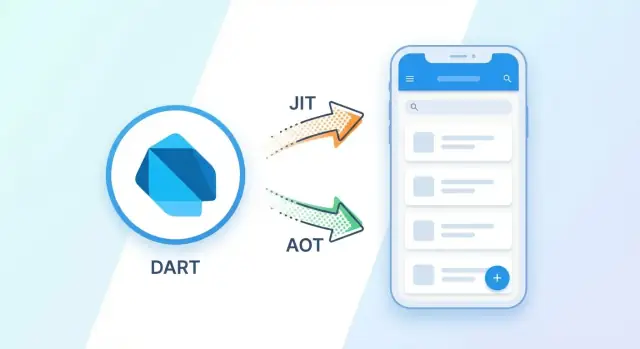
Dart is unusual because it’s designed to run in two “modes,” depending on what you’re doing: building the app or shipping it.
The Dart VM (development)
During development, your code typically runs on the Dart VM—think of it as a runtime engine that can load your app, execute it, and update it while it’s running. You write Dart code, press run, and the VM handles turning that code into something the device can execute.
This setup is what enables fast edit–run cycles: the VM is flexible and can apply changes quickly without rebuilding everything from scratch.
JIT vs AOT in plain terms
- JIT (Just-In-Time) compilation is used for development. Code is compiled as the app runs, which makes iteration quick and supports workflows like hot reload.
- AOT (Ahead-Of-Time) compilation is used for production releases. Your Dart code is compiled before it ever reaches a user’s phone, producing native machine code.
Why AOT matters for real apps
Ahead-of-time compilation helps with the things users feel immediately:
- Faster startup: less work is needed when the app launches.
- Smoother UI frames: fewer runtime surprises, which reduces the chance of dropped frames during animations and scrolling.
In other words, JIT optimizes for developer speed; AOT optimizes for user experience.
Where the web fits
When you target the browser, Dart doesn’t ship a Dart VM. Instead, Dart is compiled to JavaScript, because that’s what browsers run. The goal stays the same: keep the developer experience consistent while producing output that fits the platform’s reality.
Fast Iteration: Hot Reload and Developer Workflow
Hot reload is one of the most visible day-to-day advantages of using Dart with Flutter. Instead of stopping the app, rebuilding, reinstalling, and navigating back to the screen you were working on, you can inject code changes into the running app and see the UI update almost immediately.
What hot reload changes
Hot reload updates your app’s code while keeping the current session alive. That typically means:
- The UI redraws with your latest widget/layout changes
- You stay on the same screen instead of restarting from the app’s entry point
- Your current navigation stack often remains intact
For UI-heavy work, this shifts development from “edit → wait → re-open → re-navigate” to “edit → glance → adjust.” Those saved seconds add up quickly when you’re tuning spacing, typography, animations, or interactions.
Why it speeds up UI work, fixes, and experiments
UI development is inherently iterative: you rarely get padding, alignment, or component structure perfect on the first try. Hot reload makes micro-experiments cheap. You can try a new layout, adjust a theme color, or refactor a widget into smaller pieces and immediately confirm whether it improved the screen.
It also shortens the feedback loop for many bugs—especially visual or state-management issues—because you can tweak logic and re-check behavior without losing your place in the app.
What hot reload can’t do
Hot reload isn’t magic, and knowing its limits prevents confusion:
- Some changes require a full restart (often called “hot restart”), especially if they affect app initialization
- Certain state may reset depending on what changed and how the state is stored
- Deeper changes—like altering native platform code or some low-level app wiring—won’t be applied through hot reload
A simple example
Imagine you’re building a checkout screen and the “Place order” button looks cramped. You change padding from 12 to 16, adjust the font weight, and move the button into a bottom bar. With hot reload, you see the new layout instantly on the device, tap around to verify nothing overlaps, and keep iterating until it feels right—without restarting the app each time.
Performance for Real Apps: Isolates and Async Work
Real mobile apps don’t feel “fast” because a benchmark says so—they feel fast when the UI stays smooth while the app is doing real work.
What “smooth UI” actually means
A smooth UI is about consistent frame rendering (for example, reliably hitting 60 fps or 120 fps) and responsive input. When frames are delayed, you see jank: scrolling stutters, animations hitch, and taps feel late. Even small hiccups—like a 50–100 ms pause—can be noticeable.
Keep heavy work off the UI thread with isolates
Dart uses isolates to help prevent your UI from freezing. An isolate is its own worker with separate memory, so expensive tasks can run elsewhere without blocking the main isolate that renders frames and handles gestures.
This matters because many “normal” operations can be surprisingly heavy:
- Large JSON parsing and model mapping
- Image decoding/resizing/cropping
- Encryption/decryption and hashing
A simple pattern is: do UI work in the main isolate, send heavy computation to another isolate, and get results back via message passing.
Async/await and Futures: don’t block while waiting
Not every task needs a separate isolate. A lot of app time is spent waiting on I/O: network calls, database reads, file access. Dart’s Future and async/await let your code wait without blocking the event loop, so the UI can keep rendering and accepting input.
final data = await api.fetchProfile(); // waiting, not blocking UI
setState(() => profile = data);
The key distinction: use async/await for waiting on I/O, and use isolates when CPU work (parsing, processing, crypto) would otherwise steal time from frame rendering.
Language Features That Reduce Bugs and Cleanup Costs
Dart was designed to help teams ship UI-heavy apps without turning maintenance into a constant firefight. A lot of that benefit comes from language features that prevent common mistakes early—before they become crashes in production or expensive cleanup in later sprints.
Null safety: fewer “missing value” crashes
Null safety makes “can this be empty?” a deliberate choice. If a value must exist, the type system enforces it; if it can be absent, you handle that explicitly.
That changes day-to-day coding in practical ways:
- Fewer runtime null exceptions (especially around API responses and UI state)
- Clearer intent in function signatures (what’s required vs optional)
- More confidence when changing code, because the compiler points to unsafe spots
A type system that pays for itself
Dart’s static typing improves autocomplete, navigation, and refactoring in IDEs. It’s easier to rename fields, extract methods, or reorganize modules without introducing subtle runtime surprises.
Generics also help keep code consistent—collections and APIs can be strongly typed (for example, a list of User instead of “a list of stuff”), which reduces “wrong shape of data” bugs that often show up late.
Modern features that keep app code clean
Extensions let you add focused helpers to existing types without creating utility classes everywhere (for example, formatting on DateTime or validation on String). Combined with a solid async style (async/await), typical app logic stays readable rather than turning into nested callbacks.
Using pub.dev responsibly
Dart’s package ecosystem is a strength, but dependencies are also long-term liabilities. Prefer well-maintained packages, check recent releases and issue activity, and keep your dependency list small. Pin versions thoughtfully, and update regularly so security and breaking changes don’t pile up all at once.
How Dart Powers Flutter: The Core Fit
Flutter isn’t “a UI layer on top of native controls.” It draws its own UI, frame by frame, and Dart is the language that makes that practical without slowing teams down.
Widgets + reactive UI: why Dart feels natural
Flutter apps are built from widgets—small, composable building blocks that describe what the UI should look like for the current state. Dart’s syntax supports writing these trees in a readable way, and its async features make it straightforward to react to events (taps, network results, streams) without tangled callback code.
When something changes, Flutter rebuilds the parts of the widget tree that depend on that state. This “rebuild is normal” model works well when your code is fast to run and easy to refactor—two areas where Dart’s tooling and language design help.
Why Dart’s compile model fits Flutter’s rendering
Flutter targets smooth UI updates, which depend on consistent frame times. Dart supports fast iteration during development (via JIT) and then compiles ahead-of-time for release builds. That AOT output avoids runtime overheads that can show up as jank in animation-heavy interfaces.
Just as important: Flutter’s rendering pipeline is predictable. Dart code runs in a managed runtime with a single-threaded UI model by default, which reduces many common “UI thread” mistakes while still allowing background work when needed.
“Everything is a widget” in real layout and reuse
Buttons, padding, rows, themes, navigation—most of it is a widget. That sounds abstract until you realize it means reuse is mostly composition, not inheritance. You can wrap behavior (spacing, styling, gestures) around any element consistently.
State management: what you’ll actually see in projects
Most teams pick one of a few high-level approaches—local setState for simple screens, Provider/Riverpod for app-wide dependencies, or BLoC/Cubit for event-driven flows. The best choice usually follows app complexity and team preference, not ideology.
If you want a practical comparison, see /blog/flutter-state-management.
Native Access and Integrations Without Losing Productivity
Cross-platform doesn’t mean “no native code.” Real apps still need device-specific features—camera controls, push notifications, Bluetooth, biometrics, in-app payments, background services, and deep OS integrations. Dart’s ecosystem (especially with Flutter) is designed so you can reach those capabilities without turning the whole project into a mixed-language tangle.
Platform channels: the standard bridge
Platform channels are a structured way for Dart code to call native code (Kotlin/Java on Android, Swift/Obj‑C on iOS) and get a result back.
At a high level, your Dart code sends a message like “start a payment” or “scan for Bluetooth devices,” and the native side performs the OS-specific work and returns data (or an error). Most teams use this for:
- features where OS SDKs differ significantly between iOS and Android
- integrating existing native SDKs (analytics, payments, identity)
- performance-sensitive calls that are already optimized natively
The key productivity win: you keep most of the app in Dart, and isolate platform-specific code to small, well-defined boundaries.
Dart FFI: when you need native libraries
Dart FFI (Foreign Function Interface) lets Dart call C APIs directly, without the message-based channel model. You’d use FFI when:
- you need a mature C/C++ library (crypto, audio processing, computer vision)
- you want to reuse shared native business logic across platforms
- you need lower overhead than a message bridge for tight loops
Risks to watch
Native integrations are powerful, but they add complexity:
- Debugging: issues may span Dart, platform code, and third-party SDKs.
- Versioning: native SDK updates can break builds or runtime behavior.
- Platform differences: permissions, background rules, and hardware support vary.
A good practice is to wrap native calls in a small Dart API, add integration tests per platform, and document the contract between Dart and native code clearly.
Beyond Mobile: Where Dart Can Also Be Used
Dart is best known for powering Flutter on phones, but the same language and a large share of the same code can travel further. The key is understanding what truly stays portable (usually business logic) and what tends to be platform-specific (often UI and integrations).
Web: reuse logic, adapt the edges
Dart can run in the browser (typically via compilation to JavaScript). Teams often share:
- domain models, validation rules, formatting, and networking code
What usually needs adaptation:
- rendering and navigation details (web UX patterns differ)
- browser-only concerns like URL routing, accessibility expectations, and SEO needs
If you already have a Flutter app, Flutter Web can help keep UI code similar, but you should still budget time for web-specific polish.
Desktop: same app, different integration points
Flutter supports Windows, macOS, and Linux. A common pattern is to keep the UI structure and state management similar, while adapting:
- file system access, window management, menus/shortcuts
- packaging and auto-update strategies
Server and tooling: realistic, focused use cases
Dart is also used for command-line tools, build scripts, and lightweight backends. It’s a practical fit when you want to reuse your app’s data models or API clients, or keep a single-language toolchain. For heavy server ecosystems, your choice often depends more on libraries and team experience than raw language capability.
Practical code-sharing boundaries
Aim to share business logic (models, services, state, tests) across mobile/web/desktop, and treat UI and native integrations as platform layers. This keeps portability high without forcing every platform into the same user experience.
When Dart Is the Right Choice (and When It’s Not)
Dart tends to shine when your main goal is shipping a polished, interactive product quickly—without maintaining separate iOS and Android codebases. It’s not automatically the best tool for every app, though, especially when you’re deeply tied to platform-specific UI conventions or niche native tooling.
Great fits for Dart (especially with Flutter)
If your app is UI-heavy—lots of screens, animations, custom components, frequent design tweaks—Dart is a strong choice. Hot reload and a single shared codebase are a practical advantage for startups and product teams iterating weekly.
It also works well when you need consistent UI across platforms (same layout and behavior on iOS/Android), or when your team values predictable maintenance: one set of features, one set of bugs, one release cadence.
When Dart might not be the best option
If you must follow very specific native UI patterns that differ significantly per platform (or you need to use the platform’s newest UI framework immediately), fully native development can be simpler.
Another friction point is reliance on niche SDKs or hardware integrations where the Dart/Flutter plugin ecosystem is thin. You can write native bridges, but that reduces the “one team, one codebase” benefit and adds integration overhead.
Team and business considerations
Hiring is usually reasonable, but your local market may have more native engineers than Dart/Flutter specialists. Also consider existing code: if you already have mature native apps, switching may not pay off unless you’re rebuilding major parts.
A 5‑minute decision checklist
- Are you building one product for iOS + Android with mostly shared UX?
- Is UI iteration speed a top priority for the next 6–12 months?
- Do you need custom visuals/animations more than platform-specific widgets?
- Do required SDKs already have well-maintained Flutter plugins?
- Can your team own occasional native bridge work if needed?
- Will one codebase reduce long-term maintenance meaningfully for you?
If you answered “yes” to most, Dart is likely a pragmatic bet. If several are “no,” consider native-first—or a hybrid approach.
Getting Started: A Practical Path for Beginners
If you want to understand why Dart works well for modern app development, the fastest route is to try the workflow yourself. You don’t need to learn everything up front—start by running something real, then deepen your knowledge based on what you build.
Minimal setup: run, change, reload
-
Install Flutter (it bundles a Dart SDK), then run
flutter doctorto confirm your machine is ready. -
Create and run the sample app:
flutter create hello_dart
cd hello_dart
flutter run
- Open
lib/main.dart, change a widget (for example, edit aText()string or tweak a color), and save. You should see the app update immediately via hot reload, which is the easiest way to feel Dart’s tight feedback loop in practice.
A faster way to prototype an app end-to-end
If your goal is to validate a product idea quickly (not just learn the language), a “UI + backend + database” prototype is often the real bottleneck. Platforms like Koder.ai can help here: it’s a vibe-coding workflow where you describe the app in chat and generate a working implementation faster than a traditional build-from-scratch approach. For Flutter teams, that can be especially useful for spinning up a first pass of screens and flows, then iterating in Dart with hot reload once the shape is right. If you need a backend too, Koder.ai can generate Go services with PostgreSQL, and supports source code export, deployment/hosting, and rollback via snapshots.
Key concepts to learn first (in the right order)
Widgets: Think of the UI as a tree of small pieces. Learn basic layout widgets (Row, Column, Container) and how state works (StatefulWidget).
Async + await: Most real apps fetch data, read files, or call platform APIs. Get comfortable with Future, async, and error handling.
Null safety: Dart helps you avoid common “missing value” crashes by making nullability explicit. This pays off quickly once your codebase grows.
Packages: Learn how to add dependencies in pubspec.yaml and evaluate package quality (maintenance, popularity, platform support).
A small app to validate the workflow
Build a tiny app that proves the basics: a two-screen UI, a form, and one network call (or local storage). It’s enough to see performance, iteration speed, and integration points without a big commitment.
For next reads: /blog/flutter-vs-react-native, /blog/dart-null-safety, /blog/flutter-performance-basics
FAQ
What is Dart, and why do most people associate it with Flutter?
Dart is a modern language created by Google, and it’s most visible today because Flutter uses Dart for UI and much of app logic.
Teams notice Dart because it supports fast iteration in development (hot reload) and predictable performance in production (AOT-compiled native code).
Why was Dart created in the first place?
Dart targets the “client app” problem space: interactive, UI-heavy apps that must stay smooth, load quickly, and remain maintainable as they grow.
It was designed to balance:
- quick developer feedback loops
- strong tooling and readability
- a path from prototypes to large codebases without rewrites
What’s the difference between Dart JIT (dev) and AOT (production)?
During development, Dart commonly runs on the Dart VM using JIT (Just-In-Time) compilation, which enables fast iteration and workflows like hot reload.
For release builds, Dart uses AOT (Ahead-Of-Time) compilation to produce native machine code, improving startup time and reducing runtime overhead that can cause UI jank.
What is hot reload, and what can’t it do?
Hot reload injects updated Dart code into the running app and typically preserves your current screen and navigation state.
It’s most useful for UI iteration (layout, styling, widget refactors), but some changes still require a full restart—especially anything that affects app initialization or certain low-level wiring.
When should I use async/await vs isolates in Dart?
Use async/await for I/O waits (network, database, file reads) so the UI can keep rendering while your code awaits a Future.
Use isolates for CPU-heavy work (large JSON parsing, image processing, crypto) to prevent the main isolate (UI) from missing frames.
A practical rule: waiting → async/await; computing → isolate.
How does Dart’s null safety reduce real-world app crashes?
Null safety makes “can this be null?” explicit in types, so the compiler can catch missing-value issues earlier.
Practical benefits include:
- fewer runtime null exceptions
- clearer APIs (required vs optional values)
- safer refactors because unsafe paths are flagged during development
What parts of Dart’s type system matter most for maintainability?
Dart’s static typing improves IDE support (autocomplete, navigation, refactors) and makes large codebases easier to maintain.
Generics also help prevent data-shape bugs—for example, preferring List<User> over loosely typed collections so you catch mismatches earlier.
How does Dart run on the web, and what code can I realistically share?
On the web, Dart is typically compiled to JavaScript, because browsers don’t run the Dart VM.
In practice, many teams share business logic (models, validation, networking) across platforms, while adapting UI and platform integrations to the web’s needs (routing, accessibility, SEO considerations).
What are platform channels and Dart FFI, and when should I use each?
Use platform channels when you need to call OS-specific APIs or native SDKs (payments, Bluetooth, camera, push). Dart sends messages to Kotlin/Java (Android) or Swift/Obj-C (iOS) and receives results.
Use Dart FFI when you need to call C APIs directly (e.g., performance-sensitive libraries, existing C/C++ code) and want lower overhead than message-based bridging.
When is Dart the right choice—and when should I consider going fully native?
Dart (especially with Flutter) is a strong fit when you want:
- one codebase for iOS + Android
- fast UI iteration (hot reload)
- custom UI and consistent cross-platform behavior
It may be a weaker fit if you:
- must follow platform-specific UI conventions closely
- depend on niche native SDKs with limited Flutter plugin support
- can’t afford any native bridge work for missing integrations