

Why Graph Databases Excel at Relationships—Not Everything
Graph databases shine when connections drive your questions. Learn the best use cases, trade-offs, and when relational or document databases are a better fit.
What a Graph Database Is (Without the Hype)
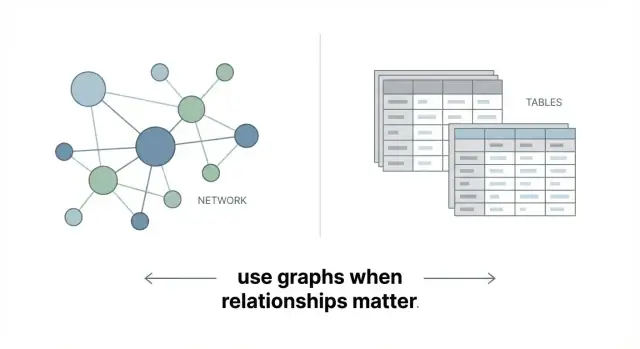
A graph database stores data as a network instead of a set of tables. The core idea is simple:
- Nodes are the “things” you care about (a customer, product, account, device, location).
- Relationships connect nodes (customer BOUGHT product, account TRANSFERRED_TO account, user FOLLOWS user).
- Properties are the details you attach to nodes and relationships (name, price, timestamp, amount, status).
That’s it: a graph database is built to represent connected data directly.
Relationships are “first-class”
In a graph database, relationships aren’t an afterthought—they’re stored as real, queryable objects. A relationship can have its own properties (for example, a PURCHASED relationship can store date, channel, and discount), and you can traverse from one node to the next efficiently.
This matters because many business questions are naturally about paths and connections: “Who is connected to whom?”, “How many steps away is this entity?”, or “What are the common links between these two things?”
How this differs from tables and joins
Relational databases excel at structured records: customers, orders, invoices. Relationships exist there too, but they’re usually represented indirectly via foreign keys, and connecting multiple hops often means writing joins across several tables.
Graphs keep the connections right next to the data, so exploring multi-step relationships tends to be more straightforward to model and query.
Setting expectations
Graph databases are excellent when the relationships are the main point—recommendations, fraud rings, dependency mapping, knowledge graphs. They’re not automatically better for simple reporting, totals, or highly tabular workloads. The goal isn’t to replace every database, but to use graph where connectivity drives the value.
Why Relationships Change the Game
Most business questions aren’t really about single records—they’re about how things connect.
A customer isn’t just a row; they’re linked to orders, devices, addresses, support tickets, referrals, and sometimes other customers. A transaction isn’t just an event; it’s connected to a merchant, a payment method, a location, a time window, and a chain of related activity. When the question is “who/what is connected to what, and how?”, relationship data becomes the main character.
Traversals: following connections step by step
Graph databases are designed for traversals: you start at one node and “walk” the network by following edges.
Instead of joining tables repeatedly, you express the path you care about: Customer → Device → Login → IP Address → Other Customers. That step-by-step framing matches how people naturally investigate fraud, trace dependencies, or explain recommendations.
Why multi-hop queries get simpler
The real difference shows up when you need multiple hops (two, three, five steps away) and you don’t know in advance where the interesting connections will appear.
In a relational model, multi-hop questions often turn into long chains of joins plus extra logic to avoid duplicates and control path length. In a graph, “find me all paths up to N hops” is a normal, readable pattern—especially in the property graph model used by many graph databases.
Relationship properties add meaning
Edges aren’t just lines; they can carry data:
- Type: purchased, referred, works_with
- Time: when the relationship started, ended, or last occurred
- Weight: frequency, confidence score, amount, risk level
Those properties let you ask better questions: “connected within the last 30 days,” “strongest ties,” or “paths that include high-risk transactions”—without forcing everything into separate lookup tables.
Best-Fit Use Cases for Graph Databases
Graph databases shine when your questions depend on connectedness: “who is linked to whom, through what, and how many steps away?” If the value of your data lives in relationship data (not just rows of attributes), a graph model can make both data modeling and querying feel more natural.
Social and professional networks
Anything shaped like a network—friends, followers, coworkers, teams, referrals—maps cleanly to nodes and relationships. Typical questions include “mutual connections,” “shortest path to a person,” or “who connects these two groups?” These queries often become awkward (or slow) when forced into many join tables.
Recommendations (and discovery)
Recommendation engines often depend on multi-step connections: user → item → category → similar items → other users. Graph databases are well-suited for “people who liked X also liked Y,” “items frequently co-viewed,” and “find me products connected by shared attributes or behavior.” This is especially useful when signals are diverse and you keep adding new relationship types.
Fraud and risk investigation
Fraud detection graphs work well because suspicious behavior is rarely isolated. Accounts, devices, transactions, phone numbers, emails, and addresses form webs of shared identifiers. A graph makes it easier to spot rings, repeated patterns, and indirect links (e.g., two “unrelated” accounts using the same device through a chain of activity).
Network and IT dependency mapping
For services, hosts, APIs, calls, and ownership, the primary question is dependency: “what breaks if this changes?” Graphs support impact analysis, root-cause exploration, and “blast radius” queries when systems are interconnected.
Knowledge graphs
Knowledge graphs connect entities (people, companies, products, documents) to facts and references. This helps with search, entity resolution, and tracing “why” a fact is known (provenance) across many linked sources.
Common Graph Questions You Can Answer Easily
Graph databases shine when the question is really about connections: who is linked to whom, through what chain, and with which patterns repeating. Instead of joining tables again and again, you ask the relationship question directly and keep the query readable as the network grows.
1) Path finding: “How are A and B connected?”
Typical questions:
- “What’s the shortest path from this customer to that merchant?”
- “Which colleagues connect Alice and Bob, and through how many steps?”
- “Show me all routes from this device to that account within 3 hops.”
This is useful for customer support (“why did we suggest this?”), compliance (“show the chain of ownership”), and investigations (“how did this spread?”).
2) Community detection: groups and clusters inside a network
Graphs help you spot natural groupings:
- “Which customers form a cluster based on shared addresses, phones, and devices?”
- “Where are the tight communities in our supplier network?”
You can use this to segment users, find fraud crews, or understand how products are co-purchased. The key is that the “group” is defined by how things connect, not by a single column.
3) Centrality and influence: finding important nodes
Sometimes the question isn’t just “who is connected,” but “who matters most” in the web:
- “Which account sits on the most paths between others?”
- “Which product is the strongest bridge between two customer segments?”
These central nodes often point to influencers, critical infrastructure, or bottlenecks worth monitoring.
4) Pattern matching: “find triangles” and “find suspicious rings”
Graphs are great at searching for repeatable shapes:
- Triangles: “A knows B, B knows C, and C knows A.”
- Rings: “Accounts transferring funds in a loop.”
In Cypher (a common graph query language), a triangle pattern can look like:
MATCH (a)-[:KNOWS]->(b)-[:KNOWS]->(c)-[:KNOWS]->(a)
RETURN a,b,c
Even if you never write Cypher yourself, this illustrates why graphs are approachable: the query mirrors the picture in your head.
Graph vs Relational: The Real Difference
Relational databases are great at what they were built for: transactions and well-structured records. If your data fits neatly into tables (customers, orders, invoices) and you mostly retrieve it by IDs, filters, and aggregates, relational systems are often the simplest, safest choice.
The join problem isn’t “joins are bad”—it’s deep joins
Joins are fine when they’re occasional and shallow. The friction starts when your most important questions require many joins, all the time, across multiple tables.
Examples:
- “Which customers bought from sellers connected to this supplier through two intermediaries?”
- “Find all devices that shared a network with devices used by this account’s close contacts.”
In SQL, these can turn into long queries with repeated self-joins and complex logic. They can also become harder to tune as relationship depth grows.
Graphs make multi-step “walks” a first-class operation
Graph databases store relationships explicitly, so multi-step traversals across connections are a natural operation. Instead of stitching tables together at query time, you traverse connected nodes and edges.
That often means:
- Shorter queries for multi-hop patterns (the query reads more like the question)
- More predictable complexity when exploring variable-depth paths (e.g., 2 to 6 hops)
A practical rule of thumb
If your team frequently asks multi-hop questions—“connected to,” “through,” “in the same network as,” “within N steps”—a graph database is worth considering.
If your core workload is high-volume transactions, strict schemas, reporting, and straightforward joins, relational is usually the better default. Many real systems use both; see /blog/practical-architecture-graph-alongside-other-databases.
When a Graph Database Is the Wrong Tool
Graph databases shine when relationships are the “main event.” If your app’s value doesn’t depend on traversing connections (who-knows-who, how items relate, paths, neighborhoods), a graph can add complexity without much payoff.
Simple CRUD with mostly single-record lookups
If most requests are “get user by ID,” “update profile,” “create order,” and the data you need lives in one record (or a predictable, small set of tables), a graph database is often unnecessary. You’ll spend time modeling nodes and edges, tuning traversals, and learning a new query style—while a relational database handles this pattern efficiently and with familiar tooling.
Reporting/BI that’s primarily aggregates
Dashboards built on totals, averages, and grouped metrics (revenue by month, orders by region, conversion rate by channel) typically fit SQL and columnar analytics better than graph queries. Graph engines can answer some aggregate questions, but they’re rarely the easiest or fastest path for heavy OLAP-style workloads.
Strong transactional needs and “SQL-native” features
When you rely on mature SQL features—complex joins with strict constraints, advanced indexing strategies, stored procedures, or well-established ACID transaction patterns—relational systems are often the natural fit. Many graph databases support transactions, but the surrounding ecosystem and operational patterns may not match what your team already depends on.
Mostly independent records with few meaningful links
If your data is largely a set of independent entities (tickets, invoices, sensor readings) with minimal cross-linking, a graph model can feel forced. In these cases, focus on a clean relational schema (or document model) and only consider graph later if relationship-heavy questions become central.
A good rule: if you can describe your top queries without words like “connected,” “path,” “neighborhood,” or “recommend,” a graph database may be the wrong first choice.
Trade-Offs to Know Before You Choose Graph
Graph databases shine when you need to follow connections quickly—but that strength has a price. Before you commit, it helps to understand where graphs tend to be less efficient, more expensive, or simply different to run day to day.
Cost and footprint
Graph databases often store and index relationships in a way that makes “hops” fast (e.g., from a customer to their devices to their transactions). The trade-off is that they can cost more in memory and storage than a comparable relational setup, especially once you add indexes for common lookups and keep relationship data readily accessible.
Not every query gets faster
If your workload looks like a spreadsheet—large table-like scans, reporting queries over millions of rows, or heavy aggregation (totals, averages, grouped rollups)—a graph database may be slower or more expensive for the same result. Graphs are optimized for traversals (“who is connected to what?”), not for crunching big batches of independent records.
Operational differences
Operational complexity can be a real factor. Backups, scaling, and monitoring are different from what many teams are used to with relational systems. Some graph platforms scale best by scaling up (bigger machines), while others support scaling out but require careful planning around consistency, replication, and query patterns.
Skills and tooling
Your team may need time to learn new modeling patterns and query approaches (for example, the property graph model and languages like Cypher). The learning curve is manageable, but it’s still a cost—especially if you’re replacing mature SQL-based reporting workflows.
A practical approach is to use graph where relationships are the product, and keep existing systems for reporting, aggregation, and tabular analytics.
Data Modeling Basics: Nodes, Edges, and Schemas
A useful way to think about graph modeling is simple: nodes are things, and edges are relationships between things. People, accounts, devices, orders, products, locations—those are nodes. “Bought,” “logged in from,” “works with,” “is parent of”—those are edges.
Property graphs vs. RDF triples
Most product-focused graph databases use the property graph model: both nodes and edges can have properties (key–value fields). For example, an edge PURCHASED might store date, amount, and channel. This makes it natural to model “relationships with details.”
RDF represents knowledge as triples: subject – predicate – object. It’s great for interoperable vocabularies and linking data across systems, but it often shifts “relationship details” into additional nodes/triples. Practically, you’ll notice RDF pushes you toward standard ontologies and SPARQL patterns, while property graphs feel closer to application data modeling.
Query languages in plain terms
- Cypher (popular with property graphs) reads like a pattern you want to find: “(Customer)-[PURCHASED]->(Product).”
- Gremlin is more like step-by-step traversal: start here, walk edges like this, filter, then aggregate.
- SPARQL is the RDF world’s query language, matching graph patterns against triples, often using shared vocabularies.
You don’t need to memorize syntax early—what matters is that graph queries are usually expressed as paths and patterns, not as joining tables.
What “schema” means in graph systems
Graphs are often schema-flexible, meaning you can add a new node label or property without a heavy migration. But flexibility still needs discipline: define naming conventions, required properties (e.g., id), and rules for relationship types.
Relationship types, direction, and properties
Pick relationship types that explain meaning (“FRIEND_OF” vs “CONNECTED”). Use direction to clarify semantics (e.g., FOLLOWS from follower to creator), and add edge properties when the relationship has its own facts (time, confidence, role, weight).
How to Decide If Your Problem Is Relationship-Driven
A problem is “relationship-driven” when the hard part isn’t storing records—it’s understanding how things connect, and how those connections change meaning depending on the path you take.
Start with questions, not tables
Begin by writing your top 5–10 questions in plain language—the ones stakeholders keep asking and your current system answers slowly or inconsistently. Good graph candidates usually include phrases like “connected to,” “through,” “similar to,” “within N steps,” or “who else.”
Examples:
- “Which customers are connected to this fraud ring through shared devices and addresses?”
- “What products are often bought together by people who also viewed X?”
- “Which suppliers are indirectly impacted if this factory goes offline?”
Translate the question into entities and interactions
Once you have questions, map the nouns and verbs:
- Key entities become nodes (Customer, Account, Device, Product, Supplier).
- Interactions become relationships (PAID_WITH, LOGGED_IN_FROM, BOUGHT, SUPPLIES).
Then decide what must be a relationship versus a node. A practical rule: if something needs its own attributes and you’ll connect multiple parties to it, make it a node (for example, an “Order” or “Login event” can be a node when it carries detail and connects many entities).
Make filtering and scoring easy
Add properties that let you narrow results and rank relevance without extra joins or post-processing. Typical high-value properties include time, amount, status, channel, and confidence score.
If most of your important questions require multi-step connections plus filtering by those properties, you’re likely dealing with a relationship-driven problem where graph databases shine.
Practical Architecture: Graph Alongside Other Databases
Most teams don’t replace everything with a graph database. A more practical approach is to keep your “system of record” where it already works well (often SQL), and use a graph database as a specialized engine for relationship-heavy questions.
Keep the source of truth in SQL (or your core datastore)
Use your relational database for transactions, constraints, and canonical entities (customers, orders, accounts). Then project a relationship view into a graph database—only the nodes and edges you need for connected queries.
This keeps auditing and data governance straightforward while still unlocking fast traversal queries.
Build the graph for one feature, not the whole company
A graph database shines when you attach it to a clearly scoped feature, such as:
- Recommendations (“people who bought X also bought Y”)
- Risk scoring (fraud rings, shared devices, common payment instruments)
- Identity resolution (linking profiles across systems)
Start with one feature, one team, and one measurable outcome. You can expand later if it proves value.
If your bottleneck is shipping the prototype (not debating the model), a vibe-coding platform like Koder.ai can help you stand up a simple graph-powered app quickly: you describe the feature in chat, generate a React UI and Go/PostgreSQL backend, and iterate while your data team validates the graph schema and queries.
Sync strategies: batch vs near-real-time
How fresh does the graph need to be?
- Batch updates (hourly/nightly) are simpler and often enough for analytics, discovery, and many recommendation engines.
- Near-real-time streams (minutes/seconds) fit fraud detection graphs and operational decisions.
A common pattern is: write transactions to SQL → publish change events → update the graph.
Consistent identifiers and clear ownership
Graphs get messy when IDs drift.
Define stable identifiers (e.g., customer_id, account_id) that match across systems, and document who “owns” each field and relationship. If two systems can create the same edge (say, “knows”), decide which one wins.
If you’re planning a pilot, see /blog/getting-started-a-low-risk-pilot-plan for a staged rollout approach.
Getting Started: A Low-Risk Pilot Plan
A graph pilot should feel like an experiment, not a rewrite. The goal is to prove (or disprove) that relationship-heavy queries become simpler and faster—without betting the whole data stack.
1) Pick a small, high-value slice
Start with a narrow dataset that already causes pain: too many JOINs, brittle SQL, or slow “who is connected to what?” questions. Keep it limited to one workflow (for example: customer ↔ account ↔ device, or user ↔ product ↔ interaction) and define a handful of queries you want answered end-to-end.
2) Define success metrics before you build
Measure more than speed:
- Query complexity: How many lines, joins, or intermediate tables does it take today vs. in graph?
- Latency: Time to return results on realistic data volumes.
- Developer time: How long to build and change queries when requirements shift?
If you can’t name the “before” numbers, you won’t trust the “after.”
3) Keep the model purposeful (avoid graph sprawl)
It’s tempting to model everything as nodes and edges. Resist that. Watch for “graph sprawl”: too many node/edge types without a clear query that needs them. Every new label or relationship should earn its place by enabling a real question.
4) Treat governance as part of the pilot
Plan for privacy, access control, and data retention early. Relationship data can reveal more than individual records (for example, connections that imply behavior). Define who can query what, how results are audited, and how data is deleted when required.
5) Run it alongside your current database
Use a simple sync (batch or streaming) to feed the graph while your existing system stays the source of truth. When the pilot proves value, you can expand scope—carefully, one use case at a time.
Quick Decision Checklist: Use Graph for Relationships
If you’re choosing a database, don’t start with the technology—start with the questions you need to answer. Graph databases shine when your hardest problems are about connections and paths, not just storing records.
A quick “is this relationship-driven?” checklist
Use this checklist to sanity-check fit before you invest:
- Relationship depth: Do you routinely need to follow relationships 2+ hops (A→B→C→D) to get an answer?
- Query patterns: Are your key questions about patterns (e.g., “people who share employers and phone numbers”) rather than single-table filters?
- Update frequency: Do relationships change often (new connections, removals, changing roles), and do you need those changes reflected quickly?
- Scale: Is the dataset large enough that joining many tables (or stitching in application code) is becoming slow, expensive, or fragile?
If you answered “yes” to most of these, a graph can be a strong fit—especially when you need multi-hop pattern matching like:
- “Find the shortest path between two entities.”
- “Show all accounts connected to this device within 3 steps.”
- “Recommend items based on shared neighbors, not just categories.”
When you should stick with SQL/NoSQL
If your work is mostly simple lookups (by ID/email) or aggregations (“total sales by month”), a relational database or a key-value/document store is usually simpler and cheaper to run.
How to de-risk the decision
Write down your top 10 business questions as plain sentences, then test them on real data in a small pilot. Time the queries, note what’s hard to express, and keep a short log of model changes you needed. If your pilot mostly turns into “more joins” or “more caching,” that’s a signal a graph may pay off. If it’s mostly counts and filters, it likely won’t.
FAQ
What is a graph database in simple terms?
A graph database stores data as nodes (entities) and relationships (connections) with properties on both. It’s optimized for questions like “how is A connected to B?” and “who is within N steps?” rather than primarily for tabular reporting.
What does it mean that relationships are “first-class” in a graph database?
Because relationships are stored as real, queryable objects (not just foreign-key values). You can traverse multiple hops efficiently and attach properties to the relationship itself (e.g., date, amount, risk_score), which makes connection-heavy questions easier to model and query.
How is a graph database different from a relational database?
Relational databases represent relationships indirectly (foreign keys) and often require multiple JOINs for multi-hop questions. Graph databases keep connections adjacent to the data, so variable-depth traversals (like 2–6 hops) are typically more direct to express and maintain.
What are the best use cases for graph databases?
Use a graph database when your core questions involve paths, neighborhoods, and patterns:
- Recommendations (user → item → shared behavior)
- Fraud rings (accounts ↔ devices ↔ addresses)
- Dependency mapping (“what breaks if this service changes?”)
- Knowledge graphs (entities linked to facts and sources)
What kinds of questions are graph databases especially good at answering?
Common graph-friendly queries include:
- Path finding: shortest path or “how are A and B connected?”
- Community detection: clusters based on dense connectivity
- Centrality: finding key bridge or influencer nodes
- Pattern matching: triangles, loops, and repeated motifs (e.g., transfer rings)
When is a graph database the wrong tool?
Often when your workload is mostly:
- Simple CRUD and single-record lookups
- BI/OLAP-style reporting with heavy aggregates (totals, rollups)
- Mostly independent records with few meaningful links
- Strong reliance on SQL-native tooling and mature relational constraints
In those cases, a relational or analytics system is usually simpler and cheaper.
Should something be a node or a relationship (edge)?
Model a relationship as an edge when it primarily connects two entities and may carry its own properties (time, role, weight). Model it as a node when it’s an event or entity with multiple attributes that connects to many parties (e.g., an Order or Login event linked to user, device, IP, and time).
What trade-offs should I expect with graph databases?
Typical trade-offs include:
- Higher memory/storage footprint to keep traversals fast
- Not every query is faster (especially large scans and heavy aggregation)
- Different operational patterns for scaling, backups, and monitoring
- A learning curve for graph modeling and query languages (Cypher/Gremlin/SPARQL)
What’s the difference between a property graph and RDF?
Property graphs let nodes and relationships have properties (key–value fields) and are common for application-style modeling. RDF represents knowledge as triples (subject–predicate–object) and often aligns with shared vocabularies and SPARQL.
Pick based on whether you need app-centric relationship properties (property graph) or interoperable semantic modeling (RDF).
How can I adopt a graph database without replacing everything?
Keep your existing system (often SQL) as the source of truth, then project the relationship view into a graph for one scoped feature (recommendations, fraud, identity resolution). Sync via batch or streaming, use stable identifiers across systems, and measure success (latency, query complexity, developer time) before expanding. See /blog/practical-architecture-graph-alongside-other-databases and /blog/getting-started-a-low-risk-pilot-plan.