

Why Horizontal Scaling Is Harder Than Vertical Scaling
Vertical scaling is often just adding CPU/RAM. Horizontal scaling needs coordination, partitioning, consistency, and more ops work—here’s why it’s harder.
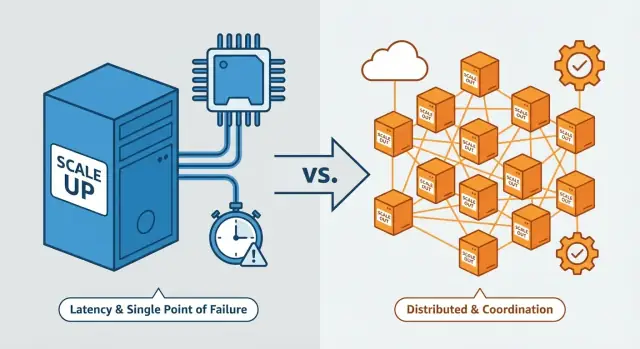
Scaling in Plain English
Scaling means “handling more without falling over.” That “more” could be:
- More users using the product at the same time
- More API requests per second
- More data stored and queried
- More background work (emails, video processing, reports) running behind the scenes
When people talk about scaling, they’re usually trying to improve one or more of these:
- Capacity: how much traffic or data the system can handle.
- Speed: how quickly it responds under load.
- Reliability: how well it keeps working when something breaks.
Most of this comes down to a single theme: scaling up preserves a “single system” feel, while scaling out turns your system into a coordinated group of independent machines—and that coordination is where difficulty explodes.
Vertical vs. Horizontal Scaling (Quick Definitions)
Vertical scaling (scale up)
Vertical scaling means making one machine stronger. You keep the same basic architecture, but upgrade the server (or VM): more CPU cores, more RAM, faster disks, higher network throughput.
Think of it like buying a bigger truck: you still have one driver and one vehicle, it just carries more.
Horizontal scaling (scale out)
Horizontal scaling means adding more machines or instances and splitting work across them—often behind a load balancer. Instead of one stronger server, you run several servers working together.
That’s like using more trucks: you can move more cargo overall, but now you have scheduling, routing, and coordination to worry about.
What usually forces the question?
Common triggers include:
- Traffic spikes (marketing campaigns, seasonality, viral growth)
- Steady product growth over months or years
- Larger datasets (more customers, more events, more history to store)
One important nuance: most real systems use both
Teams often scale up first because it’s fast (upgrade the box), then scale out when a single machine hits limits or when they need higher availability. Mature architectures commonly mix the two: bigger nodes and more nodes, depending on the bottleneck.
Why Vertical Scaling Feels Simpler
Vertical scaling is appealing because it keeps your system in one place. With a single node, you typically have a single source of truth for memory and local state. One process owns the in-memory cache, the job queue, the session store (if sessions are in memory), and temporary files.
Fewer moving parts
On one server, most operations are straightforward because there’s little or no inter-node coordination:
- Debugging is easier because logs and metrics tend to be in one place.
- Failures are clearer: either the machine is healthy or it isn’t.
- Many bottlenecks are local and measurable.
Performance tuning stays “local”
When you scale up, you pull familiar levers: add CPU/RAM, use faster storage, improve indexes, tune queries and configurations. You don’t have to redesign how data is distributed or how multiple nodes agree on “what happens next.”
The trade-offs you accept
Vertical scaling isn’t “free”—it just keeps complexity contained.
Eventually you hit limits: the biggest instance you can rent, diminishing returns, or a steep cost curve at the high end. You may also carry more downtime risk: if the one big machine fails or needs maintenance, a large portion of the system goes with it unless you’ve added redundancy.
Coordination Overhead: More Nodes, More Rules
When you scale out, you don’t just get “more servers.” You get more independent actors that must agree on who is responsible for each piece of work, at what time, and using which data.
With one machine, coordination is often implicit: one memory space, one process, one place to look for state. With many machines, coordination becomes a feature you have to design.
What coordination looks like in practice
Common tools and patterns include:
- Leader election: pick one node to make decisions (for example, which worker processes the next job). If the leader dies, everyone must agree on a replacement.
- Locks/leases: ensure only one node performs a task at a time (like sending a billing email or running a migration). Leases expire, clocks drift, and “who owns the lock” can get messy.
- Consensus systems: a small group of nodes maintains an agreed-upon view of critical state (configuration, membership, leadership). Powerful—but operationally demanding.
Symptoms when coordination goes wrong
Coordination bugs rarely look like clean crashes. More often you see:
- Race conditions: two nodes act on the same data in the wrong order.
- Duplicate work: the same job runs twice because two workers believed it was unclaimed.
- Split brain: a network hiccup creates two “leaders,” each confidently making conflicting decisions.
These issues often show up only under real load, during deployments, or when partial failures occur (one node is slow, a switch drops packets, a single zone blips). The system looks fine—until it’s stressed.
Data Partitioning and Sharding Are Hard to Get Right
When you scale out, you often can’t keep all your data in one place. You split it across machines (shards) so multiple nodes can store and serve requests in parallel. That split is where complexity starts: every read and write depends on “which shard holds this record?”
Common strategies: range vs. hash
Range partitioning groups data by an ordered key (for example, users A–F on shard 1, G–M on shard 2). It’s intuitive and supports range queries well (“show orders from last week”). The downside is uneven load: if one range gets popular, that shard becomes a bottleneck.
Hash partitioning runs a key through a hash function and distributes results across shards. It spreads traffic more evenly, but makes range queries harder because related records are scattered.
Rebalancing isn’t free
Add a node and you want to use it—meaning some data must move. Remove a node (planned or due to failure) and other shards must take over. Rebalancing can trigger large transfers, cache warm-ups, and temporary performance drops. During the move, you also need to prevent stale reads and misrouted writes.
Hot partitions and skew
Even with hashing, real traffic isn’t uniform. A celebrity account, a popular product, or time-based access patterns can concentrate reads/writes on one shard. One hot shard can cap the throughput of the entire system.
Operational work you can’t ignore
Sharding introduces ongoing responsibilities: maintaining routing rules, running migrations, performing backfills after schema changes, and planning splits/merges without breaking clients.
State: Sessions, Caches, and Background Work
When you scale out, you don’t just add more servers—you add more copies of your application. The hard part is state: anything your app “remembers” between requests or while work is in progress.
Sessions: where does the login live?
If a user logs in on Server A but their next request lands on Server B, does B know who they are?
- Sticky sessions keep sending the user to the same server. Simple, but fragile: restarts and uneven load become user-visible problems.
- A shared session store (Redis or a database) lets any server handle any request. More robust—but it adds cost and a dependency. If the session store slows down, the whole app feels slow.
Caches: fast until they disagree
Caches speed things up, but multiple servers mean multiple caches. Now you deal with:
- Invalidation: when data changes, how do you stop every cache from serving the old value?
- Coherence: nodes may disagree about what’s “true” for short windows.
- Uneven hit rates: one server is warm while another is cold, creating inconsistent performance.
Background work: avoiding double processing
With many workers, background jobs can run twice unless you design for it. You typically need a queue, leases/locks, or idempotent job logic so “send invoice” or “charge card” doesn’t happen twice—especially during retries and restarts.
Consistency and Concurrency Problems Multiply
With a single node (or a single primary database), there’s usually a clear “source of truth.” When you scale out, data and requests spread across machines, and keeping everyone in sync becomes a constant concern.
Strong vs. eventual consistency (plain English)
- Strong consistency: once a write succeeds, every reader sees the latest value immediately.
- Eventual consistency: updates propagate, but for a short window some readers may see old values.
Eventual consistency is often faster and cheaper at scale, but it introduces surprising edge cases.
What goes wrong in real systems
Common issues include:
- Stale reads: a user updates their address, refreshes, and still sees the old one.
- Write conflicts: two updates happen at nearly the same time and overwrite each other.
- Lost updates: “last write wins” silently drops a change that should have been merged.
Patterns that reduce damage
You can’t eliminate failures, but you can design for them:
- Idempotency keys: retries of “create payment” don’t double-charge.
- Retries with backoff: retry after 200ms, then 400ms, then 800ms (with jitter) to avoid stampedes.
- Deduplication: when messages arrive twice, process them once.
Why distributed transactions are tricky
A transaction across services (order + inventory + payment) requires multiple systems to agree. If one step fails mid-way, you need compensating actions and careful bookkeeping. Classic “all-or-nothing” behavior is hard when networks and nodes fail independently.
Where strong consistency matters most
Use strong consistency for things that must be correct: payments, account balances, inventory counts, seat reservations. For less critical data (analytics, recommendations), eventual consistency is often acceptable.
Networking: Latency, Timeouts, and Retries
When you scale up, many “calls” are function calls in the same process: fast and predictable. When you scale out, the same interaction becomes a network call—adding latency, jitter, and failure modes your code must handle.
Latency is not just “a bit slower”
Network calls have fixed overhead (serialization, queuing, hops) and variable overhead (congestion, routing, noisy neighbors). Even if average latency is fine, tail latency (the slowest 1–5%) can dominate user experience because a single slow dependency stalls the whole request.
Bandwidth and packet loss also become constraints: at high request rates, “small” payloads add up, and retransmits quietly increase load.
Timeouts, retries, and retry storms
Without timeouts, slow calls pile up and threads get stuck. With timeouts and retries, you can recover—until retries amplify load.
A common failure pattern is a retry storm: a backend slows down, clients time out and retry, retries increase load, and the backend gets even slower.
Safer retries usually require:
- Conservative timeouts based on real latency data
- Limited retries (often 0–1) with exponential backoff and jitter
- Clear rules for what’s safe to retry (idempotent operations)
Load balancers and service discovery
With multiple instances, clients need to know where to send requests—via a load balancer or service discovery plus client-side balancing. Either way, you add moving parts: health checks, connection draining, uneven traffic distribution, and the risk of routing to a half-broken instance.
Backpressure and rate limiting
To prevent overload from spreading, you need backpressure: bounded queues, circuit breakers, and rate limiting. The goal is to fail fast and predictably instead of letting a small slowdown turn into a system-wide incident.
Failure Modes Change: Partial Failure Becomes Normal
Vertical scaling tends to fail in a straightforward way: one bigger machine is still a single point. If it slows down or crashes, the impact is obvious.
Horizontal scaling changes the math. With many nodes, it’s normal for some machines to be unhealthy while others are fine. The system is “up,” but users still see errors, slow pages, or inconsistent behavior. This is partial failure, and it becomes the default state you design for.
How partial failures turn into cascading failures
In a scaled-out setup, services depend on other services: databases, caches, queues, downstream APIs. A small issue can ripple:
- One node can’t reach the database → it retries aggressively
- Retries increase DB load → latency rises for everyone
- Higher latency triggers more timeouts → more retries → more load
- Queues back up, caches miss, and downstream APIs get hammered
Redundancy helps, but adds rules
To survive partial failures, systems add redundancy:
- Replication: multiple copies of data or services
- Quorums: “successful only if N out of M replicas agree”
- Multi-zone deployment: spread across zones so one zone outage doesn’t take everything down
This increases availability, but introduces edge cases: split-brain scenarios, stale replicas, and decisions about what to do when quorum can’t be reached.
Resilience tools you end up needing
Common patterns include:
- Circuit breakers to stop calling a failing dependency
- Bulkheads to isolate failures so one noisy component doesn’t drown everything
- Graceful degradation to serve a simpler experience instead of hard errors
Observability and Debugging Across Many Machines
With a single machine, the “system story” lives in one place: one set of logs, one CPU graph, one process to inspect. With horizontal scaling, the story is scattered.
More machines, more missing context
Every additional node adds another stream of logs, metrics, and traces. The hard part isn’t collecting data—it’s correlating it. A checkout error might start on a web node, call two services, hit a cache, and read from a specific shard, leaving clues in different places and timelines.
Problems also become selective: one node has a bad config, one shard is hot, one zone has higher latency. Debugging can feel random because it “works fine” most of the time.
Tracing and correlation IDs (plain-language version)
Distributed tracing is like attaching a tracking number to a request. A correlation ID is that tracking number. You pass it through services and include it in logs so you can pull one ID and see the full journey end-to-end.
Alerts that help instead of overwhelm
More components usually means more alerts. Without tuning, teams get alert fatigue. Aim for actionable alerts that clarify:
- What’s broken
- Who is impacted
- What to check first
Watch saturation, not just errors
Capacity issues often appear before failures. Monitor saturation signals such as CPU, memory, queue depth, and connection pool usage. If saturation appears on only a subset of nodes, suspect balancing, sharding, or configuration drift—not just “more traffic.”
Deployments, Upgrades, and Rollbacks Get Riskier
When you scale out, a deploy is no longer “replace one box.” It’s coordinating changes across many machines while keeping the service available.
Rolling updates, canaries, and blue/green
Horizontal deployments often use rolling updates (replace nodes gradually), canaries (send a small percentage of traffic to the new version), or blue/green (switch traffic between two full environments). They reduce blast radius, but add requirements: traffic shifting, health checks, draining connections, and a definition of “good enough to proceed.”
Version skew is the default
During any gradual deploy, old and new versions run side-by-side. That version skew means your system must tolerate mixed behavior:
- New nodes calling old nodes (and vice versa)
- Old clients hitting new servers
- Different cache formats or job payloads in flight
Compatibility becomes a requirement
APIs need backward/forward compatibility, not just correctness. Database schema changes should be additive when possible (add nullable columns before making them required). Message formats should be versioned so consumers can read both old and new events.
Rollbacks get tricky with data migrations
Rolling back code is easy; rolling back data is not. If a migration drops or rewrites fields, older code may crash or silently mis-handle records. “Expand/contract” migrations help: deploy code that supports both schemas, migrate data, then remove old paths later.
Config and secrets must be consistent
With many nodes, configuration management becomes part of the deploy. A single node with stale config, wrong feature flags, or expired credentials can create flaky, hard-to-reproduce failures.
Cost and Team Complexity Often Rise with Scale Out
Horizontal scaling can look cheaper on paper: lots of small instances, each with a low hourly price. But the total cost isn’t just compute. Adding nodes also means more networking, more monitoring, more coordination, and more time spent keeping things consistent.
Fewer big boxes vs. many small instances
Vertical scaling concentrates spend into fewer machines—often fewer hosts to patch, fewer agents to run, fewer logs to ship, fewer metrics to scrape.
With scale out, the per-unit price may be lower, but you often pay for:
- Load balancers, service discovery, and extra bandwidth
- More replicas to meet performance and availability targets
- Higher baseline capacity because you need slack everywhere, not just in one place
Utilization and overprovisioning
To handle spikes safely, distributed systems frequently run under-full. You keep headroom on multiple tiers (web, workers, databases, caches), which can mean paying for idle capacity across dozens or hundreds of instances.
Operational cost: the hidden multiplier
Scale out increases on-call load and demands mature tooling: alert tuning, runbooks, incident drills, and training. Teams also spend time on ownership boundaries (who owns which service?) and incident coordination.
The result: “cheaper per unit” can still be more expensive overall once you include people time, operational risk, and the work required to make many machines behave like one system.
Choosing the Right Path: When to Scale Up vs. Scale Out
Choosing between scaling up (bigger machine) and scaling out (more machines) isn’t just about price. It’s about workload shape and how much operational complexity your team can absorb.
Decision criteria that actually matter
Start with the workload:
- Workload type: CPU-bound jobs often benefit from scale up; request-heavy web traffic often benefits from scale out behind load balancing.
- Statefulness: if requests depend on local state (sessions, caches, in-progress work), scale out forces you to redesign where that state lives.
- Consistency needs: if correctness is strict (payments, inventory), scale out introduces harder trade-offs around concurrency and consistency.
- Growth rate and spikes: predictable growth can be handled by scaling up in steps; unpredictable spikes may push you toward horizontal capacity.
A practical progression (that saves time)
A common, sensible path:
- Optimize obvious bottlenecks (slow queries, missing indexes, inefficient endpoints).
- Scale up first (bigger VM/DB instance), because it changes fewer assumptions.
- Scale out once a single node is truly the limiting factor—or when you need availability that one node can’t provide.
Hybrid patterns are normal
Many teams keep the database vertical (or lightly clustered) while scaling the stateless app tier horizontally. This limits sharding pain while still letting you add web capacity quickly.
“Ready” signals for scaling out
You’re closer when you have solid monitoring and alerts, tested failover, load tests, and repeatable deployments with safe rollbacks.
Questions to ask before committing
- Can we meet goals by optimizing or scaling up for the next 6–12 months?
- Where will sessions, caches, and background jobs live?
- Do we need strong consistency, and what failures are acceptable?
- What’s our plan for data partitioning (if any) and rebalancing?
- Do we have tooling for debugging issues across multiple nodes?
Where Koder.ai Fits (Practical Help Without Reinventing Everything)
A lot of scaling pain isn’t just “architecture”—it’s the operational loop: iterating safely, deploying reliably, and rolling back fast when reality disagrees with your plan.
If you’re building web, backend, or mobile systems and want to move quickly without losing control, Koder.ai can help you prototype and ship faster while you make these scale decisions. It’s a vibe-coding platform where you build applications through chat, with an agent-based architecture under the hood. In practice that means you can:
- Stand up a React web app, a Go + PostgreSQL backend, or a Flutter mobile app quickly, then iterate as you discover bottlenecks.
- Use planning mode to think through “scale up vs. scale out” changes before implementing them.
- Reduce deployment risk with snapshots and rollback, which matters more as you add nodes and version skew becomes normal.
- Export source code when you’re ready to move to your own pipeline, and deploy/host with custom domains.
Because Koder.ai runs globally on AWS, it can also support deployments in different regions to meet latency and data-transfer constraints—useful once multi-zone or multi-region availability becomes part of your scaling story.
FAQ
What’s the difference between vertical scaling and horizontal scaling?
Vertical scaling means making a single machine bigger (more CPU/RAM/faster disk). Horizontal scaling means adding more machines and spreading work across them.
Vertical often feels simpler because your app still behaves like “one system,” while horizontal requires multiple systems to coordinate and stay consistent.
Why does horizontal scaling introduce more complexity than vertical scaling?
Because the moment you have multiple nodes, you need explicit coordination:
- deciding who handles which work
- preventing duplicate processing
- handling network delays and partial outages
A single machine avoids many of these distributed-system problems by default.
What is “coordination overhead” in a scaled-out system?
It’s the time and logic spent making multiple machines behave like one:
- leader election and failover rules
- locks/leases and clock drift issues
- avoiding split-brain situations
Even if each node is simple, the system behavior gets harder to reason about under load and failure.
Why are sharding and data partitioning so difficult to get right?
Sharding (partitioning) splits data across nodes so no single machine has to store/serve everything. It’s hard because you must:
- route every read/write to the correct shard
- rebalance data when adding/removing capacity
- handle hot partitions where one shard becomes the bottleneck
It also increases operational work (migrations, backfills, shard maps).
What does “state” mean, and why does it matter for scaling out?
State is anything your app “remembers” between requests or while work is in progress (sessions, in-memory caches, temporary files, job progress).
With horizontal scaling, requests may land on different servers, so you typically need shared state (e.g., Redis/db) or you accept trade-offs like sticky sessions.
How do you prevent background jobs from running twice when scaling out?
If multiple workers can pick up the same job (or a job is retried), you can end up charging twice or sending duplicate emails.
Common mitigations:
- idempotent job handlers
- locks/leases around job claims
- deduplication using unique job IDs
- careful retry policies with backoff
What’s the practical difference between strong and eventual consistency?
Strong consistency means once a write succeeds, all readers immediately see it. Eventual consistency means updates propagate over time, so some readers may see stale data briefly.
Use strong consistency for correctness-critical data (payments, balances, inventory). Use eventual consistency where small delays are acceptable (analytics, recommendations).
Why do timeouts and retries become a bigger deal with horizontal scaling?
In a distributed system, calls become network calls, which adds latency, jitter, and failure modes.
Basics that usually matter most:
- set timeouts so requests don’t hang
- limit retries and add exponential backoff + jitter
- retry only safe (idempotent) operations to avoid duplicate effects
What is “partial failure,” and why is it normal at scale?
Partial failure means some components are broken or slow while others are fine. The system can be “up” but still produce errors, timeouts, or inconsistent behavior.
Design responses include replication, quorums, multi-zone deployments, circuit breakers, and graceful degradation so failures don’t cascade.
How do you debug issues when your app runs on many servers?
Across many machines, evidence is fragmented: logs, metrics, and traces live on different nodes.
Practical steps:
- use correlation IDs end-to-end
- adopt distributed tracing to see request paths
- alert on saturation signals (CPU, queue depth, connection pools), not just error rates