

Why Native Frameworks Still Matter for High-Performance Apps
Native frameworks still win for low-latency, smooth UI, battery efficiency, and deep hardware access. Learn when native beats cross-platform.
What “Performance-Critical” Really Means
“Performance-critical” doesn’t mean “nice to have fast.” It means the experience breaks down when the app is even slightly slow, inconsistent, or delayed. Users don’t just notice the lag—they lose trust, miss a moment, or make mistakes.
Everyday examples where performance is the product
A few common app types make this easy to see:
- Camera and video: Tap the shutter and you expect the capture to happen immediately. Delays can miss the moment. Preview stutter, slow focus, or dropped frames makes the app feel unreliable.
- Maps and navigation: The blue dot needs to move smoothly, reroutes should feel instant, and the UI must stay responsive while GPS, data loading, and rendering happen in parallel.
- Trading and finance: A quote that updates late, a button that registers late, or a screen that freezes during volatility can directly affect outcomes.
- Games: Frame drops and input delay don’t just “feel bad”—they change gameplay. Consistent frame pacing matters as much as raw FPS.
In all of these, performance isn’t a hidden technical metric. It’s visible, felt, and judged within seconds.
What “native frameworks” means (without the buzzwords)
When we say native frameworks, we mean building with the tools that are first-class on each platform:
- iOS: Swift/Objective‑C with Apple’s iOS SDKs (for example UIKit or SwiftUI, plus system frameworks)
- Android: Kotlin/Java with Android’s SDKs (for example Jetpack, Views/Compose, plus platform APIs)
Native doesn’t automatically mean “better engineering.” It means your app is speaking the platform’s language directly—especially important when you’re pushing the device hard.
Not anti–cross-platform: it’s about fit
Cross-platform frameworks can be a great choice for many products, particularly when speed of development and shared code matter more than squeezing every millisecond.
This article isn’t arguing “native always.” It’s arguing that when an app is truly performance-critical, native frameworks often remove whole categories of overhead and limitations.
The dimensions that usually decide it
We’ll evaluate performance-critical needs across a few practical dimensions:
- Latency: touch response, typing, real-time interactions, audio/video sync
- Rendering: smooth scrolling, animations, frame pacing, GPU-driven UI
- Battery and heat: sustained efficiency over long sessions
- Hardware/OS access: camera pipelines, sensors, Bluetooth, background execution, on-device ML
These are the areas where users feel the difference—and where native frameworks tend to shine.
Native vs Cross-Platform: Where Overhead Shows Up
Cross-platform frameworks can feel “close enough” to native when you’re building typical screens, forms, and network-driven flows. The difference usually appears when an app is sensitive to small delays, needs consistent frame pacing, or has to push the device hard for long sessions.
The extra layers that add up
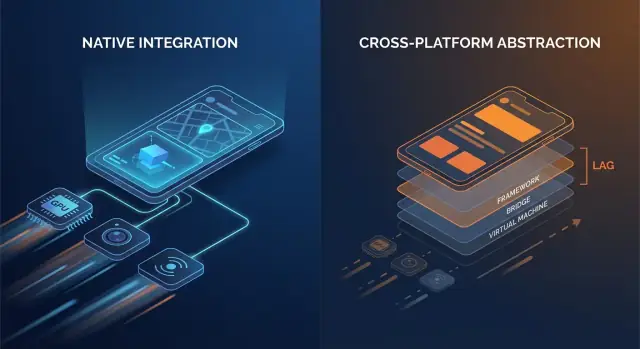
Native code generally talks to OS APIs directly. Many cross-platform stacks add one or more translation layers between your app logic and what the phone ultimately renders.
Common overhead points include:
- Bridge calls and context switching: If your UI layer and business logic live in different runtimes (for example, a managed runtime or scripting engine plus native), every interaction can require a hop across a boundary.
- Serialization and copying: Data passed across boundaries may need to be converted (JSON-like payloads, typed maps, byte buffers). That conversion work can show up on hot paths like scrolling or typing.
- Extra view hierarchies: Some frameworks create their own UI tree and then map it to native views (or render to a canvas). Reconciliation and layout can become more expensive than a direct native view update.
None of these costs is huge in isolation. The issue is repetition: they can appear on every gesture, every animation tick, and every list item.
Startup time and runtime “jank”
Overhead isn’t only about raw speed; it’s also about when work happens.
- Startup time can increase when the app must initialize an additional runtime, load bundled assets, warm up a UI engine, or rebuild state before the first screen is interactive.
- Runtime jank often comes from unpredictable pauses: garbage collection, bridge backpressure, expensive diffing, or a long task blocking the main thread right when the UI needs to hit its next frame.
Native apps can also hit these issues—but there are fewer moving parts, which means fewer places where surprises can hide.
A simple mental model
Think: fewer layers = fewer surprises. Each added layer can be well engineered, but it still introduces more scheduling complexity, more memory pressure, and more translation work.
When overhead is fine—and when it isn’t
For many apps, the overhead is acceptable and the productivity win is real. But for performance-critical apps—fast-scrolling feeds, heavy animations, real-time collaboration, audio/video processing, or anything latency-sensitive—those “small” costs can become user-visible quickly.
UI Smoothness: Frames, Jank, and Native Rendering Paths
Smooth UI isn’t just a “nice-to-have”—it’s a direct signal of quality. On a 60 Hz screen, your app has about 16.7 ms to produce each frame. On 120 Hz devices, that budget drops to 8.3 ms. When you miss that window, the user sees it as stutter (jank): scrolling that “catches,” transitions that hitch, or a gesture that feels slightly behind their finger.
Why missed frames are so easy to notice
People don’t consciously count frames, but they do notice inconsistency. A single dropped frame during a slow fade might be tolerable; a few dropped frames during a fast scroll is immediately obvious. High refresh rate screens also raise expectations—once users experience 120 Hz smoothness, inconsistent rendering feels worse than it did on 60 Hz.
The main thread is the usual bottleneck
Most UI frameworks still rely on a primary/UI thread to coordinate input handling, layout, and drawing. Jank often appears when that thread does too much work within one frame:
- Heavy layout passes: complex view hierarchies, nested containers, or frequent relayout triggered by changing constraints/sizes.
- Expensive animations: animating properties that force re-layout or re-rasterization instead of letting the GPU handle transforms.
- Synchronous work in UI callbacks: parsing JSON, formatting large text blocks, or running business logic during scroll/gesture events.
Native frameworks tend to have well-optimized pipelines and clearer best practices for keeping work off the main thread, minimizing layout invalidations, and using GPU-friendly animations.
Native components vs custom-rendered UI
A key difference is the rendering path:
- Platform-native components usually map directly to OS-optimized widgets and compositing systems.
- Custom-rendered UI approaches (common in cross-platform stacks) may add a separate render tree, additional texture uploads, or extra reconciliation work. That can be fine—until your screen becomes animation- or list-heavy and the overhead starts competing for a tight frame budget.
Where you feel it: real screen examples
Complex lists are the classic stress test: fast scrolling + image loading + dynamic cell heights can create layout churn and GC/memory pressure.
Transitions can reveal pipeline inefficiencies: shared-element animations, blurred backdrops, and layered shadows are visually rich but can spike GPU cost and overdraw.
Gesture-heavy screens (drag-to-reorder, swipe cards, scrubbers) are unforgiving because the UI must respond continuously. When frames arrive late, the UI stops feeling “attached” to the user’s finger—which is exactly what high-performance apps avoid.
Low Latency: Touch, Typing, Audio, and Real-Time UX
Latency is the time between a user action and the app’s response. Not overall “speed,” but the gap you feel when you tap a button, type a character, drag a slider, draw a stroke, or play a note.
Input-to-response: where “fast” becomes “feels right”
Useful rule-of-thumb thresholds:
- 0–50 ms: feels instant. Taps and typing feel directly connected to your finger.
- 50–100 ms: usually acceptable, but people start to sense “softness,” especially when dragging or scrubbing.
- 100–200 ms: noticeable lag. Typing feels behind; drawing lines “chase” the stylus.
- 200 ms+: frustrating. Users slow down to compensate.
Performance-critical apps—messaging, note-taking, trading, navigation, creative tools—live and die by these gaps.
Event loops, scheduling, and “thread hops”
Most app frameworks handle input on one thread, run app logic somewhere else, and then ask the UI to update. When that path is long or inconsistent, latency spikes.
Cross-platform layers can add extra steps:
- Input arrives → translated into framework events
- Logic runs in a separate runtime (often with its own event loop)
- State changes are serialized and sent back
- UI updates are scheduled later, sometimes missing the next frame
Each handoff (a “thread hop”) adds overhead and, more importantly, jitter—the response time varies, which often feels worse than a steady delay.
Native frameworks tend to have a shorter, more predictable path from touch → UI update because they align closely with the OS scheduler, input system, and rendering pipeline.
Real-time UX: audio, video, and live collaboration
Some scenarios have hard limits:
- Audio monitoring/instruments: round-trip latency often needs to stay roughly under ~20 ms to feel playable.
- Voice/video calls: you can buffer to hide network issues, but UI controls (mute, speaker, captions) must respond immediately.
- Live collaboration (docs, whiteboards): local edits must appear instantly, even if remote sync takes longer.
Native-first implementations make it easier to keep the “critical path” short—prioritizing input and rendering over background work—so real-time interactions stay tight and trustworthy.
Deep Hardware and OS Features: Native First, Always
Performance isn’t only about CPU speed or frame rate. For many apps, the make-or-break moments happen at the edges—where your code touches the camera, sensors, radios, and OS-level services. Those capabilities are designed and shipped as native APIs first, and that reality shapes what’s feasible (and how stable it is) in cross-platform stacks.
Hardware access is rarely generic
Features like camera pipelines, AR, BLE, NFC, and motion sensors often require tight integration with device-specific frameworks. Cross-platform wrappers can cover the common cases, but advanced scenarios tend to expose gaps.
Examples where native APIs matter:
- Advanced camera controls: manual focus and exposure, RAW capture, high-frame-rate video, HDR tuning, multi-camera (wide/tele) switching, depth data, and low-light behavior.
- AR experiences: ARKit/ARCore capabilities evolve quickly (occlusion, plane detection, scene reconstruction).
- BLE and background modes: scanning, reconnect behavior, and “works reliably while the screen is off” often depend on platform background execution rules.
- NFC: secure element access, card emulation limits, and reader session management are highly platform-specific.
- Health data: HealthKit/Google Fit permissions, data types, and background delivery can be nuanced and require native-first handling.
OS updates arrive native-first
When iOS or Android ships new features, official APIs are immediately available in native SDKs. Cross-platform layers may need weeks (or longer) to add bindings, update plugins, and work through edge cases.
That lag isn’t just inconvenient—it can create reliability risk. If a wrapper hasn’t been updated for a new OS release, you may see:
- permission flows that break,
- background tasks that get restricted,
- crashes triggered by updated system behaviors,
- regressions that only occur on certain device models.
For performance-critical apps, native frameworks reduce the “waiting on the wrapper” problem and let teams adopt new OS capabilities on day one—often the difference between a feature shipping this quarter or next.
Battery, Memory, and Heat: Performance You Feel Over Time
Speed in a quick demo is only half the story. The performance users remember is the kind that holds up after 20 minutes of use—when the phone is warm, the battery is dropping, and the app has been in the background a few times.
Where battery drain really comes from
Most “mysterious” battery drains are self-inflicted:
- Wake locks and runaway timers keep the CPU from sleeping, even when the screen is off.
- Background work that never truly stops (polling, frequent location checks, repeated network retries) adds up quickly.
- Excessive redraws—rebuilding UI or re-rendering animations more often than needed—keep CPU/GPU busy.
Native frameworks typically offer clearer, more predictable tools to schedule work efficiently (background tasks, job scheduling, OS-managed refresh), so you can do less work overall—and do it at better times.
Memory pressure: the hidden source of stutters
Memory doesn’t just affect whether an app crashes—it affects smoothness.
Many cross-platform stacks rely on a managed runtime with garbage collection (GC). When memory builds up, GC may pause the app briefly to clean up unused objects. You don’t need to understand the internals to feel it: occasional micro-freezes during scrolling, typing, or transitions.
Native apps tend to follow platform patterns (like ARC-style automatic reference counting on Apple platforms), which often spreads cleanup work more evenly. The result can be fewer “surprise” pauses—especially under tight memory conditions.
Heat and sustained performance
Heat is performance. As devices warm up, the OS may throttle CPU/GPU speeds to protect hardware, and frame rates drop. This is common in sustained workloads like games, turn-by-turn navigation, camera + filters, or real-time audio.
Native code can be more power-efficient in these scenarios because it can use hardware-accelerated, OS-tuned APIs for heavy tasks—such as native video playback pipelines, efficient sensor sampling, and platform media codecs—reducing wasted work that turns into heat.
When “fast” also means “cool and steady,” native frameworks often have an edge.
Profiling and Debugging: Seeing the Real Bottlenecks
Performance work succeeds or fails on visibility. Native frameworks usually ship with the deepest hooks into the operating system, the runtime, and the rendering pipeline—because they’re built by the same vendors who define those layers.
Why native toolchains see more
Native apps can attach profilers at the boundaries where delays are introduced: the main thread, render thread, system compositor, audio stack, and network and storage subsystems. When you’re chasing a stutter that happens once every 30 seconds, or a battery drain that only appears on certain devices, those “below the framework” traces are often the only way to get a definitive answer.
Common native tools (the usual suspects)
You don’t need to memorize tools to benefit from them, but it helps to know what exists:
- Xcode Instruments (Time Profiler, Allocations, Leaks, Core Animation, Energy Log)
- Xcode Debugger (thread inspection, memory graph, symbolic breakpoints)
- Android Studio Profiler (CPU, Memory, Network, Energy)
- Perfetto / System Trace (system-wide tracing on Android)
- GPU tools like Xcode’s Metal tools or vendor GPU inspectors (to diagnose overdraw, shader cost, frame pacing)
These tools are designed to answer concrete questions: “Which function is hot?”, “Which object is never released?”, “Which frame missed its deadline, and why?”
The “last 5%” bugs: freezes, leaks, and frame drops
The toughest performance problems often hide in edge cases: a rare synchronization deadlock, a slow JSON parse on the main thread, a single view that triggers expensive layout, or a memory leak that only shows up after 20 minutes of use.
Native profiling lets you correlate symptoms (a freeze or jank) with causes (a specific call stack, allocation pattern, or GPU spike) instead of relying on trial-and-error changes.
Faster fixes for high-impact issues
Better visibility shortens time-to-fix because it turns debates into evidence. Teams can capture a trace, share it, and agree on the bottleneck quickly—often reducing days of “maybe it’s the network” speculation into a focused patch and a measurable before/after result.
Reliability at Scale: Devices, OS Updates, and Edge Cases
Performance isn’t the only thing that breaks when you ship to millions of phones—consistency does. The same app can behave differently across OS versions, OEM customizations, and even vendor GPU drivers. Reliability at scale is the ability to keep your app predictable when the ecosystem isn’t.
Why “same Android/iOS” isn’t really the same
On Android, OEM skins can tweak background limits, notifications, file pickers, and power management. Two devices on the “same” Android version may differ because vendors ship different system components and patches.
GPUs add another variable. Vendor drivers (Adreno, Mali, PowerVR) can diverge in shader precision, texture formats, and how aggressively they optimize. A rendering path that looks fine on one GPU can show flicker, banding, or rare crashes on another—especially around video, camera, and custom graphics.
iOS is tighter, but OS updates still shift behavior: permission flows, keyboard/autofill quirks, audio session rules, and background task policies can change subtly between minor versions.
Why native often handles edge cases more predictably
Native platforms expose the “real” APIs first. When the OS changes, native SDKs and documentation usually reflect those changes immediately, and platform tooling (Xcode/Android Studio, system logs, crash symbols) aligns with what’s running on devices.
Cross-platform stacks add another translation layer: the framework, its rendering/runtime, and plugins. When an edge case appears, you’re debugging both your app and the bridge.
Dependency risk: updates, breaking changes, and plugin quality
Framework upgrades can introduce runtime changes (threading, rendering, text input, gesture handling) that only fail on certain devices. Plugins can be worse: some are thin wrappers; others embed heavy native code with inconsistent maintenance.
Checklist: vetting third-party libraries in critical paths
- Maintenance: recent releases, active issue triage, clear ownership.
- Native parity: uses official platform APIs (not private/unsupported hooks).
- Performance: benchmarks, avoids extra copies/allocations, minimal bridge hops.
- Failure modes: graceful fallbacks, timeouts, and error reporting.
- Compatibility: tested across OS versions, OEM devices, and GPU vendors.
- Observability: logs, crash symbols, and reproducible test cases.
- Upgrade safety: semver discipline, changelogs, migration notes.
At scale, reliability is rarely about one bug—it’s about reducing the number of layers where surprises can hide.
Graphics, Media, and ML: When Native Is a Clear Advantage
Some workloads punish even small amounts of overhead. If your app needs sustained high FPS, heavy GPU work, or tight control over decoding and buffers, native frameworks usually win because they can drive the platform’s fastest paths directly.
Workloads that strongly favor native
Native is a clear fit for 3D scenes, AR experiences, high-FPS games, video editing, and camera-first apps with real-time filters. These use cases aren’t just “compute heavy”—they’re pipeline heavy: you’re moving large textures and frames between CPU, GPU, camera, and encoders dozens of times per second.
Extra copies, late frames, or mismatched synchronization show up immediately as dropped frames, overheating, or laggy controls.
Direct access to GPU APIs, codecs, and acceleration
On iOS, native code can talk to Metal and the system media stack without intermediary layers. On Android, it can access Vulkan/OpenGL plus platform codecs and hardware acceleration through the NDK and media APIs.
That matters because GPU command submission, shader compilation, and texture management are sensitive to how the app schedules work.
Rendering pipelines and texture uploads (high level)
A typical real-time pipeline is: capture or load frames → convert formats → upload textures → run GPU shaders → composite UI → present.
Native code can reduce overhead by keeping data in GPU-friendly formats longer, batching draw calls, and avoiding repeated texture uploads. Even one unnecessary conversion (say, RGBA ↔ YUV) per frame can add enough cost to break smooth playback.
ML inference: throughput, latency, and power
On-device ML often depends on delegate/backends (Neural Engine, GPU, DSP/NPU). Native integration tends to expose these sooner and with more tuning options—important when you care about inference latency and battery.
Hybrid strategy: native modules for hotspots
You don’t always need a fully native app. Many teams keep a cross-platform UI for most screens, then add native modules for the hotspots: camera pipelines, custom renderers, audio engines, or ML inference.
This can deliver near-native performance where it counts, without rewriting everything else.
Choosing the Right Approach: Native, Cross-Platform, or Hybrid
Picking a framework is less about ideology and more about matching user expectations to what the device must do. If your app feels instant, stays cool, and remains smooth under stress, users rarely ask what it’s built with.
A practical decision matrix
Use these questions to narrow the choice quickly:
- User expectations: Is this a “utility” app where occasional hiccups are tolerable, or an experience where stutter breaks trust (banking, navigation, live collaboration, creator tools)?
- Hardware needs: Do you need the camera pipeline, Bluetooth peripherals, sensors, background processing, low-latency audio, AR, or heavy GPU work? The more “close to the metal” you get, the more native pays off.
- Timeline and iteration speed: Cross-platform can reduce time-to-market for simpler UI and shared flows. Native can be faster for performance tuning because you’re working directly with platform tooling and APIs.
- Team skills and hiring: A strong iOS/Android team will ship higher-quality native code faster. A small team with web experience may reach a usable MVP sooner with cross-platform—if performance constraints are moderate.
If you’re prototyping multiple directions, it can help to validate product flows quickly before you invest in deep native optimization. For example, teams sometimes use Koder.ai to spin up a working web app (React + Go + PostgreSQL) via chat, pressure-test the UX and data model, and then commit to a native or hybrid mobile build once the performance-critical screens are clearly defined.
What “hybrid” really means (and why it often wins)
Hybrid doesn’t have to mean “web inside an app.” For performance-critical products, hybrid usually means:
- Native core + shared business logic: Keep networking, state, and domain logic shared, while UI and performance-sensitive parts stay native.
- Native shell + shared UI where it’s safe: Use shared UI for screens that are mostly static or form-based, and keep animation-heavy or real-time views native.
This approach limits risk: you can optimize the hottest paths without rewriting everything.
Measure first, then decide
Before committing, build a small prototype of the hardest screen (e.g., live feed, editor timeline, map + overlays). Benchmark frame stability, input latency, memory, and battery over a 10–15 minute session. Use that data—not guesses—to choose.
If you do use an AI-assisted build tool like Koder.ai for early iterations, treat it as a speed multiplier for exploring architecture and UX—not a substitute for device-level profiling. Once you’re targeting a performance-critical experience, the same rule applies: measure on real devices, set performance budgets, and keep the critical paths (rendering, input, media) as close to native as your requirements demand.
Avoid premature optimization
Start by making the app correct and observable (basic profiling, logging, and performance budgets). Optimize only when you can point to a bottleneck that users will feel. This keeps teams from spending weeks shaving milliseconds off code that isn’t on the critical path.
FAQ
What does “performance-critical” actually mean in practice?
It means the user experience breaks down when the app is even slightly slow or inconsistent. Small delays can cause missed moments (camera), wrong decisions (trading), or loss of trust (navigation), because performance is directly visible in the core interaction.
Why do native frameworks often feel faster than cross-platform frameworks?
Because they talk to the platform’s APIs and rendering pipeline directly, with fewer translation layers. That usually means:
- lower input-to-response latency
- more predictable frame pacing (less jank)
- better access to OS-tuned media/GPU/hardware paths
- fewer surprises from extra runtimes and bridges
Where does cross-platform overhead usually come from?
Common sources include:
- Bridge calls/context switching between runtimes
- Serialization/copying data across boundaries
- Extra UI trees (reconciliation/diffing + layout work)
- Runtime pauses (e.g., garbage collection) that hit at the wrong time
Individually small costs can add up when they happen every frame or gesture.
What is “jank,” and why is it so noticeable on modern phones?
Smoothness is about hitting the frame deadline consistently. At 60 Hz you have ~16.7 ms per frame; at 120 Hz ~8.3 ms. When you miss, users see stutter during scroll, animations, or gestures—often more noticeable than slightly slower overall load time.
Why is the main/UI thread a frequent bottleneck?
The UI/main thread often coordinates input, layout, and drawing. Jank commonly happens when you do too much there, such as:
- heavy layout passes from complex hierarchies
- expensive animations that trigger re-layout or re-rasterization
- synchronous work in UI callbacks (JSON parsing, formatting, business logic)
Keeping the main thread predictable is usually the biggest win for smoothness.
How fast does an app need to respond to feel “instant”?
Latency is the felt gap between an action and response. Useful thresholds:
- 0–50 ms: feels instant
- 50–100 ms: usually OK, but “soft” in drags/scrubs
- 100–200 ms: noticeable lag
- 200 ms+: frustrating
Performance-critical apps optimize the entire path from input → logic → render so responses are fast and consistent (low jitter).
Why do deep hardware features push teams toward native?
Many hardware features are native-first and evolve quickly: advanced camera controls, AR, BLE background behavior, NFC, health APIs, and background execution policies. Cross-platform wrappers may cover basics, but advanced/edge behaviors often require direct native APIs to be reliable and up to date.
How do OS updates affect native vs cross-platform reliability?
Because OS releases expose new APIs immediately in native SDKs, while cross-platform bindings/plugins may lag. That gap can cause:
- delayed access to new capabilities
- broken permission/background flows after OS changes
- device-specific crashes or regressions until the wrapper updates
Native reduces “waiting on the wrapper” risk for critical features.
Why do battery, memory, and heat matter for “real” performance?
Sustained performance is about efficiency over time:
- Battery drain: runaway timers, polling, excessive redraws, background work
- Memory pressure: can trigger pauses and stutters (often worse with GC)
- Heat/throttling: long sessions can reduce CPU/GPU speed and drop FPS
Native APIs often let you schedule work more appropriately and use OS-accelerated media/graphics paths that waste less energy.
Can I get near-native performance without going fully native?
Yes. Many teams use a hybrid strategy:
- keep cross-platform for low-risk screens (forms, settings, basic flows)
- build native modules for hotspots (camera pipeline, custom rendering, audio engine, ML inference)
- prototype the hardest screen and measure frame stability, latency, memory, and battery before committing
This targets native effort where it matters most without rewriting everything.