

Why OLTP and OLAP Workloads Rarely Belong in One Database
Learn why mixing transactional (OLTP) and analytics (OLAP) on one database can slow apps, raise costs, and complicate operations—and what to do instead.
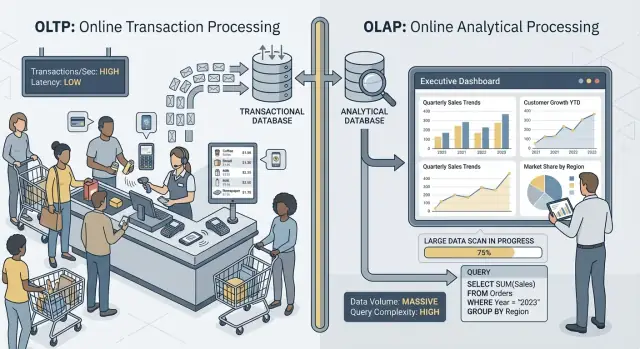
OLTP vs OLAP: What They Are (Without the Jargon)
When people say “OLTP” and “OLAP,” they’re talking about two very different ways a database gets used.
OLTP: the database that runs the business
OLTP (Online Transaction Processing) is the workload behind day-to-day actions that must be fast and correct every time. Think: “save this change right now.”
Typical OLTP tasks include creating an order, updating inventory, recording a payment, or changing a customer address. These operations are usually small (a few rows), frequent, and must respond in milliseconds because a person or another system is waiting.
OLAP: the database that explains the business
OLAP (Online Analytical Processing) is the workload used to understand what happened and why. Think: “scan a lot of data and summarize it.”
Typical OLAP tasks include dashboards, trend reports, cohort analysis, forecasting, and “slice-and-dice” questions like: “How did revenue change by region and product category over the last 18 months?” These queries often read many rows, perform heavy aggregations, and can run for seconds (or minutes) without being “wrong.”
Same data, different goals—and different needs
The main idea is simple: OLTP optimizes for fast, consistent writes and small reads, while OLAP optimizes for large reads and complex calculations. Because the goals differ, the best database settings, indexes, storage layout, and scaling approach often differ too.
Also note the wording: rarely, not never. Some small teams can share one database for a while, especially with modest data volume and careful query discipline. Later sections cover what breaks first, common separation patterns, and how to move reporting off production safely.
Quick examples
- Checkout (OLTP): a customer clicks “Pay,” and your app writes an order, payment status, and inventory updates.
- Reporting dashboard (OLAP): a manager opens a dashboard that aggregates thousands (or millions) of orders to show conversion rate, average order value, and weekly trends.
Different Goals, Different Success Metrics
OLTP and OLAP may both “use SQL,” but they’re optimized for different jobs—and that shows up in what each one considers success.
OLTP: speed, concurrency, and correctness
OLTP (transactional) systems power day-to-day operations: checkout flows, account updates, reservations, support tools. The priorities are straightforward:
- Fast response times for small reads/writes (think milliseconds)
- Many concurrent users without slowdowns
- Correctness and consistency, because a wrong balance or duplicate order is a real business problem
Success is often tracked with latency metrics like p95/p99 request time, error rate, and how well the system behaves under peak concurrency.
OLAP: scanning, aggregating, and flexibility
OLAP (analytics) systems answer questions like “What changed this quarter?” or “Which segment churned after the new pricing?” These queries often:
- Scan large amounts of data across many rows
- Perform aggregations (SUM, COUNT, percentiles) and joins
- Change frequently as analysts explore and refine questions
Success here looks more like query throughput, time-to-insight, and the ability to run complex queries without hand-tuning every report.
Why “one system for everything” creates trade-offs
When you force both workloads into one database, you’re asking it to be simultaneously great at tiny, high-volume transactions and at big, exploratory scans. The result is usually compromise: OLTP gets unpredictable latency, OLAP gets throttled to protect production, and teams end up arguing over whose queries are “allowed.” Separate goals deserve separate success metrics—and usually separate systems.
Resource Contention: When Analytics Steals From Transactions
When OLTP (your app’s day-to-day transactions) and OLAP (reporting and analysis) run on the same database, they fight over the same finite resources. The result isn’t just “slower reporting.” It’s often slower checkouts, stalled logins, and unpredictable app hiccups.
CPU and memory: long queries vs short queries
Analytical queries tend to be long-running and heavy: joins across large tables, aggregations, sorting, and grouping. They can monopolize CPU cores and, just as importantly, memory for hash joins and sort buffers.
Meanwhile, transactional queries are usually small but latency-sensitive. If CPU is saturated or memory pressure forces frequent eviction, those tiny queries start waiting behind the big ones—even if each transaction only needs a few milliseconds of actual work.
Disk I/O: large scans vs many small reads/writes
Analytics often triggers large table scans and reads lots of pages sequentially. OLTP workloads do the opposite: many small, random reads plus constant writes to indexes and logs.
Put them together and the database storage subsystem has to juggle incompatible access patterns. Caches that were helping OLTP can get “washed out” by analytics scans, and write latency can spike when the disk is busy streaming data for reports.
Connection pool pressure and queueing
A few analysts running broad queries can tie up connections for minutes. If your application uses a fixed-size pool, requests queue up waiting for a free connection. That queueing effect can make a healthy system feel broken: average latency might look acceptable, but tail latencies (p95/p99) become painful.
What users actually notice
From the outside, this shows up as timeouts, slow checkout flows, delayed search results, and generally flaky behavior—often “only during reporting” or “only at the end of the month.” The app team sees errors; the analytics team sees slow queries; the real issue is shared contention underneath.
Data Layout and Indexing Needs Pull in Opposite Directions
OLTP and OLAP don’t just “use the database differently”—they reward opposite physical designs. When you try to satisfy both in one place, you usually end up with a compromise that’s expensive and still underperforms.
OLTP: optimized for fast, selective lookups
Transactional workload is dominated by short queries that touch a tiny slice of data: fetch one order, update one inventory row, list the last 20 events for a single user.
That pushes OLTP schemas toward row-oriented storage and indexes that support point lookups and small range scans (often on primary keys, foreign keys, and a few high-value secondary indexes). The goal is predictable, low latency—especially for writes.
OLAP: optimized for scanning, grouping, and summarizing
Analytics workload often needs to read a lot of rows and only a few columns: “revenue by week by region,” “conversion rate by campaign,” “top products by margin.”
OLAP systems benefit from columnar storage (to read only the columns needed), partitioning (to prune old or irrelevant data quickly), and pre-aggregation (materialized views, rollups, summary tables) so reports don’t repeatedly recompute the same totals.
Why “index for everything” backfires
A common reaction is to add indexes until every dashboard is fast. But every extra index increases write cost: inserts, updates, and deletes now have more structures to maintain. It also increases storage and can slow maintenance tasks like vacuuming, reindexing, and backups.
Query planners and statistics drift (in plain terms)
Databases choose query plans based on statistics—estimates of how many rows match a filter, how selective an index is, and how data is distributed. OLTP changes data constantly. As distributions shift, statistics can drift, and the planner may pick a plan that’s great for yesterday’s data but slow today.
Mix in heavy OLAP queries that scan and join large tables, and you get more variability: the “best plan” becomes harder to predict, and tuning for one workload often makes the other worse.
Locking, MVCC, and Maintenance Side Effects
Even if your database “supports concurrency,” mixing heavy reporting with live transactions creates subtle slowdowns that are hard to predict—and even harder to explain to a customer staring at a spinning checkout.
Long queries still create lock trouble
OLAP-style queries often scan lots of rows, join multiple tables, and run for seconds or minutes. During that time they can hold locks (for example on schema objects, or when they need to sort/aggregate into temp structures) and they frequently increase lock contention indirectly by keeping many rows “in play.”
Even with MVCC (multi-version concurrency control), the database must track multiple versions of the same row so readers and writers don’t block each other. That helps, but it doesn’t eliminate contention—especially when queries touch hot tables that transactions update constantly.
MVCC has a hidden cost: cleanup gets harder
MVCC means old row versions stick around until the database can safely remove them. A long-running report can keep an old snapshot open, which prevents cleanup from reclaiming space.
That affects:
- Vacuum/garbage collection: cleanup can’t remove dead tuples/versions as quickly.
- Bloat/fragmentation: storage grows, indexes get less efficient, and caches become less useful.
- Compaction pressure: some engines respond by doing heavier background work, which steals I/O and CPU from transactions.
The result is a double hit: reporting makes the database work harder and makes the system slower over time.
Isolation levels amplify latency variability
Reporting tools often request stronger isolation (or accidentally run in a long transaction). Higher isolation can increase waiting on locks and increase the amount of versioning the engine must manage. From the OLTP side, you see this as unpredictable spikes: most orders write fast, then a few suddenly stall.
Practical example: end-of-month reporting slows orders
At month-end, finance runs a “revenue by product” query that scans orders and line items for the entire month. While it runs, new order writes are still accepted, but vacuum can’t reclaim old versions and indexes churn. The order API starts seeing occasional timeouts—not because it’s “down,” but because contention and cleanup overhead quietly push latency over your limits.
Workload Spikiness and Unpredictable Latency
OLTP systems live and die by predictability. A checkout, support ticket, or balance update isn’t “mostly fine” if it’s fast 95% of the time—users notice the slow moments. OLAP, by contrast, is often bursty: a few heavy queries can be quiet for hours and then suddenly consume a lot of CPU, memory, and I/O.
Spikes happen for normal business reasons
Analytics traffic tends to bunch up around routines:
- Morning “standup dashboards” where many people refresh the same charts at once
- Scheduled reports that all kick off at the top of the hour
- Month-end close and quarterly reviews that trigger long scans and joins
Meanwhile, OLTP traffic is usually steadier (or at least more continuous). When both workloads share one database, those analytics spikes translate into unpredictable latency for transactions—timeouts, slower page loads, and occasional retries that add even more load.
Why limits and scheduling help—but don’t fix the mismatch
You can reduce damage with tactics like running reports at night, limiting concurrency, enforcing statement timeouts, or setting query cost caps. These are valuable guardrails, especially for “reporting on production.”
But they don’t remove the fundamental tension: OLAP queries are designed to use lots of resources to answer big questions, while OLTP needs small, quick resource slices all day. The moment an unexpected dashboard refresh, ad-hoc query, or backfilled report slips through, the shared database is exposed again.
The noisy neighbor problem
On shared infrastructure, one “noisy” analytics user or job can monopolize cache, saturate disk, or pressure CPU scheduling—without doing anything wrong. The OLTP workload becomes collateral damage, and the hardest part is that the failures look random: latency spikes instead of clear, repeatable errors.
Operational Complexity: Backup, Security, and Capacity Planning
Mixing OLTP (transactions) and OLAP (analytics) doesn’t just create performance headaches—it also makes day-to-day operations harder. The database becomes a single “everything box,” and every operational task inherits the combined risks of both workloads.
Backups, restores, and disaster recovery slow down
Analytics tables tend to grow wide and fast (more history, more columns, more aggregates). That extra volume changes your recovery story.
A full backup takes longer, consumes more storage, and increases the chance you’ll miss your backup window. Restores are worse: when you need to recover quickly, you’re restoring not only the transactional data your app needs, but also large analytical datasets that aren’t required to get the business running again. Disaster recovery tests also take longer, so they happen less often—exactly the opposite of what you want.
Capacity planning becomes guesswork
Transactional growth is usually predictable: more customers, more orders, more rows. Analytics growth is often lumpy: a new dashboard, a new retention policy, or one team deciding to keep “just one more year” of raw events.
When both live together, you can’t easily answer:
- Are we growing because the product is successful, or because reports are storing more history?
- Do we need faster storage for transactions, or more cheap storage for analytics?
That uncertainty leads to overprovisioning (paying for headroom you don’t need) or underprovisioning (surprise outages).
Guardrails are harder to enforce fairly
In a shared database, one “innocent” query can become an incident. You’ll end up adding guardrails such as query timeouts, workload quotas, scheduled reporting windows, or workload management rules. These help, but they’re brittle: the app and analysts are now competing for the same limits, and policy changes for one group can break the other.
Security and access control get messy
Applications typically need narrow, purpose-built permissions. Analysts often need broad read access, sometimes across many tables, to explore and validate. Putting both in one database increases pressure to grant wider privileges “just to make the report work,” raising the blast radius of mistakes and expanding the set of people who can see sensitive operational data.
Scaling and Cost: You End Up Paying Twice (or Worse)
Trying to run OLTP and OLAP in the same database often looks cheaper—until you start scaling. The problem isn’t just performance. It’s that the “right” way to scale each workload pushes you toward different infrastructure, and combining them forces expensive compromises.
OLTP scaling is write-driven (and usually painful)
Transactional systems are constrained by writes: many small updates, strict latency, and bursts that must be absorbed immediately. Scaling OLTP commonly means vertical scaling (bigger CPU, faster disks, more memory) because write-heavy workloads don’t fan out easily.
When vertical limits are reached, you’re looking at sharding or other write-scaling patterns. That adds engineering overhead and often requires careful changes to the application.
OLAP scaling is compute-driven (and often elastic)
Analytics workloads scale differently: long scans, heavy aggregations, and lots of read throughput. OLAP systems typically scale by adding distributed compute, and many modern setups separate compute from storage so you can scale query horsepower without moving or duplicating data.
If OLAP shares the OLTP database, you can’t scale analytics independently. You scale the whole database—even if transactions are fine.
The hidden bill: paying OLTP-grade resources for analytics
To keep transactions fast while running reports, teams over-provision the production database: extra CPU headroom, high-end storage, and larger instances “just in case.” That means you’re paying OLTP prices to support OLAP behavior.
Separation reduces over-provisioning because each system can be sized to its job: OLTP for predictable low-latency writes, OLAP for bursty heavy reads. The result is often cheaper overall—even though it’s “two systems”—because you stop buying premium transactional capacity to run reporting on production.
Common Architectures That Keep OLTP and OLAP Apart
Most teams separate transactional workload (OLTP) from analytics workload (OLAP) by adding a second “read-oriented” system rather than forcing one database to serve both.
Pattern 1: Read replica for reporting
A common first step is a read replica (or follower) of the OLTP database, where BI tools run queries.
Pros: minimal app changes, familiar SQL, quick to set up.
Cons: it’s still the same engine and schema, so heavy reports can saturate replica CPU/I/O; some reports require features not available on replicas; and replication lag means numbers may be minutes (or more) behind. Lag also creates confusing “why doesn’t it match production?” conversations during incidents.
Best fit: small teams, modest data volume, “near-real-time” is nice but not critical, and reporting queries are controlled.
Pattern 2: Dedicated data warehouse / analytics database
Here, OLTP stays optimized for writes and point reads, while analytics goes to a data warehouse (or columnar analytics DB) designed for scans, compression, and large aggregations.
Pros: predictable OLTP performance, faster dashboards, better concurrency for analysts, and clearer cost/performance tuning.
Cons: you now operate another system and need a data model (often a star schema) that’s friendly for analytics.
Best fit: growing data, many stakeholders, complex reporting, or strict OLTP latency requirements.
Pattern 3: CDC-based pipeline into analytics
Instead of periodic ETL, you stream changes using CDC (change data capture) from the OLTP log into the warehouse (often with ELT).
Pros: fresher data with less load on OLTP, easier incremental processing, and better auditability.
Cons: more moving parts and careful handling of schema changes.
Best fit: larger volumes, high freshness needs, and teams ready for data pipelines.
Getting Data From OLTP to OLAP Safely
Moving data from your transactional database (OLTP) into an analytics system (OLAP) is less about “copying tables” and more about building a reliable, low-impact pipeline. The goal is simple: analytics gets what it needs, without putting production traffic at risk.
ETL vs ELT (plain-English version)
ETL (Extract, Transform, Load) means you clean and reshape data before it lands in the warehouse. This is useful when the warehouse is expensive to compute in, or you want tight control over what gets stored.
ELT (Extract, Load, Transform) loads raw-ish data first, then transforms inside the warehouse. This is often faster to set up and easier to evolve: you can keep the “source of truth” history and adjust transformations when requirements change.
A practical rule: if business logic changes frequently, ELT reduces rework; if governance requires only curated data stored, ETL may fit better.
CDC basics: capturing change without heavy queries
Change Data Capture (CDC) streams inserts/updates/deletes from OLTP (often from the database log) into your analytics system. Instead of repeatedly scanning big tables, CDC lets you move only what changed.
What it enables:
- Near-real-time reporting without running large reads on production
- Replays and backfills when you need to rebuild analytics tables
- History tracking (who changed what, and when), if you store change events
Data freshness: real-time vs near-real-time vs daily
Freshness is a business decision with a technical cost.
- Real-time (seconds): best for operational dashboards, but hardest to keep stable; small pipeline hiccups show up immediately.
- Near-real-time (minutes): a common sweet spot—good decision-making without extreme complexity.
- Daily batches: simplest and cheapest, great for finance-style reporting where “yesterday” is fine.
Define a clear SLA (for example: “data is up to 15 minutes behind”) so stakeholders know what “fresh” means.
Data quality checks that prevent silent failures
Pipelines usually break quietly—until someone notices numbers are off. Add lightweight checks for:
- Schema changes: new columns, renamed fields, or type changes that can null out data.
- Late-arriving events: orders or payments that show up hours later; handle with a “lookback window.”
- Deduplication: retries and replays can double-count; use stable IDs and idempotent loads.
These safeguards keep OLAP trustworthy while keeping OLTP protected.
When Sharing One Database Can Be Acceptable
Keeping OLTP and OLAP together isn’t automatically “wrong.” It can be a sensible temporary choice when the application is small, the reporting needs are narrow, and you can enforce hard boundaries so analytics can’t surprise your customers with slow checkouts, failed payments, or timeouts.
Situations where it can work
Small apps with light analytics and strict query limits often do fine on a single database—especially early on. The key is being honest about what “light” means: a handful of dashboards, modest row counts, and a clear ceiling on query runtime and concurrency.
For a narrow set of recurring reports, materialized views or summary tables can reduce the cost of analytics. Instead of scanning raw transactions, you precompute daily totals, top categories, or per-customer rollups. That keeps most queries short and predictable.
If business users can tolerate delayed numbers, off-peak reporting windows help. Schedule heavier jobs at night or during low-traffic periods, and consider a dedicated reporting role with tighter permissions and resource limits.
Guardrails you should add
- Set statement timeouts and cancel runaway queries.
- Cap concurrency for reporting users.
- Monitor p95/p99 latency for core transactions separately from reporting.
Clear warning signs it’s time to split
If you see rising transaction latency, recurring incidents during report runs, connection pool exhaustion, or “one query took down production” stories, you’re past the safe zone. At that point, separating databases (or at least using read replicas) stops being an optimization and becomes basic operational hygiene.
Practical Migration Checklist: From Shared to Separated
Moving analytics off the production database is less about a “big rewrite” and more about making the work visible, setting targets, and migrating in controlled steps.
1) Inventory what’s really happening today
Start with evidence, not assumptions. Pull a list of:
- Top OLTP endpoints/queries by frequency and p95/p99 latency (checkout, login, create order, etc.)
- Top OLAP reports/dashboards by runtime, scan volume, and business importance
Include “hidden” analytics: ad-hoc SQL from BI tools, scheduled exports, and CSV downloads.
2) Define targets: OLTP SLOs and analytics freshness
Write down the targets you’ll optimize for:
- OLTP SLOs: p95/p99 latency, error rate, and peak throughput you must sustain
- Analytics freshness: how stale is acceptable (5 minutes, 1 hour, next day), plus time-to-rebuild if a pipeline breaks
This prevents debates like “it’s slow” vs “it’s fine” and helps pick the right architecture.
3) Choose a separation path
Pick the simplest option that meets the targets:
- Read replica: fastest to adopt for read-heavy reporting, but can still be stressed by expensive queries and replica lag
- Warehouse: best for large scans, many joins, and long history; usually the right home for BI
- CDC pipeline (ETL/ELT): best when you need near-real-time analytics without hitting production
4) Roll out safely (parallel first)
- Validate definitions (time zones, refunds, “active user,” etc.) so numbers match.
- Run old and new dashboards in parallel for a full business cycle.
- Cut over report-by-report, starting with the most painful queries.
- Lock down direct “reporting on production” access once stakeholders trust the new source.
5) Add guardrails so you don’t regress
Set up monitoring for replica lag/pipeline delays, dashboard runtimes, and warehouse spend. Add query budgets (timeouts, concurrency limits), and keep an incident playbook: what to do when freshness slips, loads spike, or key metrics diverge.
A practical note if you’re building the app itself
If you’re early in a product and moving fast, the biggest risk is accidentally building analytics directly into the same database path as core transactions (for example, dashboard queries that quietly become “production-critical”). One way to avoid that is to design the separation up front—even if you start with a modest read replica—and bake it into your architecture checklist.
Platforms like Koder.ai can help here because you can prototype the OLTP side (React app + Go services + PostgreSQL) and sketch the reporting/warehouse boundary in planning mode before you ship. As the product grows, you can export source code, evolve the schema, and add CDC/ELT components without turning “reporting on production” into a permanent habit.
FAQ
What’s the simplest way to explain OLTP vs OLAP?
OLTP (Online Transaction Processing) handles day-to-day operations like creating orders, updating inventory, and recording payments. It prioritizes low latency, high concurrency, and correctness.
OLAP (Online Analytical Processing) answers business questions via large scans and aggregations (dashboards, trends, cohorts). It prioritizes throughput, flexible queries, and fast summarization over millisecond response times.
Why does running analytics on the same database hurt transactional performance?
Because the workloads compete for the same resources:
- CPU & memory: long aggregations and joins can crowd out short transactional queries.
- Disk I/O: analytics scans disrupt OLTP’s small random reads/writes and log/index writes.
- Cache churn: big scans can evict hot OLTP pages, making the app suddenly slower.
- Connection pool pressure: a few long BI queries can tie up connections and cause app queueing.
The result is often unpredictable p95/p99 latency for core user actions.
Can’t we just add more indexes to make both OLTP and OLAP fast?
Not usually. Adding indexes to make dashboards fast often backfires because:
- Every extra index increases write cost (insert/update/delete must update more structures).
- Indexes increase storage and slow down maintenance (vacuuming/reindexing/backups).
- You can end up tuning for one report and making other queries (or OLTP writes) worse.
For analytics, you often get better results from partitioning, columnar storage, or pre-aggregations in an OLAP-oriented system.
How do MVCC and long-running queries make shared databases slower over time?
MVCC helps readers and writers avoid blocking, but it doesn’t make mixed workloads “free.” Practical issues include:
- Long-running reports keep old snapshots open, delaying cleanup of old row versions.
- Cleanup delays cause bloat/fragmentation, which slows queries and wastes cache.
- Background cleanup/compaction can steal CPU and I/O from OLTP.
So even without obvious blocking, heavy analytics can degrade performance over time.
What are the warning signs that it’s time to separate OLTP and OLAP?
You often see symptoms like:
- Spikes in p95/p99 latency for checkout/login/update endpoints
- Timeouts or increased retries during reporting windows
- Connection pool exhaustion (app requests waiting for free DB connections)
- Incidents that correlate with month-end/quarter-end reporting
If the system feels “randomly slow” during dashboard refreshes, that’s a classic mixed-workload smell.
When does a read replica make sense for reporting?
A read replica is often the first step:
- Pros: minimal application changes, familiar schema/SQL, isolates production writes.
- Cons: heavy reports can still saturate replica CPU/I/O; replication lag can confuse metric comparisons; it’s still row-store OLTP tech.
It’s a good bridge when data volume is modest and “minutes behind” is acceptable.
When should we use a dedicated data warehouse instead of a replica?
A warehouse is a better fit when you need:
- Fast performance on large scans, joins, and aggregations
- Many analysts running queries concurrently
- Longer history retention without punishing OLTP
- Clear separation of tuning and cost (OLTP for latency, OLAP for throughput)
It typically requires an analytics-friendly model (often star/snowflake) and a pipeline to load data.
What is CDC, and why is it often better than running big ETL queries on production?
CDC (Change Data Capture) streams inserts/updates/deletes from the OLTP database (often via its log) into analytics.
It helps because:
- You move only what changed, instead of re-scanning big tables.
- You can get near-real-time freshness with lower OLTP impact.
- Replays/backfills are easier when you have a change stream.
The trade-off is more moving parts and careful handling of schema changes and ordering.
How do I choose between ETL and ELT for moving OLTP data into OLAP?
Pick based on how often business logic changes and what you want to store:
- ELT: load raw-ish data first, transform in the warehouse later. Easier to evolve when definitions change.
- ETL: transform before loading. Useful when you must store only curated outputs or want strict control upfront.
A practical approach is to start ELT for speed, then add governance (tests, curated models) as critical metrics stabilize.
Is it ever acceptable to keep OLTP and OLAP on the same database?
Yes—temporarily—if you keep analytics truly lightweight and add guardrails:
- Statement timeouts and cancellation for runaway queries
- Reporting concurrency caps (separate role/pool)
- Pre-aggregations (materialized views/summary tables)
- Monitoring OLTP p95/p99 separately from report runtimes
It stops being acceptable when reporting regularly causes latency spikes, pool exhaustion, or production incidents.