

Why PHP Still Powers the Web: Evolution, Strengths, Future
PHP keeps powering popular sites despite predictions of its end. Learn how it evolved, what it does well today, and when to choose it.
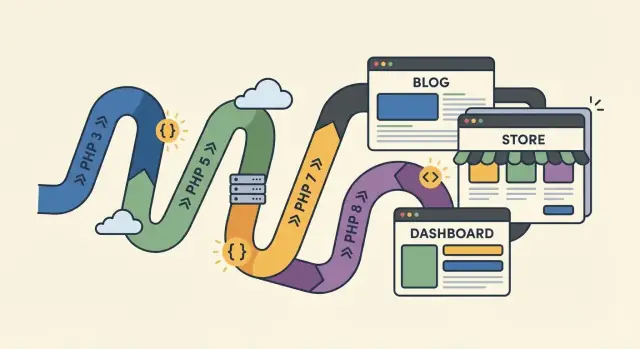
Why People Keep Saying “PHP Is Dead”
“PHP is dead” rarely means “nobody uses PHP.” Most of the time, it’s shorthand for “PHP isn’t the exciting new thing anymore,” or “I had a bad time with it once.” Those are very different claims.
What people usually mean
When someone declares PHP dead, they’re usually reacting to a mix of perception and personal experience:
- Hype has moved on. Newer languages and runtimes (Node.js, Go, Rust, Python frameworks) get more headlines, conference talks, and social media buzz.
- They remember old PHP. Many developers first met PHP through messy, copy‑pasted scripts, inconsistent style, and insecure tutorials. That experience sticks, even though the language and best practices have changed a lot.
- They associate PHP with “legacy.” Because so many long-running sites and internal tools were built with PHP, people conflate “widely deployed” with “outdated.”
Why the claim keeps resurfacing
The web development world has a short attention span. Every few years, a new stack promises cleaner architecture, better performance, or a happier developer experience—so older mainstream tools become the punchline.
PHP also suffers from its own success: it was easy to start, so plenty of bad code was written early on. The worst examples became memes, and memes outlive context.
Less hype doesn’t mean less usage
PHP doesn’t need constant excitement to stay relevant. It quietly runs an enormous amount of real traffic—especially through platforms like WordPress—and it remains a practical option on almost any web hosting.
This post isn’t about defending a favorite language. It’s about practical reality: where PHP is strong today, where it’s weak, and what that means if you’re building or maintaining software right now.
A Short History: How PHP Got Here
PHP started as a practical tool, not a grand platform. In the mid‑1990s it was essentially a set of simple scripts embedded in HTML—easy to drop into a page and immediately get dynamic output. That “just put it on the server” mindset became part of PHP’s DNA.
The PHP 4/5 era: shared hosting made it everywhere
As the web grew, PHP 4 and especially PHP 5 rode a massive wave of inexpensive shared hosting. Providers could enable a PHP module once and suddenly thousands of small sites had access to server-side scripting without special setup.
This era also shaped the reputation PHP still carries: lots of copy‑pasted snippets, inconsistent coding styles, and applications that lived for years without major rewrites.
The turning point: PHP 7 made performance a headline
For a long time, PHP’s biggest strength was accessibility, not speed. PHP 7 changed that. The engine overhaul delivered major performance gains and reduced memory usage, which mattered to everyone from small blogs to high-traffic web apps. It also signaled that PHP wasn’t standing still—it was willing to modernize the core.
PHP 8+: modern syntax, stricter behavior
PHP 8 and later releases continued the shift toward “modern PHP”: better typing features, cleaner syntax, and more consistent behavior. These changes didn’t magically fix old code, but they made new codebases more predictable and easier to maintain.
Backward compatibility: the blessing and the burden
PHP’s commitment to backward compatibility is a big reason adoption stayed high. You could upgrade hosting, update versions, and keep many older apps running. The tradeoff is that the internet accumulated a long tail of legacy code—still functioning, still deployed, and still influencing how people talk about PHP today.
Why PHP Spread So Fast (and Why It Matters)
PHP didn’t win early web development by being the most elegant language. It won by being the most reachable.
For a long time, the easiest way to put something dynamic online was simple: get cheap web hosting, upload a .php file, and it just ran. No special servers to configure, no complex deployment pipeline, and no extra runtime to install. That “drop in a file and refresh the browser” loop made PHP feel like an extension of HTML rather than a separate engineering discipline.
Built for the web’s request/response rhythm
PHP fit the way the web worked: a browser requests a page, the server runs code, returns HTML, done. That model matched typical site needs—forms, sessions, logins, content pages—without forcing developers to think in long-running processes.
Even today, that design still maps cleanly to many products: marketing sites, content-driven applications, and CRUD-heavy dashboards.
Databases without friction
Most early web apps were “read and write some data.” PHP made that approachable: connect to a database, run queries, render results. That ease helped countless small businesses ship features quickly—before “full-stack” was even a job title.
The compounding effect: code, tutorials, and shared habits
Once PHP was everywhere, it created its own gravity:
- An enormous archive of tutorials and copy‑pasteable examples lowered learning friction.
- A huge base of existing code meant new teams inherited PHP projects instead of replacing them.
- Hosting providers optimized for PHP by default, reinforcing the cycle.
This history still matters. The web is built on continuity: maintaining, extending, and integrating what already exists. PHP’s reach—across shared hosting, CMS ecosystems, and frameworks like Laravel and Symfony—means choosing PHP isn’t just a language decision; it’s choosing a mature path through web development.
WordPress and the Long Tail of PHP
WordPress is the single biggest reason PHP never stopped being “useful.” When a huge portion of the web runs on one PHP-based platform, demand doesn’t just come from new builds—it comes from years (and sometimes decades) of ongoing updates, content changes, and extensions.
How WordPress created durable demand
WordPress made publishing accessible, and it ran well on inexpensive shared hosting. That combination pushed hosting providers to optimize for PHP and made “PHP + MySQL” a default package almost anywhere you could buy hosting.
For businesses, the WordPress theme and plugin economy is the real engine. Instead of commissioning custom software, teams can often buy a plugin, add a theme, and get to market quickly. That keeps PHP relevant because most of that ecosystem is still written in PHP, maintained in PHP, and deployed to PHP-friendly hosting.
Why companies keep old WordPress sites running
Many organizations continue running existing installs because:
- The site “works,” and replacing it would be expensive and risky
- Marketing teams depend on familiar workflows and plugins
- SEO, analytics, and integrations are already tuned
- Long-lived vendor themes/plugins make incremental upgrades more realistic than rewrites
In practice, that means a constant stream of maintenance work: security patches, plugin updates, performance tuning, and gradual modernization.
Modern WordPress development (high level)
WordPress isn’t stuck in the past. Modern builds often use the REST API, the block editor (Gutenberg), and increasingly “headless” setups where WordPress manages content while a separate frontend consumes it. Even when the frontend shifts, PHP remains central on the backend—powering the admin, content model, permissions, and plugin hooks that businesses rely on.
What “Modern PHP” Means in Practice
“Modern PHP” usually doesn’t mean a single framework or a trendy rewrite. It means writing PHP the way the language has encouraged you to write it since PHP 7 and especially PHP 8+: clearer code, better tooling, and fewer surprises.
Language features that change day-to-day coding
If your memory of PHP is loose arrays and mysterious warnings, PHP 8 will feel different.
Better typing is a big part of that shift. You can add type hints for function arguments and return values, use union types (like string|int), and rely on more consistent behavior from the engine. It doesn’t force you into strictness everywhere, but it makes “what is this value supposed to be?” much easier to answer.
PHP 8 also added features that reduce boilerplate and make intent clearer:
- Named arguments let you pass values by parameter name, improving readability and reducing ordering mistakes.
- Attributes (metadata in code) replace many ad-hoc comment annotations, especially in libraries and frameworks.
matchexpressions offer a cleaner, safer alternative to longswitchblocks.
Better errors and faster feedback
Modern PHP is more opinionated about reporting problems early. Error messages have improved, many fatal mistakes are caught with clearer exceptions, and common development setups pair PHP with static analysis and formatting tools to surface issues before they reach production.
Security improvements and safer defaults (without magic)
PHP itself has steadily improved its security posture through better defaults and sharper edges: stronger password APIs, better cryptography options, and more consistent handling of common failure cases. This doesn’t “secure your app” automatically—but it reduces the number of foot-guns available to you.
The biggest difference: maintainability
Modern PHP code tends to be organized into small, testable units, installed via Composer packages, and structured in a way that new teammates can understand quickly. That shift—more than any single feature—is why modern PHP feels like a different language than the one many people remember.
Performance Today: OPcache, JIT, and Real-World Speed
PHP’s performance story used to be defined by “interpretation.” Today it’s more accurate to think in terms of compilation, caching, and how well your app uses the database and memory.
OPcache: the default performance win
OPcache stores precompiled script bytecode in memory, so PHP doesn’t need to parse and compile the same files on every request. That cuts CPU work dramatically, reduces request latency, and improves throughput—often without changing a line of application code.
For many sites, enabling and tuning OPcache is the single biggest “free” improvement: fewer CPU spikes, steadier response times, and better efficiency on shared hosting and containers alike.
JIT: helpful in specific cases, invisible in most
PHP 8 introduced a JIT (Just-In-Time) compiler. It can speed up CPU-heavy workloads—think data processing, image manipulation, number crunching, or long-running workers.
But typical web requests are frequently bottlenecked elsewhere: database calls, network I/O, template rendering, and waiting on external APIs. In those cases, JIT usually doesn’t change your user-perceived speed much. It’s not useless—it’s just not a magic switch for most CRUD-style applications.
Real-world speed is a full-stack problem
Performance depends on the whole stack:
- Database design and queries: missing indexes and N+1 query patterns can dominate response time.
- Caching strategy: page, object, and HTTP caching often beat micro-optimizing PHP code.
- Infrastructure: PHP-FPM settings, connection pools, and CDN usage matter as much as runtime features.
Practical ways teams speed up PHP apps
Teams typically get the best results by profiling first, then applying targeted fixes: add caching where it’s safe, reduce expensive queries, and trim heavy dependencies (for example, overly complex WordPress plugins). This approach is less glamorous than chasing benchmarks—but it reliably moves real metrics like TTFB and p95 latency.
Frameworks and Tooling That Modernized PHP
PHP didn’t stay relevant just because it was everywhere—it modernized because the ecosystem learned how to build and share code in a disciplined way. The biggest shift wasn’t a single feature in the language; it was the rise of shared tooling and conventions that made projects easier to maintain, upgrade, and collaborate on.
Composer: the backbone of modern PHP
Composer turned PHP into a dependency-first ecosystem, similar to what developers expected in other communities. Instead of copying libraries into projects by hand, teams could declare dependencies, lock versions, and reproduce builds reliably.
That also encouraged better packaging: libraries became smaller, more focused, and easier to reuse across frameworks and custom applications.
PSR standards and why they mattered
The PHP-FIG’s PSR standards improved interoperability between tools and libraries. When common interfaces exist for things like autoloading (PSR-4), logging (PSR-3), HTTP messages (PSR-7), and containers (PSR-11), you can swap components without rewriting an entire app.
In practice, PSRs helped PHP projects feel less “framework-locked.” You can mix best-in-class packages while keeping your codebase consistent.
Laravel and Symfony: raising expectations
Symfony pushed professional engineering habits into mainstream PHP: reusable components, clear architecture patterns, and long-term support practices. Even developers who never used the full framework often rely on Symfony components under the hood.
Laravel made modern PHP feel approachable. It popularized conventions around routing, migrations, queues, and background jobs—plus a cohesive developer experience that nudged teams toward cleaner structure and more predictable projects.
Testing and quality tools
Tooling matured alongside frameworks. PHPUnit became a default for unit and integration testing, making regression prevention part of normal workflows.
On the quality side, static analysis tools (high level: checking types, code paths, and potential bugs without running the code) helped teams refactor legacy code more safely and keep new code consistent—especially important when upgrading between PHP versions.
Ecosystem Maturity: The Quiet Advantage
PHP’s biggest strength isn’t a single feature in PHP 8, or one famous framework. It’s the accumulated ecosystem: the libraries, integrations, conventions, and people who already know how to ship and maintain PHP applications. That maturity doesn’t trend on social media—but it quietly reduces risk.
Why mature ecosystems win
When you build a real product, you spend less time writing “core” code and more time stitching together payments, email, logging, queues, storage, auth, and analytics. PHP’s ecosystem is unusually complete here.
Composer standardized dependency management years ago, which means common needs are solved in well-maintained packages instead of copy-pasted snippets. Laravel and Symfony ecosystems bring batteries-included components, while WordPress (for better and worse) provides endless integrations and plugins. The result: fewer reinventions, faster delivery, and clearer upgrade paths.
Hiring and onboarding: familiarity lowers risk
A language “survives” partly because teams can staff it. PHP is widely taught, widely used in web hosting, and familiar to many full-stack developers. Even if someone hasn’t used Laravel or Symfony, the learning curve to become productive is often shorter than in newer stacks—especially for server-side scripting and traditional web development.
That matters for small teams and agencies where turnover happens, deadlines are real, and the most expensive bug is the one nobody understands.
Documentation and learning resources
PHP’s documentation is a competitive advantage: it’s comprehensive, practical, and full of examples. Beyond the official docs, there’s a deep library of tutorials, books, courses, and community answers. Beginners can get started quickly, while experienced developers can dig into performance, testing, and architecture patterns without hitting dead ends.
Maintenance is where languages “prove” themselves
Languages don’t die because they’re imperfect—they die when they’re too costly to maintain. PHP’s long history means:
- Lots of existing, battle-tested code (including legacy code) that companies depend on
- Established upgrade practices (with clear versions and deprecations)
- Mature hosting options and operational know-how
That long-term maintenance story is unglamorous, but it’s why PHP remains a safe choice for systems meant to run for years, not weeks.
How PHP Fits into Modern Architectures
PHP’s reputation is often tied to “old-school” websites, but its day-to-day reality is modern: it runs in the same kinds of environments, talks to the same data stores, and supports the same API-first patterns as other backend languages.
Deployment: from shared hosting to serverless
PHP still shines on shared hosting—upload code, point a domain, and you’re live. That accessibility is a big reason it remains common for small businesses and content sites.
For teams that need more control, PHP works well on a VPS (single server you manage) or in containers (Docker + Kubernetes). Many production setups today run PHP-FPM behind Nginx, or use platform services that hide the infrastructure while keeping standard PHP workflows.
PHP is also appearing in serverless-style deployments. You may not always run “traditional” PHP request handling, but the idea is similar: short-lived processes that scale on demand, often packaged as containers.
Data layer: databases and caches are first-class citizens
Most PHP apps connect to MySQL/MariaDB—especially in WordPress-heavy environments—but PostgreSQL is equally common for new builds.
For speed, PHP teams often add Redis as a cache and sometimes as a queue backend. In practical terms, that means fewer database hits, faster page loads, and smoother traffic spikes—without changing the core product.
API-first PHP: REST and familiar auth patterns
PHP isn’t limited to rendering HTML. It’s frequently used to build REST APIs that serve mobile apps, single-page web apps, or third-party integrations.
Authentication usually follows the same concepts you’ll see elsewhere: session + cookies for browser-based apps, and token-based auth for APIs (for example, bearer tokens or signed tokens). The details vary by framework and requirements, but the architectural patterns are mainstream.
PHP with JavaScript frontends: a common mixed stack
Modern products often mix a PHP backend with a JavaScript frontend.
One approach is PHP serving the API while frameworks like React or Vue handle the interface. Another is a “hybrid” model where PHP renders core pages for speed and SEO, while JavaScript enhances specific parts of the UI. This lets teams choose what’s dynamic without forcing everything into a single style of application.
A note on “vibe-coding” and legacy stacks
One reason “PHP is dead” rhetoric persists is that teams overestimate the cost of change. In practice, modern tooling can help you prototype or replace parts of a system without betting the business on a rewrite. For example, Koder.ai (a chat-driven vibe-coding platform) is useful when you want to spin up an admin dashboard, a small internal tool, or a React frontend that integrates with an existing PHP API—quickly, with a clear path to deployment and source code export.
Common Criticisms (and What’s Fair)
PHP gets criticized a lot, and not all of it is just “old memes.” Some complaints are rooted in real history—especially if your only exposure is a decade-old codebase running on shared hosting. The key is separating the language from the way it was often used.
“PHP is inconsistent” (older APIs and historical baggage)
Fair point—especially if you judge PHP by its oldest standard library functions. Naming, parameter order, and return values weren’t always designed as a coherent system.
What’s changed: modern PHP development leans heavily on well-designed libraries and frameworks, with consistent interfaces. Day-to-day work is less about raw built-in functions and more about using Composer packages, typed code, and predictable APIs.
“PHP codebases are messy” (legacy and poor practices)
Also fair—because PHP was easy to deploy, it was easy to ship quick fixes, mix HTML with business logic, and skip tests. Many long-running apps carry that history.
But “legacy PHP” isn’t the same as “PHP.” A messy codebase can exist in any language; PHP just has a lot of old apps still generating revenue.
“PHP is slow” (performance stereotypes)
This one is often outdated. Plenty of slow sites are slow because of database queries, plugins, or inefficient application logic—not because of the runtime itself.
If you’re comparing modern PHP (with OPcache enabled) to early-2000s setups, you’re not comparing the same thing.
What to do about it: standards and modernization
The practical fix is process, not heroics: adopt coding standards, require code review, add tests where the risk is highest, and modernize incrementally (upgrade PHP versions, introduce Composer, and refactor modules rather than rewriting everything at once).
When PHP Is the Right Choice for New Projects
PHP is a strong choice when you want to ship a reliable web product quickly, with predictable hosting and hiring options. It’s especially compelling when your project looks like “build pages, store data, manage users, integrate payments/CRM, and keep the admin experience simple.”
Great fits for PHP
For many teams, PHP is at its best in:
- Content and marketing sites where editors need a friendly CMS and performance is mostly about caching and fast page delivery.
- Typical CRUD apps (dashboards, portals, SaaS back offices) that revolve around forms, permissions, and database workflows.
- Internal tools where the goal is speed of development, maintainability, and easy deployment on standard web hosting.
When WordPress or PHP-first frameworks are a requirement
If you need WordPress, PHP is the default: custom themes, plugins, and integrations are all part of the same ecosystem.
If you want a structured application without adopting WordPress, Laravel and Symfony offer mature conventions, dependency management via Composer, and strong communities—useful when you expect the codebase to grow over time.
Trade-offs to be honest about
PHP can be a weaker fit for:
- Very high-concurrency real-time systems (chat/streaming-style workloads) where long-lived connections and event-driven runtimes may be simpler elsewhere.
- Heavy compute workloads (ML training, large-scale data processing) that benefit from specialized platforms.
A quick decision checklist
Ask:
- Does the team already know PHP 8, WordPress, Laravel, or Symfony?
- Are you integrating with existing PHP systems or shared hosting constraints?
- Is your timeline tight, and do you need a straightforward path to production?
- Can you keep performance goals realistic with caching, queues, and sensible architecture?
If most answers are “yes,” PHP is often the pragmatic pick.
Where PHP Goes Next: Practical Takeaways
PHP’s future is less about flashy reinvention and more about steady, useful progress: better performance defaults, clearer typing, stronger tooling, and continued support from major frameworks and hosts.
Compatibility and upgrades: stay current on purpose
The biggest “future-proofing” move is simply keeping PHP and dependencies updated. Each major version cleans up older patterns and improves speed, but teams only benefit if they plan upgrades like a routine project, not an emergency.
A practical strategy is to upgrade in small steps (e.g., 7.4 → 8.0 → 8.1/8.2/8.3), using your CI pipeline to catch breaks early. Modern frameworks (Laravel, Symfony) and Composer make this manageable, but only if you keep them current too.
What to watch next
Keep an eye on:
- Language changes: continued typing improvements and deprecations that remove long-outdated behavior.
- Framework support windows: align your PHP version with supported Laravel/Symfony releases so you’re not forced into risky “big bang” upgrades.
- Tooling: better static analysis (Psalm/PHPStan), formatting, and automated refactoring tools that reduce upgrade cost.
Advice for teams: modernize incrementally and reduce risk
Treat modernization as a series of small, reversible changes:
- Add tests around critical flows before touching legacy code.
- Measure performance with profiling instead of guessing; OPcache tuning often beats large rewrites.
- Introduce strict typing and static analysis gradually, starting with new code.
- Isolate older modules behind stable interfaces while you refactor.
Closing summary
PHP endures because it’s widely deployable, well-supported, and still improving where it matters: real-world web delivery. Use it wisely by staying current, leaning on mature frameworks and tooling, and modernizing in measured steps that keep your business running.
FAQ
Is PHP actually dead, or is it just a meme?
No. The phrase usually means PHP isn’t the trendy choice, not that it’s unused. PHP still powers a large amount of production traffic—especially through WordPress—and remains widely supported by hosts and platforms.
Why do so many developers think PHP is outdated?
Mostly history and perception:
- Many people learned PHP through old tutorials and messy “PHP-in-HTML” scripts.
- Early PHP had inconsistent standard-library APIs.
- Because PHP runs many long-lived sites, it gets labeled “legacy,” even when the language and tooling have modernized.
What does “modern PHP” mean in practical terms?
“Modern PHP” typically means PHP 8+ plus current ecosystem practices:
- Type hints (arguments/returns), union types, stricter behavior
- Composer-based dependencies and autoloading
- Framework conventions (Laravel/Symfony) and PSR standards
- Testing + static analysis to catch bugs earlier
Is PHP slow compared to newer backend languages?
Yes—many performance stereotypes are outdated. Real speed comes from the whole stack, but PHP can be very fast when you:
- Enable and tune OPcache
- Profile slow endpoints
- Fix database bottlenecks (indexes, N+1 queries)
- Add caching (HTTP/page/object) where safe
What is OPcache, and why does it matter so much?
OPcache caches precompiled PHP bytecode in memory so PHP doesn’t re-parse and re-compile files on every request. In many apps it’s the biggest “free” win:
- Lower CPU usage
- Lower latency (better TTFB)
- More consistent throughput under load
Does PHP 8 JIT make web apps significantly faster?
Sometimes, but not usually for typical web pages. PHP 8’s JIT helps most in CPU-heavy workloads (e.g., image processing, numeric computation, long-running workers). Many web requests are dominated by database and network I/O, so JIT often has minimal user-visible impact.
Why is Composer considered the backbone of the PHP ecosystem?
Composer is PHP’s dependency manager. It lets you declare packages, lock versions, and reproduce builds reliably—replacing the old “copy library files into the project” approach. In practice, it enables modern workflows: autoloading, smaller reusable libraries, and safer upgrades.
What are PSR standards, and why should a team care?
They matter because they standardize interfaces across the ecosystem (autoloading, logging, HTTP messages, containers, etc.). That makes libraries interoperable and reduces lock-in:
- Easier to swap components
- More consistent codebases
- Less custom glue code over time
When is PHP the right choice for a new project today?
PHP is a strong fit when you need to ship and maintain a web product with predictable hosting and hiring:
- Content and marketing sites (often with WordPress)
- CRUD-heavy dashboards and admin panels
- Internal tools and integrations (payments, email, analytics)
Frameworks like Laravel/Symfony are good when you want structure without adopting a CMS.
How do you modernize or upgrade an existing PHP codebase safely?
Plan incremental modernization instead of rewrites:
- Upgrade PHP in steps (e.g., 7.4 → 8.0 → 8.1/8.2/8.3)
- Keep frameworks and Composer dependencies within supported versions
- Add tests around critical flows before refactoring
- Introduce stricter typing/static analysis gradually (new code first)
This reduces risk while steadily improving maintainability and security.