

Why Prompting Is Becoming a Core Skill for Web, Backend & Mobile
Prompting is shifting from a trick to an engineering skill. Learn practical patterns, tooling, testing, and team workflows for web, backend, and mobile apps.
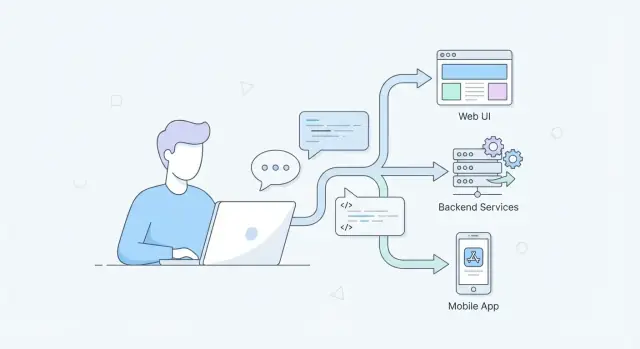
What “Prompting” Means in Real Engineering Work
Prompting in engineering isn’t “chatting with an AI.” It’s the act of providing reviewable inputs that guide an assistant toward a specific, checkable outcome—similar to how you write a ticket, a spec, or a test plan.
A good prompt is usually a small package of:
- Goal: what to build or decide
- Constraints: languages, frameworks, performance budgets, accessibility rules, API contracts, platform limits
- Context: existing code patterns, naming conventions, architecture boundaries
- Examples: sample inputs/outputs, edge cases, UI screenshots described in text, existing endpoints
- Acceptance criteria: how you’ll verify it worked (tests, lint rules, expected behaviors)
Prompting is “spec-writing,” just tighter
In real projects, you’re not asking for “a login page.” You’re specifying “a login form that matches our design tokens, validates email format, shows errors inline, and has unit tests for validation and submit states.” The prompt becomes a concrete artifact someone else can review, edit, and reuse—often checked into the repo alongside code.
Why it matters across the stack
- UI / UX / frontend: prompts can encode accessibility requirements, responsive behavior, microcopy, and component API rules so output doesn’t drift from design systems.
- APIs / backend: prompts can lock down request/response shapes, error semantics, idempotency, pagination, and database constraints—reducing “looks right” code that breaks under load.
- Mobile: prompts can account for offline mode, battery, network variability, permission flows, device-specific UI constraints, and app store policies.
What this post covers (and avoids)
This post focuses on repeatable practices: prompt patterns, workflows, testing prompts, and team review habits.
It avoids hype and “magic results.” AI assistance is useful, but only when the prompt makes expectations explicit—and when engineers verify the output the same way they verify human-written code.
Why Prompting Is Becoming a Core Skill Now
Prompting is shifting from a “nice-to-have” into a daily engineering competency because it changes how quickly teams can move from an idea to something reviewable.
Faster iteration without skipping rigor
AI-assisted tools can draft UI variants, propose API shapes, generate test cases, or summarize logs in seconds. The speed is real—but only if your prompts are specific enough to produce outputs you can actually evaluate. Engineers who can turn fuzzy intent into crisp instructions get more usable iterations per hour, and that compounds across sprints.
Natural-language specs are replacing some tickets—and they still need precision
More work is moving into natural-language: architecture notes, acceptance criteria, migration plans, release checklists, and incident write-ups. These are still “specs,” even when they don’t look like traditional specs. Prompting is the skill of writing those specs so they’re unambiguous and testable: constraints, edge cases, success criteria, and explicit assumptions.
A good prompt often reads like a mini design brief:
- What you’re building and for whom
- Inputs/outputs and constraints (performance, accessibility, device limits)
- Non-goals and trade-offs
- Examples and counterexamples
AI is entering the IDE, CI, and docs workflow
As AI features become integrated into IDEs, pull requests, CI checks, and documentation pipelines, prompting stops being an occasional chat and becomes part of everyday engineering flow. You’ll ask for code, then ask for tests, then ask for a risk review—each step benefits from consistent, reusable prompt structure.
Cross-functional teams are using the same interface
Design, product, QA, and engineering increasingly collaborate through shared AI tools. A clear prompt becomes a boundary object: everyone can read it, critique it, and align on what “done” means. That shared clarity reduces rework and makes reviews faster and calmer.
From Vague Requests to Clear, Testable Prompts
A vague ask like “build a login page” forces the model to guess what you mean. A testable prompt reads more like a mini-spec: it states inputs, expected outputs, edge cases, and how you’ll know it’s correct.
Turn requests into requirements
Start by writing what the system receives and what it must produce.
- Inputs: user actions, API payloads, device constraints
- Outputs: UI states, responses, logs/metrics
- Edge cases: invalid data, timeouts, empty states, partial failures
For example, replace “make the form work” with: “When the email is invalid, show an inline error message and disable submit; when the API returns 409, display ‘Account already exists’ and keep the entered values.”
Add constraints that prevent “pretty but wrong” answers
Constraints are how you keep the output aligned with your reality.
Include specifics like:
- Tech stack (e.g., React + TypeScript, Node + Express)
- Performance targets (e.g., render under 100ms, avoid N+1 queries)
- Accessibility (WCAG level, keyboard navigation, ARIA expectations)
- Error handling (retry policy, user messaging, logging)
Ask for trade-offs and reasoning
Instead of requesting only code, ask the model to explain decisions and alternatives. That makes reviews easier and surfaces hidden assumptions.
Example: “Propose two approaches, compare pros/cons for maintainability and performance, then implement the recommended option.”
Use examples and non-examples
Examples reduce ambiguity; non-examples prevent misinterpretation.
Weak prompt: “Create an endpoint to update a user.”
Stronger prompt: “Design PATCH /users/{id}. Accept JSON { displayName?: string, phone?: string }. Reject unknown fields (400). If user not found (404). Validate phone as E.164. Return updated user JSON. Include tests for invalid phone, empty payload, and unauthorized access. Do not change email.”
A useful rule of thumb: if you can’t write a couple of test cases from the prompt, it isn’t specific enough yet.
Web Development: Prompts for UI, UX, and Frontend Quality
Web prompting works best when you treat the model like a junior teammate: it needs context, constraints, and a definition of “done.” For UI work, that means specifying design rules, states, accessibility, and how the component should be verified.
Component generation with real design constraints
Instead of “Build a login form,” include the design system and the edge cases:
- Layout: responsive breakpoints, spacing scale, max widths
- States: default, loading, disabled, error, success
- A11y: labels, focus order, keyboard interactions, ARIA
Example prompt: “Generate a React LoginForm using our Button/Input components. Include loading state on submit, inline validation, and accessible error messaging. Provide Storybook stories for all states.”
Refactoring UI code safely
Refactors go smoother when you set guardrails:
“Refactor this component to extract UserCardHeader and UserCardActions. Keep existing props API stable, preserve CSS class names, and do not change visual output. If you must rename, provide a migration note.”
This reduces accidental breaking changes and helps keep naming and styling consistent.
Content + UI consistency
Ask explicitly for microcopy and state copy, not just markup:
“Propose microcopy for empty state, network error, and permission denied. Keep tone neutral and concise. Return copy + where it appears in the UI.”
Debugging with reproduction steps and logs
For frontend bugs, prompts should bundle evidence:
“Given these steps to reproduce, console logs, and the stack trace, propose likely causes, then rank fixes by confidence. Include how to verify in the browser and in a unit test.”
When prompts include constraints and verification, you get UI output that’s more consistent, accessible, and reviewable.
Backend Development: Prompts for APIs, Data, and Reliability
Backend work is full of edge cases: partial failures, ambiguous data, retries, and performance surprises. Good prompts help you pin down decisions that are easy to hand-wave in a chat, but painful to fix in production.
API design prompts (routes, schemas, status codes)
Instead of asking “build an API,” push the model to produce a contract you can review.
Ask for:
- Routes and verbs, with clear resource naming
- Request/response schemas (including required vs optional fields)
- Status codes for success and failure
- Pagination strategy (cursor vs offset) and sorting
- Idempotency rules for writes (especially POST)
Example prompt:
Design a REST API for managing subscriptions.
Return:
1) Endpoints with method + path
2) JSON schemas for request/response
3) Status codes per endpoint (include 400/401/403/404/409/422/429)
4) Pagination and filtering rules
5) Idempotency approach for create/cancel
Assume multi-tenant, and include tenant scoping in every query.
Data validation and error handling
Prompt for consistent validation and a stable “error shape” so clients can handle problems predictably.
Useful constraints:
- Validate at the boundary (DTO/input), then again at persistence if needed
- Use typed error codes (not just strings)
- Map domain errors to HTTP statuses (e.g., 409 for conflicts, 422 for semantic validation)
- Include correlation IDs in responses and logs
Performance: caching, batching, query planning
Models often generate correct-but-slow code unless you explicitly ask for performance choices. Prompt for expected traffic, latency targets, and data size, then request trade-offs.
Good additions:
- “Assume 1k RPS and 50ms p95 target”
- “Avoid N+1 queries; show query plan or indexes”
- “Suggest caching layers (in-memory vs Redis) and invalidation strategy”
- “Batch external calls; add timeouts and circuit breakers”
Observability: logs, metrics, traces, alerts
Treat observability as part of the feature. Prompt for what you’ll measure and what would trigger action.
Ask the model to output:
- Structured logs (event name + key fields, no sensitive data)
- Metrics (RPS, error rate, latency p50/p95/p99, queue depth)
- Trace spans around DB and external calls
- Alert rules that are actionable (symptom + likely causes + runbook hints)
Mobile Development: Prompts for Constraints and Real Devices
Mobile apps don’t fail only because of “bad code.” They fail because real devices are messy: networks drop, batteries drain, background execution is limited, and small UI mistakes become accessibility blockers. Good prompting for mobile development means asking the model to design for constraints, not just features.
Prompts for offline behavior, battery, and network variability
Instead of “Add offline mode,” ask for a plan that makes trade-offs explicit:
- “Design an offline-first approach for this screen. Specify what data is cached, cache invalidation rules, and what the UI shows for ‘stale but usable’ data.”
- “Given intermittent connectivity (2G–5G, captive portals), propose retry/backoff rules and user messaging. Include edge cases like app backgrounding during a request.”
- “Suggest ways to reduce battery impact for this feature. Consider background tasks, location usage, polling intervals, and when to stop work.”
These prompts force the model to think beyond the happy path and produce decisions you can review.
State management and navigation flows
Mobile bugs often come from state that’s “mostly correct” until the user taps back, rotates the device, or returns from a deep link.
Use prompts that describe flows:
“Here are the screens and events (login → onboarding → home → details). Propose a state model and navigation rules. Include how to restore state after process death, and how to handle duplicate taps and rapid back navigation.”
If you paste a simplified flow diagram or a list of routes, the model can produce a checklist of transitions and failure modes you can test.
Platform guidelines and accessibility checks
Ask for platform-specific review, not generic UI advice:
“Review this screen against iOS Human Interface Guidelines / Material Design and mobile accessibility. List concrete issues: touch target sizes, contrast, dynamic type/font scaling, screen reader labels, keyboard navigation, and haptics usage.”
Crash triage with stack traces + device context
Crash reports become actionable when you pair the stack trace with context:
“Given this stack trace and device info (OS version, device model, app version, memory pressure, reproduction steps), propose the most likely root causes, what logs/metrics to add, and a safe fix with a rollout plan.”
That structure turns “What happened?” into “What do we do next?”—which is where prompting pays off most on mobile.
Prompt Patterns That Work Across Web, Backend, and Mobile
Good prompts are reusable. The best ones read like a small specification: clear intent, enough context to act, and a checkable output. These patterns work whether you’re improving a UI, shaping an API, or debugging a mobile crash.
The “Spec Prompt” structure
A reliable structure is:
- Role: who the model should act as (e.g., “senior frontend engineer”)
- Goal: what success looks like
- Context: relevant files, platform, constraints, current behavior
- Constraints: performance, accessibility, backward compatibility, libraries, OS versions
- Examples: inputs/outputs, edge cases, “do/don’t” samples
- Output format: what to return (bullets, patch, JSON)
This reduces ambiguity across domains: web (a11y + browser support), backend (consistency + error contracts), mobile (battery + device constraints).
Step-by-step vs. direct output
Use direct output when you already know what you need: “Generate a TypeScript type + example payload.” It’s faster and avoids long explanations.
Ask for trade-offs and brief reasoning when decisions matter: choosing a pagination strategy, deciding caching boundaries, or diagnosing a flaky mobile test. A practical compromise is: “Briefly explain key assumptions and trade-offs, then give the final answer.”
Prompt “contracts” (lintable outputs)
Treat prompts like mini contracts by demanding structured output:
{
  "changes": [{"file": "", "summary": "", "patch": ""}],
  "assumptions": [],
  "risks": [],
  "tests": []
}
This makes results reviewable, diff-friendly, and easier to validate with schema checks.
Reducing hallucinations
Add guardrails:
- Require the model to list assumptions and ask questions if key inputs are missing.
- Ask it to signal uncertainty: “If you’re not sure, say so and offer options.”
- Request verification steps: commands, test cases, or where to look in code.
- When referencing external facts, ask it to cite sources (or explicitly state “no sources used”).
Engineering Workflow: Prompts as First-Class Artifacts
If your team uses AI regularly, prompts stop being “chat messages” and start behaving like engineering assets. The quickest way to improve quality is to give prompts the same treatment you give code: clear intent, consistent structure, and a trail of changes.
Treat prompts like code
Assign ownership and keep prompts in version control. When a prompt changes, you should be able to answer: why, what improved, and what broke. A lightweight approach is a /prompts folder in each repo, with one file per workflow (e.g., pr-review.md, api-design.md). Review prompt changes in pull requests, just like any other contribution.
If you’re using a “vibe-coding” platform like Koder.ai, the same principle still applies: even when the interface is chat-based, the inputs that produce production code should be versioned (or at least captured as reusable templates), so teams can reproduce results across sprints.
Use templates for repeatable work
Most teams repeat the same AI-assisted tasks: PR reviews, incident summaries, data migrations, release notes. Create prompt templates that standardize inputs (context, constraints, definition of done) and outputs (format, checklists, acceptance criteria). This reduces variance between engineers and makes results easier to verify.
A good template usually includes:
- Goal (what outcome you need)
- Constraints (languages, frameworks, time/memory limits)
- Project context (links to files, architecture notes)
- Output format (tables, diffs, step-by-step plan)
Make approvals explicit
Document where humans must approve outputs—especially security-sensitive areas, compliance-related changes, production database edits, and anything that touches auth or payments. Put these rules next to the prompt (or in /docs/ai-usage.md) so nobody relies on memory.
When your tooling supports it, capture “safe iteration” mechanics in the workflow itself. For example, platforms like Koder.ai support snapshots and rollback, which makes it easier to experiment with generated changes, review diffs, and revert cleanly if a prompt produced an unsafe refactor.
When prompts become first-class artifacts, you get repeatability, auditability, and safer AI-assisted delivery—without slowing the team down.
Testing and Evaluating Prompt Quality
Treat prompts like any other engineering asset: if you can’t evaluate them, you can’t improve them. “Seems to work” is fragile—especially when the same prompt will be reused by a team, run in CI, or applied to new codebases.
Build golden test cases
Create a small suite of “known inputs → expected outputs” for your prompts. The key is to make outputs checkable:
- Prefer structured outputs (JSON, tables, explicit headings) over free-form text.
- Include edge cases (empty inputs, long strings, unusual locales, error paths).
- Version the prompt and the golden cases together so changes are intentional.
Example: a prompt that generates an API error contract should always produce the same fields, with consistent naming and status codes.
Use diff-based evaluation
When you update a prompt, compare the new output to the previous output and ask: what changed and why? Diffs make regressions obvious (missing fields, different tone, swapped ordering) and help reviewers focus on behavior rather than debating style.
Automate checks in the pipeline
Prompts can be tested with the same discipline as code:
- Schema validation for JSON outputs
- Unit tests that assert key requirements (e.g., includes pagination, handles nulls)
- Static analysis for generated code
- “Does it build and run?” checks to catch syntax and dependency errors
If you’re generating full applications (web, backend, or mobile) via a platform workflow—like Koder.ai’s chat-driven build process—these checks become even more important, because you can quickly produce larger change sets. The speed should increase review throughput, not reduce rigor.
Measure real outcomes
Finally, track whether prompts actually improve delivery:
- Time saved per task (baseline vs AI-assisted)
- Defect rate (bugs found in QA/production)
- Rework rate (how often outputs need manual redo)
If a prompt saves minutes but increases rework, it’s not “good”—it’s just fast.
Security, Privacy, and Risk Controls for AI-Assisted Work
Using an LLM in engineering changes what “safe by default” means. The model can’t tell which details are confidential, and it can generate code that looks reasonable while quietly introducing vulnerabilities. Treat AI assistance as a tool that needs guardrails—just like CI, dependency scanning, or code review.
Don’t leak secrets (even accidentally)
Assume anything you paste into a chat could be stored, logged, or reviewed. Never include API keys, access tokens, private certificates, customer data, internal URLs, or incident details. Instead, use placeholders and minimal, synthetic examples.
If you need help debugging, share:
- The smallest reproducible snippet with fake values
- A redacted log excerpt (remove IDs, emails, tokens)
- A clear statement of what’s public vs. confidential
Create a team redaction workflow (templates and checklists) so people don’t invent their own rules under time pressure.
Threat-model the output, not just the input
AI-generated code can introduce classic issues: injection risks, insecure defaults, missing authorization checks, unsafe dependency choices, and fragile crypto.
A practical prompt habit is to ask the model to critique its own output:
- “List possible security risks in this code, ranked by impact.”
- “What inputs could be attacker-controlled?”
- “What should be validated server-side, and how?”
Require security review prompts for sensitive areas
For authentication, cryptography, permission checks, and access control, make “security review prompts” part of your definition of done. Pair them with human review and automated checks (SAST, dependency scanning). If you maintain internal standards, link them in the prompt (e.g., “Follow our auth guidelines in /docs/security/auth”).
The goal isn’t to ban AI—it’s to make safe behavior the easiest behavior.
Team Skills: Collaboration, Reviews, and Training
Prompting scales best when it’s treated like a team skill, not a personal trick. The goal isn’t “better prompts” in the abstract—it’s fewer misunderstandings, faster reviews, and more predictable outcomes from AI-assisted work.
Define what “good” looks like
Before anyone writes prompts, align on a shared definition of done. Turn “make it better” into checkable expectations: acceptance criteria, coding standards, naming conventions, accessibility requirements, performance budgets, and logging/observability needs.
A practical approach is to include a small “output contract” in prompts:
- What the change must do (acceptance criteria)
- What it must not do (non-goals, constraints)
- How it should be delivered (files to edit, code style, tests required)
When teams do this consistently, prompt quality becomes reviewable—just like code.
Pair prompting: write + probe
Pair prompting mirrors pair programming: one person writes the prompt, the other reviews it and actively probes assumptions. The reviewer’s job is to ask questions like:
- What inputs, edge cases, and error states are implied but not stated?
- What dependencies or product rules could be violated?
- What tests prove this is correct?
This catches ambiguity early and prevents the AI from confidently building the wrong thing.
Train with a shared playbook
Create a lightweight prompt playbook with examples from your codebase: “API endpoint template,” “frontend component refactor template,” “mobile performance constraint template,” etc. Store it where engineers already work (wiki or repo) and link it in PR templates.
If your organization uses a single platform for cross-functional building (product + design + engineering), capture those templates there too. For instance, Koder.ai teams often standardize prompts around planning mode (agreeing on scope and acceptance criteria first), then generating implementation steps and tests.
Build feedback loops from real issues
When a bug or incident traces back to an unclear prompt, don’t just fix the code—update the prompt template. Over time, your best prompts become institutional memory, reducing repeat failures and onboarding time.
A Practical Adoption Plan for Your Engineering Team
Adopting AI prompting works best as a small engineering change, not a sweeping “AI initiative.” Treat it like any other productivity practice: start narrow, measure impact, then expand.
Week 1: Pick a few high-value use cases
Choose 3–5 use cases per team that are frequent, low-risk, and easy to evaluate. Examples:
- API scaffold generation (handlers, routing, OpenAPI snippets)
- Test generation (unit tests, edge cases, regression checks)
- UI component variants (states, accessibility notes)
- Migration helpers (SQL migrations, data validation scripts)
Write down what “good” looks like (time saved, fewer bugs, clearer docs) so the team has a shared target.
Weeks 2–3: Create a tiny prompt template set
Build a small library of prompt templates (5–10) and iterate weekly. Keep each template focused and structured: context, constraints, expected output, and a quick “definition of done.” Store templates where engineers already work (repo folder, internal wiki, or ticketing system).
If you’re evaluating a platform approach, consider whether it supports the full lifecycle: generating app code, running tests, deploying, and exporting source. For example, Koder.ai can create web, backend, and Flutter mobile apps from chat, supports source code export, and provides deployment/hosting features—useful when you want prompts to move beyond snippets into reproducible builds.
Ongoing: Add lightweight governance
Keep governance simple so it doesn’t slow delivery:
- Assign a clear owner for each template
- Require quick peer review for changes (like code review)
- Maintain a short changelog (what changed, why, observed impact)
Month 2: Expand with training and shared metrics
Run 30-minute internal sessions where teams demo one prompt that measurably helped. Track a couple of metrics (cycle time reduction, fewer review comments, test coverage improvements) and retire templates that don’t earn their keep.
For more patterns and examples, explore /blog. If you’re evaluating tooling or workflows to support teams at scale, see /pricing.
FAQ
What does “prompting” mean in real engineering work?
It’s writing reviewable inputs that drive an assistant toward a specific, checkable outcome—like a ticket, spec, or test plan. The key is that the output can be evaluated against explicit constraints and acceptance criteria, not just “looks good.”
What should a “good prompt” include for engineering tasks?
A practical prompt usually includes:
- Goal (what to build/decide)
- Constraints (stack, performance, accessibility, platform limits)
- Context (existing patterns, boundaries, naming)
- Examples (inputs/outputs, edge cases, non-examples)
- Acceptance criteria (tests, expected behaviors, verification steps)
If you can’t write a couple test cases from the prompt, it’s probably still too vague.
How do you turn a vague request into a testable prompt?
Vague prompts force the model to guess your product rules, design system, and error semantics. Convert requests into requirements:
- State inputs and outputs
- List edge cases (invalid data, timeouts, empty states)
- Define how to verify (unit tests, stories, status codes)
Example: specify what happens on a 409, which fields are immutable, and what UI copy appears for each error.
Why are constraints so important when prompting?
Constraints prevent “pretty but wrong” output. Include things like:
- Tech stack and libraries you must use
- Performance budgets (e.g., p95 latency targets, avoid N+1)
- Accessibility requirements (keyboard nav, ARIA, WCAG level)
- Compatibility rules (don’t change public props/API, preserve CSS classes)
- Error handling conventions (retry/backoff, error shape)
Without constraints, the model will fill gaps with assumptions that may not match your system.
How should prompts differ for frontend/UI work?
Specify design and quality requirements up front:
- Component API rules (which design-system components to use)
- States (default/loading/disabled/error/success)
- Responsive behavior (breakpoints, max widths)
- A11y (labels, focus order, error announcement)
- Verification artifacts (Storybook stories, tests)
This reduces drift from your design system and makes reviews faster because “done” is explicit.
What makes a strong backend/API prompt?
Push for a reviewable contract rather than just code:
- Endpoints (method + path) and resource naming
- Request/response schemas (required vs optional)
- Status codes and error semantics (400/401/403/404/409/422/429)
- Pagination/filtering strategy
- Idempotency rules and tenant scoping
Ask for tests that cover invalid payloads, auth failures, and edge cases like empty updates.
How do you prompt effectively for mobile development?
Include real device constraints and failure modes:
- Offline behavior (what’s cached, invalidation, “stale but usable” UI)
- Network variability (timeouts, retry/backoff, backgrounding mid-request)
- Battery impact (when background work starts/stops)
- Navigation/state restoration (rotation, deep links, process death)
- Platform-specific accessibility checks
Mobile prompts should describe flows and recovery paths, not just the happy path.
When should you ask for step-by-step reasoning vs direct output?
Use direct output when the task is well-defined (e.g., “generate a TypeScript type + example payload”). Ask for trade-offs when decisions matter (pagination, caching boundaries, diagnosing flaky tests).
A practical middle ground: request a brief list of assumptions and pros/cons, then the final deliverable (code/contract/tests).
What are “prompt contracts,” and why are they useful?
Request a structured, lintable output so results are easy to review and diff. For example:
- JSON with
changes,assumptions,risks,tests - A patch/diff per file with a short summary
- A checklist of verification steps
Structured outputs reduce ambiguity, make regressions obvious, and allow schema validation in CI.
How do you manage security and privacy risks with AI-assisted engineering?
Use prompts and workflows that reduce leakage and risky output:
- Never paste secrets or customer data; use placeholders and redaction templates
- Ask the model to list assumptions and request missing inputs
- Require a security critique of generated code (auth, injection, unsafe defaults)
- Make sensitive areas require human approval (auth, payments, prod DB changes)
- Add verification: tests, static analysis, build/run checks
Treat AI output like any other code: it’s not trusted until reviewed and validated.