

Why SQLite Is Everywhere: The Embedded Database That Wins
SQLite powers apps, browsers, and devices worldwide. Learn why its embedded, serverless design wins: simplicity, reliability, speed, portability—and limits.
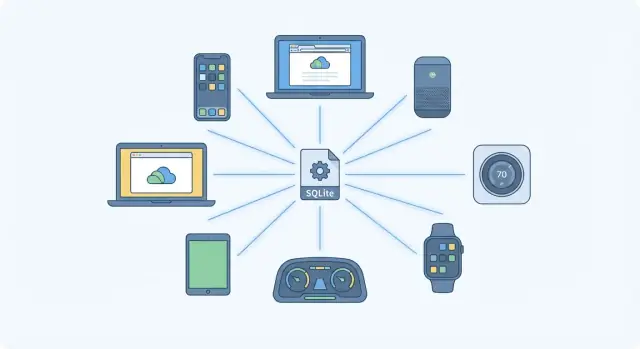
What SQLite Is (and Why People Keep Choosing It)
SQLite is a small database engine packaged as a library that your application links to—like a feature you include, not a service you run. Instead of talking over the network to a separate database machine, your app reads and writes to a single database file (often something like app.db) on disk.
That “it’s just a file” idea is a big part of the appeal. The database file contains tables, indexes, and data, and SQLite handles the hard parts—queries, constraints, and ACID transactions—behind the scenes.
Embedded vs. “Database Server”
With a client-server database (think PostgreSQL or MySQL), you typically:
- install and run a database server
- configure users, ports, backups, monitoring
- connect to it from your application over TCP
With SQLite, the database runs inside your application process. There’s no separate server to install, start, or keep healthy. Your app calls SQLite’s API, and SQLite reads/writes the local file directly.
People often describe SQLite as “serverless.” That doesn’t mean it lives in the cloud without servers—it means you don’t manage a separate database server process for it.
You’ve Probably Used SQLite Without Noticing
SQLite shows up quietly in lots of everyday software because it’s easy to ship and dependable:
- mobile apps that need a local database
- desktop apps storing settings, caches, or user data
- browsers, chat apps, and tools that need structured storage
- local-first apps that keep working offline
Many products pick SQLite because it’s a straightforward default: fast, stable, and zero configuration.
A Great Default (With Boundaries)
SQLite is an excellent choice for many single-user apps, embedded devices, prototypes that become real products, and services with moderate write concurrency. But it’s not the answer to every scaling problem—especially when many machines need to write to the same database at the same time.
The key takeaway: SQLite isn’t “small” in capability—it’s small in operational burden. That’s why people keep choosing it.
What “Embedded” and “Serverless” Actually Mean
SQLite gets described with two words that can sound buzzwordy: embedded and serverless. In SQLite, both have specific (and practical) meanings.
“Embedded” = a library, not a service
SQLite isn’t something you “run” in the background like PostgreSQL or MySQL. It’s a software library that your application links to and uses directly.
When your app needs to read or write data, it calls SQLite functions inside the same process. There’s no separate database daemon to start, monitor, patch, or restart. Your app and the database engine live together.
“Serverless” (SQLite-style) = no separate database server process
SQLite’s “serverless” does not mean the same thing as “serverless databases” marketed by cloud providers.
- Cloud serverless products still have servers—you just don’t manage them. You connect over a network, pay for capacity/usage, and operations happen on infrastructure you don’t control.
- SQLite serverless means there’s simply no database server at all. The database is typically a local file, and your app reads/writes it directly.
How apps talk to SQLite
With client-server databases, your code sends SQL over TCP to another process. With SQLite, your code issues SQL through library calls (often via a language binding), and SQLite reads/writes the database file on disk.
The result: no network hop, no connection pool to tune, and fewer failure modes (like “can’t reach the DB host”).
What this means for operations
For many products, “embedded + serverless” translates to fewer moving parts:
- No database installation step on developer machines
- Simpler deployments (especially for desktop, mobile, and edge apps)
- Easier local testing and more reproducible environments
That simplicity is a big reason SQLite shows up everywhere—even when teams could choose something heavier.
The Zero-Setup Advantage: Ship a File, Not a Service
SQLite’s most underrated benefit is also the simplest: your database is a file that travels with your app. There’s no separate server to provision, no ports to open, no user accounts to create, and no “is the database running?” checklist before anything works.
Deployment and updates get dramatically simpler
With a client-server database, shipping an app often implies shipping infrastructure: a DB instance, migrations, monitoring, credentials, and a plan for scaling. With SQLite, you typically package an initial .db file (or create it on first run) and your application reads and writes to it directly.
Updates can be easier too. Need a new table or index? You ship an application update that runs migrations against the local file. For many products, that turns a multi-step rollout into a single release artifact.
Great fit for desktop, mobile, and edge
This “ship a file” model shines when the environment is constrained or distributed:
- Desktop apps: install once, work offline, store data locally with minimal ceremony.
- Mobile apps: a proven pattern for on-device storage where network access is intermittent.
- Edge devices / kiosks / embedded systems: fewer moving parts means fewer failure points, especially where remote administration is hard.
Backups are file-based—but still deserve a plan
Copying a database file sounds trivial, and it can be—if you do it correctly. You can’t always safely copy a live database file with a naive file copy while the app is writing to it. Use SQLite’s backup mechanisms (or ensure a consistent snapshot) and store backups somewhere durable.
Less dedicated DBA work
Because there’s no server to tune and babysit, many teams avoid a chunk of operational overhead: patching a DB service, managing connection pools, rotating credentials, and keeping replicas healthy. You still need good schema design and migrations—but the “database operations” footprint is smaller.
Reliability First: Transactions and Data Integrity
SQLite’s popularity isn’t just about convenience. A big reason people trust it is that it puts correctness ahead of “fancy” features. For many apps, the most important database feature is simple: don’t lose or corrupt data.
ACID, explained like a human
SQLite supports ACID transactions, which is a compact way of saying “your data stays sane even when things go wrong.”
- Atomic: a change is all-or-nothing. If an operation includes 5 updates and the app crashes after 3, SQLite won’t leave you with a half-finished mess.
- Consistent: rules you rely on stay true. If your app expects balances to never go negative, transactions help keep updates orderly.
- Isolated: multiple operations don’t step on each other. One action won’t read another action’s half-written changes.
- Durable: once SQLite says a transaction is committed, it should still be there after a crash or power loss.
Journaling modes (high level)
SQLite achieves crash safety using a journal—a safety net that records what’s about to change so it can recover cleanly.
Two common modes you’ll hear about:
- Rollback journal: the classic approach. SQLite can “undo” incomplete work if something interrupts a write.
- WAL (Write-Ahead Logging): often improves concurrency by separating reads from writes, and can make recovery fast because changes are appended and later consolidated.
You don’t need to know the internals to benefit: the point is that SQLite is designed to recover predictably.
Why this matters more than extra features
Many applications don’t need custom clustering or exotic data types. They need accurate records, safe updates, and confidence that a crash won’t quietly corrupt user data. SQLite’s focus on integrity is a major reason it’s used in products where “boring and correct” beats “impressive and complex.”
Performance: Fast Because It’s Close to Your Code
SQLite often feels “instant” because your app talks to the database in-process. There’s no separate database server to connect to, no TCP handshake, no network latency, and no waiting on a remote machine. A query is just a function call that reads from a local file (often helped by the OS page cache), so the time between “run SQL” and “get rows back” can be surprisingly small.
Where SQLite tends to shine
For many products, the workload is mostly reads with a steady trickle of writes: loading app state, searching, filtering, sorting, and joining small-to-medium tables. SQLite is excellent at this. It can do efficient indexed lookups, quick range scans, and fast aggregations when the data fits comfortably on local storage.
Moderate write workloads are also a good fit—think user preferences, background sync queues, cached API responses, event logs, or a local-first data store that merges changes later.
The main bottleneck: write concurrency
SQLite’s trade-off is concurrency on writes. It supports multiple readers, but writes require coordination so the database stays consistent. Under heavy concurrent writes (many threads/processes trying to update at once), you can hit lock contention and see retries or “database is busy” errors unless you tune behavior and design your access patterns.
SQL fundamentals still matter
SQLite isn’t “fast by default” if the queries are poorly shaped. Indexes, selective WHERE clauses, avoiding unnecessary full-table scans, and keeping transactions appropriately scoped all make a big difference. Treat it like a real database—because it is one.
Portability and the Single-File Model
SQLite’s most distinctive trait is also its simplest: your entire database is a single file (plus optional sidecar files like a WAL journal). That file contains the schema, data, indexes—everything the app needs.
A database you can carry around
Because it’s “just a file,” portability becomes a default feature. You can copy it, attach it to a bug report, share it with a teammate (when appropriate), or move it between machines without setting up a server, users, or network access.
SQLite runs on essentially every major platform: Windows, macOS, Linux, iOS, Android, and a long list of embedded environments. That cross-platform support is paired with long-term stability: SQLite is famously conservative about backwards compatibility, so a database file created years ago can usually still be opened and read by newer versions.
Portable testing and reproducible environments
The single-file model is also a testing superpower. Want a known-good dataset for a unit test suite? Check in a small SQLite file (or generate it during tests), and every developer and CI job starts from the same baseline. Need to reproduce a customer issue? Ask for the DB file (with proper privacy handling) and you can replay the problem locally—no “it only happens on their server” mystery.
Practical note: treat the DB file like application data
That portability cuts both ways: if the file is deleted or corrupted, your data is gone. Treat the SQLite database like any important application asset:
- store it in the right OS-managed app data directory
- include it in backups where appropriate
- protect it with filesystem permissions and encryption when needed
- avoid “temporary folder” locations unless the data truly is disposable
Ecosystem and Tooling That Make SQLite Easy to Adopt
SQLite is easy to pick up partly because you rarely start from zero. It’s built into many platforms, ships with common language runtimes, and has “boring” compatibility across environments—exactly what you want for a database you embed inside an app.
Integrations you’ll actually use
Most stacks already have a well-traveled path to SQLite:
- Languages: Python (
sqlite3in the standard library), Go (mattn/go-sqlite3), Java (JDBC drivers), .NET (Microsoft.Data.Sqlite), PHP (PDO SQLite), Node.js (better-sqlite3,sqlite3). - Frameworks/ORMS: Rails (Active Record), Django, Laravel, SQLAlchemy, Prisma, Sequelize, Entity Framework.
- Mobile and desktop: iOS and macOS (SQLite is available system-wide), Android (SQLite APIs), plus wrappers like Room (Android), GRDB (Swift), and many React Native/Flutter plugins.
That breadth matters because it means your team can use familiar patterns—migrations, query builders, connection management—without inventing custom plumbing.
Tooling: from “peek at the file” to real workflows
SQLite’s tooling is unusually approachable. The sqlite3 CLI makes it simple to inspect tables, run queries, dump data, or import CSV. For visual exploration, browser-based and desktop viewers (for example, SQLiteStudio or DB Browser for SQLite) help non-specialists validate data quickly.
On the delivery side, mainstream migration tools typically support SQLite out of the box: Rails migrations, Django migrations, Flyway/Liquibase, Alembic, and Prisma Migrate all make schema changes repeatable.
The “everywhere” feedback loop
Because SQLite is so widely deployed, problems tend to be well-understood: libraries get battle-tested, edge cases are documented, and community examples are plentiful. That popularity feeds more support, which makes adoption even easier.
When choosing a library, prefer actively maintained drivers/ORM adapters for your stack, and check concurrency behavior, binding support, and how migrations are handled. A well-supported integration is often the difference between a smooth rollout and a weekend of surprises.
Where SQLite Shows Up: Real-World Use Cases
SQLite is easiest to understand when you look at where it’s actually used: places where a full database server would add cost, complexity, and failure modes.
Mobile apps and tablets
Many mobile apps need a reliable local store for user sessions, cached content, notes, or queues of “things to upload later.” SQLite fits because it’s a single-file database with ACID transactions, so your data survives crashes, low battery shutdowns, and spotty connectivity.
This is especially strong in offline-first and local-first apps: write every change locally, then sync in the background when the network is available. The benefit isn’t just offline support—it’s fast UI and predictable behavior because reads and writes stay on-device.
Desktop apps and installers
Desktop software often needs a database without asking users to configure anything. Shipping a single SQLite file (or creating it on first run) keeps installation simple and makes backups understandable: copy one file.
Apps like accounting tools, media managers, and lightweight CRM-style systems use SQLite to keep data close to the app, which boosts performance and avoids “is the database server running?” issues.
Browsers and client tools
SQLite shows up inside developer tools and applications that need structured storage for history, indexes, and metadata. It’s popular here because it’s stable, portable, and doesn’t require a separate process.
Embedded devices and appliances
Routers, kiosks, point-of-sale terminals, and IoT gateways frequently store configuration, logs, and small datasets locally. SQLite’s small footprint and file-based portability make it practical to deploy and update.
Developer workflows: local dev, tests, prototypes
Developers use SQLite for quick prototypes, local development databases, and test fixtures. It’s zero setup, easy to reset, and deterministic—benefits that translate into faster iteration and more reliable CI runs.
This is also a common pattern when building with Koder.ai: teams start with SQLite for rapid local iteration (or a single-tenant deployment), then export the generated source code and move to PostgreSQL when the product needs shared, multi-writer scaling. That “start simple, migrate when necessary” workflow keeps early delivery fast without painting you into a corner.
When SQLite Is the Wrong Fit
SQLite is a great default for local storage, but it’s not a universal answer. The key is to judge it by your workload and your team’s operational needs—not by hype.
You need many users writing at the same time
SQLite handles multiple readers well, but writes are more constrained because changes ultimately have to be serialized to keep the file consistent. If you have lots of users or processes trying to modify data concurrently—especially from different machines—a client-server database (like PostgreSQL or MySQL) is often a better match.
A common sign is an app where “everything works on a laptop,” but under real usage you see timeouts, lock contention, or queues building up around writes.
Heavy write workloads and high parallel writes
SQLite can be very fast, but it’s optimized for a different shape of work: many reads, and a moderate rate of writes. If your system does high-frequency inserts/updates (metrics ingestion, event streams, job queues, high-volume logs) and expects many parallel writers, a server database will usually scale more predictably.
This isn’t only about “speed.” It’s also about consistency of latency: a burst of writes can block other writers and sometimes readers, creating tail-latency spikes that are hard to explain to stakeholders.
Centralized access control, auditing, and network access
If you need a central database shared over the network with role-based permissions, audit trails, centralized backups, and governance features, SQLite is likely the wrong tool. You can put a SQLite file on a network share, but that tends to introduce reliability and locking problems.
A server database shines when you need:
- Controlled, centralized authentication/authorization
- Auditing of who changed what and when
- Managed backups, replication, and point-in-time recovery
- Safe remote access for multiple services and teams
A practical way to decide
Ask two questions:
- What does concurrency look like in production (how many writers, how bursty)?
- Who will operate it (do you need centralized controls and shared access)?
If the honest answers point to “many writers” and “central governance,” choosing a client-server database isn’t overkill—it’s usually the simpler, safer path.
SQLite vs Client-Server Databases: A Practical Comparison
SQLite and databases like PostgreSQL or MySQL can both store tables and run SQL, but they’re built for different shapes of problems.
Architecture: in-process file vs networked service
SQLite runs inside your application process. Your code calls SQLite, and SQLite reads/writes directly to a local database file.
A client-server database runs as a separate service. Your app connects over the network (even if “network” is just localhost), sends queries, and the server manages storage, concurrency, users, and background work.
This one difference explains most of the practical trade-offs.
Operational trade-offs: simplicity vs central control
With SQLite, deployment can be as simple as shipping a binary plus a file. No ports, no credentials, no server upgrades—often a big win for desktop apps, mobile apps, edge devices, and local-first products.
Client-server databases shine when you need centralized management: many apps and users hitting the same database, fine-grained access control, online backups, read replicas, and mature observability.
Scaling: how each grows
SQLite typically scales by:
- Vertical scaling: faster disk/CPU, better queries, caching
- Sharding naturally: one database per user, device, tenant, or project (a common pattern)
- Graduating: moving shared, multi-writer workloads to a server DB when coordination becomes the bottleneck
Client-server databases scale more easily for shared workloads via bigger machines, replication, partitioning, and pooling.
A quick decision checklist
Choose SQLite if you want local data, minimal ops, and a single app instance mostly owns the writes.
Choose a client-server DB if you need many concurrent writers, remote access from multiple services, central governance, or built-in high availability.
If you’re unsure, start with SQLite for speed of delivery, and keep a clear migration path (schemas, migrations, export/import) to PostgreSQL later (/blog/migrating-from-sqlite).
Tips to Use SQLite Safely in Production
SQLite can run happily in production—but treat it like a real database, not a “temporary file you can copy around.” A few habits make the difference between smooth operation and surprise downtime.
Concurrency: keep transactions short
SQLite supports multiple readers and (usually) a single writer at a time. That’s fine for many apps as long as you design for it.
Keep write transactions short and focused: do the work in your app first, then open a transaction, write, and commit quickly. Avoid long-running transactions that hold locks while you wait on network calls, user input, or slow loops. If you have background jobs, queue writes so they don’t pile up and block interactive requests.
Consider WAL mode for better read/write behavior
Write-Ahead Logging (WAL) changes how SQLite records changes so readers can often keep reading while a writer is active. For many apps—especially ones with lots of reads and occasional writes—WAL reduces “database is locked” friction and improves throughput.
WAL isn’t magic: you still have one writer, and you need to account for the extra WAL files on disk. But it’s a common, practical default for production deployments.
Backups and migrations: plan them anyway
Even though SQLite is a single file, you still need a backup strategy. Don’t rely on copying the file at random times; coordinate backups so you capture a consistent state (especially under load).
Likewise, manage schema changes with migrations. Keep them versioned, run them automatically during deploy, and test rollback/forward paths when possible.
Test like production
Use the same schema, indexes, and critical settings (like journal mode) in staging and automated tests. Many SQLite “surprises” show up only when data sizes grow or concurrency increases—so load-test with realistic volumes and access patterns before you ship.
Conclusion: Why “Embedded” Is Often a Feature, Not a Limit
SQLite is everywhere because it makes storing data feel like using a library, not running infrastructure. You get a proven SQL engine, ACID transactions, and mature tooling—without provisioning a database server, managing users, or babysitting a network connection.
Why people keep choosing SQLite
At its best, SQLite is the “just works” option:
- Zero setup: ship a single file with your app and start reading/writing immediately.
- Reliability: transactions protect your data even when apps crash or devices lose power.
- Speed: data sits next to your code, so there’s no network round-trip for most queries.
- Portability: the database is a file you can copy, back up, sync, or bundle for testing.
- Ecosystem: drivers, migrations, admin tools, and hosting patterns are widely understood.
The key limitation to remember
SQLite is not designed for high write concurrency or centralized, multi-user access over a network. Many readers can query at once, but heavy concurrent writes (or lots of clients trying to share one database file) is where a client-server database is usually the safer choice.
A simple next step
Start by describing your workload—then pick the simplest tool that fits. If your app is mostly local, single-user, or “local-first,” SQLite is often perfect. If you need many users writing at the same time to one shared dataset, consider a server database like PostgreSQL.
Quick checklist
- Will the database live on-device / on the same machine as the app?
- Are writes relatively low or easy to serialize?
- Do you need offline operation and simple deployment?
- Can you back up / sync a single file safely?
- Do you require many concurrent writers or a shared central database for lots of users?
If you answered “yes” to the first four and “no” to the last one, SQLite is a strong default.
FAQ
What is SQLite, in plain terms?
SQLite is an embedded database engine: it runs inside your application process as a library. Your app reads and writes a single database file (for example, app.db) directly on disk—no separate DB service to install or manage.
What does “serverless” mean for SQLite?
“Serverless” for SQLite means there is no separate database server process. It doesn’t mean “runs in the cloud without servers.” Your application calls SQLite’s API in-process, and SQLite handles storage in a local file.
Why is SQLite considered “zero setup”?
You typically don’t need to provision anything: ship your app with an initial .db file (or create it on first run), then run migrations as part of app updates. This often turns a multi-step infrastructure rollout into a single release artifact.
Is SQLite reliable enough for production data?
Yes. SQLite supports ACID transactions, which helps prevent partial writes and corruption during crashes or power loss.
- Use transactions for multi-step updates
- Keep transactions short to reduce lock time
- Prefer tested backup approaches over ad-hoc file copies
What are SQLite journaling modes, and why do they matter?
SQLite commonly uses a journal to recover safely after interruptions.
- Rollback journal: classic “undo” mechanism for incomplete writes
- WAL (Write-Ahead Logging): appends changes and can improve read/write concurrency
Many production apps choose WAL because it often reduces “database is locked” friction.
Why is SQLite often so fast?
Because it’s in-process: queries are function calls, not network round-trips. With local disk + OS page cache, many read-heavy workloads (search, filtering, indexed lookups) feel very fast—especially for desktop, mobile, and local-first apps.
What’s the main concurrency limitation of SQLite?
SQLite supports multiple readers, but writes must be coordinated to keep the file consistent. Under heavy concurrent writes you may see lock contention and database is busy / database is locked errors unless you design around serialized writes and short transactions.
When is SQLite the wrong choice?
It’s best when many machines/services need to write to the same shared database or you need centralized governance.
Choose a client-server DB (like PostgreSQL/MySQL) when you need:
- many concurrent writers
- networked access for multiple services
- centralized auth/auditing/backups/replication
How do I handle backups and safety with a single SQLite file?
Treat the database like important application data.
- Store it in the OS-appropriate app data directory
- Protect it with filesystem permissions (and encryption if needed)
- Don’t rely on naive copying while the app is writing; use a consistent snapshot/backup method
- Plan migrations and test them on realistic data sizes
How do teams “graduate” from SQLite to PostgreSQL later?
Start with SQLite when your app is local, single-user, or write-light, and keep a clean migration path.
Practical tips:
- Use versioned migrations from day one
- Avoid SQLite-specific quirks in schema/queries when portability matters
- Provide export/import tooling (for example, SQL dump or CSV)
- If you outgrow write concurrency, migrate to a server DB later (see
/blog/migrating-from-sqlite)